
Suno by Ace Data Cloud — CLI
Install the Ace integration
This integration is maintained by Ace Data Cloud and uses your Ace API key. It is not an official client published by the model owner. Check the PyPI package and its AceDataCloud repository before installing.
python -m pip install suno-cli
suno --help
suno models
The commands above show local help/reference information and do not submit a generation. Then follow Get API Token below: register/sign in, initialize General application if needed, create/copy an application key, and store it in the terminal's ACEDATACLOUD_API_TOKEN environment variable. Do not use a platform management token.
Generation follows your account's current service access, balance and pricing. Save the returned task ID and query that same ID; do not repeat generation while a task is pending.
suno task <task-id>
suno wait <task-id> --interval 5
A successful command or running preview does not prove a completed media result. Check the task's terminal outcome and returned media link. 中文首次使用指南 · Service-name package directory


A command-line tool for AI music generation using Suno through the AceDataCloud API.
Generate AI music, lyrics, and manage audio projects directly from your terminal — no MCP client required.
Features
- Music Generation — Generate from prompts, custom lyrics, extend, cover, remaster, concat
- Lyrics — Generate lyrics, mashup, optimize style descriptions
- Media Conversion — Get MP4, WAV, MIDI, timing, extract vocals
- Task Management — Query tasks, batch query, wait with polling
- Custom Models — Train, inspect, generate with, and archive custom music models
- Rich Output — Beautiful terminal tables and panels via Rich
- JSON Mode — Machine-readable output with
--jsonfor piping - File Input — Read lyrics from files with
@filenamesyntax
Quick Start
1. Get API Token
- Open Ace Data Cloud → Applications. Sign in, or register an account first.
- Find General application. If it has not been created, choose Initialize General Application. A general key can use the services available to your account; a dedicated application's key is limited to its service. Check the required service/model access and current pricing.
- Copy the API Key from the application card, or open Keys / Manage Keys → Create to create a separate key for this integration. Give it a recognizable name so you can revoke or rotate it independently.
- When creating a key, review Expiration Time, Set Usage Limitation, and Allowed APIs. Enable only the restrictions you need, allow the operations you will call, then click Create and copy the token from the key list. Task lookup does not grant permission to submit a generation. Confirm the application's balance can cover your first request; any trial allowance is whatever your account currently displays.
- Copy only the token value, without quotation marks, spaces, or
Bearer. An API Key / API Token field expects this raw value; only a manually configured HTTPAuthorizationheader needs theBearerprefix. Aplatform-...account-management token cannot replace a generation API key.
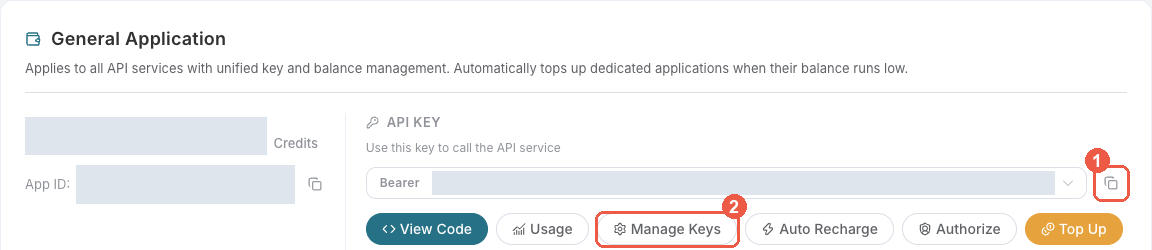
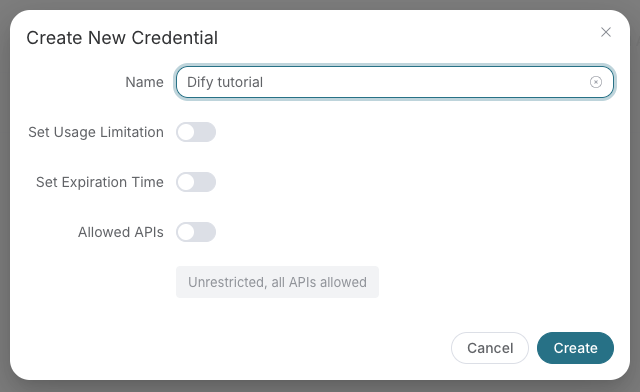
Save the key in the client's credential store or the environment variable shown below. Never put it in a prompt, shared workflow, screenshot, or Git commit. If authentication fails, check the full copied value, application/service access, expiration, usage limit, and balance before creating another key.
2. Install
# Install with pip
pip install suno-cli

# Or with uv (recommended)
uv pip install suno-cli

# Or from source
git clone https://github.com/AceDataCloud/SunoCli.git
cd SunoCli
pip install -e .
3. Configure
# Set your API token
export ACEDATACLOUD_API_TOKEN=your_token_here

# Or use .env file
cp .env.example .env
# Edit .env with your token
4. Use
# Generate music from a prompt
suno generate "A happy birthday song with acoustic guitar"

# Generate with custom lyrics
suno custom -l "[Verse]\nHello world\n[Chorus]\nLa la la" -t "Hello" -s "pop, upbeat"

# Read lyrics from a file
suno custom -l @lyrics.txt -t "My Song" -s "rock, powerful"

# Generate lyrics
suno lyrics "A love song about the ocean at sunset"

# Check task status
suno task <task-id>

# Wait for completion with polling
suno wait <task-id> --interval 5

# Get MP4 video
suno mp4 <audio-id>

# List available models
suno models
Commands
Music Generation
| Command | Description |
|---|---|
suno generate <prompt> |
Generate music from a text prompt (Inspiration Mode) |
suno custom |
Generate with custom lyrics, title, and style |
suno extend <audio_id> |
Extend an existing song from a timestamp |
suno cover <audio_id> |
Create a cover/remix version |
suno remaster <audio_id> |
Remaster a song to improve quality |
suno concat <audio_id> |
Merge extended segments into complete audio |
suno generate-persona <audio_id> |
Generate music using a saved persona |
suno generate-persona-vox <audio_id> |
Generate music using a persona's vocal style |
suno stems <audio_id> |
Separate a song into vocals + instrumental |
suno all-stems <audio_id> |
Separate a song into all individual stems |
suno replace-section <audio_id> |
Replace a time range with new content |
suno upload-extend <audio_id> |
Extend uploaded audio with AI continuation |
suno upload-cover <audio_id> |
Create a cover of uploaded audio |
suno mashup <id1> <id2>... |
Blend multiple songs into a mashup |
suno underpainting <audio_id> |
Add AI accompaniment to uploaded audio |
suno overpainting <audio_id> |
Add AI vocals to uploaded audio |
suno samples <audio_id> |
Add AI samples to uploaded audio |
suno inspo <audio_id> |
Generate a new song inspired by an existing audio |
Audio availability precheck
suno availability 33333333-3333-4333-8333-333333333333 --json
Replace the example UUID with the song's audio_id from a completed Suno task, not its task_id. suno availability <audio_id> calls authenticated POST /suno/availability synchronously before operations such as extend or cover. It currently consumes no Credits and does not submit a generation or poll a task.
A successful check returns data.id and data.available: true: positive evidence on the current channel, not a guarantee that a later operation will succeed. The state can change between the check and processing. Unknown availability returns an error (including 503 availability_unknown), never available: false. Invalid audio ID format returns 400 at the API boundary; the CLI rejects non-UUID input locally. Authentication, rate-limit and upstream errors also exit nonzero without automatic retries; retain the returned task/trace IDs for support. --json preserves the full successful response, including task_id and trace_id; without it, the command prints the data object.
Audio generation and processing failures
An audio_id identifies reference music for operations such as cover, extend and stem separation. A downloadable audio file does not guarantee that its ID remains available for further processing.
| HTTP status | Error code | Meaning |
|---|---|---|
| 500 | api_error |
the account may have been offline |
| 500 | suno_processing_unavailable |
Music processing is unavailable. |
| 500 | suno_model_unavailable |
The selected model is unavailable for this operation. |
| 500 | suno_processing_failed |
Music processing returned no audio. |
If one of these errors occurs, retain the original task_id (when available) and the error's trace_id, and contact support. The CLI displays the HTTP error body and exits nonzero; it does not automatically resubmit the operation. Do not treat a working download link as evidence that another processing attempt will succeed.
Lyrics
| Command | Description |
|---|---|
suno lyrics <prompt> |
Generate song lyrics from a prompt |
suno mashup-lyrics |
Generate mashup lyrics from two sources |
suno optimize-style <prompt> |
Optimize a style description |
Media Conversion
| Command | Description |
|---|---|
suno mp4 <audio_id> |
Get MP4 video version |
suno wav <audio_id> |
Get lossless WAV format |
suno midi <audio_id> |
Get MIDI data |
suno timing <audio_id> |
Get timing/subtitle data |
suno vocals <audio_id> |
Extract vocal track |
Task Management
| Command | Description |
|---|---|
suno task <task_id> |
Query a single task status |
suno tasks <id1> <id2>... |
Query multiple tasks at once |
suno wait <task_id> |
Wait for task completion with polling |
Custom Models
| Command | Description |
|---|---|
suno custom-model-create |
Train a model from 6–24 authorized audio URLs |
suno custom-model <model_id> |
Retrieve a custom model |
suno custom-models |
List custom models for the current application |
suno custom-model-generate <model_id> |
Generate a song with a ready custom model |
suno custom-model-delete <model_id> |
Archive a custom model |
Utilities
| Command | Description |
|---|---|
suno persona <audio_id> |
Create a saved voice style |
suno personas |
List saved voice styles |
suno persona-delete <persona_id> |
Delete a saved voice style |
suno voice <audio_url> |
Create a voice style from an external voice recording |
suno upload <audio_url> |
Upload external audio for processing |
suno availability <audio_id> |
Check positive evidence of audio availability before processing |
suno models |
List available Suno models |
suno actions |
List available API actions |
suno lyric-format |
Show lyrics formatting guide |
suno config |
Show current configuration |
Global Options
--token TEXT    API token (or set ACEDATACLOUD_API_TOKEN env var)
--version       Show version
--help          Show help message
Most commands support:
--json          Output raw JSON (for piping/scripting)
--model TEXT    Suno model version (default: chirp-v6)
The generate and custom commands also support:
--duration INT Target track length in seconds
--negative-style maps to the API's negative_tags field and takes effect only in custom mode (suno custom, which sends custom: true). There is currently no fixed character limit for this field, but overly long input may still fail; keep it concise. The option on suno generate is preserved, but that command does not enable custom mode.
suno custom -l @lyrics.txt -t "My Song" -s "pop, upbeat" --negative-style "metal, harsh vocals"
Scripting & Piping
The --json flag outputs machine-readable JSON suitable for piping:
# Generate and extract task ID
TASK_ID=$(suno generate "rock song" --json | jq -r '.task_id')

# Wait for completion and get audio URL
suno wait $TASK_ID --json | jq -r '.data[0].audio_url'

# Batch generate from a file of prompts
while IFS= read -r prompt; do
  suno generate "$prompt" --json >> results.jsonl
done < prompts.txt
Available Models
| Model | Version | Max Duration | Notes |
|---|---|---|---|
chirp-v6 |
V6 | — | Latest, best quality (default) |
chirp-v6-wild |
V6 Wild | — | V6 wild variant |
chirp-v6-mini |
V6 Mini | — | V6 compact variant |
chirp-v5-5 |
V5.5 | 8 min | High quality |
chirp-v5 |
V5 | 8 min | High quality |
chirp-v4-5-plus |
V4.5+ | 8 min | Enhanced quality |
chirp-v4-5 |
V4.5 | 4 min | Vocal gender control |
chirp-v4 |
V4 | 150s | Stable |
chirp-v3-5 |
V3.5 | 120s | Fast |
chirp-v3-0 |
V3 | 120s | Legacy |
Configuration
Environment Variables
| Variable | Description | Default |
|---|---|---|
ACEDATACLOUD_API_TOKEN |
API token from AceDataCloud | Required |
ACEDATACLOUD_API_BASE_URL |
API base URL | https://api.acedata.cloud |
SUNO_DEFAULT_MODEL |
Default model | chirp-v6 |
SUNO_REQUEST_TIMEOUT |
Timeout in seconds | 1800 |
Development
Setup Development Environment
# Clone repository
git clone https://github.com/AceDataCloud/SunoCli.git
cd SunoCli

# Create virtual environment
python -m venv .venv
source .venv/bin/activate  # or `.venv\Scripts\activate` on Windows

# Install with dev dependencies
pip install -e ".[dev,test]"
Run Tests
# Run unit tests
pytest

# Run with coverage
pytest --cov=suno_cli

# Run integration tests (requires API token)
pytest tests/test_integration.py -m integration
Code Quality
# Format code
ruff format .

# Lint code
ruff check .

# Type check
mypy suno_cli
Build & Publish
# Install build dependencies
pip install -e ".[release]"

# Build package
python -m build

# Upload to PyPI
twine upload dist/*
Docker
# Pull the image
docker pull ghcr.io/acedatacloud/suno-cli:latest

# Run a command
docker run --rm -e ACEDATACLOUD_API_TOKEN=your_token \
  ghcr.io/acedatacloud/suno-cli generate "A happy song"

# Or use docker-compose
docker compose run --rm suno-cli generate "A happy song"
Project Structure
SunoCli/
├── suno_cli/               # Main package
│   ├── __init__.py
│   ├── __main__.py        # python -m suno_cli entry point
│   ├── main.py            # CLI entry point
│   ├── core/              # Core modules
│   │   ├── client.py      # HTTP client for Suno API
│   │   ├── config.py      # Configuration management
│   │   ├── exceptions.py  # Custom exceptions
│   │   └── output.py      # Rich terminal formatting
│   └── commands/          # CLI command groups
│       ├── generate.py    # Music generation commands (12 commands)
│       ├── lyrics.py      # Lyrics & style commands
│       ├── media.py       # Media conversion commands
│       ├── persona.py     # Persona & upload commands
│       ├── task.py        # Task management commands
│       └── info.py        # Info & utility commands
├── tests/                  # Test suite (80+ tests)
├── .github/workflows/      # CI/CD (lint, test, publish to PyPI)
├── Dockerfile             # Container image
├── deploy/                # Kubernetes deployment configs
├── .env.example           # Environment template
├── pyproject.toml         # Project configuration
└── README.md
Suno CLI vs MCP Suno
| Feature | Suno CLI | MCP Suno |
|---|---|---|
| Interface | Terminal commands | MCP protocol |
| Usage | Direct shell, scripts, CI/CD | Claude, VS Code, MCP clients |
| Output | Rich tables / JSON | Structured MCP responses |
| Automation | Shell scripts, piping | AI agent workflows |
| Install | pip install suno-cli |
pip install mcp-suno |
Both tools use the same AceDataCloud API and share the same API token.
API Reference
This tool wraps the AceDataCloud Suno API:
- Suno Audios API — Music generation
- Suno Lyrics API — Lyrics generation
- Suno Tasks API — Task queries
- Suno Persona API — Persona management
Contributing
Contributions are welcome! Please:
- Fork the repository
- Create a feature branch (
git checkout -b feature/amazing) - Commit your changes (
git commit -m 'Add amazing feature') - Push to the branch (
git push origin feature/amazing) - Open a Pull Request
License
MIT License - see LICENSE for details.
Links
- AceDataCloud Platform
- MCP Suno — MCP server version
- Suno Official
Made with ❤️ by AceDataCloud
1 maintainer

Metadata
1 maintainer
Release files for suno-cli 2026.10.26.0
For a detailed explanation of source distributions (sdists) and built distributions (wheels), please see the package formats documentation.
Source distribution (sdist)
| File | Size | Uploaded | Provenance | Actions |
|---|---|---|---|---|
| suno_cli-2026.10.26.0.tar.gz | 34.4 kB | Without provenance | Details for suno_cli-2026.10.26.0.tar.gz |
Built distribution (wheel)
| File | Interpreter | ABI | Platform | Actions Reset |
|---|---|---|---|---|
| suno_cli-2026.10.26.0-py3-none-any.whl | Python 3 | none | any | Details for suno_cli-2026.10.26.0-py3-none-any.whl |
Total release size: 63.9 kB
Release files / suno_cli-2026.10.26.0.tar.gz
| Download URL | suno_cli-2026.10.26.0.tar.gz |
|---|---|
| Size | 34.4 kB |
| Tags | Source |
|
SHA-256 checksum How to use checksums |
f21e9d43558c86c7b77b6198aa7b78e95d4dd6cb4036398291114659a8b2edf8
|
|
BLAKE2b-256 checksum How to use checksums |
ab8a8c8e12b8cb5619e8498597aa60e901730009dce49e2ef9ed62f353989b49
|
| Upload date | |
|
Uploaded using Trusted Publishing? What is trusted publishing? |
No |
| Uploaded via |
twine/7.0.0 CPython/3.12.3
|
Release files / suno_cli-2026.10.26.0-py3-none-any.whl
| Download URL | suno_cli-2026.10.26.0-py3-none-any.whl |
|---|---|
| Size | 29.5 kB |
| Tags | Python 3 |
|
SHA-256 checksum How to use checksums |
fad478f769a9fa22c15f52c80859062e97981b545a6349b4db7a20365298a824
|
|
BLAKE2b-256 checksum How to use checksums |
de3d1afe9db6ecb8f391ed37e3e7af6bcc3948c5ba7b0efb7cb8536570b1b9a1
|
| Upload date | |
|
Uploaded using Trusted Publishing? What is trusted publishing? |
No |
| Uploaded via |
twine/7.0.0 CPython/3.12.3
|
Security for suno-cli 2026.10.26.0
Provenance
Provenance describes where a file came from. On PyPI, provenance is shared via attestations, which provide a verifiable record of the build or publishing details. View details, limitations and caveats.
No provenance found
None of the files in this release were uploaded with provenance metadata.
A note on package security
PyPI is a repository for distributing packages, not a service for auditing them. While third-party security researchers and our staff do their best to detect and remove malicious packages, PyPI cannot guarantee the quality, security or suitability of any given package.
To learn more about protecting yourself from malicious actors, visit our package security documentation.














