
Superboard
A local to-do board where every card can stay manual or become a standing conversation with a coding agent. Add ordinary work first; delegate research, writing or changes when that helps. The underlying state stays in plain files you own.

uvx superboard ~/Superboard
# then open http://localhost:47822
Already use Claude Code? Give it the whole setup job:
Use https://github.com/bmeindl/superboard as the Superboard package I want. Read its README, explain what you will run, set it up in
~/Superboard, start it, and open the local board for me. Do not clone the source into my workspace.
Claude Code still uses its existing host permissions and may ask before installing
uv or opening an application. The explicit terminal command above remains the
portable fallback.
The one-minute version
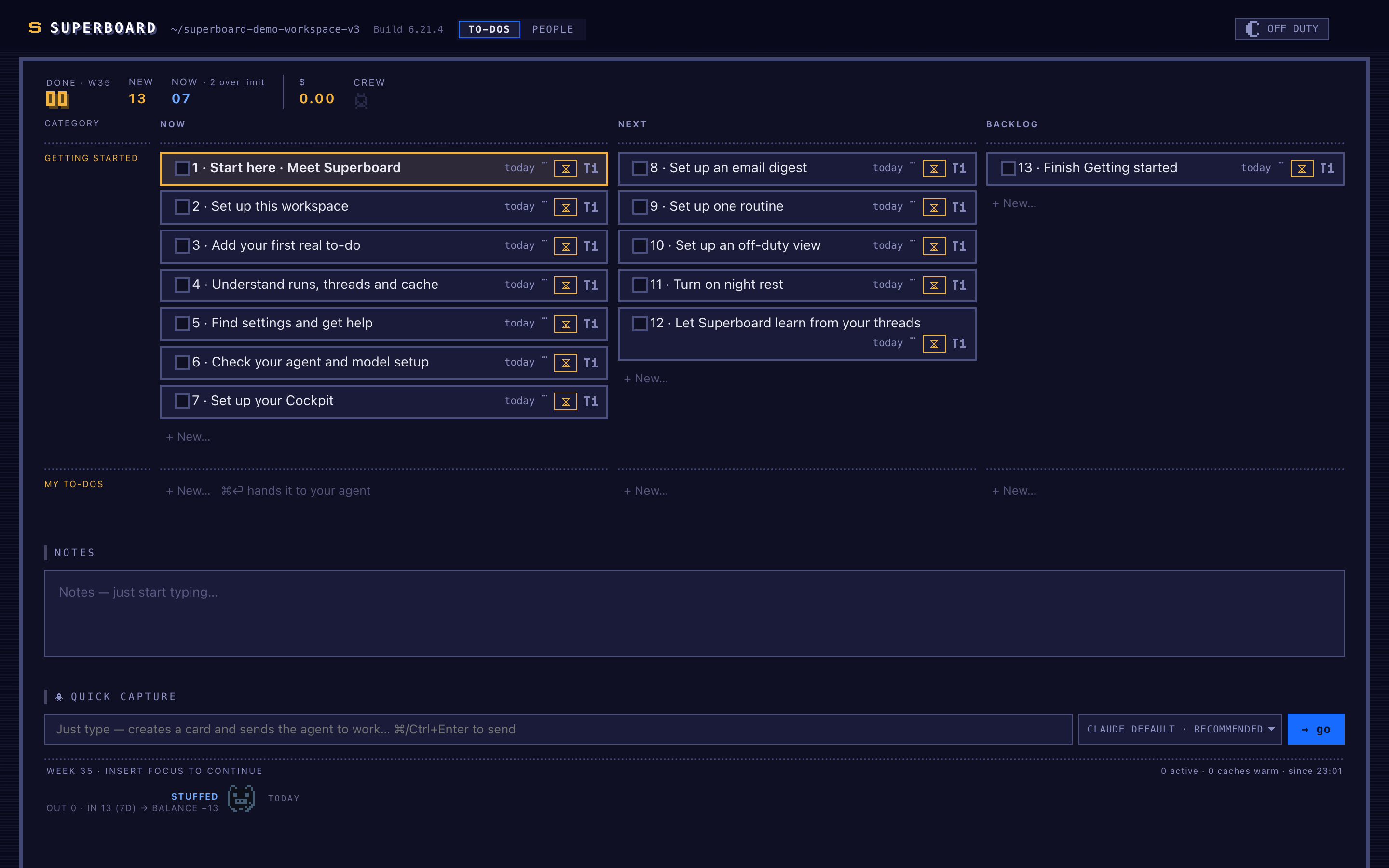
- Open the board. A fresh workspace separates Getting started from the empty My to-dos area where normal work belongs.
- Open 1 · Start here · Meet Superboard and press ▶ Agent. It opens the local introduction when the runner can access your desktop; otherwise it returns the local link. It answers questions in that card and tells you when to mark it done.
- Use 2 · Set up this workspace, then 3 · Add your first real to-do. The agent adapts the foundation and puts one genuine card under My to-dos.
- The remaining cards each name one outcome—agent/model setup, Cockpit, email digest, one routine, Off Duty, night rest or later thread learning—so you can complete or skip them independently.
- Add more work whenever.
Entercreates a manual card;Cmd/Ctrl+Entercreates it and starts the agent. - Finish onboarding. The final card archives the setup threads and removes the Getting started category.
This is not a five-minute setup, and it does not pretend to be. A board becomes genuinely useful over weeks, as your own threads accumulate.
There is no settings maze. Topics, actions, rituals, context, and skills are workspace files. Ask the agent to change them; inspect the diff whenever you want. Optional procedural skills can be copied from a separate catalogue one at a time, previewed first, and then customized locally.
What you need
- Python 3.10+ and
uv/uvx. The release gates cover macOS and Ubuntu; Windows has not been verified and is not supported in this alpha. - Claude Code installed and authenticated for the supported default runner.
- Codex is an experimental macOS runner and uses the CLI bundled with ChatGPT.
OpenCode is not a supported runner in
0.1.0. - Provider usage: Superboard does not include model access or tokens.
The board still opens without an agent CLI, but hand-offs cannot run — and it says so: the first screen carries the reason and the ▶ Agent buttons are marked rather than silently inert.
What an agent run can do
▶ Agent starts the selected CLI in auto mode. The run inherits that CLI's host
access and configured MCP/provider setup; when the task requires it, the agent can
edit or commit inside the workspace and may propose machine-wide or outside-workspace
actions. Superboard does not wrap the CLI in a second approval system. Tell the agent
what is off-limits, ask it to change its local operating rules, or ask for exact
terminal handoff commands when an interactive step is needed. The files and git diff
remain the review surface.
Why local files?
Superboard has no cloud account, database, or sync service. The board, context, and learned working rules stay inspectable and portable inside your workspace. Changing agent providers does not mean abandoning what the workspace learned.
Each ▶ Agent starts a fresh CLI process. Continuity comes from a resumable
provider session plus the durable board thread — not from a hidden Superboard
memory. A warm provider cache may reduce repeated tokens; a cold cache never
loses work.
How it works
Superboard is the piece that holds your work and coordinates the agents doing it — a personal task host. The board is the visible surface — columns, cards, one glance. Each card is a task with its own standing thread: the full conversation between you and the agent working it, persistent across weeks. A runner executes — it picks up cards you've handed off, works headlessly, and reports back into the thread: results, or a short decision sheet when only you can decide. Underneath: plain local markdown files. No database, no account, no sync. The agent brings the intelligence; the files keep it honest.
The first weeks
Superboard doesn't promise one-minute setup. It promises an honest onboarding — the kind you'd give a strong new hire. Week one, it asks too much: it doesn't know your projects, your people, or which decisions are yours alone. You correct it constantly, and the correcting is the investment — every correction lands in plain files it reads next time, and you can open any of them to see exactly what it thinks it knows. A few weeks in, the questions change character: less "what is this?", more "you killed a similar idea in March because it competed for your attention — still true?" And it compounds with what you already have: Superboard runs on top of your existing agent setup, and the more you bring — skills, context, working habits — the faster it gets good. Starting from zero works too; it just makes the first weeks matter more. Tools that promise instant magic tend to plateau fast. Superboard starts slower — and keeps compounding.
Agentic first — it grows, and you grow it
The mechanics work on day one: board, runner, standing threads, decision sheets, a working skill set — extracted from a system used daily for months. The personalization is what takes weeks. And nothing about it is finished, by design: there is no feature backlog between you and the tool — when you want the cards to work differently, you don't file a request, you tell your agent to rebuild them. The whole system is plain files and readable code, small enough for an agent to navigate and change, with every change reviewable. From the first week it grows toward you: your skills, your rules, what it has learned about how you decide. Every install grows toward its owner — that divergence is the point, not a side effect. And it flows both ways: when your setup grows something good — a skill, a routine, a sharper way of asking — it's built to flow back through ordinary open-source contribution and become part of everyone's next start. That's open source applied to a tool whose job is to learn.
Where this goes
Today, Superboard is a board. The direction is a working morning that starts with three prepared items instead of forty open loops — everything else researched, built, filed, or consciously not started while you were away, each weighed in the open against priorities you set. Questions that get sharper the longer you work together. And because everything it learns lives in inspectable files, changing models doesn't have to mean starting over. That's the target narrative, told honestly as direction — the full version is in PITCH.md. This board is step one of exactly it.
Start here, then ask the agent
The board and its onboarding cards are the primary product documentation. The README deliberately stops at orientation; users should not need to study a manual before doing useful work.
- Using Superboard — installation, workspace files, onboarding behavior, customization, and restart rules.
- Development and test rigs — sandbox, fresh-wheel test, and privacy gates.
- Architecture — contracts and trust boundaries for agents and contributors.
- Product direction · Support posture
Superboard is alpha-stage personal tooling, not a hosted multi-user project manager or a supported service. The point is a small, understandable frame that your own agent and workspace can grow into.
License
MIT — see LICENSE.
1 maintainer

Download files
Download the file for your platform. If you're not sure which to choose, learn more about installing packages.
Source Distribution
Built Distribution
Filter files by name, interpreter, ABI, and platform.
If you're not sure about the file name format, learn more about wheel file names.
Copy a direct link to the current filters
File details
Details for the file superboard-0.1.0.tar.gz.
File metadata
- Download URL: superboard-0.1.0.tar.gz
- Upload date:
- Size: 906.9 kB
- Tags: Source
- Uploaded using Trusted Publishing? Yes
- Uploaded via:
twine/7.0.0 CPython/3.13.14
File hashes
| Algorithm | Hash digest | |
|---|---|---|
| SHA256 |
3457ae8b96375239ec7c0ecaa19fb183ef1620a5f4e5ad87f31919ab8c38ffe4
|
|
| MD5 |
ff4660e9fe33f7c12714f05c1b12b0c2
|
|
| BLAKE2b-256 |
0c51633753e67f02fd816c635ee56e66ac1c5236d77703646cb8a65ec80ec9c2
|
Provenance
The following attestation bundles were made for superboard-0.1.0.tar.gz:
Publisher:
publish-to-pypi.yml on bmeindl/superboard
-
Statement:
-
Statement type:
https://in-toto.io/Statement/v1 -
Predicate type:
https://docs.pypi.org/attestations/publish/v1 -
Subject name:
superboard-0.1.0.tar.gz -
Subject digest:
3457ae8b96375239ec7c0ecaa19fb183ef1620a5f4e5ad87f31919ab8c38ffe4 - Sigstore transparency entry: 2607688832
- Sigstore integration time:
-
Permalink:
bmeindl/superboard@1bf814f58e06d75633464d21bb58812a096a3dd2 -
Branch / Tag:
refs/tags/v0.1.0 - Owner: https://github.com/bmeindl
-
Access:
public
-
Token Issuer:
https://token.actions.githubusercontent.com -
Runner Environment:
github-hosted -
Publication workflow:
publish-to-pypi.yml@1bf814f58e06d75633464d21bb58812a096a3dd2 -
Trigger Event:
push
-
Statement type:
File details
Details for the file superboard-0.1.0-py3-none-any.whl.
File metadata
- Download URL: superboard-0.1.0-py3-none-any.whl
- Upload date:
- Size: 467.8 kB
- Tags: Python 3
- Uploaded using Trusted Publishing? Yes
- Uploaded via:
twine/7.0.0 CPython/3.13.14
File hashes
| Algorithm | Hash digest | |
|---|---|---|
| SHA256 |
3a797dfb325bf30c14656a9c8e6eb174b99bf6518ee27ee742d06b43b3067dc7
|
|
| MD5 |
f5e59c24332cd2aa15a8529cc3c5459b
|
|
| BLAKE2b-256 |
ec7ccbf0e8bfc34953da08c2a4eec9412a8e9d2167a91e560094a44c42f0fdae
|
Provenance
The following attestation bundles were made for superboard-0.1.0-py3-none-any.whl:
Publisher:
publish-to-pypi.yml on bmeindl/superboard
-
Statement:
-
Statement type:
https://in-toto.io/Statement/v1 -
Predicate type:
https://docs.pypi.org/attestations/publish/v1 -
Subject name:
superboard-0.1.0-py3-none-any.whl -
Subject digest:
3a797dfb325bf30c14656a9c8e6eb174b99bf6518ee27ee742d06b43b3067dc7 - Sigstore transparency entry: 2607689220
- Sigstore integration time:
-
Permalink:
bmeindl/superboard@1bf814f58e06d75633464d21bb58812a096a3dd2 -
Branch / Tag:
refs/tags/v0.1.0 - Owner: https://github.com/bmeindl
-
Access:
public
-
Token Issuer:
https://token.actions.githubusercontent.com -
Runner Environment:
github-hosted -
Publication workflow:
publish-to-pypi.yml@1bf814f58e06d75633464d21bb58812a096a3dd2 -
Trigger Event:
push
-
Statement type:














