
'sup! - Probably the Best Unofficial Apache Superset™ CLI 🚀
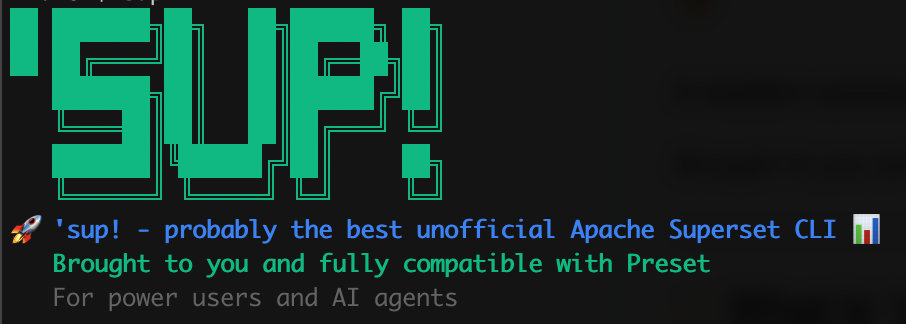
A modern command-line interface for Apache Superset and Preset workspaces
Brought to you and fully compatible with Preset • For power users and AI agents
🧪 Beta Release: This is an experimental beta release for Preset customers and the Superset community. We welcome feedback and contributions! Please report issues at https://github.com/preset-io/superset-sup/issues
✨ What is 'sup!?
'sup is a solid CLI for Apache Superset power users and their agents. It provides sectioned help, rich terminal formatting, and git-like workflows for managing Superset and Preset workspaces efficiently.
[Screenshot of beautiful ASCII art and sectioned help will go here]
🎯 Key Capabilities
- Run any SQL through Superset's data access layer - get results as rich tables, CSV, YAML or JSON
- Backup and restore charts, dashboards, and datasets with full dependency tracking
- Synchronize assets across Superset instances with Jinja2 templating for customization
- Enrich metadata to/from dbt Core/Cloud - more integrations to come
- Automate workflows and integrate with CI/CD pipelines
- Perfect for scripting and AI-assisted data exploration
🚀 Quick Start
Installation
pip install superset-sup
OR
pip install git+https://github.com/preset-io/superset-sup.git
Getting Started
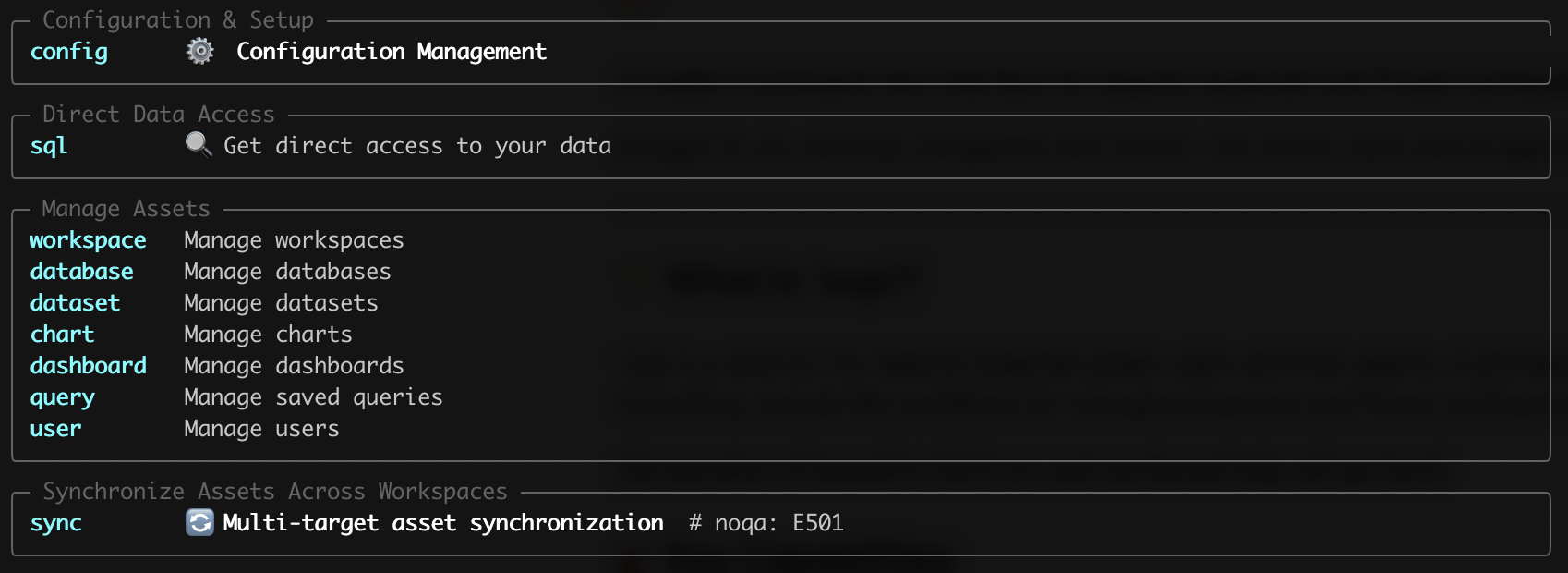
The beautiful sectioned help guides you through the perfect workflow:
# 🔧 Configuration & Setup
sup config auth          # Set up authentication credentials
sup config show          # Verify current settings

# 🔍 Direct Data Access
sup sql "SELECT COUNT(*) FROM users"           # Beautiful Rich table
sup sql "SELECT * FROM sales" --json           # JSON for agents
sup sql "SELECT * FROM sales" --csv            # CSV export

# 📊 Manage Assets
sup workspace list       # Find your workspace
sup workspace use 123    # Set default workspace
sup chart list --mine    # Your charts with server-side search
sup chart data 3628 --csv # Export chart data directly

# 🔄 Synchronize Assets Across Workspaces
sup sync create ./my_sync --source 123 --targets 456,789  # Git-ready sync
sup sync run ./my_sync --dry-run                          # Preview operations
sup sync run ./my_sync                                    # Execute sync
📋 Command Reference
Configuration & Setup
sup config- Beautiful configuration guide with sources, settings, and setup stepssup config auth- Set up authentication credentialssup config show- Display current configurationsup config set workspace-id 123- Set default workspace
Direct Data Access
sup sql "query"- Execute SQL with beautiful outputsup sql --interactive- Interactive SQL session (coming soon)sup sql "query" --json- JSON output for automationsup sql "query" --porcelain- Machine-readable output
Manage Assets
sup workspace list- List available workspacessup database list- Database operationssup dataset list --search="users"- Server-side search by table namesup chart list --mine --search="revenue"- Multi-field chart searchsup chart sql 3628- Get compiled SQL behind any chartsup chart data 3628 --csv- Export actual chart datasup dashboard list --search="exec"- Dashboard title/slug searchsup query list --mine- Discover saved queriessup user list- User management
Synchronize Assets Across Workspaces
sup sync create- Create sync configuration with templatingsup sync run --dry-run- Preview sync operationssup sync validate- Validate sync configuration- Enterprise cross-workspace workflows with Jinja2 templating
🎨 Beautiful Features
Sectioned Help System
Commands are organized in logical sections that guide your workflow:
- Configuration & Setup → Direct Data Access → Manage Assets → Synchronize
Rich Output Formats
- Rich Tables: Colorful, clickable tables with emerald green Preset branding
- JSON: Perfect for AI agents and automation (
--json) - CSV: Direct data export (
--csv) - YAML: Configuration-friendly format (
--yaml) - Porcelain: Machine-readable, no decorations (
--porcelain)
Filtering
Every entity command supports powerful, consistent filters:
--mine                      # Objects owned by current user
--name "pattern*"           # Name pattern matching with wildcards
--limit 50                  # Result pagination (default: 50)
--search "revenue"          # Server-side search (charts, dashboards,
                           # datasets)
--json                      # JSON output for automation
Agent-Optimized
Perfect for AI assistants and automation:
sup chart data 3628 --json --limit=100        # Structured data access
sup sql "SELECT COUNT(*) FROM users" --json   # Direct SQL with JSON
sup dashboard list --search="exec" --porcelain # Machine-readable output
🔄 Git-like Asset Workflows
Chart Lifecycle (Production Ready)
# Pull charts + dependencies to filesystem
sup chart pull --mine                         # Pull your charts + datasets +
                                              # databases
sup chart pull --name="*revenue*"             # Pull revenue charts +
                                              # dependencies
sup chart pull --id=3586                      # Pull specific chart +
                                              # dependencies

# Push from filesystem to workspace
sup chart push                                # Push to configured target
                                              # workspace
sup chart push --workspace-id=456             # Push to specific workspace
sup chart push --overwrite --force            # Push with overwrite, skip
                                              # confirmations
Advanced Sync Workflows
# Multi-target synchronization with templating
sup sync create ./templates --source 123 --targets 456,789,101
sup sync run ./templates --option env=prod    # Jinja2 templating for
                                              # environments
sup sync run --bidirectional                 # Two-way sync with conflict
                                              # resolution
🏗️ Architecture
Modern Tech Stack
- Typer 0.12+: Type-safe CLI with automatic help generation
- Rich 13+: Beautiful terminal formatting and tables
- Pydantic 2.0+: Configuration validation and type safety
- Pandas: Data processing and multiple output formats
Configuration
- Global:
~/.sup/config.ymlfor user preferences - Project:
.sup/state.ymlfor project-specific settings - Environment:
SUP_*variables override everything - Priority: Environment → Global → Project
Enterprise Features
- Cross-workspace sync: Source workspace → multiple target workspaces
- Asset dependencies: Automatic resolution of charts → datasets → databases
- Jinja2 templating: Environment-specific customization
- Git-ready: YAML-based assets work perfectly with version control
🎯 Extra Features
Chart SQL Access
Get the compiled SQL behind any chart - business logic included:
sup chart sql 3628
# Output: Complex SQL with filters, aggregations, joins - the actual query
# Superset runs
Chart Data Export
Access actual chart results as structured data:
sup chart data 3628 --json     # Perfect for analysis, reporting, AI
                               # models
sup chart data 3628 --csv      # Direct CSV export
Server-Side Search
Efficient search across all entity types:
- Charts:
--searchuses multi-field search (title, description, etc.) - Dashboards:
--searchsearches title and slug - Datasets:
--searchsearches table names - All searches work with
--limitfor performance
🏠 Superset Compatibility
Primary Focus: Preset-Hosted Instances
'sup is primarily designed for Preset-hosted Superset instances and has been extensively tested with Preset workspaces. All features work seamlessly with Preset's multi-workspace environment.
Self-Hosted Superset
Does it work with my Superset instance? Most functionality should work, but depending on your authentication setup, you may need to tweak the code. We welcome contributions from the broader Superset community to improve compatibility.
Preset-free mode: A future version could remove multi-workspace constructs for single-instance Superset deployments. If you're interested in this, please contribute or open an issue.
Contributing for Broader Compatibility
We're open to contributions that enable 'sup for the entire Superset community. Areas that likely need work for self-hosted instances:
- Authentication methods beyond Preset API tokens
- Single-instance mode (removing workspace concepts)
- Different API endpoint structures
🔐 Authentication
Multiple authentication methods supported:
API Token (Recommended)
sup config auth  # Interactive setup
# Or set environment variables:
export SUP_PRESET_API_TOKEN="your-token"
export SUP_PRESET_API_SECRET="your-secret"
Environment Variables
SUP_WORKSPACE_ID=123        # Default workspace
SUP_DATABASE_ID=5           # Default database
SUP_TARGET_WORKSPACE_ID=456 # Cross-workspace sync target
SUP_ASSETS_FOLDER=./assets  # Asset storage location
🎨 For Developers
AI Agent Integration
'sup is designed to be AI-friendly:
- Consistent patterns: All commands follow the same filter patterns
- Structured output: JSON and porcelain modes for automation
- Server-side filtering: Efficient data access
- Minimal tokens: Optimized for AI context windows
CI/CD Integration
# In your CI pipeline:
sup chart pull --mine --skip-dependencies     # Pull only charts
sup chart push --workspace-id=$PROD_WS --force # Deploy to production
sup sync run ./deploy --option env=production  # Multi-environment deploy
🆚 Legacy CLIs (preset-cli & superset-cli)
This package includes three command-line tools:
sup- The modern, recommended CLI with beautiful UX (🆕 focus of development)preset-cli- Legacy CLI for Preset workspaces (maintenance mode)superset-cli- Legacy CLI for standalone Superset (maintenance mode)
All three CLIs are installed together, ensuring backward compatibility with existing
workflows while providing a smooth migration path to the modern sup experience.
Why 'sup?
'sup replaces and modernizes the legacy tools while maintaining full compatibility:
- Beautiful UX: Rich formatting vs plain text
- Logical organization: Sectioned help vs long command lists
- Git-like workflows: Intuitive pull/push vs complex export/import
- Agent-optimized: Perfect for AI assistants
- Type-safe: Modern Python with full type hints
Legacy CLI Documentation
For users still using preset-cli or superset-cli, please refer to the
original preset-cli repository for
comprehensive documentation. We recommend migrating to sup for the best experience,
but the legacy CLIs will continue to work.
Migration path: Most commands have direct equivalents in sup. For example:
# Legacy preset-cli
preset-cli --workspaces=https://workspace.preset.io/ superset export

# Modern sup
sup workspace use 123
sup chart pull --mine
Apache, Apache Superset, Superset, and the Superset logo are trademarks of the Apache Software Foundation.
4 maintainers


Metadata
4 maintainers
Release files for superset-sup 0.1.6
For a detailed explanation of source distributions (sdists) and built distributions (wheels), please see the package formats documentation.
Source distribution (sdist)
| File | Size | Uploaded | |
|---|---|---|---|
| superset_sup-0.1.6.tar.gz | 797.0 kB | Details |
Built distribution (wheel)
| File | Interpreter | ABI | Platform | Reset |
|---|---|---|---|---|
| superset_sup-0.1.6-py3-none-any.whl | Python 3 | none | any | Details |
Total release size: 1.0 MB
Release files / superset_sup-0.1.6.tar.gz
| Download URL | superset_sup-0.1.6.tar.gz |
|---|---|
| Size | 797.0 kB |
| Tags | Source |
|
SHA-256 checksum How to use checksums |
80619128635a476dbdb4a068b6682c7d120226c4187411892f93ba5d648af21f
|
|
BLAKE2b-256 checksum How to use checksums |
fa31e0b7f69da3fd7df18fb82c03c0dd749f5b7fdef30b1b8f1592ded13a1ab8
|
| Upload date | |
|
Uploaded using Trusted Publishing? What is trusted publishing? |
Yes |
| Uploaded via |
twine/6.1.0 CPython/3.13.12
|
Provenance
Provenance describes where a file came from. On PyPI, provenance is shared via attestations, which provide a verifiable record of the build or publishing details. View details, limitations and caveats.


PyPI Publish Attestation
PyPI verified that this artifact, at this checksum, originated from the publisher listed below.
Signed by GitHub Actions, verified by PyPI on Jun 23, 2026.
Transparency logRelease files / superset_sup-0.1.6-py3-none-any.whl
| Download URL | superset_sup-0.1.6-py3-none-any.whl |
|---|---|
| Size | 203.7 kB |
| Tags | Python 3 |
|
SHA-256 checksum How to use checksums |
02c5c2110a7e3cfcd41fd3961ba0c458dbee8b203306c1b1a83c4a5a96b287b9
|
|
BLAKE2b-256 checksum How to use checksums |
9d9b2832250d36c0ce0a912ad21ef7b06f1faa6a9fe8701b2b91c2d933d5e113
|
| Upload date | |
|
Uploaded using Trusted Publishing? What is trusted publishing? |
Yes |
| Uploaded via |
twine/6.1.0 CPython/3.13.12
|
Provenance
Provenance describes where a file came from. On PyPI, provenance is shared via attestations, which provide a verifiable record of the build or publishing details. View details, limitations and caveats.
PyPI Publish Attestation
PyPI verified that this artifact, at this checksum, originated from the publisher listed below.
Signed by GitHub Actions, verified by PyPI on Jun 23, 2026.
Transparency log













