
Suplemon :lemon:

      ___________   _________  ___     ______________________________   ___
     /  _____/  /  /  /  _   \/  /\   /  ______/        /  ___   /   | /  /\
    /  /____/  /  /  /  /_/  /  / /  /  /_____/  /  /  /  /  /  /    |/  / /
   /____   /  /  /  /  _____/  / /  /  ______/  /  /  /  /  /  /  /|    / /
  _____/  /  /__/  /  /\___/  /____/  /_____/  /  /  /  /__/  /  / |   / /
 /_______/\_______/__/ /  /_______/________/__/__/__/________/__/ /|__/ /
 \_______\ \______\__\/   \_______\________\__\__\__\________\__\/ \__\/

          Remedying the pain of command line editing since 2014
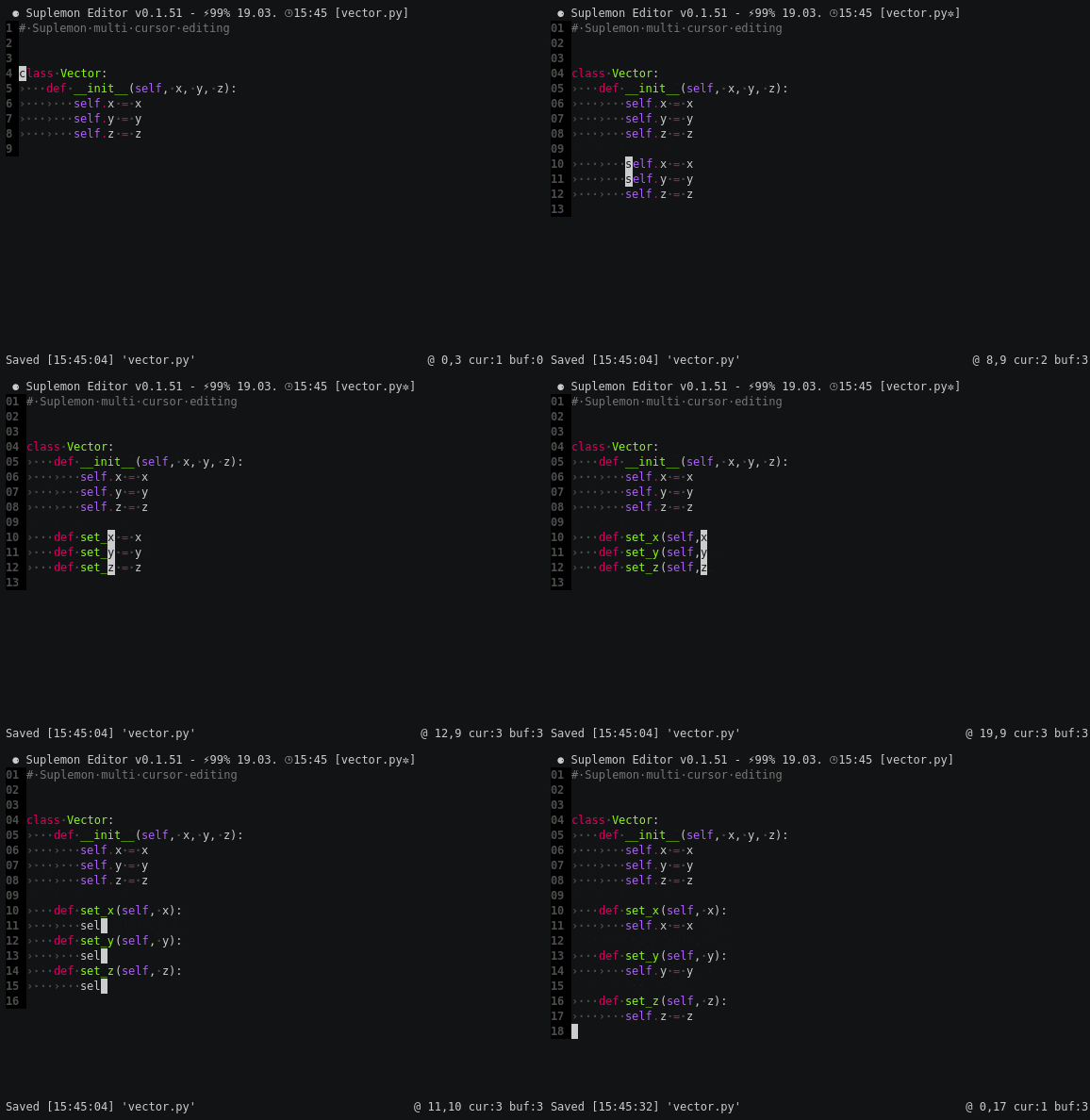
Suplemon is a modern, powerful and intuitive console text editor with multi cursor support. Suplemon replicates Sublime Text style functionality in the terminal with the ease of use of Nano. https://github.com/leancode/suplemon
About this fork
This is an actively maintained fork of richrd/suplemon.
The original is a genuinely good editor and none of the design here is ours.
Upstream simply stopped: the last commit to master landed in January 2021,
the dev branch in June 2020, and 25 issues and 5 pull requests are still
open, some since 2016. Suplemon had also stopped running altogether on
Python 3.12 and newer, which is what prompted the fork.
Since then this fork has:
- restored it on current Python, including 3.13
- fixed the upstream bugs that were reported but never merged, among them large files taking minutes to open, a crash in every prompt when the bottom bar was hidden, and missing syntax highlighting for several file extensions
- adopted the useful parts of the unmerged upstream pull requests, including the maintainer's own unreleased v0.2.9 work
- fixed things nobody had reported, such as auto indent losing tab indentation, and modified keys like Alt + Left silently doing the wrong thing
- added an installer, CI on current Python versions, and rather more documentation
See the CHANGELOG for the details.
Credit
Suplemon was written by Richard Lewis (richrd) and its contributors, and is MIT licensed. The editor, its multi cursor model and its interface are all their work. Thank you for building something worth keeping alive.
Thanks also to the people whose unmerged pull requests were adopted here: bagage and joshcangit.
If upstream ever picks development back up, the changes here are deliberately kept in small, self contained commits so they can be offered back.
Features
- Proper multi cursor editing, as in Sublime Text
- Syntax highlighting with Text Mate themes
- Autocomplete (based on words in the files that are open)
- Easy Undo/Redo (Ctrl + Z, Ctrl + Y)
- Copy & Paste, with multi line support (and native clipboard support on X11 / Unix and Mac OS)
- Multiple files in tabs
- Powerful Go To feature for jumping to files and lines
- Find, Find next and Find all (Ctrl + F, Ctrl + D, Ctrl + A)
- Custom keyboard shortcuts (and easy-to-use defaults)
- Mouse support
- Restores cursor and scroll positions when reopening files
- Extensions (easy to write your own)
- Lots more...
Caveats
- No built in selections (regions). Copy and cut act on whole lines that have a cursor on them; see the "Selecting text" section of the built in help (F1). To copy part of a line, select it with your mouse and use your terminal's own copy shortcut, usually Ctrl + Shift + C
Try it!
You can clone the repo and run Suplemon from source, or install it. Running
from source needs wcwidth; pygments is optional but gives you proper
syntax highlighting instead of the simpler line based colouring.
git clone https://github.com/leancode/suplemon.git
cd suplemon
python3 -m venv venv
./venv/bin/pip install wcwidth pygments
./venv/bin/python suplemon.py
Installation
One line, no sudo, everything under ~/.local:
curl -fsSL https://raw.githubusercontent.com/leancode/suplemon/master/install.sh | sh
It checks your platform and Python version, clones or updates the source in
~/.local/src/suplemon, builds a virtualenv, writes a launcher to
~/.local/bin/suplemon, adds an se shortcut if that name is free, and puts
~/.local/bin on your PATH if it isn't already. Re-run it any time to
update. Read it first if you'd rather not pipe a script into a shell:
install.sh.
To remove it again:
curl -fsSL https://raw.githubusercontent.com/leancode/suplemon/master/uninstall.sh | sh
That removes the launchers and ~/.local/src/suplemon, and keeps
~/.local/bin and your config. Add --purge to remove the config too, or
--dry-run to see what it would do first. With the pipe those go after
sh -s --, for example ... | sh -s -- --dry-run.
Installing as a package
The tidiest way is pipx, which puts Suplemon and its
dependencies in their own environment and gives you both a suplemon and an
se command:
pipx install suplemon-editor
The distribution is called suplemon-editor because suplemon on PyPI is the
original author's, and se there is an unrelated stream editor. The commands
it installs are still suplemon and se.
To install from a clone of the repo:
pipx install .
Plain pip install works too, but install it into a virtual environment
rather than system wide. Most current distributions ship a Python marked as
externally managed (PEP 668) and will refuse sudo pip install outright.
Usage
suplemon # New file in the current directory
suplemon [filename]... # Open one or more files
suplemon [filename:row:col]... # Open one or more files at a specific row or column (optional)
Editing a root-owned file
sudo suplemon /etc/hosts will say command not found. That is sudo, not
Suplemon: sudo replaces $PATH with its own secure_path, which never
includes ~/.local/bin, so it cannot see the launcher. Give it the full
path instead:
sudo ~/.local/bin/suplemon /etc/hosts
That works because the launcher hard-codes an absolute path to the source
tree. $HOME is root's under sudo, so a launcher written in terms of
$HOME would look for the interpreter in the wrong place.
If you do this often, either add ~/.local/bin to secure_path in
visudo, or use sudoedit, which copies the file to a temporary location,
opens it as you rather than as root, and copies it back:
SUDO_EDITOR=~/.local/bin/suplemon sudoedit /etc/hosts
sudoedit is the safer of the two: the editor never runs as root.
Notes
- Python 3.8 or higher. Python 2 is not supported.
- The master branch is considered stable.
- Tested on Linux and FreeBSD.
wcwidth is required. pygments is optional and recommended; see
docs/optional-dependencies.md for the rest.
Optional dependencies
- Pygments
For support for syntax highlighting over 300 languages.
- Flake8
For showing linting for Python files.
- xsel or xclip
For system clipboard support on X Window (Linux).
- pbcopy / pbpaste
For system clipboard support on Mac OS.
See docs/optional-dependencies.md for installation instructions.
Description
Suplemon is an intuitive command line text editor. It supports multiple cursors out of the box.
It is as easy as nano, and has much of the power of Sublime Text. It also supports extensions
to allow all kinds of customizations. To get more help hit Ctrl + H in the editor.
Suplemon is licensed under the MIT license.
Configuration
Main Config
The suplemon config file is stored at ~/.config/suplemon/suplemon-config.json.
The best way to edit it is to run the config command (Run commands via Ctrl+E).
That way Suplemon will automatically reload the configuration when you save the file.
To view the default configuration and see what options are available run config defaults via Ctrl+E.
Keymap Config
Below are the default key mappings used in suplemon. They can be edited by running the keymap command.
To view the default keymap file run keymap default
-
Ctrl + Q
Exit
-
Ctrl + W
Close file or tab
-
Ctrl + C
Copy line(s) to buffer
-
Ctrl + X
Cut line(s) to buffer
-
Ctrl + V
Insert buffer
-
Ctrl + K
Duplicate line
-
Ctrl + G
Go to line number or file (type the beginning of a filename to switch to it). You can also use 'filena:42' to go to line 42 in filename.py etc.
-
Ctrl + F
Search for a string or regular expression (configurable)
-
Ctrl + D
Search for next occurrence or find the word the cursor is on. Adds a new cursor at each new occurrence.
-
Ctrl + T
Trim whitespace
-
Alt + Arrow Key
Add new cursor in arrow direction
-
Ctrl + Left / Right
Jump to previous or next word or line
-
ESC
Revert to a single cursor / Cancel input prompt
-
Alt + Page Up
Move line(s) up
-
Alt + Page Down
Move line(s) down
-
Ctrl + S
Save current file
-
F1
Save file with new name
-
F2
Reload current file
-
Ctrl + O
Open file
-
Ctrl + W
Close file
-
Ctrl + Page Up
Switch to next file
-
Ctrl + Page Down
Switch to previous file
-
Ctrl + E
Run a command.
-
Ctrl + Z and F5
Undo
-
Ctrl + Y and F6
Redo
-
F7
Toggle visible whitespace
-
F8
Toggle mouse mode
-
F9
Toggle line numbers
-
F11
Toggle full screen
Mouse shortcuts
-
Left Click
Set cursor at mouse position. Reverts to a single cursor.
-
Right Click
Add a cursor at mouse position.
-
Scroll Wheel Up / Down
Scroll up & down.
Commands
Suplemon has various add-ons that implement extra features. The commands can be run with Ctrl + E and the prompt has autocomplete to make running them faster. The available commands and their descriptions are:
-
autocomplete
A simple autocompletion module.
This adds autocomplete support for the tab key. It uses a word list scanned from all open files for completions. By default it suggests the shortest possible match. If there are no matches, the tab action is run normally.
-
autodocstring
Simple module for adding docstring placeholders.
This module is intended to generate docstrings for Python functions. It adds placeholders for descriptions, arguments and return data. Function arguments are crudely parsed from the function definition and return statements are scanned from the function body.
-
bulk_delete
Bulk delete lines and characters. Asks what direction to delete in by default.
Add 'up' to delete lines above highest cursor. Add 'down' to delete lines below lowest cursor. Add 'left' to delete characters to the left of all cursors. Add 'right' to delete characters to the right of all cursors.
-
comment
Toggle line commenting based on current file syntax.
-
config
Shortcut for openning the config files.
-
diff
View a diff of the current file compared to it's on disk version.
-
eval
Evaluate a python expression and show the result in the status bar.
If no expression is provided the current line(s) are evaluated and replaced with the evaluation result.
-
keymap
Shortcut to openning the keymap config file.
-
linter
Linter for suplemon.
-
lower
Transform current lines to lower case.
-
lstrip
Trim whitespace from beginning of current lines.
-
paste
Toggle paste mode (helpful when pasting over SSH if auto indent is enabled)
-
reload
Reload all add-on modules.
-
replace_all
Replace all occurrences in all files of given text with given replacement.
-
reverse
Reverse text on current line(s).
-
rstrip
Trim whitespace from the end of lines.
-
save
Save the current file.
-
save_all
Save all currently open files. Asks for confirmation.
-
sort_lines
Sort current lines.
Sorts alphabetically by default. Add 'length' to sort by length. Add 'reverse' to reverse the sorting.
-
strip
Trim whitespace from start and end of lines.
-
tabstospaces
Convert tab characters to spaces in the entire file.
-
toggle_whitespace
Toggle visually showing whitespace.
-
upper
Transform current lines to upper case.
Support
If you experience problems, please open an issue on this fork.
The original project pointed people at #suplemon on Freenode. Freenode effectively ended in 2021 and that channel is gone, so GitHub issues are the place now.
Development
If you are interested in contributing to Suplemon, development dependencies can be installed via:
# For OS cleanliness, we recommend using `virtualenv` to prevent global contamination
pip install -r requirements-dev.txt
After those are installed, tests can be run via:
./test.sh
Releasing
./release.sh 0.3.1              # bump, commit, tag, push
./release.sh 0.3.1 --publish    # the same, then create the GitHub release
Publishing to PyPI happens in .github/workflows/publish.yml, triggered by a published GitHub release rather than by the tag, so tagging and publishing stay separate decisions. It uses PyPI Trusted Publishing, so no API token exists on any machine or in any repository secret.
The trusted publisher on PyPI is configured as:
| Field | Value |
|---|---|
| PyPI project name | suplemon-editor |
| Owner | leancode |
| Repository name | suplemon |
| Workflow name | publish.yml |
| Environment name | pypi |
Both the workflow and release.sh refuse to publish if the distribution name
is suplemon, which is the original author's package.
PRs are very welcome and appreciated. Target master.
The original project asked for PRs against dev, because releases were cut
from master. That no longer applies: upstream's dev last moved in June
2020 and is behind this fork by everything listed at the top of this file.
This fork develops on master directly, with each change on its own short
lived branch, so master is always the current state.
Rationale
For many the command line is a different environment for text editing. Most coders are familiar with GUI text editors and for many vi and emacs have a too steep learning curve. For them (like for me) nano was the weapon of choice. But nano feels clunky and it has its limitations. That's why I wrote my own editor with built in multi cursor support to fix the situation. Another reason is that developing Suplemon is simply fun to do.
1 maintainer

Download files
Download the file for your platform. If you're not sure which to choose, learn more about installing packages.
Source Distribution
Built Distribution
Filter files by name, interpreter, ABI, and platform.
If you're not sure about the file name format, learn more about wheel file names.
Copy a direct link to the current filters
File details
Details for the file suplemon_editor-0.3.3.tar.gz.
File metadata
- Download URL: suplemon_editor-0.3.3.tar.gz
- Upload date:
- Size: 79.4 kB
- Tags: Source
- Uploaded using Trusted Publishing? Yes
- Uploaded via:
twine/7.0.0 CPython/3.13.14
File hashes
| Algorithm | Hash digest | |
|---|---|---|
| SHA256 |
8b60cf871b2e2fdeadec0cc648475faece983db8b206a752496c3e3490a963e8
|
|
| MD5 |
69091990d3b8723398d0597907d2b507
|
|
| BLAKE2b-256 |
6d82153182baa355969d55ec19f5536f692e07f4b9a7300e6612028e55d38595
|
Provenance
The following attestation bundles were made for suplemon_editor-0.3.3.tar.gz:
Publisher:
publish.yml on leancode/suplemon
-
Statement:
-
Statement type:
https://in-toto.io/Statement/v1 -
Predicate type:
https://docs.pypi.org/attestations/publish/v1 -
Subject name:
suplemon_editor-0.3.3.tar.gz -
Subject digest:
8b60cf871b2e2fdeadec0cc648475faece983db8b206a752496c3e3490a963e8 - Sigstore transparency entry: 2704451630
- Sigstore integration time:
-
Permalink:
leancode/suplemon@8544d9b414a566722ef70479bf6487e739b4bdfe -
Branch / Tag:
refs/tags/0.3.3 - Owner: https://github.com/leancode
-
Access:
public
-
Token Issuer:
https://token.actions.githubusercontent.com -
Runner Environment:
github-hosted -
Publication workflow:
publish.yml@8544d9b414a566722ef70479bf6487e739b4bdfe -
Trigger Event:
release
-
Statement type:
File details
Details for the file suplemon_editor-0.3.3-py3-none-any.whl.
File metadata
- Download URL: suplemon_editor-0.3.3-py3-none-any.whl
- Upload date:
- Size: 92.7 kB
- Tags: Python 3
- Uploaded using Trusted Publishing? Yes
- Uploaded via:
twine/7.0.0 CPython/3.13.14
File hashes
| Algorithm | Hash digest | |
|---|---|---|
| SHA256 |
00a23f3c8740f2239127b8f758b4a0da6894bf569cff79ac5be5d5247836ef97
|
|
| MD5 |
70ff5c9da79353dd0342e375fd4d1db8
|
|
| BLAKE2b-256 |
5068c4a320e88ed8f5bae47dba7d90d8830ca472bbca9160aaf8c2117958b689
|
Provenance
The following attestation bundles were made for suplemon_editor-0.3.3-py3-none-any.whl:
Publisher:
publish.yml on leancode/suplemon
-
Statement:
-
Statement type:
https://in-toto.io/Statement/v1 -
Predicate type:
https://docs.pypi.org/attestations/publish/v1 -
Subject name:
suplemon_editor-0.3.3-py3-none-any.whl -
Subject digest:
00a23f3c8740f2239127b8f758b4a0da6894bf569cff79ac5be5d5247836ef97 - Sigstore transparency entry: 2704451645
- Sigstore integration time:
-
Permalink:
leancode/suplemon@8544d9b414a566722ef70479bf6487e739b4bdfe -
Branch / Tag:
refs/tags/0.3.3 - Owner: https://github.com/leancode
-
Access:
public
-
Token Issuer:
https://token.actions.githubusercontent.com -
Runner Environment:
github-hosted -
Publication workflow:
publish.yml@8544d9b414a566722ef70479bf6487e739b4bdfe -
Trigger Event:
release
-
Statement type:














