

SuppOrth
SuppOrth runs OrthoFinder, SonicParanoid2 and Broccoli on your protein FASTA files and combines their orthologue predictions. You can also include results from an existing OMA run.
The output contains unique protein pairs between species, the tools supporting each pair, and alignment statistics when available. It accepts two or more proteomes and keeps one-to-many and many-to-many relationships.
Install
Use Python 3.10–3.12 on macOS or Linux. Install SuppOrth, then its predictors:
python -m pip install supporth        # Install the SuppOrth command-line application
suppOrth install                     # Install the three predictors and prepare their dependencies
suppOrth check                       # Check whether predictors and required binaries are ready
SuppOrth is distributed through PyPI.
The predictors are installed from their source repositories under ~/.supporth.
You need Git and a compiler toolchain. MAFFT and FastME must already be available
or supplied during installation. SonicParanoid needs an indexed Pfam database;
preparing it can take several hours. To reuse an existing database:
suppOrth install --pfam-db /path/to/profile_db
See the installation details for interpreter selection, shared binaries and custom installation locations.
Run
Put one protein FASTA per species in a directory:
suppOrth run -f proteomes/ -o results/ -t 8
Or pass the files directly:
suppOrth run speciesA.faa speciesB.faa speciesC.faa -o results/ -t 8
Use unique protein identifiers across the FASTAs. SuppOrth reads the first whitespace-separated field of each header. The predictors run sequentially, using the requested thread budget.
By default, a pair is kept if at least three tools support it, or its alignment identity is greater than 80%. Change the thresholds with:
suppOrth run -f proteomes/ -o results/ --supportLv 2 --identity_filter 90
Use --supportLv 1 to keep every predicted cross-species pair. Support counts
measure agreement between methods; they are not probabilities.
Include OMA
Run OMA separately with the same protein identifiers, then supply its output:
suppOrth run -f proteomes/ -o results/ --oma /path/to/oma_run/Output/
SuppOrth imports OMA's PairwiseOrthologs tables as a fourth source of support.
It does not install or run OMA. See the OMA guide
for accepted folders and identifier matching.
Results
Open these files in results/:
suppOrth.tsv: protein pairs, support counts, 0/1 tool columns and alignment statistics.suppOrth.pngandsuppOrth.svg: overlap figures from all predictor calls before filtering.provenance.json: inputs, options, software versions and run status.
Tool labels are F (OrthoFinder), S (SonicParanoid), B (Broccoli) and
O (OMA). For example, SupportedBy=F,S,O means three tools support the pair.
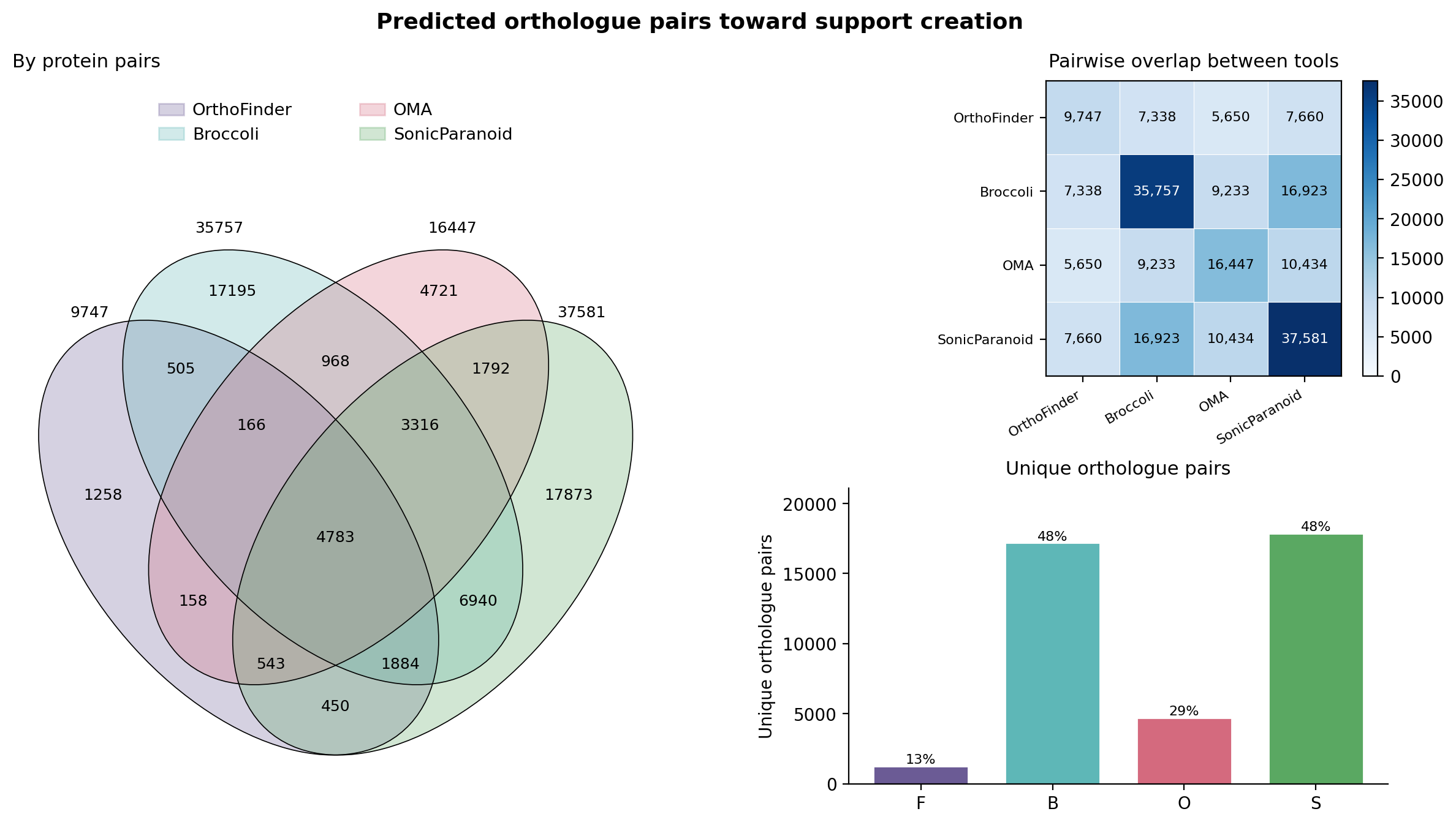
The SuppOrth manual includes the first ten rows of an example output, all output files, native predictor options, BLAST/DIAMOND selection and maintenance commands.
More options
OrthoFinder uses DIAMOND, MAFFT and IQ-TREE by default. Select BLAST with
--alignment blast. Pass native predictor arguments in a quoted string:
suppOrth run -f proteomes/ -o results/ --opt orthofinder="-I 2.0"
See the SuppOrth manual and release instructions.
1 maintainer

Metadata
1 maintainer
Release files for supporth 0.4.0
For a detailed explanation of source distributions (sdists) and built distributions (wheels), please see the package formats documentation.
Source distribution (sdist)
| File | Size | Uploaded | |
|---|---|---|---|
| supporth-0.4.0.tar.gz | 69.9 kB | Details |
Built distribution (wheel)
| File | Interpreter | ABI | Platform | Reset |
|---|---|---|---|---|
| supporth-0.4.0-py3-none-any.whl | Python 3 | none | any | Details |
Total release size: 131.1 kB
Release files / supporth-0.4.0.tar.gz
| Download URL | supporth-0.4.0.tar.gz |
|---|---|
| Size | 69.9 kB |
| Tags | Source |
|
SHA-256 checksum How to use checksums |
aefa414dd6850b6cb609c06bec95ce32c7656fd70ac8f6916bf6ea76b34336b2
|
|
BLAKE2b-256 checksum How to use checksums |
9d8ff3f14b7ff0433c9a42f8f709ad559facf256382abd39a09c298b10170d19
|
| Upload date | |
|
Uploaded using Trusted Publishing? What is trusted publishing? |
No |
| Uploaded via |
twine/7.0.0 CPython/3.13.2
|
Release files / supporth-0.4.0-py3-none-any.whl
| Download URL | supporth-0.4.0-py3-none-any.whl |
|---|---|
| Size | 61.2 kB |
| Tags | Python 3 |
|
SHA-256 checksum How to use checksums |
4e2339e4331a75fa3ec0efee07d6b2d49f7c9fb1242bba64dce93c35ebaba645
|
|
BLAKE2b-256 checksum How to use checksums |
107991915d9fa34b403e7b70f40175bf78ef2b92ff72c8891f0a74511e21bb12
|
| Upload date | |
|
Uploaded using Trusted Publishing? What is trusted publishing? |
No |
| Uploaded via |
twine/7.0.0 CPython/3.13.2
|














