
Suraya
A blend of Grafana and Marimo, with flavours of AMG and PMM.
About
Grafana Suraya is a community distribution of Grafana, with batteries included, similarly like AWS and Percona are doing it.
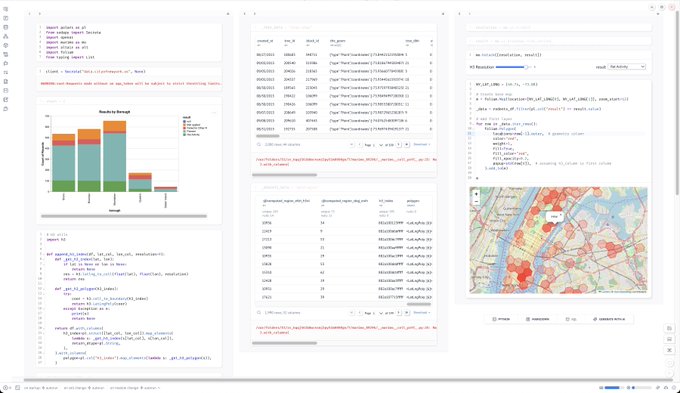
Pairing Grafana with reactive notebooks using Jupyter and Marimo technologies optimally connects the Grafana and Python software ecosystems, and provides a gateway from one to the other.
Topics
Amazon Managed Grafana (AMG) provides scalable and secure data visualization for your operational metrics, logs, and traces, as a fully managed service developed in collaboration with Grafana Labs and Amazon Web Services (AWS). It includes 40+ additional best-of-breed plugins from the Grafana Marketplace. On top of this curated set of baseline plugins, Suraya additionally includes all 7 plugins of the Volkov Labs Business Suite for Grafana.
CrateDB is a distributed and scalable SQL database for storing and analyzing massive amounts of data in near real-time, even with complex queries. It is PostgreSQL-compatible, and based on Lucene.
Grafana, traditionally like »Dashboard anything. Observe everything.«, and still going strong, it makes you query, visualize, alert on, and understand your data no matter where it’s stored. With Grafana, you can create, explore, and share all of your data through beautiful, flexible dashboards, on top of many high-quality database connectors.
Marimo is an open-source reactive notebook for Python — reproducible, git-friendly, executable as a script, and shareable as an app. Marimo notebooks are reproducible, extremely interactive, designed for collaboration, and reactive, which means that when running a cell or interacting with an UI element, Marimo will backtrack and update all dependent cells and UI elements when needed. Contrary to Jupyter Notebooks using the JSON format, Marimo notebooks are stored as pure Python, executable as a script, and deployable as an app.
Percona Monitoring and Management (PMM) is an open source database observability, monitoring, and management tool for use with MySQL, PostgreSQL, MongoDB, and the servers on which they run, enabling to view node- to single- query performance metrics for all of your databases in a single place. The Query Analytics subsystem quickly locates costly and slow-running queries to address bottlenecks. Percona Advisors provide performance, security, and configuration recommendations, and alerting and management features like backup, restore, and built-in open source Private DBaaS complete the story.
PyViz enumerates the best open-source (OSS) Python data visualization tools in different categories. Marimo provides the gateway to all of them.
Usage
uv pip install suraya
python -m suraya.system.mk boot
open http://localhost:8080/
Credentials are: admin/grafana
Start Grafana Suraya with admin password grafana.
docker run --rm -it \
  --publish=3000:3000 \
  --env='GF_SECURITY_ADMIN_PASSWORD=grafana' \
  ghcr.io/daq-tools/grafana-suraya:latest
Note: This OCI image is not publicly available yet. However, it is easy to build it on your workstation: Please consider following up at reading the documentation about the development sandbox.
Features
-
Batteries included: A curated set of Grafana plugins provides the convenience of Amazon Managed Grafana (AMG) for the masses, with the additional freedom that it is easy to add your own, proprietary or not.
-
Developer friendly: Fast, incremental OCI builds, also on pull requests, so you can ship development results fast, without even thinking about it. Short release cycles, and a friendly community with a happy-to-merge attitude, in order to ship early and often.
-
Releases: Grafana Suraya is an OCI-based distribution, based on stable releases of Grafana OSS, and its nightly variants.
What's inside
alias suraya='docker run --rm -it --entrypoint= ghcr.io/daq-tools/grafana-suraya:latest'
Display Grafana version.
suraya grafana --version
Display list of installed plugins.
suraya gf-plugins-list
ae3e-plotly-panel @ 0.5.0
alexanderzobnin-zabbix-app @ 4.6.1
dlopes7-appdynamics-datasource @ 3.10.4
grafana-athena-datasource @ 3.0.0
grafana-bigquery-datasource @ 2.0.1
grafana-clickhouse-datasource @ 4.5.1
grafana-clock-panel @ 2.1.8
grafana-cloudflare-datasource @ 0.1.2-preview
grafana-datadog-datasource @ 3.12.4
grafana-dynatrace-datasource @ 3.21.4
grafana-github-datasource @ 2.0.1
grafana-gitlab-datasource @ 2.3.11
grafana-googlesheets-datasource @ 2.0.1
grafana-honeycomb-datasource @ 2.7.7
grafana-iot-sitewise-datasource @ 1.25.2
grafana-iot-twinmaker-app @ 2.0.0
grafana-jira-datasource @ 1.11.4
grafana-mongodb-datasource @ 1.22.8
grafana-newrelic-datasource @ 4.6.8
grafana-opensearch-datasource @ 2.22.3
grafana-oracle-datasource @ 2.10.4
grafana-redshift-datasource @ 1.20.0
grafana-salesforce-datasource @ 1.7.8
grafana-saphana-datasource @ 1.7.5
grafana-servicenow-datasource @ 2.12.14
grafana-splunk-datasource @ 5.4.1
grafana-splunk-monitoring-datasource @ 1.7.10
grafana-timestream-datasource @ 2.9.13
grafana-wavefront-datasource @ 2.5.8
grafana-x-ray-datasource @ 2.13.1
marcusolsson-gantt-panel @ 0.8.1
marcusolsson-hourly-heatmap-panel @ 2.0.1
michaeldmoore-scatter-panel @ 1.2.0
moogsoft-aiops-app @ 9.0.0
netsage-sankey-panel @ 1.1.3
operato-windrose-panel @ 1.2.0
pixie-pixie-datasource @ 0.0.9
redis-datasource @ 2.2.0
simpod-json-datasource @ 0.6.6
volkovlabs-echarts-panel @ 6.5.0
volkovlabs-form-panel @ 5.0.0
volkovlabs-grapi-datasource @ 3.4.0
volkovlabs-image-panel @ 6.2.0
volkovlabs-rss-datasource @ 4.3.0
volkovlabs-table-panel @ 2.0.0
volkovlabs-variable-panel @ 3.6.0
Display number of installed plugins.
suraya gf-plugins-count
48
Screenshots

1 maintainer

Metadata
1 maintainer
Release files for suraya 0.0.1
For a detailed explanation of source distributions (sdists) and built distributions (wheels), please see the package formats documentation.
Source distribution (sdist)
| File | Size | Uploaded | |
|---|---|---|---|
| suraya-0.0.1.tar.gz | 27.9 kB | Details |
Built distribution (wheel)
| File | Interpreter | ABI | Platform | Reset |
|---|---|---|---|---|
| suraya-0.0.1-py3-none-any.whl | Python 3 | none | any | Details |
Total release size: 54.9 kB
Release files / suraya-0.0.1.tar.gz
| Download URL | suraya-0.0.1.tar.gz |
|---|---|
| Size | 27.9 kB |
| Tags | Source |
|
SHA-256 checksum How to use checksums |
30819c8fe4dae215af75c7acc8acc82065bc098e563b1d40e3fc7893e7f0479b
|
|
BLAKE2b-256 checksum How to use checksums |
c45e5f42aecc966d4138e5310927ebf3eef54e3fbbc61f1f5c94d02b0d4b1db6
|
| Upload date | |
|
Uploaded using Trusted Publishing? What is trusted publishing? |
Yes |
| Uploaded via |
twine/6.1.0 CPython/3.13.12
|
Provenance
Provenance describes where a file came from. On PyPI, provenance is shared via attestations, which provide a verifiable record of the build or publishing details. View details, limitations and caveats.


PyPI Publish Attestation
PyPI verified that this artifact, at this checksum, originated from the publisher listed below.
Signed by GitHub Actions, verified by PyPI on Apr 26, 2026.
Transparency logRelease files / suraya-0.0.1-py3-none-any.whl
| Download URL | suraya-0.0.1-py3-none-any.whl |
|---|---|
| Size | 27.0 kB |
| Tags | Python 3 |
|
SHA-256 checksum How to use checksums |
679152628996171c3820c8a101d8c0a862e8311e3672a4f36af4f30425acd0b8
|
|
BLAKE2b-256 checksum How to use checksums |
1da6c006e3576df570d4714fa0246fdc45615f539ce519a2496ebe215e916a46
|
| Upload date | |
|
Uploaded using Trusted Publishing? What is trusted publishing? |
Yes |
| Uploaded via |
twine/6.1.0 CPython/3.13.12
|
Provenance
Provenance describes where a file came from. On PyPI, provenance is shared via attestations, which provide a verifiable record of the build or publishing details. View details, limitations and caveats.
PyPI Publish Attestation
PyPI verified that this artifact, at this checksum, originated from the publisher listed below.
Signed by GitHub Actions, verified by PyPI on Apr 26, 2026.
Transparency log













