
DAGMC-viz Documentation
The purpose of this toolkit is to assist with the visualization of DAGMC geometries in VisIt. This can include creating a default interactive view in VisIt, removing the graveyard volume from a given geometry, and expanding vector tags on a given mesh to facilitate database animation.
Installation
The Direct Accelerated Geometry Monte Carlo visualization toolkit requires Python 2.7, VisIt 2.3.13 or above, and MOAB 5.1.0. The inclusion of VisIt and MOAB in the PYTHONPATH and the VisIt and MOAB executables in the PATH are required.The toolkit can be installed on a linux platform with the following command.
pip install svalinn-tools==0.3
If the user is in a Python environment, each of the three submodules can be accessed in the following way.
import svalinn_tools.{SUBMODULE}
Description
Data Loading
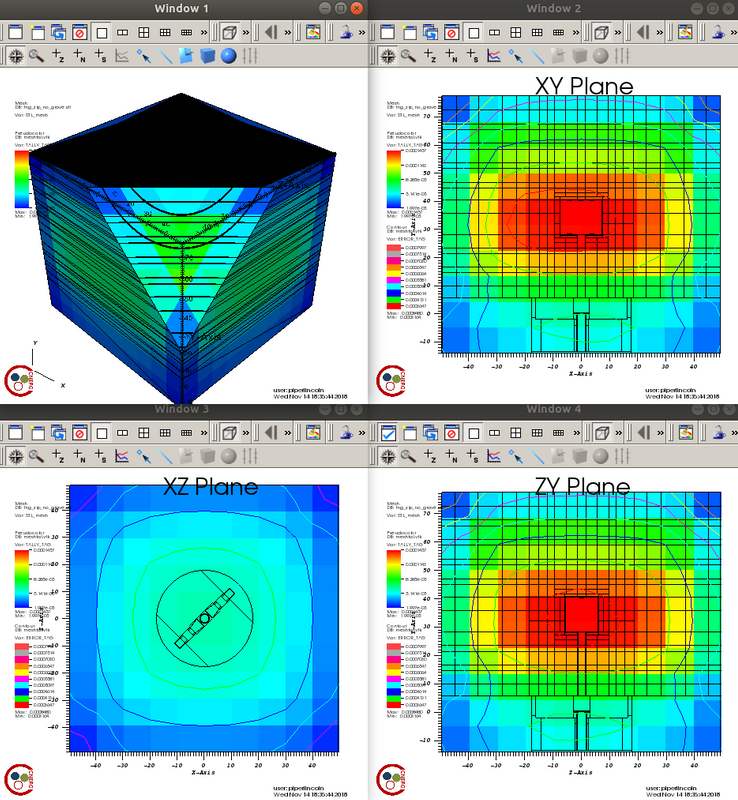
This module can be used to create a default interactive output in VisIt from an h5m geometry file and an h5m or vtk data file. The following four interactive plot windows are displayed in a 2x2 grid.
  1. A cube with a clip through the first octant.
  2. XY plane slice through the centroid.
  3. XZ plane slice through the centroid.
  4. ZY plane slice through the centroid.
Each window has a mesh plot with the "STL_mesh" variable, a Pseudocolor plot with the "TALLY_TAG" variable, and the second, third, and fourth windows have Contour plots with the "ERROR_TAG" variable.
data_loading [geometryfile] [datafile]
The user may indicate whether or not they would like each window to be saved as a png file in their current directory by adding the -i option to the command. If the user would like to remove the timestamp from each image, the -t option can be added to the command as well.
data_loading [geometryfile] [datafile] -i -t
The user may indicate whether or not they would like the VisIt session file to be saved in their current directory by adding the -s option to the command. If the user does not want VisIt to be automatically launched, the -v option must be appended to the commmand as well.
data_loading [geometryfile] [datafile] -s -v
A sample output from an h5m geometry file and a vtk data file can be seen below.
Graveyard Removal
This module can be used to remove the graveyard volume/group from an h5m geometry file. The new file will be written in the current directory with _no_grave.h5m appended to the original file name. It can also extract curve, surface, and volume EntitySets.
graveyard_removal [h5mfile]
The user may specify a specific output file name and extension by adding the -o option to the command. The new file will be written in the current directory. The user may also specify if they would like the entity handle of the graveyard volume/group to be printed by adding the -p option to the command.
graveyard_removal [h5mfile] -o [outputfile] -p
Tag Expansion
This module can be used to expand vector tags on a mesh and generate a data file for each value in the vector tag. VisIt will recognize the collection of these data files as a database, and permit stepping through them in an animation.
tag_expansion [meshfile]
The user may specify a directory name by adding the -d option to the command. If the user would like a previous directory to be overwritten, the -o option may be specified as well. If the user would like the vector tags on a specific element in the mesh to be expanded, the -e option may also be used.
tag_expansion -e [element] -d [directory] -o
NOTE: This is based on previous work done by Lane Schultz.
1 maintainer

Metadata
1 maintainer
Release files for svalinn-tools 0.3
For a detailed explanation of source distributions (sdists) and built distributions (wheels), please see the package formats documentation.
Source distribution (sdist)
| File | Size | Uploaded | |
|---|---|---|---|
| svalinn_tools-0.3.tar.gz | 594.5 kB | Details |
Built distribution (wheel)
| File | Interpreter | ABI | Platform | Reset |
|---|---|---|---|---|
| svalinn_tools-0.3-py2.py3-none-any.whl | Python 2, Python 3 | none | any | Details |
Total release size: 1.2 MB
Release files / svalinn_tools-0.3.tar.gz
| Download URL | svalinn_tools-0.3.tar.gz |
|---|---|
| Size | 594.5 kB |
| Tags | Source |
|
SHA-256 checksum How to use checksums |
5dc88be3a7bf4074ac72570bffbab96e1900307b1b50d1f7b3d41ce7c12e3e04
|
|
BLAKE2b-256 checksum How to use checksums |
69678825caa69ae877254cd7bdac8a84c7dc754c6df09ee6ea274946057c75b4
|
| Upload date | |
|
Uploaded using Trusted Publishing? What is trusted publishing? |
No |
| Uploaded via |
twine/1.15.0 pkginfo/1.5.0.1 requests/2.22.0 setuptools/41.4.0 requests-toolbelt/0.9.1 tqdm/4.36.1 CPython/2.7.17
|
Release files / svalinn_tools-0.3-py2.py3-none-any.whl
| Download URL | svalinn_tools-0.3-py2.py3-none-any.whl |
|---|---|
| Size | 593.7 kB |
| Tags | Python 2 Python 3 |
|
SHA-256 checksum How to use checksums |
be9d229ae4baeb28bf2f56711cf05e998b00432b08fce7a6a56eae0c30a389e7
|
|
BLAKE2b-256 checksum How to use checksums |
5a6167d147b6dc7cf813175cd321508550de4f2407c764223a027694de5bc5dd
|
| Upload date | |
|
Uploaded using Trusted Publishing? What is trusted publishing? |
No |
| Uploaded via |
twine/1.15.0 pkginfo/1.5.0.1 requests/2.22.0 setuptools/41.4.0 requests-toolbelt/0.9.1 tqdm/4.36.1 CPython/2.7.17
|













