
Convert SVG files into editable draw.io diagrams.
Verified details
These details have been verified by PyPIProject links
GitHub Statistics
Maintainers

Project description
svg-to-drawio


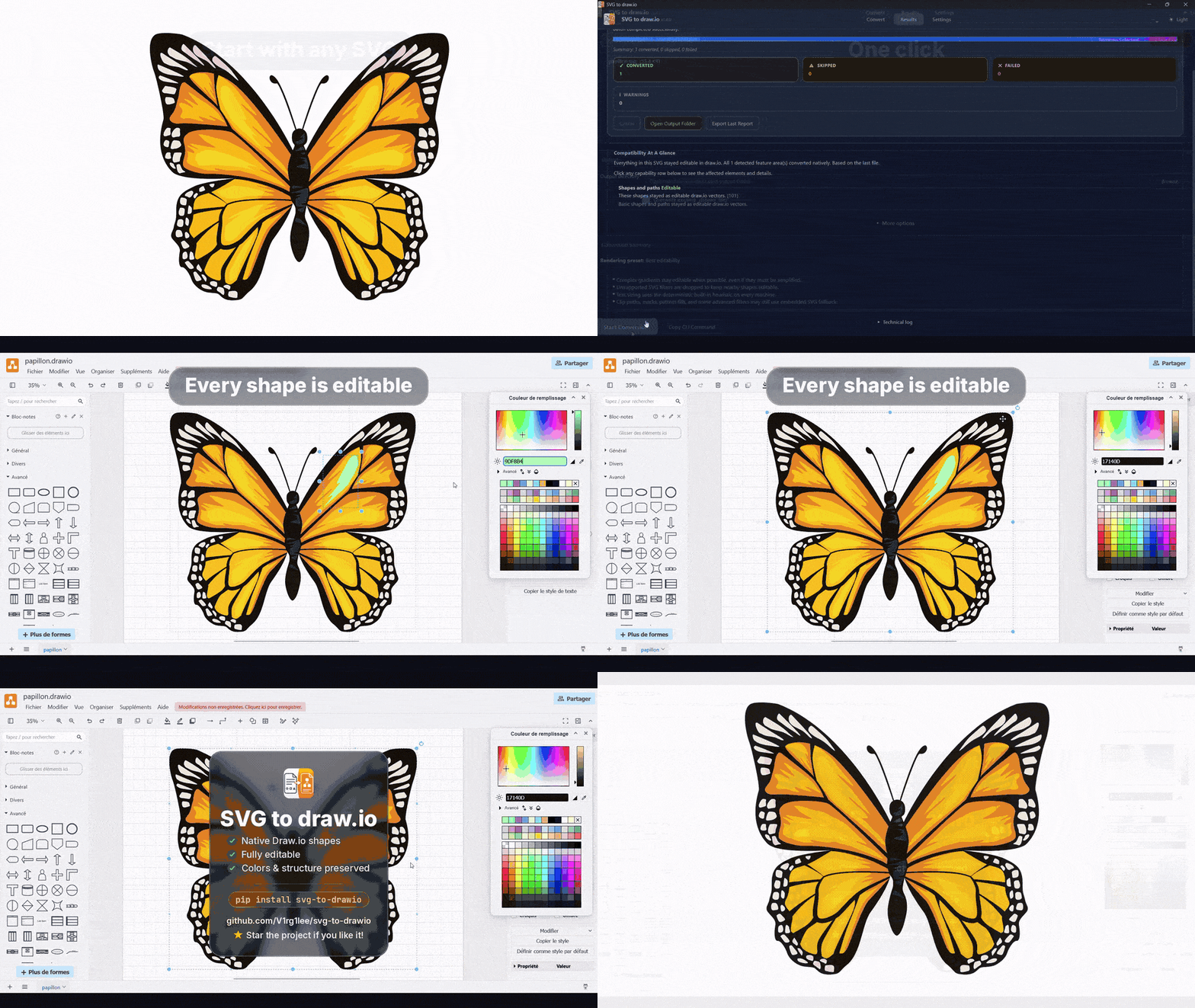
Convert any SVG into a truly native, editable draw.io diagram. Every shape, line, and text label becomes its own selectable cell - not a single flattened picture pasted onto the canvas.
pip install svg-to-drawio
⭐ If this project saves you time, consider giving it a star!
📖 Full documentation: https://v1rg1lee.github.io/svg-to-drawio/ - see CHANGELOG.md for release notes.
- Truly editable output - rectangles, circles, paths, text, and groups all stay as native, movable draw.io cells.
- One engine, three ways in - the CLI, the Python API, and the desktop app all share the exact same conversion logic, so results are identical everywhere.
- Smart fallbacks, not silent failures - gradients, filters, masks, and clip-paths render natively whenever draw.io supports them, and fall back to a faithful embedded SVG image when it can't, instead of dropping detail.
- Built for batches - convert a single icon or an entire folder tree recursively, with watch mode, incremental caching, and structured diagnostics.
Contents
- Quick start
- Desktop app
- CLI reference
- Python API
- Interface parity
- Advanced rendering
- Development
- Release authenticity
- Contributing
- Changelog
- License
- Full documentation site ↗
Quick start
Requirements: Python 3.11+, no external runtime dependency for the CLI.
pip install svg-to-drawio
svg-to-drawio diagram.svg
If you want the optional event-driven watch mode instead of polling:
pip install "svg-to-drawio[watch]"
If you want the best available text sizing backend in library / CLI environments too:
pip install "svg-to-drawio[text-metrics]"
The CLI, Python API, and desktop app all expose the same rendering policies. The desktop presets map directly to the CLI and API too.
By default, output is written next to the source file (diagram.svg -> diagram.drawio).
Running from a repository checkout instead of an installed package works the same way:
svg-to-drawio diagram.svg
svg-to-drawio path/to/folder/ --recursive --overwrite
Desktop app
For anyone who would rather drag, drop, and click than type commands. The desktop app uses the exact same conversion engine as the CLI and Python API, so there is no difference in output quality.
Download a release artifact from the Releases page:
- Windows:
x64andARM64builds, each available as aSetup.exeinstaller or a direct portable.exe - Linux:
x64andARM64builds across.deb,.rpm,.flatpak, portable.AppImage, and plain.tar.gz - macOS: universal2
.dmgdisk image for Apple Silicon and Intel Macs
| Platform | Architecture | Recommended download | Other available formats |
|---|---|---|---|
| Windows | x64 |
windows-x64-setup.exe |
windows-x64.exe |
| Windows | ARM64 |
windows-arm64-setup.exe |
windows-arm64.exe |
| Linux (Debian / Ubuntu family) | x64 |
linux-amd64.deb |
linux-x86_64.flatpak, linux-x64.AppImage, linux-x64.tar.gz |
| Linux (Debian / Ubuntu family) | ARM64 |
linux-arm64.deb |
linux-aarch64.flatpak, linux-arm64.AppImage, linux-arm64.tar.gz |
| Linux (Fedora / openSUSE / RHEL-like) | x64 |
linux-x86_64.rpm |
linux-x86_64.flatpak, linux-x64.AppImage, linux-x64.tar.gz |
| Linux (Fedora / openSUSE / RHEL-like) | ARM64 |
linux-aarch64.rpm |
linux-aarch64.flatpak, linux-arm64.AppImage, linux-arm64.tar.gz |
| Linux (cross-distro) | x64 |
linux-x86_64.flatpak |
linux-x64.AppImage, linux-x64.tar.gz |
| Linux (cross-distro) | ARM64 |
linux-aarch64.flatpak |
linux-arm64.AppImage, linux-arm64.tar.gz |
| macOS | universal2 |
macos.dmg |
none |
Features: drag-and-drop, multi-root queues, live progress, cooperative cancellation, safe close / force close, one-click output folder access, watch mode, persistent preferences, rendering presets, merging multiple SVGs into one file (pages or tile grid) with an optional notes legend / page background, copy-as-CLI command, a plain-English compatibility panel with clickable details, and JSON report export.
GitHub Actions now also smoke-tests the produced desktop deliverables on Windows (x64, ARM64), Linux (x64, ARM64), and macOS so installer/archive regressions are caught earlier.
Run it from source instead:
pip install -r requirements-desktop.txt
python desktop_app.py
CLI reference
svg-to-drawio [INPUT] [OPTIONS]
| Option | Description |
|---|---|
--output-dir DIR |
Write .drawio files into a separate directory |
--recursive |
Walk subfolders when the input is a directory |
--overwrite |
Replace existing .drawio outputs (skip by default) |
--watch |
Re-convert SVG files automatically whenever they change |
--stdout |
Write XML to stdout instead of a file (single file only) |
Full CLI reference (CI gates, batch tuning, rendering policies)
| Option | Description |
|---|---|
--watch-backend MODE |
auto, poll, or event when watch mode is enabled |
--flatten |
Dissolve <g> groups and emit all shapes at the root level |
--analyze |
Inspect compatibility and diagnostics without writing .drawio output |
--report-json PATH |
Write a structured JSON report with diagnostics, fallbacks, and compatibility data |
--no-cache |
Disable the persistent cache for unchanged inputs |
--max-elements N |
Warn and truncate output after N drawable elements |
--workers N |
Convert files in parallel |
--rendering-preset PRESET |
Apply balanced, editability, or fidelity exactly like in the desktop app |
--gradient-policy MODE |
auto, prefer-native, or prefer-fallback for multi-stop gradients |
--filter-policy MODE |
auto, prefer-native, or force-fallback for SVG filters |
--text-metrics-policy MODE |
auto, system, or heuristic for text sizing |
--fail-on-warning |
Exit with code 1 if any converted file reports a warning |
--fail-on-fallback |
Exit with code 1 if any file uses embedded SVG fallback |
--min-score N |
Exit with code 1 if any file scores below N compatibility points (0-100) |
--require-native CAPABILITY... |
Require capability families such as text, gradients, or clipping to stay fully native |
--merge {pages,grid} |
Combine every input SVG into one .drawio file: one page per SVG, or a labeled tile grid |
--merge-output PATH |
Path of the combined file written by --merge (required with --merge) |
--grid-columns N |
Number of columns in the --merge grid layout (default: auto, roughly square) |
--legend |
Add a "Notes" layer summarizing the conversion report to the output |
--background-color VALUE |
Set the draw.io page background color (e.g. #FFFFFF) |
Examples
# Write output to a separate folder
svg-to-drawio src/icons/ --recursive --output-dir dist/diagrams --overwrite

# Watch a folder and reconvert on every save
svg-to-drawio src/ --watch --overwrite

# Force CI to fail if a conversion needed SVG fallback
svg-to-drawio assets/ --recursive --fail-on-fallback --min-score 90

# Analyze a file and emit a JSON report without generating a .drawio file
svg-to-drawio diagram.svg --analyze --report-json report.json

# Prefer editable native output over exact SVG filters and complex gradients
svg-to-drawio diagram.svg --filter-policy prefer-native --gradient-policy prefer-native

# Use the same preset as the desktop app's "Best visual fidelity" button
svg-to-drawio diagram.svg --rendering-preset fidelity

# Use parallel workers for a larger batch
svg-to-drawio src/ --recursive --workers 4 --overwrite

# Pipe draw.io XML directly into another tool
svg-to-drawio diagram.svg --stdout > diagram.drawio

# Flatten all groups into a single layer
svg-to-drawio diagram.svg --flatten --overwrite

# Combine a brand kit of logos into one file, one page per logo
svg-to-drawio logos/ --merge pages --merge-output brand.drawio --overwrite

# Combine them into a single page, labeled tile grid, with a notes legend
svg-to-drawio logos/ --merge grid --grid-columns 3 --merge-output brand-grid --legend
During a normal conversion run, the CLI prints the active rendering plan in plain English, then a short compatibility summary that mainly highlights rows that were not fully native. --analyze prints the full per-file compatibility matrix, and --report-json writes the same data in machine-readable form for CI, automation, or custom tooling.
Python API
from svg_to_drawio import RenderingOptions, convert_file, convert_file_result, convert_to_string

# Write to disk and get the output path back
out = convert_file("diagram.svg")

# Or keep the XML + structured report together
result = convert_file_result("diagram.svg")
print(result.output_path)
print(result.compatibility_score)
print(result.report.compatibility_overview.headline)

# Return draw.io XML as a string without writing a file
xml = convert_to_string(
    "diagram.svg",
    rendering_options=RenderingOptions(
        gradient_policy="prefer-native",
        filter_policy="prefer-native",
        text_metrics_policy="heuristic",
    ),
)
The same beginner-friendly presets exposed by the desktop app are available in the API too:
from svg_to_drawio import rendering_preflight_lines, rendering_preset_options

options = rendering_preset_options("fidelity")
for line in rendering_preflight_lines(options):
    print(line)
More API examples ▸ in-memory strings, batch service, diagnostics, CI quality gates
For in-memory use cases such as web backends, notebooks, or CI transforms:
from svg_to_drawio import convert_svg_string_result

result = convert_svg_string_result(
    '<svg xmlns="http://www.w3.org/2000/svg" width="80" height="40">'
    '<rect x="0" y="0" width="80" height="40" fill="#2563eb" />'
    "</svg>",
    title="memory-diagram",
)
print(result.xml)
print(result.report.to_dict()["schema_version"])
For batch conversions with progress reporting and cancellation:
from svg_to_drawio import ConversionOptions, ConversionService

service = ConversionService()
summary = service.convert(
    ["folder/", "other.svg"],
    ConversionOptions(output_dir="out/", recursive=True, overwrite=True),
    reporter=lambda event: print(event.message),
)
print(summary.to_status_line())
To combine several SVGs into one .drawio file, with an optional notes legend / page background:
from svg_to_drawio import PostProcessOptions, merge_files

summary = merge_files(
    ["logos/"],
    "brand-grid",  # ".drawio" is appended automatically if missing
    mode="grid",
    columns=3,
    overwrite=True,
    post_process=PostProcessOptions(legend=True, background="#FFFFFF"),
)
print(summary.to_status_line())
post_process is also accepted by every convert_* function for ordinary (non-merge) conversions.
For one-off diagnostics without writing output files:
from svg_to_drawio import analyze_file

report = analyze_file("diagram.svg")
print(report.compatibility_score)
print(report.compatibility_overview.headline)
print(report.compatibility_overview.summary)
for row in report.compatibility_matrix:
    print(row.label, row.status_label, row.message)
for issue in report.issues:
    print(issue.message)
If you want to convert a file and still inspect the same structured report afterwards:
from svg_to_drawio import Converter

converter = Converter()
converter.convert_file("diagram.svg")
report = converter.get_report()
payload = report.to_dict()  # JSON-friendly diagnostics + compatibility data
For automation gates in CI:
from svg_to_drawio import QualityGateOptions, convert_svg_string_result, evaluate_quality_gates

result = convert_svg_string_result(svg_text, title="ci-check")
violations = evaluate_quality_gates(
    [result.report],
    QualityGateOptions(fail_on_fallback=True, min_score=90, require_native=("text",)),
)
if violations:
    raise SystemExit(1)
Interface parity
The CLI, Python API, and desktop app use the same conversion, fallback, diagnostics, merge, watch, cache, and post-processing code paths. Their workflow-specific differences are intentional: the desktop owns the interactive preview, while the CLI/API expose automation features such as stdout XML and quality-gate exit codes.
See the detailed interface parity matrix
for the exact equivalent of each feature. The public API also exports watch_svg_files(...),
and merge operations now accept cooperative cancellation through CancellationToken.
Advanced rendering
The engine exposes a small set of rendering policies shared by the CLI, Python API, and desktop app:
rendering_preset="balanced" | "editability" | "fidelity"is available directly in the CLI and viarendering_preset_options(...)in the Python API, while the desktop app exposes the same choices as buttons / combo-box presets.gradient_policy="auto"keeps the default behavior: use native multi-stop approximation when supported, otherwise fall back to embedded SVG.gradient_policy="prefer-native"keeps output editable even for unsupported multi-stop gradients by reducing them to draw.io's native two-color gradients when needed.gradient_policy="prefer-fallback"always preserves multi-stop gradients through embedded SVG fallback.filter_policy="auto"keeps the default behavior: native shadows stay native, some glow or simple offset filters may be approximated natively, and harder filters fall back.filter_policy="prefer-native"ignores unsupported filters instead of falling back so the surrounding shapes stay editable, while still keeping supported native approximations.filter_policy="force-fallback"always preserves filters through embedded SVG fallback.text_metrics_policy="auto"uses Qt text shaping whenPySide6is available, then falls back to Pillow or Tk font metrics, and finally to the built-in heuristic.text_metrics_policy="system"explicitly prefers real font metrics over the heuristic.text_metrics_policy="heuristic"keeps text sizing deterministic without consulting the system font backend.
The desktop app also exposes three beginner-friendly presets built on top of those policies:
BalancedBest editabilityBest visual fidelity
What gets converted
| SVG element | draw.io output |
|---|---|
<rect> |
Rectangle cell (rounded corners from rx / ry) |
<circle> / <ellipse> |
Ellipse cell |
<line> |
Edge (no arrow by default) |
<polyline> |
Edge with waypoints |
<polygon> |
Filled stencil shape |
<path> |
Stencil; open unfilled paths with markers become edges; multi-stop linear gradients can be approximated natively |
<text> / <tspan> |
Text cell |
textual <foreignObject> |
XHTML text flattened into an editable text cell; complex HTML layout is simplified |
<image> |
Image cell with embedded asset data |
<g> |
Native draw.io group cell |
Inkscape layers (<g inkscape:groupmode="layer">) |
draw.io layer cell |
<a> |
Passes link=URL to child cells |
<use> / <symbol> |
Resolved from <defs> and rendered in place |
nested <svg> |
Handled with its own viewBox transform |
Supported CSS and SVG features
- CSS
<style>blocks: element, class (.cls), ID (#id), descendant (A B), child (A > B), multi-class (.a.b), and attribute selectors - A standalone
:rootpseudo-class (commonly used to scope CSS variables); other pseudo-classes (:hover,:first-child, etc.) never match, so rules using them are silently ignored rather than applied - CSS inheritance through
<g>groups and custom properties (var(--name, fallback)) currentColor,display:none, andvisibility:hidden- Transforms:
translate,scale,rotate,matrix,skewX,skewY viewBoxmapping withpreserveAspectRatioon both root and nested SVGs<defs>+<use>reuse- Linear and radial gradients with
gradientTransformandxlink:hrefinheritance - Multi-stop linear gradients on
<rect>,<circle>,<ellipse>, and<path>approximated natively as stacked two-color gradient bands - Multi-stop radial gradients on
<rect>,<circle>, and<ellipse>approximated as adaptive concentric rings marker-start,marker-end, andmarker-midwith closest draw.io arrow matching, filled triangle detection, marker-tip positioning, plus simple custom endpoint shapesopacity,fill-opacity,stroke-opacitystroke-dasharray,stroke-linecap,stroke-linejoin,fill-rule: evenodd- Text:
font-weight,font-style,font-size,font-family,text-anchor,text-decoration, approximatedominant-baseline, native approximation forletter-spacingandtextLength <textPath>approximated with rotated editable glyphs placed along the source path, includingstartOffset, styledtspans, and normal-offsetdy/baseline-shifthandling, with a compatibility warning- Simple
clip-path/maskrewrites for some solid-filled cases, including simpleobjectBoundingBoxmappings and polygonal replacements; otherwise embedded SVG fallback keeps the appearance - Simple user-space dot / stripe / grid
<pattern>fills on rectangles can be expanded into editable native geometry; more complex pattern artwork still falls back - Structured diagnostics, compatibility scoring, and a user-facing compatibility matrix for CLI, automation, and the desktop app
<title>-> draw.io tooltip;feDropShadow, classic shadow chains, some glow-like filters, and simple offset filters -> native draw.io shadow styling or editable approximation- Color formats: hex (
#rgb,#rgba,#rrggbb,#rrggbbaa),rgb(),rgba(),hsl(),hsla(),none,transparent - Local
<image>paths anddata:URIs (SVG, PNG); assets are embedded into the output - Remote
<image>URLs stay linked and are reported as an approximation
Limitations
- Some very simple solid-filled
clipPath,mask, and rectangle pattern cases can stay editable, but most advanced clips, masks, and pattern artwork still fall back to embedded SVG for visual fidelity. - Native filter support is still intentionally narrow: drop shadows, classic shadow chains, some glow-like filters, and simple offsets are covered, while broader SVG filter graphs still fall back or are dropped depending on policy.
- Multi-stop radial gradients on
<path>elements fall back to embedded SVG because draw.io's radial gradient always fills the whole cell bounding box. - Two-stop gradients are mapped directly to draw.io's native gradient properties.
stop-opacityis blended against white for all gradient types. - Multi-stop gradients combined with a CSS
filteror a shear transform fall back to embedded SVG because the filter or skew effect itself requires SVG. - The advanced rendering policies can intentionally trade exact fidelity for editability by keeping native shapes and simplifying unsupported gradients or filters.
- Text uses platform font metrics when available, with a tuned heuristic fallback in headless environments.
letter-spacing,textLength, andtextPathare approximated with editable positioned glyphs for better fidelity.textPathnow follows the source path more closely, but advanced SVG text layout is still reported as an approximation rather than perfect native fidelity.<image>with shear-heavy transforms is approximated by its bounding box because draw.io image cells do not support true skew.- Local
<image>paths are resolved relative to the SVG file being converted and must stay inside the source SVG's folder tree; the resulting asset is embedded into the.drawiooutput so it stays self-contained. - Raster
<image>assets are wrapped in a tiny SVG before embedding because draw.io handles embedded SVGs more reliably than raw PNGs. - SVG animation elements such as
<animate>and<animateTransform>are not preserved; the static base geometry is converted.
Transform rendering
| Transform | draw.io output |
|---|---|
translate, scale |
Native geometry offset / scaling |
rotate(theta) |
Native rotation=... style around the shape center |
skewX, skewY, or any matrix with shear |
Stencil with baked-in geometry |
Combined translate + rotate |
Native rotation with corrected center |
| Nested groups | All transforms accumulated before rendering |
Open, unfilled paths with SVG markers become draw.io edges so arrowheads stay editable. Native triangle markers retain a filled arrow style, and their reference-point overhang is applied so the visible tip reaches the same endpoint as in the source SVG.
Tip: re-exporting to SVG from draw.io
The converter now keeps common Mermaid and draw.io <foreignObject> text labels editable by flattening their
XHTML text into draw.io labels. Complex HTML layout and mixed inline formatting may still be simplified. For the
most faithful editable re-export from draw.io:
- Edit -> Select All
- In the right-hand panel, click Convert labels to SVG
- File -> Export as -> SVG
Development
Run tests
python -m unittest discover -s tests -v
The checked-in fixture regression snapshot is intentionally generated with text_metrics_policy="heuristic" so it stays stable across Windows, Linux, and CI runners even when system font backends differ.
To regenerate the versioned fixture baseline deterministically:
python -m tests.regenerate_fixtures
Lint and type-check
python -m ruff check main.py svg_to_drawio svg_to_drawio_desktop tests
python -m mypy
Build documentation
python scripts/build_docs.py build --strict
The wrapper sets the official NO_MKDOCS_2_WARNING=1 opt-out from Material for MkDocs and keeps docs builds pinned to the MkDocs 1.x line declared in requirements-docs.txt.
Install dev tooling and Git hooks
pip install -r requirements-dev.txt
python -m pre_commit install --hook-type pre-commit --hook-type pre-push
python -m pre_commit run --all-files
Pre-commit runs ruff, mypy, and repository hygiene hooks on every commit. Tests run on every push, and GitHub Actions mirrors the same checks remotely.
CI also builds and smoke-tests desktop deliverables on GitHub-hosted Windows, Linux, and macOS runners, including installer/package validation on architectures you might not have locally.
Manual packaging (desktop app)
Build the base standalone bundle (Windows / Linux / macOS):
python build_desktop.py
This produces:
dist/desktop/svg-to-drawio.exeon Windowsdist/desktop/svg-to-drawioon Linuxdist/desktop/SVG to draw.io.appon macOS
On Windows, the portable release asset is the default onefile executable directly. The Setup.exe installer uses a separate onedir bundle so the installed app starts faster once deployed.
Extra packaging layers are built on top of that base bundle:
- Windows installer:
packaging/windows/build_installer.ps1 - Linux Debian package:
packaging/linux/build_deb.sh - Linux RPM package:
packaging/linux/build_rpm_in_fedora_container.sh+packaging/linux/build_rpm.sh - Linux Flatpak bundle:
packaging/linux/build_flatpak.sh - Linux AppImage:
packaging/linux/build_appimage.sh - macOS DMG:
packaging/macos/build_dmg.sh
Windows installer
The Windows installer is built with Inno Setup.
Install Inno Setup, for example:
winget install JRSoftware.InnoSetup
Then build the dedicated onedir installer bundle and wrap it into a Setup.exe:
env\Scripts\python.exe -m pip install -r requirements-desktop.txt
env\Scripts\python.exe build_desktop.py --bundle-mode onedir --dist-dir dist\desktop-installer
$version = env\Scripts\python.exe -c "from svg_to_drawio import __version__; print(__version__)"
.\packaging\windows\build_installer.ps1 -Version $version -InputDir "dist\desktop-installer\svg-to-drawio" -OutputDir "dist\release" -PackageArchitecture x64
This produces:
dist\release\svg-to-drawio-<version>-windows-x64-setup.exe
For a Windows ARM64 installer, pass -PackageArchitecture arm64 instead. The payload architecture should match the machine that built the bundle.
Linux packages
For Linux, the release page now ships five packaging styles on both x64 and ARM64:
.deb: best for Debian, Ubuntu, Linux Mint, Pop!_OS, and close derivatives.rpm: best for Fedora, openSUSE, RHEL-like systems, and similar distributions.flatpak: best when you want one installer format that works across many distros.AppImage: best when you prefer a portable single file instead of an installed package.tar.gz: best when you explicitly want the raw unpacked bundle
The .deb, .flatpak, and .tar.gz outputs reuse the dedicated Ubuntu-built onedir Linux bundle:
python -m pip install -r requirements-desktop.txt
python build_desktop.py --bundle-mode onedir --dist-dir dist/desktop-linux-package
VERSION="$(python -c 'from svg_to_drawio import __version__; print(__version__)')"
The .rpm is built differently on purpose: it is assembled from a Fedora-built bundle so the packaged runtime matches Fedora/openSUSE/RHEL-like ABI expectations instead of reusing the Ubuntu bundle.
Linux Debian package
ARCH="$(dpkg --print-architecture)"
chmod +x packaging/linux/build_deb.sh
./packaging/linux/build_deb.sh \
  dist/desktop-linux-package/svg-to-drawio \
  "$VERSION" \
  "dist/release/svg-to-drawio-${VERSION}-linux-${ARCH}.deb"
This produces:
dist/release/svg-to-drawio-<version>-linux-<arch>.deb
Typical end-user installation after downloading the .deb from a release:
sudo apt install ./svg-to-drawio-<version>-linux-<arch>.deb
This installs the app under /opt/svg-to-drawio, adds a launcher command at /usr/bin/svg-to-drawio, and registers the desktop entry and icon.
Linux RPM package
docker --version
chmod +x packaging/linux/build_rpm_in_fedora_container.sh
./packaging/linux/build_rpm_in_fedora_container.sh "$VERSION"
This produces:
dist/release/svg-to-drawio-<version>-linux-<rpm-arch>.rpm
By default the helper uses docker and the Fedora image pinned as DEFAULT_FEDORA_IMAGE in packaging/linux/common.sh (currently fedora:42, shared with the smoke-test script so the build and test environments always match). If you prefer Podman locally, you can run:
CONTAINER_RUNTIME=podman ./packaging/linux/build_rpm_in_fedora_container.sh "$VERSION"
Typical end-user installation after downloading the .rpm from a release:
sudo dnf install ./svg-to-drawio-<version>-linux-<rpm-arch>.rpm
On openSUSE, the equivalent is usually:
sudo zypper install ./svg-to-drawio-<version>-linux-<rpm-arch>.rpm
This installs the app under /opt/svg-to-drawio, adds the svg-to-drawio launcher command, and registers the desktop entry, icon, and metainfo.
Linux Flatpak bundle
Build the Flatpak bundle from the same dedicated Linux onedir bundle:
eu-strip --version
flatpak --version
flatpak-builder --version
FLATPAK_ARCH="$(flatpak --default-arch)"
chmod +x packaging/linux/build_flatpak.sh
./packaging/linux/build_flatpak.sh \
  dist/desktop-linux-package/svg-to-drawio \
  "$VERSION" \
  "dist/release/svg-to-drawio-${VERSION}-linux-${FLATPAK_ARCH}.flatpak"
On Debian/Ubuntu systems, install elfutils as well, because flatpak-builder uses eu-strip while assembling the final bundle.
This produces:
dist/release/svg-to-drawio-<version>-linux-<flatpak-arch>.flatpak
Typical end-user installation after downloading the .flatpak from a release:
flatpak install --user ./svg-to-drawio-<version>-linux-<flatpak-arch>.flatpak
flatpak run io.github.v1rg1lee.svg-to-drawio
On the first install, Flatpak may also download the required runtime from Flathub.
Linux AppImage
An AppImage is not a system installer like Setup.exe on Windows, .deb, .rpm, or .flatpak. It is a portable Linux application bundle that you usually download, mark as executable, and run directly.
Build the base executable first, then package it with appimagetool:
python -m pip install -r requirements-desktop.txt
python build_desktop.py
APPIMAGE_ARCH="x86_64"   # use "aarch64" on Linux ARM64
curl -L \
  -o "appimagetool-${APPIMAGE_ARCH}.AppImage" \
  "https://github.com/AppImage/appimagetool/releases/download/continuous/appimagetool-${APPIMAGE_ARCH}.AppImage"
chmod +x "appimagetool-${APPIMAGE_ARCH}.AppImage" packaging/linux/AppRun packaging/linux/build_appimage.sh
VERSION="$(python -c 'from svg_to_drawio import __version__; print(__version__)')"
PACKAGE_ARCH="x64"       # use "arm64" on Linux ARM64
export ARCH="$APPIMAGE_ARCH"
export APPIMAGE_SIGN=1   # optional: embed a GPG signature if gpg is configured locally
./packaging/linux/build_appimage.sh \
  dist/desktop/svg-to-drawio \
  "$VERSION" \
  "./appimagetool-${APPIMAGE_ARCH}.AppImage" \
  "dist/release/svg-to-drawio-${VERSION}-linux-${PACKAGE_ARCH}.AppImage"
In GitHub Actions, appimagetool is downloaded automatically by the workflow. For a local Linux build, you need to download it yourself first as shown above.
This produces:
dist/release/svg-to-drawio-<version>-linux-<x64-or-arm64>.AppImage
Typical end-user usage after downloading the AppImage from a release:
chmod +x svg-to-drawio-<version>-linux-<x64-or-arm64>.AppImage
./svg-to-drawio-<version>-linux-<x64-or-arm64>.AppImage
Some Linux systems require FUSE / libfuse.so.2 to run AppImages directly. If the AppImage fails to start with a FUSE-related error, install your distro's FUSE 2 compatibility package first, or extract the AppImage manually.
If you enabled APPIMAGE_SIGN=1, you can inspect the embedded signature afterwards with:
./svg-to-drawio-<version>-linux-<x64-or-arm64>.AppImage --appimage-signature
With a passphrase-protected key, local embedded AppImage signing still depends on your local GPG / pinentry setup. In GitHub Actions, the desktop release workflow prepares the runner's normal GPG home and warms up gpg-agent with a loopback-signed dummy operation so appimagetool can reuse the cached passphrase.
The recommended Linux download depends on the distro:
- Use
.debon Debian / Ubuntu families - Use
.rpmon Fedora / openSUSE / RHEL-like systems - Use
.flatpakwhen you want the same install flow across many different distros - Use
.AppImagewhen you prefer a portable single-file app - Use
.tar.gzonly if you specifically want the raw bundle
macOS DMG
Build the base app bundle first, then wrap it in a disk image:
python -m pip install -r requirements-desktop.txt
python build_desktop.py
VERSION="$(python -c 'from svg_to_drawio import __version__; print(__version__)')"
bash packaging/macos/build_dmg.sh \
  "dist/desktop/SVG to draw.io.app" \
  "$VERSION" \
  "dist/release/svg-to-drawio-${VERSION}-macos.dmg"
This produces a universal2 macOS app bundle wrapped in a DMG:
dist/release/svg-to-drawio-<version>-macos.dmg
Release assets now spell out the CPU family in the filename as well, for example windows-x64, windows-arm64, linux-amd64, linux-arm64, linux-x86_64, or linux-aarch64 depending on the native package format.
Project structure
main.py                      # CLI entry point
desktop_app.py               # Desktop application entry point
build_desktop.py             # PyInstaller bundle builder
packaging/                   # Windows and Linux packaging assets
svg_to_drawio/
  __init__.py                # Public package exports
  __main__.py                # python -m svg_to_drawio entry point
  cli.py                     # Installed console CLI
  capability_registry.py     # Shared capability/help/compatibility registry
  compatibility.py           # User-facing compatibility matrix + overview builders
  conversion_cache.py        # Persistent cache for unchanged inputs
  conversion_service.py      # Shared batch service (CLI + desktop)
  converter.py               # Conversion orchestration
  css.py                     # CSS parsing, selector matching, cascade
  defs.py                    # <defs> index, gradients, markers, filters
  diagnostics.py             # Structured issues, assets, scores, JSON reports
  drawio_model.py            # Cell model + XML serialization
  drawio_output.py           # draw.io document wrapper
  emitter_context.py         # Per-conversion state shared by emitters
  cell_factory.py            # Cell construction helpers
  element_geometry.py        # Transformed bounds and geometry helpers
  filter_effects.py          # Native shadow-compatible SVG filter parsing
  path_arcs.py               # SVG arc conversion helpers
  path_bounds.py             # Tight bounding boxes for path commands
  path_parser.py             # SVG path tokenization and command parsing
  path_simplification.py     # Path simplification helpers
  path_stencil.py            # Path -> stencil serialization
  path_types.py              # Shared path type aliases
  path_utils.py              # Path helper facade
  polygon_clip.py            # Polygon clipping for gradient approximation
  rendering_options.py       # Shared rendering policy model
  simple_clipping.py         # Simple clipPath / mask native rewrite helpers
  simple_patterns.py         # Simple dot/stripe/grid pattern native expansion
  style_builder.py           # draw.io style-string builder
  styles.py                  # Visual property extraction
  svg_fallback.py            # Embedded SVG fallback generation
  text_metrics.py            # Text measurement backend selection
  transforms.py              # 2D affine transforms + viewBox mapping
  utils.py                   # Shared parsing helpers
  elements/
    gradient_approx.py       # Native multi-stop gradient approximation
    image.py                 # <image> emitter
    path.py                  # <path> emitter
    poly.py                  # <polyline> / <polygon> emitters
    shape_paths.py           # Primitive path generation
    shape_support.py         # Shared stencil helpers
    shapes.py                # line, rect, circle, ellipse emitters
    style_support.py         # Shared emitter-side style helpers
    text.py                  # <text> / <tspan> emitter
svg_to_drawio_desktop/
  app.py                     # PySide6 main window
  widgets.py                 # Drag-and-drop widgets
  worker.py                  # Background conversion workers
tests/
  unit/                      # Rendering, styles, transforms, compatibility, fuzz
  integration/              # CLI and end-to-end flows
Release authenticity
GitHub release downloads ship with verification material (checksums, Sigstore bundles, optional GPG signatures) for users who want stronger provenance checks.
Verification details ▸
GitHub release downloads now ship with verification material for users who want stronger provenance checks:
- Every release publishes a top-level
SHA256SUMS.txtmanifest plusSHA256SUMS.txt.sigstore.json. - If the repository secret
RELEASE_GPG_PRIVATE_KEYis configured, the workflow also publishesSHA256SUMS.txt.asc. - If the repository secret
RELEASE_GPG_PRIVATE_KEYis configured, the workflow also publishessvg-to-drawio-release-signing-key.asc. - Every AppImage is still signed in the AppImage-native way when signing is enabled.
- Detailed artifact-by-artifact Sigstore bundles, plus detached AppImage
.ascsignatures when present, are grouped into a singlesvg-to-drawio-<version>-verification-bundles.ziparchive instead of cluttering the main release asset list. - If the GPG key is passphrase-protected, add the optional repository secret
RELEASE_GPG_PASSPHRASE.
Recommended verification flow for a tagged GitHub release:
cosign verify-blob SHA256SUMS.txt \
  --bundle SHA256SUMS.txt.sigstore.json \
  --certificate-identity "https://github.com/V1rg1lee/svg-to-drawio/.github/workflows/desktop-build.yml@refs/tags/v3.3.0" \
  --certificate-oidc-issuer "https://token.actions.githubusercontent.com"

sha256sum -c SHA256SUMS.txt
If GPG assets are present in the release:
gpg --import svg-to-drawio-release-signing-key.asc
gpg --verify SHA256SUMS.txt.asc SHA256SUMS.txt
If you want artifact-by-artifact Sigstore verification instead of checking the manifest, extract svg-to-drawio-3.3.0-verification-bundles.zip and use the matching <artifact>.sigstore.json bundle with cosign verify-blob. The same archive also contains detached *.AppImage.asc files when GPG signing is enabled and you want to verify an AppImage with GPG in addition to its embedded signature.
The project currently publishes direct .deb / .rpm files, not a full APT or DNF repository, so GPG is applied to checksums and AppImage sidecars rather than repository metadata. These signatures prove provenance and integrity, but they do not replace a commercially trusted Authenticode signature for Windows SmartScreen or enterprise allow-listing.
To generate a dedicated GPG release key locally for this repository:
python scripts/generate_release_gpg_key.py
This writes ignored key material into .signing/release-gpg/:
private-key.asc: paste into the GitHub secretRELEASE_GPG_PRIVATE_KEYpublic-key.asc: publish or attach if you want users to verify GPG signatures manuallyfingerprint.txt: handy for release notes or verification docsgithub-secrets.txt: ready-to-follow setup notes
If you want a passphrase-protected key instead:
python scripts/generate_release_gpg_key.py --passphrase "your-passphrase-here"
That still enables detached GPG signatures in CI. The desktop release workflow also attempts embedded AppImage signing in CI for passphrase-protected keys by configuring the runner's normal GPG home and priming gpg-agent before appimagetool runs.
Contributing
Bug reports, feature proposals, and pull requests are welcome - see CONTRIBUTING.md for dev setup, the test/lint workflow, and how to report a bug with a minimal SVG reproducer. Found a security issue? See SECURITY.md instead of opening a public issue. This project follows the Code of Conduct. Thanks to everyone listed in CONTRIBUTORS.md.
Have a usage question or an idea you want feedback on before filing a formal request? Use Discussions instead of an issue.
License
See LICENSE.
Project details
Verified details
These details have been verified by PyPIProject links
GitHub Statistics
Maintainers
Release history Release notifications | RSS feed


Download files
Download the file for your platform. If you're not sure which to choose, learn more about installing packages.
Source Distribution
Built Distribution
Filter files by name, interpreter, ABI, and platform.
If you're not sure about the file name format, learn more about wheel file names.
Copy a direct link to the current filters
File details
Details for the file svg_to_drawio-3.10.0.tar.gz.
File metadata
- Download URL: svg_to_drawio-3.10.0.tar.gz
- Upload date:
- Size: 7.5 MB
- Tags: Source
- Uploaded using Trusted Publishing? Yes
- Uploaded via: twine/6.1.0 CPython/3.13.13
File hashes
| Algorithm | Hash digest | |
|---|---|---|
| SHA256 |
bc00c6104c93b3b6d2394e0e30896e5fd50f8e6c74fb61754dfcde8f3e1c44c6
|
|
| MD5 |
8d4ff4a25354a042401b031f9749af57
|
|
| BLAKE2b-256 |
3b0eb2034906b2966483894924f33ca3f2634187b69d46a2ac4d18d535653f69
|
Provenance
The following attestation bundles were made for svg_to_drawio-3.10.0.tar.gz:
Publisher:
pypi-publish.yml on V1rg1lee/svg-to-drawio
-
Statement:
-
Statement type:
https://in-toto.io/Statement/v1 -
Predicate type:
https://docs.pypi.org/attestations/publish/v1 -
Subject name:
svg_to_drawio-3.10.0.tar.gz -
Subject digest:
bc00c6104c93b3b6d2394e0e30896e5fd50f8e6c74fb61754dfcde8f3e1c44c6 - Sigstore transparency entry: 1895536425
- Sigstore integration time:
-
Permalink:
V1rg1lee/svg-to-drawio@f91db4922d4e4a212f2b56bb187f97e217b4e10c -
Branch / Tag:
refs/tags/v3.10.0 - Owner: https://github.com/V1rg1lee
-
Access:
public
-
Token Issuer:
https://token.actions.githubusercontent.com -
Runner Environment:
github-hosted -
Publication workflow:
pypi-publish.yml@f91db4922d4e4a212f2b56bb187f97e217b4e10c -
Trigger Event:
release
-
Statement type:
File details
Details for the file svg_to_drawio-3.10.0-py3-none-any.whl.
File metadata
- Download URL: svg_to_drawio-3.10.0-py3-none-any.whl
- Upload date:
- Size: 145.7 kB
- Tags: Python 3
- Uploaded using Trusted Publishing? Yes
- Uploaded via: twine/6.1.0 CPython/3.13.13
File hashes
| Algorithm | Hash digest | |
|---|---|---|
| SHA256 |
2b3c3dc970952ef16729811b3f2811d2144ac7b4b329c5b1add0a32a35792096
|
|
| MD5 |
1e13bf11e78fb91c7ffd998e477993d2
|
|
| BLAKE2b-256 |
8a3e950d8ac63238ffce56040dfcf204b746a3bf4ef0f2aaf82839acb2eeee62
|
Provenance
The following attestation bundles were made for svg_to_drawio-3.10.0-py3-none-any.whl:
Publisher:
pypi-publish.yml on V1rg1lee/svg-to-drawio
-
Statement:
-
Statement type:
https://in-toto.io/Statement/v1 -
Predicate type:
https://docs.pypi.org/attestations/publish/v1 -
Subject name:
svg_to_drawio-3.10.0-py3-none-any.whl -
Subject digest:
2b3c3dc970952ef16729811b3f2811d2144ac7b4b329c5b1add0a32a35792096 - Sigstore transparency entry: 1895536700
- Sigstore integration time:
-
Permalink:
V1rg1lee/svg-to-drawio@f91db4922d4e4a212f2b56bb187f97e217b4e10c -
Branch / Tag:
refs/tags/v3.10.0 - Owner: https://github.com/V1rg1lee
-
Access:
public
-
Token Issuer:
https://token.actions.githubusercontent.com -
Runner Environment:
github-hosted -
Publication workflow:
pypi-publish.yml@f91db4922d4e4a212f2b56bb187f97e217b4e10c -
Trigger Event:
release
-
Statement type:






