
This release has been yanked by its maintainers, and will be ignored by installers, except when explicitly specified.
Consider using release 0.9.1 instead.
Reason given by maintainers: Relicensed to FSL-1.1-MIT as of 0.9.0
svgsmith
Agent-native, self-verifying raster→SVG vectorizer.




pip install svgsmith
svgsmith turns PNG/JPG images into editable SVG. It is built to be driven by an
AI agent without a human in the loop: it picks the right tracing engine for the input,
post-processes the result into clean editable layers, and verifies its own output by
re-rasterizing the SVG and comparing it to the original — re-tuning until a quality
threshold is met. Every run returns a structured JSON report so a calling agent can
decide whether to accept, retry, or escalate.
It does not reinvent tracing. It wraps proven engines (VTracer for color, Potrace for line art) and adds the layer that is missing for agent use: routing, editable output, and a self-verification loop.
Status: released —
svgsmith 0.1.0is on PyPI. Engine routing, editable post-processing, the self-verify loop, the CLI + JSON report, SVG→PNG rasterization, and thevectorizeskill are all in.
System dependencies
The line-art engine shells out to the Potrace binary (svgsmith does not bundle a Potrace Python binding). Install it from your package manager before use:
The self-verify loop rasterizes SVGs with CairoSVG, which needs the Cairo system library. Install both:
# Debian / Ubuntu
sudo apt-get install -y potrace libcairo2 libcairo2-dev
# macOS (Homebrew)
brew install potrace cairo
The color engine (VTracer) ships as a pinned PyPI wheel and needs no system package.
Installation
Requires Python 3.11+. Install the system dependencies above first, then svgsmith:
pip install svgsmith
From source
git clone https://github.com/realproject7/svgsmith
cd svgsmith
pip install .          # add ".[dev]" for the test/lint extras
Verify the install:
svgsmith --version
svgsmith convert path/to/image.png --out out.svg --report json
What makes it different
- Auto-routing — classifies the input (logo/icon vs illustration vs pixel art) and selects the engine + preset automatically. No tracer-flag expertise required.
- Low-res cartoon cleanup — low-resolution, JPEG/anti-aliased flat cartoon art is detected and supersampled before tracing, then snapped to a small fixed-K palette with a pure-black outline anchor — clean flat colors and smooth outlines instead of a scratchy, near-duplicate-color trace. Applied only to that input class (with an output-complexity fallback), so other art is unaffected.
- Editable output — instead of one monolithic
<path>, output is grouped into<g>layers with simplified paths and a consolidated color palette. - Self-verifying — converts, re-rasterizes, diffs against the original (SSIM), and re-tunes parameters until it converges on a quality target.
- Structured report — emits JSON (mode, engine, iterations, similarity score, warnings) so agents can branch programmatically.
- Local & private — runs fully offline; images never leave the machine.
Gallery
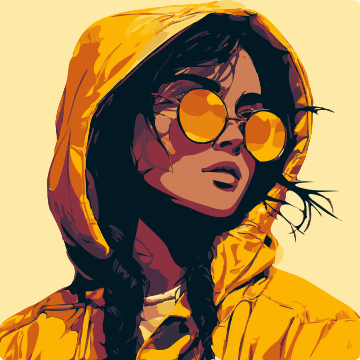
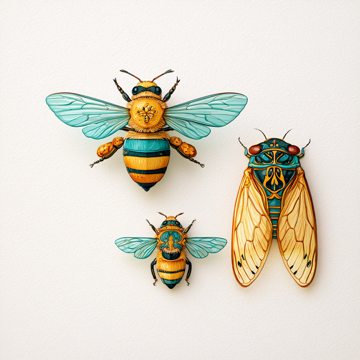
Each pair is the original raster (left) and the actual svgsmith SVG output (right), rendered at the same size.
| Original (PNG) | svgsmith (SVG) | |
|---|---|---|
Mascot · --detail high |
 |
 |
Portrait · --detail high |
 |
 |
Painterly · --detail clean |
 |
 |
Usage
svgsmith convert input.png \
  --mode auto \         # auto | binary | color | pixel
  --quality 0.9 \       # target similarity (0–1), drives the verify loop
  --max-iters 4 \
  --editable \          # editable layered output (default on; --no-editable for raw)
  --out output.svg \
  --report json
Flags
| Flag | Default | Meaning |
|---|---|---|
--mode {auto,binary,color,pixel} |
auto |
auto classifies the image and routes it: binary→Potrace (logos/line art), color→VTracer (illustrations), pixel→VTracer pixel preset. |
--quality FLOAT |
0.9 |
Target fidelity in [0,1] (SSIM vs the original). Drives the verify loop. |
--max-iters INT |
4 |
Max verify/refine iterations before returning the best result so far. |
--editable / --no-editable |
on | Editable grouped/simplified SVG, or the raw traced output. |
--smooth / --no-smooth |
on | Curve-refit color contours into smooth, sparse Béziers (Schneider least-squares). |
--detail {high,normal,clean,poster} |
normal |
Color detail dial. high = maximum detail; clean = edge-preserving cleanup (less noise/grain); poster = bold flat graphic with few colors. |
--solid-background |
off | Isolate the subject and repaint the background as one clean solid color — removes texture/grain/specks while keeping subject detail. |
--background COLOR |
off | Like --solid-background, but repaint the detected background to a specific color (#RRGGBB or named, e.g. white). auto = the detected median. |
--transparent-background |
off | Remove the background instead of repainting it — the edge-connected background is cut, leaving a transparent SVG. The subject is kept even where it shares the background color (color mode). |
--flatten-shading |
off | Smooth continuous-tone art (gradients) is traced faithfully into many flat colour bands by default. Pass this to instead collapse soft/glossy shading into a few clean flat regions (color mode) — a bold flat-graphic look and a smaller file. |
--uniform-outline |
off | Force an even-width outline band (outlined illustrations only; would add a wrong border on line art). |
--out PATH |
<input>.svg |
Output SVG path. |
--report {off,json} |
off |
Print a JSON report to stdout (the only thing on stdout). |
For AI agents — mapping a user's request to flags
svgsmith is meant to be driven by an agent: the user describes what they want in plain
language, and the agent translates that into flags. The flags compose — pick a mode
(or let auto decide), then add refinements for what the user asked for.
| If the user says… | The agent calls svgsmith with… |
|---|---|
| "vectorize / trace this", nothing specific | (defaults) --mode auto |
| "clean logo", "crisp icon", black & white line art | --mode binary --quality 0.95 |
| "pixel art", "sprite" | --mode pixel |
| "keep every detail / texture / shading" | --detail high |
| "make it cleaner / tidier", "less noise" | --detail clean |
| "poster / flat / bold graphic", "minimalist" | --detail poster |
| "put it on a clean / solid background", "just the subject on a flat background" | --solid-background |
"make the background white / <color>", "change / swap the background color" |
--background white |
| "cut it out", "transparent background", "remove the background entirely", "just the subject, no background" | --transparent-background |
| "detailed character on a plain background" | --detail high --solid-background |
| "it looks scratchy / shattered / broken", "glossy or shiny art isn't clean", "flatten the shading" | --flatten-shading |
| "even / consistent outline" (art that already has a dark outline) | --uniform-outline |
| "keep the rough / hand-drawn look", "don't smooth" | --no-smooth |
| "give it back as a PNG", "render / preview it" | svgsmith rasterize out.svg |
Always pass --report json so the agent can read the result (mode used, similarity,
warnings) and decide whether to accept, retry with a different flag, or tell the user
why (e.g. a photo warning). The bundled vectorize skill
encodes this exact mapping and the accept/retry logic.
Rasterize (SVG → PNG)
The inverse command renders an SVG back to a PNG (preview, thumbnail, round-trip):
svgsmith rasterize input.svg --out out.png        # intrinsic (viewBox) size
svgsmith rasterize input.svg --width 512           # fixed width
svgsmith rasterize input.svg --scale 2 --background white
Output
The SVG is responsive and scalable: it carries a viewBox and no fixed pixel
dimensions (style="width:100%;height:100%", preserveAspectRatio="xMidYMid meet"),
so it fits any container or browser window with its aspect ratio preserved — no
overflow or scrollbars.
Exit codes
| Code | Meaning |
|---|---|
0 |
Success — similarity >= --quality. |
2 |
SVG was produced but stayed below the quality target (still written to --out). |
1 |
Hard error (e.g. unreadable input, missing potrace binary). |
JSON report
{
  "output": "output.svg",
  "mode_used": "color",
  "engine": "vtracer",
  "preset": "illustration",
  "iterations": 2,
  "similarity": 0.93,
  "passed_threshold": true,
  "svg": { "paths": 84, "groups": 6, "colors": 12, "bytes": 14820 },
  "warnings": []
}
| Field | Meaning |
|---|---|
mode_used / engine / preset |
What the router actually chose. |
iterations |
How many verify/refine passes ran. |
similarity |
Best SSIM achieved vs the original. |
passed_threshold |
similarity >= --quality. |
svg |
Output stats: path count, <g> groups, distinct colors, byte size. |
warnings |
Human-readable caveats (e.g. photographic gradients that vectorize poorly). |
How the self-verify loop works
svgsmith doesn't trust a single trace. After producing an SVG it:
- re-rasterizes the SVG back to a bitmap (via
cairosvg) at the original resolution, - scores it against the source with SSIM — that score is
similarity, - if it's below
--quality, re-tunes the trace/post-process parameters and retries, up to--max-iters, and - returns the best-scoring result with the score in the report.
That closed loop is what lets an agent run svgsmith unsupervised: it gets a converged
result and a confidence number, not a guess. For an end-to-end agent wrapper, see the
vectorize skill.
License
MIT — see LICENSE.
1 maintainer

Download files
Download the file for your platform. If you're not sure which to choose, learn more about installing packages.
Source Distribution
Built Distribution
Filter files by name, interpreter, ABI, and platform.
If you're not sure about the file name format, learn more about wheel file names.
Copy a direct link to the current filters
File details
Details for the file svgsmith-0.4.1.tar.gz.
File metadata
- Download URL: svgsmith-0.4.1.tar.gz
- Upload date:
- Size: 68.1 kB
- Tags: Source
- Uploaded using Trusted Publishing? No
- Uploaded via: twine/6.2.0 CPython/3.12.13
File hashes
| Algorithm | Hash digest | |
|---|---|---|
| SHA256 |
dcb90e4df2d8a479c26b123e19b44c94cfa6d630ca2af3b9f68e0d97ee52c442
|
|
| MD5 |
ef04a01a5aef174686da5d3c5ab90d65
|
|
| BLAKE2b-256 |
890c62e4af3b17782053d605ec6e2e4bcf07496a66e00c963fce53e786b37237
|
File details
Details for the file svgsmith-0.4.1-py3-none-any.whl.
File metadata
- Download URL: svgsmith-0.4.1-py3-none-any.whl
- Upload date:
- Size: 55.5 kB
- Tags: Python 3
- Uploaded using Trusted Publishing? No
- Uploaded via: twine/6.2.0 CPython/3.12.13
File hashes
| Algorithm | Hash digest | |
|---|---|---|
| SHA256 |
1275399f86e0ff610e7a83f969a27941b3887ed2457877400caf9d935b5316b8
|
|
| MD5 |
354b717d05213adc3f1687a02468bc7b
|
|
| BLAKE2b-256 |
424c10804e64fe27a8cfff3b8a177d17bfad4972892a497af70727ecd82f15cb
|







