
sw2robot






Click an OS badge to grab the latest prebuilt editor from the release page. Cross-platform for edit / build / export; the extract step (driving SolidWorks over COM) is Windows + SolidWorks only.
SolidWorks → robot (URDF) converter. Turn a SolidWorks assembly into a URDF, then clean it up in the browser.
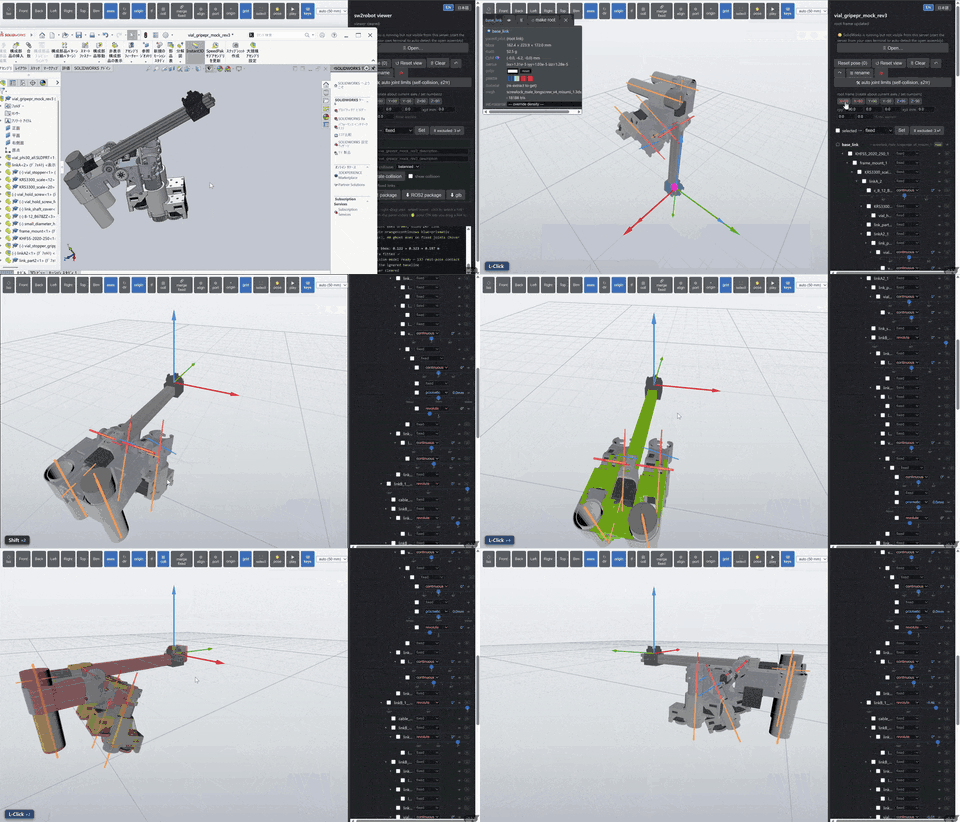
One import package, with two subpackages:
sw2robot.exporter— the exporter.extractopens a throwaway copy of a.sldasmin a hidden SolidWorks instance and pulls the kinematic graph + per-link meshes intograph.json(slow, Windows + SolidWorks only).buildturns thatgraph.jsoninto a URDF (fast, headless, no SolidWorks). The original CAD file is never modified.sw2robot.editor— a single-page browser editor on top of the graph: re-root the tree, change joint types (incl. Shift+drag box-select to bulk-set a range), edit root frames, set materials/densities, see live self-collision as you drag, auto joint limits from a self-collision sweep, and export a ROS / robot-compiler package.
How sw2robot relates to the classic exporter
sw2robot builds on — and is inspired by — the great, long-standing
solidworks_urdf_exporter
SolidWorks add-in. The two tools solve the same first mile differently, and they
compose rather than compete:
- The kinematic tree is inferred, not hand-built. The classic add-in asks you to lay out the link hierarchy and set each joint's origin and axis by hand inside SolidWorks. sw2robot instead reads the assembly's existing mates (constraints) to infer the link tree and joint axes automatically — then lets you correct anything it got wrong in the browser editor, rather than building it from scratch.
- Editing is cross-platform. Only the extract step needs Windows + SolidWorks; edit / build / export run natively on Windows, macOS, and Linux from a single prebuilt binary — no SolidWorks and no Python.
- It also edits URDFs the classic exporter produced. Already exporting with
the classic add-in? Open that
.urdfin sw2robot's editor to re-root the tree, retype joints, add limits/mimic, place end-coord frames, and re-export a ROS package. sw2robot works on any URDF, not only its own output. - An assembly the add-in already configured is read, not re-guessed. The
add-in stores its whole configuration inside the
.SLDASM; sw2robot finds it and uses the authored link tree, names, frames and axes instead of inferring them. Addsw2urdf_config: sw2urdf_compatto the joint config to go further and reproduce the add-in's own export — its authored axis signs and the mass / inertia it computed — so a migrated URDF matches the one you already have.
Which one fits depends on your workflow, not on which is "better":
classic solidworks_urdf_exporter |
sw2robot | |
|---|---|---|
| Extract (assembly → URDF) | Windows + SolidWorks | Windows + SolidWorks |
| Link tree & joint axes | set by hand in SolidWorks | inferred from mates, then edited |
| Edit / build / export | inside SolidWorks (Windows) | Windows / macOS / Linux |
| Edit an existing URDF | — | ✓ (any URDF, not just its own) |
| Install | SolidWorks add-in | single prebuilt binary (no Python) |
Install in one line (no Python, no clone)
A single command downloads the prebuilt editor for your OS, drops it on your
PATH as sw2robot-web, and you're done. No Python, no cloning this repo.
Linux / macOS — with curl:
curl -LsSf https://jsk-ros-pkg.github.io/solidworks_urdf_exporter2/install.sh | sh
…or with wget if you don't have curl:
wget -qO- https://jsk-ros-pkg.github.io/solidworks_urdf_exporter2/install.sh | sh
Windows — in PowerShell:
powershell -ExecutionPolicy ByPass -c "irm https://jsk-ros-pkg.github.io/solidworks_urdf_exporter2/install.ps1 | iex"
Then launch the editor (it opens http://localhost:8090 in your browser —
xdg-open on Linux, the default browser elsewhere):
sw2robot-web
The installer picks the matching sw2robot-web-<os>-<arch> asset from the
latest release,
installs it to ~/.local/bin (Windows: %LOCALAPPDATA%\sw2robot\bin), and adds
that dir to PATH if needed. Knobs:
# pin a version instead of latest
SW2ROBOT_VERSION=v0.3.2 curl -LsSf https://jsk-ros-pkg.github.io/solidworks_urdf_exporter2/install.sh | sh
# or, when piping:  ... | sh -s -- --version v0.3.2 --bin-dir /usr/local/bin

# choose the install dir / don't touch any shell rc
SW2ROBOT_INSTALL_DIR=/usr/local/bin SW2ROBOT_NO_MODIFY_PATH=1 curl -LsSf .../install.sh | sh
Prebuilt binaries currently ship for Linux x64, Linux arm64, macOS (Apple Silicon), and Windows x64. Re-running the installer upgrades in place; the editor can also self-update from its own UI. Prefer to grab the file by hand, or need a different OS/arch? The per-OS steps below still apply.
Opening a .urdf with sw2robot
The installer also registers a .urdf file association, so you can hand a URDF
straight to the editor the same way on Linux and macOS:
xdg-open robot.urdf      # Linux
open robot.urdf          # macOS
Either launches the editor with that URDF loaded (URDF-input mode). A .urdf
also gets an Open With → sw2robot entry in the file manager / Finder, and
sw2robot shows up in your application menu. Pass SW2ROBOT_NO_DESKTOP=1 to the
installer (or --no-desktop) to skip this. Linux needs xdg-utils installed
for the association; without it the binary still installs and the step is
skipped with a note.
Quick start — download the Windows .exe (no Python)
If you just want to convert a SolidWorks assembly, you don't need to install Python or clone this repo. Grab the prebuilt editor and run it:
- Download. Go to the
latest release
and download
sw2robot-web-windows-x64-v<version>.exe(under Assets). It's a single self-contained file — nothing to install. - Run it. Double-click the
.exe. A console window opens, a local server starts, and your default browser opens the editor athttp://localhost:8090automatically.- Windows SmartScreen may warn that the publisher is unknown (the binary is unsigned). Click More info → Run anyway.
- To pick a different port or skip auto-opening the browser, run it from a
terminal:
sw2robot-web-windows-x64-v<version>.exe --port 9000 --no-browser.
- Extract a robot. Open your
.sldasmassembly with the in-app file picker — the 🗄 file browser (lists SolidWorks' recent files for one-click access) or 📋 paste a full path. SolidWorks needs the real on-disk path to resolve referenced parts, which a browser never exposes for a drag-and-dropped file, so the editor opens by path rather than by drop. The app drives a hidden SolidWorks instance to pull the kinematic graph + meshes. Your original CAD file is never modified. Extracted packages are written to%TEMP%\sw2robot\output.- The extract step needs SolidWorks installed on the same machine — the app talks to it over COM; it does not embed SolidWorks.
- No SolidWorks? You can still open and edit an already-extracted package, and the build / export steps work without it.
- Clean it up. In the editor: re-root the tree, set joint types (Shift+drag to bulk-set a range), edit the root frame, set materials and densities, watch live self-collision as you drag joints, and run the auto joint-limit sweep.
- Export. Export a ROS / robot-compiler package (URDF + meshes + configs) from the editor, ready to drop into your workspace.
Closing the console window stops the server and tears down the SolidWorks instance it spawned.
Quick start — macOS / Linux (no SolidWorks)
SolidWorks does not run on macOS / Linux, so the extract step (assembly →
graph) is Windows-only. Everything else — open & edit an already-extracted
package, open & edit any URDF, build, and export — runs natively on macOS
and Linux.
Option A — download the prebuilt editor (no Python). Grab the asset for your OS from the latest release (under Assets):
macOS (Apple Silicon) — sw2robot-web-macos-arm64-v<version>.zip. Unzip it
to get sw2robot-web.app; double-click to launch (it opens the editor in your
browser at http://localhost:8090).
# Gatekeeper blocks unsigned apps on first launch — clear the quarantine once,
# then double-click, or run it from a terminal to see the server log / URL:
xattr -dr com.apple.quarantine sw2robot-web.app
./sw2robot-web.app/Contents/MacOS/sw2robot-web
Linux (x64) — sw2robot-web-linux-x64-v<version> (a single binary):
chmod +x sw2robot-web-linux-x64-v<version>          # mark it executable once
./sw2robot-web-linux-x64-v<version>                 # opens http://localhost:8090
The binary is frozen against GLIBC 2.35, so it runs on Ubuntu 22.04 or newer
(22.04, 24.04, …). On older distros you may hit a GLIBC_2.xx not found error
at launch — in that case run from source (Option B below) instead.
Option B — run from source (see Install from source below):
pip install -e ".[ui]"
# edit an already-extracted package, or open any URDF directly:
python -m sw2robot.editor.webserver path/to/robot.urdf
The editor opens in URDF-input mode when you point it at a .urdf file: re-root,
retype joints, set mimic/limits/materials, add end-coord ports, and re-export a
ROS package — then closing the tab leaves your original .urdf untouched.
Editor — features & keyboard shortcuts
Everything below edits the package server-side and rebuilds the URDF in place (~0.5 s), so the viewer always shows the real exported result.
Kinematics
- Make root — pick any link and make it the base; the tree is re-rooted and every edge between the old and new root is flipped automatically.
- Joint types — toggle a joint fixed ↔ movable, or Shift+drag a box over the tree to bulk-set a whole range at once.
- Flip axis — reverse a joint's positive direction in one keystroke.
- Mimic — link follower joints to a master so they move together; set a
multiplier and offset per follower (URDF
<mimic>). Move the master and the followers track it live. - Delete subtree — drop a link and everything below it.
- Actuator & physics — per movable joint, set
<limit>effort/velocity and the optional URDF<dynamics>(damping/friction),<safety_controller>(soft limits, k_position, k_velocity) and<calibration>(rising/falling). Blank fields stay unset. Persisted injoints.yaml, so they survive a re-extract (or hand-edit the same keys under each joint injoints.yaml).
Coordinate frames
- Root frame — rotate the root about its current axes or type exact numbers;
or click a face to align the root to it (origin = face center). Written as
root_rpy/root_xyzinjoints.yaml. - ⊕ Port (end-coords) — click a face to drop a named, coordinate-only link
there with +Z = the face normal, then nudge it with the gizmo
(
gmove /rrotate) and Place. Handy for end-effector, sensor, or mount frames. Click a magenta marker to remove one. Stored underports:injoints.yaml. - Export shape + weight? — the checkbox on each link row in the joint tree.
Uncheck it for a CAD-only part (a
dummy_axisdrawn just to carry a joint axis): the link and its joint stay in the tree, but the URDF gets a bare frame — no<visual>, no<collision>, no<inertial>. Stored asframe_only:injoints.yaml. (Different from mass-only, which keeps the weight and only works on a fixed child.) - CAD coordinate systems — every named SolidWorks coordinate system (in the
assembly, a sub-assembly, or inside a part file) becomes one of these
coordinate-only links automatically, on the part it was drawn in — or, for a
frame drawn in the top-level assembly, on the component its origin was picked
from. Turn it off or pick a subset with
coordinate_system_links: off | all | [<name>, ...]injoints.yaml; the default skips frames an embedded SW2URDF config already uses as link origins.
Authoring aids — live self-collision highlight as you drag a joint, an
auto joint-limit sweep, per-link materials/densities, a tf view (frame
triads + parent links), and a sizeable ground grid.
Navigation — left-drag orbits, right-drag pans, the wheel dollies right into
the assembly so you can inspect internal parts. Double-click a link to make
it the orbit centre (then orbit and zoom around that part); press v to
recentre the orbit on it, or c for a full view reset.
Keyboard shortcuts (with a link selected or hovered):
| Key | Action |
|---|---|
t |
toggle joint fixed ↔ movable |
f |
flip the joint axis / direction |
m |
start mimic linking (then click followers · Enter/m apply · Esc cancel) |
r / R |
make root at this link |
Del / Backspace |
delete the link + its subtree |
0 / Home |
reset pose (all joints to 0) |
c |
reset the view (pose, iso camera, orbit back on the model) |
v |
recentre the orbit on the focused link (or model), keeping your angle/zoom |
Esc |
clear selection / cancel the current mode |
click · dbl-click · Shift+drag |
select · focus (orbit around it + jump to its tree row) · box-select a range |
| mouse | left-drag orbit · right-drag pan · wheel zoom (dollies right inside the model) |
In a port/end-coords placement session the gizmo owns the keys: g move,
r rotate, Esc cancel.
Install from source (developers)
Prefer this if you want to hack on sw2robot or run it on a non-Windows machine (view / edit / build / export work anywhere; only extract needs Windows + SolidWorks).
pip install -e .            # core: extract / build / web editor (view+edit)
pip install -e ".[ui]"      # + live collision highlight, auto joint-limits
[ui] adds python-fcl (collision queries); scikit-robot (FK, primitive
fitting) is a core dependency. The editor's view / edit / extract / build work
without [ui]; collision and auto-limits just report "not available" until it
is installed.
Use
Extract a .sldasm -> URDF (Windows, with SolidWorks installed):
python -m sw2robot.exporter.export path/to/assembly.sldasm -o output
Or a single .sldprt -> URDF. Point the exact same command (or the editor's
🗄 file browser / 📋 path bar) at a lone part instead of an assembly:
python -m sw2robot.exporter.export path/to/part.sldprt -o output
A single part has no mates to infer a kinematic tree from, so this yields a trivial 1-link, 0-joint URDF — one rigid body with the part's mesh and its SolidWorks-native mass / centre-of-mass / inertia tensor (exact CAD geometry
- material, not a mesh estimate). Handy for a static prop, an environment object, or a single end-effector/sensor body you want in a simulator with an accurate inertial. It will not turn a multibody part into a jointed robot — that needs an assembly with mates.
Open the browser editor on an already-extracted package (no SolidWorks needed — a sample is included):
python -m sw2robot.editor.webserver examples/fingertip
# then open http://localhost:8090
From the editor you can also extract a fresh package: open a .sldasm with the
in-app file picker (🗄 file browser of SolidWorks' recent files, or 📋 paste a
full path) and it drives SolidWorks for you. It opens by real on-disk path —
not by browser drag-and-drop, which never exposes the path SolidWorks needs to
resolve referenced parts.
Headless build / edit / export (no GUI):
python -m sw2robot.editor # see the CLI
Fast re-extract while debugging. Keep the assembly open in SolidWorks, then:
# reuse the running SolidWorks (skips the multi-minute reopen)
python -m sw2robot.exporter.extract path/to/assembly.sldasm --attach

# refresh ONLY coordinate systems / reference axes in graph.json (seconds)
python -m sw2robot.exporter.extract output/<robot> --refresh frames --attach
Layout
sw2robot/                one import package (pip install sw2robot)
  exporter/              SolidWorks -> graph.json -> URDF
  editor/                the browser editor (server + single-page web/index.html)
    _vendor/rc_config/   vendored ROS/MoveIt/Gazebo config generators
examples/fingertip/      a small pre-extracted package to try the editor offline
tests/                   pytest (sw2robot.exporter classification) + tests/e2e (puppeteer UI suite)
Tests
PYTHONPATH= pytest                       # sw2robot.exporter unit tests
cd tests/e2e && npm i && node run.mjs    # UI suite (needs a running sw2robot-web + Chrome)
Some pytest fixtures expect a cached output/<pkg>/graph.json; those skip when
absent.
Contributing
Please read CONTRIBUTING.md before opening an issue or pull request. In short: discuss first via an issue, keep PRs small and focused, attach a demo video for UI changes, and disclose any AI usage.
License
Apache License 2.0 © 2026 Iori Yanokura
1 maintainer

Download files
Download the file for your platform. If you're not sure which to choose, learn more about installing packages.
Source Distribution
Built Distribution
Filter files by name, interpreter, ABI, and platform.
If you're not sure about the file name format, learn more about wheel file names.
Copy a direct link to the current filters
File details
Details for the file sw2robot-0.4.1.tar.gz.
File metadata
- Download URL: sw2robot-0.4.1.tar.gz
- Upload date:
- Size: 888.4 kB
- Tags: Source
- Uploaded using Trusted Publishing? Yes
- Uploaded via:
twine/7.0.0 CPython/3.13.14
File hashes
| Algorithm | Hash digest | |
|---|---|---|
| SHA256 |
2b7fa0fadba3aa47a921596102389e45320761893b4a4a3a5bff5d01dd5d7681
|
|
| MD5 |
88f9020692843abdb61d0ffd4f664c91
|
|
| BLAKE2b-256 |
8965d967c33a5d360f4cb64e0f93fb60f12152cec1e09824e20ac7a9aba43df6
|
Provenance
The following attestation bundles were made for sw2robot-0.4.1.tar.gz:
Publisher:
release.yml on jsk-ros-pkg/solidworks_urdf_exporter2
-
Statement:
-
Statement type:
https://in-toto.io/Statement/v1 -
Predicate type:
https://docs.pypi.org/attestations/publish/v1 -
Subject name:
sw2robot-0.4.1.tar.gz -
Subject digest:
2b7fa0fadba3aa47a921596102389e45320761893b4a4a3a5bff5d01dd5d7681 - Sigstore transparency entry: 2596674583
- Sigstore integration time:
-
Permalink:
jsk-ros-pkg/solidworks_urdf_exporter2@1fa1e4b9d91b34019446b04b531cda3f04aa9982 -
Branch / Tag:
refs/tags/v0.4.1 - Owner: https://github.com/jsk-ros-pkg
-
Access:
public
-
Token Issuer:
https://token.actions.githubusercontent.com -
Runner Environment:
github-hosted -
Publication workflow:
release.yml@1fa1e4b9d91b34019446b04b531cda3f04aa9982 -
Trigger Event:
push
-
Statement type:
File details
Details for the file sw2robot-0.4.1-py3-none-any.whl.
File metadata
- Download URL: sw2robot-0.4.1-py3-none-any.whl
- Upload date:
- Size: 503.1 kB
- Tags: Python 3
- Uploaded using Trusted Publishing? Yes
- Uploaded via:
twine/7.0.0 CPython/3.13.14
File hashes
| Algorithm | Hash digest | |
|---|---|---|
| SHA256 |
e2e4b42582ad708db41e3a2454ab6e40367734949541454b758dd4eb23d69f96
|
|
| MD5 |
0b00761d7de448cc0d90830123bff5a1
|
|
| BLAKE2b-256 |
fd60e10a9759f30902004fad389d9b7c35bb0139aae1e002c955dd22eeddd76f
|
Provenance
The following attestation bundles were made for sw2robot-0.4.1-py3-none-any.whl:
Publisher:
release.yml on jsk-ros-pkg/solidworks_urdf_exporter2
-
Statement:
-
Statement type:
https://in-toto.io/Statement/v1 -
Predicate type:
https://docs.pypi.org/attestations/publish/v1 -
Subject name:
sw2robot-0.4.1-py3-none-any.whl -
Subject digest:
e2e4b42582ad708db41e3a2454ab6e40367734949541454b758dd4eb23d69f96 - Sigstore transparency entry: 2596674651
- Sigstore integration time:
-
Permalink:
jsk-ros-pkg/solidworks_urdf_exporter2@1fa1e4b9d91b34019446b04b531cda3f04aa9982 -
Branch / Tag:
refs/tags/v0.4.1 - Owner: https://github.com/jsk-ros-pkg
-
Access:
public
-
Token Issuer:
https://token.actions.githubusercontent.com -
Runner Environment:
github-hosted -
Publication workflow:
release.yml@1fa1e4b9d91b34019446b04b531cda3f04aa9982 -
Trigger Event:
push
-
Statement type:







