


swagger-coverage-py
This project is the adapter that allows using swagger-coverage tool in Python projects (PyTest+Requests).
Original description summary:
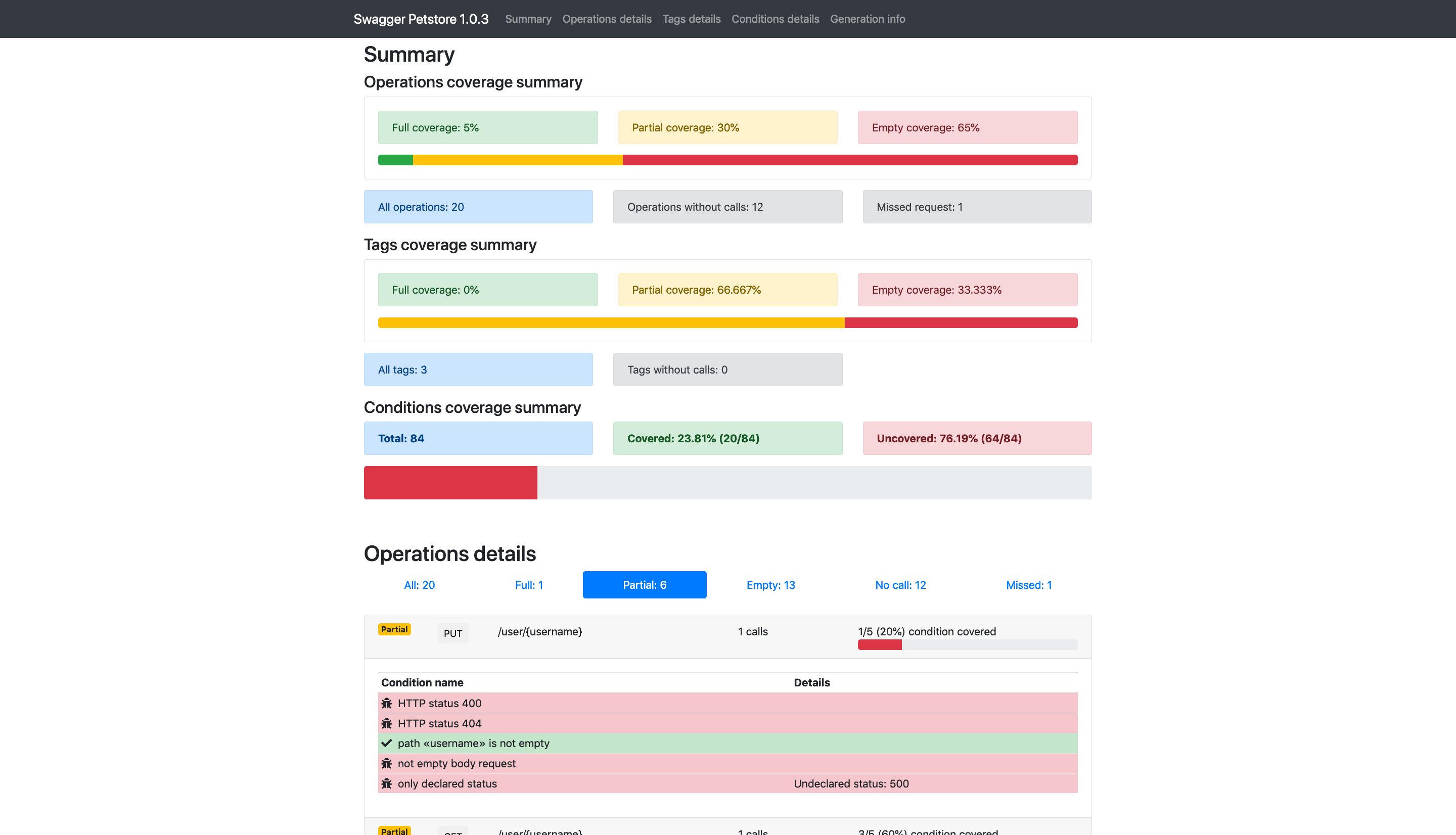
Swagger-coverage gives a full picture about coverage of API tests (regression) based on OAS 2 (Swagger). By saying coverage we mean not a broad theme functionality, but presence (or absence) of calls defined by API methods, parameters, return codes or other conditions which corresponds specification of API.
Some more info about the project you can also
find HERE
How to use:
All required steps are listed below. Additionally, you can find a working example here: allure-results-sample.
0. Resolve dependencies:
- python 3.6+
- java JDK 11+ (with JAVA_HOME environment variable set)
- Enable Long Paths (Windows only). Check the guide HERE
1. Install swagger-coverage-py as a project requirement.
pip install swagger-coverage
2. Add environment variables (Optionally):
API_DOCS_TYPE="swagger"  # Note: "openapi" is default type of API docs
API_DOCS_VERSION="2.0"  # Note: "3.0.0" is default version of API docs
API_DOCS_FORMAT="yaml"  # Note: "json" is default format of API docs and output files
API_COVERAGE_REPORTS_DISABLED=True  # Skip requests recording. No files will be saved to 'swagger-coverage-output' dir
DEBUG_MODE=True  # Enable debug mode. All commandline logs will be printed to console (False by default)
3. Add the session-scoped fixture
import pytest
from swagger_coverage_py.reporter import CoverageReporter
from requests.auth import HTTPBasicAuth


@pytest.fixture(scope="session", autouse=True)
def setup_swagger_coverage():
    reporter = CoverageReporter(api_name="my-project", host="http://my-project.com")
    reporter.cleanup_input_files()
    reporter.setup("/api/v1/resources/my_project/doc/swagger.json", auth=HTTPBasicAuth("username", "password"))

    yield
    reporter.generate_report()
If you have 2 and more projects, then just add more reporters:
import pytest
from swagger_coverage_py.reporter import CoverageReporter
from requests.auth import HTTPBasicAuth


@pytest.fixture(scope="session", autouse=True)
def setup_swagger_coverage():
    reporter = CoverageReporter(api_name="petstore", host="https://petstore.swagger.io")
    reporter.cleanup_input_files()
    reporter.setup(path_to_swagger_json="/v2/swagger.json")

    reporter2 = CoverageReporter(api_name="my-project", host="http://my-project.com")
    reporter2.cleanup_input_files()
    reporter2.setup(path_to_swagger_json="/api/v1/swagger.json", auth=HTTPBasicAuth("username", "password"))

    yield
    reporter.generate_report()
    reporter2.generate_report()
YAML format is also supported:
import pytest
from swagger_coverage_py.reporter import CoverageReporter


@pytest.fixture(scope="session", autouse=True)
def setup_swagger_coverage():
    reporter = CoverageReporter(api_name="petstore", host="https://petstore.swagger.io")
    reporter.cleanup_input_files()
    reporter.setup("/v2/swagger.yaml")

    yield
    reporter.generate_report()
Steps and Parameters:
api_name- Define the name of the API. This name will be used to find a configuration file.
For APIs in this example the files must have namesswagger-coverage-config-petstore.jsonandswagger-coverage-config-my-project.json.
host- The host of the API. It will be used to download a swagger.json file and to identify the CoverageListener output directory for each API.
cleanup_input_files()- THis step deletes all files in the CoverageListener output directory (according to the target host)
path_to_swagger_json- A second part of the HTTP link to your OpenApi/Swagger documentation in JSON format
Adaptedswagger-<api_name>.jsonfile will be created in your project root.
The "Swagger 2.0" format is completely compatible with this tool.
The "OpenAPI 3.0.2" format is partly compatible. "Tags coverage summary" calculation is not supported.
auth- An authentication parameter for "requests" lib. Skip it if your API doesn't require authentication.
4. Create and place swagger-coverage-config-<api_name>.json file(s) to your project:
{
    "rules": {
        "status": {
            "enable": true,
            "ignore": [
                "500"
            ],
            "filter": []
        },
        "paths": {
            "enable": true,
            "ignore": [
                "/user/{username}"
            ]
        },
        "only-declared-status": {
            "enable": false
        },
        "exclude-deprecated": {
            "enable": true
        }
    },
    "writers": {
        "html": {
            "locale": "en",
            "filename": "swagger-coverage-report-petstore.html"
        }
    }
}
The path section is designed to exclude specific endpoints (all methods) from the final HTML report.
To do this, you need to set enable parameter to true and specify a list of endpoints (as you see them in the swagger doc) in the ignore section.
Then these endpoints will be removed from the API doc before it is saved locally.
Note: Remove already downloaded API docs before running a new version of this lib.
If you have more than 1 API then this config MUST:
1. Be created for each microservice which you track using
CoverageListener.Otherwise, the default behavior will be applied, and your report will be saved as
swagger-coverage-report.htmlwhich may cause override in case you have multiple APIs2. Contain
writerssection with filename in the format:swagger-coverage-report-<api_name>.html3. Be placed in the root of your project
More examples of configuration options you can find in the Configuration options section of the documentation.
5. Trace all your API calls with CoverageListener:
from requests import Response
from requests.auth import HTTPBasicAuth
from swagger_coverage_py.listener import CoverageListener

response: Response = CoverageListener(
    method="get",
    base_url="https://petstore.swagger.io",
    raw_path="/v2/store/order/{orderId}",
    uri_params={"orderId": 1},
    auth=HTTPBasicAuth("username", "password"),
    params={"type": "active"},
).response
Note: "auth" and "params" arguments are default for "requests" lib and are not required.
You can use any other **kwargs that are applicable for Requests library.
6. Run your tests and open created swagger-coverage-report-<api_name>.html report(s) in your browser.
Important remarks:
- Virtual environments are supported. Make sure your virtual environment directory has name
venv. - To create report you have to run your test from the project root. Check that workind directory of your runner is
not
"<root>/test"
How it works:
- The fixture
setup_swagger_coveragesetups required artifacts - During test execution the CoverageListener saves all requests as JSON files in swagger format to a subdirectory named
as a called host. (e.g.
swagger-coverage-output/petstore.swagger.io/). - After all tests execution a
CoverageReporter().generate_report()creates and saves new report(s) into your project root.
Created & Maintained By
License
Swagger coverage is released under version 2.0 of the Apache License
1 maintainer

Metadata
1 maintainer
Release files for swagger-coverage 3.5.2
For a detailed explanation of source distributions (sdists) and built distributions (wheels), please see the package formats documentation.
Source distribution (sdist)
| File | Size | Uploaded | |
|---|---|---|---|
| swagger_coverage-3.5.2.tar.gz | 22.0 MB | Details |
Built distribution (wheel)
| File | Interpreter | ABI | Platform | Reset |
|---|---|---|---|---|
| swagger_coverage-3.5.2-py3-none-any.whl | Python 3 | none | any | Details |
Total release size: 44.1 MB
Release files / swagger_coverage-3.5.2.tar.gz
| Download URL | swagger_coverage-3.5.2.tar.gz |
|---|---|
| Size | 22.0 MB |
| Tags | Source |
|
SHA-256 checksum How to use checksums |
e9d7b1de822939c52c9aaeb76200a1560646893c357f3fdc89b94800b5c1fb23
|
|
BLAKE2b-256 checksum How to use checksums |
df0f1f3b2db3a96d64896429053ab9f3a84deca2f5c85ce21c9cf73c4f59beb2
|
| Upload date | |
|
Uploaded using Trusted Publishing? What is trusted publishing? |
No |
| Uploaded via |
twine/6.2.0 CPython/3.9.25
|
Release files / swagger_coverage-3.5.2-py3-none-any.whl
| Download URL | swagger_coverage-3.5.2-py3-none-any.whl |
|---|---|
| Size | 22.1 MB |
| Tags | Python 3 |
|
SHA-256 checksum How to use checksums |
b4ad2bc0dbd42fbf27d38f9f0b68fb146bf3ecf0633504ce6653c0474cf90b55
|
|
BLAKE2b-256 checksum How to use checksums |
5e408b678707e7c481d1be95be8514f18b060465b9097a52d9473c3db46b8985
|
| Upload date | |
|
Uploaded using Trusted Publishing? What is trusted publishing? |
No |
| Uploaded via |
twine/6.2.0 CPython/3.9.25
|














