
Fetch the currently playing song from Spotify and display lyrics on cmd or in a browser tab.

Project description
 SwagLyrics-For-Spotify






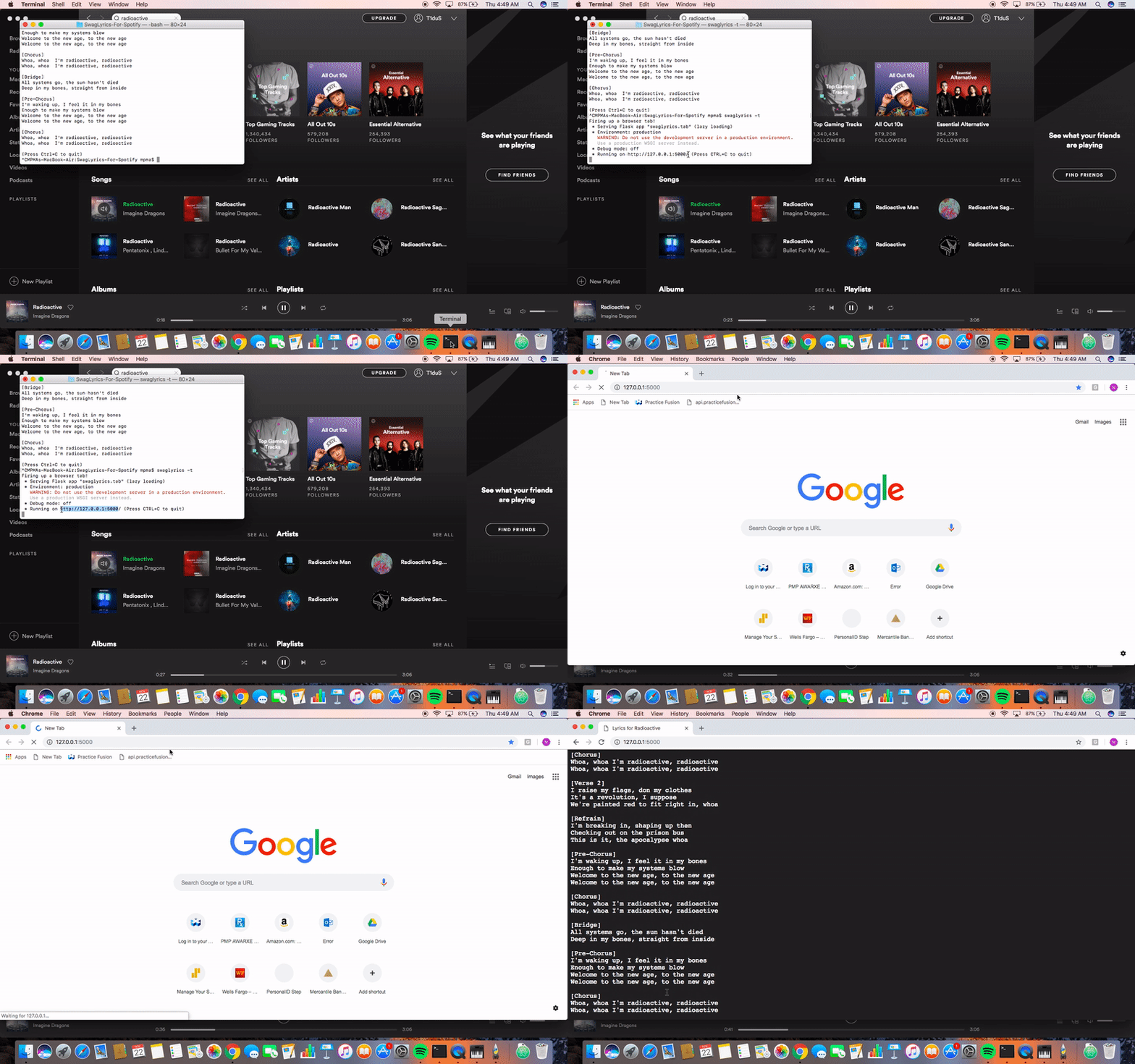
Fetches the currently playing song from Spotify on Windows, Linux and macOS and displays the lyrics in the command-line or in a browser tab.
Refreshes automatically when song changes. The lyrics are fetched from Genius.
Turns out Deezer already has this feature in-built but with swaglyrics, you can have it in Spotify as well.
I'm mainly trying to build this project as far as I can, for practice and to learn and work with more technologies and platforms.
Initially developed this for personal use. Pretty much functionality oriented -- I usually develop something that I can see helping me and other users in the same situation. Packaged so I can first hand handle production-ready code to an extent and to make distribution and usage easier.
Installation
Requires Python3. Use pip or pip3 depending on your installation. You might want to use the --user flag on Linux to
avoid using pip as root.
pip install swaglyrics
Make sure to use a version >= 0.1.6 since the previous ones don't have the tab option supported.
Usage
usage: swaglyrics [-h] [-t] [-c] [-n]
Either the tab or cli argument is required to output lyrics.
Arguments:
  -h, --help      show this help message and exit
  -t, --tab       Display lyrics in a browser tab.
  -c, --cli       Display lyrics in the command-line.
  -n, --no-issue  Disable issue-making on cli.
You can quit by pressing Ctrl+C
Community
- SwagLyrics participated in Google Code-in 2018 with CCExtractor Development.
- SwagLyrics is participating in Google Summer of Code 2019 with CCExtractor Development. The selected project can be found here.
Changelog
-
v0.2.8
- Fixed creation of multiple unsupported.txt
- Improved stripper + genius_stripper on backend as fallback
- Full test coverage for cli.py
- Add support for local music too
- Add coloring
- Remove extra dependency
-
v0.2.6
- Added favicon
- Removed extra dependency
-
v0.2.5
- Refactored stripper to support more songs straightaway
- Fixed bugs
- Added -n argument (helps while testing)
- Added more test cases
-
v0.2.4
- Added server-side database
- All songs with lyrics on Genius supported now!
- Global sync of unsupported songs
- Added more tests (85% coverage)
- Improved issue-making using Spotify API
-
v0.2.3
- Added macOS support
- Added more tests
- Added unidecode to support songs with diacritics
- Fixed commandline not clearing b/w songs on Linux
- Improved issue-making
-
v0.2.1
- Added Linux support
- Added more tests
- Set up code coverage and continuous integration
-
v0.1.9
- A GitHub issue is created automatically on the repo when an unsupported song is encountered (implemented server-side using pythonanywhere).
Compiling SwagLyrics for Development
- Clone the repo by
git clone https://github.com/SwagLyrics/SwagLyrics-For-Spotify.gitor use ssh. cdinto the cloned repo.pip install -e .the -e flag installs it locally in editable mode.
Improvements Planned
Linux and macOS support doneBetter logging of unsupported songs, the isolated unsupported.txt is sub-optimal for multiple users since the file will only update locally with songs which worked fine when it was just me but since I hope others use it too, I'll try to add a better method with server support.- Better tests to test all of the functionality. (cli.py fully tested!)
- Perhaps a tiny app using Electron that could fit in your tray to be opened whenever you want lyrics for a song.
Supporting more songs, currently the program sometimes fails at remixes since while the lyrics are same as original, the artist is the remixer. done- Documenting all the files.
SwagLyrics on Windows with Terminal
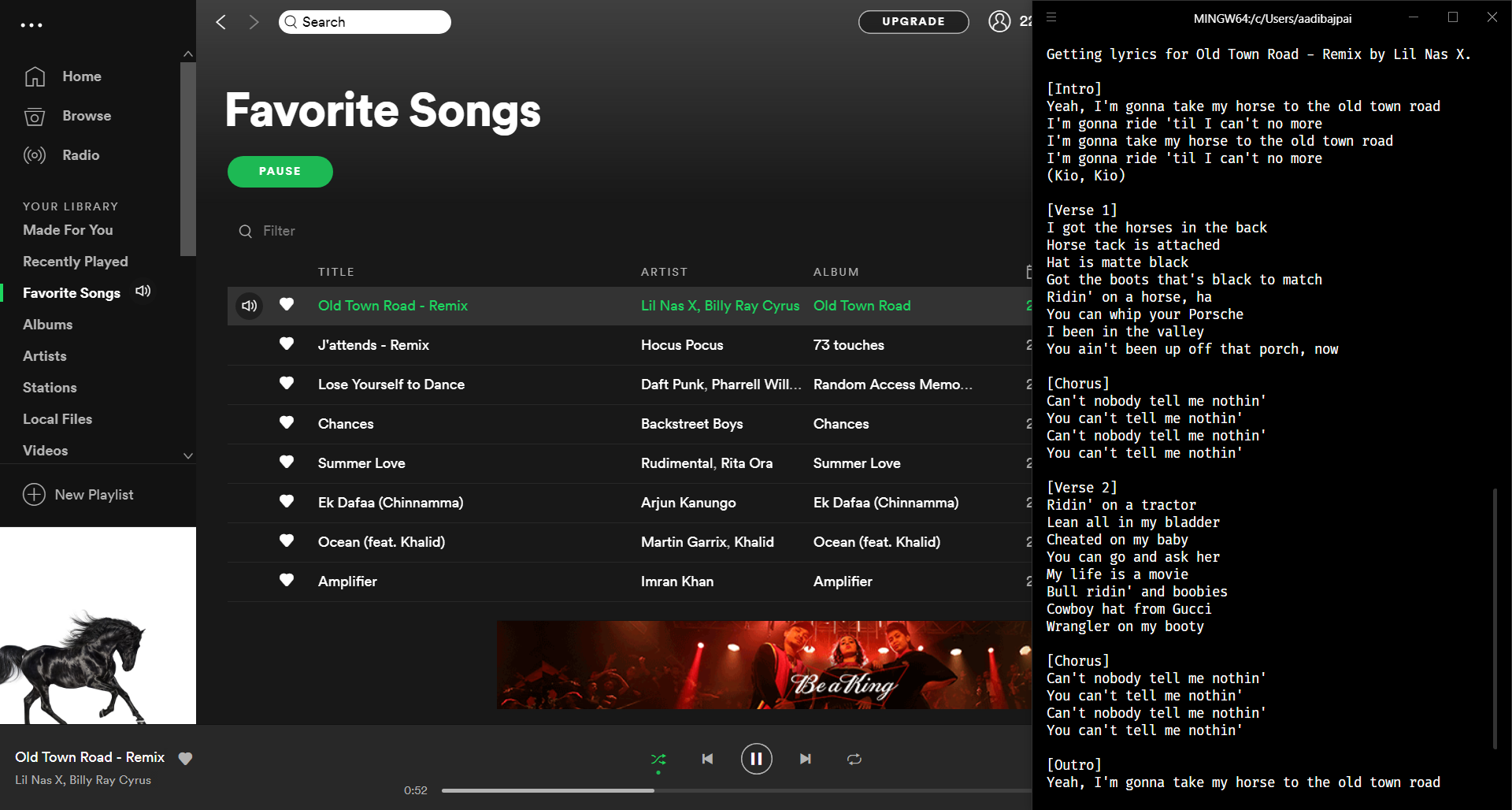
SwagLyrics on Windows with Firefox Side-View

Screencast - SwagLyrics on Linux

Screencast - SwagLyrics on macOS
Release history Release notifications | RSS feed


Download files
Download the file for your platform. If you're not sure which to choose, learn more about installing packages.
Source Distribution
Built Distribution
Filter files by name, interpreter, ABI, and platform.
If you're not sure about the file name format, learn more about wheel file names.
Copy a direct link to the current filters
File details
Details for the file swaglyrics-0.2.8.tar.gz.
File metadata
- Download URL: swaglyrics-0.2.8.tar.gz
- Upload date:
- Size: 14.4 kB
- Tags: Source
- Uploaded using Trusted Publishing? No
- Uploaded via: twine/1.13.0 pkginfo/1.4.2 requests/2.19.1 setuptools/41.0.1 requests-toolbelt/0.8.0 tqdm/4.27.0 CPython/3.7.3
File hashes
| Algorithm | Hash digest | |
|---|---|---|
| SHA256 |
e10ddc16203b6760a30b99a1835ec2d0a8bb3f36d230e27255ba043a99c5cf34
|
|
| MD5 |
6ff32d068b80bf73c6cf3a893fbb166c
|
|
| BLAKE2b-256 |
3074de9a5e7ec2230159fcefc11079497dce29a6da414b73e1b82a331eefc55a
|
File details
Details for the file swaglyrics-0.2.8-py3-none-any.whl.
File metadata
- Download URL: swaglyrics-0.2.8-py3-none-any.whl
- Upload date:
- Size: 17.4 kB
- Tags: Python 3
- Uploaded using Trusted Publishing? No
- Uploaded via: twine/1.13.0 pkginfo/1.4.2 requests/2.19.1 setuptools/41.0.1 requests-toolbelt/0.8.0 tqdm/4.27.0 CPython/3.7.3
File hashes
| Algorithm | Hash digest | |
|---|---|---|
| SHA256 |
5b316127fc1a304ee71c6b77928207b4bbfb4dcebeb1aebd937c4906a9dda75d
|
|
| MD5 |
7b8b03f82200e9767f5ce0156dbe2b97
|
|
| BLAKE2b-256 |
785a6c6cb7d140b0bf79daf91f1f1140eb57b06748b0d1b5eeadb3b8100549c6
|






