
🐝 Swarm Agent Kit
A minimalist, state-aware multi-agent orchestration framework for Python.




Swarm Kit sits between simple chat scripts and heavyweight agent frameworks. It provides shared state, tool execution, async support, database persistence hooks and a live dashboard. The core engine is short enough to read in one sitting.
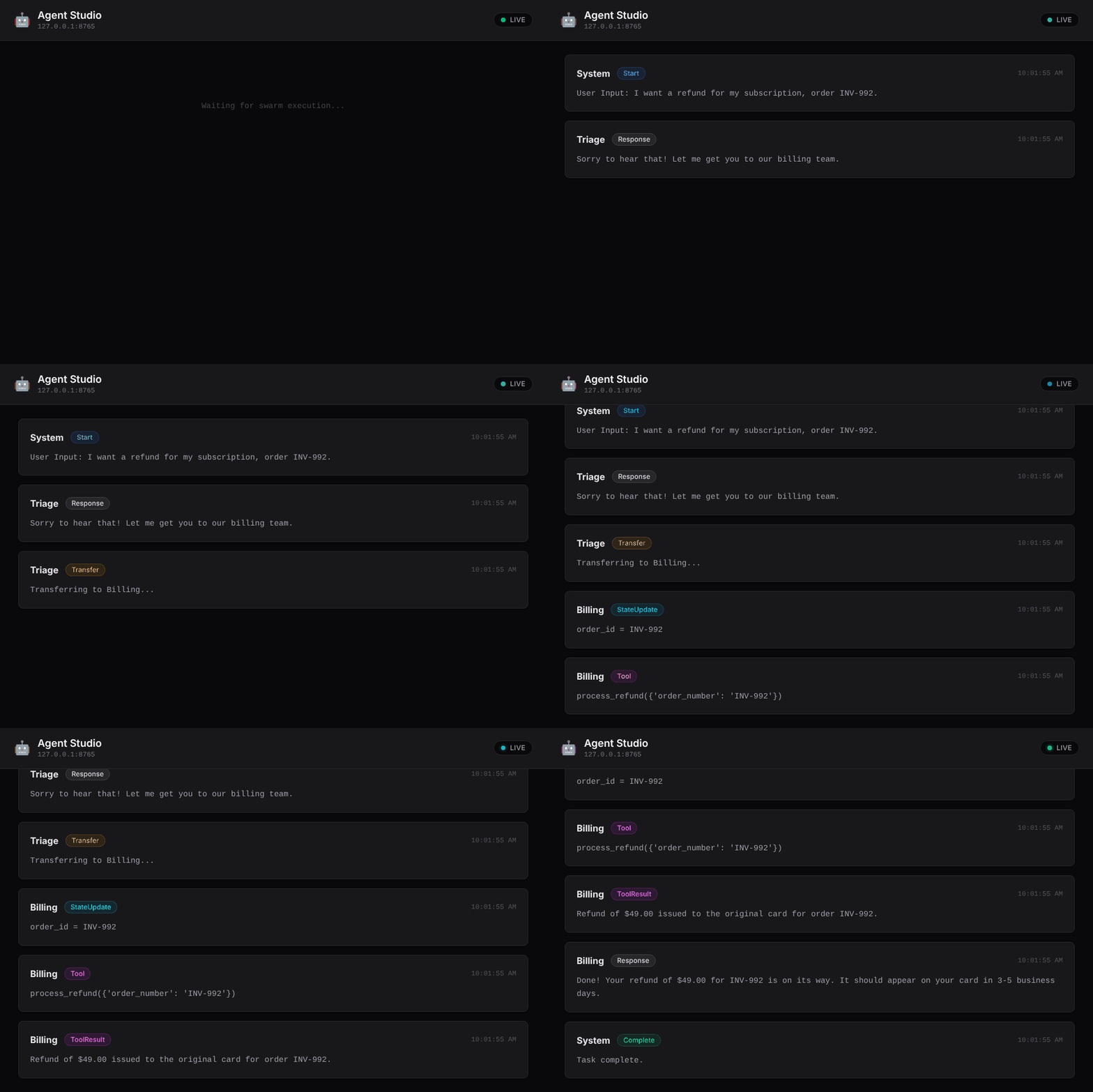
The Agent Studio dashboard following a run: handoff → state update → tool call → reply.
from swarm_kit import Agent, Swarm

def lookup_order(order_id: str) -> str:
    """Look up the status of a customer's order."""
    return {"ORD-123": "Shipped"}.get(order_id, "Order not found")

support = Agent(name="Support", instructions="Help customers with their orders.", tools=[lookup_order])

result = Swarm(agents=[support]).execute("Support", "Where is ORD-123?")
print(result.final_output)  # e.g. "Your order ORD-123 has shipped."
Features
- Two orchestration modes. In unsupervised mode, agents hand off to each other on their own. In supervised mode, a planner LLM runs agents through a fixed sequence.
- Any model. Built on LiteLLM, so OpenAI, Anthropic, Gemini, Ollama, Azure, Bedrock and 100+ other providers work, and each agent can use a different one.
- Plain-function tools. Pass a typed Python function and the JSON schema is generated
from its signature and docstring. Sync and
asyncfunctions both work. - Global state. Agents read and update a shared dictionary, which keeps prompts short.
- Bring your own database. Save/load hooks work with Redis, Postgres, SQLite and others. Concurrent sessions stay isolated.
- Async support.
execute_async()is safe to call from FastAPI and otherasyncioservers. - Observability. You get a live terminal transcript, a structured
event_handlercallback, a JSONL event log, and the Agent Studio dashboard.
Installation
pip install swarm-agent-kit
Put your API key in a .env file. It is loaded automatically:
OPENAI_API_KEY="sk-..."
Or run swarm-kit init my-project to generate a starter project.
Unsupervised mode: agents hand off to each other
from swarm_kit import Agent, Swarm

def process_refund(order_number: str) -> str:
    """Process a refund. Call this only once you have the order number."""
    return f"Refund issued for {order_number}."

triage = Agent(
    name="Triage",
    description="Front desk that routes customers.",
    instructions="Find out what the user needs. Refunds go to 'Billing'.",
)
billing = Agent(
    name="Billing",
    description="Handles refunds.",
    instructions="Issue refunds with process_refund, then confirm to the user.",
    tools=[process_refund],
    model="gpt-4o-mini",
)

swarm = Swarm(agents=[triage, billing])
result = swarm.execute("Triage", "I want a refund for INV-992")

print(result.last_agent, result.final_output, result.state)
Supervised mode: a planner runs the agents in order
swarm = Swarm(agents=[researcher, copywriter, editor])
result = swarm.execute_plan("Write a tweet about the Apollo 11 landing")

print(result.plan)          # [{'agent_name': 'Researcher', 'task': ...}, ...]
print(result.final_output)
Async and database persistence
async def load(session_id):
    data = await redis.get(session_id)
    return (json.loads(data)["history"], json.loads(data)["state"]) if data else ([], {})

async def save(session_id, history, state):
    await redis.set(session_id, json.dumps({"history": history, "state": state}))

swarm = Swarm(agents=[support], load_handler=load, save_handler=save, verbose=False, log_file=None)

@app.post("/chat")
async def chat(req: ChatRequest):
    result = await swarm.execute_async("Support", req.message, session_id=req.user_id)
    return {"reply": result.final_output}
Agent Studio
swarm-kit studio # http://127.0.0.1:8000
The Studio is a live, local dashboard that shows each response, handoff, tool call and state change while your swarm runs.
Documentation
The full guides and API reference are at moseleydev.github.io/swarm-kit:
Runnable examples are in examples/.
Contributing
Contributions of any size are welcome, from typo fixes to new features, and first-time contributors are encouraged. 🎃 Hacktoberfest participants welcome!
- Pick an open issue labelled
good first issueorhelp wanted. Ideas include streaming, retries, token and cost tracking, persistence adapters, Studio improvements and new examples. - Comment on it to get it assigned to you, so nobody duplicates your work.
- Follow CONTRIBUTING.md and open a PR.
git clone https://github.com/moseleydev/swarm-kit && cd swarm-kit
uv sync --group dev && uv run pytest   # no API key needed
Thanks to everyone who has contributed:

Please read our Code of Conduct. To report a vulnerability, see SECURITY.md.
Support the project
If Swarm Kit is useful to you, please ⭐ star the repo. It helps other developers find it.
License
MIT © moseleydev
1 maintainer

Metadata
1 maintainer
Release files for swarm-agent-kit 0.2.0
For a detailed explanation of source distributions (sdists) and built distributions (wheels), please see the package formats documentation.
Source distribution (sdist)
| File | Size | Uploaded | Provenance | Actions |
|---|---|---|---|---|
| swarm_agent_kit-0.2.0.tar.gz | 633.8 kB | With provenance | Details for swarm_agent_kit-0.2.0.tar.gz |
Built distribution (wheel)
| File | Interpreter | ABI | Platform | Actions Reset |
|---|---|---|---|---|
| swarm_agent_kit-0.2.0-py3-none-any.whl | Python 3 | none | any | Details for swarm_agent_kit-0.2.0-py3-none-any.whl |
Total release size: 655.5 kB
Release files / swarm_agent_kit-0.2.0.tar.gz
| Download URL | swarm_agent_kit-0.2.0.tar.gz |
|---|---|
| Size | 633.8 kB |
| Tags | Source |
|
SHA-256 checksum How to use checksums |
55df686c8ce742e67cdd201130e56e1c4eabbbac557af2e03825abe93cb25204
|
|
BLAKE2b-256 checksum How to use checksums |
9fc34fa4ca4d37a7055d2cd5a096266fe0140248aee56f9c785621052c83093d
|
| Upload date | |
|
Uploaded using Trusted Publishing? What is trusted publishing? |
Yes |
| Uploaded via |
twine/7.0.0 CPython/3.13.14
|
Provenance
Provenance describes where a file came from. On PyPI, provenance is shared via attestations, which provide a verifiable record of the build or publishing details. View details, limitations and caveats.


PyPI Publish Attestation
PyPI verified that this artifact, at this checksum, originated from the publisher listed below.
Signed by GitHub Actions, verified by PyPI on Oct 8, 2026.
Transparency logRelease files / swarm_agent_kit-0.2.0-py3-none-any.whl
| Download URL | swarm_agent_kit-0.2.0-py3-none-any.whl |
|---|---|
| Size | 21.7 kB |
| Tags | Python 3 |
|
SHA-256 checksum How to use checksums |
efc69f29eb812d575b9955374ebb48e34dd68f1e73518dcb36d0dd43b95ea19d
|
|
BLAKE2b-256 checksum How to use checksums |
5e267a39b0329278e57d9957b561926bc5fbecd814509086f10d116e20e698b3
|
| Upload date | |
|
Uploaded using Trusted Publishing? What is trusted publishing? |
Yes |
| Uploaded via |
twine/7.0.0 CPython/3.13.14
|
Provenance
Provenance describes where a file came from. On PyPI, provenance is shared via attestations, which provide a verifiable record of the build or publishing details. View details, limitations and caveats.
PyPI Publish Attestation
PyPI verified that this artifact, at this checksum, originated from the publisher listed below.
Signed by GitHub Actions, verified by PyPI on Oct 8, 2026.
Transparency logSecurity for swarm-agent-kit 0.2.0
Provenance
Provenance describes where a file came from. On PyPI, provenance is shared via attestations, which provide a verifiable record of the build or publishing details. View details, limitations and caveats.
Full provenance
All 2 files in this release have been uploaded with provenance metadata.
Attestation for swarm_agent_kit-0.2.0.tar.gz
PyPI Publish Attestation
PyPI verified that this artifact, at this checksum, originated from the publisher listed below.
Signed by GitHub Actions, verified by PyPI on Oct 8, 2026.
Transparency logA note on package security
PyPI is a repository for distributing packages, not a service for auditing them. While third-party security researchers and our staff do their best to detect and remove malicious packages, PyPI cannot guarantee the quality, security or suitability of any given package.
To learn more about protecting yourself from malicious actors, visit our package security documentation.














