
Tools for automatic parametrization of bonded terms in coarse-grained molecular models, with respect to an all-atom trajectory

Project description
Swarm-CG
Swarm-CG is designed for automatically optimizing the bonded terms of a MARTINI-based coarse-grained (CG) molecular model, in explicit or implicit solvent, with respect to a reference all-atom (AA) trajectory and starting from a preliminary CG model (topology and non-bonded parameters). The package is designed for usage with Gromacs and contains 3 modules for:
- Evaluating the bonded parametrization of a CG model
- Optimizing bonded terms of a CG model
- Monitoring an optimization procedure
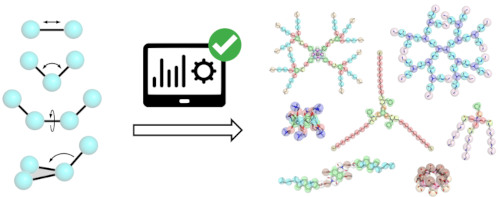
Swarm-CG works with MARTINI version 2 or 3. Virtual sites are correctly handled and the AA-to-CG mapping can be interpreted as center of mass (COM) or center of geometry (COG).
Publication
Empereur-mot, C.; Pesce, L.; Bochicchio, D.; Perego, C.; Pavan, G.M. (2020) Swarm-CG: Automatic Parametrization of Bonded Terms in MARTINI-based Coarse-Grained Models of Simple to Complex Molecules via Fuzzy Self-Tuning Particle Swarm Optimization. ChemRxiv. Preprint
Installation & Usage
Swarm-CG was tested using Python 3.6.8 and Gromacs 2018.6.
pip3 install swarm-cg    # creates the 3 entrypoints/aliases below

scg_evaluate -h          # see point 1
scg_optimize -h          # see point 2
scg_monitor -h           # see point 3
To better handle sampling in symmetrical molecules you can form groups of bonds/angles/dihedrals that Swarm-CG will consider identical, using line returns and/or comments in the topology (ITP) file. AA-mapped distributions will be averaged within groups to create the references used for evaluation (see point 1) or as target of the optimization procedure (see point 2). For optimization, identical parameters will be used for the bonds/angles/dihedrals within each group.
Here is an ITP file extract from the demonstration data of PAMAM G1:
[ bonds ]
;   i     j   funct   length   force.c.
; bond group 1
    1     2       1        0         0           ; B1
; bond group 2
    1     3       1        0         0           ; B2
    1     9       1        0         0           ; B2
; bond group 3
    3     4       1        0         0           ; B3
    9    10       1        0         0           ; B3
1. Evaluate bonded parametrization of a CG model
The module scg_evaluate enables quick evaluation of the fit of bond, angle and dihedral distributions between a CG model trajectory and a reference AA model trajectory of an identical molecule, by producing a single comprehensive figure.
scg_evaluate -aa_tpr G1_DATA/aa_topol.tpr -aa_traj G1_DATA/aa_traj.xtc -cg_map G1_DATA/cg_map.ndx -cg_itp G1_DATA/cg_model.itp -cg_tpr G1_DATA/cg_topol.tpr -cg_traj G1_DATA/cg_traj.xtc
It can also be used for inspecting AA-mapped distributions exclusively.
scg_evaluate -aa_tpr G1_DATA/aa_topol.tpr -aa_traj G1_DATA/aa_traj.xtc -cg_map G1_DATA/cg_map.ndx -cg_itp G1_DATA/cg_model.itp
This module is particularly useful to assess the need to run an optimization procedure (assuming one already has a CG model). It is also suited to the assessment of geometrical changes triggered by a modification of CG beads types (defining non-bonded parameters) or after manually editing bonded parameters while working on a model. This command also provides publication-quality figures to support the parametrization of your models (also in vectorized formats). Radius of gyration (Rg) and solvent accessible surface area (SASA) are also calculated.
2. Optimize bonded terms of a CG model
The module scg_optimize allows to automatically optimize the bonded parameters of a CG model according to a reference AA trajectory. To this end, several simulations will be run to explore and evaluate the relevance of different sets of bonded parameters, using 3 optimization cycles.
For example, using demonstration data of PAMAM G1:
scg_optimize -in_dir G1_DATA/ -gmx gmx_2018.6_p
Which will use all default filenames of the software and is exactly identical to this command:
scg_optimize -aa_tpr G1_DATA/aa_topol.tpr -aa_traj G1_DATA/aa_traj.xtc -cg_map G1_DATA/cg_map.ndx -cg_itp G1_DATA/cg_model.itp -cg_gro G1_DATA/start_conf.gro -cg_top G1_DATA/system.top -cg_mdp_mini G1_DATA/mini.mdp -cg_mdp_equi G1_DATA/equi.mdp -cg_mdp_md G1_DATA/md.mdp -gmx gmx_2018.6_p
We recommend to first prepare files in a directory to be fed to Swarm-CG via argument -in_dir.
The input is composed of:
- An AA reference trajectory (TPR + XTC/TRR)
- The AA to CG mapping (NDX)
- A preliminary CG model (ITP, equilibrium values and force constants can be initialized arbitrarily to e.g. 0)
- A CG configuration used as starting point of each iterative optimization run (GRO file, from a mapped AA frame and solvated if necessary)
- Other simulation files (TOP and MDP, notably with your barostat and thermostat choices)
At all times during execution, the best parametrized model is accessible in the optimization output folder at out_dir/optimized_CG_model/cg_model.itp. The bonded parameters obtained via the Boltzmann inversion implemented in Swarm-CG with groups averaging (see paper sections 2.1 and 6.1) are also available at out_dir/boltzmann_inv_CG_model/cg_model.itp.
The AA trajectory is mapped on-the-fly (if atoms are mapped to multiple CG beads, atom masses are split accordingly). The AA trajectory must contain box information for PBC handling, otherwise it is assumed the molecule is "unwrapped" already. Only the MDP file provided via arg -cg_mdp_md will be modified to adjust nsteps according to arguments -cg_time_short and cg_time_long, taking into account the timestep ts you provided. To minimize the execution time of scg_optimize, equilibration should stay short (e.g. 50-500 fs) and so should the optimization cycles 1 and 2 (via arg -cg_time_short e.g. 10-20 ns). To maximize the precision of scg_optimize, optimization cycle 3 must always use longer simulation times (via arg -cg_time_long e.g. 25-100 ns). Execution times should vary between 4h to 24h according to parameters and hardware used.
For information about the different execution modes, please see paper sections 2.4 and 4 and command help (-h).
3. Monitor an ongoing CG model optimization
Optimization procedures can be monitored at any point during execution. The module scg_monitor produces a visual summary (see paper Fig. 3) of the progress of an optimization procedure started with module scg_optimize. The plot will be produced in the directory provided via arg -opti_dir.
scg_monitor -opti_dir MODEL_OPTI__STARTED_03-07-2020_10h_12m_15s
See the help (-h) for a complete description of scg_monitor output. In particular, note that Rg and SASA might be rough estimates in this display, as they are calculated from short simulations used for optimization. These values must probably be validated using longer simulation times. Using scg_evaluate can be helpful to this end.
Extended usage (untested)
In principle, Swarm-CG workflow is general and can be applied also for tuning bonded terms in coarser CG models (by mapping more than 3-5 atoms to each CG bead and providing adequate non-bonded parameters). To this end, it is possible to use an AA trajectory as reference for optimization, but also instead a high resolution CG trajectory (fine grain) for tuning the coarser CG model (see paper section 4 for a more detailed discussion about crossing CG scales).
Another possible use case would be the tuning of elastic networks in CG models of proteins, although this still requires a well sampled AA or fine CG reference trajectory.
Please feel free to open an Issue or email us if you are interested into extended usages and need help.
Credits
Swarm-CG makes extensive use of FST-PSO and MDAnalysis. We thank Marco S. Nobile for his valuable insights.
Release history Release notifications | RSS feed


Download files
Download the file for your platform. If you're not sure which to choose, learn more about installing packages.
Source Distribution
Built Distribution
Filter files by name, interpreter, ABI, and platform.
If you're not sure about the file name format, learn more about wheel file names.
Copy a direct link to the current filters
File details
Details for the file swarm-cg-1.1.4.tar.gz.
File metadata
- Download URL: swarm-cg-1.1.4.tar.gz
- Upload date:
- Size: 66.0 kB
- Tags: Source
- Uploaded using Trusted Publishing? No
- Uploaded via: twine/3.2.0 pkginfo/1.5.0.1 requests/2.24.0 setuptools/50.3.0 requests-toolbelt/0.9.1 tqdm/4.50.0 CPython/3.6.9
File hashes
| Algorithm | Hash digest | |
|---|---|---|
| SHA256 |
749f2a442a97721b0ab72da1dca5fcfd6b3c69969befa97e9a505729d729c8f8
|
|
| MD5 |
a8ea0d59370fa32bbd6fb0657ecc8853
|
|
| BLAKE2b-256 |
076faf3611ae4b37d5ba7d4db849a6414ae057e3bc2a119e4817fd884ff384bf
|
File details
Details for the file swarm_cg-1.1.4-py3-none-any.whl.
File metadata
- Download URL: swarm_cg-1.1.4-py3-none-any.whl
- Upload date:
- Size: 67.8 kB
- Tags: Python 3
- Uploaded using Trusted Publishing? No
- Uploaded via: twine/3.2.0 pkginfo/1.5.0.1 requests/2.24.0 setuptools/50.3.0 requests-toolbelt/0.9.1 tqdm/4.50.0 CPython/3.6.9
File hashes
| Algorithm | Hash digest | |
|---|---|---|
| SHA256 |
43316050ccb989f72219172ad174f9e5144dbb019bb2d3633d6ac2ebc2e20ca2
|
|
| MD5 |
2fd4d59dbca538153fb4872a466a17fc
|
|
| BLAKE2b-256 |
5780eb65ca34e8c6ce4b311db638d1a0749ef2b0ab2463856b3ef34526756201
|






