
This release is a pre-release and may not be stable for production use.
SwarmBots
SwarmBots is a GPU-vectorized multi-agent reinforcement-learning benchmark for self-assembling modular robots. Policies control both movement and assembly: identical articulated units can move independently, connect into load-bearing structures, and disconnect during an episode. The swarm's physical structure is part of the control problem.
The task suite spans wall and bridge traversal, exploration under partial observability, climbing, navigation, and cooperative payload transport. Use your own learning algorithm with the benchmark's environment and evaluation API, or start with the included learning baselines.
SwarmBots is an alpha benchmark under active development. Scenario difficulty, reward functions, and benchmark design are still being evaluated. Suggestions, bug reports, and feedback from researchers are welcome through GitHub issues or by emailing Dominik Baron at dominik.b4ron@gmail.com, especially reports of tasks that are too easy, too hard, or reward unintended behavior.
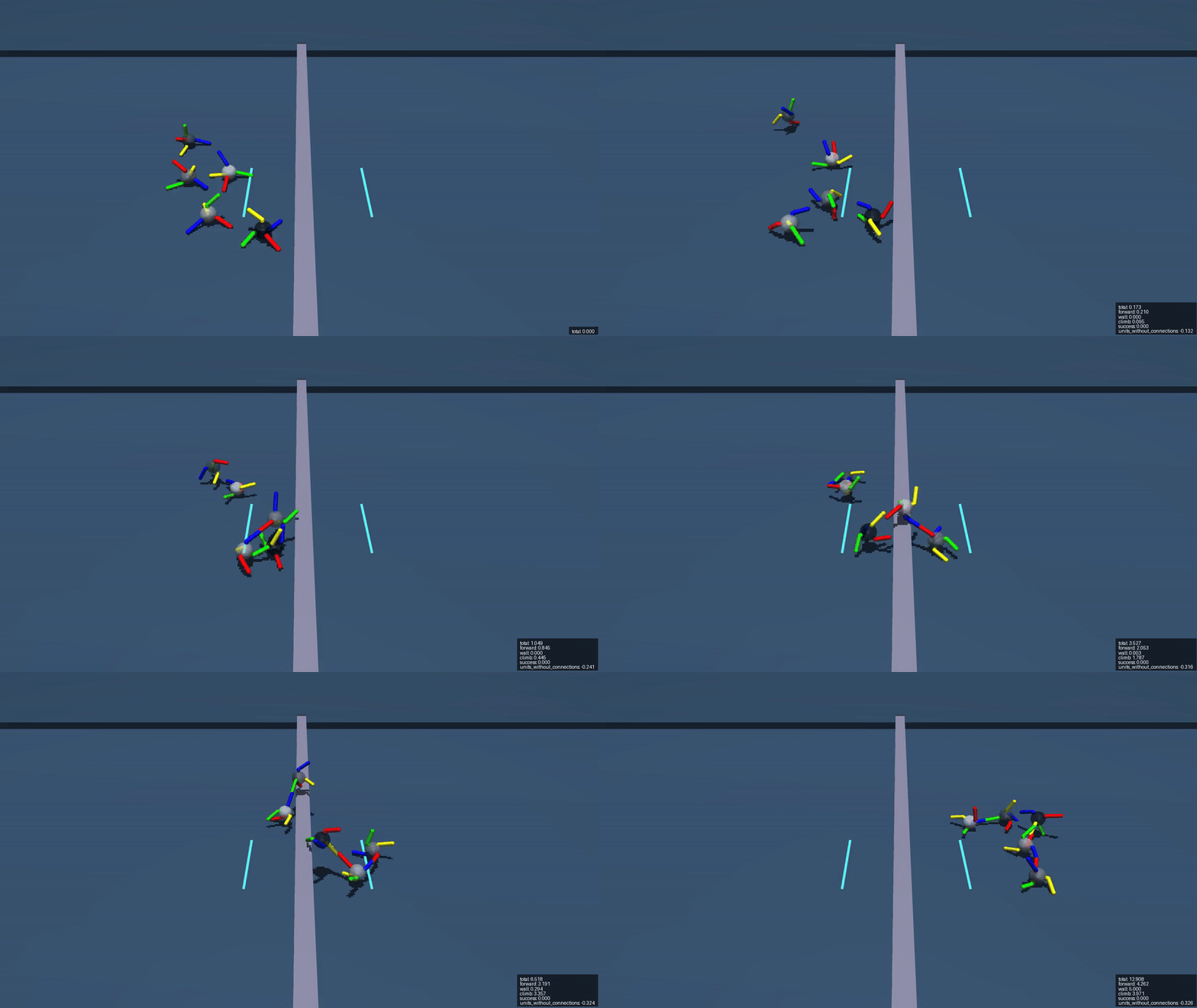
| Wall traversal | Finding a hidden opening |
|---|---|
 |
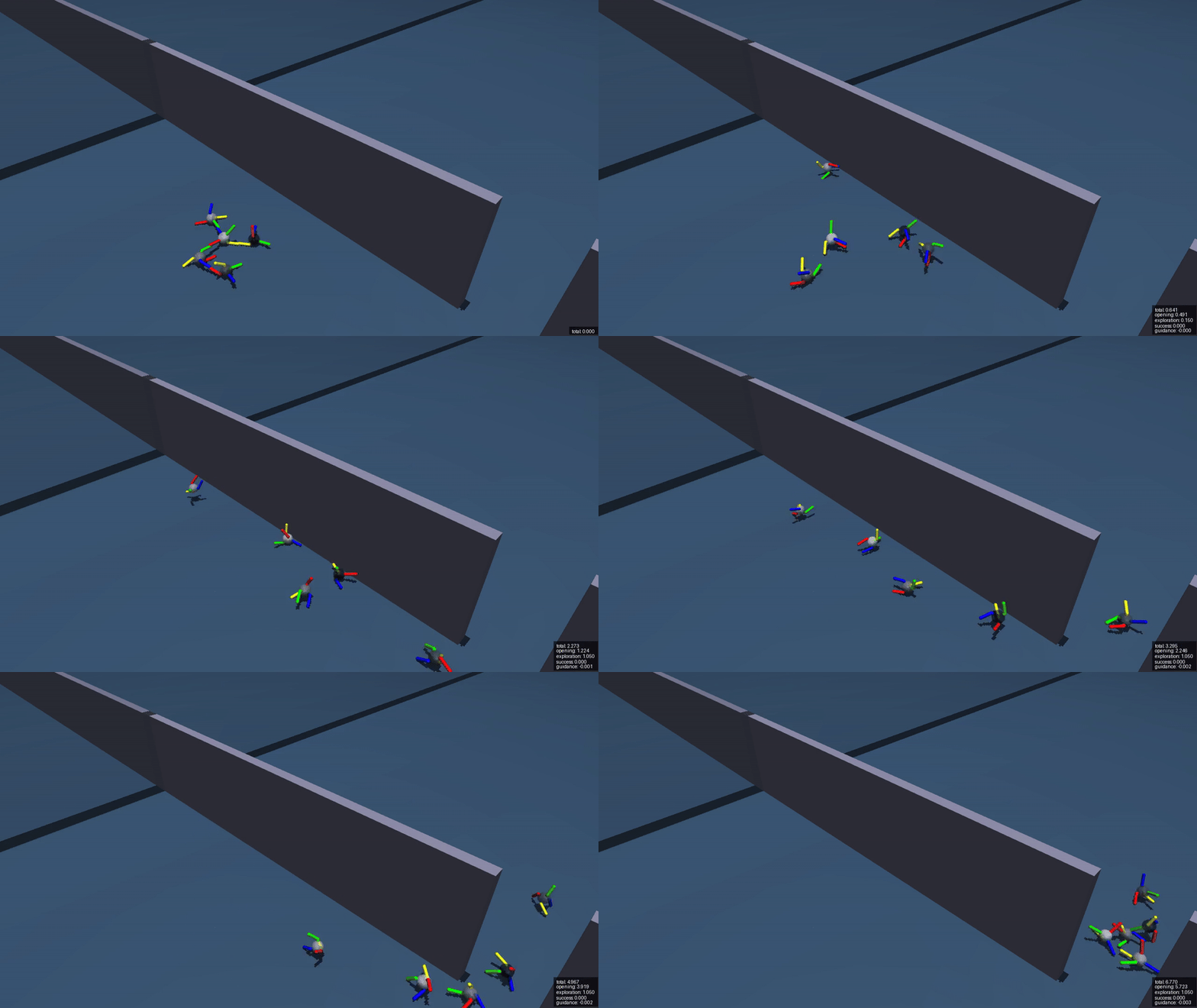 |
See the scenario catalog for task definitions.
Benchmark highlights
- Physical self-assembly. Agents control articulated limbs and connectors. Forming or releasing a connection changes how the units can move together and transmit forces.
- Partial observability and exploration. FindOpening emphasizes exploration within an episode to locate a hidden passage. PO-wall adds partial observability to the connected locomotion challenge of wall traversal. Privileged simulator information is available for training critics, but excluded from evaluated actors.
- Variable assemblies. Registered tasks sample initial morphologies with four or five active units. An agent mask identifies active units within five padded slots.
- GPU simulation. Built on MuJoCo Warp, SwarmBots runs parallel worlds and keeps observations, actions, and rewards as PyTorch tensors on the simulation device.
Task suite
The full suite has 15 registered tasks, including an eight-task core suite for evaluation. Task names below expand to SwarmBots-<name>-v0.
| Task family | Tasks | Maturity | Challenge |
|---|---|---|---|
| Wall traversal | WallEasy, WallMedium, WallHard |
Beta | Connected locomotion over fixed walls from 0.2 to 0.4 m high. |
| PO-wall traversal | POWallEasy, POWallMedium, POWallHard |
Beta | Connected locomotion over randomized hidden walls from 0.25 to 0.4 m high, with partial observability adding difficulty. |
| Bridge traversal | Bridge |
Alpha | Locomotion across a narrow movable bridge. |
| Exploration under partial observability | FindOpening |
Beta | Exploration within an episode to locate and pass through a hidden opening. |
| Climbing and navigation | Climb, VerticalReach, MoveTo |
Alpha | Platform climbing, elevated goal reaching, and navigation toward sampled planar goals. |
| Payload transport | PayloadPlane, PayloadStep, DualPayloadPlane, MultiPayloadGoal |
Alpha | Cooperative payload transport, step traversal, and delivery of variable payload sets to assigned goals. |
The core suite covers medium fixed and hidden walls, bridge traversal, finding an opening, climbing, vertical reach, payload-over-step transport, and multi-payload goal transport. Access it through swarmbots.CORE_BENCHMARK_IDS; swarmbots.ALL_BENCHMARK_IDS exposes the full suite.
Scenario maturity is tracked separately from the overall benchmark's alpha status. Beta scenarios have undergone extensive internal testing, but have not yet received feedback from other researchers and are not considered final. Alpha scenarios have seen limited testing; their difficulty, rewards, or success conditions may need revision. Core-suite membership indicates task coverage, not maturity. See the scenario maturity and versioning guide for per-task labels and how they relate to package releases and -v0 task IDs.
Each task defines its own rewards and, where applicable, a terminal success condition. The scenario catalog lists exact benchmark IDs, observations, and success criteria. Scenario parameters are customizable for new experiments; report modified tasks as custom variants.
Install
Python 3.11 or newer is required. CUDA is strongly recommended; CPU execution exists for development and tests but is not the benchmark's performance target. SwarmBots is currently versioned as an alpha. Install the alpha release explicitly with:
uv add "swarmbots==0.1.0a2"
On Windows, installing from PyPI selects CPU-only PyTorch by default. Before running the CUDA examples below, configure CUDA PyTorch and matching Windows Triton in your application project using the published-package GPU setup guide. The source checkout's CUDA configuration is not inherited by projects that install SwarmBots from PyPI.
Install from source:
git clone https://github.com/brn-dev/swarm-bots.git
cd swarm-bots
uv sync
The source checkout selects CUDA PyTorch on Windows and Linux, including matching Windows Triton, through its lockfile and default cuda dependency group. Subsequent syncs retain that setup. Follow GPU setup to configure the compiler, verify the compiled environment, or select CUDA when using the published package in another project.
Quick start
List the registered tasks and run a short smoke test:
.venv/bin/swarmbots list
.venv/bin/swarmbots smoke SwarmBots-WallEasy-v0 --device cuda --num-envs 64
On Windows, use .venv\Scripts\swarmbots.exe. No environment activation is required. For a CPU smoke test, use --device cpu --num-envs 2; CPU simulation is much slower than the intended CUDA path.
Add --compiled to verify PyTorch compilation as well as simulation. The ordinary smoke test uses eager operations; it does not check compiler setup.
Create an environment directly:
import torch
from swarmbots import make_env

env = make_env("SwarmBots-WallEasy-v0", num_envs=256, device="cuda", seed=42)
observations, info = env.reset(seed=42)

actions = {
    "actuators": torch.zeros(env.action_space["actuators"].shape, device=env.device),
    "connectors": torch.zeros(env.action_space["connectors"].shape, device=env.device),
}
observations, rewards, terminations, truncations, info = env.step(actions)
env.close()
The environment uses Gymnasium SAME_STEP autoreset. When a lane ends, the returned observation is already its next reset observation; the terminal observation is in info["final_obs"] and selected by info["_final_obs"].
Explicit resets and autoresets both settle physics before returning observations. The settling interval is outside the episode's control-step budget, so evaluation and training start from the same reset distribution.
Use your own policy
SwarmBots exposes vector environments with Gymnasium spaces and reset() / step() conventions. Data stays in PyTorch tensors; Gymnasium wrappers and training libraries that expect NumPy arrays require adaptation.
Observations are dictionaries of batched tensors:
local_obs: per-agent observations, shaped(worlds, agents, features).global_obs: task information visible to all agents.agent_mask: which padded agent slots are active.hidden_local_varsandhidden_global_vars: privileged state for centralized training or diagnostics. Do not pass these to an evaluated actor.
Actions contain per-agent actuators and connectors tensors. Rewards and done flags are team-level tensors with one value per simulated world.
Centralized, partially centralized, and decentralized actors are all allowed; actors may combine the permitted observations across agents within each world. The benchmark does not prescribe a learning algorithm or require decentralized execution. See the Python API for integration details.
Evaluate and compare policies
The built-in evaluator accepts a callable policy(observations, episode_starts) that returns the actuators and connectors action tensors. It passes only non-privileged observations and reports episode returns, lengths, and success rate where defined. Recurrent policies use episode_starts to reset their state per world.
Evaluate one seed of your policy with:
from swarmbots import evaluate_policy

result = evaluate_policy(
    policy,
    "SwarmBots-WallMedium-v0",
    num_envs=256,
    num_episodes=256,
    seed=1000,
    device="cuda",
    action_mode="deterministic",
)
print(result.mean_return, result.success_rate)
Put neural-network policies in evaluation mode, select deterministic actions, and freeze observation normalization before calling the evaluator. action_mode records that choice; it does not change policy behavior.
For comparable results, protocol 0.1 specifies:
- Unmodified registered tasks with a 500-control-step episode limit.
- Seeds
1000through1004, with 256 worlds and exactly the first episode from each world per seed: 1,280 episodes per task. - Per-task mean return and success rate where defined, with mean and standard deviation across the five seed-level means, plus raw episode data and runtime metadata.
The evaluator requires num_episodes <= num_envs; additional seeds provide more samples. Reward scales differ between tasks, so report per-task scores. Evaluation samples the registered morphology pool; protocol 0.1 does not measure generalization to unseen morphologies. Report training budgets and training seeds separately.
The five-seed reporting example starts from a uniform-random sanity baseline and shows how to export episodes, settings, runtime versions, and aggregate statistics to JSON.
Optional learning baselines
The package includes PPO/MAPPO, multi-agent transformer (MAT), transformer-based SAC (TMASAC), and recurrent variants as starting points for benchmark experiments.
from swarmbots.learn import train

trainer = train(
    "SwarmBots-WallMedium-v0",
    "mappo",
    num_envs=1024,
    device="cuda",
    total_timesteps=100_000_000,
    run_dir="runs/wall-medium/mappo",
)
list_variants() lists the available presets, and as_benchmark_policy(trainer) adapts a trained actor for evaluation. See learning baselines for customization, checkpoint continuation, and custom training loops.
Record policy behavior
Record your policy with swarmbots record <benchmark-id> --policy module:function, or an included-baseline checkpoint with --checkpoint <path> --variant <variant>. See recording for the policy factory interface, checkout script, and video options.
Documentation
The documentation guide provides a starting point for exploring tasks, integrating policies, and reporting results.
- Scenario catalog
- Benchmark and reporting protocol
- Python API, compatibility, and custom policies
- GPU setup and compiled smoke test
- Policy recording and video options
- Optional learning baselines and presets
The benchmark and API are alpha. Scenario maturity labels describe testing confidence; benchmark IDs, package releases, and protocol versions identify the task definition, implementation, and evaluation procedure used in an experiment. Record the exact package version and Git commit when reporting results.
Citation
Please cite the software version used in your experiments. Machine-readable citation metadata is available in CITATION.cff.
For the benchmark and policy designs, also cite Dominik Baron (2026), SwarmBots: a GPU-accelerated multi-agent continuous control benchmark with transformer baselines, master's thesis, Johannes Kepler University Linz. The published thesis is available under the persistent identifier urn:nbn:at:at-ubl:1-108602.
Thesis source and supplementary material are available in the thesis repository.
License
SwarmBots is released under the Apache License 2.0.
1 maintainer

Metadata
1 maintainer
Release files for swarmbots 0.1.0a2
For a detailed explanation of source distributions (sdists) and built distributions (wheels), please see the package formats documentation.
Source distribution (sdist)
| File | Size | Uploaded | |
|---|---|---|---|
| swarmbots-0.1.0a2.tar.gz | 4.4 MB | Details |
Built distribution (wheel)
| File | Interpreter | ABI | Platform | Reset |
|---|---|---|---|---|
| swarmbots-0.1.0a2-py3-none-any.whl | Python 3 | none | any | Details |
Total release size: 4.9 MB
Release files / swarmbots-0.1.0a2.tar.gz
| Download URL | swarmbots-0.1.0a2.tar.gz |
|---|---|
| Size | 4.4 MB |
| Tags | Source |
|
SHA-256 checksum How to use checksums |
2985f328b3c9dbe2263bbd2207e78c48ca35edb3857d1c08bad5fe9697d2a9a0
|
|
BLAKE2b-256 checksum How to use checksums |
7ef8251a66ea7a6bb65dbe5814efb148e510b16161b2e7b4b1d98b0663efddfe
|
| Upload date | |
|
Uploaded using Trusted Publishing? What is trusted publishing? |
Yes |
| Uploaded via |
uv/0.12.19 {"installer":{"name":"uv","version":"0.12.19","subcommand":["publish"]},"python":null,"implementation":{"name":null,"version":null},"distro":{"name":"Ubuntu","version":"24.04","id":"noble","libc":null},"system":{"name":null,"release":null},"cpu":null,"openssl_version":null,"setuptools_version":null,"rustc_version":null,"ci":true}
|
Provenance
Provenance describes where a file came from. On PyPI, provenance is shared via attestations, which provide a verifiable record of the build or publishing details. View details, limitations and caveats.


PyPI Publish Attestation
PyPI verified that this artifact, at this checksum, originated from the publisher listed below.
Signed by GitHub Actions, verified by PyPI on Oct 4, 2026.
Transparency logRelease files / swarmbots-0.1.0a2-py3-none-any.whl
| Download URL | swarmbots-0.1.0a2-py3-none-any.whl |
|---|---|
| Size | 486.9 kB |
| Tags | Python 3 |
|
SHA-256 checksum How to use checksums |
756ede4739acf2fb57de34da20ccf102bd994ea16224f72a1390eac3888bb7a8
|
|
BLAKE2b-256 checksum How to use checksums |
7b9c48992a9544bd7bf7b1909a9aef5359fbd6ed7c761a12b17a485627f165b0
|
| Upload date | |
|
Uploaded using Trusted Publishing? What is trusted publishing? |
Yes |
| Uploaded via |
uv/0.12.19 {"installer":{"name":"uv","version":"0.12.19","subcommand":["publish"]},"python":null,"implementation":{"name":null,"version":null},"distro":{"name":"Ubuntu","version":"24.04","id":"noble","libc":null},"system":{"name":null,"release":null},"cpu":null,"openssl_version":null,"setuptools_version":null,"rustc_version":null,"ci":true}
|
Provenance
Provenance describes where a file came from. On PyPI, provenance is shared via attestations, which provide a verifiable record of the build or publishing details. View details, limitations and caveats.
PyPI Publish Attestation
PyPI verified that this artifact, at this checksum, originated from the publisher listed below.
Signed by GitHub Actions, verified by PyPI on Oct 4, 2026.
Transparency log













