
Swaybeing
A simple daemon for Sway/i3 to track per-app screen time
Screenshots
How it works
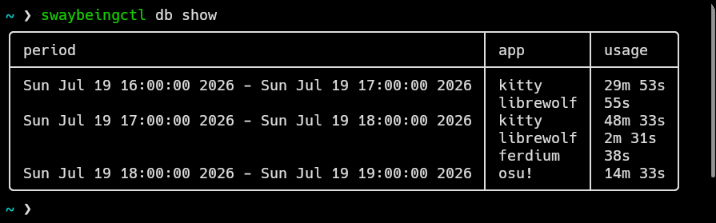
Swaybeing monitors the time you spend in each app. It subscribes to window changes through the i3/Sway IPC socket. When a window is closed or the focus changes to a different app, it compares current timestamp with the timestamp snapshotted when you started using the app and adds it to a write queue. The queue is then written to a database (each 5 minutes by default).
Usage stats are stored in an SQLite database. Each day is divided into equal time periods (of the length of 3 hours by default). App usage data is split between those periods. This is a balance between inefficient storing of linear app usage timestamps and not dividing them at all. Changing the period length will only take effect next day if current day already contains usage data.
Daylight savings are also handled clearly. Swaybeing internally uses the UTC timezone, which is later visually converted to your current timezone when running the swaybeingctl db show command.
Installation
Nix
To test it out, you can enter a temporary nix shell:
nix shell git+https://codeberg.org/OliMoli/swaybeing
For a permanent installation, first add Swaybeing to your flake:
{
  inputs = {
    # ... other inputs

    swaybeing = {
      url = "git+https://codeberg.org/OliMoli/swaybeing";
      inputs.nixpkgs.follows = "nixpkgs";
    };
  };

  # ... rest of your flake

  outputs = inputs @ { self, nixpkgs, ... }: {
    # example host, replace with your own!
    nixosConfigurations.example = nixpkgs.lib.nixosSystem {
      # ... rest of the system

      specialArgs = {
        # This is important!
        inherit inputs;
      }
    };
  };
}
Then, import the module and set services.swaybeing.enable = true;. It will automatically install the package and configure the systemd user service.
{ inputs, ... }: {
  modules = [
    inputs.swaybeing.nixosModules.default # System module (appiles to all users)
    inputs.swaybeing.homeModules.default # Home module (applies to a single user)
  ];

  services.swaybeing = {
    enable = true; # install the package and enable the autostart service

    # Optional values with examples:
    package = inputs.swaybeing.packages.${pkgs.system}.default; # specify a custom Swaybeing package to use instead
    extraOptions = [ "-l", "debug" ]; # extra command line arguments to be passed to the swaybeingd command
    systemdTargets = [ "sway-session.target" ]; # systemd target which triggers the start of swaybeingd; highly recommended to set

    # Home Manager only: generate config.json
    config = {
      period_length = 24;
      commit_interval = 60;
    };
  };
}
If you prefer not to use the module, you can install the packages manually instead:
{ pkgs, inputs, ... }:
{
  environment.systemPackages = [ inputs.swaybeing.packages.${pkgs.system}.default ]; # NixOS
  home.packages = [ inputs.swaybeing.packages.${pkgs.system}.default ]; # Home Manager
}
Once Swaybeing gets more stable I'll PR it to Nixpkgs.
Virtual env
To test it out, clone the repo and source the venv-setup script, or venv-setup.fish if you use fish.
It will automatically create a temporary venv, drop you into it and source shell completions.
PyPI
A PyPI package is available here
Setup
Put this line in your Sway/i3 config:
exec --no-startup-id swaybeingd
You can also add Swayidle hooks to pause monitoring screentime when you're idle:
# Sample screen lock hook
lock 'swaybeingctl msg pause; your-locker; swaybeingctl msg resume'
unlock 'swaybeingctl msg resume; your-unlocker'
before-sleep 'loginctl lock-session'

# Stop monitoring after 1 minute of idling
timeout 60 'swaybeingctl msg pause' resume 'swaybeingctl msg resume'
or if you use Home Manager:
{ config, pkgs, inputs, ... }:
let
  swaybeing = "${inputs.swaybeing.packages.${pkgs.system}.default}";
  # or
  swaybeing = config.services.swaybeing.package;

  swaybeingctl = "${swaybeing}/bin/swaybeingctl";
in
{
  services.swayidle = {
    enable = true;
    events = {
      # Sample screen lock hook
      lock = "${swaybeingctl} msg pause; your-locker; ${swaybeingctl} msg resume";
      unlock = "${swaybeingctl} msg resume; your-unlocker";
      before-sleep = "${pkgs.systemd}/bin/loginctl lock-session";
    };

    timeouts = [
      {
        # Stop monitoring after 1 minute of idling
        timeout = 60;
        command = "${swaybeingctl} msg pause";
        resumeCommand = "${swaybeingctl} msg resume";
      }
    ];
  };
}
Usage
The swaybeingd command launches the main daemon.
Use swaybeingctl to query the database and communicate with the daemon.
Basic commands:
swaybeingctl db show: show recorded usage informationswaybeingctl msg pause: pause monitoring timeswaybeingctl msg resume: resume monitoring time
More commands can be listed by passing the --help argument.
Config
The config file is located at $XDG_CONFIG_HOME/swaybeing/config.json. Config location can be overridden with the -c flag
| Key | Default value | Description |
|---|---|---|
autocommit |
false |
Automatically write all changes after a window event (disables internal write queue). |
commit_interval |
60 |
How often in seconds to write the changes to the database. Set to 0 to disable this feature. |
database |
"$XDG_DATA_HOME/swaybeing/database.db" |
Where to store the database. Can be overriden with the -d flag. |
period_length |
3 |
Time period length in hours. Must be divisible by 24. Lower = more accuracy. See "How it works" section above. |
socket |
"$XDG_RUNTIME_DIR/swaybeing.socket" |
Socket path. Can be overriden with the -s flag. |
time_format |
null |
Time format formatted with strftime() (see man date) to use in CLI. If set to null, uses ctime() instead. |
timezone |
null |
IANA timezone to use in CLI. If set to null, uses system timezone. |
All paths in the config allow enviromnent variable and home directory (~) expansion.
Shell completions
Swaybeing uses Click as its argument parsing engine. According to the docs here are the commands to generate completions:
_SWAYBEINGD_COMPLETE=shellname_source swaybeingd
_SWAYBEINGCTL_COMPLETE=shellname_source swaybeingctl
Replace "shellname" with either bash, zsh or fish.
To permanently install a bash/zsh completion, save the completions to files by adding > filename to the end of the commands above and add source filename to your .bashrc/.zshrc (obviously replace "filename" with your own destination filename)
For fish, put the completions in ~/.config/fish/completions/command_name.fish, replacing "command_name" with swaybeingd or swaybeingctl
Contributing
See CONTRIBUTING.md.
License
This project is licensed under the LGPL-3.0-or-later license.
1 maintainer

Metadata
1 maintainer
Release files for swaybeing 0.1.1
For a detailed explanation of source distributions (sdists) and built distributions (wheels), please see the package formats documentation.
Source distribution (sdist)
| File | Size | Uploaded | Provenance | |
|---|---|---|---|---|
| swaybeing-0.1.1.tar.gz | 24.8 kB | Without provenance | Details |
Built distribution (wheel)
| File | Interpreter | ABI | Platform | Reset |
|---|---|---|---|---|
| swaybeing-0.1.1-py3-none-any.whl | Python 3 | none | any | Details |
Total release size: 49.5 kB
Release files / swaybeing-0.1.1.tar.gz
| Download URL | swaybeing-0.1.1.tar.gz |
|---|---|
| Size | 24.8 kB |
| Tags | Source |
|
SHA-256 checksum How to use checksums |
975d7385b42e950e8de7aa5c86b3e19154190cd4a2e69b1a6bbacb9e572e00df
|
|
BLAKE2b-256 checksum How to use checksums |
38d8ad29e0075269e6d9415c4679a46dbe961290b5ef5d3b51ff62257c47e659
|
| Upload date | |
|
Uploaded using Trusted Publishing? What is trusted publishing? |
No |
| Uploaded via |
twine/6.2.0 CPython/3.14.6
|
Release files / swaybeing-0.1.1-py3-none-any.whl
| Download URL | swaybeing-0.1.1-py3-none-any.whl |
|---|---|
| Size | 24.7 kB |
| Tags | Python 3 |
|
SHA-256 checksum How to use checksums |
479e1076aafd07818b9dfaed339211a3dceaacf8cdf13ca935d8a468acc90282
|
|
BLAKE2b-256 checksum How to use checksums |
3ca5b0a8093c79c5715a7d3b095f250644e2457edf992843a06cea7f6be9a790
|
| Upload date | |
|
Uploaded using Trusted Publishing? What is trusted publishing? |
No |
| Uploaded via |
twine/6.2.0 CPython/3.14.6
|
Security for swaybeing 0.1.1
Provenance
Provenance describes where a file came from. On PyPI, provenance is shared via attestations, which provide a verifiable record of the build or publishing details. View details, limitations and caveats.
No provenance found
None of the files in this release were uploaded with provenance metadata.
A note on package security
PyPI is a repository for distributing packages, not a service for auditing them. While third-party security researchers and our staff do their best to detect and remove malicious packages, PyPI cannot guarantee the quality, security or suitability of any given package.
To learn more about protecting yourself from malicious actors, visit our package security documentation.














