
Extracting and plotting pareto fronts

Project description
sweet_pareto
Generate pareto fronts from pandas data frames
| Package |   |
| Meta |   |
Install
Install the plotting capabilities (what you probably want) with e.g.,
pip install sweetpareto[plot]
Usage
Best used inside a Jupyter Notebook. There are some quirks trying to make the plot and save natively with
matplotlib that I'm trying to sort out still.
Plot API
Using the Palmer penguins dataset
import seaborn
import sweetpareto.vis as spv

df = seaborn.load_dataset("penguins")

>>> spv.pareto_plot(
...     df,
...     xs="flipper_length_mm",
...     y="body_mass_g",
...     maxx=False,
...     maxy=True,
...     col="sex",
...     color="species",
...     marker="species",
...     height=4,
...     aspect=1,
...     theme="whitegrid",
...     show_points=True,
... )
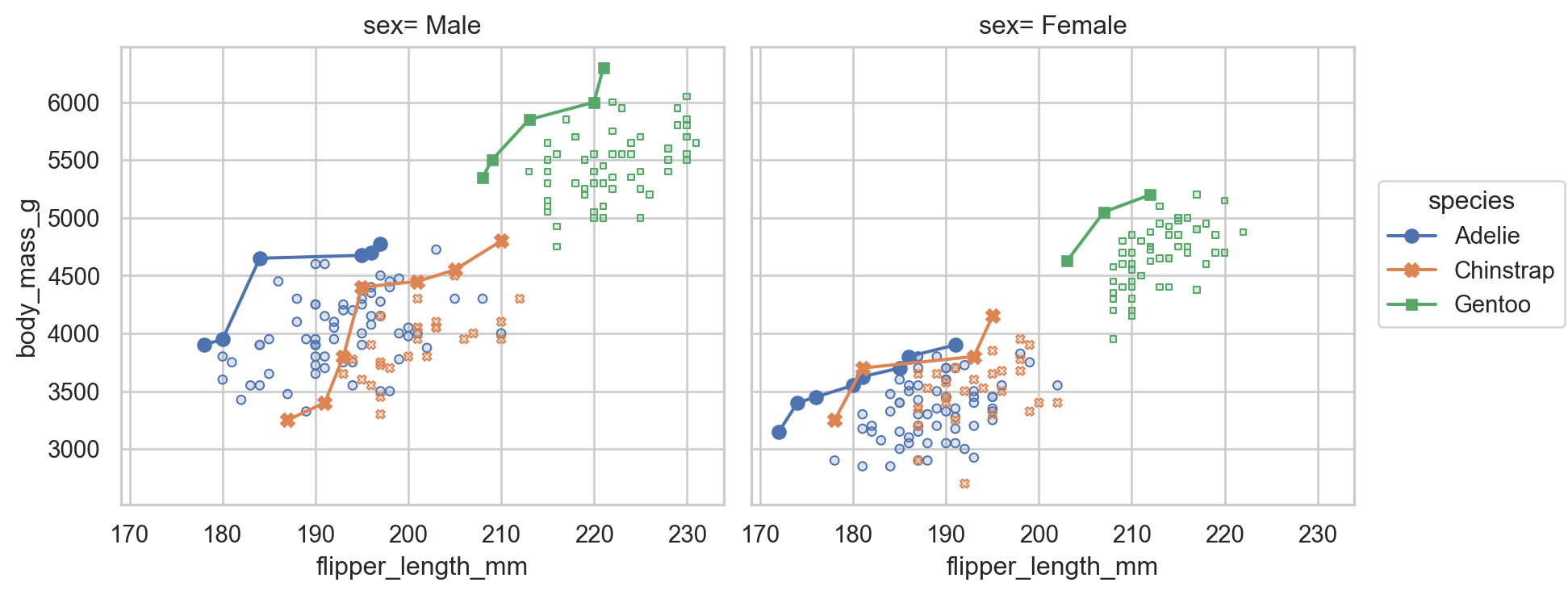
There is also spv.Pareto, a seaborn.objects.Stat
object that can be used to make your own plots with the seaborn.objects API
Core API
The sweetpareto module provides two functions: pareto_indices and pareto_index. The names are similar, but their purposes are slightly
different.
If you have a pandas.DataFrame, you can obtain a subsection of the index for the points that reside on the pareto front with pareto_index
>>> ix = sweetpareto.pareto_index(
...     df,
...     x="flipper_length_mm",
...     y="body_mass_g",
...     maxx=False,
...     maxy=True,
... )
>>> ix
Index([28, 20, 122, 31, 29, 39, 7, 81, 109, 252, 259, 329, 233, 297, 237], dtype='int64')
This Index can be used to access the whole data set along the pareto front with df.loc[ix].
pareto_index uses pareto_indices behind the scenes. This function works on two equal sized
vectors x and y. The returned list contains the positions in x and y that make up the pareto front.
The core API can be installed with pip install sweetpareto, excluding the [plot] extras group.
Engines
By default, the package comes with two "engines" for finding the pareto indices. These can be selected with the
engines= kwargs in various functions.
Default is "python" which is considered the "reference" solution. It's flexible in that it can handle just about
any data type you want to examine e.g., non-complex numbers.
There is also the "cython" engine. It uses a faster, but less flexible Cython-ized solver. Less flexible in that it
can only handle arrays of numpy.float64. This is probably what you have, at least for plotting. But, if that is not
the case, and you still want to use the "cython" engine, the unsatisfying answers are
- Up or downcast your data to
numpy.float64, or - Reach out on the Issue Tracker.
Dev
The dev environment is managed with hatch. I'm still learning this so if you see something that needs improvement, please
let me know.
Testing
Sometimes, hatch will forget or not recognize that the cython engine needs to be rebuilt. I can't find an easily solution here other
than removing the offending environments with hatch env remove or (more aggressively) hatch env prune
Release
For a given version X.Y.Z,
hatch version "X.Y.Z"
will update the project version. This will need to be committed and, eventually, merged to main.
Once the new version has been merged to main,
- Make a tag with
git tag - Build with
hatch build - Publish with
hatch publish
Test images
Build the test images with
hatch run test:gen-test-images
and then, upon acceptable review of images in tests/baseline, stage and commit the new images.
License
This project is made available under the terms of the Mozilla Public License, version 2.0
Issues / features
If you find something doesn't work as expected, or you'd like to propose a feature, please consider creating an issue on the codeberg issue tracker.
This is a fun project for me to work on, and it's also an excuse for me to try out new (to me) Python things. So, be aware that I might not respond immediately, and may not take up your issue or feature request. That doesn't mean it's not worthwhile. Just that I've got a life outside of this project and will not be able to handle all requests.
Contributing
Thank you! I'm glad you found this project interesting enough to put some of your valuable time into a pull request. See the CONTRIBUTING.md file for advice.
Release history Release notifications | RSS feed


Download files
Download the file for your platform. If you're not sure which to choose, learn more about installing packages.
Source Distribution
File details
Details for the file sweetpareto-1.1.0rc0.tar.gz.
File metadata
- Download URL: sweetpareto-1.1.0rc0.tar.gz
- Upload date:
- Size: 185.7 kB
- Tags: Source
- Uploaded using Trusted Publishing? No
- Uploaded via: Hatch/1.16.5 cpython/3.14.3 HTTPX/0.28.1
File hashes
| Algorithm | Hash digest | |
|---|---|---|
| SHA256 |
b5507b45c072546f369ffde184e55057c0e3c5a3a7ecf4b3bdc1ac99891eac42
|
|
| MD5 |
4ba5e817c263d2e781cd714777fcb4a7
|
|
| BLAKE2b-256 |
7d89b4e7bf591f1a44826718a4758ba768addf6e3fc503931b878d4c409e2250
|






