
Nexus
Nexus wraps your coding agent, lives inside its execution loop, and turns AI-assisted development into something you can afford, govern, and trust — cutting token spend, stopping risky actions before they run, and recording a provable trail of everything the agent does.
Nexus works with any coding agent. Claude Code and OpenAI Codex are supported today — one timeline, one policy, one audit trail across both. The rest are coming.
npm i -g @swfte/nexus
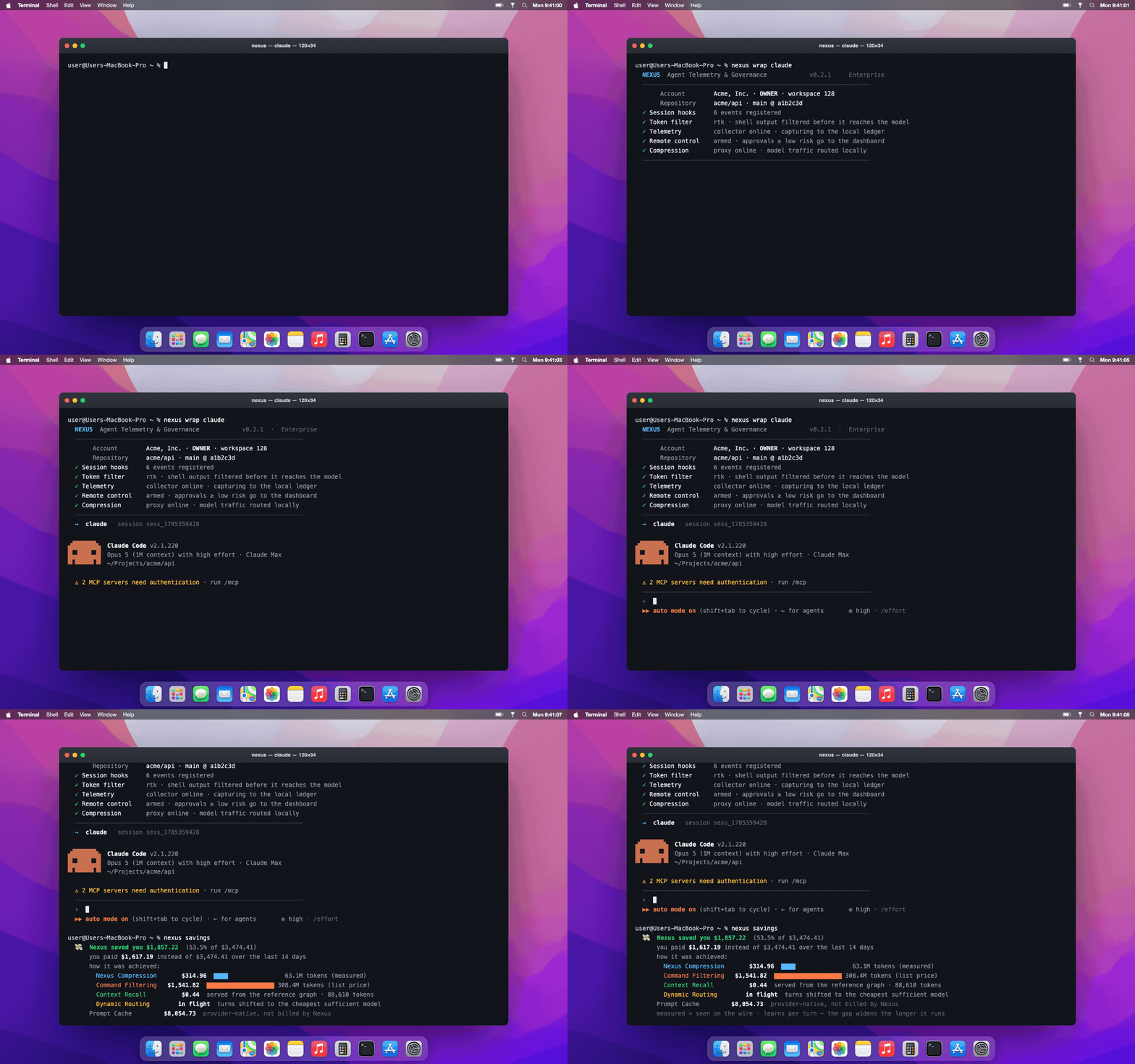
nexus wrap claude     # or: nexus wrap codex
That's it. From the first prompt you're capturing, governed, and saving — nothing else to configure.
Home: www.swfte.com
Why we built it
Coding agents changed the cost and the risk of shipping software overnight — and the tooling didn't catch up.
The cost became a large, variable, per-developer bill nobody could attribute. Vendor dashboards show you a total; they can't tell you which repo, which engineer, or which prompt spent it — and they can't cut it. The same context gets re-sent every turn. The same files get re-read and re-searched. The same boilerplate burns full agent turns. Flagship models run work a cheaper one would finish identically. The waste is invisible, so it never gets fixed.
The risk is that an agent editing your production repo is an actor with write access — and most teams genuinely cannot say what it did, why, or whether it was allowed to. The record lives in throwaway chat logs, the reasoning is tangled up with the actions, and there's no line between "the model says it did X" and "X provably happened."
Both problems have one root cause: nothing was watching the loop itself. Sit inside the agent's execution loop, capture the ground truth once, and you can save money and govern the work from the same place — locally, attributably, without asking anyone to trust a screenshot. That's Nexus.
How it fits together
The CLI in this repo captures and enforces where the agent runs. The Nexus SDKs do the same from inside the services you run yourself. Both write the same events to the same ledger, and the console at nexus.swfte.com is where the team observes, decides and learns from it. A decision is equally valid from the terminal or from the web, and either way it is documented once, with who, when and why.

The console frames are real captures of the product (docs/media/console/), taken from a local
build with a synthetic persona. The knowledge and audience figures come from a real 30-day ledger.
Rendered by docs/media/build_explainer.py; re-run it after a
boot-report or console change. An MP4 sits next to the GIF.
It makes agents cheaper — and proves it
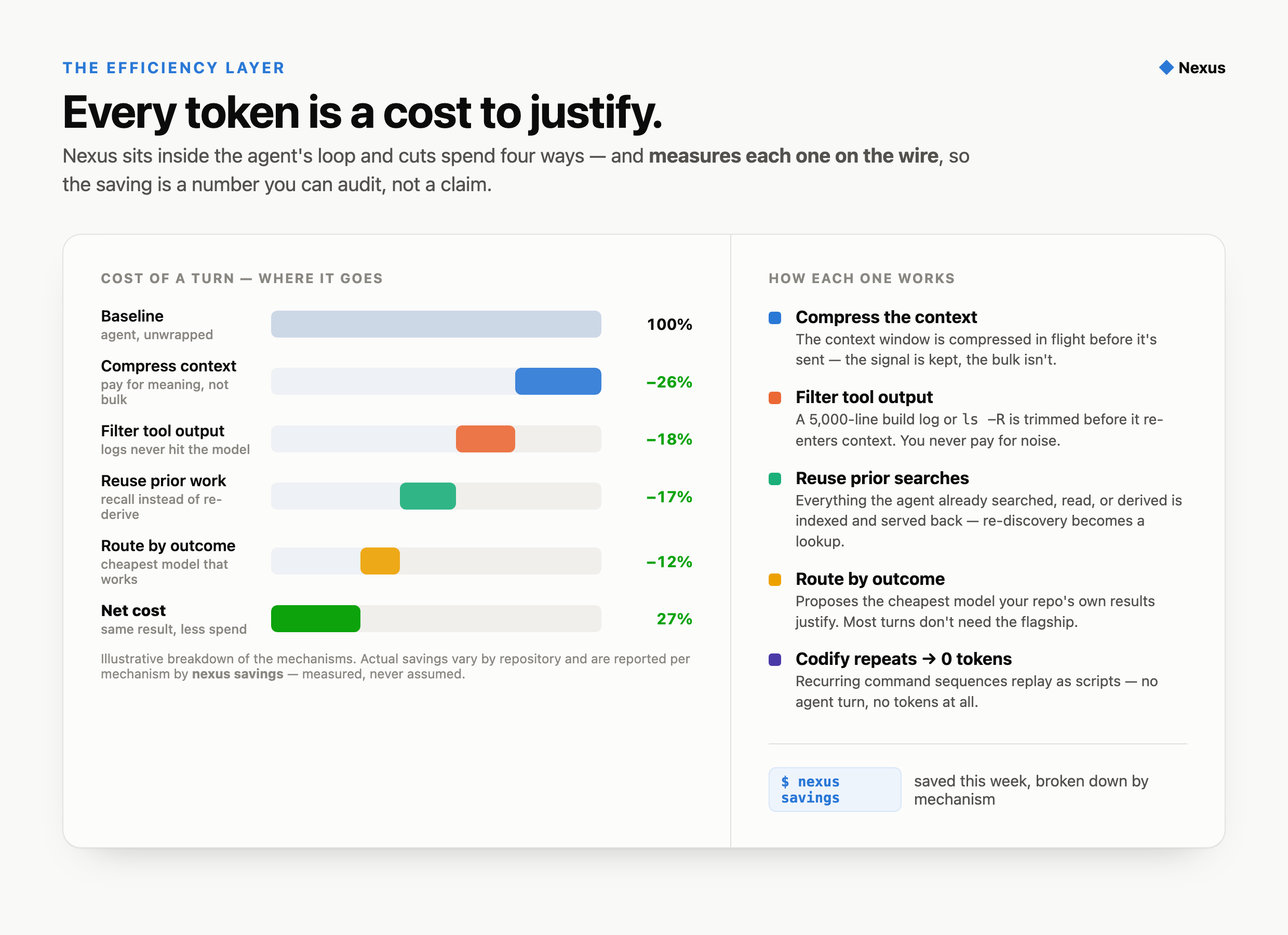
Nexus treats every token as a cost to justify, and attacks it four ways. Every mechanism's
contribution is measured on the wire, not estimated — nexus savings shows exactly what each one
saved, so the number holds up in front of finance.
| How it saves | |
|---|---|
| Compress context | Shrinks the context window in flight before it's sent — you pay for meaning, not bulk. |
| Filter tool output | A 5,000-line build log or ls -R never reaches the model at full price; only what matters does. |
| Reuse prior searches | Nexus indexes everything the agent has already searched, read, and derived — and serves it back instead of paying to re-discover it. The biggest waste in agent work, turned into a lookup. |
| Codify repeats | Recurring command sequences replay as scripts with zero agent turns and zero tokens. |
| Route by outcome | Proposes the cheapest model your repo's own results justify — most turns don't need the flagship, and Nexus knows which ones from your history. |
nexus savings # what you saved this week, by mechanism
The algorithm: index once, reuse everywhere — and learn as you go
Most agent spend is rediscovery — re-reading the same files, re-running the same searches, re-deriving what it knew a moment ago. Nexus builds a centralised source of references: everything an agent indexes, searches, or learns is captured once and served back on demand, so it stops paying to re-index and re-search content it already has. Same budget, far more work.
And it compounds — the longer Nexus runs, the more it saves:
- Continuous learning. Every turn's real outcome — did it work, did your checks pass, was it reworked — feeds back, so recall, routing, and macros sharpen against your repositories over time.
- Dynamic model shifting. Nexus routes each turn to the cheapest model your own results prove is sufficient, and re-evaluates as evidence accumulates. Routine turns stay cheap; only the ones that genuinely need the flagship get it.
- A shared reference graph. What one engineer's agent indexes becomes an instant lookup for the whole team's agents — nobody re-pays to discover what the team already knows.
The net effect: do more with fewer tokens, and the gap widens the longer you run it.
The rule throughout: spend less without changing what the developer sees. Nexus never silently degrades a result to save money, and every saving is attributable so you can audit the trade-off.
It governs what agents do — before they do it
Put agents near production with confidence.
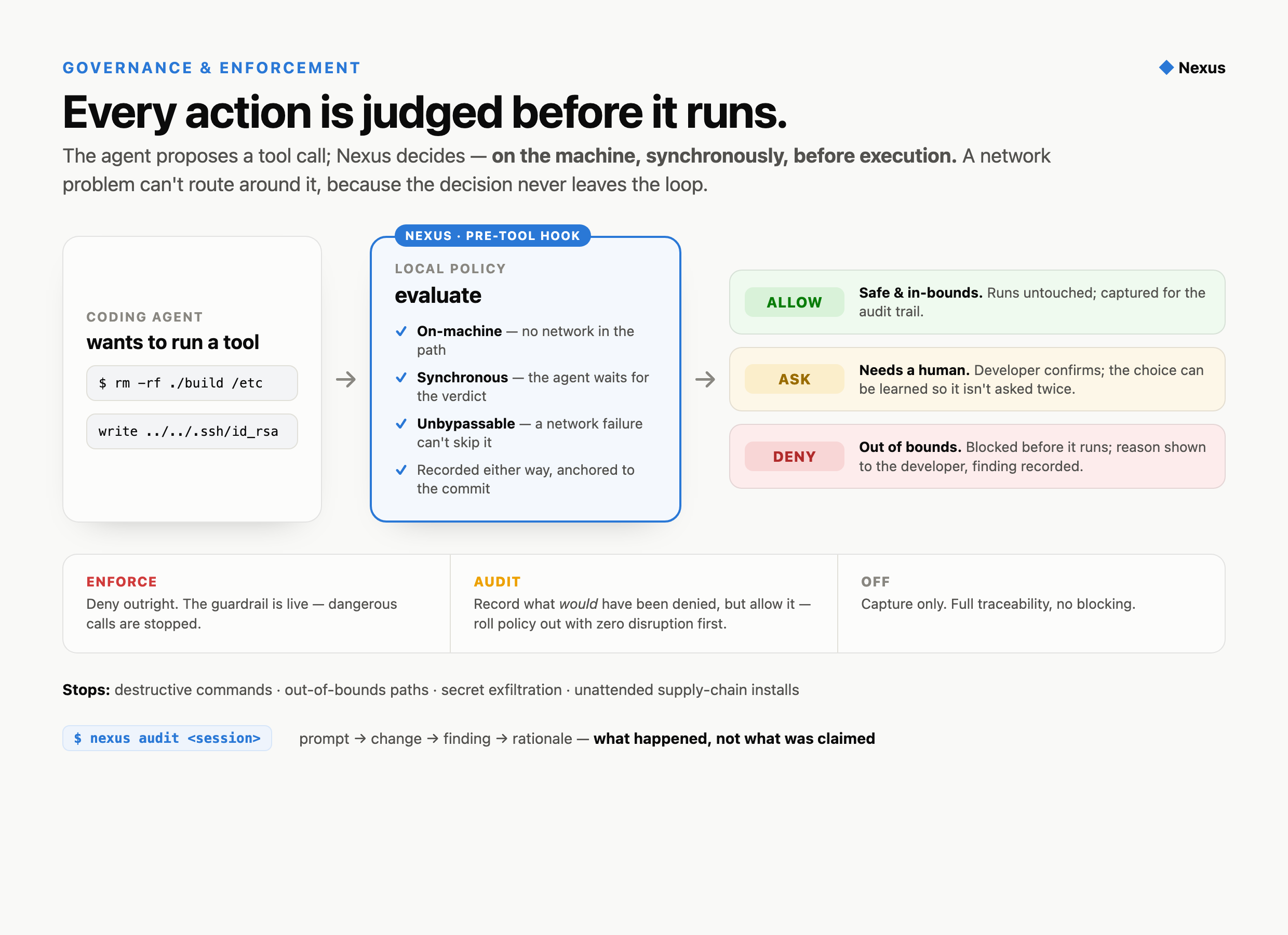
Enforcement happens in flight, on-machine, and can't be bypassed. Before any tool call runs,
Nexus judges it against your policy and returns allow / deny / ask — synchronously, entirely on the
developer's machine, so a network problem can't route around it. Destructive commands, out-of-bounds
paths, things that should never happen unattended: stopped, with the reason shown to the developer
and recorded. Roll it out safely with audit mode first, then flip to enforce.
Everything is traceable — what happened, not what was claimed. Every turn, Nexus records the facts: files touched, lines changed, rework, findings raised, whether your checks passed — anchored to the commit, with the exact token cost from the agent's own usage. It keeps the model's account of why separate from the verifiable record of what, so a reviewer never has to take an explanation as evidence.
nexus audit <session> # the full prompt → change → finding → rationale trail
Dependency installs are logged as supply-chain events. Sensitive-code touches raise findings. And from the dashboard you can require a minimum client version, freeze a team or the whole fleet, revoke a machine, or halt a live session — all through a signed policy the client verifies.
It maps your codebase — so you can see it
Nexus doesn't just watch the agent; it builds an understanding of the code and lets you look at it.
- A model of your codebase — what each module does, why it exists, and its security invariants, reverse-engineered and kept honest (claims stay marked as claims until a human confirms them).
- Repository intelligence — sequence diagrams, a database-schema map, and a security posture, generated from the code and kept current.
- A visual knowledge graph — your architecture, module relationships, and team knowledge export into a graph you can render and explore, not read as prose.
- A shared, versioned knowledge base — what one engineer's agent learns becomes something the whole team (and their agents) build on.
Your codebase, categorised and visual — modules, data model, call flows, and the reasoning behind them — instead of tribal knowledge that walks out the door.
You can talk to it — and nothing you say leaves the machine
Dictation is the rare feature that is easier to describe than to notice: there is nothing to see,
because until you set it up nothing happens. nexus listen is push-to-talk into whichever agent
you have wrapped. You speak, the words appear in the agent's prompt, and the cursor stays where it
is so you can read them before pressing Enter — it never submits on your behalf.
nexus voice           # what dictation needs, and what is already here
nexus voice install   # fetch it — asks first, every time, and downloads nothing otherwise
nexus listen          # push-to-talk into the wrapped session
The speech never goes anywhere. The models run on your hardware. No audio and no transcript text is transmitted, and neither is written to the ledger — not at any capture tier, including the full one that does record prompts and answers. A voice event carries how long the window was, how loud it was, how many characters came out, whether you submitted it, and a truncated one-way digest of the text whose only job is to make repetition countable — three windows with the same digest is somebody saying the same sentence three times because the first two came out wrong, which is the clearest signal there is that dictation is not working for you.
Audio is left out as a category rather than as a tier setting: a voice sample identifies a person across every recording ever made, cannot be rotated after a leak the way a token can, and captures whoever else happened to be in the room. The transcript is barely better, since a dictated prompt is usually the least guarded text in a session. Neither is the right default at any tier, so neither is a parameter at any tier.
It works with any harness Nexus wraps, because it writes to the terminal the agent is already reading from rather than integrating with the agent itself. There is no browser extension, no menubar companion, and no Accessibility permission to grant.
Setting it up means fetching a compiled runtime and a 714 MB model, neither of which fits in an npm
package. nexus voice install does it, having first told you the size, the publisher and the
licence of each file; every download is checked against a digest pinned in the source before it is
put in place. You are offered this once, on first run, and never asked again — whichever way you
answer.
Who it's for
- Engineering leaders who adopted agents and can't yet answer "what did they change, what did it cost, and who's accountable?"
- Security & compliance who need agent activity attributable and bounded by policy — not reconstructed from chat logs after an incident.
- Platform & FinOps who own the model bill and need per-repo, per-engineer attribution and a savings number that survives scrutiny.
- Individual engineers who just want local cost visibility with nothing leaving the laptop —
nexus wrap --local claudeornexus wrap --local codexdoes exactly that: full capture and enforcement, zero egress.
Get started
npm i -g @swfte/nexus     # macOS (Apple Silicon + Intel) and Linux (glibc + musl)
nexus wrap claude         # Claude Code — capture, governance, savings
nexus wrap codex          # OpenAI Codex — same capture, policy, and audit trail
npm install installs the binary and nothing else. It does not sign you in, does not open a
browser, and does not write to your agent's settings — installing a tool is not the same as asking
it to start. The first nexus command you run does that setup, with you there and having asked for
it: sign-in through your browser, then the agent hooks. For fleets, set NEXUS_SETUP_CODE in the
install environment and the install completes the whole thing unattended — zero-touch, no browser —
because an operator setting that variable is the request. Either way the install never fails
and stays quiet on CI, Docker, and headless setups.
Same tool via pip: pip install swfte-nexus. Either way you get one command, nexus,
on your PATH. It's a single self-contained binary — no Python or runtime deps, macOS builds
Developer-ID-signed and notarized. (Windows support is on the way.)
Drop the prefix
Typing nexus wrap every time only governs the sessions somebody remembered to prefix — and the
ones that escape (a hurried terminal, a Makefile, a CI step) are exactly the ones nobody is
watching. One command makes bare claude and codex governed sessions everywhere:
nexus shell install --tools claude,codex   # both agents under Nexus — terminals, scripts, CI alike
nexus shell install                        # Claude Code only (default)
nexus shell status                         # what's governed, and whether it's live in this shell
nexus shell uninstall                      # hand the agents back, any time
It installs a shim on your PATH (the pyenv/asdf/volta pattern) and adds one marked, reversible
block to your shell config.
A resumed session stays governed. claude --resume and the fork a context-compaction creates
used to begin something that looked like a brand-new session and was not — so the second half of a
long piece of work could run outside the wrapper, uncaptured and unattributed, with nothing in the
audit trail to say a session had ever been continued. Nexus now chains them, and the lineage
survives the resume. nexus providers shows which harnesses this holds for and what Nexus can do
to each; adding a harness is a registry entry, not a new code path, so what is true of claude is
true of codex by construction rather than by anyone remembering. It fails open: if Nexus is missing, broken, mid-upgrade, or simply
not signed in, claude / codex still run — unwrapped, and it tells you so. nexus shell strict on
flips that to "no account, no agent" for deployments that need it. Nested agent calls aren't
double-wrapped, and nexus wrap claude / nexus wrap codex keep working exactly as before.
nexus wrap claude    # wrap Claude Code
nexus wrap codex     # wrap OpenAI Codex — same capture, policy, and audit trail
nexus savings        # what the efficiency layer saved
nexus audit <id>     # the prompt → change → outcome trail
nexus model          # the reverse-engineered map of your codebase
nexus listen         # speak into the wrapped session — on-device, nothing transmitted
nexus providers      # the harnesses Nexus knows, and what it can do to each
nexus gates          # what "done" was declared to mean, and whether anything checked
nexus licenses       # third-party attribution for bundled components
nexus doctor         # environment check
Full command reference: docs/public/commands.md.
Private by default
- Local first. Every event lands in an append-only ledger under
~/.nexus(owner-only). Forwarding needs a workspace credential; with none, nothing leaves the machine.nexus wrap --localguarantees zero egress per session even when signed in. - You set the privacy tier. Default
metadata_onlykeeps no prompt text, no diffs, no file contents — just fingerprints, counts, and secret-redacted metadata.hashedandfullopt in to more, deliberately. A repo-local config can tighten the tier but never loosen it. - Redaction before storage, not at the network edge — keys, tokens, JWTs, emails, and high-entropy secrets are masked, over-redacting rather than risking a leak.
- The model's answers and reasoning are never captured by default.
- No inbound network surface — the collector is loopback-only; remote control is outbound long-poll. Nothing dials in.
- The collector authenticates local callers — per-install bearer tokens in
~/.nexus(0600; a read token and a write token),Hostchecks against DNS rebinding and an exact browser-origin allowlist. Rotate withnexus collector rotate-token.
Full statement: docs/public/privacy.md.
The Open Alexandria Project — our pledge
Nexus exists to make AI-assisted development dramatically cheaper. We've made a pledge about what to do with that: a share of every token Nexus saves goes to building the Open Alexandria Project — a public, freely available knowledge archive for everyone.
The same efficiency layer that trims your bill helps fund a permanent, open commons of engineering knowledge — searchable and free to all, not locked inside any one company. The more Nexus saves, the more we give back.
To be exact about what this is today: a funding pledge, not a data programme. Nexus contributes nothing to Alexandria. There is no upload path for it in the client — no code in this package sends anything to an archive, a corpus, or any destination other than the ones the privacy model already names, and the archive is not being built out of what runs on your machine. The pledge is about where a share of the revenue goes, not about your data.
nexus alexandria reports exactly that, and records a preference in case it ever changes:
nexus alexandria          # status — today, it reports that nothing is contributed
nexus alexandria off/on   # record your preference in case a contribution path ever ships
If a contribution path is ever added, it will read that preference before it sends anything, and this section will describe it only once that is true — the rule is enforced by a test in the build, not left to editorial care. Until then, take the paragraph above literally rather than generously: nothing is contributed, and we would rather the README be dull and true than warm and ahead of the code.
We think tools that profit from the world's code owe something back to it. The Open Alexandria Project is how we pay that debt — openly, and for everyone.
Coming soon: open-source & self-hostable
We're releasing an open-source version of the entire Nexus stack so you can self-host and centralise it all in-house — the collector, the ingest and telemetry backend, the codebase-model and knowledge graph, and the governance and policy control plane — running inside your own network, under your own control, with nothing leaving your infrastructure. If you need agent savings and governance but can't send anything to a hosted service, this is for you.
Register interest: www.swfte.com · sales@swfte.com
Licensing
Nexus is proprietary software, free to download and use under the End User Licence
Agreement and the Swfte Terms of Service — installing or
using it accepts both. The compiled binary is distributed openly; the source is not published. Run
nexus licenses for third-party notices.
- Product: www.swfte.com
- Licensing, procurement, security review, pilots, and open-source early access: sales@swfte.com
1 maintainer

Metadata
1 maintainer
Release files for swfte-nexus 0.4.0
For a detailed explanation of source distributions (sdists) and built distributions (wheels), please see the package formats documentation.
Built distributions (wheels)
| File | Actions Reset | |||
|---|---|---|---|---|
| swfte_nexus-0.4.0-py3-none-musllinux_1_2_x86_64.whl | Python 3 | none | Linux musl 1.2+ x86-64 | Details for swfte_nexus-0.4.0-py3-none-musllinux_1_2_x86_64.whl |
| swfte_nexus-0.4.0-py3-none-musllinux_1_2_aarch64.whl | Python 3 | none | Linux musl 1.2+ ARM64 | Details for swfte_nexus-0.4.0-py3-none-musllinux_1_2_aarch64.whl |
| swfte_nexus-0.4.0-py3-none-manylinux_2_28_x86_64.whl | Python 3 | none | Linux glibc 2.28+ x86-64 | Details for swfte_nexus-0.4.0-py3-none-manylinux_2_28_x86_64.whl |
| swfte_nexus-0.4.0-py3-none-manylinux_2_28_aarch64.whl | Python 3 | none | Linux glibc 2.28+ ARM64 | Details for swfte_nexus-0.4.0-py3-none-manylinux_2_28_aarch64.whl |
| swfte_nexus-0.4.0-py3-none-macosx_11_0_arm64.whl | Python 3 | none | macOS 11.0+ ARM64 | Details for swfte_nexus-0.4.0-py3-none-macosx_11_0_arm64.whl |
| swfte_nexus-0.4.0-py3-none-macosx_10_9_x86_64.whl | Python 3 | none | macOS 10.9+ x86-64 | Details for swfte_nexus-0.4.0-py3-none-macosx_10_9_x86_64.whl |
Total release size: 59.8 MB
Release files / swfte_nexus-0.4.0-py3-none-musllinux_1_2_x86_64.whl
| Download URL | swfte_nexus-0.4.0-py3-none-musllinux_1_2_x86_64.whl |
|---|---|
| Size | 9.8 MB |
| Tags | Linux musl 1.2+ x86-64 Python 3 |
|
SHA-256 checksum How to use checksums |
3069b88b40b4d8b646166a334ece08f5952a4d8ff331aa2b9bc75e84feff1f73
|
|
BLAKE2b-256 checksum How to use checksums |
9700ff97989fd62b5a5e73e3894a86cc6c78499a3b55b17f6cebf156045d3f38
|
| Upload date | |
|
Uploaded using Trusted Publishing? What is trusted publishing? |
Yes |
| Uploaded via |
twine/7.0.0 CPython/3.13.16
|
Provenance
Provenance describes where a file came from. On PyPI, provenance is shared via attestations, which provide a verifiable record of the build or publishing details. View details, limitations and caveats.


PyPI Publish Attestation
PyPI verified that this artifact, at this checksum, originated from the publisher listed below.
Signed by GitHub Actions, verified by PyPI on Nov 24, 2026.
Transparency logRelease files / swfte_nexus-0.4.0-py3-none-musllinux_1_2_aarch64.whl
| Download URL | swfte_nexus-0.4.0-py3-none-musllinux_1_2_aarch64.whl |
|---|---|
| Size | 9.4 MB |
| Tags | Linux musl 1.2+ ARM64 Python 3 |
|
SHA-256 checksum How to use checksums |
1728259609405f58021db725825aea7bc79f8c2371257dad4818c8c9c6334bc4
|
|
BLAKE2b-256 checksum How to use checksums |
a35de50ecf1524bd7617864cc0c3b715f4d0e9fc2401b321bd8b38d34220bf27
|
| Upload date | |
|
Uploaded using Trusted Publishing? What is trusted publishing? |
Yes |
| Uploaded via |
twine/7.0.0 CPython/3.13.16
|
Provenance
Provenance describes where a file came from. On PyPI, provenance is shared via attestations, which provide a verifiable record of the build or publishing details. View details, limitations and caveats.
PyPI Publish Attestation
PyPI verified that this artifact, at this checksum, originated from the publisher listed below.
Signed by GitHub Actions, verified by PyPI on Nov 24, 2026.
Transparency logRelease files / swfte_nexus-0.4.0-py3-none-manylinux_2_28_x86_64.whl
| Download URL | swfte_nexus-0.4.0-py3-none-manylinux_2_28_x86_64.whl |
|---|---|
| Size | 9.4 MB |
| Tags | Linux glibc 2.28+ x86-64 Python 3 |
|
SHA-256 checksum How to use checksums |
839cf6a8bca8ab42bfeb8319006904734da4bdbae653d8c6ab3a8504aae00db8
|
|
BLAKE2b-256 checksum How to use checksums |
93b1a7d2c6fc5e5332c4d1a4cab6680f06b817d6a049d83dcf60dca0f4ab4223
|
| Upload date | |
|
Uploaded using Trusted Publishing? What is trusted publishing? |
Yes |
| Uploaded via |
twine/7.0.0 CPython/3.13.16
|
Provenance
Provenance describes where a file came from. On PyPI, provenance is shared via attestations, which provide a verifiable record of the build or publishing details. View details, limitations and caveats.
PyPI Publish Attestation
PyPI verified that this artifact, at this checksum, originated from the publisher listed below.
Signed by GitHub Actions, verified by PyPI on Nov 24, 2026.
Transparency logRelease files / swfte_nexus-0.4.0-py3-none-manylinux_2_28_aarch64.whl
| Download URL | swfte_nexus-0.4.0-py3-none-manylinux_2_28_aarch64.whl |
|---|---|
| Size | 9.0 MB |
| Tags | Linux glibc 2.28+ ARM64 Python 3 |
|
SHA-256 checksum How to use checksums |
52a59945c732c8091283f38e5e953675ca9fb4f05fc1fa1abc81b2a4a2c6c3a5
|
|
BLAKE2b-256 checksum How to use checksums |
5b48fdb622ab1984371012272867f9829a67b679c7a47b9b2bdfee2165e59c97
|
| Upload date | |
|
Uploaded using Trusted Publishing? What is trusted publishing? |
Yes |
| Uploaded via |
twine/7.0.0 CPython/3.13.16
|
Provenance
Provenance describes where a file came from. On PyPI, provenance is shared via attestations, which provide a verifiable record of the build or publishing details. View details, limitations and caveats.
PyPI Publish Attestation
PyPI verified that this artifact, at this checksum, originated from the publisher listed below.
Signed by GitHub Actions, verified by PyPI on Nov 24, 2026.
Transparency logRelease files / swfte_nexus-0.4.0-py3-none-macosx_11_0_arm64.whl
| Download URL | swfte_nexus-0.4.0-py3-none-macosx_11_0_arm64.whl |
|---|---|
| Size | 10.9 MB |
| Tags | Python 3 macOS 11.0+ ARM64 |
|
SHA-256 checksum How to use checksums |
f23f9c9a3ac3c5a908b9169a97bb2f61576edf8f63b6d9fb10bc9a68dae2b0f1
|
|
BLAKE2b-256 checksum How to use checksums |
f5e2f34a806d6ecaca944d49af0ce4dade067404ed0ac82f8003f619ae378804
|
| Upload date | |
|
Uploaded using Trusted Publishing? What is trusted publishing? |
Yes |
| Uploaded via |
twine/7.0.0 CPython/3.13.16
|
Provenance
Provenance describes where a file came from. On PyPI, provenance is shared via attestations, which provide a verifiable record of the build or publishing details. View details, limitations and caveats.
PyPI Publish Attestation
PyPI verified that this artifact, at this checksum, originated from the publisher listed below.
Signed by GitHub Actions, verified by PyPI on Nov 24, 2026.
Transparency logRelease files / swfte_nexus-0.4.0-py3-none-macosx_10_9_x86_64.whl
| Download URL | swfte_nexus-0.4.0-py3-none-macosx_10_9_x86_64.whl |
|---|---|
| Size | 11.3 MB |
| Tags | Python 3 macOS 10.9+ x86-64 |
|
SHA-256 checksum How to use checksums |
c232b400a71bda37c98079f8414ebb059f9d0a9f8ff220abb0d21bff9b704441
|
|
BLAKE2b-256 checksum How to use checksums |
be907aaeb724c9a6874c22cea79f1a72cd2ea563c7ee2a6bc956fe170fc894c1
|
| Upload date | |
|
Uploaded using Trusted Publishing? What is trusted publishing? |
Yes |
| Uploaded via |
twine/7.0.0 CPython/3.13.16
|
Provenance
Provenance describes where a file came from. On PyPI, provenance is shared via attestations, which provide a verifiable record of the build or publishing details. View details, limitations and caveats.
PyPI Publish Attestation
PyPI verified that this artifact, at this checksum, originated from the publisher listed below.
Signed by GitHub Actions, verified by PyPI on Nov 24, 2026.
Transparency logSecurity for swfte-nexus 0.4.0
Provenance
Provenance describes where a file came from. On PyPI, provenance is shared via attestations, which provide a verifiable record of the build or publishing details. View details, limitations and caveats.
Full provenance
All 6 files in this release have been uploaded with provenance metadata.
Attestation for swfte_nexus-0.4.0-py3-none-musllinux_1_2_x86_64.whl
PyPI Publish Attestation
PyPI verified that this artifact, at this checksum, originated from the publisher listed below.
Signed by GitHub Actions, verified by PyPI on Nov 24, 2026.
Transparency logA note on package security
PyPI is a repository for distributing packages, not a service for auditing them. While third-party security researchers and our staff do their best to detect and remove malicious packages, PyPI cannot guarantee the quality, security or suitability of any given package.
To learn more about protecting yourself from malicious actors, visit our package security documentation.














