
SwiftCNV 


SwiftCNV is a fast and scalable Python implementation of the core InferCNV algorithm to infer copy number variations (CNVs) from single-cell RNA-seq data. It provides additional features and is designed for seamless interoperability with Anndata objects and Scanpy.
Documentation
For detailed information and example tutorials, please refer to our documentation.
Installation
SwiftCNV can be installed through pip:
pip install swiftcnv
Python dependencies are: numpy, pandas, scipy, scikit-learn, anndata, matplotlib
Extra dependencies for the tutorial: scanpy, ipykernel, leidenalg, requests
pip install swiftcnv[tutorial]
Usage
SwiftCNV can be run from the command line from a h5ad file, but can also be imported to your script for advanced usage and AnnData/Scanpy integration. SwiftCNV requires a portion of the cells to be defined as reference to calculate the CNV score, normally being cells that are not expected to be malignant (e.g., based on cell type). The program requires a GTF file containing gene annotations, which be obtained from the Gencode database.
Command Line Interface
Required arguments
| Option | Description |
|---|---|
-i, --input |
Path to input h5ad object |
-o, --output |
Path to output directory |
-a, --gtf-path |
Path to gtf gene annotations file for building gene order |
Optional arguments
| Option | Description |
|---|---|
-X, --read-X |
Raw counts are loaded from <input>.X. Default: laoded from <input>.layers["counts"] |
-c, --cells |
TSV with "cell_name", <reference-col> (and optionally <sample-col>). Default: <input>.obs will be used |
--reference-col |
Column to find reference status. Default: reference |
--reference-vals |
Value(s) of reference cells in <reference-col> column. Default: <reference-col> will be interpreted as bool |
-s, --sample-col |
Column in <cells>/<input>.obs sample IDs for stratification. Default: no samples |
--by-sample |
Substract the mean of the reference cells for each sample instead of all samples together |
--exclude-immune |
Exclude genes names that start with (HLA-|IGH|IGK|IGL) to avoid bias from reference immune cells |
--sex-chr |
Include genes from chromosomes X and Y that are excluded by default |
-p, --plot |
Plot final heatmap and heatmaps by sample (if provided) |
--hmm |
Perform HMM segmentation of CNV states |
--hmm-by |
Stratification for HMM segmentation (subcluster, sample or cell). Default: subcluster |
--n-clusters |
Number of clusters for performing HMM segmentation analysis. Default: 3 |
--cutoff |
Remove genes whose mean normalized expression across reference cells is below cutoff. Default: 0.1 |
--min-cells-per-gene |
Remove genes expressed in less cells than this value. Default: 3 |
--genes-window |
Window size for smoothing in genes. Default: 1% of genes (min. 51) if <bases-window> is also not defined |
--bases-window |
Window size for smoothing in MB. Default: 30MB if is also not defined |
-t, --threads |
Number of threads to use in parallel processes (HMM segmentation and clustering) |
Reference cells can be specified using a TSV file with two columns, cell_name and reference, where the reference column contains TRUE or FALSE to indicate whether each cell is used as a reference. Alternatively, reference cells can also be specified by providing the column in adata.obs containing the cell type annotations (--reference-col) and which ones should be used as reference (--reference-value). Finally, the column identifying the samples must be specified.
Example
A typical call from a cells file would be:
swiftcnv \
    -i /path/to/adata.h5ad \
    -o /path/to/output \
    -c /path/to/cells.tsv \
    -a /path/to/gene_annotations.gtf.gz \
    -s sample \
    -p \
    --hmm \
    --exclude-immune
Where the required cells.tsv file (-c / --cells) would be:
| cell_name | reference | sample |
|---|---|---|
| AAATGCCTCACATACG | True | s1 |
| AACCATGGTTATTCTC | False | s1 |
| AACGTTGGTTTACTCT | True | s2 |
| ... | ... | ... |
Alternatively, one can use cell types from the input file to define the reference
swiftcnv \
    -i /path/to/adata.h5ad \
    -o /path/to/output \
    -a /path/to/gene_annotations.gtf.gz \
    --reference-col cell_type \
    --reference-vals T_cell Macrophage Fibroblast \
    -s sample \
    -p \
    --hmm
Outputs
Output files are placed under -o/--output (or output_dir if defined). SwiftCNV generates 3 main files:
cnv_scores.npz: compressed matrix (cells x genes) containing the CNV valuescell_order.tsv.gz: file containing cell barcodes, reference status and sample_id if providedgene_order.tsv.gz: file containing gene metadata
If -p/--plot was specified:
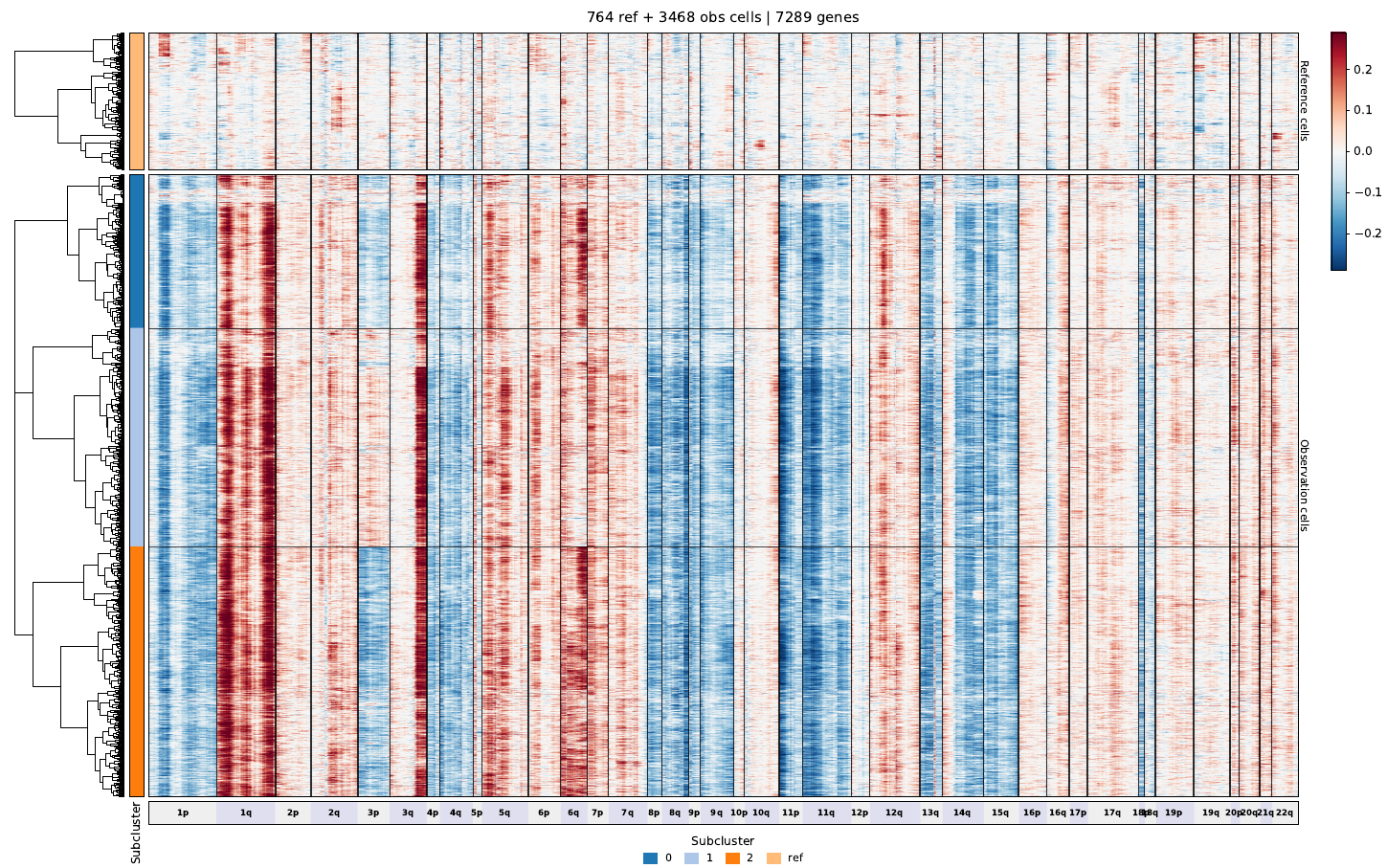
cnv_scores.png: Heatmap plot of the whole CNV scores matrixcnv_scores_by_sample.pdf: Heatmap plots of each sample if provided
if --hmm was specified HMM segmentation outputs will go to a hmm/ directory:
cnv_states.tsv.gz: DataFrame containing 3-states labels matrix by subcluster, cell or sample, depending on--hmm-bycnv_states.png: Heatmap plot with the found HMM statestumor_subclusters.tsv.gz: subcluster labels for the state HMM clustering if--hmm-by=subcluster(default)
2 maintainers


Metadata
2 maintainers
Release files for swiftcnv 0.2.2
For a detailed explanation of source distributions (sdists) and built distributions (wheels), please see the package formats documentation.
Source distribution (sdist)
| File | Size | Uploaded | |
|---|---|---|---|
| swiftcnv-0.2.2.tar.gz | 17.7 MB | Details |
Built distribution (wheel)
| File | Interpreter | ABI | Platform | Reset |
|---|---|---|---|---|
| swiftcnv-0.2.2-py3-none-any.whl | Python 3 | none | any | Details |
Total release size: 35.5 MB
Release files / swiftcnv-0.2.2.tar.gz
| Download URL | swiftcnv-0.2.2.tar.gz |
|---|---|
| Size | 17.7 MB |
| Tags | Source |
|
SHA-256 checksum How to use checksums |
86395754a269358b655cd24978d820d6b9b94eedd0755fac59ea583a643ff908
|
|
BLAKE2b-256 checksum How to use checksums |
012c171dda4fd8cd6e739c359772857ad3ad6f37e2494e6d0f30376b938db867
|
| Upload date | |
|
Uploaded using Trusted Publishing? What is trusted publishing? |
No |
| Uploaded via |
twine/7.0.0 CPython/3.12.0
|
Release files / swiftcnv-0.2.2-py3-none-any.whl
| Download URL | swiftcnv-0.2.2-py3-none-any.whl |
|---|---|
| Size | 17.7 MB |
| Tags | Python 3 |
|
SHA-256 checksum How to use checksums |
dfd6d7bb1186e6042268081ce6c80a1b43d809e75079c6d6d16c462b16116c50
|
|
BLAKE2b-256 checksum How to use checksums |
2432c20aa7ffc09589557ed5ddeddd9ab089bd0476f84ec4c8c69d102daf986b
|
| Upload date | |
|
Uploaded using Trusted Publishing? What is trusted publishing? |
No |
| Uploaded via |
twine/7.0.0 CPython/3.12.0
|














