
swiftdoc
A lightweight and fast documentation tool for Python codebases, powered by Rust.
swiftdoc reads your .py files, never imports or runs them, and writes a static site: one page per module, a searchable index, and three switchable layouts. The theme is built into the binary, so generation works offline.
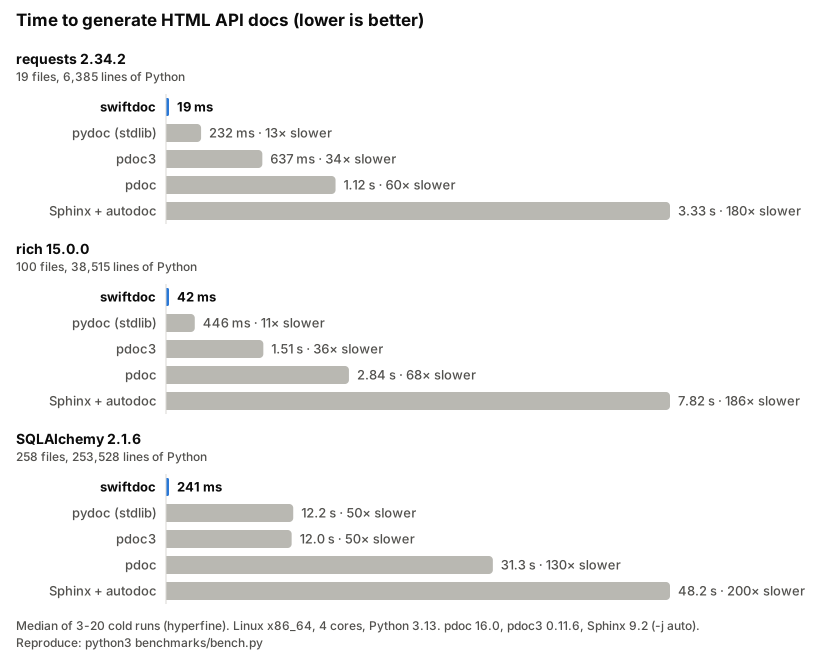
swiftdoc documents all 253,000 lines of SQLAlchemy in about a quarter of a second: 50x faster than pydoc and pdoc3, 130x faster than pdoc, and 200x faster than Sphinx with autodoc. See Benchmarks for how this was measured.
Why swiftdoc
- It never imports or runs your code. It is safe on untrusted or security-sensitive code, and it works where importing fails: missing native or GPU dependencies, heavy import side effects, machines without network access.
- It is fast enough to run on every commit. Checking for broken links and missing docstrings in CI costs less than a second; see Using swiftdoc in CI.
- It fits into existing docs. It reads Google, NumPy and reST docstrings, links to and from Sphinx sites through
objects.inv, and writes JSON and Markdown as well as HTML.
| swiftdoc | pydoc | pdoc | pdoc3 | Sphinx + autodoc | |
|---|---|---|---|---|---|
| Reads code by | parsing | importing | importing | importing | importing |
| SQLAlchemy, HTML (benchmarks) | 0.24 s | 12.2 s | 31.3 s | 12.0 s | 48.2 s |
| Docstrings | Markdown, plus Google, NumPy and reST sections | plain text | Markdown, Google, NumPy, reST | Markdown, Google, NumPy | reST; Google and NumPy with Napoleon |
| Output | HTML, JSON, Markdown | HTML, text | HTML | HTML, Markdown | HTML, PDF, ePub and more |
| Theming | CSS variables, template blocks | none | templates, CSS | templates | themes, extensions |
| Search | yes | no | yes | optional | yes |
| Guides next to the API | Markdown pages | no | no | no | yes |
| Intersphinx | reads and writes | no | no | no | reads and writes |
| Several versions | --version-dir |
no | no | no | with Read the Docs or extensions |
Limits of parsing. swiftdoc documents what is written in the source. It does not see attributes created at runtime, members inherited from classes in other packages, docstrings built by code, or signatures changed by decorators. If your API is mostly generated at runtime, an import-based tool shows more of it.
Guides: Deploying to GitHub Pages · Using swiftdoc in CI · Migrating from Sphinx or pdoc · Template context
Table of Contents
- Why swiftdoc
- Installation
- Usage
- Writing docs
- The generated site
- Restyling with CSS
- Custom templates
- Benchmarks
- Development
- Troubleshooting
Installation
Choose the installation method that fits your environment.
Option A: pip, pipx or uv (Recommended)
From v0.6.1, swiftdoc is on PyPI. The wheels hold the compiled binary, so no Rust toolchain is needed.
pipx install swiftdoc      # or
uv tool install swiftdoc   # or
pip install swiftdoc
To pin it per project, add swiftdoc to your dev dependencies, for example uv add --dev swiftdoc. Wheels are built for Linux (x86_64 and aarch64, glibc and musl), macOS (Intel and Apple silicon) and Windows (x86_64).
Option B: One-Line Script Installer
You do not need Cargo or Rust installed for this. The script downloads the pre-compiled binary for your platform, verifies its SHA-256 checksum when the release publishes one, and installs it.
- macOS / Linux (Bash/Zsh): installs to
/usr/local/bin
curl -fsSL https://raw.githubusercontent.com/kura120/swiftdoc/master/scripts/install.sh | sh
- Windows (PowerShell): installs to
%USERPROFILE%\.cargo\bin
irm https://raw.githubusercontent.com/kura120/swiftdoc/master/scripts/install.ps1 | iex
Option C: Fast Binary Installer (cargo-binstall)
If you have Cargo but want to avoid compile times, install the pre-compiled binary with cargo-binstall. swiftdoc is not published on crates.io, so point it at the repository:
# Install cargo-binstall if you don't have it
cargo install cargo-binstall

cargo binstall --git https://github.com/kura120/swiftdoc swiftdoc
Option D: Build from Source
git clone https://github.com/kura120/swiftdoc.git
cd swiftdoc
cargo install --path .
Usage
Run swiftdoc against a Python project directory or a single .py file:
swiftdoc --src path/to/project --out ./docs --name project-name
Settings can also live in pyproject.toml; see Configuring with pyproject.toml. In a configured project, swiftdoc alone builds the site.
swiftdoc theme eject copies the bundled theme into a folder for customizing; see Starting from the bundled theme.
Run swiftdoc with no arguments in a terminal, in a project without a [tool.swiftdoc] table, to use the interactive setup wizard instead. It is prefilled from pyproject.toml when there is one. In the wizard, Tab moves between fields, the arrow keys browse folders in path fields, and Enter on the last row generates the site.
Options
| Flag | Meaning |
|---|---|
-s, --src <PATH> |
Project directory, or a single .py file. Required unless set in pyproject.toml. |
-o, --out <DIR> |
Where the site (and api.json) is written. Required unless set in pyproject.toml. |
--format <html|json|markdown> |
What to write to --out: the HTML site, api.json, Markdown pages, or any mix. Repeatable. Default html. See JSON output and Markdown output. |
-n, --name <NAME> |
Package name shown in the docs. Defaults to [project] name; required if there is none. |
--doc-version <VERSION> |
Your project's version, shown in the sidebar. Defaults to [project] version, else 1.0.0. |
--layout <classic|minimal|modern> |
Layout the site opens with. Default classic. |
--theme <auto|dark|light|slate> |
Color theme the site opens with. auto (default) follows the reader's system setting. |
-e, --exclude <NAME> |
Skip a file or directory, by name or by path relative to --src. Repeatable. |
--source-url <URL> |
Base URL of a browsable copy of the sources. Turns each symbol's file:line reference into a link. |
--css <FILE> |
Extra stylesheet, linked after the bundled one on every page. Repeatable. See Restyling with CSS. |
--pages <DIR> |
Folder of Markdown pages (guides, tutorials) published next to the API reference. See Markdown pages. |
--intersphinx <NAME=URL> |
Link names from another project's Sphinx docs, such as python=https://docs.python.org/3. Repeatable. See Linking to other projects. |
--version-dir <ROOT> |
Docs for several releases side by side: builds into ROOT/<doc-version>/ with a version switcher. See Several versions. |
-t, --templates <DIR> |
Directory with replacement theme files. See Custom templates. |
--strict |
Exit with an error if a file fails to parse, or a macro, image or doc-link cannot be resolved. Useful in CI. |
--clean |
Remove files that an earlier run wrote to --out and this run no longer produces, such as pages for deleted modules. |
--no-cache |
Ignore the build cache and render every page. See Incremental builds. |
--include-private |
Also document private names and modules. See Public API. |
--docstring-style <STYLE> |
How to read docstring sections: auto, google, numpy, rest or markdown. Default auto. See Docstring sections. |
--coverage |
Print a documentation coverage report. Without --out on the command line, no site is written. See Documentation coverage. |
--fail-under <PERCENT> |
Exit with an error when coverage is below PERCENT (0 to 100). Turns on --coverage. |
--coverage-format <text|json> |
Format of the coverage report. Default text. |
--config <FILE> |
The pyproject.toml to read. By default it is found automatically (see below). |
-V, --version |
Print the swiftdoc version. |
-h, --help |
Print help. |
Changed in this release:
-v/--version <VERSION>used to set the version shown in the docs. That is now--doc-version, and--versionreports the tool's own version.
--strict, --clean, --include-private, --coverage and --no-cache also take =true or =false, so a command line can turn off what pyproject.toml turns on.
Configuring with pyproject.toml
Put any option in a [tool.swiftdoc] table, using the flag's name as the key:
[project]
name = "myproject"
version = "2.1.0"

[tool.swiftdoc]
src = "src/myproject"
out = "docs"
layout = "modern"
theme = "dark"
exclude = ["tests", "_vendor"]
source-url = "https://github.com/me/myproject/blob/main"
strict = true
Then run swiftdoc with no arguments. The name and version come from [project]; set name or doc-version in [tool.swiftdoc] to show something else. If the version is dynamic, swiftdoc shows 1.0.0 and prints a hint; pass --doc-version to set it.
Each setting is taken from the first place that has it:
- the command-line flag;
[tool.swiftdoc];[project](fornameanddoc-versiononly);- the built-in default.
A flag replaces the config value, it does not add to it: --exclude or --css on the command line replaces the whole exclude or css list.
Paths in pyproject.toml (src, out, templates, css) are relative to the directory that holds it. Paths on the command line are relative to the current directory.
swiftdoc looks for pyproject.toml in --src (or the current directory, without --src) and then in each parent directory, stopping at the repository root (the first directory with a .git). --config <FILE> names the file instead.
An unknown key in [tool.swiftdoc] prints a warning naming it. With strict, it is an error.
What is scanned
Every .py file under --src is documented, except:
__main__.pyfiles;- hidden directories (names starting with
., such as.venvand.git); __pycache__,venv,node_modules,site-packages,build,dist,htmlcov,__pypackages__and*.egg-infodirectories;- anything named with
--exclude.
Files with syntax errors are reported and skipped; the rest of the site is still generated.
Public API
By default only the public API is documented, the way pdoc does it:
- If a module defines
__all__, only the names listed there are shown. A listed_nameis shown too.__all__must be a literal list or tuple of strings;+=,.extend(...)and.append(...)with literals are followed. If it is built any other way, it is ignored. - Otherwise, names starting with
_are hidden. Dunder methods such as__init__and__call__are always shown. - A module whose name starts with
_is hidden, and so is everything inside a package whose name starts with_.
Hidden items get no page and do not appear in the navigation or search. A #sd-doc-link to one is reported as a warning instead of being linked. Pass --include-private to document everything.
Documentation coverage
--coverage counts how much of the public API has a docstring:
$ swiftdoc --src src/myproject --coverage
Module               Documented    Cover
----------------------------------------
myproject.cli               1/6    16.7%
myproject.core             9/12    75.0%
myproject                   1/1   100.0%
----------------------------------------
Total                     11/19    57.9%
Modules, classes, functions and methods are counted. Dunder methods (__init__, __repr__, ...) and variables are not: constructor parameters are usually documented in the class docstring, protocol methods rarely need their own, and constants rarely carry docstrings. "Public" follows the Public API rules, so with --include-private everything counts. An item is documented when its docstring is not empty after whitespace is stripped. Doc-only #sd-write pages are not counted, and files that fail to parse are left out (they are reported as usual). Rows are sorted worst first.
--fail-under 80 turns the report on and exits with an error when the total is below 80%:
Error: documentation coverage is 57.89%, below --fail-under 80%
When is the site written? --coverage or --fail-under on the command line without --out there only checks: nothing is written, even when pyproject.toml sets out. Add --out on the command line to build the site too. Set in [tool.swiftdoc] instead (coverage = true, fail-under = 80, coverage-format = "json"), coverage is added to every normal build.
In CI, the check needs no output folder:
- uses: kura120/swiftdoc@master
  with:
    args: --fail-under 80
The action always passes --out, so this also builds the site. To only check, run swiftdoc --src src/myproject --fail-under 80 in a step instead. The pre-commit hook takes the same flags, for example args: [--fail-under=80].
--coverage-format json prints only JSON on stdout (progress goes to stderr), so it can be piped or saved. Shortened to one module:
{
  "schema_version": 1,
  "include_private": false,
  "fail_under": 80.0,
  "passed": false,
  "totals": { "documented": 11, "total": 19, "percent": 57.89 },
  "kinds": {
    "module": { "documented": 3, "total": 3 },
    "class": { "documented": 2, "total": 3 },
    "function": { "documented": 4, "total": 8 },
    "method": { "documented": 2, "total": 5 }
  },
  "modules": [
    {
      "module": "myproject.cli",
      "path": "myproject/cli.py",
      "documented": 1,
      "total": 6,
      "percent": 16.67,
      "undocumented": ["myproject.cli.main", "myproject.cli.Parser"]
    }
  ],
  "undocumented": ["myproject.cli.main", "myproject.cli.Parser", "..."]
}
modules is sorted by module name. module is "" for a root __init__.py, which has no dotted name; its path and its entry in undocumented use the file name. undocumented lists qualified names in source order. Percentages are rounded to two decimals, and percent is 100 when there is nothing to count. schema_version changes only when a field is renamed or removed.
JSON output
--format json writes the parsed API to <out>/api.json, for tools that build on swiftdoc's parser: other site generators, API diffs between releases, linters, search indexes.
swiftdoc --src src/myproject --out build --format json                 # api.json only
swiftdoc --src src/myproject --out build --format html --format json   # site and api.json
With only json, no HTML is written: --out gets api.json, the .swiftdoc-manifest, and the images docstrings refer to (under assets/). --clean removes a site left there by an earlier run. In pyproject.toml, use format = ["html", "json"].
This is separate from a coverage check: --coverage without --out on the command line writes nothing at all, whatever format says.
The file holds the same API the site shows: after the Public API filtering, or everything with --include-private. Every module, class, method, function, variable and attribute has three forms of its docstring:
docstring: exactly as written in the source, so you can render it your own way;docstring_html: as the site renders it, macros included. Its links are relative to the module'spage;summary: the first meaningful line, as plain text.
Functions, classes, variables and section entries have type_links: the names in their annotations (or base classes) that link to their documentation, each with its target page and anchor. Functions and classes also have sections: the parsed docstring sections (params, returns, raises, ...), each entry with its name, type, default, description and description_html. It is null when the docstring has none. When it is set, docstring_html holds only the rest of the docstring, while docstring is still the full text.
Shortened ("...": "..." marks left-out fields):
{
  "schema_version": 1,
  "swiftdoc_version": "0.6.1",
  "package": { "name": "myproject", "version": "2.1.0" },
  "include_private": false,
  "modules": [
    {
      "name": "engine",
      "qualname": "myproject.engine",
      "path": "myproject/engine.py",
      "page": "myproject/engine.html",
      "docstring": "Runs jobs.",
      "docstring_html": "<p>Runs jobs.</p>\n",
      "summary": "Runs jobs.",
      "is_document": false,
      "is_private": false,
      "all": null,
      "classes": [
        { "name": "Engine", "qualname": "myproject.engine.Engine", "line": 8, "bases": [], "...": "...", "methods": [], "variables": [], "classes": [] }
      ],
      "functions": [],
      "variables": [
        { "name": "TIMEOUT", "qualname": "myproject.engine.TIMEOUT", "line": 4, "annotation": "float", "value": "2.5", "...": "..." }
      ]
    }
  ]
}
The full shape is in docs/api.schema.json (JSON Schema 2020-12). A test validates real output against it, so it cannot fall out of date. Modules are sorted by qualname, then path; members keep source order. Nested classes are listed in their parent's classes, with qualified names such as myproject.engine.Engine.Config. The same input always gives a byte-identical file. schema_version changes only when a field is renamed, removed or changes type.
Markdown output
--format markdown writes the API reference as Markdown, to drop into an existing MkDocs or Docusaurus site, a wiki, or an LLM's context:
swiftdoc --src src/myproject --out docs/api --format markdown
It writes one .md page per module at the same path as its HTML page (core/engine.html becomes core/engine.md, a package's __init__.py becomes index.md in its folder), plus:
index.md: the package docstring and a list of every module with its summary;llms.txt: a short index in the llms.txt format, for AI tools;llms-full.txt: every page in one file.
Each page has the module docstring, then Variables, Classes (each with its attributes and methods) and Functions. Every symbol has a python code block with its signature, then its docstring as written (docstrings are Markdown already). The #sd- macros become plain Markdown:
| Macro | Markdown |
|---|---|
#sd-note: text |
> **Note:** text |
#sd-warning: text |
> **Warning:** text |
#sd-doc-link: target |
See reference: [target](../core/engine.md#class.Engine) |
#sd-image: path |
, with the image copied to assets/ |
#sd-code lang |
a fenced lang block |
>>> doctest sessions are fenced as pycon. A doc-link or image that cannot be resolved stays as text, so no link is ever broken.
Each symbol heading is preceded by an HTML anchor with the same id the HTML site uses: class.Engine, method.Engine.run, attr.Engine.speed, fn.boot and var.TIMEOUT. Doc-links point at these, and they work on GitHub, in MkDocs and in Docusaurus without any extension.
With MkDocs, point docs_dir at the output, or write it into a folder of your docs. This config also makes mkdocs build --strict fail on any broken link or anchor:
site_name: myproject
docs_dir: docs/api
validation:
  links:
    not_found: warn
    anchors: warn
Docusaurus 3 reads .md files as MDX by default, and MDX rejects some plain Markdown, such as a { or < in a docstring. Set markdown: { format: 'detect' } in docusaurus.config.js so .md files are read as CommonMark.
The output is deterministic: the same input gives byte-identical files. Pages follow the site's order (#sd-z-index, then name).
Keeping the output folder tidy
Each run records the files it wrote in .swiftdoc-manifest inside --out. --clean deletes files listed there that the current run did not produce, and removes folders left empty. Anything swiftdoc did not write, such as a CNAME file or hand-written pages, is never touched. An output folder from before this feature has no manifest, so its old files are not removed.
Incremental builds
Each run saves a cache in .swiftdoc-cache inside --out, next to .swiftdoc-manifest. The next run only parses files whose content changed and only rewrites pages whose content would change. A run with no changes writes no pages.
- Editing a docstring re-renders that module's page and the index.
- Adding, removing or renaming a module, class or function, or changing a one-line summary, re-renders every page, because every page shows the navigation.
- A page that links to a renamed symbol with
#sd-doc-link, or shows an image that changed, is re-rendered too. - A new swiftdoc version, a changed option, or a changed template or
--cssfile rebuilds everything. With--templates, any change to a module re-renders every page, since a custom template can show any module on any page.
The result is always the same as a full build. --no-cache forces one (and saves a fresh cache). A coverage report needs every file parsed, so --coverage does not read the cache; a coverage-only run (no --out) neither reads nor writes one. --format json and --format markdown are also full builds, since api.json and the Markdown pages are made from the raw docstrings that cached modules no longer keep; with html too, the run still saves a cache for the next HTML build. The cache belongs to the output folder: if you commit --out, add .swiftdoc-cache to your .gitignore.
Live preview
swiftdoc serve --src ./my_project --out ./docs
serve builds the site, serves --out at http://127.0.0.1:8000/ and rebuilds whenever a file under --src, the --templates folder or a --css file changes. Open pages reload once the rebuild is done. Rebuilds are incremental, so a docstring edit usually shows up in well under a second.
- It takes every build option and reads
[tool.swiftdoc]like a normal build. Put the options afterserve:swiftdoc serve --src x, notswiftdoc --src x serve. --port Npicks the port (default 8000). If it is taken, the next free one is used and the actual URL is printed.--port 0picks any free port. Only 127.0.0.1 is bound, so the site is not reachable from other machines.--openopens the site in your browser.- The reload script is added to pages as they are served. Files on disk never contain it, so the folder is the same as a normal build's and safe to publish.
- If a file fails to parse, the error is printed and nothing is rebuilt: the last good site stays up. Fixing the file and saving rebuilds it. Other errors, such as a broken template, are printed the same way, and the server keeps running.
- Hidden files and folders (
.git, editor swap files),__pycache__and the output folder itself are not watched. Changes topyproject.tomlneed a restart. - Ctrl+C stops the server once the build in progress finishes; a second Ctrl+C stops it at once.
Several versions
--version-dir keeps the docs of every release in one folder, with a version switcher in the sidebar:
swiftdoc --src src/myproject --version-dir site --doc-version 1.0.0
swiftdoc --src src/myproject --version-dir site --doc-version 2.0.0
- Each build goes to
site/<version>/instead of--out. site/versions.jsonlists the versions, newest first. The newest that is not a pre-release (rc,beta, ...) is marked latest, andsite/index.htmlredirects to it.- The switcher reads
versions.jsonwhen the page loads, so old builds list newer versions without being rebuilt. It opens the same page in the chosen version, or that version's front page when the page does not exist there. - All links are relative, so the folder works on GitHub Pages or any static host. The switcher needs the site served over HTTP; opened from disk, it shows only the current version.
- Without
--version-dir, the output is unchanged.
Linking to source
swiftdoc --src . --out docs --name myproject \
  --source-url https://github.com/me/myproject/blob/main
Linking from Sphinx
Every HTML build writes objects.inv, a Sphinx inventory of every module, class, function, method and variable. A Sphinx project links to your API with intersphinx:
# conf.py
extensions = ["sphinx.ext.intersphinx"]
intersphinx_mapping = {"myproject": ("https://example.com/docs/", None)}
Names are import paths: when --src is a package folder (it has an __init__.py), they start with its name, as in myproject.engine.Engine. python -m sphinx.ext.intersphinx docs/objects.inv lists them.
Linking to other projects
--intersphinx NAME=URL links names from another project's documentation through its Sphinx inventory (URL/objects.inv). Python's docs, NumPy, Requests and most of the ecosystem publish one.
swiftdoc --src src/myproject --out docs --intersphinx python=https://docs.python.org/3
In pyproject.toml: intersphinx = ["python=https://docs.python.org/3", "numpy=https://numpy.org/doc/stable"].
- Annotations link when the name is written in full (
pathlib.Path) or imported (from pathlib import Path, then-> Path). #sd-doc-link: os.getcwdlinks to the other project's page when no symbol of your own matches.- Inventories are downloaded with
curl(included in Linux, macOS and Windows 10 and later) once and cached in your user cache folder (SWIFTDOC_CACHE_DIRoverrides it), so later builds work offline. A cached copy is refreshed after a week, and kept when the refresh fails. - An inventory that cannot be loaded prints a warning and the build continues. With
--strictthe build fails.
GitHub Actions
The repository is also a GitHub Action. It downloads the release binary for the runner (Linux x86_64 or arm64, macOS Intel or Apple silicon, Windows), checks its SHA-256 checksum, and runs swiftdoc. A missing or wrong checksum fails the step. A full build takes well under a second, so it can run on every push.
This workflow builds the docs and publishes them to GitHub Pages. In the repository settings, set Pages to deploy from GitHub Actions.
name: Docs

on:
  push:
    branches: [main]

permissions:
  contents: read
  pages: write
  id-token: write

jobs:
  build:
    runs-on: ubuntu-latest
    steps:
      - uses: actions/checkout@v4
      - uses: kura120/swiftdoc@master
        with:
          src: src/myproject
          out: site
          name: myproject
          args: --strict --source-url https://github.com/${{ github.repository }}/blob/${{ github.sha }}
          upload-pages-artifact: true

  deploy:
    needs: build
    runs-on: ubuntu-latest
    environment:
      name: github-pages
      url: ${{ steps.deployment.outputs.page_url }}
    steps:
      - id: deployment
        uses: actions/deploy-pages@v4
| Input | Meaning |
|---|---|
version |
Release to install, such as 0.6.1. Default latest. |
install |
release (default) downloads a binary. source builds the action's own checkout with cargo and needs a Rust toolchain on the runner. |
src |
--src. Default ., or src from [tool.swiftdoc] when pyproject.toml configures swiftdoc. |
out |
--out. Default site. |
name |
--name. Defaults to the repository name, or the name from pyproject.toml when it configures swiftdoc. |
args |
Any other flags, passed through. Quotes group words. |
upload-pages-artifact |
true uploads out with actions/upload-pages-artifact. Default false. |
The action's outputs are version (the swiftdoc version installed) and out. Once a release includes the action and the hook, pin its tag instead of master here and in the pre-commit config below.
pre-commit
The hook runs swiftdoc --strict into a temporary directory, so a file that fails to parse, or a doc-link, macro or image that cannot be resolved, fails the commit. It does not install swiftdoc: install it first (see Installation) so swiftdoc is on PATH.
repos:
  - repo: https://github.com/kura120/swiftdoc
    rev: master
    hooks:
      - id: swiftdoc
        args: [--src, src/myproject, --name, myproject]
--src defaults to . and --name to the folder name, unless pyproject.toml has a [tool.swiftdoc] table, in which case both come from it. Any other args are passed to swiftdoc.
Writing docs
Docstrings are rendered as Markdown, including tables, strikethrough and task lists. Python code blocks are syntax-highlighted at build time.
Docstring sections
Google, NumPy and reST sections are shown as lists of parameters, return values and exceptions instead of plain text. The style is detected for each docstring:
def connect(host: str, port: int = 5432) -> Connection:
    """Open a connection.

    Args:
        host: Server to connect to.
        port: Port number.

    Returns:
        An open connection.

    Raises:
        ConnectionError: If the server does not answer.
    """
The same works with NumPy headers (Parameters underlined with dashes) and reST fields (:param host:, :returns:, :raises ConnectionError:).
- Parameter sections:
Args,Arguments,Parameters,Keyword Args,Other Parameters. Types and defaults missing from the docstring are taken from the signature; for a class, from__init__. A parameter the docstring documents but the signature lacks is still shown. Parameters it leaves out are not added. Returns,Yields,RaisesandAttributesare lists too.Example(s),Note(s),Warning(s)andSee Alsoare shown below them. Notes and warnings use the same boxes as#sd-noteand#sd-warning.- Descriptions are Markdown, and macros such as
#sd-doc-linkwork in them when they are on their own line.
A section that does not fit its format, such as an Args: line that is not name: text, is left in the docstring as written. Nothing is ever dropped. A docstring that mixes styles has each style's sections taken out.
--docstring-style google (or numpy, rest) reads only that style. --docstring-style markdown turns sections off, and every docstring renders as plain Markdown. In pyproject.toml, use docstring-style = "numpy".
Variables and attributes
Module variables, type aliases (type X = ...) and class attributes are documented with their annotation and value. Values longer than 80 characters are cut short and end in …. Enum members get an enum badge, and fields of a @dataclass (or attrs class) get a field badge.
Document a variable with a string right after it, or with #: comments above it or at the end of its line:
TIMEOUT: float = 2.5
"""Seconds to wait for a reply."""

#: How often a request is retried.
MAX_RETRIES = 3

DEFAULT_NAME = "anonymous"  #: Used when no name is given.
Class attributes starting with _ are private, dunders included. __slots__, __match_args__, __annotations__, __doc__, __module__ and __all__ are never documented.
Nested and conditional definitions
Classes defined inside a class are shown inside its card, under qualified names such as Outer.Inner. Link to them the same way: #sd-doc-link: engine.Outer.Inner.
Definitions inside if, try and with blocks are documented too, at module and class level. Function bodies and if __name__ == "__main__": blocks are not.
When a name is defined in several branches, such as if sys.version_info >= (3, 11): and else:, or try: and except ImportError:, only the first definition is shown. Definitions in a branch get a conditional badge. Definitions that only exist under if TYPE_CHECKING: get a type-checking badge, and a runtime definition of the same name always wins over them. Several definitions in the same block, such as @overload signatures or a property and its setter, are all kept.
Linked types
Names in annotations and base classes link to their documentation when they are part of the documented code: parameter and return types, variable annotations, base classes, and the types in docstring sections, including types taken from the signature.
from .style import Style
from . import widgets as w

class Console(w.Base):
    def render(self, style: Optional[Style] = None) -> list["w.Button"]: ...
Here w.Base, Style and w.Button link; Optional and list do not. A name links when the module defines it, or when one of the module's imports of the documented code binds it: import pkg.x, import pkg.x as y, from .a import B, from ..pkg import C as D, also inside if TYPE_CHECKING:. Forward references in strings link too; values inside Literal[...] do not.
Everything else, such as builtins, typing and other packages, stays plain text without a warning. The annotation itself is always shown as written. In Markdown output, a Types: line under the signature links the documented names; api.json keeps the annotations as written and lists the links in type_links.
Macros
Put a macro on its own line inside any docstring.
| Macro | Effect |
|---|---|
#sd-note: text |
A highlighted note box. The text may use inline Markdown. |
#sd-warning: text |
A highlighted warning box. The text may use inline Markdown. |
#sd-doc-link: target |
A "See Reference" link to a module, class, function, method, variable or attribute. |
#sd-image: path |
An image. The path is relative to --src and must stay inside it. |
#sd-code |
Starts a Python code block that ends at the next line containing only ```. For another language, name it: #sd-code json. |
#sd-write |
As the first line of a module docstring, in a module with no classes or functions: renders the module as a plain document page. |
#sd-z-index: N |
In a module docstring: sort position in the navigation. Lower numbers come first. |
#sd-doc-link targets are dotted paths. All of these work, as long as they identify exactly one thing:
#sd-doc-link: core.engine                 a module
#sd-doc-link: core.engine.Engine          a class
#sd-doc-link: core.engine.Engine.run      a method
#sd-doc-link: helpers.slugify             a unique trailing path is enough
#sd-doc-link: Engine                      a bare name, if only one module defines it
A target that cannot be found is shown as "(not found)" and reported as a warning. So are a misspelled macro, a missing image and a #sd-code block that is never closed. Macro-looking lines inside an ordinary fenced code block are left as text.
A documentation-only page
"""#sd-write
#sd-z-index: 1
# Getting Started

Welcome to the project.

#sd-note: Requires Python 3.10 or newer.
#sd-doc-link: core.engine.Engine
"""
Markdown pages
--pages docs (or pages = "docs" in [tool.swiftdoc]) publishes every .md file in docs/, including subfolders, as a page in a "Guides" group above the API reference. docs/guide.md becomes docs/guide.html.
---
title: Getting started
order: 1
---
# Getting started

Read [the configuration guide](advanced/config.md#options) next.

#sd-doc-link: core.engine.Engine
- The title comes from
titlein the front matter, else the first#heading, else the file name. - Pages are sorted by
order, or by a number prefix like01_install.md, then by title. - Relative links to other
.mdfiles point to their pages. Macros and doc-links work as in docstrings, and pages are in search. - A top-level
index.mdis not a page: it replaces the root__init__.pydocstring on the landing page. - Images in pages are looked up relative to
--src, like images in docstrings.
Ordering folders
Prefix a folder name with digits and an underscore to control its position. The prefix sets the order and is not shown: 01_getting_started/ appears first, as "getting_started". Folders without a prefix follow, largest first.
A folder's __init__.py docstring becomes the folder's description, and the root __init__.py docstring is shown on the landing page.
The generated site
- Layouts: Classic, Minimal and Modern, switchable from the sidebar. Each has a light and a dark palette; Classic also has Slate.
- Theme: follows the reader's system setting by default. The button at the top of the sidebar flips between light and dark, and the choice is remembered.
- Search: press
/orCtrl+K, type, move with the arrow keys, open with Enter, close with Esc. Search covers names and the first line of each docstring. - Module pages: signatures with defaults and annotations as written, class bases,
property/static/classmethod/abstractbadges, afile:linereference per symbol, and an "On this page" outline on wide screens.
The output is plain static files. Open index.html directly or host the folder anywhere.
Restyling with CSS
To change colors or fonts, keep the bundled theme and add a stylesheet with --css:
/* brand.css */
:root {
    --accent-blue: #2563eb;
    --font-body: "IBM Plex Sans", sans-serif;
}
swiftdoc --src ./myproject --out ./docs --css brand.css
In pyproject.toml: css = ["docs/brand.css"].
Each file is copied to custom/ in the output and linked after style.css on every page, in the order given, so it can also add or override rules. A missing file is an error. --clean removes copies that a later run no longer writes.
A plain :root rule like the one above applies to every layout and color theme; !important is not needed. To set a value for one theme or layout only, use its attribute: :root[data-theme="light"], :root[data-layout="modern"], or both.
The bundled theme reads these properties. The colors are set per layout and per color theme; the rest are set per layout.
| Property | Controls |
|---|---|
--bg-color |
Page background, and the search box, search results and selects |
--sidebar-bg |
Sidebar background |
--text-color |
Body text |
--muted-color |
Secondary text and icons: labels, badges, line references |
--code-bg |
Code blocks, signature boxes, table headers, quotes, callouts |
--accent-blue |
Main accent: links, entity names, the active page, focus rings |
--accent-red |
Keywords in signatures and code, and error callouts |
--border-color |
Borders and dividers |
--card-border |
Module card borders (Modern layout) |
--sidebar-hover |
Hover and active background in the sidebar and search results |
--scrollbar-thumb, --scrollbar-thumb-hover |
Scrollbar color |
--font-body |
Body text and form controls |
--font-heading |
Headings, the sidebar title and labels |
--font-mono |
Code and signatures |
--radius-sm, --radius-md |
Corner rounding of small controls, and of cards and the search panel |
--shadow-card |
Shadow under module cards (Modern) and images |
--card-lift |
How far a module card moves up on hover (Modern) |
--content-max-width |
Maximum width of the main column |
--show-nav-icons |
display of the sidebar's file and folder icons; none hides them |
--nav-icon-color, --nav-icon-size, --nav-icon-stroke, --nav-icon-opacity |
Sidebar icon color, size, line width and opacity |
Custom templates get the copied files' paths as extra_css. The bundled base.html links them in its stylesheets block, so a template that replaces that block, or a whole page, has to link them itself.
Custom templates
--templates <DIR> replaces parts of the bundled theme. Any of these files found in the directory is used instead of the built-in one; the rest fall back to the bundled theme:
base.html index.html module.html document.html sidebar.html style.css app.js
The HTML files are Tera templates. docs/templates.md lists every variable they can use. context_version is bumped when one of them is renamed, removed or changes type.
Starting from the bundled theme
swiftdoc theme eject writes the theme built into your swiftdoc binary to a folder, as a starting point:
swiftdoc theme eject              # writes ./swiftdoc-theme
swiftdoc theme eject my-theme     # or another folder
swiftdoc --src ./myproject --out ./docs --templates swiftdoc-theme
The files are exact copies, so the folder renders the default site until you change it. It also gets a short README.md about blocks, --css and extra_css. If any of the files already exists, nothing is written and the existing ones are listed; --force overwrites them.
Delete the files you don't change. They fall back to the bundled theme, so later swiftdoc releases can still fix them.
Overriding one block
You do not have to copy a whole page to change part of it. The bundled templates are also available under the swiftdoc/ prefix, so a custom template can extend the one it replaces and override only the blocks it changes. Everything else keeps the bundled default.
This module.html gives every module page a new header and leaves the rest of the page alone:
{% extends "swiftdoc/module.html" %}

{% block header %}
<h1 class="module-title">{{ display_module_name }} <small>{{ package.name }} {{ version }}</small></h1>
{% endblock header %}
Use {{ super() }} inside a block to keep the bundled content and add to it:
{% block scripts %}{{ super() }}<script src="{{ root_path }}extra.js" defer></script>{% endblock scripts %}
index.html, module.html and document.html all extend base.html, which holds the page skeleton. Its blocks are:
| Block | Holds |
|---|---|
head |
Everything inside <head>, including the blocks below it |
title |
The text of <title> |
description |
The content of the description <meta> tag |
stylesheets |
The style.css link |
body_attributes |
Extra attributes on <body> |
sidebar |
The sidebar.html include and the resize handle |
header |
The top of the page: breadcrumb and title |
content |
The page body |
outline |
The "On this page" panel (module pages only) |
footer |
Empty by default; shown after the page body |
scripts |
The script tags at the end of <body> |
module.html also splits content into module_docstring, classes and functions.
A custom base.html that extends swiftdoc/base.html changes every page at once, for example to add a footer to the whole site.
Any other *.html file in the directory, including ones in subfolders, can be included or extended by name: {% include "partials/footer.html" %}. Whole-file replacements still work: a template that does not use extends is rendered as it is.
Benchmarks
Each tool generated HTML API docs for three packages from PyPI. Every run started from an empty output folder, and the figure is the median of 3 to 20 runs measured with hyperfine on a 4-core Linux machine.
| Package | Size | swiftdoc | pydoc | pdoc3 | pdoc | Sphinx + autodoc |
|---|---|---|---|---|---|---|
| requests 2.34.2 | 19 files, 6.4k lines | 19 ms | 232 ms | 637 ms | 1.12 s | 3.33 s |
| rich 15.0.0 | 100 files, 38.5k lines | 42 ms | 446 ms | 1.51 s | 2.84 s | 7.82 s |
| SQLAlchemy 2.1.6 | 258 files, 254k lines | 241 ms | 12.2 s | 12.0 s | 31.3 s | 48.2 s |
| SQLAlchemy, peak memory | 130 MB | 146 MB | 133 MB | 1,077 MB | 524 MB |
These are cold builds with swiftdoc's defaults: public API only, with module variables, nested classes, structured docstring sections and linked types all included, and no build cache (each run starts from an empty folder). A rebuild that reuses the cache is faster still; see Incremental builds.
Why the gap is so large. pydoc, pdoc, pdoc3 and Sphinx's autodoc all import your package and inspect the live objects, so they pay for Python startup, every import side effect and runtime introspection. swiftdoc parses the source with Ruff's Rust parser instead and renders pages in parallel on every core.
What that trade-off costs. Import-based tools see things a parser cannot, such as attributes created at runtime, members inherited from other packages, and docstrings assigned with __doc__ = .... Because swiftdoc never imports, it also works without your dependencies installed and never runs your code.
Fairness. Every tool used the same Python and the same package versions. Sphinx ran with -j auto, so it used all cores the same way swiftdoc does. Import-based tools were given only modules that import cleanly on the test machine; swiftdoc parsed every file, so it did slightly more work.
To reproduce, run cargo build --release && python3 benchmarks/bench.py, then python3 benchmarks/make_chart.py to redraw the chart. Raw numbers are in benchmarks/results.json.
Development
cargo test                                   # unit tests and end-to-end tests against tests/fixtures
cargo clippy --all-targets -- -D warnings
cargo fmt --check
The generated site is checked for WCAG 2.2 AA with axe-core and for keyboard use, in a real browser. CI runs the same checks:
swiftdoc --config /dev/null --src tests/fixtures/sample --out /tmp/sample-site --name demo
swiftdoc --config /dev/null --src tests/fixtures/variables --out /tmp/variables-site --name variables
swiftdoc --config /dev/null --src tests/fixtures/nested --out /tmp/nested-site --name nested
swiftdoc --config /dev/null --src tests/fixtures/docstrings --out /tmp/docstrings-site --name docstrings
cd tests/a11y && npm ci && npx playwright install chromium
node audit.js /tmp/sample-site /tmp/variables-site /tmp/nested-site /tmp/docstrings-site   # every layout x light, dark and slate; --quick for light and dark
node keyboard.js /tmp/sample-site                    # search, nav tree, theme and layout controls
node structure.js /tmp/sample-site /tmp/variables-site /tmp/nested-site /tmp/docstrings-site   # landmarks and heading levels
Release builds are made with scripts/build.sh [TARGET] or scripts/build.ps1 [-Target TARGET]. Pushing a v* tag that matches the version in Cargo.toml builds and publishes binaries with SHA-256 checksums, and publishes the swiftdoc wheels and sdist to PyPI through trusted publishing. Each wheel is installed and run on its own platform first. The Packaging workflow builds and tests the Linux wheel on pull requests that touch packaging files.
UPX compression is available with --upx / -Upx for local builds. Published binaries are not packed: the download is already compressed, and packed executables are unsupported on macOS and often flagged by antivirus tools on Windows.
Troubleshooting
'swiftdoc' is not recognized as a command
If you chose Option D (or your script path environment variable is missing), your shell cannot locate the executable. You must add Cargo's binary directory to your PATH.
- Windows (PowerShell):
[Environment]::SetEnvironmentVariable("Path", "$env:Path;$env:USERPROFILE\.cargo\bin", "User")
- macOS / Linux:
echo 'export PATH="$HOME/.cargo/bin:$PATH"' >> ~/.zshrc
source ~/.zshrc
Dependency Conflicts during Local Compilation
If you see a compiler error stating the trait bound 'CompactString: GetSize' is not satisfied during source installations, run:
cargo clean
cargo install --path .
This forces Cargo to respect the exact version constraint specified in the manifest.
1 maintainer

Metadata
1 maintainer
Release files for swiftdoc 0.6.1
For a detailed explanation of source distributions (sdists) and built distributions (wheels), please see the package formats documentation.
Source distribution (sdist)
| File | Size | Uploaded | Provenance | Actions |
|---|---|---|---|---|
| swiftdoc-0.6.1.tar.gz | 284.9 kB | With provenance | Details for swiftdoc-0.6.1.tar.gz |
Built distributions (wheels)
Total release size: 20.5 MB
Release files / swiftdoc-0.6.1.tar.gz
| Download URL | swiftdoc-0.6.1.tar.gz |
|---|---|
| Size | 284.9 kB |
| Tags | Source |
|
SHA-256 checksum How to use checksums |
1bbeea939ffa42240a3aefd997cb8869f8ace90f4b644b8e1ca62613945931e4
|
|
BLAKE2b-256 checksum How to use checksums |
08750f2e18dedce3624e6fe23b24986562a941682b9c8fb04a35ef36436163f1
|
| Upload date | |
|
Uploaded using Trusted Publishing? What is trusted publishing? |
Yes |
| Uploaded via |
twine/7.0.0 CPython/3.13.16
|
Provenance
Provenance describes where a file came from. On PyPI, provenance is shared via attestations, which provide a verifiable record of the build or publishing details. View details, limitations and caveats.


PyPI Publish Attestation
PyPI verified that this artifact, at this checksum, originated from the publisher listed below.
Signed by GitHub Actions, verified by PyPI on Nov 9, 2026.
Transparency logRelease files / swiftdoc-0.6.1-py3-none-win_amd64.whl
| Download URL | swiftdoc-0.6.1-py3-none-win_amd64.whl |
|---|---|
| Size | 2.8 MB |
| Tags | Python 3 Windows x86-64 |
|
SHA-256 checksum How to use checksums |
538f33202000d155626b6da56ab1750350a9d76f8c6433221be4e07d9483d534
|
|
BLAKE2b-256 checksum How to use checksums |
91a07b0bba0851692e74b646185dc5609e0f3307dd3c56c5cdf7df8deb2f6bfa
|
| Upload date | |
|
Uploaded using Trusted Publishing? What is trusted publishing? |
Yes |
| Uploaded via |
twine/7.0.0 CPython/3.13.16
|
Provenance
Provenance describes where a file came from. On PyPI, provenance is shared via attestations, which provide a verifiable record of the build or publishing details. View details, limitations and caveats.
PyPI Publish Attestation
PyPI verified that this artifact, at this checksum, originated from the publisher listed below.
Signed by GitHub Actions, verified by PyPI on Nov 9, 2026.
Transparency logRelease files / swiftdoc-0.6.1-py3-none-musllinux_1_2_x86_64.whl
| Download URL | swiftdoc-0.6.1-py3-none-musllinux_1_2_x86_64.whl |
|---|---|
| Size | 3.1 MB |
| Tags | Linux musl 1.2+ x86-64 Python 3 |
|
SHA-256 checksum How to use checksums |
51936e0c6eb07377f21051756680e9cc630a2d9d0535486393d08019819fab2d
|
|
BLAKE2b-256 checksum How to use checksums |
7a3fdb196f7b1b5337f27680ce3e2e31e99d059340be8c8f0d9bde819c3952cb
|
| Upload date | |
|
Uploaded using Trusted Publishing? What is trusted publishing? |
Yes |
| Uploaded via |
twine/7.0.0 CPython/3.13.16
|
Provenance
Provenance describes where a file came from. On PyPI, provenance is shared via attestations, which provide a verifiable record of the build or publishing details. View details, limitations and caveats.
PyPI Publish Attestation
PyPI verified that this artifact, at this checksum, originated from the publisher listed below.
Signed by GitHub Actions, verified by PyPI on Nov 9, 2026.
Transparency logRelease files / swiftdoc-0.6.1-py3-none-musllinux_1_2_aarch64.whl
| Download URL | swiftdoc-0.6.1-py3-none-musllinux_1_2_aarch64.whl |
|---|---|
| Size | 2.9 MB |
| Tags | Linux musl 1.2+ ARM64 Python 3 |
|
SHA-256 checksum How to use checksums |
f97e70cf856f72621f35b26ed0661f5616e77bb279640174db1e8a74a6221e39
|
|
BLAKE2b-256 checksum How to use checksums |
dffb0d2aa2446935cd6282df92a1e477e78f37926d664bc604c68ea5561cf771
|
| Upload date | |
|
Uploaded using Trusted Publishing? What is trusted publishing? |
Yes |
| Uploaded via |
twine/7.0.0 CPython/3.13.16
|
Provenance
Provenance describes where a file came from. On PyPI, provenance is shared via attestations, which provide a verifiable record of the build or publishing details. View details, limitations and caveats.
PyPI Publish Attestation
PyPI verified that this artifact, at this checksum, originated from the publisher listed below.
Signed by GitHub Actions, verified by PyPI on Nov 9, 2026.
Transparency logRelease files / swiftdoc-0.6.1-py3-none-manylinux2014_x86_64.manylinux_2_17_x86_64.whl
| Download URL | swiftdoc-0.6.1-py3-none-manylinux2014_x86_64.manylinux_2_17_x86_64.whl |
|---|---|
| Size | 3.0 MB |
| Tags | Linux glibc 2.17+ x86-64 Python 3 |
|
SHA-256 checksum How to use checksums |
e1796176ef9b4ceb6cac8f377e518c1f7b68daf0413ba4e7d5a0ee31e18b368c
|
|
BLAKE2b-256 checksum How to use checksums |
197212e3a221779abefa275b91f36af0519b8751afee8e27c3ffbcfcbdad310c
|
| Upload date | |
|
Uploaded using Trusted Publishing? What is trusted publishing? |
Yes |
| Uploaded via |
twine/7.0.0 CPython/3.13.16
|
Provenance
Provenance describes where a file came from. On PyPI, provenance is shared via attestations, which provide a verifiable record of the build or publishing details. View details, limitations and caveats.
PyPI Publish Attestation
PyPI verified that this artifact, at this checksum, originated from the publisher listed below.
Signed by GitHub Actions, verified by PyPI on Nov 9, 2026.
Transparency logRelease files / swiftdoc-0.6.1-py3-none-manylinux2014_aarch64.manylinux_2_17_aarch64.whl
| Download URL | swiftdoc-0.6.1-py3-none-manylinux2014_aarch64.manylinux_2_17_aarch64.whl |
|---|---|
| Size | 2.9 MB |
| Tags | Linux glibc 2.17+ ARM64 Python 3 |
|
SHA-256 checksum How to use checksums |
3dda59304c3def7dee1dc14185a44729065d2155012496237399856ebc34b424
|
|
BLAKE2b-256 checksum How to use checksums |
164cb8d04b7e0fcddccb680ef176241e733f076fe7c6f1e08e53adc6585d2414
|
| Upload date | |
|
Uploaded using Trusted Publishing? What is trusted publishing? |
Yes |
| Uploaded via |
twine/7.0.0 CPython/3.13.16
|
Provenance
Provenance describes where a file came from. On PyPI, provenance is shared via attestations, which provide a verifiable record of the build or publishing details. View details, limitations and caveats.
PyPI Publish Attestation
PyPI verified that this artifact, at this checksum, originated from the publisher listed below.
Signed by GitHub Actions, verified by PyPI on Nov 9, 2026.
Transparency logRelease files / swiftdoc-0.6.1-py3-none-macosx_11_0_arm64.whl
| Download URL | swiftdoc-0.6.1-py3-none-macosx_11_0_arm64.whl |
|---|---|
| Size | 2.7 MB |
| Tags | Python 3 macOS 11.0+ ARM64 |
|
SHA-256 checksum How to use checksums |
8d2daa9b9539761a8d7778fb4201d0bfa964ebaa839905c9f02efeb1a82df058
|
|
BLAKE2b-256 checksum How to use checksums |
dae2215c7e38afd0ee01d17dedbe5d2df3fa55600b2986a268b7578bcdec5b2b
|
| Upload date | |
|
Uploaded using Trusted Publishing? What is trusted publishing? |
Yes |
| Uploaded via |
twine/7.0.0 CPython/3.13.16
|
Provenance
Provenance describes where a file came from. On PyPI, provenance is shared via attestations, which provide a verifiable record of the build or publishing details. View details, limitations and caveats.
PyPI Publish Attestation
PyPI verified that this artifact, at this checksum, originated from the publisher listed below.
Signed by GitHub Actions, verified by PyPI on Nov 9, 2026.
Transparency logRelease files / swiftdoc-0.6.1-py3-none-macosx_10_12_x86_64.whl
| Download URL | swiftdoc-0.6.1-py3-none-macosx_10_12_x86_64.whl |
|---|---|
| Size | 2.9 MB |
| Tags | Python 3 macOS 10.12+ x86-64 |
|
SHA-256 checksum How to use checksums |
26b64b37fbaa113245161591c704b2e42add7ec9a9ad9879f479791e814699e2
|
|
BLAKE2b-256 checksum How to use checksums |
6682d26bfc42eaf6d4847f33655c5fbd6f216f7e9722b99095b9d041d69e3d65
|
| Upload date | |
|
Uploaded using Trusted Publishing? What is trusted publishing? |
Yes |
| Uploaded via |
twine/7.0.0 CPython/3.13.16
|
Provenance
Provenance describes where a file came from. On PyPI, provenance is shared via attestations, which provide a verifiable record of the build or publishing details. View details, limitations and caveats.
PyPI Publish Attestation
PyPI verified that this artifact, at this checksum, originated from the publisher listed below.
Signed by GitHub Actions, verified by PyPI on Nov 9, 2026.
Transparency logSecurity for swiftdoc 0.6.1
Provenance
Provenance describes where a file came from. On PyPI, provenance is shared via attestations, which provide a verifiable record of the build or publishing details. View details, limitations and caveats.
Full provenance
All 8 files in this release have been uploaded with provenance metadata.
Attestation for swiftdoc-0.6.1.tar.gz
PyPI Publish Attestation
PyPI verified that this artifact, at this checksum, originated from the publisher listed below.
Signed by GitHub Actions, verified by PyPI on Nov 9, 2026.
Transparency logA note on package security
PyPI is a repository for distributing packages, not a service for auditing them. While third-party security researchers and our staff do their best to detect and remove malicious packages, PyPI cannot guarantee the quality, security or suitability of any given package.
To learn more about protecting yourself from malicious actors, visit our package security documentation.













