

Swiss AI-Hub
The open-source AI infrastructure stack for Swiss enterprises.
Connect, orchestrate, and monitor best-in-class open-source tools to deliver
what cloud AI platforms promise, but where you own every layer.





Why this exists
Over the past years we have met dozens of Swiss companies building remarkably similar stacks: a vector database here, an ingestion pipeline there, an LLM gateway, some kind of chat UI. Small teams doing impressive work, and consistently underestimating the day-two problems. Authentication across services. Cost tracking per department. PII filtering before data crosses a border. Observability that connects a user's question to the exact document chunk that answered it. Secret rotation. Upgrading 30 interdependent containers without downtime. The prototype is 10 % of the work; running it in production, securely, at scale, is the other 90 %.
A Swiss KMU with 100 employees should not be building and maintaining its own AI infrastructure, just as it would not write its own database or email server.
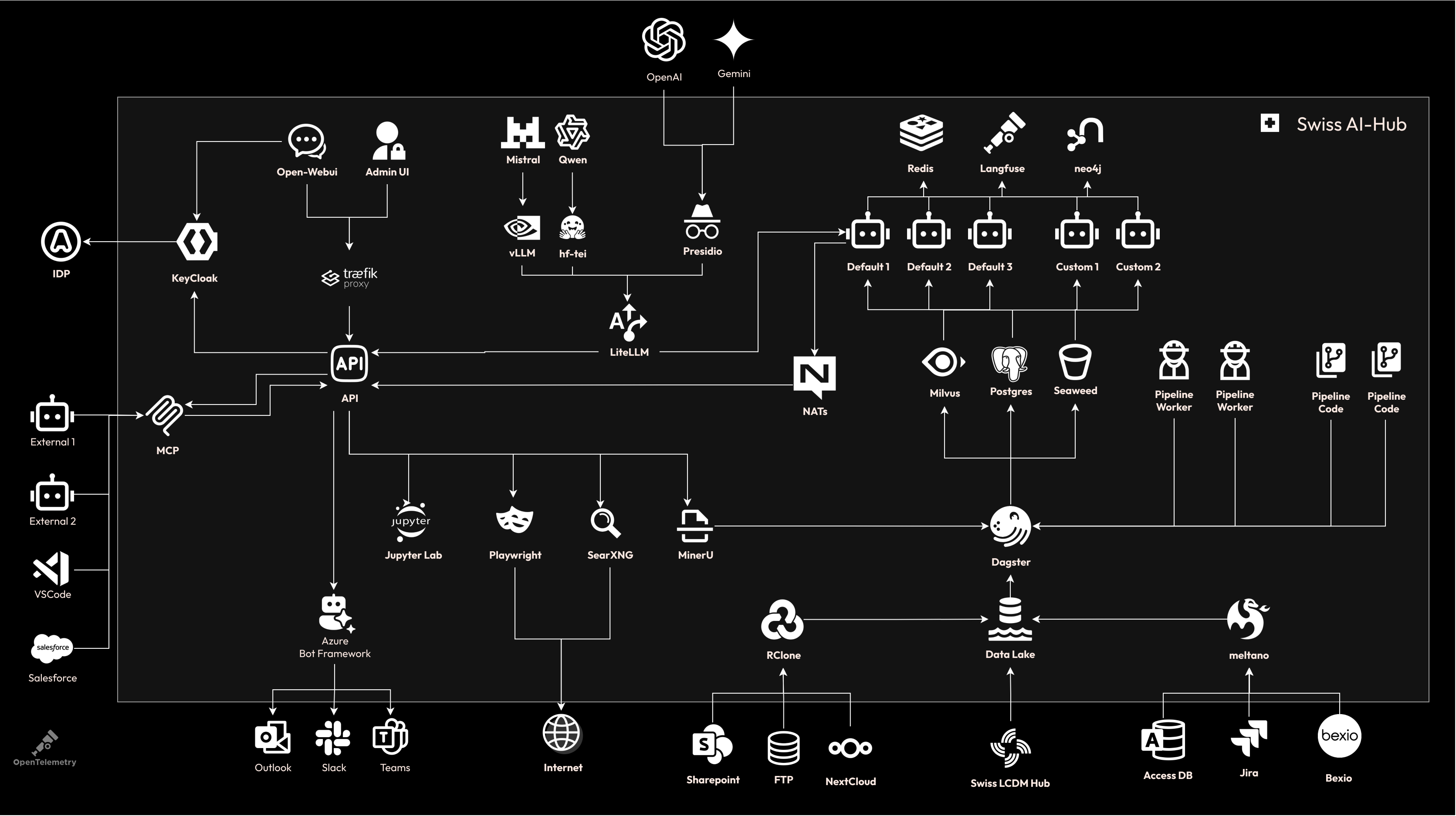
Our thesis: the best AI platform is one you do not build from scratch. Open-WebUI ships a better chat interface than we could build, and it improves every week. Milvus handles vector search at scale. Dagster solved pipeline orchestration and data lineage. Rclone connects 70+ cloud storage providers. Keycloak handles every SSO scenario. LiteLLM unifies every LLM provider behind one API. Langfuse gives observability that most platforms charge a premium for. When these projects ship new features, you get them. No vendor approval, no license upgrade.
Our job is to make them work together. We wire these tools into an opinionated, production-ready stack (integrated auth, unified observability, secure networking, cost tracking, and a shared event protocol) then give you SDKs to extend it, because every out-of-the-box platform eventually limits you.
Where competition belongs: your domain expertise, your specialized agents, your proprietary data. Not authentication systems or vector databases. The platform handles the commodity layer so you can focus on what differentiates you.
Quick start
curl -fsSL https://raw.githubusercontent.com/bbvch-ai/aihub-core/main/install.sh | bash
cd swiss-ai-hub
# Edit .env: set DOMAIN, OAuth credentials, and LLM provider keys
docker compose up -d
The installer downloads the latest release, auto-detects GPU hardware, extracts the bundle, and generates all secrets. On a GPU machine this starts ~35 containers including local inference (vLLM, Whisper, MinerU). Without a GPU it routes inference to Swiss LLM Cloud or any OpenAI-compatible endpoint.
What you get
Infrastructure stack
One docker compose up starts ~30 containers, fully integrated. Every component below is included, configured, and
wired together.
LLM gateway & inference
| Component | Powered by | Role |
|---|---|---|
| LLM proxy | LiteLLM | Unified OpenAI-compatible gateway routing to any provider (local vLLM, Swiss LLM Cloud, Azure OpenAI) with per-user/team/model cost tracking |
| Local inference (chat, embeddings, reranking) | vLLM | High-throughput OpenAI-compatible server running chat, embedding, and reranker models on GPU. No data leaves the network |
| Speech-to-text & text-to-speech | Speaches | OpenAI-compatible audio server (Faster Whisper STT, Piper/Kokoro TTS) enabling voice I/O without cloud APIs |
Agent memory
| Component | Powered by | Role |
|---|---|---|
| Long-term memory | Mem0 + Neo4j | Extracts and retrieves facts across sessions; Neo4j graph backend captures entity relationships (people, projects, concepts) |
Document processing
| Component | Powered by | Role |
|---|---|---|
| PDF & image parsing | MinerU | Converts complex PDFs into clean markdown: tables, formulas, multi-column layouts, OCR in 109 languages |
| Office document parsing | MarkItDown | Converts DOCX, PPTX, XLSX, and Outlook messages into markdown with embedded image extraction |
Data pipelines
| Component | Powered by | Role |
|---|---|---|
| Pipeline orchestration | Dagster | Asset-based orchestration with scheduling, lineage from source document to vector embedding, and monitoring UI |
| Cloud storage sync | Rclone | Pulls documents from 70+ backends (SharePoint, OneDrive, Google Drive, S3, Azure Blob, SFTP, Dropbox) into the pipeline |
Vector & semantic search
| Component | Powered by | Role |
|---|---|---|
| Vector database | Milvus + Attu | Stores embeddings, serves low-latency ANN queries for RAG; Attu provides a web UI for inspection and debugging |
Databases & storage
| Component | Powered by | Role |
|---|---|---|
| Relational database | PostgreSQL + pgvector | Four instances (OpenWebUI, Langfuse, Dagster, LiteLLM) with vector extension for hybrid relational + similarity queries |
| Document database | FerretDB | MongoDB-compatible API over PostgreSQL. Stores conversations, agent configs, and app data without a separate Mongo deployment |
| Object storage | SeaweedFS | S3-compatible distributed filesystem for documents, pipeline artifacts, and parsed outputs |
| Metadata consensus | etcd | Distributed KV store backing Milvus collection metadata and SeaweedFS filer metadata |
Caching & messaging
| Component | Powered by | Role |
|---|---|---|
| Message broker | NATS | Central event bus with JetStream persistence for agent workflow events, process orchestration, discovery, and real-time streaming |
| Ephemeral cache | Valkey | Redis-compatible in-memory store for transient agent state and workflow step tracking |
Observability & tracing
| Component | Powered by | Role |
|---|---|---|
| AI observability | Langfuse + ClickHouse | Full prompt/response capture, per-trace cost tracking, RAG analysis, evaluation datasets; ClickHouse powers sub-second analytics |
| Distributed tracing | OpenTelemetry + Collector | Propagates trace context across all services; forwards traces to Langfuse and optionally to external backends |
Security & networking
| Component | Powered by | Role |
|---|---|---|
| SSO & identity | Keycloak / any OIDC provider | Single sign-on via OpenID Connect supporting Azure AD, Google, Okta, or any compliant IdP |
| PII detection & anonymization | Presidio | Scans and redacts PII (emails, phone numbers, passports, credit cards) before text reaches external providers |
| Reverse proxy | Traefik | TLS termination, automatic Let's Encrypt, route prioritization, security headers |
| Connection pooling | PgBouncer | Multiplexes PostgreSQL connections across all services to prevent connection exhaustion |
Integrations & utilities
| Component | Powered by | Role |
|---|---|---|
| MS Teams & Slack bots | Microsoft Agents SDK | Connects agents to Teams, Slack, and web chat channels |
| Code execution sandbox | Open Terminal | Sandboxed Python runtime for OpenWebUI code execution (plain LLM models); per-user isolation, downloadable file output |
| Browser automation | Playwright | Headless browser for agent web search and page parsing |
| Docker socket proxy | Tecnativa | Read-only Docker API access for Traefik, preventing container escape |
SDKs
Every turnkey platform eventually limits you. Swiss AI-Hub ships SDKs so you are never blocked:
| SDK | Purpose |
|---|---|
| Agent SDK | Build custom agents with decorated workflow steps, dependency injection, and automatic platform integration (streaming, tracing, auth, cost tracking) |
| Pipeline SDK | Create Dagster data pipelines with source templates for any Rclone-supported provider |
| Process SDK | Orchestrate multi-step workflows across agents, humans, and external systems |
Your code inherits SSO, observability, the chat UI, admin dashboards, cost tracking, and the event protocol. No REST endpoints to build, no WebSocket plumbing, no auth logic to write.
Platform tour
Five demos showing the platform end-to-end: from ingesting documents to chatting with an agent to controlling costs.
Each runs out of the box after docker compose up.

Upload documents to the knowledge base
Drag files into the admin UI. The platform parses, chunks, embeds, and indexes them automatically. Supports PDF, DOCX, PPTX, XLSX, and plain text. For production, connect SharePoint, OneDrive, Google Drive, or any of 70+ providers via Rclone for continuous sync.

Track every step of the data pipeline
Dagster provides full lineage from source document to vector embedding: which files were processed, how they were chunked, when embeddings were created, what ended up in Milvus. Automatic retry and failure handling included.

Create agents without writing code
Developers publish agent blueprints (workflow logic, form schema, default config). Administrators create agent profiles through a no-code configurator: pick a blueprint, fill in the form (knowledge base, model, temperature, system prompt), and the agent goes live. One blueprint powers many profiles. An "Expert RAG Agent" blueprint becomes your HR policy agent, legal FAQ agent, and IT support agent, each with different knowledge bases and instructions.
Ask questions grounded in your data
Agents retrieve relevant documents, generate answers with full source attribution, and stream responses in real-time. Every interaction is traced end-to-end in Langfuse, from the user's question through retrieval, reranking, and generation.


Control costs and model routing
LiteLLM provides a unified dashboard for all LLM usage. Set spending limits per user, team, or model. Route requests between local and cloud models. Monitor token consumption, latency, and cost per request from a single pane.
Build with the SDK
You write an agent class, start it, and the platform does the rest. On startup the agent connects to NATS, registers itself with the API, and becomes discoverable: it appears in the chat UI for users, gets a configuration form in the admin panel for administrators, and receives full distributed tracing in Langfuse. No REST endpoints to build, no WebSocket plumbing, no service discovery to configure.
Because agents communicate through the Swiss AI Agent Protocol, every typed event you emit (retrieval results, guard
decisions, LLM chunks) is rendered as a live, rich update in the chat UI. Users see exactly what the agent is doing:
which documents were retrieved, whether context was sufficient, how confident the answer is. And when your workflow
requires human judgment, BotInTheLoop sends the question to a Teams or Slack channel and pauses the agent until the
expert responds — native human-in-the-loop without building a single integration.
pip install swiss-ai-hub-agent    # Agent development
pip install swiss-ai-hub-pipeline # Data pipelines (Dagster)
pip install swiss-ai-hub-process  # Process orchestration
Agents
An agent is a stateless, event-driven workflow. Each @step declares what it consumes and produces. The runtime handles
dispatch, dependency injection, state persistence, and horizontal scaling. Steps communicate through typed events, not
function calls.
This agent retrieves documents from the knowledge base, answers with an LLM when context is found, and escalates to a human expert via Teams or Slack when it is not, pausing the workflow until the expert responds:
from swiss_ai_hub.agent import Agent, AgentRunner, step
from swiss_ai_hub.core.agents import AgentConfig
from swiss_ai_hub.core.events.agent import (
    UserMessageEvent, LLMStopEvent, StopEvent, RetrieverEvent,
    ContextSufficientAcceptEvent, ContextInsufficientRejectEvent, BotInTheLoop,
)
from swiss_ai_hub.core.displayers import EventDisplayer
from swiss_ai_hub.core.generative_ai.retrievers.knowledge_retriever import KnowledgeRetriever
from swiss_ai_hub.core.i18n import LocaleString, LocaleHandler
from llama_index.core.base.llms.types import ChatMessage

class ExpertQAAgent(Agent):
    name = LocaleString(en="Expert QA")
    description = LocaleString(en="Answers from documents or escalates to a human expert")
    icon = "mage:user-check"

    # Step 1: triggered when a user sends a message
    # config, t, and other dependencies are injected automatically — just declare what you need
    @step()
    async def retrieve(self, event: UserMessageEvent, config: AgentConfig, t: LocaleHandler) -> RetrieverEvent:
        retriever = KnowledgeRetriever(config.retriever)  # connect to the Milvus vector store
        nodes = await retriever.retrieve(query=event.user_query, t=t)  # semantic search
        return RetrieverEvent(nodes=nodes)  # pass retrieved documents to the next step

    # Step 2: emit a guard event — the runtime routes each type to a different step
    @step()
    async def check_context(self, event: RetrieverEvent) -> ContextSufficientAcceptEvent | ContextInsufficientRejectEvent:
        if event.nodes:
            return ContextSufficientAcceptEvent()  # documents found → routes to respond()
        return ContextInsufficientRejectEvent()  # no documents → routes to escalate()

    # Step 3a: only triggered by ContextSufficientAcceptEvent
    # the runtime also injects RetrieverEvent and UserMessageEvent from earlier in the run
    @step()
    async def respond(
        self, _: ContextSufficientAcceptEvent, retrieval: RetrieverEvent, start: UserMessageEvent,
        config: AgentConfig, displayer: EventDisplayer,
    ) -> LLMStopEvent:
        context = "\n\n".join(node.content for node in retrieval.nodes)  # build context from documents
        messages = [ChatMessage(role="system", content=f"Answer based on:\n{context}"), *start.messages]
        async with config.llm.cost_reporting_llm(displayer) as llm:  # tracks token usage and cost
            return await displayer.display_llm_stream(config.llm, llm, messages, as_stop_step=True)  # stream to chat UI

    # Step 3b: only triggered by ContextInsufficientRejectEvent — sends question to a Teams/Slack channel
    # BotInTheLoop pauses the workflow until the expert responds
    @step()
    async def escalate(
        self, _: ContextInsufficientRejectEvent, start: UserMessageEvent, config: AgentConfig,
    ) -> BotInTheLoop.request:
        return BotInTheLoop.invoke(question=start.user_query, user=start.user, channel_config=config.channel)

    # Step 4: the dispatcher resumes here when the expert replies in Teams/Slack
    @step()
    async def relay_expert(self, event: BotInTheLoop.response, displayer: EventDisplayer) -> StopEvent:
        await displayer.display_chunk(f"{event.responder.user_name}: {event.response}", model_name="human-expert")
        return StopEvent()  # workflow complete

# One line to start — connects to NATS, registers with the platform, and listens for events
runner = AgentRunner(agent_type=ExpertQAAgent, agent_config=AgentConfig.as_form())
await runner.run_forever()
On startup the agent registers itself: it appears in the chat UI, gets a configuration form in the admin panel, and
receives full distributed tracing through Langfuse. The runtime routes ContextSufficientAcceptEvent to respond and
ContextInsufficientRejectEvent to escalate; steps never call each other. BotInTheLoop sends the question to a
configured Teams or Slack expert channel and pauses the workflow; when the expert responds, the dispatcher resumes at
relay_expert.
Data pipelines
Pipelines use a two-stage architecture: Stage 1 pulls files from external sources into the S3 data lake, Stage 2 processes them through MinerU parsing, chunking, embedding, and Milvus vector storage. Both stages are Dagster pipelines — observable assets detect changes, dynamic partitions track individual files, and eager automation propagates updates through the entire chain.
Stage 1 needs no code of its own: the platform's rclone_pipeline code location syncs every knowledge database that
picks a Source in the create dialog. The backend (SharePoint or OneDrive, Google Drive, S3, Azure Blob, SFTP), its
credentials, root folder and include/exclude patterns are stored encrypted on the database itself, and one deployment
serves all such databases, resolving the target per run. Each top-level folder of the synced root becomes a namespace,
and every synced or removed file is announced to the ingestion pipeline the way an upload is.
Stage 2 is where a deployment adds its own processing. This ingestor parses, chunks, embeds and indexes documents for RAG, with hierarchical summaries and LLM-powered table refinement, for every database that selects it:
from swiss_ai_hub.pipeline.util import document_ingestion_pipeline_definitions
from swiss_ai_hub.core.i18n import LocaleString
from swiss_ai_hub.core.infrastructure import DocumentIngestionPipelineSettings

# Stage 2: Data Lake → Vector Store
# Serves every knowledge database assigned to this ingestor, resolving the target per run
defs = document_ingestion_pipeline_definitions(
    ingestor="acme_rag",
    display_name=LocaleString(en="Acme RAG"),
    description=LocaleString(en="Contracts and legal documents"),
    # Models, enrichment steps and observation schedule this deployment defaults to, from
    # DOCUMENT_INGESTION_*; every knowledge database overrides them in the create dialog
    settings=DocumentIngestionPipelineSettings(),
)
The source pipeline observes each database's remote on a daily schedule and writes changed files into SeaweedFS. The ingestion pipeline runs as a separate code location: when a file lands, eager automation triggers MinerU parsing, structural chunking, embedding, and Milvus upsert. Deleted source files cascade through both stages automatically.
Pre-configured models
Both deployment profiles use the same embedding and reranking models (BGE-M3, BGE-Reranker-v2-M3), so you can migrate between local and cloud without re-embedding your vector database. Additional providers can be added through LiteLLM configuration.
Local models (airgapped / GPU deployment)
| Task | Model | Served by |
|---|---|---|
| Chat & text generation | Qwen3-VL-30B-A3B-Instruct-FP8 | Local vLLM |
| Text embeddings | BGE-M3 | Local vLLM |
| Reranking | BGE-Reranker-v2-M3 | Local vLLM |
| Document parsing (OCR) | MinerU 2.5 1.2B | Local MinerU VLM |
| Speech-to-text | Faster Whisper Large v3 | Local Speaches |
| Text-to-speech | Piper / Kokoro | Local Speaches |
Swiss LLM Cloud models (cloud deployment)
| Task | Model | Served by |
|---|---|---|
| Chat & text generation | Apertus 70B, Gemma 4 31B, Kimi K2.6, Ministral 3 14B, Qwen3.5 122B | Swiss LLM Cloud |
| Text embeddings | BGE-M3 | Swiss LLM Cloud |
| Reranking | BGE-Reranker-v2-M3 | Swiss LLM Cloud |
| Document parsing (OCR) | MinerU 2.5 1.2B | Swiss LLM Cloud |
| Speech-to-text | Whisper Large v3 | Swiss LLM Cloud |
All models on Swiss LLM Cloud run in Swiss data centers under Swiss jurisdiction. Stateless request processing: no prompts stored, no data used for training, no content leaves Switzerland.
Contributing
Swiss AI-Hub is developed by bbv Software Services and open to contributions. See CONTRIBUTING.md for the full guide, or jump in:
| Join the Discord | Ask questions, share what you have built, get help |
| Open an issue | Report bugs and request features |
| Read the ADRs | Understand key decisions before proposing structural changes |
License
Swiss AI Hub is fully open-source under a dual-license model — each published artifact carries its own license,
and the per-package LICENSE file is authoritative for its subtree:
- Apache-2.0 — the platform runtime and shared code (
packages/core,agent,api,bot,pipeline,process, and the repository root). See LICENSE. - AGPL-3.0-or-later — the frontend (
packages/web), the multi-tenant administration plane (packages/sysadmin-api,packages/sysadmin-web), and the backup service (packages/backup).
The split is intentional: the backend stays permissive so you can build and run proprietary agents and extensions without any obligation to disclose them, while the copyleft components (the UI, the administration plane, and the backup service) keep improvements flowing back to the community and block proprietary SaaS rehosts.
See LICENSES.md for the full per-package matrix and rationale.
Built in Switzerland by bbv Software Services. Runs anywhere.
2 maintainers


Metadata
2 maintainers
Release files for swiss-ai-hub 0.323.0
For a detailed explanation of source distributions (sdists) and built distributions (wheels), please see the package formats documentation.
Source distribution (sdist)
| File | Size | Uploaded | |
|---|---|---|---|
| swiss_ai_hub-0.323.0.tar.gz | 25.2 kB | Details |
Built distribution (wheel)
| File | Interpreter | ABI | Platform | Reset |
|---|---|---|---|---|
| swiss_ai_hub-0.323.0-py3-none-any.whl | Python 3 | none | any | Details |
Total release size: 41.5 kB
Release files / swiss_ai_hub-0.323.0.tar.gz
| Download URL | swiss_ai_hub-0.323.0.tar.gz |
|---|---|
| Size | 25.2 kB |
| Tags | Source |
|
SHA-256 checksum How to use checksums |
b1b568e8be2e16ea27fcfabc9ac431f2e076e612d4148248d1a62b53531b05bd
|
|
BLAKE2b-256 checksum How to use checksums |
01cbd95993d18498aaa5c7557d33ec4156433bb8c46bdcc609795331250f1f3b
|
| Upload date | |
|
Uploaded using Trusted Publishing? What is trusted publishing? |
Yes |
| Uploaded via |
uv/0.12.23 {"installer":{"name":"uv","version":"0.12.23","subcommand":["publish"]},"python":null,"implementation":{"name":null,"version":null},"distro":{"name":"Ubuntu","version":"24.04","id":"noble","libc":null},"system":{"name":null,"release":null},"cpu":null,"openssl_version":null,"setuptools_version":null,"rustc_version":null,"ci":true}
|
Release files / swiss_ai_hub-0.323.0-py3-none-any.whl
| Download URL | swiss_ai_hub-0.323.0-py3-none-any.whl |
|---|---|
| Size | 16.4 kB |
| Tags | Python 3 |
|
SHA-256 checksum How to use checksums |
d605f1a3f2551022885f7619c12c33e87b0f7bcdca1848ebfc021bf1a2cfa034
|
|
BLAKE2b-256 checksum How to use checksums |
04bd7f08bb030118eb944ec43eed34c9d6067ed284a9b31315880ed7f2598cc9
|
| Upload date | |
|
Uploaded using Trusted Publishing? What is trusted publishing? |
Yes |
| Uploaded via |
uv/0.12.23 {"installer":{"name":"uv","version":"0.12.23","subcommand":["publish"]},"python":null,"implementation":{"name":null,"version":null},"distro":{"name":"Ubuntu","version":"24.04","id":"noble","libc":null},"system":{"name":null,"release":null},"cpu":null,"openssl_version":null,"setuptools_version":null,"rustc_version":null,"ci":true}
|














