




swissparlpy
This module provides easy access to the data of the OData webservice of the Swiss parliament, the OpenParlData.ch REST API and the Gever (Geschäftsverwaltungssystem) APIs of the canton and the city of Zurich.
Table of Contents
Installation
swissparlpy is available on PyPI, so to install it simply use:
$ pip install swissparlpy
To install with visualization support (for plotting voting results):
$ pip install swissparlpy[visualization]
Usage
See the examples directory for more scripts.
Backend Selection
swissparlpy supports multiple data backends. By default, it uses the official OData API of parlament.ch, but you can also use the OpenParlData.ch REST API or the Gever APIs of the canton and the city of Zurich.
Using the default OData (parlament.ch) backend:
>>> import swissparlpy as spp
>>> tables = spp.get_tables()  # Uses OData service of parlament.ch by default
Using the OpenParlData backend:
>>> import swissparlpy as spp
>>> tables = spp.get_tables(backend='openparldata')
>>> data = spp.get_data('cantons', backend='openparldata')
Using the Gever backend:
The Gever backend has two instances: gever_canton_zurich for the Kantonsrat of the canton of Zurich (gever is an alias for it) and gever_city_zurich for the Gemeinderat of the city of Zurich.
>>> import swissparlpy as spp
>>> tables = spp.get_tables(backend='gever_city_zurich')
>>> data = spp.get_data('geschaeft', backend='gever_city_zurich')
>>> data = spp.get_data('wahlkreise', backend='gever')  # canton of Zurich
Using backends with SwissParlClient:
>>> from swissparlpy import SwissParlClient
>>>
>>> # OData backend
>>> odata_client = SwissParlClient(backend="odata")
>>> odata_client.get_tables()
['MemberParty', 'Party', 'Person', 'PersonAddress', 'PersonCommunication', 'PersonInterest', 'Session', 'Committee', 'MemberCommittee', 'Canton', 'Council', 'Objective', 'Resolution', 'Publication', 'External', 'Meeting', 'Subject', 'Citizenship', 'Preconsultation', 'Bill', 'BillLink', 'BillStatus', 'Business', 'BusinessResponsibility', 'BusinessRole', 'LegislativePeriod', 'MemberCouncil', 'MemberParlGroup', 'ParlGroup', 'PersonOccupation', 'RelatedBusiness', 'BusinessStatus', 'BusinessType', 'MemberCouncilHistory', 'MemberCommitteeHistory', 'Vote', 'Voting', 'SubjectBusiness', 'Transcript', 'ParlGroupHistory', 'Tags', 'SeatOrganisationNr', 'PersonEmployee', 'Rapporteur', 'Mutation', 'SeatOrganisationSr', 'MemberParlGroupHistory', 'MemberPartyHistory']
>>> # OpenParlData backend
>>> opd_client = SwissParlClient(backend="openparldata")
>>> opd_client.get_tables()
['bodies', 'speeches', 'persons', 'groups', 'meetings', 'agendas', 'texts', 'votes', 'docs', 'affairs', 'votings', 'interests', 'events', 'external_links', 'contributors', 'person_images', 'memberships', 'access_badges']
>>> # Gever backend (canton of Zurich)
>>> gever_client = SwissParlClient(backend="gever_canton_zurich")
>>> gever_client.get_tables()
['behoerden', 'sitzungendetail', 'geschaeft', 'mitglieder', 'parteien', 'wahlkreise', 'direktion', 'geschaeftsart', 'gremiumtyp', 'krversand', 'ablaufschritte']
All module-level functions (get_tables(), get_variables(), get_overview(), get_glimpse(), get_data()) support the backend parameter.
Note: The OpenParlData backend is still under development. The actual API endpoints and query parameters may need to be adjusted based on the final OpenParlData.ch API specification.
Get tables and their variables
>>> import swissparlpy as spp
>>> spp.get_tables()[:5] # get first 5 tables
['MemberParty', 'Party', 'Person', 'PersonAddress', 'PersonCommunication']
>>> spp.get_variables('Party') # get variables of table `Party`
['ID', 'Language', 'PartyNumber', 'PartyName', 'StartDate', 'EndDate', 'Modified', 'PartyAbbreviation']
Get data of a table
>>> import swissparlpy as spp
>>> data = spp.get_data('Canton', Language='DE')
>>> data
<swissparlpy.client.SwissParlResponse object at 0x7f8e38baa610>
>>> data.count
26
>>> data[0]
{'ID': 2, 'Language': 'DE', 'CantonNumber': 2, 'CantonName': 'Bern', 'CantonAbbreviation': 'BE'}
>>> [d['CantonName'] for d in data]
['Bern', 'Neuenburg', 'Genf', 'Wallis', 'Uri', 'Schaffhausen', 'Jura', 'Basel-Stadt', 'St. Gallen', 'Obwalden', 'Appenzell A.-Rh.', 'Solothurn', 'Waadt', 'Zug', 'Aargau', 'Basel-Landschaft', 'Luzern', 'Thurgau', 'Freiburg', 'Appenzell I.-Rh.', 'Schwyz', 'Graubünden', 'Glarus', 'Tessin', 'Zürich', 'Nidwalden']
The return value of get_data is iterable, so you can easily loop over it. Or you can use indices to access elements, e.g. data[1] to get the second element, or data[-1] to get the last one.
Even slicing is supported, so you can do things like only iterate over the first 5 elements using
for rec in data[:5]:
   print(rec)
Get data from a specific backend
Use the backend parameter to specify which backend you want to query.
>>> import swissparlpy as spp
>>> data = spp.get_data('persons', firstname="Stefan", backend="openparldata")
>>> data
<swissparlpy.client.SwissParlResponse object at 0x0000023357FF9F60>
>>> data.count
234
>>> data[0]
{'id': 11374, 'url_api': 'https://api.openparldata.ch/v1/persons/11374', 'body_key': 'LU', 'external_id': '890ce2d9430741659346d8f2d9074e77', 'external_alternative_id': None, 'title': None, 'fullname': 'Stefan Roth', 'firstname': 'Stefan', 'lastname': 'Roth', 'body_id': 261, 'party_de': 'CVP', 'party_fr': None, 'party_it': None, 'party_external_id': None, 'party_harmonized_de': 'Christlichdemokratische Volkspartei der Schweiz', 'party_harmonized_fr': 'Parti démocrate-chrétien', 'party_harmonized_it': 'Partito popolare democratico', 'party_harmonized_en': "Christian Democratic People's Party", 'party_harmonized_wikidata_id': 'Q659461', 'website_parliament_url_de': 'https://www.lu.ch/kr/mitglieder_und_organe/mitglieder/mitglieder_detail?Id=890ce2d9430741659346d8f2d9074e77', 'website_parliament_url_fr': None, 'website_parliament_url_it': None, 'image_url_external': 'https://www.lu.ch/kr/parlamentsgeschaefte/CdwsFiles?fotoid=890ce2d9430741659346d8f2d9074e77-1664&version=2', 'image_url_oparl': 'https://files.openparldata.ch/images/persons/original/LU-11374_v1.jpg', 'email': None, 'phone': None, 'birthday': '1960-01-01', 'birthday_format': 'year', 'deathday': None, 'street': None, 'postal_code': None, 'city': 'Luzern', 'occupation_de': 'Betriebsökonom FH / Executive MBA', 'occupation_fr': None, 'occupation_it': None, 'marital_status_de': None, 'marital_status_fr': None, 'marital_status_it': None, 'electoral_district_de': 'Luzern-Stadt', 'electoral_district_fr': None, 'electoral_district_it': None, 'website_personal': None, 'gender': 'm', 'parliamentary_group_name_de': None, 'parliamentary_group_name_fr': None, 'parliamentary_group_name_it': None, 'parliamentary_group_name_rm': None, 'parliamentary_group_external_id': None, 'parliament_sector': None, 'parliament_seat': None, 'active': False, 'language': 'de', 'function_latest_de': None, 'function_latest_fr': None, 'function_latest_it': None, 'function_latest_rm': None, 'function_latest_external_id': None, 'wikidata_id': None, 'updated_external_at': None, 'updated_at': '2026-02-22T11:57:59', 'created_at': '2025-08-14T06:31:49', 'links': {'memberships': 'https://api.openparldata.ch/v1/persons/11374/memberships', 'interests': 'https://api.openparldata.ch/v1/persons/11374/interests', 'access_badges': 'https://api.openparldata.ch/v1/persons/11374/access_badges', 'contributors': 'https://api.openparldata.ch/v1/persons/11374/contributors', 'affairs': 'https://api.openparldata.ch/v1/persons/11374/affairs', 'speeches': 'https://api.openparldata.ch/v1/persons/11374/speeches', 'votes': 'https://api.openparldata.ch/v1/persons/11374/votes', 'external_links': 'https://api.openparldata.ch/v1/persons/11374/external_links', 'person_images': 'https://api.openparldata.ch/v1/persons/11374/person_images', 'bodies': 'https://api.openparldata.ch/v1/persons/11374/bodies'}}
Or create a client object to create a specfic backend
import swissparlpy as spp

opd_client = spp.SwissParlClient(backend="openparldata")
odata_client = SwissParlClient(backend="odata")

# then use the client to query the backend
person_vars_opd = opd_client.get_variables("persons")
person_vars_odata = odata_client.get_variables("Person")
Use together with pandas
To create a pandas DataFrame from get_data simply pass the return value to the constructor:
>>> import swissparlpy as spp
>>> import pandas as pd
>>> parties = spp.get_data('Party', Language='DE')
>>> parties_df = pd.DataFrame(parties)
>>> parties_df
      ID Language  PartyNumber  ...                   EndDate                         Modified PartyAbbreviation
0     12       DE           12  ... 2000-01-01 00:00:00+00:00 2010-12-26 13:05:26.430000+00:00                SP
1     13       DE           13  ... 2000-01-01 00:00:00+00:00 2010-12-26 13:05:26.430000+00:00               SVP
2     14       DE           14  ... 2000-01-01 00:00:00+00:00 2010-12-26 13:05:26.430000+00:00               CVP
3     15       DE           15  ... 2000-01-01 00:00:00+00:00 2010-12-26 13:05:26.430000+00:00      FDP-Liberale
4     16       DE           16  ... 2000-01-01 00:00:00+00:00 2010-12-26 13:05:26.430000+00:00               LDP
..   ...      ...          ...  ...                       ...                              ...               ...
78  1582       DE         1582  ... 2000-01-01 00:00:00+00:00 2015-12-03 08:48:38.250000+00:00             BastA
79  1583       DE         1583  ... 2000-01-01 00:00:00+00:00 2019-03-07 17:24:15.013000+00:00              CVPO
80  1584       DE         1584  ... 2000-01-01 00:00:00+00:00 2019-11-08 17:28:43.947000+00:00                Al
81  1585       DE         1585  ... 2000-01-01 00:00:00+00:00 2019-11-08 17:41:39.513000+00:00               EàG
82  1586       DE         1586  ... 2000-01-01 00:00:00+00:00 2021-08-12 07:59:22.627000+00:00               M-E

[83 rows x 8 columns]
Or use the convenience method .to_dataframe():
>>> import swissparlpy as spp
>>> parties_df = spp.get_data('Party', Language='DE').to_dataframe()
Large queries
Large queries (especially the tables Voting and Transcripts) may result in server-side errors (500 Internal Server Error). In these cases it is recommended to download the data in smaller batches, save the individual blocks and combine them after the download.
This is an example script to download all votes of the legislative period 50, session by session, and combine them afterwards in one DataFrame:
import swissparlpy as spp
import pandas as pd
import os

__location__ = os.path.realpath(os.getcwd())
path = os.path.join(__location__, "voting50")

# download votes of one session and save as pickled DataFrame
def save_votes_of_session(id, path):
    if not os.path.exists(path):
        os.mkdir(path)
    data = spp.get_data("Voting", Language="DE", IdSession=id)
    print(f"{data.count} rows loaded.")
    df = pd.DataFrame(data)
    pickle_path = os.path.join(path, f'{id}.pks')
    df.to_pickle(pickle_path)
    print(f"Saved pickle at {pickle_path}")


# get all session of the 50 legislative period
sessions50 = spp.get_data("Session", Language="DE", LegislativePeriodNumber=50)
sessions50.count

for session in sessions50:
    print(f"Loading session {session['ID']}")
    save_votes_of_session(session['ID'], path)

# Combine to one dataframe
df_voting50 = pd.concat([pd.read_pickle(os.path.join(path, x)) for x in os.listdir(path)])
OData backend specific options
Some features (like advanced filters) or only available with the OData backend.
Substrings
If you want to query for substrings there are two main operators to use:
__startswith:
>>> import swissparlpy as spp
>>> persons = spp.get_data("Person", Language="DE", LastName__startswith='Bal')
>>> persons.count
12
__contains
>>> import swissparlpy as spp
>>> co2_business = spp.get_data("Business", Title__contains="CO2", Language = "DE")
>>> co2_business.count
265
You can suffix any field with those operators to query the data.
Date ranges
To query for date ranges you can use the operators...
__gt(greater than)__gte(greater than or equal)__lt(less than)__lte(less than or equal)
...in combination with a datetime object.
>>> import swissparlpy as spp
>>> from datetime import datetime
>>> business = spp.get_data(
...     "Business",
...     Language="DE",
...     SubmissionDate__gt=datetime.fromisoformat('2019-09-30'),
...     SubmissionDate__lte=datetime.fromisoformat('2019-10-31')
... )
>>> business.count
22
Advanced filter
Text query
It's possible to write text queries using operators like eq (equals), ne (not equals), lt/lte (less than/less than or equals), gt / gte (greater than/greater than or equals), startswith() and contains:
import swissparlpy as spp
import pandas as pd

persons = spp.get_data(
   "Person",
   filter="(startswith(FirstName, 'Ste') or LastName eq 'Seiler') and Language eq 'DE'"
)

df = pd.DataFrame(persons)
print(df[['FirstName', 'LastName']])
Callable Filter
You can provide a callable as a filter which allows for more advanced filters.
swissparlpy.Filter provides or_ and and_.
import swissparlpy as spp
import pandas as pd

# filter by FirstName = 'Stefan' OR LastName == 'Seiler'
def filter_by_name(ent):
   return spp.Filter.or_(
      ent.FirstName == 'Stefan',
      ent.LastName == 'Seiler'
   )

df = spp.get_data("Person", filter=filter_by_name, Language='DE').to_dataframe()
print(df[['FirstName', 'LastName']])
Documentation
The referencing table has been created and is available here. It contains the dependency diagram between all of the tables as well, some exhaustive descriptions as well as the code needed to generate such interactive documentation. The documentation can indeed be recreated using dbdiagram.io.
Below is a first look of what the dependencies are between the tables contained in the API:

Visualize voting results
The plot_voting function allows you to visualize voting results of the Swiss National Council according to the seating order.
Warning: The mapping from seats to persons is currently not historized, so "older" votes might not be displayed correctly. You can provide your own mapping with the seats parameter.
Note: This feature requires matplotlib and pandas. Install with: pip install swissparlpy[visualization]
>>> import swissparlpy as spp
>>> import matplotlib.pyplot as plt
>>>
>>> # Get voting data for a specific vote
>>> votes = spp.get_data("Voting", Language="DE", IdVote=23458)
>>>
>>> # Create visualization with default scoreboard theme
>>> fig = spp.plot_voting(votes, theme='scoreboard', result=True)
>>> plt.show()
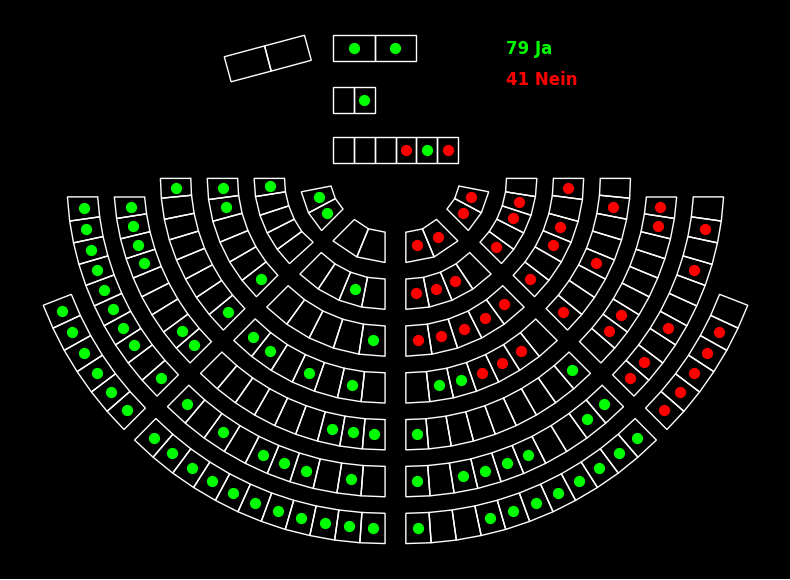
The function supports different themes:
scoreboard: Imitates the council hall scoreboard (neon colors on black background)sym1,sym2: Colored symbols on light backgroundpoly1,poly2,poly3: Color-filled polygons with different edge styles
You can also highlight specific parliamentary groups:
>>> # Highlight a parliamentary group
>>> fig = spp.plot_voting(
...     votes_df,
...     theme='poly1',
...     highlight={'ParlGroupCode': ["S"]},
...     result=True
... )
>>> plt.show()
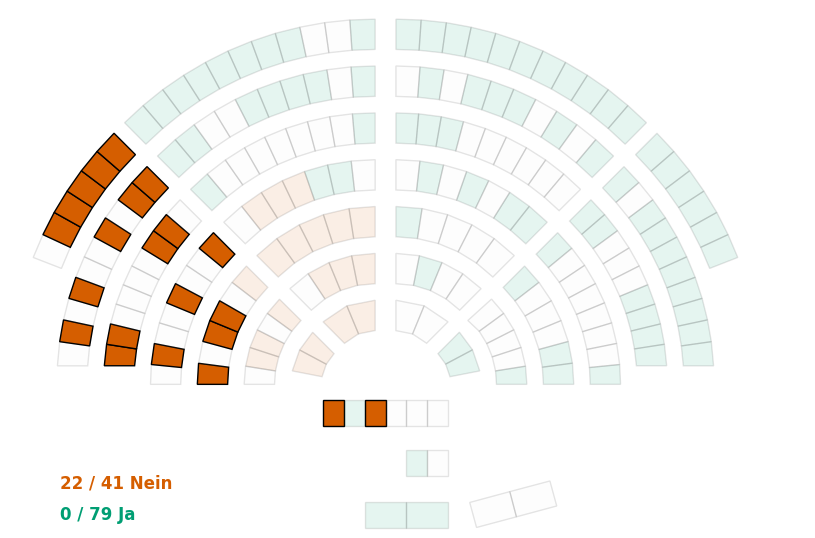
See the visualization example for more details.
OpenParlData backend specific options
Search
The OpenParlDataBackend has the ability to filter and search, all the parameters described in the API documentation can be used here.
Filter by values
>>> import swissparlpy as spp
>>>
>>> opd_client = spp.SwissParlClient(backend="openparldata")
>>> response = opd_client.get_data("persons", firstname="Karin", lastname="Keller-Sutter")
>>> df = response.to_dataframe()
>>> print(df[['firstname', 'lastname', "title"]])
  firstname       lastname                         title
0     Karin  Keller-Sutter  Dipl. Konferenzdolmetscherin
Search in the data
>>> import swissparlpy as spp
>>>
>>> opd_client = spp.SwissParlClient(backend="openparldata")
>>> response = opd_client.get_data("speeches", search_mode="natural", search_scope="all", search_language="de", search="Budget")
>>> len(response)
457
>>> df = response.to_dataframe()
>>> df[["id", "body_key", "person_id", "meeting_id", "date_start", "date_end", "text_content_de"]]
          id body_key  person_id  meeting_id           date_start date_end                                    text_content_de
0    1100333      351     4256.0        1262  2024-11-14T18:18:52     None  <p><b>Corina Liebi (JGLP)</b> für die PVS: Für...
1    1100301      351     4191.0        1578  2024-05-30T22:24:34     None  <p><b>Ursina Anderegg (GB)</b> für die Fraktio...
2    1100187      351     4139.0        1219  2025-11-20T18:02:10     None  <p><b>Debora Alder-Gasser (EVP)</b> für die Ko...
3    1100167      351     4315.0        1219  2025-11-20T17:11:50     None  <p><b>Simone Richner (FDP)</b> für die Kommiss...
4    1100016      351     4237.0        1628  2024-06-27T13:44:06     None  <p><b>Franziska Geiser (GB)</b> für die FIKO: ...
..       ...      ...        ...         ...                  ...      ...                                                ...
452  1088291      351     4237.0        1193  2025-03-27T21:51:35     None  <p><b>Franziska Geiser (GB)</b> für die Frakti...
453  1088272      351     4162.0        1404  2025-03-20T17:36:23     None  <p><b>Janina Aeberhard (GLP)</b> für die Kommi...
454  1088255      351     4123.0        1870  2023-09-21T15:50:27     None  <p><b>Barbara Keller (SP)</b> für die SBK: Ich...
455  1088206      351     4114.0        1404  2025-03-20T17:50:35     None  <p><b>Laura Curau (Mitte)</b> für die Fraktion...
456  1088186      351     4237.0        1404  2025-03-20T18:39:10     None  <p><b>Franziska Geiser (GB)</b> für die Frakti...

[457 rows x 7 columns]
limit is a page size, not a cap
limit is passed straight to the API, where it controls the size of a single page (500 by default).
The response follows the next_page links transparently, so iterating a result still yields all
matching records, no matter what limit you set:
>>> import swissparlpy as spp
>>>
>>> opd_client = spp.SwissParlClient(backend="openparldata")
>>> response = opd_client.get_data("persons", limit=10)
>>> len(response)  # total number of records, taken from the first page
26574
>>> len(list(response))  # iterating loads every page
26574
To only get a few records, use get_glimpse() or slice the response (response[:10]).
Note that len(response) is the total record count reported by the API and is available after a
single request, which makes it a cheap way to count records.
Case sensitivity of search_mode="exact"
While the API documents search_mode="exact" as a case-insensitive exact match, it behaves
case-sensitively in practice, i.e. search="Nationalrat" returns results, while
search="nationalrat" does not.
Get related data
The OpenParlData-API returns related tables/entities for their data. E.g. if you query persons the API will return all related entities like memberships or affairs.
>>> import swissparlpy as spp
>>>
>>> opd_client = spp.SwissParlClient(backend="openparldata")
>>> geru = opd_client.get_data("persons", firstname="Gerhard", lastname="Andrey")[0]
>>> geru.get_related_tables()
['memberships', 'interests', 'access_badges', 'contributors', 'affairs', 'speeches', 'votes', 'external_links', 'person_images', 'bodies']
>>> member_df = geru.get_related_data('memberships').to_dataframe()
>>> print(member_df[["external_id", "group_name_de", "role_name_de", "type_harmonized"]].head())
                            external_id               group_name_de      role_name_de   type_harmonized
0              CHE_interest_kultur_4245                      Kultur          Mitglied    interest_group
1  936edfe6-f8fd-4667-a986-ab5200acafb9  Gruppe Parlaments-IT (PIT)          Mitglied  committee_ad_hoc
2  6f42fed7-0dc6-4ed7-b655-b391ad828068  Gruppe Parlaments-IT (PIT)          Mitglied  committee_ad_hoc
3  63898798-ac17-469f-bb21-5e562d76b1de  Gruppe Parlaments-IT (PIT)  Vizepräsident/in  committee_ad_hoc
4  28d9ed41-e55c-4c55-a1f3-ab1300c25d52                     Büro NR  Stimmenzähler/in         committee
Gever backend specific options
The GeverBackend queries the Gever (Geschäftsverwaltungssystem) APIs of the canton and the city of Zurich.
It is based on goifer, a standalone client for the same APIs.
Instances and tables
There are two instances, each with its own set of tables (called indexes in the API):
>>> import swissparlpy as spp
>>> spp.get_tables(backend='gever')  # canton of Zurich
['behoerden', 'sitzungendetail', 'geschaeft', 'mitglieder', 'parteien', 'wahlkreise', 'direktion', 'geschaeftsart', 'gremiumtyp', 'krversand', 'ablaufschritte']
>>> spp.get_tables(backend='gever_city_zurich')  # city of Zurich
['ablaufschritt', 'abstimmung', 'behoerdenmandat', 'departement', 'dokument', 'geschaeft', 'geschaeftsart', 'gremiumdetail', 'gremiumstyp', 'gremiumsuebersicht', 'kontakt', 'partei', 'pendentbei', 'ratspost', 'referendum', 'sitzung', 'wahlkreis', 'wohnkreis', 'wortmeldung']
Table names are lowercase, but the lookup is case-insensitive, so both of these work:
>>> data = spp.get_data('geschaeft', backend='gever_city_zurich')
>>> data = spp.get_data('Geschaeft', backend='gever_city_zurich')
get_variables() returns the fields of a table, based on the XSD schema of the API:
>>> spp.get_variables('wahlkreise', backend='gever')
['name', 'inaktiv', 'obj_guid', 'seq', 'idx']
Queries
The Gever API uses its own query syntax (CQL). Pass a query as filter to use it as-is:
>>> import swissparlpy as spp
>>> data = spp.get_data('wahlkreise', 'inaktiv = false', backend='gever')
>>> data[0]
{'obj_guid': 'dee39e1ccd4c40db82729b3d0762a302', 'seq': '2242344', 'idx': 'Wahlkreise', 'name': 'I      Zürich 1+2', 'inaktiv': False}
Keyword arguments are turned into a query, strings are matched with adj, numbers and booleans with =:
>>> # searches for 'name adj "Marti" and vorname adj "Res"'
>>> data = spp.get_data('mitglieder', name='Marti', vorname='Res', backend='gever')
String values are quoted automatically, so values with spaces work as well (an unquoted term with a space is rejected by the API):
>>> # searches for 'vorname adj "Hans Peter"'
>>> data = spp.get_data('mitglieder', vorname='Hans Peter', backend='gever')
Without a filter, all records are queried (seq > 0). Callable filters (spp.Filter) are not supported by this backend.
The number of records per request (default 500), the language and the first record can be set on the backend or per query:
>>> import swissparlpy as spp
>>> from swissparlpy import GeverBackend
>>>
>>> client = spp.SwissParlClient(backend=GeverBackend(instance='city_zurich', maximum_records=100))
>>> data = client.get_data('geschaeft', maximum_records=10, start_record=20, lang='de-CH')
Just like the other backends, the result is iterable, indexable and sliceable, and further pages are loaded lazily.
len(response) is the total number of hits reported by the API, so iterating over a large table pages through all of it: use get_glimpse() (which never loads more than the rows it was asked for) or slice the response to get only a few records.
Nested and list fields
Elements the schema of a table declares as repeatable (maxOccurs of unbounded or greater than 1, whether it is on the element itself or on a wrapping sequence/choice/all) are always returned as a list, even if a record contains only a single one of them.
This keeps the records of a table consistent, which matters when converting them to a DataFrame:
>>> import swissparlpy as spp
>>> data = spp.get_data('mitglieder', backend='gever')
>>> isinstance(data[0]['position'], list)  # a single position
True
>>> isinstance(data[1]['position'], list)  # several positions
True
>>> df = data.to_dataframe()
A repeatable element is usually held by a container element that holds nothing else, e.g. <MitbeteiligteDepartemente><Departement/>...</MitbeteiligteDepartemente>. The list keeps the name of the container, not the name of the element it holds, because the same element can be held by several containers: a geschaeft of the city has a Departement below both FederfuehrendesDepartement and MitbeteiligteDepartemente, and naming both columns departement would make them collide.
As long as a table has a usable schema, every other nested element is flattened into the record, however deep, e.g. a mitglieder record's Person -> Kontakt wrapper becomes top-level person_kontakt_* fields rather than a nested dict. That includes the container of a single (non-repeatable) element, so a member's mandates end up in person_kontakt_behoerdenmandate and the leading department of a business in federfuehrendesdepartement_departement_name. List fields themselves stay as a list, but each item in it is flattened the same way.
If the schema of a table cannot be loaded, there is no reliable way to tell a repeatable field from a wrapper, so nesting is kept as-is instead, e.g. record['dokument']['edokument']['version']['nr']. A handful of known field names are still flattened in that case as a fallback.
Note that the records of this backend are normalized slightly differently than the ones of goifer: nesting is flattened based on the schema instead of goifer's fixed set of rules, and list fields are always lists.
A list field like behoerdenmandate above stays as a list-of-dicts column when converted with to_dataframe(), which is often not what you want for further analysis. Use explode() to turn it into its own DataFrame instead, one row per item, with the parent record's obj_guid carried along as parent_obj_guid so it can be joined back:
>>> import swissparlpy as spp
>>> data = spp.get_data('mitglieder', backend='gever')
>>> mandates = data.explode('behoerdenmandate')
>>> mandates.columns.tolist()
['parent_obj_guid', 'obj_guid', 'dauer_start', 'dauer_end', 'dauer', 'gremiumtyp', 'name', 'kurzname', 'funktion']
The name of the list field is enough, even if it is nested (the mandates above are in person_kontakt_behoerdenmandate), the full column name works as well. If the same name is nested below several columns, explode() raises a SwissParlError that lists them.
Pass parent_columns to also carry other parent fields along (prefixed with parent_), to avoid a separate join for common cases:
>>> mandates = data.explode('behoerdenmandate', parent_columns=['person_kontakt_vorname', 'person_kontakt_name'])
explode() raises a SwissParlError if the field is not one of the table's list fields. Without a schema, there's no way to know this ahead of time, so records where the field wasn't kept as a list (see above) are silently skipped instead.
Value conversion
The API returns everything as a string, the backend converts the values of a record:
- values that look like an ISO date/time become a
datetime, e.g.'2019-05-06T00:00:00' 'true'and'false'become abool- elements marked as
nilbecomeNone
The conversion is based on the value, not on the type of the schema, which has one pitfall: a string of 8 digits (e.g. an ID like '20240110') is a valid ISO date and is converted to a datetime on Python 3.11 and newer, but stays a string on older versions. If you rely on such a field, convert it yourself.
Download documents
Some tables return documents (edokument), for those a download URL and a filename are added automatically. Note that the exact path to doc below depends on whether a schema is available for the table, see Nested and list fields: with a schema the documents are a list field of flattened records, without one the nesting is kept (meetings[0]['dokument']['edokument']['download_url']).
>>> import swissparlpy as spp
>>> meetings = spp.get_data('sitzungendetail', backend='gever')
>>> doc = meetings[0]['sitzungsdokumente'][0]
>>> doc['edokument_download_url']
'https://parlzhcdws.cmicloud.ch/parlzh3/cdws/Files/9db1203429e04a39a233e56eab42feea-332/1/PDF'
>>> doc['edokument_filename']
'63. KR-Protokoll vom 9.7.2012, Nachmittag.pdf'
To build a download URL yourself, use the file() method of the backend:
>>> from swissparlpy import GeverBackend
>>> backend = GeverBackend(instance='canton_zurich')
>>> member = backend.get_data('mitglieder', 'Name adj Marti and Vorname adj Res')[0]
>>> backend.file('mitglieder', member['foto_id'], member['foto_version']['nr'], 'Original')
'https://parlzhcdws.cmicloud.ch/parlzh2/cdws/Files/6bf54e3bdd24400d85e13169c3a5bbf8-1664/1/Original'
Custom instances
To query another host (e.g. an integration environment), pass a url to override the base URL of the instance:
>>> from swissparlpy import GeverBackend
>>> backend = GeverBackend(instance='city_zurich', url='https://www.integ.gemeinderat-zuerich.ch')
Other Gever instances can be used by passing a config, either as dict or as path to a YAML file (this requires pyyaml). See gever_config.py for the structure:
>>> from swissparlpy import GeverBackend
>>> config = {
...     'my_instance': {
...         'api_base': 'https://example.org',
...         'files_api': {'path': '/api/files'},
...         'indexes': {'geschaeft': {'path': '/api/geschaeft'}},
...     }
... }
>>> backend = GeverBackend(instance='my_instance', config=config)
Similar libraries for other languages
- R: zumbov2/swissparl
- JavaScript: michaelschoenbaechler/swissparl
Credits
This library is inspired by the R package swissparl of David Zumbach.
Ralph Straumann initial asked about a Python version of swissparl on Twitter, which led to this project.
Development
To develop on this project, install uv:
curl -LsSf https://astral.sh/uv/install.sh | sh
uv pip install -e ".[dev,test]"
Alternatively, use the provided setup script:
./dev_setup.sh
Release
To create a new release, follow these steps (please respect Semantic Versioning):
- Adapt the version number in
swissparlpy/__init__.py - Update the CHANGELOG with the version
- Update the website in the
websitedirectory if necessary (at least the version number) - Create a pull request to merge
developintomain(make sure the tests pass!) - Create a new release/tag on GitHub (on the main branch)
- The publication on PyPI happens via GitHub Actions on every tagged commit
1 maintainer

Metadata
1 maintainer
Release files for swissparlpy 2.1.0
For a detailed explanation of source distributions (sdists) and built distributions (wheels), please see the package formats documentation.
Source distribution (sdist)
| File | Size | Uploaded | |
|---|---|---|---|
| swissparlpy-2.1.0.tar.gz | 4.4 MB | Details |
Built distribution (wheel)
| File | Interpreter | ABI | Platform | Reset |
|---|---|---|---|---|
| swissparlpy-2.1.0-py3-none-any.whl | Python 3 | none | any | Details |
Total release size: 4.4 MB
Release files / swissparlpy-2.1.0.tar.gz
| Download URL | swissparlpy-2.1.0.tar.gz |
|---|---|
| Size | 4.4 MB |
| Tags | Source |
|
SHA-256 checksum How to use checksums |
2bcba02d13a5c037b80f1b2fc680aedbc87ce80a758324bd1940a686196c9a7f
|
|
BLAKE2b-256 checksum How to use checksums |
f4a916ef1714441a137ec5e4aa5164e87cb7f9141776e0ae7ab140f30c3cd5a1
|
| Upload date | |
|
Uploaded using Trusted Publishing? What is trusted publishing? |
No |
| Uploaded via |
uv/0.12.3 {"installer":{"name":"uv","version":"0.12.3","subcommand":["publish"]},"python":null,"implementation":{"name":null,"version":null},"distro":{"name":"Ubuntu","version":"24.04","id":"noble","libc":null},"system":{"name":null,"release":null},"cpu":null,"openssl_version":null,"setuptools_version":null,"rustc_version":null,"ci":true}
|
Release files / swissparlpy-2.1.0-py3-none-any.whl
| Download URL | swissparlpy-2.1.0-py3-none-any.whl |
|---|---|
| Size | 48.9 kB |
| Tags | Python 3 |
|
SHA-256 checksum How to use checksums |
0ba3755921f37e68973d37f69f6add54055e1fe78cb684e0ef16423a02e6c4ec
|
|
BLAKE2b-256 checksum How to use checksums |
6ab87c340005090e038e952a6c60365b1a786e44f3455c08c4a93afe768b175e
|
| Upload date | |
|
Uploaded using Trusted Publishing? What is trusted publishing? |
No |
| Uploaded via |
uv/0.12.3 {"installer":{"name":"uv","version":"0.12.3","subcommand":["publish"]},"python":null,"implementation":{"name":null,"version":null},"distro":{"name":"Ubuntu","version":"24.04","id":"noble","libc":null},"system":{"name":null,"release":null},"cpu":null,"openssl_version":null,"setuptools_version":null,"rustc_version":null,"ci":true}
|














