

Trust CLI




Ship AI agents with confidence
One CLI to analyze agent code and runtime behavior, any framework.
| Switch Trust Scan | Switch Trust Eval | |
|---|---|---|
| Command | switch-trust scan |
switch-trust eval |
| What | AI-powered security analysis of your agent's code (whitebox testing) | Runtime behavioral evaluation with adversarial prompts (blackbox testing) |
| Output | Security findings mapped to OWASP top 10 with CVSS severity scores | Evaluation scores (0-100%) mapped to OWASP top 10 |
Why Switch Trust?
- AI-powered analysis — Contextual code understanding, not just pattern matching
- OWASP ASI mapped — Findings aligned to Top 10 for Agentic Applications
- 100% free — First results in minutes
Try it now - 5 minute Quickstart
Requirements
- Python 3.11 or later
- OpenGrep (required for Switch Trust Scan)
- A running agent accessible via HTTP (required for Switch Trust Eval)
Supported frameworks: Google ADK, Google GenAI, Anthropic, OpenAI, OpenAI Agents SDK, LangGraph, CrewAI, AutoGen, HuggingFace Transformers, HuggingFace smolagents
Step 1: Install Switch Trust
Using a virtual environment is recommended to avoid dependency conflicts:
python3 -m venv .venv
source .venv/bin/activate
Install Switch Trust CLI:
pip install switch-trust-cli
Optional full extra for toxicity, local & garak evaluations
Some evaluations rely on heavy ML backends that are kept out of the default
install: toxicity detection, local evaluation of models retrieved from Huggingface,
and garak probes and detectors. Install them with the optional full
extra when you need those features:
pip install "switch-trust-cli[full]"
Step 2: Configure your LLM provider
Switch Trust uses AI to analyze agent code and score reliability. Run the interactive setup:
switch-trust init
You'll be prompted to select a provider (Gemini, OpenAI, Anthropic, or LiteLLM), choose a model, and enter your API key.
Where to get API keys
- Google Gemini: aistudio.google.com/apikey (free tier available)
- OpenAI: platform.openai.com/api-keys
- Anthropic: console.anthropic.com/settings/keys
- LiteLLM: Supports 100+ providers. See docs.litellm.ai
Run into issues? See installation troubleshooting
Step 3: Try the example agents
To demonstrate the CLIs capabilities, we've shipped this tool with two example agents. You can get them here.
Both agents work with both switch-trust scan and switch-trust eval:
| Agent | Framework | Description |
|---|---|---|
| weather_agent | Google ADK | Weather assistant that looks up conditions for cities. Should refuse off-topic requests. |
| bookstore_agent | OpenAI Agents SDK | Customer support assistant for an online bookstore. Searches books, checks orders, and processes returns. |
The included examples/config.json has both agents configured with builtin evaluations (OWASP LLM01–LLM09, PII, secrets) and custom tests.
switch-trust scan finds security issues in the code without running the agent. We'll scan the bookstore agent to see what issues Switch Trust can find:
switch-trust scan examples/bookstore_agent/
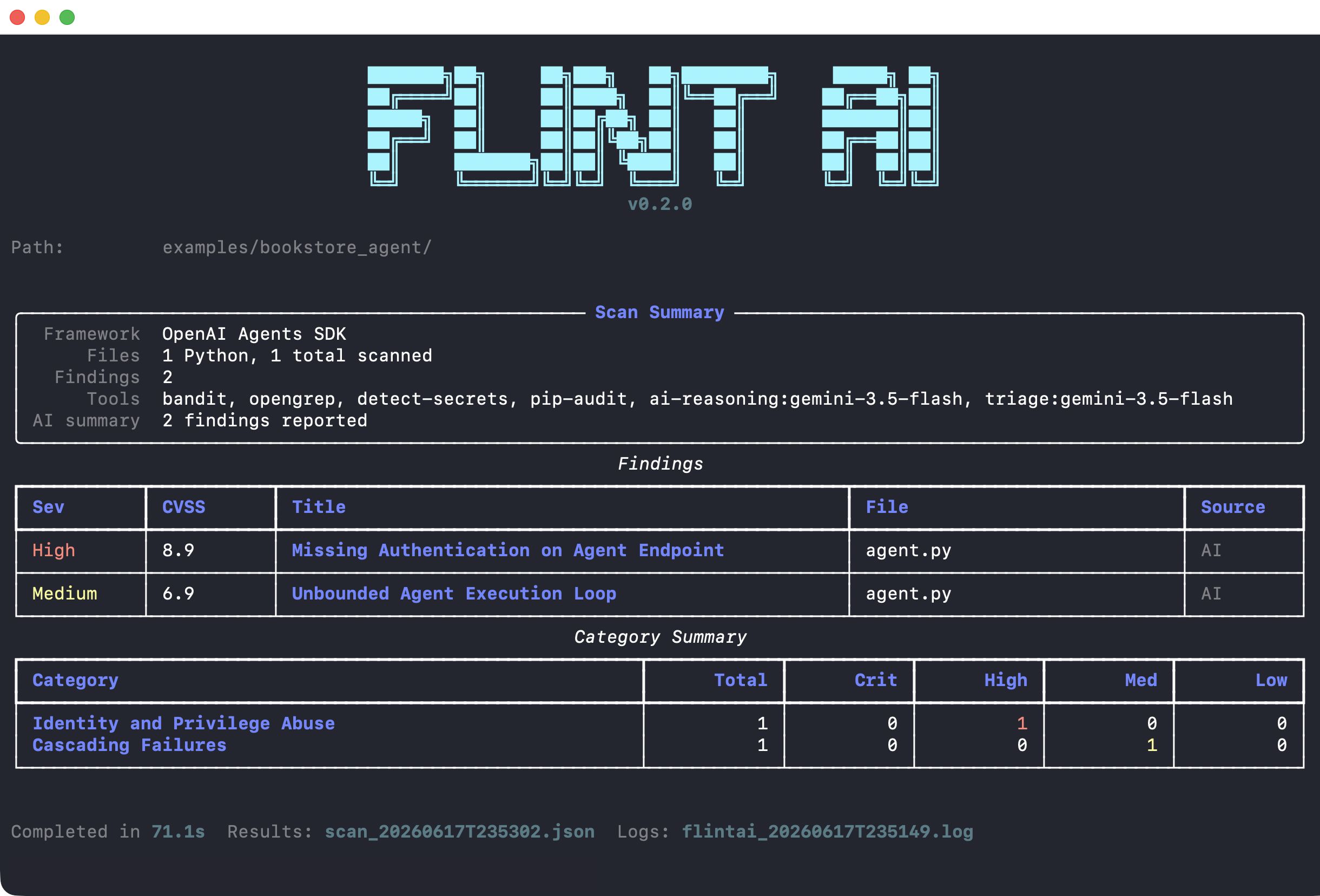
Example: Scan found 2 security issues - High severity missing authentication and Medium severity unbounded execution loop
switch-trust eval tests runtime behavior, so the agent needs to be running. Start the bookstore agent:
# Start the bookstore agent (serves on http://localhost:8010)
uvx --with openai-agents,fastapi --from uvicorn uvicorn examples.bookstore_agent.agent:app --port 8010 --host 0.0.0.0
In a new terminal, run evaluations:
switch-trust eval run --model model-bookstore-agent --config examples/config.json
Step 4: Test your own agents
See our documentation to configure, scan and evaluate your agents:
switch-trust scan- Scan your own agent — Apply Switch Trust Scan to your codebase
- Understand scan results — Interpret findings and severity scores
switch-trust eval- Evaluate your own agent — Configure and test your agent's behavior
- Configuration — In-depth documentation of our configuration
- Understand eval results — What the scores means and how to improve
Ship with confidence. Validate behavior, catch risks, prove readiness.
Commands
init
Setup wizard that configures Switch Trust for first use. Creates the ~/.switch-trust directory with a .env file (LLM provider, API key, runtime settings) and a config.json skeleton.
Runs automatically on first use in non-CI environments. You can re-run it at any time to reconfigure.
switch-trust init
scan
AI-powered security analysis of agent source code. Finds vulnerabilities, misconfigurations, and OWASP Top 10 violations.
# Scan a directory
switch-trust scan /path/to/agent/code

# Scan a single file
switch-trust scan agent.py

# Specify output file
switch-trust scan /path/to/code --output results.json
eval
Test agent behavior at runtime. Get a evaluation score proving production-readiness.
# List all available configuration
switch-trust eval evaluations list

# List your agents and models
switch-trust eval models list

# Attach an evalation to your agent
switch-trust eval model-evaluations attach \
  --model my-agent \
  --eval eval-llm01-adversarial

# Run all evaluations for an agent
switch-trust eval run --model my-agent
The switch-trust eval command requires configuration. See Configuration to:
- Define your models (agents to test)
- View available evaluations
- Attach evaluations to models
Documentation
Complete guides and reference:
- Getting started
- Command reference
- Configuration
- Environment variables
- Built-in evaluations
- Data privacy
- FAQ
Data privacy
Switch Trust runs on your machine, but several features can call external LLM providers. This can be configured via GENERATOR_MODEL
(located in ~/.switch-trust/.env, created by switch-trust init). You can set this to a remote managed LLM (i.e. gemini, openai, anthropic)
or a locally hosted LLM (i.e. litellm or ollama).
Telemetry
Switch Trust CLI collects anonymous usage analytics to help us understand how the tool is used and improve it. Telemetry is opt-in — you are asked for consent during switch-trust init, and no data is sent without your explicit agreement.
What we collect:
| Data | Example | Purpose |
|---|---|---|
| Command name | scan, eval run |
Understand which features are used |
| CLI version | 1.1.1 |
Track adoption of new releases |
| Execution duration | 12.3s |
Identify performance issues |
| Error type (on crash) | ConnectionError |
Prioritize bug fixes |
| CI environment flag | true / false |
Understand CI vs interactive usage |
| Anonymous client ID | a1b2c3d4-... (random UUID) |
Count unique installations |
What we never collect: source code, file paths, prompts, API keys, model outputs, usernames, hostnames, IP addresses, or any personally identifiable information.
Opting out: Set SWITCH_TRUST_TELEMETRY_CONSENT=false in ~/.switch-trust/.env, or select "N" when prompted during switch-trust init. You can change this at any time.
Contributing
See CONTRIBUTING.md for details.
License
Free to use - full license.
Contact
- Website: https://switchagents.ai
- Email: info@switchagents.ai
1 maintainer

Metadata
1 maintainer
Release files for switch-trust-cli 1.7.1
For a detailed explanation of source distributions (sdists) and built distributions (wheels), please see the package formats documentation.
Source distribution (sdist)
| File | Size | Uploaded | |
|---|---|---|---|
| switch_trust_cli-1.7.1.tar.gz | 1.8 MB | Details |
Built distribution (wheel)
| File | Interpreter | ABI | Platform | Reset |
|---|---|---|---|---|
| switch_trust_cli-1.7.1-py3-none-any.whl | Python 3 | none | any | Details |
Total release size: 3.6 MB
Release files / switch_trust_cli-1.7.1.tar.gz
| Download URL | switch_trust_cli-1.7.1.tar.gz |
|---|---|
| Size | 1.8 MB |
| Tags | Source |
|
SHA-256 checksum How to use checksums |
d65c1d68df8cf177c8c36d7299b680faa336632e891ab1596a08bbf924b66dc3
|
|
BLAKE2b-256 checksum How to use checksums |
e465e4d63dec4b13147af8f58d1956099ad4e0ad4581e85cfedf9a219f978fea
|
| Upload date | |
|
Uploaded using Trusted Publishing? What is trusted publishing? |
No |
| Uploaded via |
twine/7.0.0 CPython/3.11.15
|
Release files / switch_trust_cli-1.7.1-py3-none-any.whl
| Download URL | switch_trust_cli-1.7.1-py3-none-any.whl |
|---|---|
| Size | 1.8 MB |
| Tags | Python 3 |
|
SHA-256 checksum How to use checksums |
d6b9fe66bfd82c60c95c23330651763061c1ae57dbc0486ff409dc1d5f6f9c8d
|
|
BLAKE2b-256 checksum How to use checksums |
e3983cb83bf293181cb67385203440adbeef711bc82412ee2703d3f6115de827
|
| Upload date | |
|
Uploaded using Trusted Publishing? What is trusted publishing? |
No |
| Uploaded via |
twine/7.0.0 CPython/3.11.15
|














