
Python SDK for discovering and using AI models across the SyftBox network

Project description
Syft Hub SDK
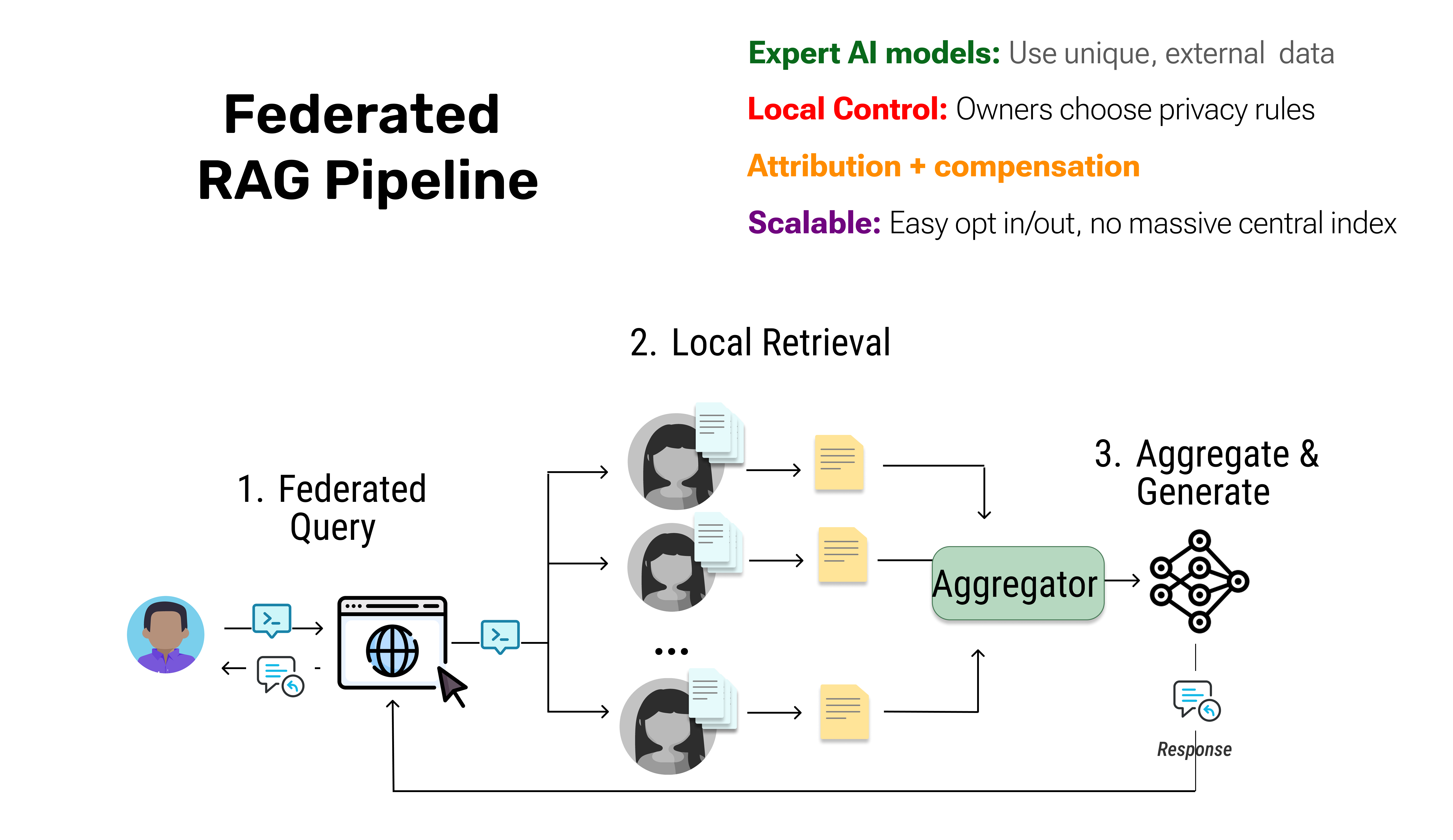
Build Federated RAG and tap into distributed data sources without centralizing knowledge.
LLMs often fail on domain-specific questions, not from lack of capability, but from missing access to expert data. RAG extends their reach with external context, but only if you already own the data.
🚀 Quick Start: Federated RAG
from syft_hub import Client

client = Client()

# Choose data sources from the network
hacker_news_source = client.load_service("demo@openmined.org/hacker-news")
arxiv_source = client.load_service("demo@openmined.org/arxiv-agents")
github_source = client.load_service("demo@openmined.org/trending-github")

# Choose an LLM to synthesize insights
claude_llm = client.load_service("aggregator@openmined.org/claude-3.5-sonnet")

# Create a Federated RAG pipeline
fedrag_pipeline = client.pipeline(
    data_sources=[hacker_news_source, arxiv_source, github_source],
    synthesizer=claude_llm
)

# Run your query across the network
query = "What methods can help improve context in LLM agents?"
result = fedrag_pipeline.run(messages=[{"role": "user", "content": query}])

print(result)
What just happened?
- Each data source was queried on its own infrastructure (no data centralization)
- Only relevant snippets were retrieved and shared
- The LLM synthesized insights from multiple sources into one answer
- Data owners maintained full control and privacy
📦 Installation
# Basic installation
pip install syft-hub
For Jupyter/Colab: Make sure Syft runtime is available:
!pip install syfthub syft-installer
import syft_installer as si

# Make sure Syft runtime is running
si.install_and_run_if_needed()
Outside Jupyter/Colab: Donwload and run distributed protocol, SyftBox.
💡 Why Federated RAG?
Traditional approaches to domain-specific AI have a fundamental flaw: data owners must hand over their raw data and lose control. This introduces legal, privacy, and intellectual property risks.
The result? Most organizations say no, and AI stays limited to public training data.
Federated RAG solves this by letting AI "walk the halls" and consult distributed data sources without centralizing knowledge:
- 🔒 Privacy-preserving: Data stays where it belongs
- 🌐 Distributed: Query multiple sources in one pipeline
- ⚡ Selective sharing: Only relevant snippets are returned
- 🎯 Domain expertise: Access specialized knowledge networks
Think of it like a student gathering input from multiple teachers (biology, law, ethics professors) rather than studying alone—the result is far richer.
🎯 Core Concepts
1. Data Sources
Data sources are federated peers that own their data. They don't ship it to you — you query them at runtime.
# Load data sources from the network
hacker_news = client.load_service("demo@openmined.org/hacker-news")
arxiv_papers = client.load_service("demo@openmined.org/arxiv-agents")
2. Synthesizers (LLMs)
Synthesizers take insights from multiple data sources and combine them into coherent answers.
# Load an LLM for generation
claude = client.load_service("aggregator@openmined.org/claude-3.5-sonnet")
3. Pipelines
Pipelines orchestrate federated queries across data sources and route results to synthesizers.
# Create a pipeline
pipeline = client.pipeline(
    data_sources=[source1, source2, source3],
    synthesizer=llm
)

# Run queries
result = pipeline.run(messages=[{"role": "user", "content": "Your question"}])
🌐 How It Works
- Distributed Indexing: Each data source maintains its own private index (embeddings of their documents)
- Federated Query: When you run a pipeline, your query is broadcast to selected data sources
- Local Retrieval: Each source searches its own index and returns only the top-k most relevant snippets
- Aggregation: The pipeline collects all snippets and ranks them globally
- Synthesis: The LLM receives the best snippets and generates a grounded answer
Key insight: Raw data never leaves the source. Only relevant snippets are shared based on semantic similarity to your query.
📚 Examples
Example 1: Multi-Source Domain Expertise
Query specialized knowledge across different domains:
from syft_hub import Client

client = Client()

# Load domain-specific sources
medical_db = client.load_service("<medical_institution>/medical-research")
pharma_trials = client.load_service("<pharma_company>/clinical-trials")
patient_notes = client.load_service("<hospital_X>/doctor-notes")

# Load synthesizer
gpt4 = client.load_service("aggregator@openmined.org/gpt-4")

# Create pipeline
medical_rag = client.pipeline(
    data_sources=[medical_db, pharma_trials, patient_notes],
    synthesizer=gpt4
)

# Ask domain-specific questions
query = "Is drug X safe for diabetes patients with kidney disease?"
answer = medical_rag.run(messages=[{"role": "user", "content": query}])

print(answer)
Example 2: Single Source RAG
Not every use case needs multiple sources:
# Query a single specialized source
company_docs = client.load_service("yourcompany@example.com/internal-docs")
assistant = client.load_service("aggregator@openmined.org/claude-3.5-sonnet")

rag_pipeline = client.pipeline(
    data_sources=[company_docs],
    synthesizer=assistant
)

result = rag_pipeline.run(
    messages=[{"role": "user", "content": "What's our remote work policy?"}]
)
```---

## 🔍 Service Discovery

Discover available data sources and LLMs on the network:

```python
# List all services
client.list_services()

# List services by type
chat_services = client.list_services(
    service_type="chat",
    tags=["opensource"],
    max_cost=0.10
)

search_services = client.list_services(
    service_type="search",
    datasite="yourcompany@example.com"
)
💰 Setup accounting for paid models
Each new user received $20 upon registration (but hey, most are anyway free!)
Preview and manage costs for federated queries:
# Setup accounting for paid services
await client.register_accounting(
    email="your@email.com",
    password="your_password"
)

# Check account balance
info = await client.get_account_info()
print(f"Balance: ${info['balance']}")

# Get cost estimate for multi-source RAG
estimate = pipeline.estimate_cost()
🏥 Health Monitoring
Monitor service availability and performance:
# Check single service health
status = await client.check_service_health("service-name", timeout=5.0)

# Start continuous monitoring
monitor = client.start_health_monitoring(
    services=["service1", "service2"],
    check_interval=30.0
)
📖 API Reference
Client Methods
| Method | Description |
|---|---|
load_service(identifier) |
Load a data source or LLM from the network |
pipeline(data_sources, synthesizer) |
Create a Federated RAG pipeline |
list_services(service_type, ...) |
Discover available services |
chat("datasite/service_name", messages, ...) |
Direct chat with an LLM |
search("datasite/service_name", query, ...) |
Search a data source |
register_accounting(email, password, ...) |
Register to use paid services |
connect_accounting(email, password, ...) |
Setup existing account for paid services |
Pipeline Methods
| Method | Description |
|---|---|
run(messages) |
Execute federated query and synthesize results |
Response Objects
ChatResponse:
response.message.content    # The AI's response
response.cost              # Cost of the request
response.usage.total_tokens # Tokens used
response.service           # Service name
SearchResponse:
response.results           # List of search results
response.cost              # Cost of the request
response.query             # Original query

# Individual result
result.content             # Document content
result.score              # Similarity score (0-1)
result.metadata           # Additional metadata
🤝 Contributing
Contributions are welcome! This SDK is part of the broader SyftBox ecosystem for privacy-preserving AI.
📄 License
See LICENSE file for details.
Release history Release notifications | RSS feed


Download files
Download the file for your platform. If you're not sure which to choose, learn more about installing packages.
Source Distribution
Built Distribution
Filter files by name, interpreter, ABI, and platform.
If you're not sure about the file name format, learn more about wheel file names.
Copy a direct link to the current filters
File details
Details for the file syft_hub-0.1.21.tar.gz.
File metadata
- Download URL: syft_hub-0.1.21.tar.gz
- Upload date:
- Size: 140.5 kB
- Tags: Source
- Uploaded using Trusted Publishing? No
- Uploaded via: twine/6.2.0 CPython/3.12.11
File hashes
| Algorithm | Hash digest | |
|---|---|---|
| SHA256 |
335213b893368a18d06d385a12f7d155f040b42de3b13384ad079516475ce31d
|
|
| MD5 |
c423975f8404e0d826120a6c4d28e63b
|
|
| BLAKE2b-256 |
d041ec97a38adf38076cd232483a592660f53c686077e03fd151594910e2cacb
|
File details
Details for the file syft_hub-0.1.21-py3-none-any.whl.
File metadata
- Download URL: syft_hub-0.1.21-py3-none-any.whl
- Upload date:
- Size: 156.0 kB
- Tags: Python 3
- Uploaded using Trusted Publishing? No
- Uploaded via: twine/6.2.0 CPython/3.12.11
File hashes
| Algorithm | Hash digest | |
|---|---|---|
| SHA256 |
6c7458da4e512d9b383cb5f720dcca42b2c1340d77fc91a1a09de6ceb00ef7b5
|
|
| MD5 |
a0a88f583ceb5e7fc20d853e08ec2a3e
|
|
| BLAKE2b-256 |
d6601961e6a6a82f25dc039653fd4837235820fbb49b05f3e71d23bcf78913cc
|






