
 Efficient Search for Pareto-optimal Flows
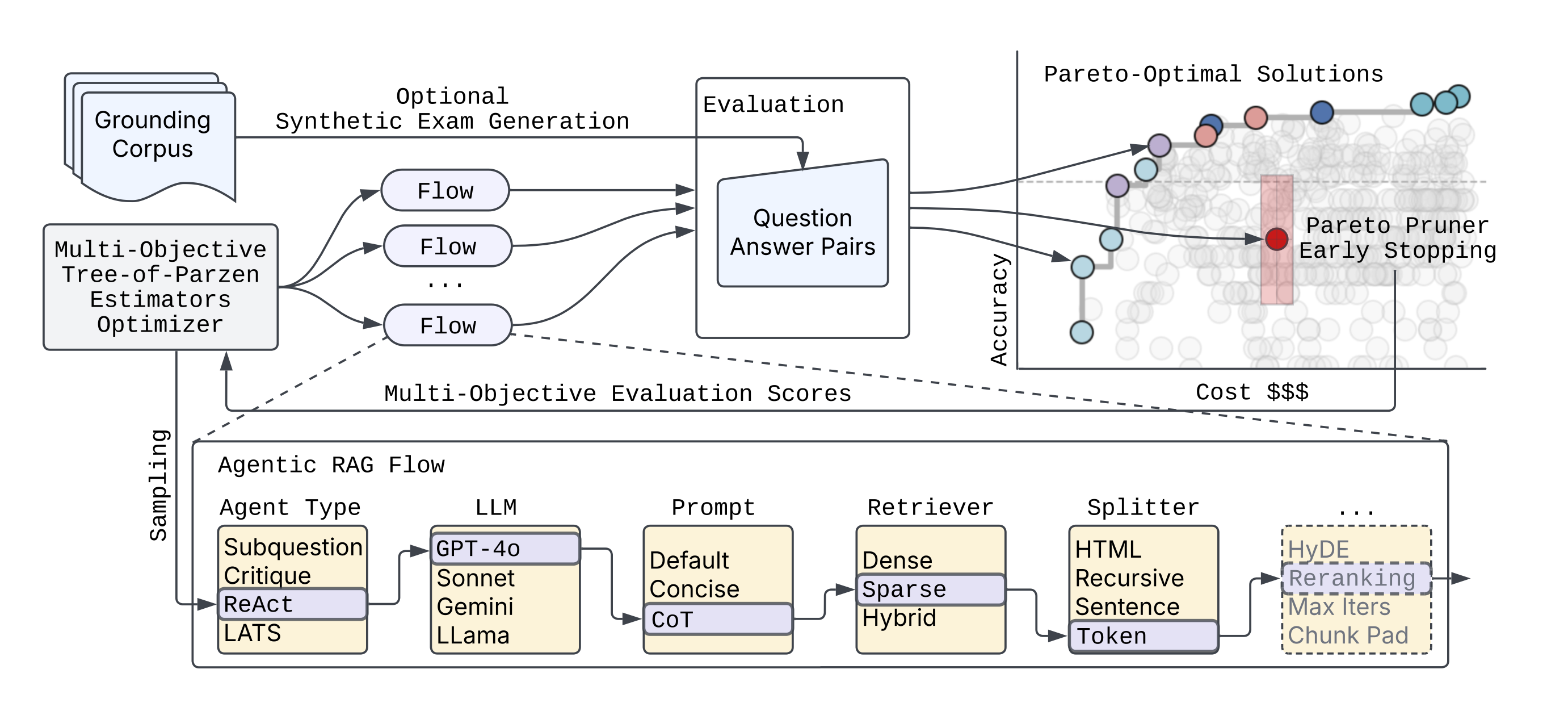
syftr is an agent optimizer that helps you find the best agentic workflows for a given budget. You bring your own dataset, compose the search space from models and components, and syftr finds the best combination of parameters for your budget. It uses advances in multi-objective Bayesian Optimization and a novel domain-specific "Pareto Pruner" to efficiently sample a search space of agentic and non-agentic flows to estimate a Pareto-frontier (optimal trade-off curve) between accuracy and objectives that compete like cost, latency, throughput.
Please read more details in our blogpost and full technical paper.
We are excited for what you will discover using syftr!
Libraries and frameworks used
syftr builds on a number of powerful open source projects:
-
Ray for distributing and scaling search over large clusters of CPUs and GPUs
-
Optuna for its flexible define-by-run interface (similar to PyTorch’s eager execution) and support for state-of-the-art multi-objective optimization algorithms
-
LlamaIndex for building sophisticated agentic and non-agentic RAG workflows
-
HuggingFace Datasets for fast, collaborative, and uniform dataset interface
-
Trace for optimizing textual components within workflows, such as prompts
Installation
Please clone the syftr repo and run:
curl -LsSf https://astral.sh/uv/install.sh | sh
uv venv --python 3.12.7
source .venv/bin/activate
uv sync --extra dev
uv pip install -e .
or to use syftr as a library, install directly from PyPi:
pip install syftr
NOTE: syftr works as a library, but still needs easy access to config.yaml and study files you intend to run. Config file should be present as ~/.syftr/config.yaml, or in your current working directory.
You can download sample config file to your ~/.syftr directory with this command
curl -L https://raw.githubusercontent.com/datarobot/syftr/main/config.yaml.sample \
     -o ~/.syftr/config.yaml
You also need studies to run syftr. You can write your own or download our example study with this command to current working directory
curl -L https://raw.githubusercontent.com/datarobot/syftr/main/studies/example-dr-docs.yaml > example-dr-docs.yaml
Required Credentials
syftr's examples require the following credentials:
- Azure OpenAI API key
- Azure OpenAI endpoint URL (
api_url) - PostgreSQL server dsn (if no dsn is provided, will use local SQLite)
To enter these credentials, copy config.yaml.sample to config.yaml and edit the required portions.
Additional Configuration Options
syftr uses many components including Ray for job scheduling and PostgreSQL for storing results. In this section we describe how to configure them to run syftr successfully.
- The main config file of syftr is
config.yaml. You can specify paths, logging, database and Ray parameters and many others. For detailed instructions and examples, please refer to config.yaml.sample. You can rename this file toconfig.yamland fill in all necessary details according to your infrastructure. - You can also configure syftr with environment variables:
export SYFTR_PATHS__ROOT_DIR=/foo/bar - When the configuration is correct, you should be able to run
examples/1-welcome.ipynbwithout any problems. - syftr uses SQLite by default for Optuna storage. The
database.dsnconfiguration field can be used to configure any Optuna-supported relational database storage. We recommend Postgres for distributed workloads.
Quickstart
First, run syftr check to validate your credentials and configuration.
Note that most LLM connections are likely to fail if you have not provided configuration for them.
Next, try the example Jupyter notebooks located in the examples directory.
Or directly run a syftr study using the CLI syftr run studies/example-dr-docs.yaml --follow or with the API:
from syftr import api

s = api.Study.from_file("studies/example-dr-docs.yaml")
s.run()
Obtaining the results after the study is complete:
s.wait_for_completion()
print(s.pareto_flows)
[{'metrics': {'accuracy': 0.7, 'llm_cost_mean': 0.000258675},
  'params': {'response_synthesizer_llm': 'gpt-4o-mini',
   'rag_mode': 'no_rag',
   'template_name': 'default',
   'enforce_full_evaluation': True}},
   ...
]
LLM Configuration
syftr can be configured to use a wide variety of LLMs from a variety of LLM providers.
These are configured using the generative_models section of config.yaml.
Each LLM provider has some different configuration options as well as some common ones.
Let's look at an example using gpt-4.5-preview hosted in Azure OpenAI:
generative_models:
  # azure_openai Provider Example
  azure_gpt_45_preview:
    provider: azure_openai

    temperature: 0.0
    max_retries: 0

    # Provider-specific configurations
    deployment_name: "gpt-4.5-preview"
    api_version: "2024-12-01-preview"
    additional_kwargs:
      user: syftr

    # Cost example - options are the same for all models (required)
    cost:
      type: tokens                      # tokens, characters, or hourly
      input: 75
      output: 150.00
      # rate: 12.00

    # LLamaIndex LLMetadata Example - keys and defaults are the same for all models
    metadata:
      model_name: gpt-4.5-preview
      context_window: 100000
      num_output: 2048
      is_chat_model: true
      is_function_calling_model: true
      system_role: SYSTEM
Provider-specific options
All LLM configurations defined under generative_models: share a common set of options inherited from the base LLMConfig:
cost: (Object, Required) Defines the cost structure for the LLM.type: (String, Required) Type of cost calculation:tokens,characters, orhourly.input: (Float, Required) Cost for input (e.g., per million tokens/characters).output: (Float, Required iftypeistokensorcharacters) Cost for output.rate: (Float, Required iftypeishourly) Average cost per hour.
metadata: (Object, Required) Contains essential metadata about the LLM.model_name: (String, Required) The specific model identifier (e.g., "gpt-4o-mini", "gemini-1.5-pro-001").context_window: (Integer, Optional) The maximum context window size. Defaults to3900.num_output: (Integer, Optional) Default number of output tokens the model is expected to generate. Defaults to256.is_chat_model: (Boolean, Optional) Indicates if the model is a chat-based model. Defaults tofalse.is_function_calling_model: (Boolean, Optional) Indicates if the model supports function calling. Defaults tofalse.system_role: (String, Optional) The expected role name for system prompts (e.g.,SYSTEM,USER). Defaults toSYSTEM.
temperature: (Float, Optional) The sampling temperature for generation. Defaults to0.0.
See LLM provider-specific configuration to configure each supported provider.
Embedding models
You may also enable additional embedding model endpoints:
local_models:
...
  embedding:
    - model_name: "BAAI/bge-small-en-v1.5"
      api_base: "http://vllmhost:8001/v1"
      api_key: "non-default-value"
      additional_kwargs:
        extra_body:
          truncate_prompt_tokens: 512
    - model_name: "thenlper/gte-large"
      api_base: "http://vllmhost:8001/v1"
      additional_kwargs:
        extra_body:
          truncate_prompt_tokens: 512
Models added in the config.yaml will be automatically added to the default search space, or you can enable them manually for specific flow components.
Adding Custom Datasets
See detailed instructions here.
Adding Custom Flows
To add your own flow class, follow the guide here.
Citation
If you use this code in your research please cite the following publication.
@article{syftr2025,
  title={syftr: Pareto-Optimal Generative AI},
  author={Conway, Alexander and Dey, Debadeepta and Hackmann, Stefan and Hausknecht, Matthew and Schmidt, Michael and Steadman, Mark and Volynets, Nick},
  booktitle={Proceedings of the International Conference on Automated Machine Learning (AutoML)},
  year={2025},
}
Contributing
Please read our contributing guide for details on how to contribute to the project. We welcome contributions in the form of bug reports, feature requests, and pull requests.
Please note we have a code of conduct, please follow it in all your interactions with the project.
2 maintainers


Metadata
2 maintainers
Release files for syftr 0.4.0
For a detailed explanation of source distributions (sdists) and built distributions (wheels), please see the package formats documentation.
Source distribution (sdist)
| File | Size | Uploaded | Provenance | |
|---|---|---|---|---|
| syftr-0.4.0.tar.gz | 2.5 MB | With provenance | Details |
Built distribution (wheel)
| File | Interpreter | ABI | Platform | Reset |
|---|---|---|---|---|
| syftr-0.4.0-py3-none-any.whl | Python 3 | none | any | Details |
Total release size: 2.7 MB
Release files / syftr-0.4.0.tar.gz
| Download URL | syftr-0.4.0.tar.gz |
|---|---|
| Size | 2.5 MB |
| Tags | Source |
|
SHA-256 checksum How to use checksums |
c80cd3dc07ce7c57afde58248de99cb6808534422cb9a6480d170dea669d8605
|
|
BLAKE2b-256 checksum How to use checksums |
27ce9c0bb38d8963662ee01e544c46941d7ea7c83b9103b22247d074f9b22035
|
| Upload date | |
|
Uploaded using Trusted Publishing? What is trusted publishing? |
Yes |
| Uploaded via |
twine/6.1.0 CPython/3.13.7
|
Provenance
Provenance describes where a file came from. On PyPI, provenance is shared via attestations, which provide a verifiable record of the build or publishing details. View details, limitations and caveats.


PyPI Publish Attestation
PyPI verified that this artifact, at this checksum, originated from the publisher listed below.
Signed by GitHub Actions, verified by PyPI on Jan 27, 2026.
Transparency logRelease files / syftr-0.4.0-py3-none-any.whl
| Download URL | syftr-0.4.0-py3-none-any.whl |
|---|---|
| Size | 214.9 kB |
| Tags | Python 3 |
|
SHA-256 checksum How to use checksums |
7c41384f9430a29b12bbd3088e384f5cd9643f3cf5dd7cbb32ef5b49d2d2b2c5
|
|
BLAKE2b-256 checksum How to use checksums |
7b733e7f0ae205b448db9197b2b86d349689e032f79622bc96a047d31ba9cdc4
|
| Upload date | |
|
Uploaded using Trusted Publishing? What is trusted publishing? |
Yes |
| Uploaded via |
twine/6.1.0 CPython/3.13.7
|
Provenance
Provenance describes where a file came from. On PyPI, provenance is shared via attestations, which provide a verifiable record of the build or publishing details. View details, limitations and caveats.
PyPI Publish Attestation
PyPI verified that this artifact, at this checksum, originated from the publisher listed below.
Signed by GitHub Actions, verified by PyPI on Jan 27, 2026.
Transparency logSecurity for syftr 0.4.0
Provenance
Provenance describes where a file came from. On PyPI, provenance is shared via attestations, which provide a verifiable record of the build or publishing details. View details, limitations and caveats.
Full provenance
All 2 files in this release have been uploaded with provenance metadata.
Attestation for syftr-0.4.0.tar.gz
PyPI Publish Attestation
PyPI verified that this artifact, at this checksum, originated from the publisher listed below.
Signed by GitHub Actions, verified by PyPI on Jan 27, 2026.
Transparency logA note on package security
PyPI is a repository for distributing packages, not a service for auditing them. While third-party security researchers and our staff do their best to detect and remove malicious packages, PyPI cannot guarantee the quality, security or suitability of any given package.














