
SyGra: Graph-oriented Synthetic data generation Pipeline






Framework to easily generate complex synthetic data pipelines by visualizing and configuring the pipeline as a
computational graph. LangGraph is used as the underlying graph
configuration/execution library. Refer
to LangGraph examples to get a sense of the different
kinds of computational graph which can be configured.
Introduction
SyGra Framework is created to generate synthetic data. As it is a complex process to define the flow, this design simplifies the synthetic data generation process. SyGra platform will support the following:
- Defining the seed data configuration
- Define a task, which involves graph node configuration, flow between nodes and conditions between the node
- Define the output location to dump the generated data
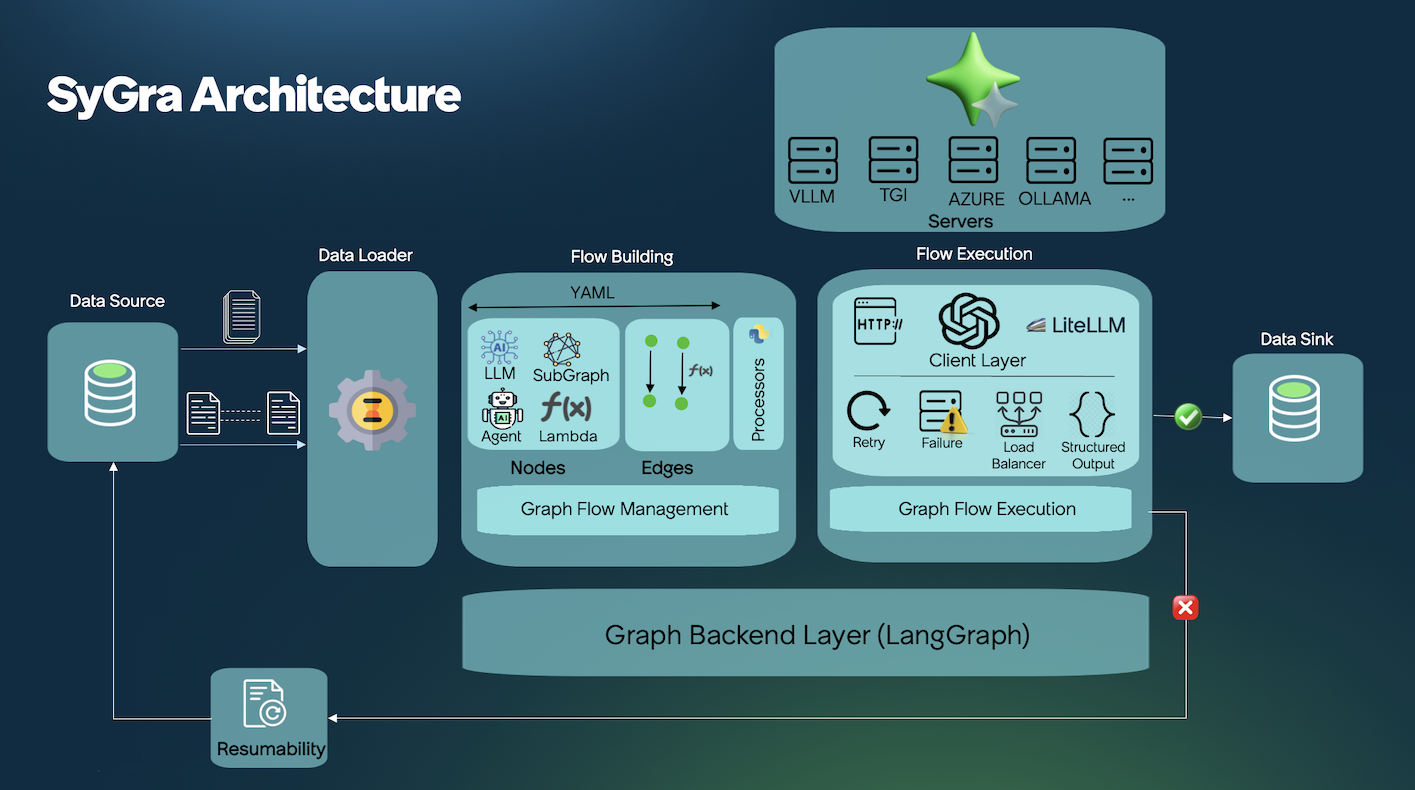
Seed data can be pulled from various data source, few examples are Huggingface, File system, ServiceNow Instance. Once the seed data is loaded, SyGra platform allows datagen users to write any data processing using the data transformation module. When the data is ready, users can define the data flow with various types of nodes. A node can also be a subgraph defined in another yaml file.
Each node can be defined with preprocessing, post processing, and LLM prompt with model parameters. Prompts can use seed data as python template keys.
Edges define the flow between nodes, which can be conditional or non-conditional, with support for parallel and one-to-many flows.
At the end, generated data is collected in the graph state for a specific record, processed further to generate the final dictionary to be written to the configured data sink.
Quick Start
Using the Framework
Clone the repo and run a built-in example in 2 commands:
# 1. Clone and enter the repo
git clone https://github.com/ServiceNow/SyGra.git && cd SyGra

# 2. Set your model credentials
export SYGRA_GPT_4O_MINI_URL="https://api.openai.com/v1"
export SYGRA_GPT_4O_MINI_TOKEN="sk-..."

# 3. Run an example task
uv run python main.py -t examples.glaive_code_assistant -n 2
Expected Output:
Processing records: 100%|████████████████| 2/2
Output written to: output/glaive_code_assistant.jsonl
Check output/glaive_code_assistant.jsonl — you'll see generated code solutions with self-critique refinement.
What Just Happened?
The task tasks/examples/glaive_code_assistant loads coding problems from HuggingFace and runs a self-critique loop:
Key concepts:
- Data source pulls from HuggingFace datasets
- Conditional edges create loops (critique → regenerate until correct)
{question}and{answer}come from the dataset
Browse all examples here: tasks/examples/
Using the Library
Install SyGra as a Python package for use in scripts or notebooks:
pip install sygra
Then build pipelines programmatically:
import sygra

workflow = sygra.Workflow("my_workflow")
results = (
    workflow
    .source([
        {"topic": "space exploration"},
        {"topic": "artificial intelligence"},
    ])
    .llm(
        model="gpt-4o-mini",
        prompt="Write a short story about {topic}",
        output="story"
    )
    .sink("output/stories.json")
    .run()
)

print(results)
Expected Output:
[
  {"topic": "space exploration", "story": "In the year 2157, Captain Maya Chen..."},
  {"topic": "artificial intelligence", "story": "The neural network awakened..."}
]
Check output/stories.json for the full generated content.
SyGra Studio
SyGra Studio is a visual workflow builder that replaces manual YAML editing with an interactive drag-and-drop interface. It also allows you to execute a task, monitor during execution and view the result along with metadata like latency, token usage etc.

Studio Features:
- Visual Graph Builder — Drag-and-drop nodes, connect them visually, configure with forms
- Real-time Execution — Watch your workflow run with live node status and streaming logs
- Rich Analytics — Track usage, tokens, latency, and success rates across runs
- Multi-LLM Support — Azure OpenAI, OpenAI, Ollama, vLLM, Mistral, and more
# One command to start
make studio
# Then open http://localhost:8000
Task Components
SyGra supports extendability and ease of implementation—most tasks are defined as graph configuration YAML files. Each task consists of two major components: a graph configuration and Python code to define conditions and processors. YAML contains various parts:
- Data configuration : Configure file or huggingface or ServiceNow instance as source and sink for the task.
- Data transformation : Configuration to transform the data into the format it can be used in the graph.
- Node configuration : Configure nodes and corresponding properties, preprocessor and post processor.
- Edge configuration : Connect the nodes configured above with or without conditions.
- Output configuration : Configuration for data tranformation before writing the data into sink.
The data configuration supports source and sink configuration, which can be a single configuration or a list. When it is a list of dataset configuration, it allows merging the dataset as column based and row based. Access the dataset keys or columns with alias prefix in the prompt, and finally write into various output dataset in a single flow.
A node is defined by the node module, supporting types like LLM call, multiple LLM call, lambda node, and sampler node.
LLM-based nodes require a model configured in models.yaml and runtime parameters. Sampler nodes pick random samples from static YAML lists. For custom node types, you can implement new nodes in the platform.
As of now, LLM inference is supported for TGI, vLLM, OpenAI, Azure, Azure OpenAI, Ollama and Triton compatible servers. Model deployment is external and configured in models.yaml.
SyGra as a Platform
SyGra can be used as a reusable platform to build different categories of tasks on top of the same graph execution engine, node types, processors, and metric infrastructure.
Eval
Evaluation tasks live under tasks/eval and provide a standard pattern for:
- Computing unit metrics per record during graph execution
- Computing aggregator metrics after the run via graph post-processing
See: tasks/eval/README.md
Contact
To contact us, please send us an email!
License
The package is licensed by ServiceNow, Inc. under the Apache 2.0 license. See LICENSE for more details.
Questions?
Ask SyGra's DeepWiki
Open an issue or start a discussion! Contributions are welcome.
2 maintainers


Release files for sygra 2.0.0.post1
For a detailed explanation of source distributions (sdists) and built distributions (wheels), please see the package formats documentation.
Source distribution (sdist)
| File | Size | Uploaded | |
|---|---|---|---|
| sygra-2.0.0.post1.tar.gz | 84.9 MB | Details |
Built distribution (wheel)
| File | Interpreter | ABI | Platform | Reset |
|---|---|---|---|---|
| sygra-2.0.0.post1-py3-none-any.whl | Python 3 | none | any | Details |
Total release size: 85.8 MB
Release files / sygra-2.0.0.post1.tar.gz
| Download URL | sygra-2.0.0.post1.tar.gz |
|---|---|
| Size | 84.9 MB |
| Tags | Source |
|
SHA-256 checksum How to use checksums |
b3e2910367b44662ff561a907c5f92c50573ce777763bb04f8f1690b79e7a246
|
|
BLAKE2b-256 checksum How to use checksums |
27471b8173fe06223f2199b99c9be21458edec458dfae4a6c4e22807b2084add
|
| Upload date | |
|
Uploaded using Trusted Publishing? What is trusted publishing? |
No |
| Uploaded via |
twine/6.2.0 CPython/3.9.25
|
Release files / sygra-2.0.0.post1-py3-none-any.whl
| Download URL | sygra-2.0.0.post1-py3-none-any.whl |
|---|---|
| Size | 885.9 kB |
| Tags | Python 3 |
|
SHA-256 checksum How to use checksums |
9e5b7fa3a088f692b1f9d8bb3f4d4f2b996a43928aebbcdd7cc1c071cfd6772d
|
|
BLAKE2b-256 checksum How to use checksums |
01ee89d00048ab05da7408c76db54ec69e90a8ab723bde119375dd7cdbf77cfe
|
| Upload date | |
|
Uploaded using Trusted Publishing? What is trusted publishing? |
No |
| Uploaded via |
twine/6.2.0 CPython/3.9.25
|














