

Symphony
A self-hosted web UI that runs your coding agent on tickets, in a sandbox, on your own machine.
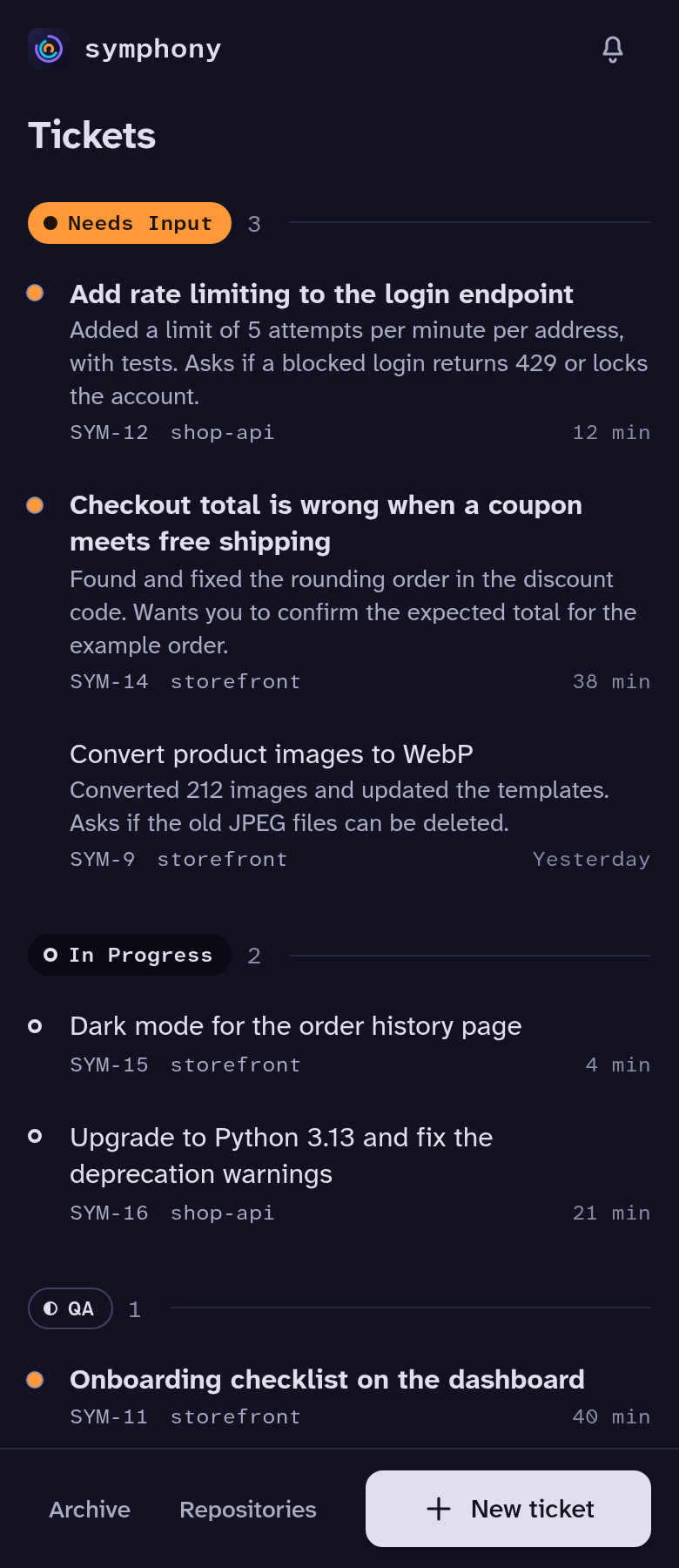
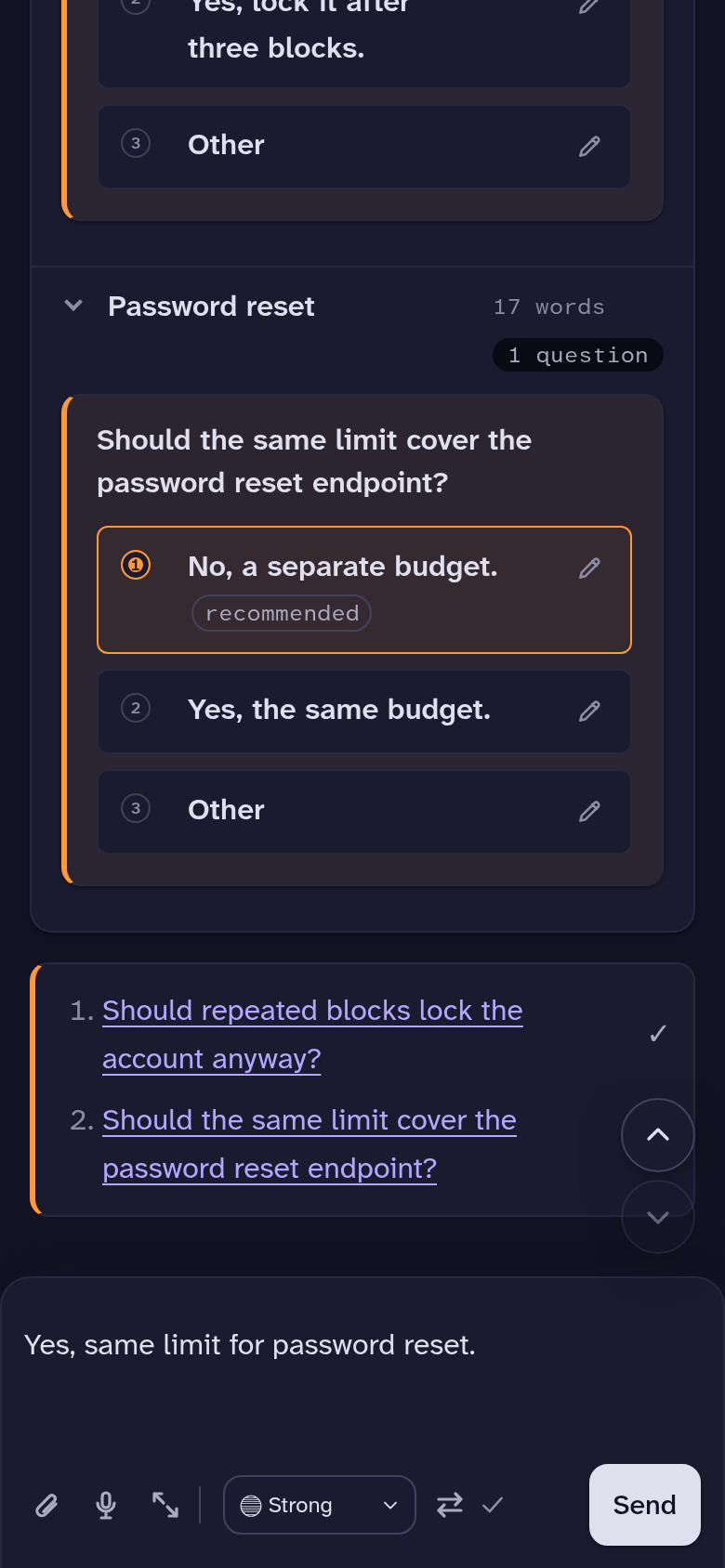
Write a ticket, press Start, and walk away. Symphony clones the repository, runs OpenCode, OMP or pi on it inside a bubblewrap sandbox, and posts the agent's reply on the ticket. Answer when you have a moment, from your desk or your phone, and the agent continues the same session. Several tickets run at the same time, so you can keep planning while the agents work.
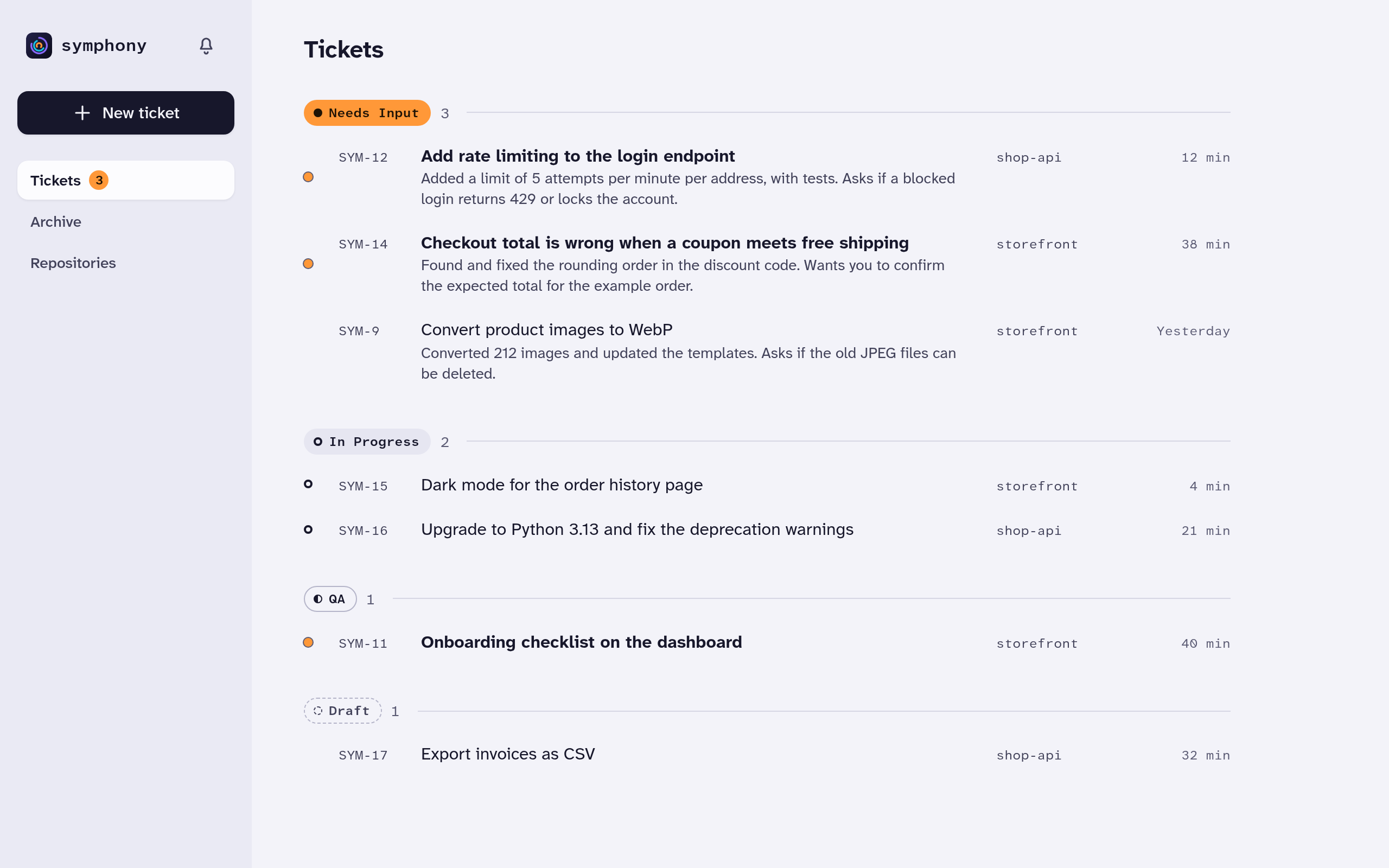
It is one small Python daemon. There is no database, no account and no cloud service: a ticket is a JSON file in a directory you choose, and the agent is the CLI you already use, with the login it already has.
For a quick tour with more screenshots, see symphony.stavros.io.
What you get
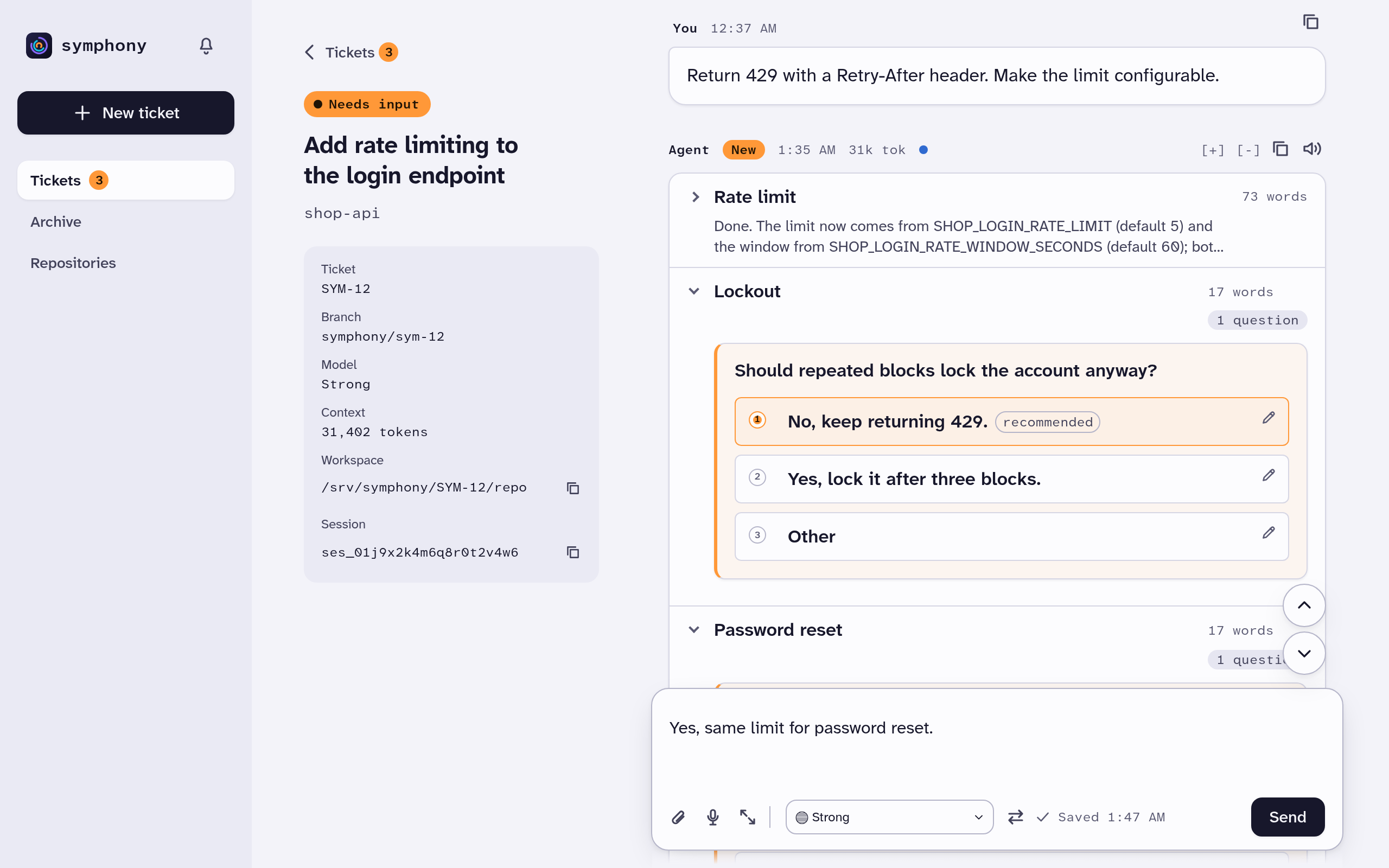
- A thread for each task. The ticket text is the prompt. The agent's reply arrives as a comment with rendered Markdown, and your reply resumes the same agent session with its full context.
- Sandboxed turns. Each turn runs in bubblewrap. It can write to the ticket's own checkout and to your tool caches, and the rest of the machine is read-only. Your SSH keys, the usual cloud credential directories, Symphony's own config and every other ticket are hidden.
- Parallel work. Up to ten turns run at once, each in its own clone of the repository and, by default, on its own branch.
- Your agent and your models. Use OpenCode, OMP or pi. Give your models short names in the config and pick one per ticket from a dropdown.
- Made for the phone. The layout fits a small screen, the UI installs as an app, and once you turn notifications on, a push notification tells you when a ticket needs you.
- Dictation. Speak the ticket or the reply instead of typing it (needs a Soniox key).
- Attachments. Add screenshots and files to a ticket or a reply. Images go to the model as image input.
- Titles and summaries. With an Anthropic key, tickets get a title automatically, and each ticket that waits for you shows one line that says what the agent did and what it needs.
- Light and dark. The theme follows your system.
- Autosave. Drafts and half-written replies are saved on the server as you type, so you can start on one device and finish on another.
- Manual QA. If your repository has a
.symphony/servescript, one button runs it in the sandbox, so you can try the agent's work before you accept it. - An API for agents. A small JSON API with a built-in guide lets another agent file tickets, read the replies and answer them.
Setup
You need:
- Python 3.11 or later and
git. - For the sandbox: Linux and
bwrap(apt install bubblewrap,dnf install bubblewraporpacman -S bubblewrap). The sandbox is bubblewrap, which is Linux only. - One coding agent, installed and logged in: OpenCode V2 (the default), OMP or pi.
Symphony checks for bwrap and the selected agent when it starts, and
refuses to start if either is missing, so an incomplete install fails at once
instead of on the first ticket. There is one exception: the web UI started
from a terminal runs without bwrap. That is a quick trial on Linux, and it
is how Symphony runs on a Mac. It then has no sandbox, and it says so in a
warning at startup. See
Running without bubblewrap.
Run it with nothing else to set up — in a terminal, from a directory with no
config.yaml:
uvx symphony-agent
The first run creates the workspace in ~/symphony, picks the first coding
agent it finds (OpenCode, then OMP, then pi), and writes a config with a
random password. It prints the address and the password, which is also
stored in ~/symphony/config.yaml. Open http://127.0.0.1:27149/ and log in
with it (the browser's username field is ignored, so any username works).
Then:
- Press New ticket.
- In Repository, choose Add a repository… and type
owner/nameor a clone URL. Symphony remembers it for the next ticket. - Give the ticket a title, describe the task, and press Start.
The ticket moves to In Progress. When the agent finishes its turn, the ticket moves to Needs Input and shows the reply. Reply to continue, or press Done.
Some things to know:
- Symphony clones with your own git credentials, outside the sandbox. If
git cloneworks in your shell, it works here, private repositories included. - The work stays in the ticket's checkout,
~/symphony/SYM-1/repofor the first ticket, on the branchsymphony/sym-1. Push it yourself after you review it, or ask the agent to commit and push. ~/symphonyis the workspace: one directory per ticket, plusstate.json, the ticket store andconfig.yaml, which holds the password. Keep that file private.- To change the agent, edit
agent:in~/symphony/config.yaml. - To use a workspace of your own, run Symphony from a directory that already
holds a
config.yaml, or pass--workspace. - No
uv?pip install symphony-agentinstalls the samesymphony-agentcommand.
To keep the daemon running, see the systemd unit in
Running Symphony.
Every option is in
Configuration,
and every button is in the
web UI guide.
Use it from your phone
The quick start above listens on 127.0.0.1 only. To reach Symphony from
another device, put a reverse proxy with HTTPS in front of the port (Caddy,
nginx, Traefik and so on). Do not expose the plain HTTP port: the login is
HTTP Basic auth, which sends the password with every request. Use a long,
unique password: anyone who has it can start a coding agent on your machine.
HTTPS is also what makes the phone features work. Browsers allow app install, push notifications and the microphone only on a secure page. The web UI guide has the proxy settings.
Use Linear or GitHub Projects instead
Symphony started as a daemon for Linear, and it still works without its own UI. One daemon uses one tracker: the web UI, Linear, or GitHub.
- Linear. Add the
Agentlabel to an issue and move it to In Progress. Symphony works on it, posts the reply as a comment, and moves the issue to a Needs Input state. Your comment resumes the agent. See Linear setup. - GitHub Projects. Set the
Symphonyfield of a project item toonand its Status to In Progress. The conversation happens in the issue's comments, and the Status field shows the state. See GitHub setup.
About the sandbox
The sandbox gives the agent one writable checkout, writable cache
directories (~/.cache, ~/.local/share and the agents' own state), and a
read-only view of the rest of your machine, with the usual credential
directories hidden. It protects you from an agent that makes a mistake: it
cannot edit another project, change your shell configuration or read your
SSH keys.
By default it does not stop the agent from using your GitHub login. The gh
credentials and your SSH agent stay reachable on purpose, so that the agent
can read issues and open pull requests. If you do not want that, add those
paths to sandbox.hide_paths, next to the default entries. The sandbox also
shares your network and runs as your user, so it is not a defence against an
agent that tries to get out.
How it works
describes exactly what is and is not hidden.
What it does not do
- It does not sandbox the agent outside Linux. On a Mac it runs without the sandbox, and only from a terminal. It does not run on Windows.
- It does not let you steer a turn that is running. You can stop it, or wait and reply.
- It does not retry a failed turn by itself. The ticket comes back to you with the error and a Retry button.
- It does not combine trackers. Web UI tickets do not appear in Linear or GitHub, and the reverse.
The full list is in How it works.
Documentation
- Web UI: ticket states, the reply box, repositories, models, attachments, titles, dictation, notifications, the agent API and the reverse proxy.
- Configuration:
the annotated
config.yaml, model names, per-repository setup scripts, secrets and manual QA. - Running Symphony:
install options,
systemd, where to keep credentials, and troubleshooting. - How it works: the pipeline, the sandbox and the limitations.
- Linear setup and GitHub setup.
- Development: how to run the tests and work on Symphony itself.
License
AGPL-3.0-only. See LICENSE.
1 maintainer

Metadata
1 maintainer
Release files for symphony-agent 0.11.0
For a detailed explanation of source distributions (sdists) and built distributions (wheels), please see the package formats documentation.
Source distribution (sdist)
| File | Size | Uploaded | Provenance | Actions |
|---|---|---|---|---|
| symphony_agent-0.11.0.tar.gz | 3.5 MB | With provenance | Details for symphony_agent-0.11.0.tar.gz |
Built distribution (wheel)
| File | Interpreter | ABI | Platform | Actions Reset |
|---|---|---|---|---|
| symphony_agent-0.11.0-py3-none-any.whl | Python 3 | none | any | Details for symphony_agent-0.11.0-py3-none-any.whl |
Total release size: 4.0 MB
Release files / symphony_agent-0.11.0.tar.gz
| Download URL | symphony_agent-0.11.0.tar.gz |
|---|---|
| Size | 3.5 MB |
| Tags | Source |
|
SHA-256 checksum How to use checksums |
053edca5f6dc2a85d3a974e9aa0793d60cd23c1967257cac9242e62ec133cb88
|
|
BLAKE2b-256 checksum How to use checksums |
49a4bb25e17b0fade8209dac865e1eeef876d29249c9ee05fe6cc7e10aff0c35
|
| Upload date | |
|
Uploaded using Trusted Publishing? What is trusted publishing? |
Yes |
| Uploaded via |
twine/7.0.0 CPython/3.13.16
|
Provenance
Provenance describes where a file came from. On PyPI, provenance is shared via attestations, which provide a verifiable record of the build or publishing details. View details, limitations and caveats.


PyPI Publish Attestation
PyPI verified that this artifact, at this checksum, originated from the publisher listed below.
Signed by GitHub Actions, verified by PyPI on Nov 29, 2026.
Transparency logRelease files / symphony_agent-0.11.0-py3-none-any.whl
| Download URL | symphony_agent-0.11.0-py3-none-any.whl |
|---|---|
| Size | 502.5 kB |
| Tags | Python 3 |
|
SHA-256 checksum How to use checksums |
dc21d34363c8efd15ca9b61b0ed7d96d7bb15a49864fae04557588c4b55e9593
|
|
BLAKE2b-256 checksum How to use checksums |
300b8625eb44fed308c79cf3d63ca0c18c4e4573f1cccda2ccd510395adae097
|
| Upload date | |
|
Uploaded using Trusted Publishing? What is trusted publishing? |
Yes |
| Uploaded via |
twine/7.0.0 CPython/3.13.16
|
Provenance
Provenance describes where a file came from. On PyPI, provenance is shared via attestations, which provide a verifiable record of the build or publishing details. View details, limitations and caveats.
PyPI Publish Attestation
PyPI verified that this artifact, at this checksum, originated from the publisher listed below.
Signed by GitHub Actions, verified by PyPI on Nov 29, 2026.
Transparency logSecurity for symphony-agent 0.11.0
Provenance
Provenance describes where a file came from. On PyPI, provenance is shared via attestations, which provide a verifiable record of the build or publishing details. View details, limitations and caveats.
Full provenance
Both files in this release have been uploaded with provenance metadata.
Attestation for symphony_agent-0.11.0.tar.gz
PyPI Publish Attestation
PyPI verified that this artifact, at this checksum, originated from the publisher listed below.
Signed by GitHub Actions, verified by PyPI on Nov 29, 2026.
Transparency logA note on package security
PyPI is a repository for distributing packages, not a service for auditing them. While third-party security researchers and our staff do their best to detect and remove malicious packages, PyPI cannot guarantee the quality, security or suitability of any given package.
To learn more about protecting yourself from malicious actors, visit our package security documentation.













