
Equations that can be algebraicly manipulated.

Project description
sympy_equation




This package defines relations that all high school and college students would
recognize as mathematical equations, consisting of a left hand side (lhs) and
a right hand side (rhs) connected by the relation operator "=". This is
implemented by the Equation class, which also supports mathematical
operations applied to both sides simultaneously, just as students are taught
to do when attempting to isolate (solve for) a variable. Thus the statement
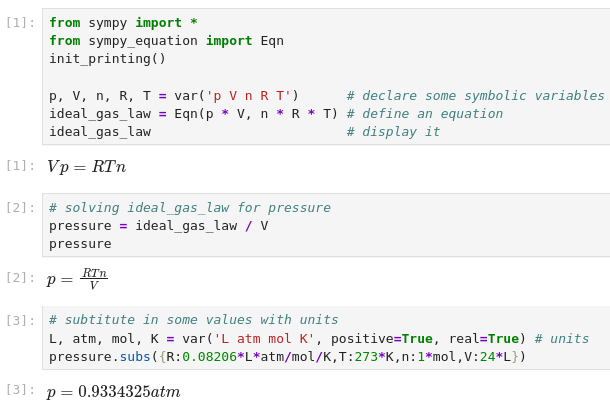
Equation/b yields a new equation Equation.lhs/b = Equation.rhs/b.
The intent is to allow using the mathematical tools in SymPy to rearrange equations and perform algebra in a stepwise fashion using as close to standard mathematical notation as possible. In this way more people can successfully perform algebraic rearrangements without stumbling over missed details such as a negative sign.
A simple example as it would appear in a Jupyter notebook is shown immediately below:
In IPython environments (IPython, Jupyter, Google Colab, etc...) there is
also a shorthand syntax for entering equations provided through the IPython
preparser. An equation can be specified as eq1 =@ a/b = c/d.
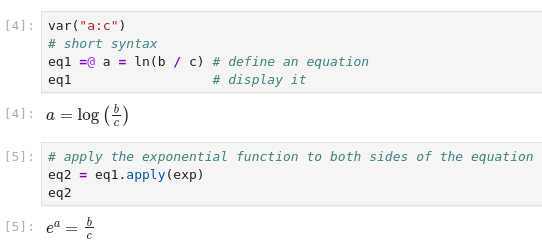
If no Python name is specified for the equation (no eq_name to the left of =@), the equation will still be defined, but will not be easily accessible
for further computation. The =@ symbol combination was chosen to avoid
conflicts with reserved python symbols while minimizing impacts on syntax
highlighting and autoformatting.
More examples of the capabilities of Algebra with Sympy are here.
Development and Support
If you feel like a feature could be implemented, open an issue or create a PR. Implementing new features and fixing bugs requires time and energy too. If you found this module useful and would like to show your appreciation, please consider sponsoring this project with either one of these options:

Installation
sympy_equation can be installed with pip or conda.
pip install sympy_equation
Or
conda install -c conda-forge sympy_equation
Customizing the module
equation_config is an object containing a few properties to customize
the behaviour of the module:
from sympy_equation import equation_config
Arguably the most useful options are :
equation_config.integers_as_exact(default is False). When it's True and we are running in an IPython/Jupyter environment, it preparses the content of a code line in order to convert integer numbers to sympy's Integer. In doing so, we can write 2/3, which will be converted to Integer(2)/Integer(3), which then SymPy converts to Rational(2, 3). If False, no preparsing is done, and Python evaluates 2/3 to 0.6666667, which will then be converted by SymPy to a Float.equation_config.show_label(default is False). When it's True, a label with the name of the equation in the python environment will be shown on the screen.
Check out the documentation to read more about these and other options.
Differences between sympy_equation and algebra_with_sympy
sympy_equationis a fork of algebra_with_sympy, starting from the version 1.0.2.algebra_with_sympyinstalls a custom version of SymPy, which exposes theEquationclass. The basic idea is to better integrate theEquationclass with other SymPy functionalities. The downside is that as new releases of SymPy are available, the users ofalgebra_with_sympymust wait for a new version of the package to be released as well. Differently,sympy_equationis an external package that only depends on SymPy: as new releases of SymPy are available,sympy_equationwill work with them right away. The downside is that it might not be as integrated with SymPy's functionalities as one would like it to be.algebra_with_sympyexposes thealgwsym_configobject to customize the behaviour of the module. Similarly,sympy_equationexposes theequation_config. The available options are very similar, but their default values are often different.algebra_with_sympyoverwrites the default behaviour of SymPy'ssolve()andsolveset()in order for them to return sets of solutions. This can be annoying if you are used to the SymPy's way of doing things. Differently,sympy_equationdoesn't change the behaviour of these functions, rather it extends it in order to deal with theEquationclass.


Download files
Download the file for your platform. If you're not sure which to choose, learn more about installing packages.
Source Distribution
Built Distribution
Filter files by name, interpreter, ABI, and platform.
If you're not sure about the file name format, learn more about wheel file names.
Copy a direct link to the current filters
File details
Details for the file sympy_equation-1.1.3.tar.gz.
File metadata
- Download URL: sympy_equation-1.1.3.tar.gz
- Upload date:
- Size: 21.5 kB
- Tags: Source
- Uploaded using Trusted Publishing? Yes
- Uploaded via: pdm/2.24.1 CPython/3.13.3 Linux/6.11.0-1014-azure
File hashes
| Algorithm | Hash digest | |
|---|---|---|
| SHA256 |
52f5dd7447b7c89225df28c580e58a319fe99094f3414e0a1b414df0927f3c58
|
|
| MD5 |
56a9700a4234ddb1a5b6d95f6b24f363
|
|
| BLAKE2b-256 |
c8462a645d7c13e1fa7ad977e47e584c55f6eb50372fb5fc67d4e9c7edc11ad9
|
File details
Details for the file sympy_equation-1.1.3-py3-none-any.whl.
File metadata
- Download URL: sympy_equation-1.1.3-py3-none-any.whl
- Upload date:
- Size: 15.6 kB
- Tags: Python 3
- Uploaded using Trusted Publishing? Yes
- Uploaded via: pdm/2.24.1 CPython/3.13.3 Linux/6.11.0-1014-azure
File hashes
| Algorithm | Hash digest | |
|---|---|---|
| SHA256 |
06c5d8c769f3acd213948bc60f8168f30ac0c38b443cb8f141365d4c3fee3720
|
|
| MD5 |
b1e0779d6fbb09767814b57575a9c291
|
|
| BLAKE2b-256 |
6731a0407378db233c2595c6d698ed932ea86a84b5bf562945c84f0acd8d84f3
|






