

Syna
The AI agent with a pod.
julynx.github.io/syna
uv tool install syna-agent
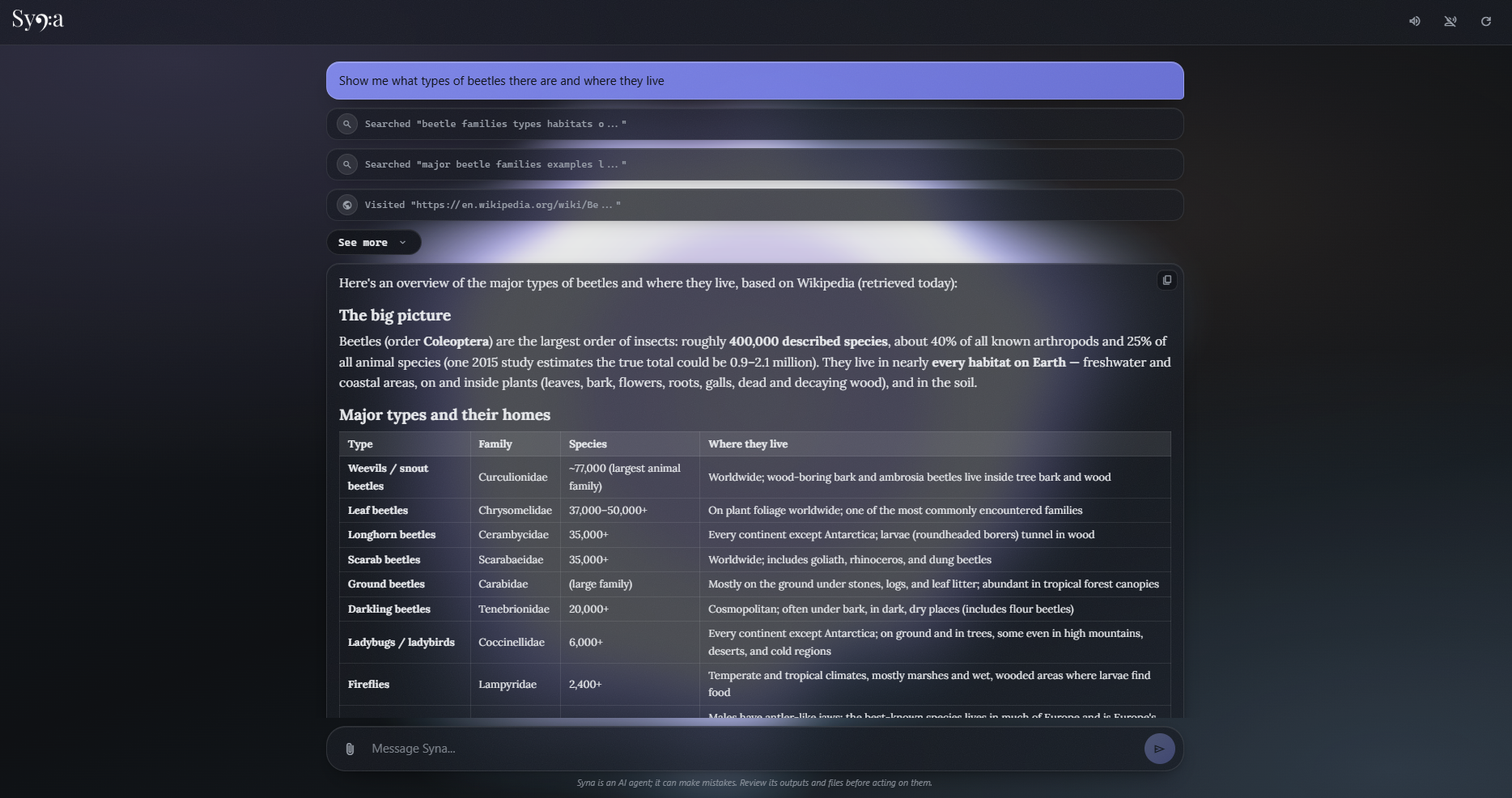
You're getting the full kit
Syna has a pod, a Debian container, and her commands run inside of it. They cannot touch your actual system. She can only see what you decide to share with her. She respects your boundaries.
Syna has a browser, and native web search and web interaction tools, no API key required.
Syna has a voice; enable voice mode to talk to Syna and listen to her. She can transcribe an audio file into text, and the other way around, powered by the models of your choice.
Syna has sight; she can understand images and ensure the documents, graphs and websites she creates look amazing before sharing them with you. Say goodbye to troubleshooting broken layouts.
Syna has a canvas, and your favorite model is the brush. Ask her to paint something for you, and she will take care of the rest.
Syna has principles. She knows how to do her research, supports her answers with sources, and verifies her own work.
Syna has a pen, and her notebooks have an index. Long files don't scare her, she can locate the exact line that needs to change, and replace it without having to read the entire file and spit it out like a maniac.
Syna has a control panel, and it's a gift for you. Customize everything. Don't want voice mode or image generation? Disable them, they'll stay off.
Syna has patience. She is ready for long and complex tasks. When her workspace gets cluttered, she doesn't panic, she tidies up. She uses elision, compaction, and caching to keep your bills low and make every token count.
Syna has connections. OpenRouter is her best friend, but she also works with OpenAI, Google Gemini, local Ollama, or any OpenAI-compatible endpoint. Pick your favorite.
Syna is a star, and she looks like one. She pulses in the background as she works, changes colors, and thinks in polytones. She knows the agent of the future shouldn't look like a gray chat.
Getting started
Using Syna (Web UI) - Recommended
-
Open your
Terminaland paste the following command to install Syna:uv tool install syna-agent
The
uvpackage manager is the recommended way to install Syna. If you don't have it installed, run the following command depending on your system:- Windows:
powershell -ExecutionPolicy ByPass -c "irm https://astral.sh/uv/install.ps1 | iex" - Linux:
curl -LsSf https://astral.sh/uv/install.sh | sh
- Windows:
-
Syna is now installed. Enter the following command into your
Terminalto run it:syna
Then, open your browser and go to the following url:
http://127.0.0.1:8000
Using Syna (CLI)
-
Before you start, run the following command:
syna-setup
A wizard will guide you into configuring your API key, model, and other settings. It saves them into an
.envfile in~/.syna.If you want to do this manually: [Click me]
Create a new file in
~/.syna/.envwith the following contents:OPENROUTER_API_KEY=your-api-key # Your API key goes here MODEL=~z-ai/glm-flash-latest # Or any model of your preference BASE_URL=https://openrouter.ai/api/v1 # Optional: Any OpenAI-compatible endpoint THINKING_EFFORT=medium # Can be either of none|minimal|low|medium|high|xhigh|max
Voice mode is enabled by adding speech models to the same
.envfile:STT_MODEL=google/chirp-3 # Transcribes microphone recordings TTS_MODEL=google/gemini-3.8-flash-lite-tts # Reads the answers out loud TTS_VOICE=Kore # Optional: voice of the TTS model SPEECH_LANGUAGE=en # Optional: ISO-639-1 code, English by default
Image generation (the model's
text_to_imagetool) is enabled the same way:IMAGE_MODEL=google/gemini-3.1-flash-image
Please note that you need to have either
PodmanorDockerinstalled on your system. The setup wizard can install it for you in one click, or you can also do so manually. Podman is the recommended option, visit podman.io to get it. -
You're good to go. All it takes is:
syna-cli
Privacy
Syna does not collect your personal information or send your messages anywhere except to the provider you specified. Their Terms of Service and Privacy Policy apply.
Links
1 maintainer

Metadata
1 maintainer
Release files for syna-agent 0.10.5
For a detailed explanation of source distributions (sdists) and built distributions (wheels), please see the package formats documentation.
Source distribution (sdist)
| File | Size | Uploaded | Provenance | |
|---|---|---|---|---|
| syna_agent-0.10.5.tar.gz | 5.3 MB | Without provenance | Details |
Built distribution (wheel)
| File | Interpreter | ABI | Platform | Reset |
|---|---|---|---|---|
| syna_agent-0.10.5-py3-none-any.whl | Python 3 | none | any | Details |
Total release size: 10.7 MB
Release files / syna_agent-0.10.5.tar.gz
| Download URL | syna_agent-0.10.5.tar.gz |
|---|---|
| Size | 5.3 MB |
| Tags | Source |
|
SHA-256 checksum How to use checksums |
56a5d6eeddd1b906bf0f5ee56d430f2525882f1d78fce93ffc44dea46669756e
|
|
BLAKE2b-256 checksum How to use checksums |
7420e9040028c81310e00d84d083ed45046e49c86f1e7ca8cb497bc0017002a1
|
| Upload date | |
|
Uploaded using Trusted Publishing? What is trusted publishing? |
No |
| Uploaded via |
uv/0.13.5 {"installer":{"name":"uv","version":"0.13.5","subcommand":["publish"]},"python":null,"implementation":{"name":null,"version":null},"distro":null,"system":{"name":null,"release":null},"cpu":null,"openssl_version":null,"setuptools_version":null,"rustc_version":null,"ci":null}
|
Release files / syna_agent-0.10.5-py3-none-any.whl
| Download URL | syna_agent-0.10.5-py3-none-any.whl |
|---|---|
| Size | 5.4 MB |
| Tags | Python 3 |
|
SHA-256 checksum How to use checksums |
c0cea8bba1d91a62bee6ebe3dc8ee8386e1bbddac3506abf93e308ad2b3a0505
|
|
BLAKE2b-256 checksum How to use checksums |
26ffe8536ebd987a59abf702b297ddcf4392789e376b4c5b1479beb644febf6f
|
| Upload date | |
|
Uploaded using Trusted Publishing? What is trusted publishing? |
No |
| Uploaded via |
uv/0.13.5 {"installer":{"name":"uv","version":"0.13.5","subcommand":["publish"]},"python":null,"implementation":{"name":null,"version":null},"distro":null,"system":{"name":null,"release":null},"cpu":null,"openssl_version":null,"setuptools_version":null,"rustc_version":null,"ci":null}
|
Security for syna-agent 0.10.5
Provenance
Provenance describes where a file came from. On PyPI, provenance is shared via attestations, which provide a verifiable record of the build or publishing details. View details, limitations and caveats.
No provenance found
None of the files in this release were uploaded with provenance metadata.
A note on package security
PyPI is a repository for distributing packages, not a service for auditing them. While third-party security researchers and our staff do their best to detect and remove malicious packages, PyPI cannot guarantee the quality, security or suitability of any given package.
To learn more about protecting yourself from malicious actors, visit our package security documentation.














