







Synalog
Logic programming for AI agents: Datalog-family language compiling to optimized SQL
Synalog is a logic programming language from the Datalog family, a fork of Logica with the entire engine (parser, compiler and verifier) rewritten in Rust. It compiles to optimized SQL and ships as a Python package built on PyO3: parsing is ~86.7x faster and compilation ~13.7x faster than the original Python implementation, so validating and compiling a program is effectively instant.
Synalog was built for the AI agents era. The main idea is to give an agent a dynamic semantic layer over its data: a layer of named concepts and rules that the agent both reads from and writes to at inference time. Unlike a traditional BI semantic layer, which is modeled once by humans and frozen, Synalog's layer is authored on the fly: the agent extracts entities and relationships into knowledge graphs, derives meaning with composable logical rules, and reasons over time with temporal reasoning: accumulating all of it as structured, reusable memory.
New here, or deciding whether this belongs in your stack? Why Synalog makes the case in business terms, including the trade-offs and the cases where another tool wins.
What the agent gains
A raw table is just rows; an agent has to re-interpret what they mean on every query. Synalog turns that meaning into a layer the agent owns:
- A shared vocabulary over raw tables: instead of re-deriving "who is an active customer" or "what counts as revenue" in every query, the agent defines it once as a named concept and reuses it everywhere. The semantic layer is the agent's interface to the data.
- Instant knowledge-graph construction from raw tables: a handful of entity and relationship concepts turn existing relational tables into a traversable knowledge graph, with no ETL pipeline, no separate graph database, and no data movement. The graph is virtual: it compiles to SQL that runs directly on the source tables.
- Knowledge graphs the agent can traverse: model entities and relationships as concepts, then follow connections (composition, inverse, symmetric, recursive chains) without writing fragile join logic. See Knowledge graphs.
- Recursion and transitive reasoning: transitive closures and graph traversals (org charts, taxonomies, bills of materials, referral chains, shortest paths) that are impossible to write correctly in raw SQL come out as a base case plus a recursive case, with the verifier guaranteeing termination.
- Logical rules that compose: rules build on other rules, so knowledge accumulates instead of being re-derived. Complex questions decompose into small named predicates the agent can inspect, reuse, and combine.
- Temporal reasoning: time-aware rules and edges (validity windows, "active today", overlap, point-in-time joins) let the agent answer when, not just what. That kind of reasoning is notoriously error-prone to express directly in SQL.
- Dynamic, not static: the layer evolves as the agent learns. New rules extend the vocabulary at runtime; the rule base itself becomes the agent's long-term memory over structured data.
- Auditable reasoning: every derived fact traces back through named rules, giving full lineage from answer to source tables.
- Compile-time verification: a formal verifier catches structural errors before any SQL touches a database, so a self-authored rule that parses but is unsound is rejected up front. See Verification.
- A fast Rust engine: check and compile sit inside the agent's inner loop (every generated rule is validated, every query compiled, often several times per step). The Rust core makes that loop cost milliseconds instead of seconds. See Benchmark.
Because SQL engines are better optimized than logic programming engines, Synalog compiles into optimized SQL that runs on SQLite, DuckDB, BigQuery, PostgreSQL, Presto, Trino and Databricks: efficiently scaling to petabytes of data. See Supported engines.
Full documentation: https://synalinks.github.io/synalog/
At a glance
import duckdb
import synalog

source = """
@Engine("duckdb");

Employee(name: "Alice", department: "Engineering", salary: 75000);
Employee(name: "Bob", department: "Marketing", salary: 65000);
Employee(name: "Charlie", department: "Engineering", salary: 80000);

@OrderBy(EngineeringTeam, "name");
EngineeringTeam(name:, salary:) :- Employee(name:, department: "Engineering", salary:);
"""

errors, warnings = synalog.check(source)
assert errors == []

sql = synalog.compile(source, "EngineeringTeam")
rows = duckdb.sql(sql).fetchall()
# [('Alice', 75000), ('Charlie', 80000)]
Installation
pip install synalog
Or with uv: uv add synalog (or uv pip install synalog). The CLI also runs without installing via uvx synalog.
Requires Python 3.10+. Wheels are published for Linux (x86_64, aarch64, armv7, s390x, ppc64le; glibc and musl), Windows (x64, x86, aarch64) and macOS (x86_64, aarch64).
Add the skill to your coding agent
Synalog ships an Agent Skill, a SKILL.md that teaches a coding agent the language, the CLI and the conventions, so it writes and runs programs correctly. It follows the open Agent Skills standard, so it works with Claude Code, Cursor, Codex, OpenCode, Cline, Windsurf and 70+ other agents. Install it with the skills CLI (GitHub is the registry, so there is nothing to publish or install first):
npx skills add SynaLinks/synalog              # this project (./.claude/skills, ./.agents/skills, …)
npx skills add SynaLinks/synalog -g           # user-wide (~/.claude/skills, …)
npx skills add SynaLinks/synalog -a cursor codex   # only specific agents
The skill is maintained in this repo at skills/synalog/SKILL.md; npx skills add copies it into the right place for each agent.
Command-line interface
Installing the package also installs a synalog command (also available as python -m synalog):
synalog program.l print Predicate      # print compiled SQL
synalog program.l run Predicate        # execute and print a table
synalog program.l run Predicate --csv  # execute and print CSV
Both print and run validate the whole program first and exit 1 with the verifier's errors if it is invalid, so verification always happens before any SQL is produced or executed.
$ synalog program.l run EngineeringTeam
+---------+--------+
| name    | salary |
+---------+--------+
| Alice   | 75000  |
| Charlie | 80000  |
+---------+--------+
2 rows
-as the file reads the program from stdin;-c PROGRAMpasses the program text inline, likepython -c.--engineoverrides the program's@Engineannotation (defaultduckdb).--limit/--offsetpaginate the result.--csv(withrun) prints results as CSV instead of the rendered table.--search REGEX(withprint/run) keeps only rows where some column matches the regular expressionREGEX, e.g.synalog program.l run Customers --search "(?i)acme". In the interactive session the same is.search Customers (?i)acme.runexecutes onduckdb(the default),sqlite(stdlib) orpsql(in a project connected to it) out of the box: synalog depends on duckdb and on psycopg with its bundled libpq, on macOS and Linux alike. For other engines, install their driver (pip install 'synalog[trino]', ...) or useprintand run the SQL with your own client.import path.to.file.Pred;statements resolvepath/to/file.lagainst the program file's directory, then the current directory; pass--import-root DIR(repeatable) to search elsewhere.--load TABLE=PATH(repeatable) loads a csv/tsv/json/jsonl/parquet file as a table before running, e.g.synalog senior.l run Senior --load employees=employees.csv.
Projects: layer.toml
A folder with a layer.toml is a project. Its [connection] says which database its programs run on, as plain fields — commit it:
[connection]
engine = "psql"
host = "db.example.com"
port = 5432
database = "sales"
user = "analyst"
schema = "public"
Secrets never go in the file (synalog refuses it): each comes from the environment as SYNALOG_<ENGINE>_<FIELD> — SYNALOG_PSQL_PASSWORD, SYNALOG_DATABRICKS_ACCESS_TOKEN, or GOOGLE_APPLICATION_CREDENTIALS for BigQuery — usually from the project's .env, kept out of git. Inside the project (from the program's folder or the current directory, and their parents), run, print and verify use that engine and connection, imports resolve from the project's folder, and synalog introspect writes the project's tables/, one file per table of the database. The project's file is the only place a connection comes from; --engine and an @Engine annotation choose the dialect, and a remote engine runs only through the project's connection to it. synalog connect <engine> key=value ... writes it — the non-secret fields to layer.toml, the secret ones to .env — synalog connect shows it (secrets hidden), synalog connect clear removes it. The fields of every engine are in synalog.project.ENGINES.
Running synalog with no arguments starts an interactive session, in the spirit of python (the options above, e.g. --engine or --load, apply to it too):
$ synalog
Synalog 0.1.0 on duckdb, type .help for help
>>> Employee(name: "Alice", salary: 75000);
>>> Employee(name: "Bob", salary: 65000);
>>> Total(t? += salary) distinct :- Employee(salary:);
>>> Total
+--------+
| t      |
+--------+
| 140000 |
+--------+
1 row
Type a rule ending in ; to add it to the session program (it is validated first, and rejected with an error if invalid), or a predicate name to compile and run it. .help lists the session commands (.show, .sql <Pred>, .engine <name>, .load <table> <path>, .clear, .exit).
Quick start
import synalog

source = """
@Engine("duckdb");

Employee(name: "Alice", department: "Engineering", salary: 75000);
Employee(name: "Bob", department: "Marketing", salary: 65000);
Employee(name: "Charlie", department: "Engineering", salary: 80000);

@OrderBy(EngineeringTeam, "name");
EngineeringTeam(name:, salary:) :- Employee(name:, department: "Engineering", salary:);
"""

errors, warnings = synalog.check(source)
assert errors == []

sql = synalog.compile(source, "EngineeringTeam")
print(sql)
You can then execute the SQL with any database driver (sqlite3, duckdb, psycopg, google-cloud-bigquery, etc.).
Python API
parse(source, file_name=None, engine=None, import_root=None) -> str
Parse source and return the AST as a JSON string.
ast = synalog.parse(source)
compile(source, predicate, limit=None, offset=None, engine=None, import_root=None) -> str
Compile a single predicate to SQL. limit is combined with the @Limit directive: actual = min(limit, @Limit).
sql = synalog.compile(source, "TopCustomers", limit=20, offset=40)
search(source, predicate, pattern, limit=None, offset=None, engine=None, import_root=None) -> str
Compile a predicate to SQL that keeps only rows where some column matches the regular expression pattern (the per-column conditions are OR-ed, each column cast to text). The regex is evaluated by the target engine's native operator (~ on PostgreSQL, REGEXP on SQLite, regexp_matches on DuckDB, REGEXP_LIKE elsewhere). It is not a SQL LIKE pattern. limit/offset apply to the filtered rows.
sql = synalog.search(source, "Customers", "(?i)acme", limit=20)
compile_all(source, engine=None, import_root=None) -> dict[str, str]
Compile every defined predicate in the program. Returns a mapping predicate_name -> sql.
sqls = synalog.compile_all(source)
for name, sql in sqls.items():
    print(name, sql)
execute(source, predicate, engine=None, project=None, import_root=None, limit=None, offset=None, pattern=None, assertion=None, loads=()) -> tuple[list[str], list[tuple]]
Run a predicate on its database (the program's or project's engine and connection) and return (columns, rows). Each recursion stops as soon as a step changes nothing, so it costs the steps its data needs, and @Recursive(P, -1) (until nothing changes) runs on every engine. plan() returns the same steps for a host that runs them itself.
columns, rows = synalog.execute(source, "TopCustomers", limit=20)
check(source, engine=None, import_root=None, assertions=True, project=None) -> tuple[list[str], list[str]]
Run structural validation. Returns the error messages and the warning messages, as two lists. The program is valid when there is no error; warnings do not make it invalid. Inside a project whose layer.toml has a [connection] — the current directory's, or the folder project names — it also runs the program's @Assert statements against the database and reports each violated one as an error; assertions=False keeps it offline.
errors, warnings = synalog.check(source)
if errors:
    for e in errors:
        print(e)
All of these functions accept an optional engine keyword that overrides the program's @Engine annotation (one of sqlite, duckdb, bigquery, psql, presto, trino, databricks; default duckdb) and an optional import_root keyword listing directories where import statements look up .l files (default: the current directory). They raise ValueError on syntax or compilation errors.
Language overview
A Synalog program is a project: a folder with a layer.toml, holding one predicate per file in three folders, the layout of semantic layers:
shop/
├── tables/orders.l               # the data: one file per database table
├── concepts/customer.l           # entities and relationships extracted from tables
├── rules/customer_revenue.l       # insights derived from concepts
├── rules/top_customers.l
└── layer.toml                    # the project's name, description and database
Each file is named after its predicate and opens with front matter (name, the predicate; description, what its rows are), then imports what it builds on by folder, file and predicate, then orders its predicate with @OrderBy. A database table is referenced by its lowercase database name in tables/, and everything else builds on the PascalCase predicate that maps it:
tables/orders.l
---
name: Orders
description: One row per order, with its customer, amount and status.
---
@OrderBy(Orders, "order_id");
Orders(order_id:, customer_id:, amount:, status:) :-
  orders(order_id:, customer_id:, amount:, status:);
concepts/customer.l
---
name: Customer
description: Every customer who placed at least one order.
---
import tables.orders.Orders;

@OrderBy(Customer, "customer_id");
Customer(customer_id:) distinct :- Orders(customer_id:);
rules/customer_revenue.l
---
name: CustomerRevenue
description: Total amount ordered by each customer, all statuses included.
---
import concepts.customer.Customer;
import tables.orders.Orders;

@OrderBy(CustomerRevenue, "customer_id");
CustomerRevenue(customer_id:, total? += amount) distinct :-
  Customer(customer_id:), Orders(customer_id:, amount:);
Imports resolve from the project's folder, so every file runs on its own: synalog rules/customer_revenue.l run CustomerRevenue. The snippets below show the language itself, one rule at a time.
Named arguments
Synalog uses named arguments only (no positional arguments). The left side of : is the column name, the right side is the variable:
# column "amount" bound to variable "total"
Orders(amount: total)

# shorthand: column and variable share the same name
Orders(amount:)
Variables and expressions
Variables are defined with ==. Arithmetic, string and comparison operators are supported:
OrderWithTax(order_id:, total:) :-
  Orders(order_id:, amount:),
  total == amount * 1.10;
Operators: +, -, *, /, ^ (power), % (modulo), ++ (string concat), ==, !=, <, >, <=, >=, &&, ||, !, in, is null, is not null.
Aggregation
Aggregation uses the distinct keyword and special operators in the rule head:
# Sum
Revenue(total? += amount) distinct :- Orders(amount:);

# Count
OrderCount(n? += 1) distinct :- Orders(order_id:);

# Min / Max
Cheapest(min_price? Min= price) distinct :- Products(price:);
Priciest(max_price? Max= price) distinct :- Products(price:);

# Average
AvgOrder(avg? Avg= amount) distinct :- Orders(amount:);

# Collect into list / set
AllNames(names? List= name) distinct :- Users(name:);
UniqueNames(names? Set= name) distinct :- Users(name:);

# Value with max/min key
TopSeller(name? ArgMax= name -> revenue) distinct :- Sales(name:, revenue:);
Logical operators
# Conjunction (AND), comma
Result(x:, y:) :- TableA(x:), TableB(x:, y:);

# Disjunction (OR), pipe
Combined(x:) distinct :- SourceA(x:) | SourceB(x:);

# Negation (NOT), tilde
Inactive(user_id:) :- Users(user_id:), ~Logins(user_id:);
Multiple rule definitions for the same predicate combine results (union):
HighValue(user_id:) :- Orders(user_id:, amount:), amount > 10000;
HighValue(user_id:) :- Referrals(user_id:, tier: "vip");
Conditionals
OrderSize(order_id:, size:) :-
  Orders(order_id:, amount:),
  size == (if amount > 1000 then "large"
           else if amount > 100 then "medium"
           else "small");
Directives
Directives control predicate behavior and must be placed before the rule definition:
@OrderBy(TopCustomers, "total", "DESC");
@Limit(TopCustomers, 10);
TopCustomers(customer_id:, total? += amount) distinct :- Orders(customer_id:, amount:);
| Directive | Purpose |
|---|---|
@OrderBy(Pred, col1, ...) |
Sort order. Append "DESC" for descending |
@Limit(Pred, n) |
Maximum number of rows |
@Recursive(Pred, n) |
Allow recursion with iteration limit |
@Ground(Pred) |
Force materialization before dependents |
@Engine(name) |
Target SQL engine |
Functors
Functors let you reuse predicate logic by parameterizing input predicates:
# Define a reusable pattern
@OrderBy(SegmentRevenue, "segment_id");
SegmentRevenue(segment_id:, total? += amount) distinct :-
  Segment(segment_id:, user_id:),
  Orders(user_id:, amount:);

# Apply to different segments
EnterpriseRevenue := SegmentRevenue(Segment: EnterpriseCustomers);
SMBRevenue := SegmentRevenue(Segment: SMBCustomers);
Recursion
Recursive predicates compute transitive closures, for example finding all managers above an employee:
@Recursive(AllManagers, 20);

# Base case: direct manager
AllManagers(employee_id:, manager_id:) :- Employees(employee_id:, manager_id:);

# Recursive case: manager's managers
AllManagers(employee_id:, manager_id:) :-
  AllManagers(employee_id:, manager_id: intermediate),
  Employees(employee_id: intermediate, manager_id:);
Useful for: referral chains, org charts, product taxonomies, bill of materials.
Shortest paths
Find shortest paths in weighted graphs by enumerating route costs recursively, then keeping the minimum per destination with a Min= aggregation:
# Enumerate route costs from the origin, hop by hop.
@Recursive(RouteCost, 10);
RouteCost(destination:, cost:) :-
  ShippingRoutes(origin: "warehouse_main", destination:, cost:);
RouteCost(destination:, cost: total) :-
  RouteCost(destination: hub, cost: hub_cost),
  ShippingRoutes(origin: hub, destination:, cost:),
  total == hub_cost + cost;

# Keep the cheapest cost per destination.
@OrderBy(ShippingCost, "destination");
ShippingCost(destination:, total? Min= cost) distinct :- RouteCost(destination:, cost:);
Temporal data
When working with timestamps or dates, always convert to string first:
@OrderBy(MonthlyOrders, "month");
MonthlyOrders(month:, count? += 1) distinct :-
  Orders(created_at:),
  month == Substr(ToString(created_at), 1, 7);

# Filter by date range
RecentOrders(order_id:) :-
  Orders(order_id:, created_at:),
  ToString(created_at) >= "2024-01-01";
Today(date:) (today's date as "YYYY-MM-DD") and Now(timestamp:) (the current instant as the engine's native timestamp) are built-in concepts. They are inlined per dialect by the compiler, with no runtime table needed, so they work on every engine. Now is the most precise value; derive coarser parts (date, time, hour) from it through the ToString → Substr pipeline. Join against Today whenever a rule needs "today":
@OrderBy(ThisMonthOrders, "order_id");
ThisMonthOrders(order_id:, created_at:) :-
  Orders(order_id:, created_at:),
  Today(date:),
  Substr(ToString(created_at), 1, 7) == Substr(date, 1, 7);
They are reserved names: you cannot redefine, extend, or update them.
Knowledge graphs
Entities and relationships become node and edge concepts, and rules traverse them. Edges join through the node concepts rather than the raw table, so a filter on a node applies to every edge built on it:
@OrderBy(Person, "person_id");
Person(person_id:, name:, profile_url:) distinct :- Employees(person_id:, name:, profile_url:);

@OrderBy(WorksIn, "person_id");
WorksIn(person_id:, department_id:) distinct :-
  Person(person_id:),
  Department(department_id:),
  Employees(person_id:, department_id:);
Relationships with a lifetime carry it as a half-open interval [valid_from, valid_to), using "9999-12-31" as the open end so ISO strings compare correctly, and Today supplies the clock for point-in-time questions:
@OrderBy(CurrentEmployment, "person_id");
CurrentEmployment(person_id:, company_id:, role:) distinct :-
  EmployedAt(person_id:, company_id:, role:, valid_from:, valid_to:),
  Today(date:),
  valid_from <= date, date < valid_to;
Node and edge patterns, temporal modeling, point-in-time queries and time-respecting traversals are covered in Knowledge graphs.
Built-in functions
String: Substr, Length, Upper, Lower, Split, Join, Like, Format
Array: Size, Element, ArrayConcat, Range
Math: Abs, Floor, Ceil, Round, Sqrt, Log, Exp, Sin, Cos
Type casting: ToInt64, ToFloat64, ToString
Other: Coalesce, IsNull
Built-in concepts: Today(date:) is today's date as "YYYY-MM-DD"; Now(timestamp:) is the current instant as a native timestamp (see Temporal data above).
Supported engines
| Engine | @Engine value |
Notes |
|---|---|---|
| DuckDB | duckdb |
Default engine |
| SQLite | sqlite |
|
| PostgreSQL | psql |
|
| BigQuery | bigquery |
|
| Trino | trino |
|
| Presto | presto |
|
| Databricks | databricks |
Double-quoted string literals |
Each engine has its own SQL dialect for string literals, array syntax, GROUP BY style, record construction, regex matching, and standard library functions.
Benchmark
The Rust core is benchmarked against the original Python Logica implementation on every program of the compiler test suite (504 programs across 6 engines). Both run in-process: Synalog through the same PyO3 extension that pip install synalog ships, so the numbers measure exactly what a Python caller gets:
| Python Logica | Synalog (Rust) | Speedup | |
|---|---|---|---|
| Parse | 13.4 s | 0.15 s | 87x |
| Compile | 61.3 s | 5.2 s | 13x |
| Verify | n/a | 0.16 s | Rust-only |
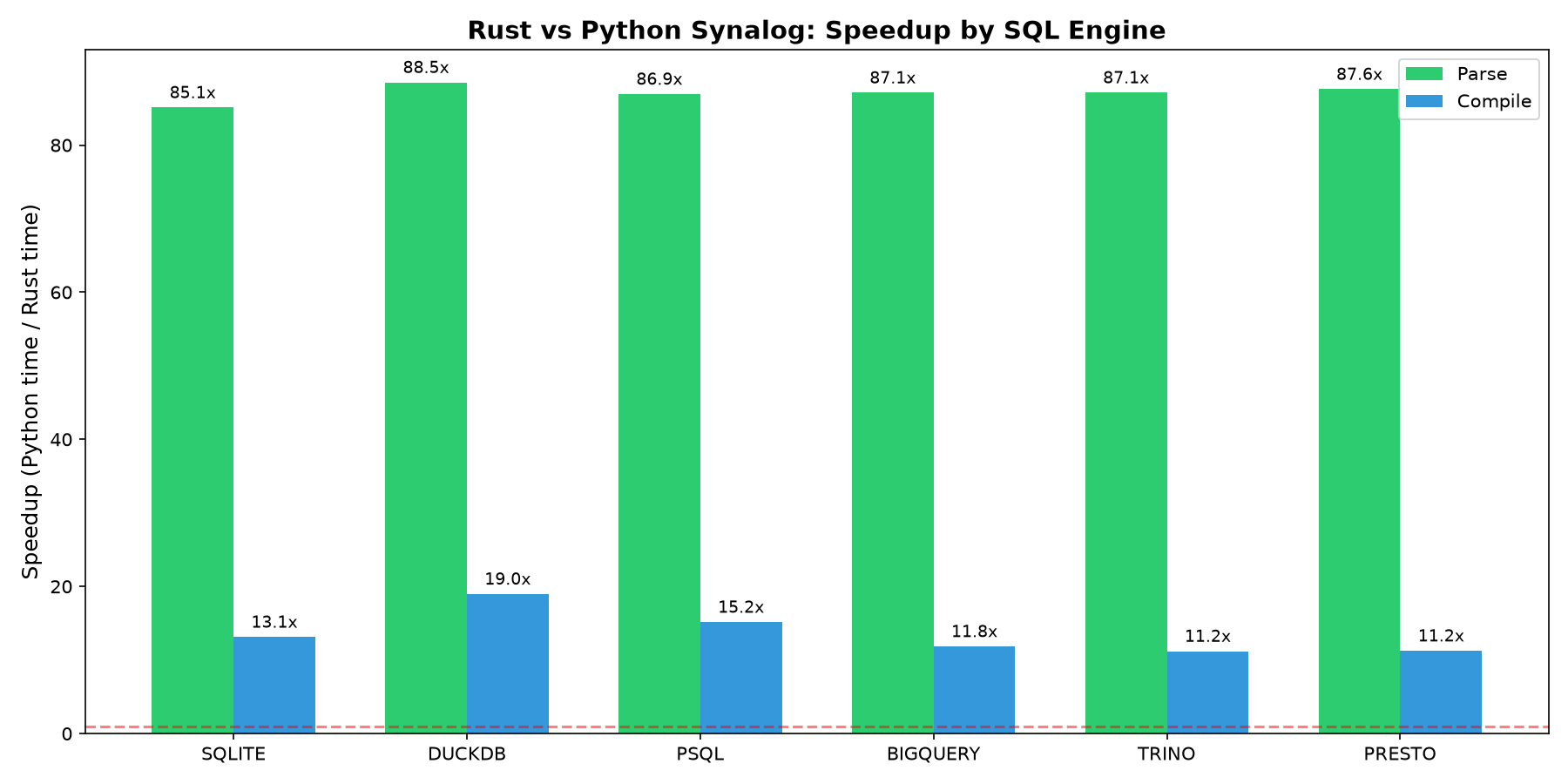
Speedup is the geometric mean of per-program speedups (every program weighted equally). Parsing is uniformly ~85x to ~88x faster; compilation ranges from ~11x (trino, presto) to ~19x (duckdb). Verification (safety, stratification, recursion and reserved-name checks) is a Synalog-specific pass with no standalone Python equivalent. Per-engine tables and methodology are on the Benchmark page; reproduce with python3 benchmark.py.
Verification
Unlike Logica, which lets the database raise errors at execution time, Synalog embeds a formal verifier that catches issues at compile time.
| Check | What it detects |
|---|---|
| Safety | Head variables not bound in the body |
| Safe negation | Negated variables without a positive occurrence |
| Safe aggregation | Aggregated variables not bound outside the aggregate |
| Stratification | Negative recursion cycles |
| Arity | Predicates used with inconsistent argument counts |
| Recursion | Missing base cases, trivial loops, unbounded recursion without @Recursive |
| Reserved names | Rules that redefine a built-in library predicate (Num, Str, ArgMin, Today, Now, ...) |
Unsafe SqlExpr |
User rules that reach for the raw-SQL escape hatch |
errors, warnings = synalog.check(bad_source)
for e in errors:
    print(e)
# Unbound variable 'y' in head of rule: Test(x:, y:) :- Numbers(x:)
Differences with Datalog and Logica
Named attributes only
Synalog doesn't support positional attributes like Logica or Datalog: it only uses named attributes, which reduce agent mistakes. This feature is optional in Logica; we made it mandatory.
In Synalog, the compiled SQL uses actual column names, not col{i} format, making it compatible with existing database schemas.
Pagination
Pagination is critical for AI agents with limited context windows. It also avoids loading large amounts of data into memory, enabling use on memory-constrained cloud infrastructure.
Synalog applies pagination at compile time via the limit and offset arguments of compile(). The limit is combined with the @Limit directive: actual_limit = min(limit, @Limit).
Compile-time verification
Synalog embeds a formal verifier that catches structural errors before any SQL is generated. This prevents agents from producing programs that parse correctly but fail at execution time, a common failure mode when working with SQL directly.
Building from source
The project uses maturin to build the Python wheel from the Rust crate.
pip install maturin
maturin develop --release    # install into the active venv
maturin build --release      # produce a wheel in target/wheels/
Run the Rust test suite:
cargo test
Run specific test groups:
cargo test --lib                        # unit tests
cargo test --test compiler_tests        # compiler golden tests (all engines)
cargo test --test parser_tests          # parser golden tests (all engines)
cargo test --test verifier_tests        # verifier tests (all engines)
cargo test --test search_tests          # search feature tests (all engines)
Tests
cd synalog
./shell/test.sh
Credits
Synalog is a fork of Logica, the logic programming language created by Evgeny Skvortsov and the Logica team at Google LLC. The parser, compiler, and type-inference engine were rewritten in Rust, but the language design, semantics, and a large part of the algorithms originate from their work. Synalog would not exist without it, heartfelt thanks to the Logica authors for their amazing work.
- Logica: https://github.com/EvgSkv/logica
- Logica documentation: https://logica.dev/
Files derived from Logica carry an // Original work: Copyright 2020 Google LLC header and a note describing the modifications, as required by the Apache License 2.0.
License
Synalog is licensed under the Apache License, Version 2.0 see LICENSE and NOTICE.
- Original Logica work: Copyright 2020 Google LLC, licensed under Apache 2.0.
- Modifications and new code: Copyright 2025-2026 Yoan Sallami (Synalinks Team), licensed under Apache 2.0.
1 maintainer

Metadata
1 maintainer
Release files for synalog 2.2.0
For a detailed explanation of source distributions (sdists) and built distributions (wheels), please see the package formats documentation.
Source distribution (sdist)
| File | Size | Uploaded | Provenance | |
|---|---|---|---|---|
| synalog-2.2.0.tar.gz | 1.1 MB | Without provenance | Details |
Built distributions (wheels)
Total release size: 45.2 MB
Release files / synalog-2.2.0.tar.gz
| Download URL | synalog-2.2.0.tar.gz |
|---|---|
| Size | 1.1 MB |
| Tags | Source |
|
SHA-256 checksum How to use checksums |
a3713e57b9534fabd75548753c3e8147474010c5dfdd82b13f6bf305bfcdbd15
|
|
BLAKE2b-256 checksum How to use checksums |
a8de0311acc21158ba1a06733c316e4aad0648152fa6902759c8cd6f76adbed4
|
| Upload date | |
|
Uploaded using Trusted Publishing? What is trusted publishing? |
No |
| Uploaded via |
maturin/1.15.0
|
Release files / synalog-2.2.0-cp314-cp314t-win_amd64.whl
| Download URL | synalog-2.2.0-cp314-cp314t-win_amd64.whl |
|---|---|
| Size | 1.4 MB |
| Tags | CPython 3.14 CPython 3.14 free-threading Windows x86-64 |
|
SHA-256 checksum How to use checksums |
2d14e2fc3494b0d2b2105e09d1bae9a87142b9d6df72fea364571ff5a5f59ddd
|
|
BLAKE2b-256 checksum How to use checksums |
87105eb17cbe0e672ce0e5cb85b7eed1581487a3007cfa45f1632296e746233b
|
| Upload date | |
|
Uploaded using Trusted Publishing? What is trusted publishing? |
No |
| Uploaded via |
maturin/1.15.0
|
Release files / synalog-2.2.0-cp314-cp314t-win32.whl
| Download URL | synalog-2.2.0-cp314-cp314t-win32.whl |
|---|---|
| Size | 1.2 MB |
| Tags | CPython 3.14 CPython 3.14 free-threading Windows x86-32 |
|
SHA-256 checksum How to use checksums |
78729723df2ff066b52c88805651de55ddbafadde4965bc5a0e1fbadc9348370
|
|
BLAKE2b-256 checksum How to use checksums |
0c8302501981d7cfe8c3397767feee7394f04d3fad7ef43f0460a0c9dcea0da9
|
| Upload date | |
|
Uploaded using Trusted Publishing? What is trusted publishing? |
No |
| Uploaded via |
maturin/1.15.0
|
Release files / synalog-2.2.0-cp314-cp314t-musllinux_1_2_x86_64.whl
| Download URL | synalog-2.2.0-cp314-cp314t-musllinux_1_2_x86_64.whl |
|---|---|
| Size | 1.7 MB |
| Tags | CPython 3.14 CPython 3.14 free-threading Linux musl 1.2+ x86-64 |
|
SHA-256 checksum How to use checksums |
1bc0da43762abb836ccda72001353224e1617940153dda6646c9f49b09c8f185
|
|
BLAKE2b-256 checksum How to use checksums |
016b0c2d94c6d171bfce222f9c96e45aeb3a46f710f798da13518fcaaa9f227c
|
| Upload date | |
|
Uploaded using Trusted Publishing? What is trusted publishing? |
No |
| Uploaded via |
maturin/1.15.0
|
Release files / synalog-2.2.0-cp314-cp314t-musllinux_1_2_i686.whl
| Download URL | synalog-2.2.0-cp314-cp314t-musllinux_1_2_i686.whl |
|---|---|
| Size | 1.8 MB |
| Tags | CPython 3.14 CPython 3.14 free-threading Linux musl 1.2+ x86-32 |
|
SHA-256 checksum How to use checksums |
87f526c30afa6b86696ea362817f2e79899e0eb8151a1192b27d4ee74e089716
|
|
BLAKE2b-256 checksum How to use checksums |
b9e263659d0a6b5df7e18c3bf3530a336270122058f355dd838ab5de326d7fe1
|
| Upload date | |
|
Uploaded using Trusted Publishing? What is trusted publishing? |
No |
| Uploaded via |
maturin/1.15.0
|
Release files / synalog-2.2.0-cp314-cp314t-musllinux_1_2_armv7l.whl
| Download URL | synalog-2.2.0-cp314-cp314t-musllinux_1_2_armv7l.whl |
|---|---|
| Size | 1.8 MB |
| Tags | CPython 3.14 CPython 3.14 free-threading Linux musl 1.2+ ARMv7l |
|
SHA-256 checksum How to use checksums |
957536bcf8760f22cb30f259e7639e49d5ae1e36b60b8ef911810abef9c21f33
|
|
BLAKE2b-256 checksum How to use checksums |
668adb0d5ff8612fe39639a3d846b41cb494980af881be12172e432d57cbc28d
|
| Upload date | |
|
Uploaded using Trusted Publishing? What is trusted publishing? |
No |
| Uploaded via |
maturin/1.15.0
|
Release files / synalog-2.2.0-cp314-cp314t-musllinux_1_2_aarch64.whl
| Download URL | synalog-2.2.0-cp314-cp314t-musllinux_1_2_aarch64.whl |
|---|---|
| Size | 1.6 MB |
| Tags | CPython 3.14 CPython 3.14 free-threading Linux musl 1.2+ ARM64 |
|
SHA-256 checksum How to use checksums |
585d405e5c6e7fe295ca926f95e74e942f62019107afefa2bd8304d89960cb53
|
|
BLAKE2b-256 checksum How to use checksums |
66a5699472109195c17fada7db3b0fcc2d9a3ffe155917f58a3fcdb72ed771f8
|
| Upload date | |
|
Uploaded using Trusted Publishing? What is trusted publishing? |
No |
| Uploaded via |
maturin/1.15.0
|
Release files / synalog-2.2.0-cp314-cp314t-manylinux_2_17_x86_64.manylinux2014_x86_64.whl
| Download URL | synalog-2.2.0-cp314-cp314t-manylinux_2_17_x86_64.manylinux2014_x86_64.whl |
|---|---|
| Size | 1.5 MB |
| Tags | CPython 3.14 CPython 3.14 free-threading Linux glibc 2.17+ x86-64 |
|
SHA-256 checksum How to use checksums |
2c8bc2fcee02e66f455bdbd4b8c980cb7f361f942d713091a300a07950f7d75b
|
|
BLAKE2b-256 checksum How to use checksums |
2833bd92c65dfdf1c328b25fd4eacb9256e06d44193445fd95b3889420f4ba0a
|
| Upload date | |
|
Uploaded using Trusted Publishing? What is trusted publishing? |
No |
| Uploaded via |
maturin/1.15.0
|
Release files / synalog-2.2.0-cp314-cp314t-manylinux_2_17_s390x.manylinux2014_s390x.whl
| Download URL | synalog-2.2.0-cp314-cp314t-manylinux_2_17_s390x.manylinux2014_s390x.whl |
|---|---|
| Size | 1.5 MB |
| Tags | CPython 3.14 CPython 3.14 free-threading Linux glibc 2.17+ IBM System/390x |
|
SHA-256 checksum How to use checksums |
39d09e4cd8890fba5d85dce2c24a7aee762bbb5005ffe2612cd73d9148354d38
|
|
BLAKE2b-256 checksum How to use checksums |
eb57c2248e5d1ad68b652527ad0d7518eaa33927dae1b92e8b270c34a31f9fe6
|
| Upload date | |
|
Uploaded using Trusted Publishing? What is trusted publishing? |
No |
| Uploaded via |
maturin/1.15.0
|
Release files / synalog-2.2.0-cp314-cp314t-manylinux_2_17_ppc64le.manylinux2014_ppc64le.whl
| Download URL | synalog-2.2.0-cp314-cp314t-manylinux_2_17_ppc64le.manylinux2014_ppc64le.whl |
|---|---|
| Size | 1.7 MB |
| Tags | CPython 3.14 CPython 3.14 free-threading Linux glibc 2.17+ PowerPC 64-le |
|
SHA-256 checksum How to use checksums |
31e8c366baa2f9c22926a1a20802af4ce22e1eaf9553b193d022b4ab11352fc8
|
|
BLAKE2b-256 checksum How to use checksums |
ab476ae5a3ff2a2c36f890eccaa652177b5e1d3dd4ac1f7e44a7da4cba3edf1b
|
| Upload date | |
|
Uploaded using Trusted Publishing? What is trusted publishing? |
No |
| Uploaded via |
maturin/1.15.0
|
Release files / synalog-2.2.0-cp314-cp314t-manylinux_2_17_armv7l.manylinux2014_armv7l.whl
| Download URL | synalog-2.2.0-cp314-cp314t-manylinux_2_17_armv7l.manylinux2014_armv7l.whl |
|---|---|
| Size | 1.5 MB |
| Tags | CPython 3.14 CPython 3.14 free-threading Linux glibc 2.17+ ARMv7l |
|
SHA-256 checksum How to use checksums |
42df57e001f3329df3802c3eb046fcd87f9dba2e703ac546c8ef1d8cc856591f
|
|
BLAKE2b-256 checksum How to use checksums |
b132a10fe274022b2488e1c6ea12982d5a8e711ec98f984cf31a5638102bb2c7
|
| Upload date | |
|
Uploaded using Trusted Publishing? What is trusted publishing? |
No |
| Uploaded via |
maturin/1.15.0
|
Release files / synalog-2.2.0-cp314-cp314t-manylinux_2_17_aarch64.manylinux2014_aarch64.whl
| Download URL | synalog-2.2.0-cp314-cp314t-manylinux_2_17_aarch64.manylinux2014_aarch64.whl |
|---|---|
| Size | 1.4 MB |
| Tags | CPython 3.14 CPython 3.14 free-threading Linux glibc 2.17+ ARM64 |
|
SHA-256 checksum How to use checksums |
68cad67bc5b4cdeacce1df771d8925097d30553f74efed685495c4ad848f8562
|
|
BLAKE2b-256 checksum How to use checksums |
adc67615e548a536cd2c84f95223e12e4c3a54bf7fffeb2918a728588b9eb50f
|
| Upload date | |
|
Uploaded using Trusted Publishing? What is trusted publishing? |
No |
| Uploaded via |
maturin/1.15.0
|
Release files / synalog-2.2.0-cp314-cp314t-manylinux_2_5_i686.manylinux1_i686.whl
| Download URL | synalog-2.2.0-cp314-cp314t-manylinux_2_5_i686.manylinux1_i686.whl |
|---|---|
| Size | 1.6 MB |
| Tags | CPython 3.14 CPython 3.14 free-threading Linux glibc 2.5+ x86-32 |
|
SHA-256 checksum How to use checksums |
327256d116767b131da76ae7c59bb8e1d7be1b17ad2b80d5243b21819d5de257
|
|
BLAKE2b-256 checksum How to use checksums |
b18883268acd20316455d503a23f9e5c758a3732a01ac13d2345e55ccb6f5a27
|
| Upload date | |
|
Uploaded using Trusted Publishing? What is trusted publishing? |
No |
| Uploaded via |
maturin/1.15.0
|
Release files / synalog-2.2.0-cp314-cp314t-macosx_11_0_arm64.whl
| Download URL | synalog-2.2.0-cp314-cp314t-macosx_11_0_arm64.whl |
|---|---|
| Size | 1.3 MB |
| Tags | CPython 3.14 CPython 3.14 free-threading macOS 11.0+ ARM64 |
|
SHA-256 checksum How to use checksums |
95109280f3cb452cb1e3d564e1434508bbdad982141d63c03fe366dc66c4a92a
|
|
BLAKE2b-256 checksum How to use checksums |
0ec072a67ea78d20712dee4bc30d6b077d9a1d29b3ea0e69e160647d75b4be61
|
| Upload date | |
|
Uploaded using Trusted Publishing? What is trusted publishing? |
No |
| Uploaded via |
maturin/1.15.0
|
Release files / synalog-2.2.0-cp314-cp314t-macosx_10_12_x86_64.whl
| Download URL | synalog-2.2.0-cp314-cp314t-macosx_10_12_x86_64.whl |
|---|---|
| Size | 1.4 MB |
| Tags | CPython 3.14 CPython 3.14 free-threading macOS 10.12+ x86-64 |
|
SHA-256 checksum How to use checksums |
f32f987c14527528bfcc5406040db99fea435530a548957bd227732065b9969c
|
|
BLAKE2b-256 checksum How to use checksums |
55ab7a88d1486bfd11379a158df504593d2512e40df8546ae45e0df571d22aa6
|
| Upload date | |
|
Uploaded using Trusted Publishing? What is trusted publishing? |
No |
| Uploaded via |
maturin/1.15.0
|
Release files / synalog-2.2.0-cp310-abi3-win_arm64.whl
| Download URL | synalog-2.2.0-cp310-abi3-win_arm64.whl |
|---|---|
| Size | 1.2 MB |
| Tags | CPython 3.10 Windows ARM64 abi3 |
|
SHA-256 checksum How to use checksums |
85136b628d0ff5f5360d9d365f5478de7b2a22014a25f377f42475564942df10
|
|
BLAKE2b-256 checksum How to use checksums |
e104213f17dba0645b415c98ad457f4e061f3e61e529193ff9f84e2700ce9eb3
|
| Upload date | |
|
Uploaded using Trusted Publishing? What is trusted publishing? |
No |
| Uploaded via |
maturin/1.15.0
|
Release files / synalog-2.2.0-cp310-abi3-win_amd64.whl
| Download URL | synalog-2.2.0-cp310-abi3-win_amd64.whl |
|---|---|
| Size | 1.4 MB |
| Tags | CPython 3.10 Windows x86-64 abi3 |
|
SHA-256 checksum How to use checksums |
c11c07ac96c3c757058dfd317378a683af1161915035c3584cfcfc3e598be7b2
|
|
BLAKE2b-256 checksum How to use checksums |
818992d8f818513e2549149240fda6c3b74c6353e13b8da23135ffbc48f5010d
|
| Upload date | |
|
Uploaded using Trusted Publishing? What is trusted publishing? |
No |
| Uploaded via |
maturin/1.15.0
|
Release files / synalog-2.2.0-cp310-abi3-win32.whl
| Download URL | synalog-2.2.0-cp310-abi3-win32.whl |
|---|---|
| Size | 1.3 MB |
| Tags | CPython 3.10 Windows x86-32 abi3 |
|
SHA-256 checksum How to use checksums |
b0f72f34501f3993afc143024b1c650d2ad6cdd2c0ae63a411ddd9b8c6316f79
|
|
BLAKE2b-256 checksum How to use checksums |
07e9cf8f1ca27337d2c3635a6aa7006ba869eeb9cf77aba6a4f329c6de2c827d
|
| Upload date | |
|
Uploaded using Trusted Publishing? What is trusted publishing? |
No |
| Uploaded via |
maturin/1.15.0
|
Release files / synalog-2.2.0-cp310-abi3-musllinux_1_2_x86_64.whl
| Download URL | synalog-2.2.0-cp310-abi3-musllinux_1_2_x86_64.whl |
|---|---|
| Size | 1.7 MB |
| Tags | CPython 3.10 Linux musl 1.2+ x86-64 abi3 |
|
SHA-256 checksum How to use checksums |
396bfa3e47f16f1c0fdb5eb447950c9a5aa5da8e046266d4d86976743639ea9c
|
|
BLAKE2b-256 checksum How to use checksums |
6f8813279377ab0dbdcaa015029ea2d628c99405f4b8bbe7cad62d196799342d
|
| Upload date | |
|
Uploaded using Trusted Publishing? What is trusted publishing? |
No |
| Uploaded via |
maturin/1.15.0
|
Release files / synalog-2.2.0-cp310-abi3-musllinux_1_2_i686.whl
| Download URL | synalog-2.2.0-cp310-abi3-musllinux_1_2_i686.whl |
|---|---|
| Size | 1.8 MB |
| Tags | CPython 3.10 Linux musl 1.2+ x86-32 abi3 |
|
SHA-256 checksum How to use checksums |
36c6f40f52b61481377494075ee40f257d4ac1609467b18bbd559b6f06050a15
|
|
BLAKE2b-256 checksum How to use checksums |
fa7720810d67ab88c53e63555dfba7f8348de454fbd640d5f48871c97cdf0ad4
|
| Upload date | |
|
Uploaded using Trusted Publishing? What is trusted publishing? |
No |
| Uploaded via |
maturin/1.15.0
|
Release files / synalog-2.2.0-cp310-abi3-musllinux_1_2_armv7l.whl
| Download URL | synalog-2.2.0-cp310-abi3-musllinux_1_2_armv7l.whl |
|---|---|
| Size | 1.8 MB |
| Tags | CPython 3.10 Linux musl 1.2+ ARMv7l abi3 |
|
SHA-256 checksum How to use checksums |
61bc23a404adcc9b355f92842c6650d51baf5979f52880dd0dc544a8c132c357
|
|
BLAKE2b-256 checksum How to use checksums |
6f60e07399a7e8d9bd7f2aebd22fac68608efc79f65824778eb9e5f22d86a98e
|
| Upload date | |
|
Uploaded using Trusted Publishing? What is trusted publishing? |
No |
| Uploaded via |
maturin/1.15.0
|
Release files / synalog-2.2.0-cp310-abi3-musllinux_1_2_aarch64.whl
| Download URL | synalog-2.2.0-cp310-abi3-musllinux_1_2_aarch64.whl |
|---|---|
| Size | 1.6 MB |
| Tags | CPython 3.10 Linux musl 1.2+ ARM64 abi3 |
|
SHA-256 checksum How to use checksums |
0042ff10f01464156a84393685ea5e9cd90ddb4f06b7ab2c9558a512a058a041
|
|
BLAKE2b-256 checksum How to use checksums |
e60abc3f789b5283b1f0f20745a99327f09544e65d862696f2af5742b18eeee5
|
| Upload date | |
|
Uploaded using Trusted Publishing? What is trusted publishing? |
No |
| Uploaded via |
maturin/1.15.0
|
Release files / synalog-2.2.0-cp310-abi3-manylinux_2_17_x86_64.manylinux2014_x86_64.whl
| Download URL | synalog-2.2.0-cp310-abi3-manylinux_2_17_x86_64.manylinux2014_x86_64.whl |
|---|---|
| Size | 1.5 MB |
| Tags | CPython 3.10 Linux glibc 2.17+ x86-64 abi3 |
|
SHA-256 checksum How to use checksums |
357e5030a351726c5c6a1b6f3f43cddd6da1166025ff5811c5a34ee9056de922
|
|
BLAKE2b-256 checksum How to use checksums |
9f509a4467a8cada37a3d5e261976797dc08067eabcef38d7ac80e478e8f9daa
|
| Upload date | |
|
Uploaded using Trusted Publishing? What is trusted publishing? |
No |
| Uploaded via |
maturin/1.15.0
|
Release files / synalog-2.2.0-cp310-abi3-manylinux_2_17_s390x.manylinux2014_s390x.whl
| Download URL | synalog-2.2.0-cp310-abi3-manylinux_2_17_s390x.manylinux2014_s390x.whl |
|---|---|
| Size | 1.5 MB |
| Tags | CPython 3.10 Linux glibc 2.17+ IBM System/390x abi3 |
|
SHA-256 checksum How to use checksums |
f8461ef6a44c08d00177a129aa08872615ae1f7057a9b2a262b8c443299a2cb1
|
|
BLAKE2b-256 checksum How to use checksums |
cf0ead4b323dbdf2d8dff9b0b0ed9f596f8a6d4504656a03ac1d433acb15a4f7
|
| Upload date | |
|
Uploaded using Trusted Publishing? What is trusted publishing? |
No |
| Uploaded via |
maturin/1.15.0
|
Release files / synalog-2.2.0-cp310-abi3-manylinux_2_17_ppc64le.manylinux2014_ppc64le.whl
| Download URL | synalog-2.2.0-cp310-abi3-manylinux_2_17_ppc64le.manylinux2014_ppc64le.whl |
|---|---|
| Size | 1.6 MB |
| Tags | CPython 3.10 Linux glibc 2.17+ PowerPC 64-le abi3 |
|
SHA-256 checksum How to use checksums |
da47fb4e36b1f1d0dd6c689f04f24c9a9267e26cb2428c0fcc93adaa54ed388b
|
|
BLAKE2b-256 checksum How to use checksums |
3cb747131aba5b28cfb7aa62f73b3915bc75291ac360fef189446ffd90e3bcb0
|
| Upload date | |
|
Uploaded using Trusted Publishing? What is trusted publishing? |
No |
| Uploaded via |
maturin/1.15.0
|
Release files / synalog-2.2.0-cp310-abi3-manylinux_2_17_armv7l.manylinux2014_armv7l.whl
| Download URL | synalog-2.2.0-cp310-abi3-manylinux_2_17_armv7l.manylinux2014_armv7l.whl |
|---|---|
| Size | 1.5 MB |
| Tags | CPython 3.10 Linux glibc 2.17+ ARMv7l abi3 |
|
SHA-256 checksum How to use checksums |
ecd9b89bcb2f62dee0c644b3b677eeb4ba14f84088de01d9c3dcc3e6dfb90d57
|
|
BLAKE2b-256 checksum How to use checksums |
a2b183906e1f18dd3cf7f3e21645b3104406897fa4c1899d102b0050c87337ab
|
| Upload date | |
|
Uploaded using Trusted Publishing? What is trusted publishing? |
No |
| Uploaded via |
maturin/1.15.0
|
Release files / synalog-2.2.0-cp310-abi3-manylinux_2_17_aarch64.manylinux2014_aarch64.whl
| Download URL | synalog-2.2.0-cp310-abi3-manylinux_2_17_aarch64.manylinux2014_aarch64.whl |
|---|---|
| Size | 1.4 MB |
| Tags | CPython 3.10 Linux glibc 2.17+ ARM64 abi3 |
|
SHA-256 checksum How to use checksums |
ef78e32a3487142356ade219c6ca3e114157ce2fcac6d6d25b02683ef8288303
|
|
BLAKE2b-256 checksum How to use checksums |
22ed49d9074cbbaaccc22507f6c0cadb621723114d203eabc4a0760754a61177
|
| Upload date | |
|
Uploaded using Trusted Publishing? What is trusted publishing? |
No |
| Uploaded via |
maturin/1.15.0
|
Release files / synalog-2.2.0-cp310-abi3-manylinux_2_5_i686.manylinux1_i686.whl
| Download URL | synalog-2.2.0-cp310-abi3-manylinux_2_5_i686.manylinux1_i686.whl |
|---|---|
| Size | 1.6 MB |
| Tags | CPython 3.10 Linux glibc 2.5+ x86-32 abi3 |
|
SHA-256 checksum How to use checksums |
ad4bd5a887d706a1ed9b6a1f1f717104838843283853d5de7efca84059623c86
|
|
BLAKE2b-256 checksum How to use checksums |
258ff03b373f49b7f441b2f9bf8e1a6d39de7ebfc98e6143a2a6f4df368a4192
|
| Upload date | |
|
Uploaded using Trusted Publishing? What is trusted publishing? |
No |
| Uploaded via |
maturin/1.15.0
|
Release files / synalog-2.2.0-cp310-abi3-macosx_11_0_arm64.whl
| Download URL | synalog-2.2.0-cp310-abi3-macosx_11_0_arm64.whl |
|---|---|
| Size | 1.3 MB |
| Tags | CPython 3.10 abi3 macOS 11.0+ ARM64 |
|
SHA-256 checksum How to use checksums |
e4605cb50f025e9ed6921bc3a4f572b34c7b5104260944ac22bed24cdfd39142
|
|
BLAKE2b-256 checksum How to use checksums |
aa51cf23ef718e61b0e3c2b7911db13096a853b13a6970af4eaa4ef4736a1aad
|
| Upload date | |
|
Uploaded using Trusted Publishing? What is trusted publishing? |
No |
| Uploaded via |
maturin/1.15.0
|
Release files / synalog-2.2.0-cp310-abi3-macosx_10_12_x86_64.whl
| Download URL | synalog-2.2.0-cp310-abi3-macosx_10_12_x86_64.whl |
|---|---|
| Size | 1.4 MB |
| Tags | CPython 3.10 abi3 macOS 10.12+ x86-64 |
|
SHA-256 checksum How to use checksums |
813b4daa9d1e1abc84f944c432c48f6883be94395a4005e7e3c5fd8eb05f379c
|
|
BLAKE2b-256 checksum How to use checksums |
80dc14368a3ede678edbf7f7a1762b510273523e4cbe5b4ed911e9dae3cb7a19
|
| Upload date | |
|
Uploaded using Trusted Publishing? What is trusted publishing? |
No |
| Uploaded via |
maturin/1.15.0
|
Security for synalog 2.2.0
Provenance
Provenance describes where a file came from. On PyPI, provenance is shared via attestations, which provide a verifiable record of the build or publishing details. View details, limitations and caveats.
No provenance found
None of the files in this release were uploaded with provenance metadata.
A note on package security
PyPI is a repository for distributing packages, not a service for auditing them. While third-party security researchers and our staff do their best to detect and remove malicious packages, PyPI cannot guarantee the quality, security or suitability of any given package.
To learn more about protecting yourself from malicious actors, visit our package security documentation.














