
Synapse AI — Multi-Agent Orchestration Platform








Build AI workflows that actually ship.
Wire agents, tools, and LLMs into deterministic pipelines — without the framework lock-in. Synapse is an open-source platform for creating, connecting, and orchestrating AI agents powered by any LLM — local or cloud. Agents use real tools: browsing the web, querying databases, executing code, reading files, managing emails, and anything else you can expose through an MCP server, a webhook, or a Python script.
🌐 Website · 📖 Documentation · 💬 Discord
Install
Quick Setup Script (recommended)
macOS / Linux:
curl -sSL https://raw.githubusercontent.com/synapseorch-ai/synapse-ai/main/setup.sh | bash
Windows (PowerShell):
irm https://raw.githubusercontent.com/synapseorch-ai/synapse-ai/main/setup.ps1 | iex
npm
npm install -g synapse-orch-ai
synapse
pip
pip install synapse-orch-ai
synapse
Docker
docker run -d \
  -p 3000:3000 \
  -v synapse-data:/data \
  -v /var/run/docker.sock:/var/run/docker.sock \
  synapseorchai/synapse-ai:latest
Then open http://localhost:3000. See the Docker guide in the docs for custom ports and environment variable configuration.
Security: publish only the frontend port
3000— the backend (8765) serves an internal API and should not be exposed on0.0.0.0(docker-compose binds it to127.0.0.1). The container auto-generates a shared internal token so that surface is authenticated by default. For any network-reachable deployment, enable login (Settings → Security) and/or setallow_stdio_mcp=false, since registering a stdio MCP server launches local commands.
Upgrading
| Install method | Upgrade command |
|---|---|
| Bash / PowerShell installer (recommended) | synapse upgrade |
| pip | pip install --upgrade synapse-orch-ai |
| npm | npm update -g synapse-orch-ai |
| Docker | docker pull synapseorchai/synapse-ai:latest |
Upgrade note (security hardening): the backend now auto-generates a shared internal token and, under docker-compose, binds its port to
127.0.0.1by default. The UI and its API are unaffected (the frontend proxies the backend internally). If you previously called the backend directly on:8765(e.g. external API clients), either point them at the frontend instead —http://host:3000/api/v1|v2/...— or setSYNAPSE_BACKEND_BIND=0.0.0.0in.envto keep publishing:8765.
Scale Mode
Run unlimited agents and orchestrations concurrently. When you need to go beyond a single process, the distributed scale layer handles the load:
- Redis Cluster — job queue, SSE event streams, pub/sub cancellation signals, auto-failover
- ARQ worker fleet — 1 to 100+ independent workers, each running up to 20 concurrent orchestrations; autoscale with KEDA on queue depth
- PgBouncer — multiplexes hundreds of worker connections into a small, stable Postgres pool
- S3 artifact storage — stream large file outputs directly to AWS S3, Cloudflare R2, or MinIO
- Multi-tenant quotas — per-team or per-customer concurrent run limits with HTTP 429 enforcement
- Per-step checkpoint recovery — worker crashes don't lose jobs; the next worker resumes from the last completed step
Three Docker images — pull only what you need:
docker pull synapseorchai/synapse-ai:latest             # full app (standalone mode)
docker pull synapseorchai/synapse-ai-api-server:latest  # stateless API server (scale mode)
docker pull synapseorchai/synapse-ai-worker:latest      # worker process (scale mode, run as many as needed)
The docker-compose.yml in the repo spins up the full stack. Production K8s manifests are in infra/k8s/.
What Makes Synapse Different
- Multi-Model Orchestrations — Run a different LLM at every step. Use a fast model for routing, a powerful one for analysis. You control where the compute goes.
- Deterministic DAG Execution — Orchestrations follow the exact path you designed. No hallucinated detours.
- Turn Anything Into a Tool — Python scripts, REST APIs, webhooks, MCP servers, or entire orchestrations — all become agent-callable tools.
- Human-in-the-Loop — Pause workflows for human review. Resumable across restarts. Connect via UI, Slack, Telegram, or any messaging channel.
- Scales to Millions of Requests — The distributed scale layer separates API servers, Redis job queues, and independent worker processes so you can run any number of agents or orchestrations concurrently. Start on one machine, grow to a Kubernetes cluster — the V2 API never changes.
- Local-First, No Lock-In — Full local operation with Ollama. Mix local and cloud models freely. Your data stays yours.
- Built-In Scheduling & Messaging — Cron-based automation with results pushed to Slack, Discord, Telegram, Teams, or WhatsApp.
- 14+ LLM Providers — Cloud, local, and CLI providers including Ollama, OpenAI, Anthropic, Gemini, xAI, DeepSeek, AWS Bedrock, and more.
Synapse UI
https://github.com/user-attachments/assets/7a5ab42c-5fae-4f13-876c-13aa9b5a0366
Demos
Content Writing Orchestration
Multi-agent pipeline that researches a topic, drafts content in a Google Doc, and returns the shared link. (Video is 2x speed)
https://github.com/user-attachments/assets/4eec5db8-70d0-47b6-8608-f52b1f7b7d68
Autonomous Code Development & PR Creation
Multi-agent system with human-in-the-loop that writes code and generates pull requests autonomously.
https://github.com/user-attachments/assets/95a511e1-e3e9-4812-b9ca-f7f4c28ef80f
Native Orchestration Builder
Chat with the AI builder — describe what you want, and it creates the orchestration DAG for you.
https://github.com/user-attachments/assets/282cc99d-cdea-4ad0-b648-f22112c6e295
Key Concepts
| Concept | Summary |
|---|---|
| Agents | Independent ReAct loops with their own system prompt, tools, model, and repos. Docs → |
| Orchestrations | DAGs of steps — wire agents together with routing, parallelism, loops, and human gates. Docs → |
| Tool Ecosystem | 10+ native tool servers, built-in MCP servers, remote MCP via OAuth/PAT, and custom HTTP/Python tools. Docs → |
| AI Builder | A meta-agent that designs and materializes orchestrations from natural language. Docs → |
| Schedules | Cron/interval automation with messaging notifications. Docs → |
| Messaging | Slack, Discord, Telegram, Teams, WhatsApp — with multi-agent mode. Docs → |
| Scale Mode | Distributed execution layer: Redis job queue, independent worker fleet, per-step Postgres checkpoints, S3 artifact storage, and multi-tenant quotas. Docs → |
| V2 API | Stable versioned REST API for building products on top of Synapse — enqueue, stream, cancel, webhooks. Docs → |
| Vault | Persistent file storage shared across agents and sessions. Docs → |
CLI
synapse start     # start backend + frontend, open browser
synapse stop      # stop background processes
synapse upgrade   # upgrade to the latest version
synapse uninstall # remove Synapse, wipe ~/.synapse, and uninstall the package
Roadmap
- Spawn Sub-Agent Tool — Agents natively spawn and delegate tasks to temporary sub-agents mid-execution.
- Compact Conversations — Automatic message history compression for large contexts.
- Global Variables — Dynamic variables injectable into prompts, orchestrations, tools, and MCP environments.
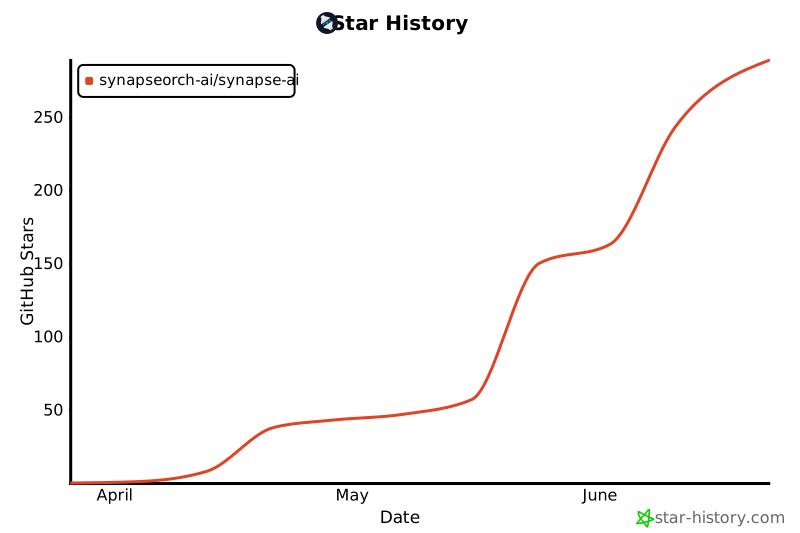
Star History
Contributing
See CONTRIBUTING.md for dev setup, architecture details, how to add MCP tool servers, and the PR checklist.
License
Synapse AI is licensed under AGPL v3 — see LICENSE
1 maintainer

Metadata
1 maintainer
Release files for synapse-orch-ai 1.9.2
For a detailed explanation of source distributions (sdists) and built distributions (wheels), please see the package formats documentation.
Source distribution (sdist)
| File | Size | Uploaded | Provenance | |
|---|---|---|---|---|
| synapse_orch_ai-1.9.2.tar.gz | 996.1 kB | Without provenance | Details |
Built distribution (wheel)
| File | Interpreter | ABI | Platform | Reset |
|---|---|---|---|---|
| synapse_orch_ai-1.9.2-py3-none-any.whl | Python 3 | none | any | Details |
Total release size: 22.5 MB
Release files / synapse_orch_ai-1.9.2.tar.gz
| Download URL | synapse_orch_ai-1.9.2.tar.gz |
|---|---|
| Size | 996.1 kB |
| Tags | Source |
|
SHA-256 checksum How to use checksums |
b72c2b716c2f1c05429e45ed482dae5e78a3be43eede75ec7d4d4e27afeb80c8
|
|
BLAKE2b-256 checksum How to use checksums |
da598ed7a75d468ea0781f6a6fd424ab2216217659f78a13b428cfae581c1e00
|
| Upload date | |
|
Uploaded using Trusted Publishing? What is trusted publishing? |
No |
| Uploaded via |
twine/7.0.0 CPython/3.11.17
|
Release files / synapse_orch_ai-1.9.2-py3-none-any.whl
| Download URL | synapse_orch_ai-1.9.2-py3-none-any.whl |
|---|---|
| Size | 21.5 MB |
| Tags | Python 3 |
|
SHA-256 checksum How to use checksums |
5c89cd9a47ef814798c45c52bbc17845ba0ca566111ed3a14556ecf0e6c43790
|
|
BLAKE2b-256 checksum How to use checksums |
fe8dce09902d3be0398bd9bfe3cd1de6a13246097d39af8759aa86997de04fc6
|
| Upload date | |
|
Uploaded using Trusted Publishing? What is trusted publishing? |
No |
| Uploaded via |
twine/7.0.0 CPython/3.11.17
|
Security for synapse-orch-ai 1.9.2
Provenance
Provenance describes where a file came from. On PyPI, provenance is shared via attestations, which provide a verifiable record of the build or publishing details. View details, limitations and caveats.
No provenance found
None of the files in this release were uploaded with provenance metadata.
A note on package security
PyPI is a repository for distributing packages, not a service for auditing them. While third-party security researchers and our staff do their best to detect and remove malicious packages, PyPI cannot guarantee the quality, security or suitability of any given package.
To learn more about protecting yourself from malicious actors, visit our package security documentation.














