
🛡️ Synapse Shield
Stop bots on your login and signup forms without showing your users a CAPTCHA.
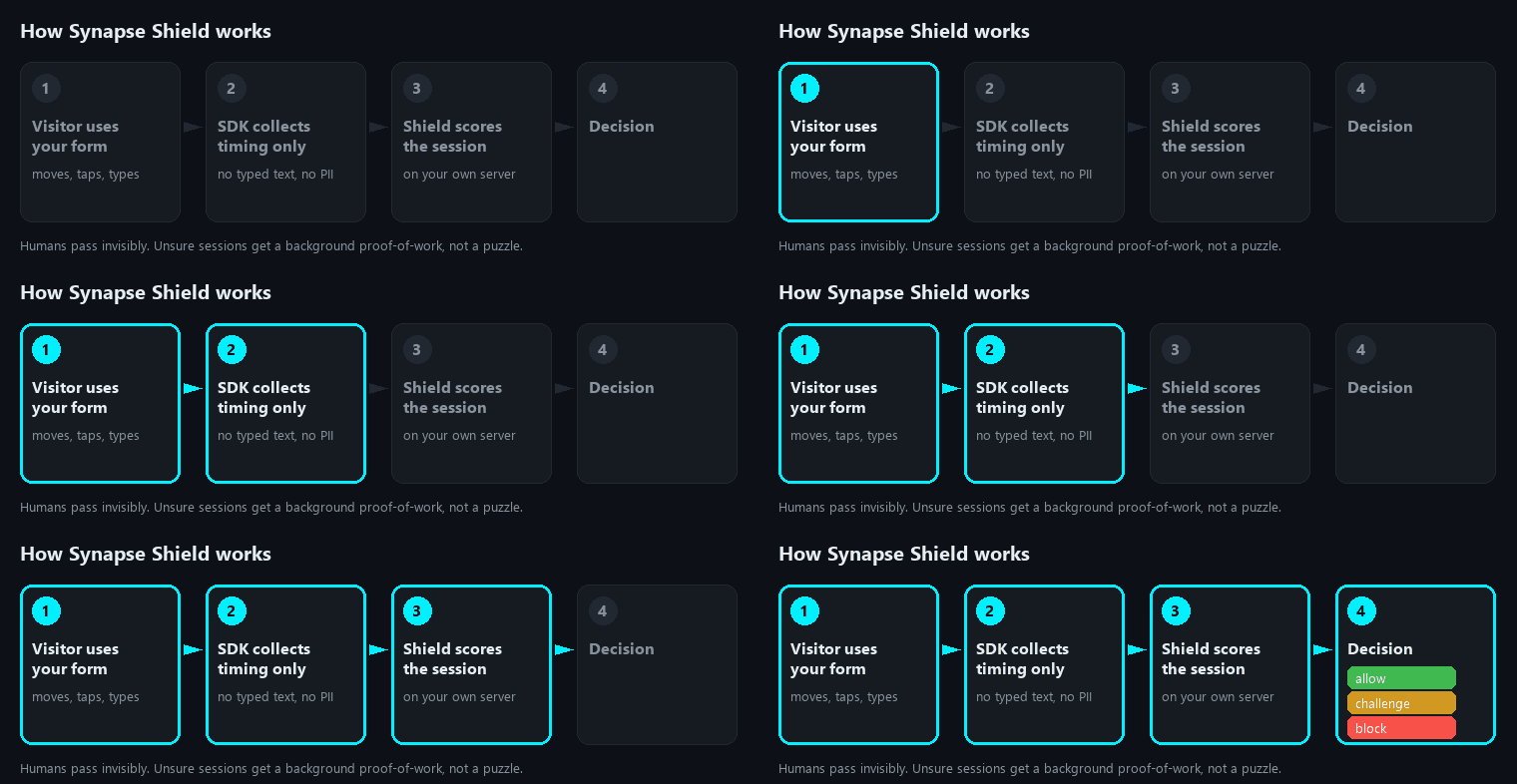
A self-hosted, open-source alternative to Cloudflare Turnstile. It looks at how a visitor moves, taps and types, never at what they type.





🌐 English | 简体中文
Why
- No puzzles. Real people just use your form. When the shield is unsure, the browser solves a short proof-of-work in the background instead of showing a picture puzzle.
- Your server, your data. Everything runs on your own machine. No third-party service sees your visitors.
- No typed text leaves the browser. The SDK sends movement and timing only; every typed character is masked.
- Drop-in. One middleware line for FastAPI, Django, Flask, Litestar, Sanic or any ASGI app, plus a small browser SDK (plain JS, React or Vue).
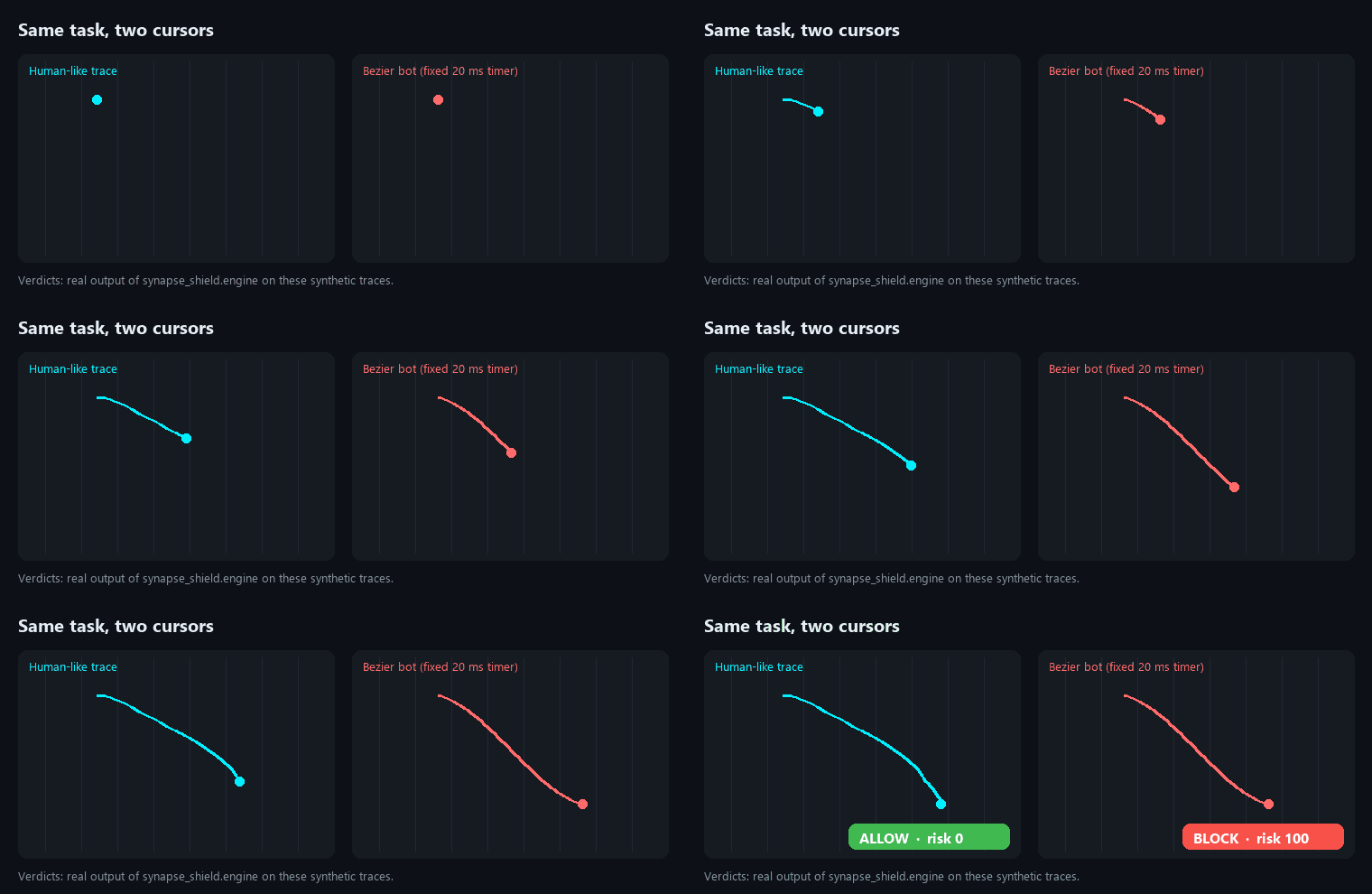
Generated from the project's own synthetic traces by scripts/make_readme_gifs.py; the verdicts are the engine's real output on those traces.
Install
pip install "synapse-shield[server]"
Start the server with its live dashboard, then open http://127.0.0.1:8000:
synapse-shield run --port 8000
Check that everything is set up correctly:
synapse-shield doctor
Upgrading to 0.12 behind a reverse proxy? The client IP is now read only from the header you name in
SYNAPSE_PROXY_HEADER(defaultx-forwarded-for). Behind Cloudflare setSYNAPSE_PROXY_HEADER=cf-connecting-ip, otherwise every visitor looks like a Cloudflare IP (details).
Docker
git clone https://github.com/0xStoic-bit/Synapse_Shield.git
cd Synapse_Shield
docker-compose up -d
The API and dashboard are on http://localhost:8000.
Other install options
| Command | What you get |
|---|---|
pip install synapse-shield |
Scoring engine only (for use inside your own app) |
pip install "synapse-shield[server]" |
+ the built-in server and dashboard |
pip install "synapse-shield[frameworks]" |
+ Django, Flask, Sanic and Litestar adapters |
pip install "synapse-shield[all]" |
Everything |
Pre-built wheels are published for Linux, macOS and Windows, so no Rust toolchain is needed.
Protect a form in 5 minutes
1. Server (FastAPI shown, other frameworks):
from fastapi import FastAPI
from synapse_shield import SynapseShieldMiddleware

app = FastAPI()
app.add_middleware(SynapseShieldMiddleware, protected_paths=["/api/login"])
2. Browser (plain HTML shown, React and Vue):
<!-- served by `synapse-shield run`; in your own app, serve synapse_shield/static/synapse-sdk.js from the installed package -->
<script src="/static/synapse-sdk.js"></script>
<script>
  SynapseShield.init();
  SynapseShield.protectFetch("/api/login"); // adds the X-Synapse-Token header to these requests

  // your existing code stays the same
  fetch("/api/login", { method: "POST", body: new FormData(loginForm) });
</script>
That's it. Requests to /api/login without a valid token, or that look automated, are refused before they reach your code.
When the server is unsure it answers
429 challenge_requiredand asks for a background proof-of-work. The React and Vue SDKs (submitProtected()) and plain JS (submit(),protectFetch()) solve it automatically in the background (details).
What your users experience
| Situation | Result |
|---|---|
| Normal visitor (mouse, touch, trackpad) | Passes, sees nothing |
| Keyboard-only or screen-reader user, very short interaction | Passes after a short background proof-of-work (handled by all three browser SDKs) |
| Scripted bot, headless browser, replayed request | Blocked |
Want to try it on real traffic first without blocking anyone? Use shadow mode.
Honest limits
- Bot detection numbers in this project come from synthetic attack generators, not from real bot traffic. Human false-positive numbers come from the public SapiMouse dataset (120 people).
- A determined attacker who records real human sessions and replays each one with small changes can look human. The shield raises the cost (single-use tokens, replay fingerprints, proof-of-work), but it is one layer: keep rate limits and account-level protections such as MFA.
Documentation
| I want to… | Read |
|---|---|
| Add it to Django, Flask, Litestar, Sanic, ASGI, React, Vue | Integrations |
| Tune behaviour, alerts, metrics | Configuration |
| Measure false positives before enforcing | Shadow mode |
| Know what data is processed and stored | Privacy notes for operators |
| Understand how detection works | Architecture |
| See attack test results | Benchmarks |
| Browse every feature by release | Feature history |
| Run the tests or build the Rust core | Tests · Rust core · SDK tests |
Full index: docs/.
Support
If Synapse Shield saves you from a CAPTCHA or a bot swarm, a ⭐ helps other developers find it. Issues and pull requests are welcome (CONTRIBUTING.md), and you can sponsor the project.
Featured on Mfuns (architecture review, in Chinese).
License
MIT. Free for commercial and personal use.
1 maintainer

Metadata
1 maintainer
Release files for synapse-shield 0.12.0
For a detailed explanation of source distributions (sdists) and built distributions (wheels), please see the package formats documentation.
Source distribution (sdist)
| File | Size | Uploaded | Provenance | Actions |
|---|---|---|---|---|
| synapse_shield-0.12.0.tar.gz | 189.3 kB | Without provenance | Details for synapse_shield-0.12.0.tar.gz |
Built distributions (wheels)
Total release size: 3.7 MB
Release files / synapse_shield-0.12.0.tar.gz
| Download URL | synapse_shield-0.12.0.tar.gz |
|---|---|
| Size | 189.3 kB |
| Tags | Source |
|
SHA-256 checksum How to use checksums |
a7fad781e5879a47414d5b079f0b6dbd36ec2b509e8b5355b159af4819e4530d
|
|
BLAKE2b-256 checksum How to use checksums |
5957c3068828007581c8b23127de8d21b8524a4dfcbdb5f1add473a00a20502c
|
| Upload date | |
|
Uploaded using Trusted Publishing? What is trusted publishing? |
No |
| Uploaded via |
twine/7.0.0 CPython/3.13.16
|
Release files / synapse_shield-0.12.0-cp310-abi3-win_amd64.whl
| Download URL | synapse_shield-0.12.0-cp310-abi3-win_amd64.whl |
|---|---|
| Size | 361.3 kB |
| Tags | CPython 3.10 Windows x86-64 abi3 |
|
SHA-256 checksum How to use checksums |
f6c9f4a5f499e261eb5d383e34bfd1fcc51d4c922e59cf01587e89779946b369
|
|
BLAKE2b-256 checksum How to use checksums |
5942b0df2e20a9d525626bfaa957d033e2bfaa3c2b3a18cd401a5e20eec9c7a0
|
| Upload date | |
|
Uploaded using Trusted Publishing? What is trusted publishing? |
No |
| Uploaded via |
twine/7.0.0 CPython/3.13.16
|
Release files / synapse_shield-0.12.0-cp310-abi3-musllinux_1_2_x86_64.whl
| Download URL | synapse_shield-0.12.0-cp310-abi3-musllinux_1_2_x86_64.whl |
|---|---|
| Size | 676.8 kB |
| Tags | CPython 3.10 Linux musl 1.2+ x86-64 abi3 |
|
SHA-256 checksum How to use checksums |
d6b89de65359ee05f27648a0b6a201b11b9a420cb32987e54646778da33fcca7
|
|
BLAKE2b-256 checksum How to use checksums |
ec70f2ed0cb978138546d801420fa02aac19a2ae0c90837f1c8f67dadf70a917
|
| Upload date | |
|
Uploaded using Trusted Publishing? What is trusted publishing? |
No |
| Uploaded via |
twine/7.0.0 CPython/3.13.16
|
Release files / synapse_shield-0.12.0-cp310-abi3-musllinux_1_2_aarch64.whl
| Download URL | synapse_shield-0.12.0-cp310-abi3-musllinux_1_2_aarch64.whl |
|---|---|
| Size | 635.9 kB |
| Tags | CPython 3.10 Linux musl 1.2+ ARM64 abi3 |
|
SHA-256 checksum How to use checksums |
cdd94fc869ba91da10d0060c4fb2635782b7c161f9a521addd75009bff7fe8d7
|
|
BLAKE2b-256 checksum How to use checksums |
74deb600c3a3455facb02d08cbbc1d8a5ab6b93145bb1c620b16817609ee6f1f
|
| Upload date | |
|
Uploaded using Trusted Publishing? What is trusted publishing? |
No |
| Uploaded via |
twine/7.0.0 CPython/3.13.16
|
Release files / synapse_shield-0.12.0-cp310-abi3-manylinux2014_x86_64.manylinux_2_17_x86_64.whl
| Download URL | synapse_shield-0.12.0-cp310-abi3-manylinux2014_x86_64.manylinux_2_17_x86_64.whl |
|---|---|
| Size | 465.4 kB |
| Tags | CPython 3.10 Linux glibc 2.17+ x86-64 abi3 |
|
SHA-256 checksum How to use checksums |
f014c085e729efdbbff555c5ce41cf57b05459f3b979a26d75f4d636f79a6691
|
|
BLAKE2b-256 checksum How to use checksums |
e6c3e4735a1f04f73b6bff2538427051ec3ec1a57a6a2e1de216ac37546db39e
|
| Upload date | |
|
Uploaded using Trusted Publishing? What is trusted publishing? |
No |
| Uploaded via |
twine/7.0.0 CPython/3.13.16
|
Release files / synapse_shield-0.12.0-cp310-abi3-manylinux2014_aarch64.manylinux_2_17_aarch64.whl
| Download URL | synapse_shield-0.12.0-cp310-abi3-manylinux2014_aarch64.manylinux_2_17_aarch64.whl |
|---|---|
| Size | 458.0 kB |
| Tags | CPython 3.10 Linux glibc 2.17+ ARM64 abi3 |
|
SHA-256 checksum How to use checksums |
0417e7987e781431dd1e5b5d754aac90fa5054110da7ccb151b79892e1bf9107
|
|
BLAKE2b-256 checksum How to use checksums |
ba8fb14c819f573c0a144a3f93baac91d4ddff625195fe9201aef57eedb8a873
|
| Upload date | |
|
Uploaded using Trusted Publishing? What is trusted publishing? |
No |
| Uploaded via |
twine/7.0.0 CPython/3.13.16
|
Release files / synapse_shield-0.12.0-cp310-abi3-macosx_11_0_arm64.whl
| Download URL | synapse_shield-0.12.0-cp310-abi3-macosx_11_0_arm64.whl |
|---|---|
| Size | 441.6 kB |
| Tags | CPython 3.10 abi3 macOS 11.0+ ARM64 |
|
SHA-256 checksum How to use checksums |
240c6a3b5e4f49bed651bf7b532794190fe61255bc2efb37ab2d35c4196bcda4
|
|
BLAKE2b-256 checksum How to use checksums |
8d0ff480eef53bc37ccd81f75d7a3f74fed24cf3292e18c0b5a5ce198b1dddb4
|
| Upload date | |
|
Uploaded using Trusted Publishing? What is trusted publishing? |
No |
| Uploaded via |
twine/7.0.0 CPython/3.13.16
|
Release files / synapse_shield-0.12.0-cp310-abi3-macosx_10_12_x86_64.whl
| Download URL | synapse_shield-0.12.0-cp310-abi3-macosx_10_12_x86_64.whl |
|---|---|
| Size | 455.1 kB |
| Tags | CPython 3.10 abi3 macOS 10.12+ x86-64 |
|
SHA-256 checksum How to use checksums |
e2f7c6bd1fdd1e3cc541bd2e5cf7445f3aa40f23a5f2b62291b9f08807f2df0e
|
|
BLAKE2b-256 checksum How to use checksums |
5d662c9dd48c14bedba89684aae9727a3d96b32f15676487663e633418cdb828
|
| Upload date | |
|
Uploaded using Trusted Publishing? What is trusted publishing? |
No |
| Uploaded via |
twine/7.0.0 CPython/3.13.16
|
Security for synapse-shield 0.12.0
Provenance
Provenance describes where a file came from. On PyPI, provenance is shared via attestations, which provide a verifiable record of the build or publishing details. View details, limitations and caveats.
No provenance found
None of the files in this release were uploaded with provenance metadata.
A note on package security
PyPI is a repository for distributing packages, not a service for auditing them. While third-party security researchers and our staff do their best to detect and remove malicious packages, PyPI cannot guarantee the quality, security or suitability of any given package.
To learn more about protecting yourself from malicious actors, visit our package security documentation.














