
Synarmo is a local-first, low-latency auto-suggest engine and Python package for personalized next-word and short-phrase prediction. Built for context-aware local inference, it provides service APIs, an extensible inference architecture, and llama.cpp/GGUF support for swappable local CPU or GPU-accelerated models

Project description
Synarmo



Synarmo (derived from synarmozo — "to fit together, to join closely") is a local inference, low-latency auto-suggest engine and Python package for personalized next-word and short-phrase predictions across messaging, chat, and assistive typing workflows. It combines context-aware local inference, service APIs, and llama.cpp/GGUF support for swappable local models.
# Install with llama.cpp and service support
pip install "synarmo[llama,service]"
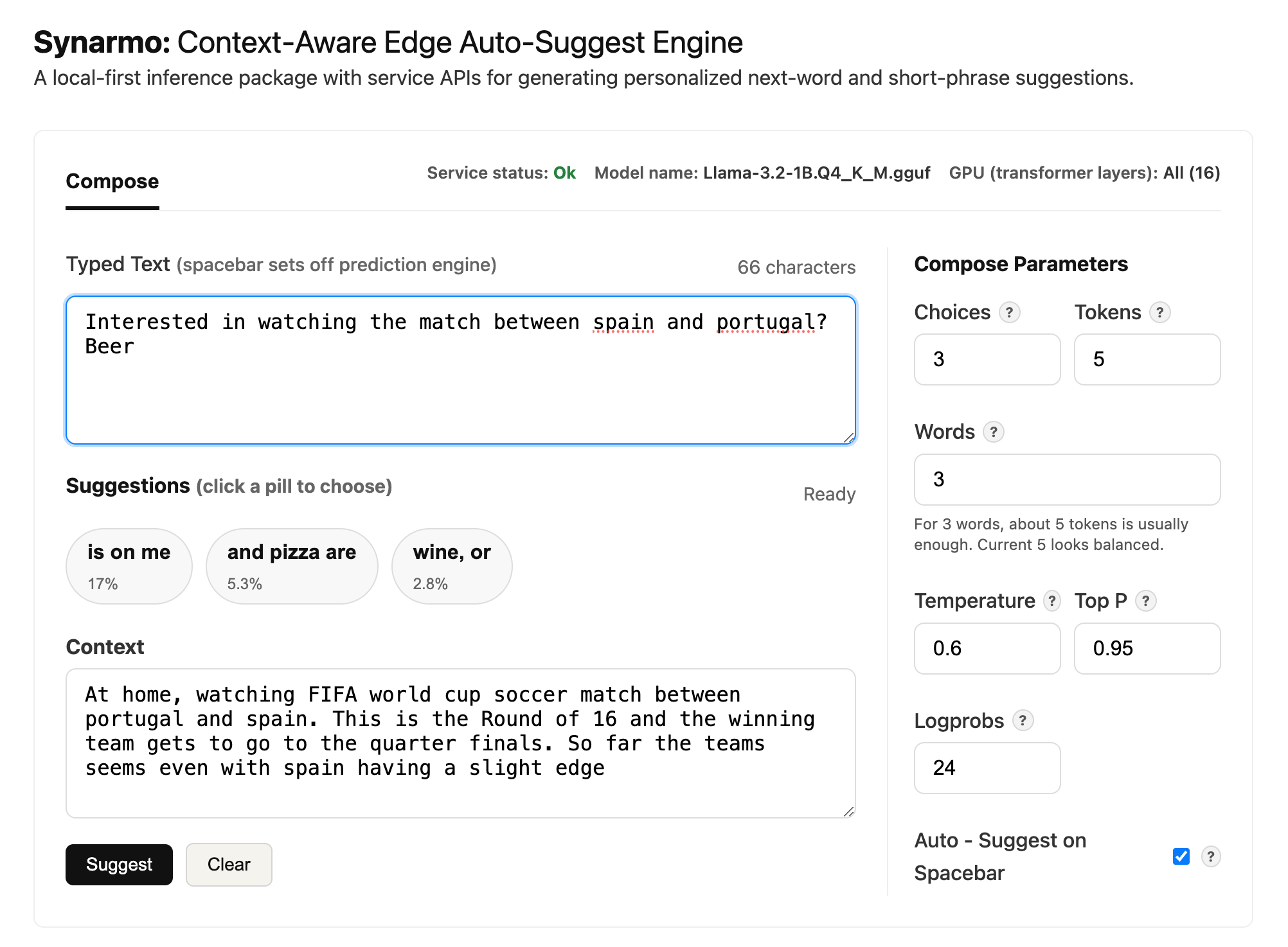
The repository includes an
Interactive UI for evaluations and tuning
API calls with context and parameters. When SYNARMO_LLAMA_VERBOSE=1 is enabled
in .env, native llama.cpp logs include prefill/prompt evaluation and
generation throughput in tokens/sec, plus KV cache details, Metal/CUDA buffer
sizes, and other load diagnostics.
Synarmo is intended to be used as:
- a PyPI package for predicting suggestions
- integration surfaces for other applications through REST and WebSocket
- an interactive browser
/uifor testing and tuning API calls with context and parameters - a llama.cpp/GGUF-backed engine that can run on CPU or supported GPUs such as Apple Metal, with model and GPU-layer settings controlled through
.env
The primary path uses a local GGUF model for inference through llama.cpp. For no-model verification checks of package install, CLI, service, or UI wiring, see Mock Mode.
Install - PyPI Package
Install Synarmo with llama.cpp and service support:
Step 1: Install the package
pip install "synarmo[llama,service]"
mkdir -p ~/models/synarmo
Step 2: Copy and review the .env file
Copy .env.example to .env in the directory where you will run synarmo or your
Python app, then review the configuration:
cp .env.example .env
Default config
LOCAL_MODELS_CACHE=~/models/synarmo
SYNARMO_MAX_SUGGESTIONS=3
SYNARMO_MAX_TOKENS=5
SYNARMO_MAX_SUGGESTION_WORDS=4
SYNARMO_TEMPERATURE=0.25
SYNARMO_TOP_P=0.95
SYNARMO_LOGPROB_POOL=24
SYNARMO_N_GPU_LAYERS=-1
SYNARMO_LLAMA_VERBOSE=0
SYNARMO_MODEL_REPO_ID=QuantFactory/Llama-3.2-1B-GGUF
SYNARMO_MODEL=Llama-3.2-1B.Q4_K_M.gguf
Step 3: Download or verify the local inference model
synarmo model-ensure --backend llama-cpp
This checks LOCAL_MODELS_CACHE and downloads SYNARMO_MODEL from
SYNARMO_MODEL_REPO_ID if the GGUF model file is missing. With this .env
configuration, the model is stored at:
~/models/synarmo/Llama-3.2-1B.Q4_K_M.gguf
See Configure A Local Model for model paths and Infrastructure - llama.cpp Configuration for CPU/GPU settings.
Step 4: Test the installed package with the llama.cpp backend
Run one suggestion request:
synarmo suggest "My goals" \
  --context "in the gym working out with a coach. I am looking to build strength and being able to run up a flight of stairs without tiring" \
  --backend llama-cpp
Run the interactive autosuggest loop from the installed package:
synarmo compose "I want to" \
  --context "At the gym, with my coach. Discussing strength training and endurance goals like running up a flight of stairs." \
  --backend llama-cpp
compose shows suggestions, lets you choose one, appends it to the typed
text, and immediately predicts the next suggestions.
Install - Interactive /ui (Git Repo Clone)
The Interactive /ui allows you to test local suggestions with context and auto-suggest parameters. It needs FastAPI service, static UI assets, and a virtual environment.
Step 1 — Clone the repository:
git clone https://github.com/vrraj/synarmo.git
cd synarmo
Step 2 — Create a virtual environment and install with llama.cpp and service extras:
python3 -m venv .venv
source .venv/bin/activate
pip install -e ".[llama,service]"
This installs Synarmo in editable mode with llama.cpp and service dependencies.
Use the [dev] extra when running tests or linters.
Step 3 — Configure a local GGUF model:
cp .env.example .env
mkdir -p ~/models/synarmo
The included .env.example sets the Hugging Face repo and GGUF filename that
the next step can download, and assumes an Apple Silicon Mac with one
integrated Metal GPU. See
Configure A Local Model for manual model paths and
other model options, and
Infrastructure - llama.cpp Configuration
for CPU/GPU settings.
Step 4 — Download or verify the local inference model:
make model-ensure
This checks LOCAL_MODELS_CACHE and downloads SYNARMO_MODEL from
SYNARMO_MODEL_REPO_ID if the GGUF file is missing. The first model download
can take some time.
Step 5 — Start the service with real local inference:
make ux
make ux starts the configured llama.cpp backend in the background and waits for /health.
Step 6 — Open the UI shown by make ux:
http://127.0.0.1:8765/ui
The UI calls the same /health and /evaluate/autocomplete endpoints that a
client application can call directly.
Stop the background service when you are done:
make stop
Configure A Local Model
Step 1 — Create .env and the model cache
For a source checkout:
cp .env.example .env
mkdir -p ~/models/synarmo
For PyPI installs, copy .env.example to .env in the directory where you run synarmo or
start your Python app, then create the cache:
cp .env.example .env
mkdir -p ~/models/synarmo
Step 2 — Choose a model source
For automatic download from Hugging Face:
Default config
LOCAL_MODELS_CACHE=~/models/synarmo
SYNARMO_MAX_SUGGESTIONS=3
SYNARMO_MAX_TOKENS=5
SYNARMO_MAX_SUGGESTION_WORDS=4
SYNARMO_TEMPERATURE=0.25
SYNARMO_TOP_P=0.95
SYNARMO_LOGPROB_POOL=24
SYNARMO_N_GPU_LAYERS=-1
SYNARMO_LLAMA_VERBOSE=0
SYNARMO_MODEL_REPO_ID=QuantFactory/Llama-3.2-1B-GGUF
SYNARMO_MODEL=Llama-3.2-1B.Q4_K_M.gguf
For a GGUF file you downloaded yourself:
LOCAL_MODELS_CACHE=~/models/synarmo
SYNARMO_N_GPU_LAYERS=-1
SYNARMO_LLAMA_VERBOSE=0
SYNARMO_MODEL=Llama-3.2-1B.Q4_K_M.gguf
For a model stored outside the cache, use an absolute path:
SYNARMO_N_GPU_LAYERS=-1
SYNARMO_LLAMA_VERBOSE=0
SYNARMO_MODEL=/Users/raj/models/qwen2.5-1.5b-instruct-q4_k_m.gguf
Relative SYNARMO_MODEL filenames resolve inside LOCAL_MODELS_CACHE.
Step 3 — Download or verify the model
For PyPI installs:
synarmo model-ensure --backend llama-cpp
For a source checkout from the git repository:
make model-ensure
Both commands load the backend once, downloading the Hugging Face GGUF file if it is missing.
Step 4 — Run with llama.cpp
synarmo suggest "My goals" \
  --context "at the gym working with a coach. I want to get stronger and be able to run up a flight of stairs without getting tired." \
  --backend llama-cpp
For a one-off override, pass --model-path:
synarmo suggest "My goals" \
  --backend llama-cpp \
  --model-path ~/models/synarmo/Llama-3.2-1B.Q4_K_M.gguf
Any llama.cpp-compatible GGUF model works. To try another family such as Qwen, change
SYNARMO_MODEL_REPO_IDandSYNARMO_MODEL, or pointSYNARMO_MODELat a local.gguffile.
Infrastructure - llama.cpp Configuration
Synarmo uses llama-cpp-python for GGUF inference. Install with [llama],
then choose how many layers llama.cpp should offload:
| Value | Behavior | When to use |
|---|---|---|
0 |
CPU inference | Portable default, CPU-only machines, or debugging GPU issues. |
-1 |
Offload all possible layers | Apple Silicon with Metal, NVIDIA CUDA, or another supported GPU build. |
| positive integer | Offload only that many layers | Limited GPU memory or heat/power tuning. |
SYNARMO_N_GPU_LAYERS=-1
SYNARMO_N_GPU_LAYERS is a layer count, not a GPU count. The included
.env.example uses -1 for Apple Silicon/Metal. If the variable is unset,
Synarmo falls back to CPU-only (0) for portability.
Older Intel Macs with discrete low-memory GPUs may report Metal support but
fail during GPU-offloaded requests, sometimes appearing in the browser as
Failed to fetch. For those machines, prefer CPU mode:
SYNARMO_N_GPU_LAYERS=0
For Apple Silicon Metal offload, 16 GB or more of unified memory is a practical
recommended floor for smooth local testing with the default 1B Q4_K_M model and
service UI. Systems with less available GPU/unified memory should use CPU mode
or a small positive layer count instead of -1.
Performance Logs
Temporarily enable native llama.cpp logs:
SYNARMO_LLAMA_VERBOSE=1
Verbose logs include prefill/prompt evaluation tokens/sec, generation
tokens/sec, KV cache details, and Metal/CUDA buffer sizes. Leave it 0 during normal service use.
On this Apple M2 setup, the default 1B Q4_K_M model with Metal offload commonly shows about 50 prompt-evaluation tokens/sec and 95-100 generation tokens/sec on a lightly loaded machine.
CPU, Metal, CUDA
For CPU-only:
SYNARMO_N_GPU_LAYERS=0
On Apple Silicon, the normal install is usually enough. If Metal offload is not
available, rebuild llama-cpp-python with Metal:
CMAKE_ARGS="-DGGML_METAL=on" pip install --upgrade --force-reinstall --no-cache-dir llama-cpp-python
For NVIDIA CUDA:
CMAKE_ARGS="-DGGML_CUDA=on" pip install --upgrade --force-reinstall --no-cache-dir llama-cpp-python
Then use:
SYNARMO_N_GPU_LAYERS=-1
If GPU memory is tight, use a positive layer count instead of
-1.
Verify GPU Support
.venv/bin/python -c "import llama_cpp, platform; print(llama_cpp.__version__); print(platform.machine())"
.venv/bin/python -c "from llama_cpp import llama_cpp; print(llama_cpp.llama_supports_gpu_offload())"
On macOS, libggml-metal should appear here when Metal support is linked:
otool -L .venv/lib/python3.13/site-packages/llama_cpp/lib/libllama.dylib
Interfaces At A Glance
| Interface | Use it for | Example |
|---|---|---|
| Python API | Embed suggestions in another Python app | SynarmoEngine.load(backend="llama-cpp").suggest("My goals") |
| CLI | Run quick local prediction commands | synarmo suggest "My goals" --backend llama-cpp |
| Service Mode | Run Synarmo as a local server for app, UI, REST, or WebSocket clients | synarmo serve --backend llama-cpp |
Service mode starts one local Synarmo process, keeps the model warm, and makes that model available over local endpoints:
| Endpoint | Use it for |
|---|---|
GET /health |
Check that the service is ready and see the active backend/model. |
POST /suggest |
Request suggestions from an app, script, keyboard, or other client. |
POST /evaluate/autocomplete |
Test auto-suggest parameters; this is the endpoint used by /ui. |
WebSocket /ws/suggest |
Keep a live suggestion channel open while a user types. |
GET /ui |
Open the browser interface for testing and tuning suggestions. |
Minimal REST request:
curl -X POST http://127.0.0.1:8765/suggest \
  -H 'content-type: application/json' \
  -d '{"text":"My goals","context":"in the gym working out with a coach. I am looking to build strength and being able to run up a flight of stairs without tiring"}'
Integration Details
Python API
Use SynarmoEngine when embedding prediction into another Python app:
from synarmo import SynarmoEngine

engine = SynarmoEngine.load(
    backend="llama-cpp",
    max_suggestions=3,
    max_suggestion_words=4,
    temperature=0.25,
    top_p=0.95,
    max_tokens=5,
    logprob_pool=24,
)

suggestions = engine.suggest(
    text="My goals",
    context="in the gym working out with a coach. I am looking to build strength and being able to run up a flight of stairs without tiring",
)

print([item.text for item in suggestions])
For a one-off call:
import synarmo

suggestions = synarmo.predict(
    text="My goals",
    context="in the gym working out with a coach. I am looking to build strength and being able to run up a flight of stairs without tiring",
    backend="llama-cpp",
    max_suggestions=3,
    max_suggestion_words=4,
    temperature=0.25,
    top_p=0.95,
    max_tokens=5,
    logprob_pool=24,
)
The engine loads the model once and reuses it for later predictions when used
as an object or service. If SYNARMO_MODEL_REPO_ID is configured and the GGUF
file is missing, this first load downloads the model before returning
suggestions, which can take some time.
After changing code or prompt text, restart any running synarmo serve
process so the service reloads the updated Python modules and prompt
construction. The service keeps the model warm while it is running.
Service Mode
Run Synarmo as a local REST/WebSocket server when another app or the browser
/ui needs suggestions. The service loads the backend once and keeps it warm.
synarmo serve --backend llama-cpp
By default it listens at:
http://127.0.0.1:8765
Useful endpoints:
| Endpoint | What it does |
|---|---|
GET /health |
Confirms the service is ready and reports the active backend/model. |
POST /suggest |
Returns ranked suggestions for text and optional context. |
POST /evaluate/autocomplete |
Returns auto-suggest candidates and token scores for tuning. |
WebSocket /ws/suggest |
Accepts repeated suggestion requests over one live connection. |
GET /ui |
Opens the browser UI backed by the same service. |
Check readiness from another terminal:
curl http://127.0.0.1:8765/health
If the configured Hugging Face model is missing, startup downloads it before
/health is ready.
Test And Tune With /ui
The browser UI is for tuning API calls before building a production client. It lets you:
- type the current message
- provide conversation or scene context
- change auto-suggest parameters such as choices, candidate words, temperature, top-p, and logprob pool
- inspect how the service responds
Compose Parameters
When testing an installed package or the browser UI, these startup defaults can
come from .env. UI changes still apply to the current browser request; edit
.env and restart synarmo serve or make ux to change the initial defaults.
| Parameter | Built-in default | What it does |
|---|---|---|
| Choices | 3 | Number of suggestions to show. |
| Tokens | 5 | Maximum generated tokens behind each suggestion. Higher values allow longer completions but can take longer. |
| Words | 4 | Maximum words displayed for each suggestion. |
| Temperature | 0.25 | Controls randomness. Lower is more predictable; higher is more varied. |
| Top P | 0.95 | Nucleus sampling value passed to the one-token llama.cpp probe. |
| Logprobs | 24 | Number of top next-token log probabilities to request from llama.cpp for starter selection. |
| Auto - Suggest on Spacebar | On | Automatically asks for new suggestions after typing a space. |
.env setting |
Applies to |
|---|---|
SYNARMO_MAX_SUGGESTIONS |
Choices |
SYNARMO_MAX_TOKENS |
Tokens |
SYNARMO_MAX_SUGGESTION_WORDS |
Words |
SYNARMO_TEMPERATURE |
Temperature |
SYNARMO_TOP_P |
Top P |
SYNARMO_LOGPROB_POOL |
Logprobs |
For auto-suggest, Synarmo uses Logprobs as the starter pool size. It asks
llama.cpp for a one-token probe with logprobs enabled, sorts the returned
next-token probabilities, removes duplicate first-word starters, and expands up
to Choices starters into short suggestions. Top P is passed to the probe
sampling call; the follow-up expansion for each selected starter is
deterministic.
How The Auto-suggest Flow Works
With the llama.cpp backend, this same auto-suggest flow powers
synarmo.predict(), engine.suggest(), REST /suggest, WebSocket
/ws/suggest, and the browser /ui.
Suppose the current text is:
I want to
Synarmo first asks the model for likely next-token starters. The top scored starters might be:
go
eat
help
Those starters become the beginning of each candidate:
I want to go
I want to eat
I want to help
Then Synarmo expands each starter just enough to make a cleaner word or short phrase:
go outside
eat lunch
help me
Tokens controls the internal room the model has for that expansion. Words
controls how many whitespace-separated words are kept for display. For example,
if the model produces:
go outside with my friends
then the displayed suggestion depends on Words:
Words = 1  -> go
Words = 2  -> go outside
Words = 3  -> go outside with
This auto-suggest strategy uses logprobs to pick strong starter tokens, then makes one short deterministic expansion call for each starter.
Use Service Endpoints
Basic suggestions:
curl -X POST http://127.0.0.1:8765/suggest \
  -H 'content-type: application/json' \
  -d '{"text":"My goals","context":"in the gym working out with a coach. I am looking to build strength and being able to run up a flight of stairs without tiring"}'
Auto-suggest evaluation (via /evaluate/autocomplete) used by /ui:
curl -X POST http://127.0.0.1:8765/evaluate/autocomplete \
  -H 'content-type: application/json' \
  -d '{
    "text": "My goals",
    "contexts": ["in the gym working out with a coach. I am looking to build strength and being able to run up a flight of stairs without tiring"],
    "choices": 3,
    "candidate_tokens": 5,
    "candidate_words": 2,
    "temperature": 0.5,
    "top_p": 0.95,
    "logprob_pool": 24
  }'
WebSocket clients can connect to:
ws://127.0.0.1:8765/ws/suggest
and send:
{"text": "My goals", "context": "in the gym working out with a coach. I am looking to build strength and being able to run up a flight of stairs without tiring"}
CLI Suggestion Loop
Run a single suggestion request:
synarmo suggest "My goals" \
  --context "in the gym working out with a coach. I am looking to build strength and being able to run up a flight of stairs without tiring" \
  --backend llama-cpp
Run the terminal compose loop:
synarmo compose "My goals" \
  --context "in the gym working out with a coach. I am looking to build strength and being able to run up a flight of stairs without tiring" \
  --backend llama-cpp
compose shows suggestions, lets you choose one, appends it to the typed
text, and immediately predicts the next suggestions.
From a source checkout, you can also run the repo-only interactive autosuggest smoke script:
python scripts/test_package_predict.py
The script imports synarmo like a normal package consumer, loads compose
defaults from .env, and then repeatedly asks for suggestions, lets you pick
one, appends it, and predicts the next set. Use it from a checkout after
installing Synarmo into the active Python environment and setting up a model:
python scripts/test_package_predict.py \
  --text "I want to" \
  --context "At the gym, with my coach. Discussing strength training and endurance goals like running up a flight of stairs." \
  --backend llama-cpp
Add --auto to always accept the first candidate for a quick end-to-end run.
Expected shape:
My goals
1. go outside
2. have water
3. talk to you
Choose 1-3, enter custom text, or q to quit:
Mock Mode
Mock mode is a deterministic development backend for verifying Synarmo without a GGUF model, llama.cpp setup, or model download. It returns canned short suggestions and sends them through the same context, prompt, service, and ranking pipeline used by the real backend.
Use it to check:
- Python package imports and API calls
- CLI wiring for
suggestandcompose - FastAPI startup,
/health,/suggest, and/evaluate/autocomplete - browser
/uirequest and rendering behavior - deterministic verification specs and CI runs
- suggestion parsing, deduping, filtering, truncation, and max suggestion count
Install the lightweight package and run a no-model API check:
pip install synarmo
python -c "from synarmo import SynarmoEngine; e=SynarmoEngine.load(); print([s.text for s in e.suggest('I want to')])"
From a source checkout, run the verification specs without downloading a model:
pip install -e ".[dev]"
PYTHONPATH=src pytest
The files under tests/ are production behavior verification specs. For
example, test_engine.py verifies prediction behavior, test_config.py
verifies configuration contracts, and test_service.py verifies service/API
contracts.
Start the service or browser UI with the mock backend:
synarmo serve --backend mock
make ux-mock
Use --backend llama-cpp when checking real suggestion quality, model latency,
memory usage, token probabilities, or how a specific GGUF model behaves.
How It Works
Synarmo keeps UI code outside the core package. A client sends current text, optional context, and profile settings to the engine. The engine builds a prompt, runs the selected backend, then ranks and trims candidates into short suggestions.
client or /ui
  -> SynarmoEngine
  -> context + memory + prompt
  -> model backend
  -> ranking and filtering
  -> short suggestions
The model layer is swappable. Any llama.cpp-compatible GGUF model can be tried
by changing .env values or passing --model-path.
Extending Inference & Mobile Direction
Synarmo currently ships with a llama-cpp runtime backend for local GGUF
model inference. The core engine is designed around a small backend boundary:
class ModelBackend(Protocol):
    name: str

    def generate(self, prompt: str, options: GenerationOptions) -> str:
        ...
That means the prompt builder, context assembly, ranking, CLI, and service
APIs can stay stable while a new runtime adapter implements generate(...).
Additional runtimes such as ONNX, MLX, Core ML, or a mobile-specific
llama.cpp adapter can plug in through the same boundary with their own backend
implementation, tokenizer/model loading, decoding loop, sampling behavior, and
tests.
The next product step is a mobile app that uses the same prediction flow with an on-device model. Synarmo is also intended to serve as a portable reference implementation for smartphone apps — the Python package defines the prediction flow, API shape, prompting, context handling, and ranking behavior that can be reimplemented in a native mobile client with an on-device model runtime:
- on-device GGUF/Core ML/MLX-style model runtime where appropriate
- shared prompt, memory, and ranking concepts
- local inference prediction loop tuned for short suggestions
See docs/ARCHITECTURE.md for design notes and mobile direction.
Repository Layout
src/synarmo/
  engine.py              # Python prediction API
  config.py              # Runtime and model configuration
  context.py             # Context assembly
  memory.py              # Local user profile data
  prompts.py             # Prompt construction
  suggestions.py         # Suggestion ranking and filtering
  models/                # Model backends
  service/               # FastAPI app factory
  ui/                    # Local UI assets
docs/
  ARCHITECTURE.md
License
MIT License - see LICENSE file for details.
Contributing
Contributions welcome! Please feel free to submit a Pull Request.


Download files
Download the file for your platform. If you're not sure which to choose, learn more about installing packages.
Source Distribution
Built Distribution
Filter files by name, interpreter, ABI, and platform.
If you're not sure about the file name format, learn more about wheel file names.
Copy a direct link to the current filters
File details
Details for the file synarmo-0.1.3.tar.gz.
File metadata
- Download URL: synarmo-0.1.3.tar.gz
- Upload date:
- Size: 25.7 kB
- Tags: Source
- Uploaded using Trusted Publishing? No
- Uploaded via: twine/6.2.0 CPython/3.9.6
File hashes
| Algorithm | Hash digest | |
|---|---|---|
| SHA256 |
94dcd86f1c8055fa3444ab96045735d8f955605b76aedc64d8169eda093db0d9
|
|
| MD5 |
5c05f4f8bd2e5d9ae3777925e885dde1
|
|
| BLAKE2b-256 |
b7f8e1b34db065e7e90752ec391ab3cefe7aadc280ebe55a173431124e80ec39
|
File details
Details for the file synarmo-0.1.3-py3-none-any.whl.
File metadata
- Download URL: synarmo-0.1.3-py3-none-any.whl
- Upload date:
- Size: 32.6 kB
- Tags: Python 3
- Uploaded using Trusted Publishing? No
- Uploaded via: twine/6.2.0 CPython/3.9.6
File hashes
| Algorithm | Hash digest | |
|---|---|---|
| SHA256 |
730eece2c27ebf0a273104537efc2f2a94bb0e9aed8fb3a0eb3aa39b6d7208c1
|
|
| MD5 |
e8b168b0ce35d80905397b7a648bb21d
|
|
| BLAKE2b-256 |
bf9af25136266f7429f246030993b9f2f266684b2ef6b5773b08b5c73946ef4c
|






