
Synch





Introduction
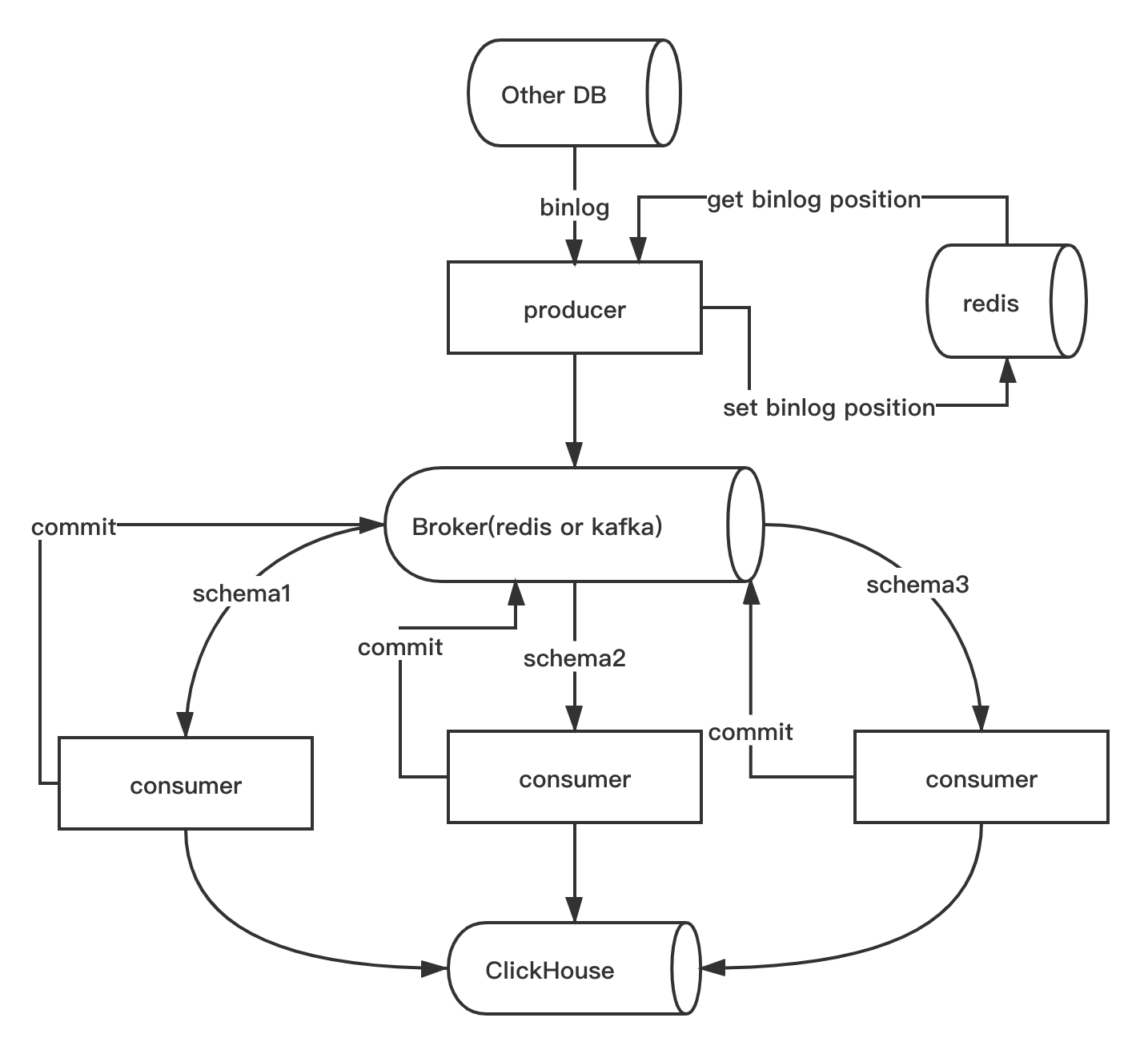
Sync data from other DB to ClickHouse, current support postgres and mysql, and support full and increment ETL.
Features
- Full data etl and real time increment etl.
- Support DDL and DML sync, current support
add columnanddrop columnandchange columnof DDL, and full support of DML also. - Email error report.
- Support kafka and redis as broker.
- Multiple source db sync to ClickHouse at the same time。
- Support ClickHouse
MergeTree,CollapsingMergeTree,VersionedCollapsingMergeTree,ReplacingMergeTree. - Support ClickHouse cluster.
Requirements
- Python >= 3.7
- redis, cache mysql binlog file and position and as broker, support redis cluster also.
- kafka, need if you use kafka as broker.
- clickhouse-jdbc-bridge, need if you use postgres and
set
auto_full_etl = true, or execsynch etlcommand.
Install
> pip install synch
Usage
Config file synch.yaml
synch will read default config from ./synch.yaml, or you can use synch -c specify config file.
See full example config in synch.yaml.
Full data etl
Maybe you need make full data etl before continuous sync data from MySQL to ClickHouse or redo data etl with --renew.
> synch --alias mysql_db etl -h

Usage: synch etl [OPTIONS]

  Make etl from source table to ClickHouse.

Options:
  --schema TEXT     Schema to full etl.
  --renew           Etl after try to drop the target tables.
  -t, --table TEXT  Tables to full etl.
  -h, --help        Show this message and exit.
Full etl from table test.test:
> synch --alias mysql_db etl --schema test --table test --table test2
Produce
Listen all MySQL binlog and produce to broker.
> synch --alias mysql_db produce
Consume
Consume message from broker and insert to ClickHouse,and you can skip error rows with --skip-error. And synch will do
full etl at first when set auto_full_etl = true in config.
> synch --alias mysql_db consume -h

Usage: synch consume [OPTIONS]

  Consume from broker and insert into ClickHouse.

Options:
  --schema TEXT       Schema to consume.  [required]
  --skip-error        Skip error rows.
  --last-msg-id TEXT  Redis stream last msg id or kafka msg offset, depend on
                      broker_type in config.

  -h, --help          Show this message and exit.
Consume schema test and insert into ClickHouse:
> synch --alias mysql_db consume --schema test
Monitor
Set true to core.monitoring, which will create database synch in ClickHouse automatically and insert monitoring
data.
Table struct:
create table if not exists synch.log
(
    alias String,
    schema String,
    table String,
    num        int,
    type       int, -- 1:producer, 2:consumer
    created_at DateTime
)
    engine = MergeTree partition by toYYYYMM
(
    created_at
) order by created_at;
ClickHouse Table Engine
Now synch support MergeTree, CollapsingMergeTree, VersionedCollapsingMergeTree, ReplacingMergeTree.
MergeTree, default common choices.CollapsingMergeTree, see detail in CollapsingMergeTree.VersionedCollapsingMergeTree, see detail in VersionedCollapsingMergeTree .ReplacingMergeTree, see detail in ReplacingMergeTree.
Use docker-compose(recommended)
Redis Broker, lightweight and for low concurrency
version: "3"
services:
  producer:
    depends_on:
      - redis
    image: long2ice/synch
    command: synch --alias mysql_db produce
    volumes:
      - ./synch.yaml:/synch/synch.yaml
  # one service consume on schema
  consumer.test:
    depends_on:
      - redis
    image: long2ice/synch
    command: synch --alias mysql_db consume --schema test
    volumes:
      - ./synch.yaml:/synch/synch.yaml
  redis:
    hostname: redis
    image: redis:latest
    volumes:
      - redis
volumes:
  redis:
Kafka Broker, for high concurrency
version: "3"
services:
  zookeeper:
    image: bitnami/zookeeper:3
    hostname: zookeeper
    environment:
      - ALLOW_ANONYMOUS_LOGIN=yes
    volumes:
      - zookeeper:/bitnami
  kafka:
    image: bitnami/kafka:2
    hostname: kafka
    environment:
      - KAFKA_CFG_ZOOKEEPER_CONNECT=zookeeper:2181
      - ALLOW_PLAINTEXT_LISTENER=yes
      - JMX_PORT=23456
      - KAFKA_CFG_AUTO_CREATE_TOPICS_ENABLE=true
      - KAFKA_ADVERTISED_LISTENERS=PLAINTEXT://kafka:9092
    depends_on:
      - zookeeper
    volumes:
      - kafka:/bitnami
  kafka-manager:
    image: hlebalbau/kafka-manager
    ports:
      - "9000:9000"
    environment:
      ZK_HOSTS: "zookeeper:2181"
      KAFKA_MANAGER_AUTH_ENABLED: "false"
    command: -Dpidfile.path=/dev/null
  producer:
    depends_on:
      - redis
      - kafka
      - zookeeper
    image: long2ice/synch
    command: synch --alias mysql_db produce
    volumes:
      - ./synch.yaml:/synch/synch.yaml
  # one service consume on schema
  consumer.test:
    depends_on:
      - redis
      - kafka
      - zookeeper
    image: long2ice/synch
    command: synch --alias mysql_db consume --schema test
    volumes:
      - ./synch.yaml:/synch/synch.yaml
  redis:
    hostname: redis
    image: redis:latest
    volumes:
      - redis:/data
volumes:
  redis:
  kafka:
  zookeeper:
Important
- You need always keep a primary key or unique key without null or composite primary key.
- DDL sync not support postgres.
- Postgres sync is not fully test, be careful use it in production.
ThanksTo
Powerful Python IDE Pycharm from Jetbrains.

License
This project is licensed under the Apache-2.0 License.
1 maintainer

Metadata
1 maintainer
Release files for synch 0.7.2
For a detailed explanation of source distributions (sdists) and built distributions (wheels), please see the package formats documentation.
Source distribution (sdist)
| File | Size | Uploaded | |
|---|---|---|---|
| synch-0.7.2.tar.gz | 26.2 kB | Details |
Built distribution (wheel)
| File | Interpreter | ABI | Platform | Reset |
|---|---|---|---|---|
| synch-0.7.2-py3-none-any.whl | Python 3 | none | any | Details |
Total release size: 65.6 kB
Release files / synch-0.7.2.tar.gz
| Download URL | synch-0.7.2.tar.gz |
|---|---|
| Size | 26.2 kB |
| Tags | Source |
|
SHA-256 checksum How to use checksums |
10c532d2a83f996e6802c4b5fff8e68b0e1dddbf79236f69687aa9ccd56c612f
|
|
BLAKE2b-256 checksum How to use checksums |
8ca1a171ecaed29f664aae2b064927dcca821af207b351bfabdcd4e821f5d756
|
| Upload date | |
|
Uploaded using Trusted Publishing? What is trusted publishing? |
No |
| Uploaded via |
twine/3.4.2 importlib_metadata/4.8.1 pkginfo/1.7.1 requests/2.26.0 requests-toolbelt/0.9.1 tqdm/4.62.2 CPython/3.9.7
|
Release files / synch-0.7.2-py3-none-any.whl
| Download URL | synch-0.7.2-py3-none-any.whl |
|---|---|
| Size | 39.4 kB |
| Tags | Python 3 |
|
SHA-256 checksum How to use checksums |
a07ca58324ef8db3034907560d8c6bef6121320011cec8af6e8467da8bf5faf0
|
|
BLAKE2b-256 checksum How to use checksums |
2046e1f4509c8cd1a167ffb20eb6965c358e1a342ca9f61e1cde96118715b351
|
| Upload date | |
|
Uploaded using Trusted Publishing? What is trusted publishing? |
No |
| Uploaded via |
twine/3.4.2 importlib_metadata/4.8.1 pkginfo/1.7.1 requests/2.26.0 requests-toolbelt/0.9.1 tqdm/4.62.2 CPython/3.9.7
|














