
SynTemp
Graph-based Reaction Templates/Rules Extraction
Overview
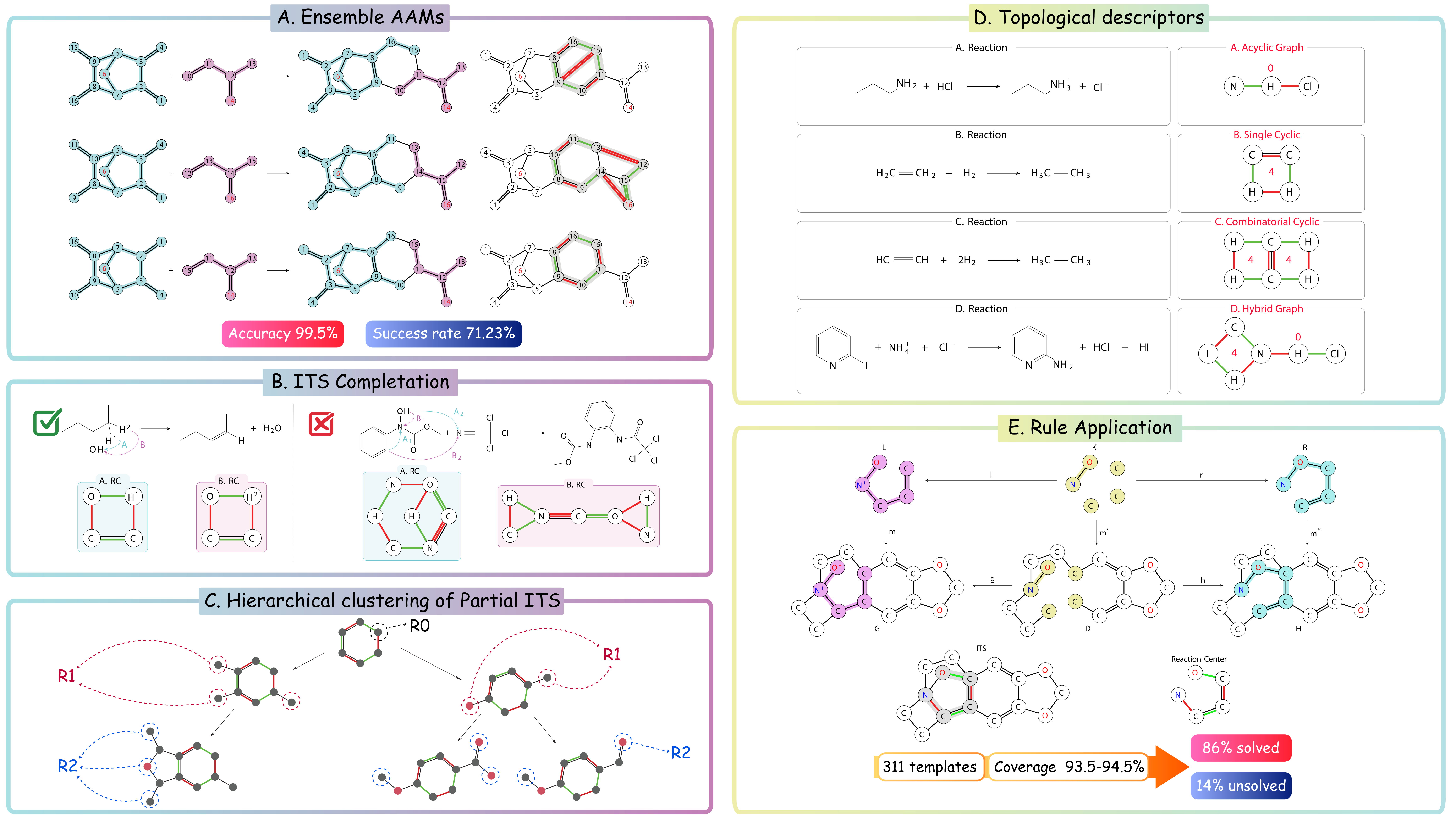
This repository is dedicated to the systematic extraction of reaction rules from reaction databases. Our primary focus is the computational analysis and transformation of molecular reactions into a structured set of rules. This work facilitates a deeper understanding of reaction mechanisms and pathways. The SynTemp framework is organized into four main phases:
- AAMs Inference: Based on ensemble AAMs for accurate atom mapping.
- Imaginary Transition State (ITS) Completion: Enhances ITS by incorporating hydrogen inference to fully capture the reaction mechanism.
- Reaction Center Detection and Extension: Focuses on identifying and extending the core active sites of reactions.
- Hierarchical Clustering: Groups extended reaction centers or partial ITS to analyze reaction patterns.
The general framework and its components are depicted in Figures A, B, and C below. Please visit full user guide & API reference for detailed examples, configuration options, and best practices.
Downstream Applications
- Templates Analysis: We have developed topological descriptors for ITS graphs to encapsulate the essential information of templates.
- Rules Application: Observes the trade-off between radii and coverage/novelty metrics. Increased coverage tends to reduce the number of output solutions due to the complexities of subgraph matching within the DPO framework. However, it also decreases novelty. This trade-off serves as a precursor to our forthcoming research, which will focus on developing a constrained framework for synthesis planning.
Table of Contents
Installation
To install and set up the SynTemp framework, follow these steps.
Prerequisites
- Python 3.11
- rdkit>=2024.3.5
- networkx>=3.3
- synrbl>=1.0.0
- synkit>=0.0.4
If you want to run ensemble AAMs
- dgl==2.1.0
- dgllife==0.3.2
- localmapper>=0.1.5
- rxn-chem-utils>=1.6.0
- rxn-utils>=2.0.0
- rxnmapper>=0.4.1
- chython==1.78
- chytorch>=1.65
- chytorch-rxnmap>=1.4
- torch==2.2.0
- torchdata==0.7.1
Step-by-Step Installation Guide
-
Python Installation: Ensure that Python 3.11 or later is installed on your system. You can download it from python.org.
-
Creating a Virtual Environment (Optional but Recommended): It's recommended to use a virtual environment to avoid conflicts with other projects or system-wide packages. Use the following commands to create and activate a virtual environment:
python -m venv syntemp-env
source syntemp-env/bin/activate  # On Windows use `syntemp-env\Scripts\activate`
Or Conda
conda create --name syntemp-env python=3.11
conda activate syntemp-env
- Install from PyPi: The easiest way to use SynTemp is by installing the PyPI package syntemp.
pip install syntemp
Optional if you want to install full version including three types of atom map
pip install syntemp[all]
- Verify Installation: After installation, you can verify that Syn Temp is correctly installed by running a simple test
echo -e "R-id,reaction\n0,COC(=O)[C@H](CCCCNC(=O)OCc1ccccc1)NC(=O)Nc1cc(OC)cc(C(C)(C)C)c1O>>COC(=O)[C@H](CCCCN)NC(=O)Nc1cc(OC)cc(C(C)(C)C)c1O" > test.csv
python -m syntemp --data_path test.csv --rebalancing --id 'R-id' --rsmi 'reaction' --rerun_aam --fix_hydrogen --log_file ./log.txt --save_dir ./
Usage
Use in script
from syntemp.auto_template import AutoTemp

data = [{'R-id': 0,
  'reactions': 'COC(=O)C(CCCCNC(=O)OCc1ccccc1)NC(=O)Nc1cc(OC)cc(C(C)(C)C)c1O.O>>COC(=O)C(CCCCN)NC(=O)Nc1cc(OC)cc(C(C)(C)C)c1O.O=C(O)OCc1ccccc1'},
{'R-id': 1,
  'reactions': 'Nc1cccc2cnccc12.O=C(O)c1cc([N+](=O)[O-])c(Sc2c(Cl)cncc2Cl)s1>>O.O=C(Nc1cccc2cnccc12)c1cc([N+](=O)[O-])c(Sc2c(Cl)cncc2Cl)s1'},
{'R-id': 4,
  'reactions': 'CCOc1ccc(Oc2ncnc3c2cnn3C2CCNCC2)c(F)c1.O=C(Cl)OC1CCCC1>>CCOc1ccc(Oc2ncnc3c2cnn3C2CCN(C(=O)OC3CCCC3)CC2)c(F)c1.Cl'},
{'R-id': 5,
  'reactions': 'Cn1cnc(-c2cc(C#N)ccn2)c1Br.OB(O)c1ccc(-n2cccn2)cc1>>Cn1cnc(-c2cc(C#N)ccn2)c1-c1ccc(-n2cccn2)cc1.OB(O)Br'},
{'R-id': 6,
  'reactions': 'CC1(C)OB(c2ccc(OCc3ccc4ccccc4n3)cc2)OC1(C)C.N#Cc1ccc(OC2CCCCO2)c(Br)c1>>CC1(C)OB(Br)OC1(C)C.N#Cc1ccc(OC2CCCCO2)c(-c2ccc(OCc3ccc4ccccc4n3)cc2)c1'}]

auto = AutoTemp(
    rebalancing=True,
    mapper_types=["rxn_mapper", "graphormer", "local_mapper"],
    id="R-id",
    rsmi="reactions",
    n_jobs=1,
    verbose=2,
    batch_size=1,
    job_timeout=None,
    safe_mode=False,
    save_dir=None,
    fix_hydrogen=True,
)

(reaction_dicts, templates, hier_templates,
its_correct, uncertain_hydrogen,) = auto.temp_extract(data, lib_path=None)

core_temp = templates[0]


# In order to perform forward prediction, you can use the following code:
from synkit.IO import gml_to_its
from synkit.Synthesis.Reactor.syn_reactor import SynReactor
reactor = SynReactor(substrate='COC(=O)C(CCCCNC(=O)OCc1ccccc1)NC(=O)Nc1cc(OC)cc(C(C)(C)C)c1O.O', template=gml_to_its(core_temp[0]['gml']))

print(reactor.smarts)
Use in command line
echo -e "R-id,reaction\n0,COC(=O)[C@H](CCCCNC(=O)OCc1ccccc1)NC(=O)Nc1cc(OC)cc(C(C)(C)C)c1O>>COC(=O)[C@H](CCCCN)NC(=O)Nc1cc(OC)cc(C(C)(C)C)c1O" > test.csv
python -m syntemp --data_path test.csv --rebalancing --id 'R-id' --rsmi 'reaction' --rerun_aam --fix_hydrogen --log_file ./log.txt --save_dir ./
Reproduce templates extraction
Run these commands from the root of the cloned repository.
python -m syntemp --data_path Data/USPTO_50K_original.csv --log_file Data/Test/log.txt --save_dir Data/Test/ --rebalancing --fix_hydrogen --rerun_aam --n_jobs 3 --batch_size 1000 --rsmi reactions --id ID
Publication
SynTemp: Efficient Extraction of Graph-Based Reaction Rules from Large-Scale Reaction Databases
Citation
@article{phan2025syntemp,
  title={SynTemp: Efficient Extraction of Graph-Based Reaction Rules from Large-Scale Reaction Databases},
  author={Phan, Tieu-Long and Weinbauer, Klaus and Laffitte, Marcos E Gonz{\'a}lez and Pan, Yingjie and Merkle, Daniel and Andersen, Jakob L and Fagerberg, Rolf and Flamm, Christoph and Stadler, Peter F},
  journal={Journal of Chemical Information and Modeling},
  volume={65},
  number={6},
  pages={2882--2896},
  year={2025},
  publisher={ACS Publications}
}
Contributing
License
This project is licensed under MIT License - see the License file for details.
Acknowledgments
This project has received funding from the European Unions Horizon Europe Doctoral Network programme under the Marie-Skłodowska-Curie grant agreement No 101072930 (TACsy -- Training Alliance for Computational)
1 maintainer

Metadata
1 maintainer
Release files for syntemp 1.0.3
For a detailed explanation of source distributions (sdists) and built distributions (wheels), please see the package formats documentation.
Source distribution (sdist)
| File | Size | Uploaded | Provenance | Actions |
|---|---|---|---|---|
| syntemp-1.0.3.tar.gz | 38.7 MB | With provenance | Details for syntemp-1.0.3.tar.gz |
Built distribution (wheel)
| File | Interpreter | ABI | Platform | Actions Reset |
|---|---|---|---|---|
| syntemp-1.0.3-py3-none-any.whl | Python 3 | none | any | Details for syntemp-1.0.3-py3-none-any.whl |
Total release size: 66.2 MB
Release files / syntemp-1.0.3.tar.gz
| Download URL | syntemp-1.0.3.tar.gz |
|---|---|
| Size | 38.7 MB |
| Tags | Source |
|
SHA-256 checksum How to use checksums |
4e0736df304f477e49e8abda31e9dde8c5217a525b0e28fbbc614893a82bf9ce
|
|
BLAKE2b-256 checksum How to use checksums |
b0805f39a391294c2aad03b59a8b5ab11948a29963d9768bc1922988fe0705a3
|
| Upload date | |
|
Uploaded using Trusted Publishing? What is trusted publishing? |
Yes |
| Uploaded via |
twine/6.1.0 CPython/3.12.9
|
Provenance
Provenance describes where a file came from. On PyPI, provenance is shared via attestations, which provide a verifiable record of the build or publishing details. View details, limitations and caveats.


PyPI Publish Attestation
PyPI verified that this artifact, at this checksum, originated from the publisher listed below.
Signed by GitHub Actions, verified by PyPI on Jul 18, 2025.
Transparency logRelease files / syntemp-1.0.3-py3-none-any.whl
| Download URL | syntemp-1.0.3-py3-none-any.whl |
|---|---|
| Size | 27.6 MB |
| Tags | Python 3 |
|
SHA-256 checksum How to use checksums |
05da7c55b178ca9850f035da22e343a7fca0920b3b57281998f5eb5760b26a86
|
|
BLAKE2b-256 checksum How to use checksums |
0303c869f0e14317ff8c8c2ca5cba63c715df5e3e2afc8999541bc8c52e2f2fe
|
| Upload date | |
|
Uploaded using Trusted Publishing? What is trusted publishing? |
Yes |
| Uploaded via |
twine/6.1.0 CPython/3.12.9
|
Provenance
Provenance describes where a file came from. On PyPI, provenance is shared via attestations, which provide a verifiable record of the build or publishing details. View details, limitations and caveats.
PyPI Publish Attestation
PyPI verified that this artifact, at this checksum, originated from the publisher listed below.
Signed by GitHub Actions, verified by PyPI on Jul 18, 2025.
Transparency logSecurity for syntemp 1.0.3
Provenance
Provenance describes where a file came from. On PyPI, provenance is shared via attestations, which provide a verifiable record of the build or publishing details. View details, limitations and caveats.
Full provenance
All 2 files in this release have been uploaded with provenance metadata.
Attestation for syntemp-1.0.3.tar.gz
PyPI Publish Attestation
PyPI verified that this artifact, at this checksum, originated from the publisher listed below.
Signed by GitHub Actions, verified by PyPI on Jul 18, 2025.
Transparency logA note on package security
PyPI is a repository for distributing packages, not a service for auditing them. While third-party security researchers and our staff do their best to detect and remove malicious packages, PyPI cannot guarantee the quality, security or suitability of any given package.
To learn more about protecting yourself from malicious actors, visit our package security documentation.














