




Quickstart / Use cases / Output / Command line / How it works / Documentation
SynthOCR makes OCR training data for Kurdish. Choose your text and a look; it renders text images, each with its exact text label (ground truth), and saves them to a folder on your computer.
It is built for Sorani and Kurmanji, with Arabic and English, and handles what makes Kurdish hard: joining letters, right-to-left text mixed with numbers and Latin words, and fonts that silently miss letters. One Python package powers the web app and the command line. Everything runs locally.
Quickstart
Install the package with uv
(or pip install "synthocr[web]") and start the app:
uv tool install "synthocr[web]"
synthocr ui
The app opens at 127.0.0.1:8000. Stop it with
Ctrl+C. On first start it downloads open fonts and Kurdish, Arabic and English
text (about 80 MB, under a minute) into your SynthOCR folder; run synthocr setup
to do this ahead of time, or synthocr setup --offline without the Tatoeba text.
Where are my files? And how to run from source.
Fonts, text and the app's own copy of each dataset live in your SynthOCR folder:
~/Library/Application Support/SynthOCR on macOS, %LOCALAPPDATA%\SynthOCR on
Windows and ~/.local/share/synthocr on Linux. Set SYNTHOCR_HOME to use another
folder. Datasets you save go wherever you choose.
To work on SynthOCR itself, run it from a clone; it then uses the repository's
config.toml, fonts and text:
git clone https://github.com/ardalan-jalal/SynthOCR.git
cd SynthOCR
uv sync --locked --extra web
uv run --extra web synthocr ui
macOS or Windows? Install the text-shaping libraries first.
On macOS:
brew install freetype harfbuzz fribidi libraqm jpeg-turbo libtiff webp
On Windows, install MSYS2, run
pacman -S mingw-w64-ucrt-x86_64-fribidi in its terminal and add
C:\msys64\ucrt64\bin to your PATH. On Debian/Ubuntu, you may need
sudo apt-get install libfribidi0.
Check that shaping works; this must print True:
uv run python -c 'from PIL import features; print(features.check_feature("raqm"))'
Make a dataset
- Text: pick languages (Sorani, Kurmanji, Arabic, English) and, with several, each one's share. Use the built-in text or upload a TXT, CSV or JSONL file.
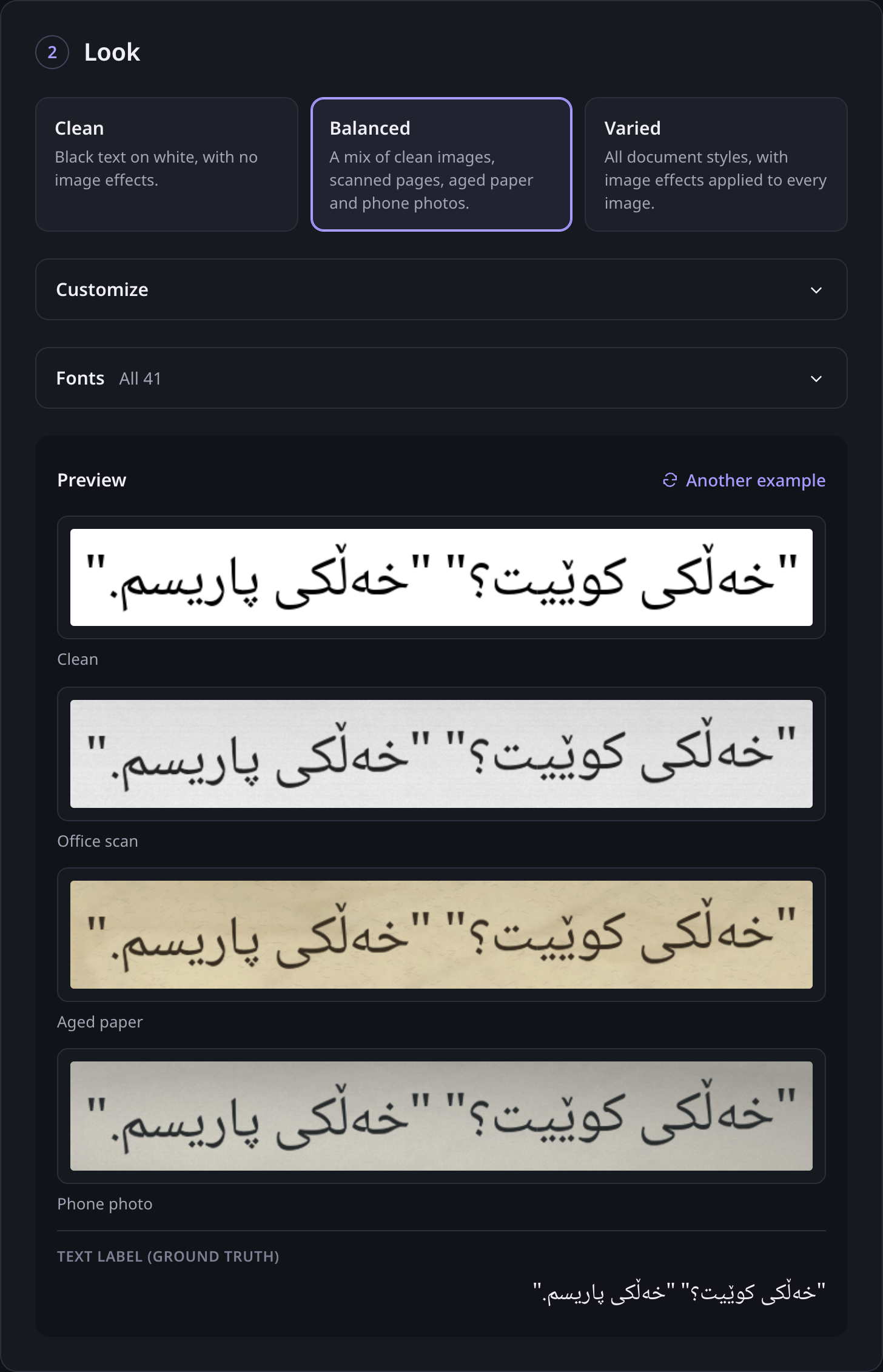
- Look: choose Clean, Balanced or Varied. Customize sets backgrounds, effects, tilt, blur and text size; Fonts picks fonts or adds your own.
- Generate: choose a folder and a label format, then click Generate dataset. Every image is checked against its label before it is saved.
See the app — one Sorani sentence, clean and in three Balanced styles.
Saving into a folder needs Chrome or Edge; other browsers download a ZIP.
Common use cases
| Use case | Example |
|---|---|
| Fine-tune an OCR model | Make line images with exact labels for Tesseract, TrOCR, PaddleOCR, docTR or your own model. |
| Fill gaps in real data | Add scanned, aged and photographed looks, or rare letters and numbers, that a small real dataset lacks. |
| Test fonts for Kurdish | See which fonts draw every Sorani or Kurmanji letter correctly before you use them. |
| Check an OCR pipeline | Feed known text through your OCR and compare its output with the exact labels. |
| Teaching and research | Show how shaping, direction and image quality affect recognition, with reproducible settings. |
Synthetic images help, but they are not a substitute for real documents. Measure your model on real, hand-checked text before trusting it.
What you get
my-dataset/
  images/00000000.png …   the text images
  labels.csv              or manifest.jsonl, metadata.jsonl, *.gt.txt (your format)
  origins.jsonl           where each text came from, with its license
| Format | Contents |
|---|---|
| Images + labels.jsonl | One JSON line per image: text, language, font, text position, source and checksum. |
| Images + labels.csv | Image file name and text, one row per image. |
| Images + .gt.txt | A text file next to each image, for Tesseract training. |
| Hugging Face ImageFolder | Images and metadata.jsonl for datasets.load_dataset("imagefolder"). |
Labels keep the original logical character order, including right-to-left and mixed-script text. They are never changed to fit a font: each label is drawn only in a font that has every one of its characters.
Command line
synthocr kurdish                                  # 1,000 Sorani images, verified
synthocr kurdish --language both --samples 10000  # Sorani and Kurmanji
synthocr generate --language ckb --language en \
    --language-weight ckb=70 --language-weight en=30 --samples 5000 --output dataset/mixed
synthocr export --dataset dataset/mixed --format csv --output dataset/mixed-csv
synthocr kurdish --check --language both          # all 274 Kurdish spelling cases
Common options
| Option | What it does |
|---|---|
--samples N |
Number of images. |
--language TAG |
Use text tagged with this language (ckb, kmr, ar, en, …); repeat to combine. |
--language-weight TAG=N |
Share of images per language; omitted languages weigh 1, 0 excludes one. |
--font FILE |
Use only this font (name or ID from synthocr fonts list); repeat. |
--augmentation 0..1 |
Share of images with backgrounds and effects. |
--background-preset NAME |
Document background, e.g. office-scan, aged-paper; repeat to mix. |
--rotation, --blur, --contrast |
Upper limits for tilt (degrees), blur (pixels) and contrast change. |
--format png|jpg|webp|tif |
Image format. |
--seed N, --workers N |
Reproducibility and parallel workers. |
--output PATH |
A new, empty folder; existing data is never overwritten. |
See synthocr generate --help and augmentation settings.
How it works
SynthOCR takes text from the bundled corpus or your file, picks for each label a font that can draw all of it, and renders it with Pillow and RAQM (HarfBuzz and FriBiDi) for correct shaping and direction. Backgrounds and effects (paper texture, grain, shadows, stains, folds, scan bands, tilt, blur) are generated procedurally; no images are downloaded. Every image is then decoded and checked against its label, checksum and bounds before the dataset is offered to you.
Text is streamed from a SQLite index and images are written as they are made, so large datasets fit on an ordinary laptop. The web app is FastAPI with plain HTML, CSS and JavaScript; it never sends folder paths to the server, and the browser writes the finished files into the folder you choose.
Speed
On an Apple M4 Pro with one worker, the app generated and verified 1,000 mixed
Sorani, Kurmanji and English images in 9 seconds (Balanced style), and saved all
files to a folder 5 seconds later. Speed depends on fonts, image size, effects and
hardware; measure yours with synthocr benchmark --samples 1000.
Privacy
Everything runs on your computer. The app listens only on 127.0.0.1, uploads
and fonts you add stay in its local workspace, and nothing is sent to any service.
Development
uv sync --locked --extra web --group dev
uv run --group dev ruff check . && uv run --group dev ruff format --check .
uv run --extra web --group dev pytest
node --test tests/ui.test.cjs
See CONTRIBUTING.md to get started and the development guide for architecture, checks and CI.
Documentation
- App guide: every option in the app
- Kurdish guide: Kurdish text, spelling cases and font checks
- Augmentation: backgrounds and effects in detail
- Development: adding text and fonts, tests, architecture
- Hosting: running it on a server
- Data sources and fonts: provenance and licenses
License and credits
Licensed under either of the MIT License or the Apache License, Version 2.0, at your option. Copyright © 2026 Ardalan Jalal. Unless you state otherwise, any contribution you submit is dual-licensed in the same way, without additional terms.
Bundled fonts (SIL Open Font License) and texts (Tatoeba, CC BY 2.0 France; templates, CC0) keep their own licenses, and generated datasets inherit them. See NOTICE for details.
Maintained by @ardalan-jalal.
1 maintainer

Metadata
1 maintainer
Release files for synthocr 2.1.0
For a detailed explanation of source distributions (sdists) and built distributions (wheels), please see the package formats documentation.
Source distribution (sdist)
| File | Size | Uploaded | Provenance | Actions |
|---|---|---|---|---|
| synthocr-2.1.0.tar.gz | 130.6 kB | With provenance | Details for synthocr-2.1.0.tar.gz |
Built distribution (wheel)
| File | Interpreter | ABI | Platform | Actions Reset |
|---|---|---|---|---|
| synthocr-2.1.0-py3-none-any.whl | Python 3 | none | any | Details for synthocr-2.1.0-py3-none-any.whl |
Total release size: 264.4 kB
Release files / synthocr-2.1.0.tar.gz
| Download URL | synthocr-2.1.0.tar.gz |
|---|---|
| Size | 130.6 kB |
| Tags | Source |
|
SHA-256 checksum How to use checksums |
0b0c322f4759f59a82781693ec183d32de98b2d3d3bb837a8b4c7b192521012f
|
|
BLAKE2b-256 checksum How to use checksums |
693b7f6a10f89367990f486a776415492507cd3bf6db8030b58b8bc825747931
|
| Upload date | |
|
Uploaded using Trusted Publishing? What is trusted publishing? |
Yes |
| Uploaded via |
twine/7.0.0 CPython/3.13.16
|
Provenance
Provenance describes where a file came from. On PyPI, provenance is shared via attestations, which provide a verifiable record of the build or publishing details. View details, limitations and caveats.


PyPI Publish Attestation
PyPI verified that this artifact, at this checksum, originated from the publisher listed below.
Signed by GitHub Actions, verified by PyPI on Oct 29, 2026.
Transparency logRelease files / synthocr-2.1.0-py3-none-any.whl
| Download URL | synthocr-2.1.0-py3-none-any.whl |
|---|---|
| Size | 133.8 kB |
| Tags | Python 3 |
|
SHA-256 checksum How to use checksums |
8f07a9588ed8a532848357b31408f93795fefded3405ee918d67effa8b24c49b
|
|
BLAKE2b-256 checksum How to use checksums |
837b900909f53843c3ee7728130a5c4bb53bb90b44b69c2b8573b162f882fe63
|
| Upload date | |
|
Uploaded using Trusted Publishing? What is trusted publishing? |
Yes |
| Uploaded via |
twine/7.0.0 CPython/3.13.16
|
Provenance
Provenance describes where a file came from. On PyPI, provenance is shared via attestations, which provide a verifiable record of the build or publishing details. View details, limitations and caveats.
PyPI Publish Attestation
PyPI verified that this artifact, at this checksum, originated from the publisher listed below.
Signed by GitHub Actions, verified by PyPI on Oct 29, 2026.
Transparency logSecurity for synthocr 2.1.0
Provenance
Provenance describes where a file came from. On PyPI, provenance is shared via attestations, which provide a verifiable record of the build or publishing details. View details, limitations and caveats.
Full provenance
All 2 files in this release have been uploaded with provenance metadata.
Attestation for synthocr-2.1.0.tar.gz
PyPI Publish Attestation
PyPI verified that this artifact, at this checksum, originated from the publisher listed below.
Signed by GitHub Actions, verified by PyPI on Oct 29, 2026.
Transparency logA note on package security
PyPI is a repository for distributing packages, not a service for auditing them. While third-party security researchers and our staff do their best to detect and remove malicious packages, PyPI cannot guarantee the quality, security or suitability of any given package.
To learn more about protecting yourself from malicious actors, visit our package security documentation.













