
system-diff
Draws your system from its code (parts, entry points, data, outside systems) and what each change adds, changes or removes. No dependencies; SVG pictures for PRs and READMEs.
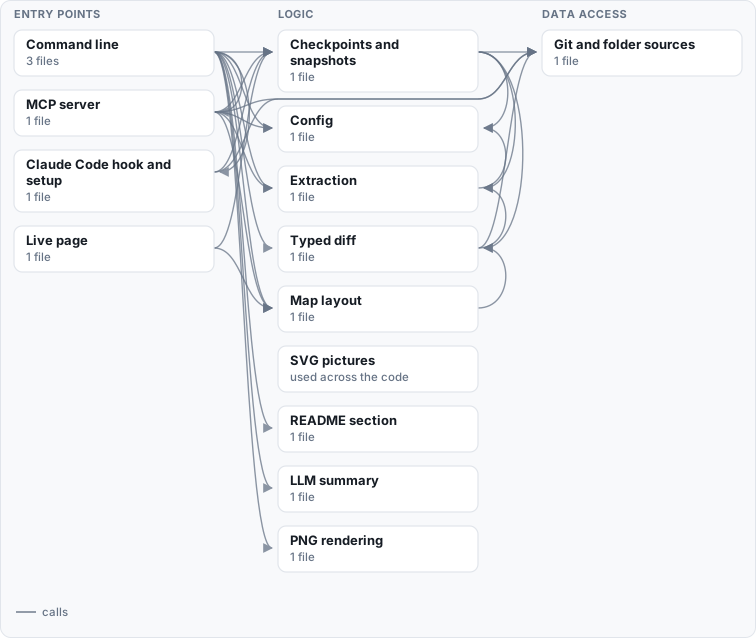
How this map is made
Regenerated by system-diff from the code: the parts and their columns from system-diff.toml, the connections from imports, API calls and the settings each part reads, the outside systems from the settings a deploy configuration sets, and the tables from the migrations. Parts used everywhere are drawn without the arrows into them, and each part keeps only its strongest connections; system-diff map writes all of them to system.json.
Read by the code but set by no deploy configuration, so not drawn: Headless Chromium (Docker or Playwright) (png).
What it does
map: reads a commit straight from git (no checkout) or a folder, and writessystem.json(everything it found) andsystem.svg(the picture): a column per role, from what people use through entry points, logic and data access to stored data and outside systems.diff: the typed difference between two commits, or a commit and your working tree: parts, endpoints, connections, outside systems, tables, settings and deployment files added, changed or removed. One sentence (headline.txt), the exact list (plan.txt, liketerraform plan), and a picture of only what changed, with the parts it touches beside it (diff.svg).--narrateadds a plain-words summary from your own LLM.readme: keeps a generated system map in your README, between two markers.draw: hand-made pictures in the same look, from small JSON specs: maps, stages of a process, sequences.
Deterministic: the same code gives the same picture, byte for byte, and a part that did not change keeps its place.
Install
pipx install system-diff
Python 3.11 or newer, nothing else. pip install "system-diff[png]" adds PNG output through Playwright; system-diff png also uses Docker when it is there.
Use
system-diff map --dir . --out docs/diagrams          # the system as it is now
system-diff diff --base origin/main --out out        # what this branch does to it
system-diff diff --base HEAD --head . --out out      # what your uncommitted work does to it
system-diff readme --json docs/diagrams/system.json  # refresh the map in README.md
With no config, every folder of code is a part named by its path. A system-diff.toml at the repository root names the
parts and says what is what:
tests = ["tests/**"]

[code]
roots = ["app/", "web/src/"]

[[components]]
id = "api"
label = "API"
kind = "interface"          # ui | interface | logic | data: the column it is drawn in
paths = ["app/api/**"]

[[externals]]
id = "postgres"
label = "PostgreSQL"
shape = "db"
env = ["DATABASE_URL"]      # the settings that reach it
Every key, and how the code is read: the wiki.
In pull requests
This repository runs system-diff on itself: the map above is regenerated from its own code, CI fails when it is out of
date, and every pull request gets its system diff as a comment (.github/workflows/system-diff.yml, which you can
copy).
With AI coding agents
When an agent changes the code with you, the question is what it did to the system. system-diff answers it as you go:
pipx install system-diff
pipx inject system-diff mcp  # the MCP server's one dependency
system-diff setup claude     # the hook, a skill and the MCP server, in one step (--scope project, --undo)
system-diff watch            # http://127.0.0.1:8765/ : the system diff since you last marked it seen
- After every Claude Code turn, one line says what changed in the system since your checkpoint ("Adds 1 endpoint (DELETE /api/orders/{id}); changes 1 table (public.orders)."), or nothing when nothing structural did.
- The live page redraws as files change. Press Mark as seen once you have understood it: the next diff then
shows only what is new to you.
system-diff checkpointdoes the same from the terminal. - The MCP server gives the agent
system_diff(the exact plan to explain from, and the picture),system_map,draw(pictures of processes and sequences in the same look) andcheckpoint. - The working tree is read as a snapshot (untracked files included) without touching your index, HEAD or branches,
and the checkpoint lives under
refs/system-diff/, in your clone only.
License
MIT
1 maintainer

Metadata
1 maintainer
Release files for system-diff 0.1.0
For a detailed explanation of source distributions (sdists) and built distributions (wheels), please see the package formats documentation.
Source distribution (sdist)
| File | Size | Uploaded | Provenance | Actions |
|---|---|---|---|---|
| system_diff-0.1.0.tar.gz | 55.4 kB | With provenance | Details for system_diff-0.1.0.tar.gz |
Built distribution (wheel)
| File | Interpreter | ABI | Platform | Actions Reset |
|---|---|---|---|---|
| system_diff-0.1.0-py3-none-any.whl | Python 3 | none | any | Details for system_diff-0.1.0-py3-none-any.whl |
Total release size: 108.2 kB
Release files / system_diff-0.1.0.tar.gz
| Download URL | system_diff-0.1.0.tar.gz |
|---|---|
| Size | 55.4 kB |
| Tags | Source |
|
SHA-256 checksum How to use checksums |
4596f3d5bb371328e08712c8fa537b6254665b27e6555fc58e41137b669a51af
|
|
BLAKE2b-256 checksum How to use checksums |
b33b490a9ac8736d3462ef4027d49ee4fea37a76af2178849ffd800d24ea5584
|
| Upload date | |
|
Uploaded using Trusted Publishing? What is trusted publishing? |
Yes |
| Uploaded via |
twine/7.0.0 CPython/3.13.16
|
Provenance
Provenance describes where a file came from. On PyPI, provenance is shared via attestations, which provide a verifiable record of the build or publishing details. View details, limitations and caveats.


PyPI Publish Attestation
PyPI verified that this artifact, at this checksum, originated from the publisher listed below.
Signed by GitHub Actions, verified by PyPI on Nov 2, 2026.
Transparency logRelease files / system_diff-0.1.0-py3-none-any.whl
| Download URL | system_diff-0.1.0-py3-none-any.whl |
|---|---|
| Size | 52.8 kB |
| Tags | Python 3 |
|
SHA-256 checksum How to use checksums |
a7742a5c9c1d3da3c65abd3cc0f7feca81affb43bfbb0bec6c9bf0b749ce6d59
|
|
BLAKE2b-256 checksum How to use checksums |
287488774ed0161dfbb2fc96d4cfdb363e1fbc3e06e75a7eb64dbbe293b4dc3c
|
| Upload date | |
|
Uploaded using Trusted Publishing? What is trusted publishing? |
Yes |
| Uploaded via |
twine/7.0.0 CPython/3.13.16
|
Provenance
Provenance describes where a file came from. On PyPI, provenance is shared via attestations, which provide a verifiable record of the build or publishing details. View details, limitations and caveats.
PyPI Publish Attestation
PyPI verified that this artifact, at this checksum, originated from the publisher listed below.
Signed by GitHub Actions, verified by PyPI on Nov 2, 2026.
Transparency logSecurity for system-diff 0.1.0
Provenance
Provenance describes where a file came from. On PyPI, provenance is shared via attestations, which provide a verifiable record of the build or publishing details. View details, limitations and caveats.
Full provenance
All 2 files in this release have been uploaded with provenance metadata.
Attestation for system_diff-0.1.0.tar.gz
PyPI Publish Attestation
PyPI verified that this artifact, at this checksum, originated from the publisher listed below.
Signed by GitHub Actions, verified by PyPI on Nov 2, 2026.
Transparency logA note on package security
PyPI is a repository for distributing packages, not a service for auditing them. While third-party security researchers and our staff do their best to detect and remove malicious packages, PyPI cannot guarantee the quality, security or suitability of any given package.
To learn more about protecting yourself from malicious actors, visit our package security documentation.













