




The website has the guide, the reference, and a live example: https://0xfauzi.github.io/systemap/.
A coding agent can write code faster than you can read it. After many changes, you can forget parts of your Python or TypeScript system.
systemap gives you one page that shows the parts of your system and their connections. Your coding agent writes the map from your code. Commands find changes that make the map incorrect. The Changes view shows changed parts and connections before you merge the code.
This page gives the map terms, the installation procedure, and the commands that compare the map with the code.
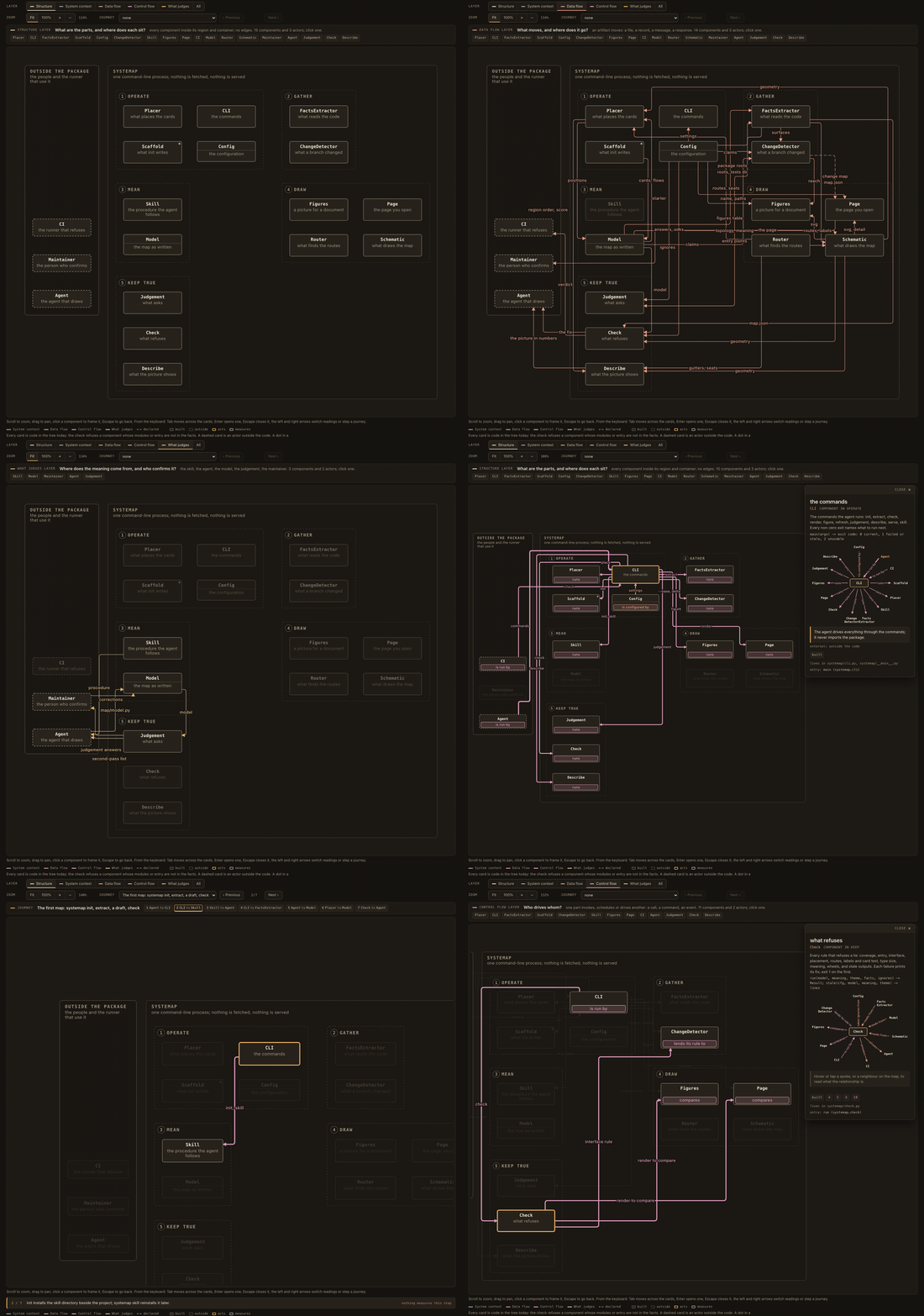
Open the live map, which is systemap's map of itself.
What are a component, a flow, and a sequence?
A component is a part of the system. Its modules have one function, such as code extraction, email delivery, or database access. The component shows a function, not a file or directory.
A flow is a connection between two components. Its line has a label that
shows what goes between the components: for example, a request or a file.
If each flow has an id, two or more flows can connect the same two components.
A sequence is an authored set of ordered steps for an operation. The page shows one step at a time. A sequence does not record an execution.

The figure shows systemap's own map with no flow lines. A layer shows the flows that answer one question. Examples include connections across the system boundary, data flow, and control flow. Select a component to see its connected components and the explanation for each connection.
Structure shows no flow lines after a component selection.
Other layers show only flow lines that connect to the selected component.
Flow labels show on their lines. A label that does not fit on its line
shows for a pointer, keyboard focus, or selection, and the Details panel lists it.
When the map is smaller than 100 percent, the labels become larger, so that you can read them. A label moves along its line to a place where it touches no card, label, or other line. A label without such a place also shows only for a pointer, keyboard focus, or selection. The Details panel keeps all component connections, with direction and evidence.
Flow lines also show evidence. A solid internal line shows a current source review. This is a recorded source review whose source records and claim digest still agree with the stored source snapshot. At least one source record is in a module of a flow endpoint. A short dashed line shows structural evidence: an import, a shared module, or a configured mechanism. A long dashed line shows a declared flow without that evidence.
Structural evidence does not show direction or the artifact that a flow carries. External flows have an actor at one end. None of these states records execution.
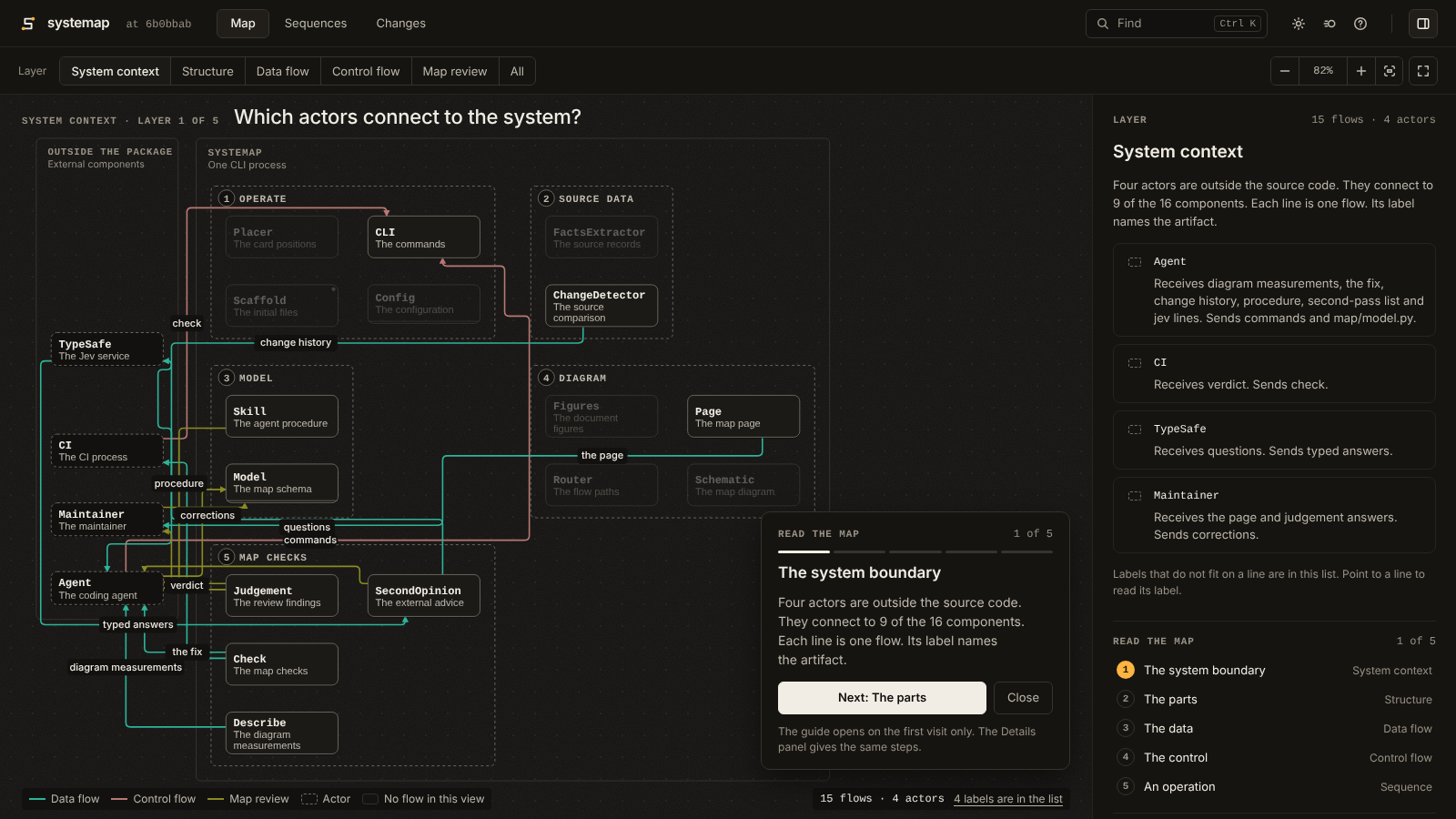
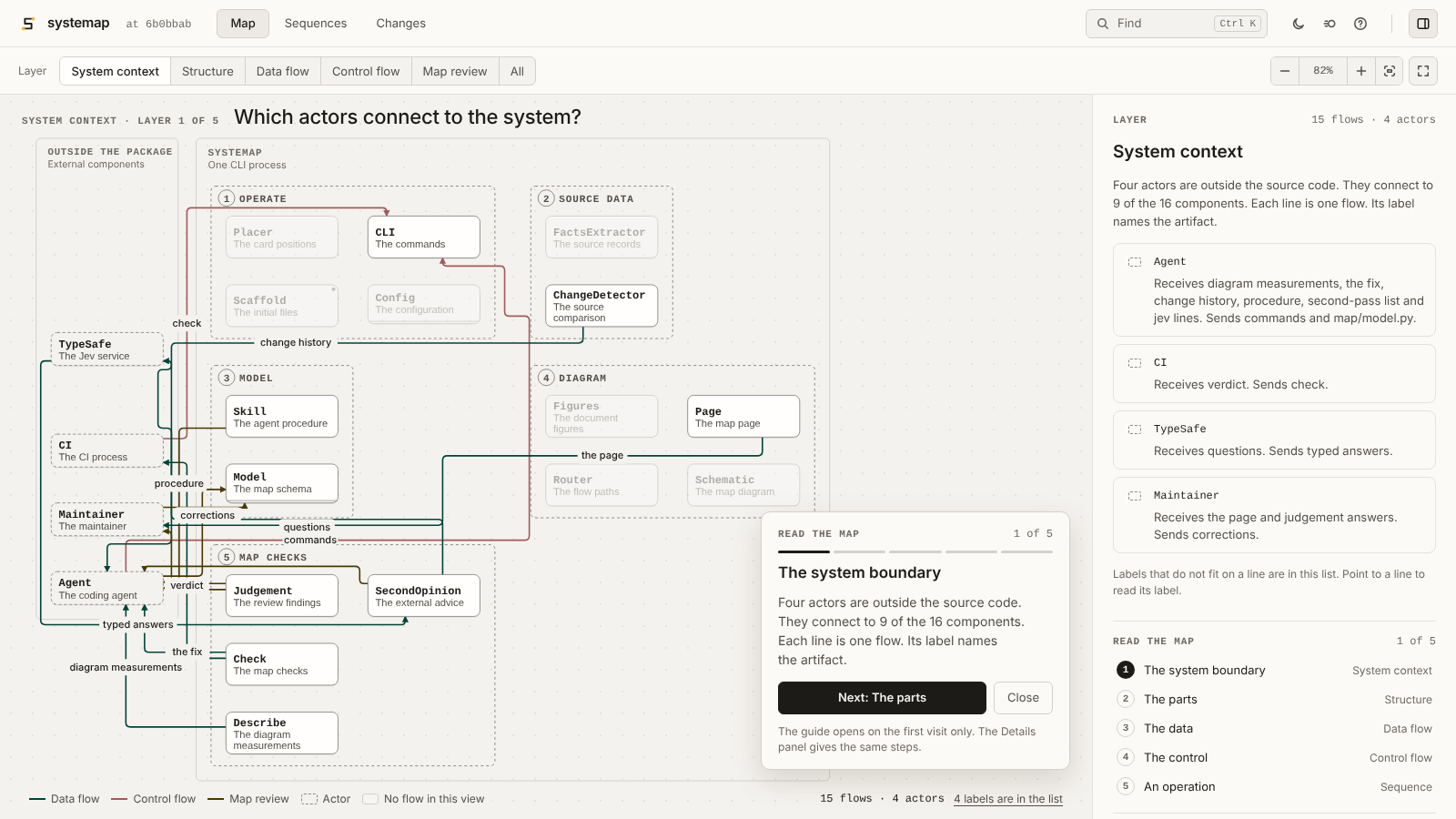
The page has three views. Map shows the layers. Sequences shows one operation as a route on the map, then one step at a time, with a note at each step. A button in its row opens the list of sequences. Changes shows the components and flows that a revision comparison changed.
On the first visit, a guide card gives up to five steps through the map. The three views have the same parts. Each has a row of controls under the header and a panel at the right. Above the map, one line gives a small label and a question. On a wide window, the Map view opens the panel with the page. With no selection, the panel shows the current layer: one card for each flow, actor, or region.
The header has no menu. Find (Ctrl+K, Cmd+K, or /) opens one search field for views, layers, components, flows, sequences, rules, and actions. Icon buttons select the theme, set Reduce motion, show the keyboard keys, and open the Details panel. Motion is on until the reader sets Reduce motion on the page.
The full-screen button and the F key show the map alone in each view. The Map panel gives all rules of the system and an explanation of the lines and cards. The commit in the header opens the source records of the page.
The themes are Ink and Paper. Ink has dark surfaces and is the default. Paper has light surfaces. The first visit uses the device theme.
Only the flow kinds, the selection, and the change have colors. A line has the color of its flow kind in all views. The selection color identifies only the current item, such as the selected card, the current step, and a wider line under the selected line. Cards, regions, text, and other lines are neutral.
The map has one flat view. Card text changes size with the zoom. Fit shows the full map as large as the map area permits.
In a sequence step, the acting component has an ACTS tag and a measurement component has a MEASURES tag. On a phone, the map shows its regions as a grid, and a sequence shows one step below the map. The map gets the height that the step and its buttons do not use. Its zoom keeps the card text at a size that you can read, and the acting component stays in view.
The panel gives source modules, entry points, related sequences, and evidence states. These values come from the current model and recorded source data.
How do you install systemap?
Install systemap. Then write the initial files:
uv tool install systemap        # or: uv add --dev systemap
systemap init                   # --no-ci: no workflow. --strict-ci: findings fail CI.
For a TypeScript repository, install the parser extra:
uv tool install 'systemap[typescript]'
After you upgrade systemap, operate systemap refresh and commit the facts file.
A facts file from an earlier version is stale, and systemap check exits 1 until you write it again.
CHANGELOG.md gives the other steps for each version.
The TypeScript adapter reads .ts, .tsx, .mts, and .cts modules. These records include:
-
Named exports, default exports, and local re-exports.
-
Imports and package
binandexportsentries. -
JSONC
tsconfig.jsonfiles and inherited path aliases.
For each source file, systemap uses the nearest tsconfig.json file above that file.
If that configuration does not select the file, systemap uses a configuration in its
references that selects the file. Thus a solution tsconfig.json with "files": []
and the tsconfig.json file of each monorepo package give their own path aliases.
A package.json file in a package directory below the root gives more bin and
exports entries.
The outDir and rootDir options connect compiled package entries to source
files. An inherited path that starts with ${configDir} uses the directory of
your own tsconfig.json. This is also the tsc behavior.
If rootDir is missing, systemap uses the rule for your TypeScript version:
-
TypeScript 5 uses the longest common directory of the selected input files. The
include,files, andexcludeoptions select these files. -
TypeScript 6 and later use the
tsconfig.jsondirectory. -
The
compositeoption uses thetsconfig.jsondirectory on all versions.
systemap reads the version from node_modules/typescript, then from
package.json. If the two files do not give a version, systemap tries the two roots.
A compiled target maps to source only if one root gives a match and the other does not.
Extraction and change analysis show common test filenames, such as .test.ts,
.spec.ts, .cy.ts, and the files in __tests__ directories. For other
filenames, add repository-specific globs, such as
test_patterns = ["**/*.check.ts"]. If a compiled target is not in the configured
outDir directory, systemap can connect the target to a unique source file.
The target directories are dist/, distribution/, build/, and lib/.
The source directories are src/ and source/.
If the parser cannot read syntax or map a package target, the facts include an
explicit unknown record. systemap check prints these records but does not
reject the map for them. Each unknown record must have a correction or
an accepted answer before systemap judgement --strict accepts it. A missing npm package in
tsconfig.json extends also gives an unknown record. Extraction can thus
continue without node_modules.
The TypeScript grammar used by the reader rejects some
correct generic call signatures, such as obj?.m<T>?.(). These modules stay in the facts
with an unknown public surface. A second parse reads export type * from and the
variance keywords in and out.
TypeScript discovery first uses src/, then the repository root. For a
monorepo or a repository without src/, configure [package_roots] for the
application packages. With this configuration, scripts and fixtures do not become
application modules. If only the package directories of a workspace have a
tsconfig.json file, init selects TypeScript and writes no package roots.
The init command writes the configuration, an empty map, the skill
instructions, and a CI workflow. The command then prints this instruction:
Make a map of this repository with systemap. Obey the systemap skill and its writing rules.
Give the instruction to your agent. The agent reads the code, selects a component for each module, writes flows, and does the checks. A second examination finds missing claims.
When the agent stops, read its completion report. It gives the recorded answers and the uncertain claims. Correct the items with which you do not agree. Then commit the page.
For Claude Code, use the repository's plugin marketplace:
/plugin marketplace add 0xfauzi/systemap
/plugin install systemap@systemap
The plugin also gives a live map in Claude Code. See What does the live map in Claude Code show?
Other agents can use the same instructions if they can read files and execute commands.
The writing profile in systemap.toml sets the writing rules for map names, sequence steps, and other map text.
The default profile is plain. Its rules limit the sentence length and require literal words and one term for each concept.
A person or a program can examine these rules without a dictionary.
To use the full ASD-STE100 Issue 9 rules, set profile = "asd-ste100" in the [writing] table.
These rules need the official ASD dictionary.
The language policy gives the two profiles, the glossary, and the examination procedure.
This repository uses the asd-ste100 profile for its map, its interface text, and its documentation.
TypeScript example
This example repository has three files. src/service.ts exports a function.
src/index.ts re-exports the function. The test imports the source module.
src/index.ts
src/service.ts
tests/service.test.ts
src/service.ts exports a function, src/index.ts makes it available to
callers, and the test imports the source module:
// src/service.ts
export function greet(name: string): string {
  return `Hello, ${name}`;
}

// src/index.ts
export { greet } from "./service";

// tests/service.test.ts
import { greet } from "../src/service";
test("greets a person", () => {
  expect(greet("Ada")).toBe("Hello, Ada");
});
Without the language key, systemap finds the language from the source files.
If the evidence for Python and the evidence for TypeScript are equal, the command stops and tells you to set the key.
After systemap init, set the language and the source root in systemap.toml:
language = "typescript"

[package_roots]
"src" = "example"
To read the extracted records, execute these commands:
systemap extract
systemap facts --names example.service
systemap facts --module example.service
The facts show greet as an export of example.service.
They also connect tests/service.test.ts to that module.
Give your agent the instruction from init to write the map.
Then execute the checks:
systemap check && systemap judgement --strict
The larger fixture in
tests/fixtures/typescript-app includes path
aliases, TSX, and a package binary.
What does the live map in Claude Code show?
The Claude Code plugin shows the map of the current files while an agent changes them.
It uses the systemap live command.
In a repository with systemap.toml, or with [tool.systemap] in pyproject.toml,
the plugin shows one line above the prompt:
map: not started · Start live map
The live map reads map/model.py without running its code, unless SYSTEMAP_TRUST_MODEL_CODE=1 is in the environment of Claude Code.
To start it, select Start live map or type /map.
The plugin then runs systemap live --port 0 --json --no-watch.
After a turn that changes files, the plugin tells systemap live to render the map again.
The line above the prompt then shows the state of the live map:
map: live · 3 map updates · Open map · Show. The map shows the current files. A map update is asystemap deltaline that needs an action.map: rendering. systemap renders the map now.map: not updated: .... systemap could not render the map. The page keeps the last correct map.
Open map opens the full page in a browser. Show and /map open a pane.
On a surface other than the terminal, the pane shows the change figure and the map update lines.
In a terminal, the pane shows the map update lines and the link.
If the figure has more than 131,072 characters, the pane shows the link and no figure.
The plugin has two options. Set them with /plugin configure systemap@systemap or in /config:
command: the command that starts systemap. The default issystemap. Examples areuv run systemapanduvx systemap.autostart: if true, the live map starts with each session in a systemap repository. The default is false.
If the command cannot start, the line says so and gives the name of the command option.
In a directory without systemap configuration, the plugin shows nothing.
Why does an agent write the map?
Extraction finds modules, public names, imports, and test references. These facts do not show which modules have one function. Test references also do not show test coverage. Unknown records show information that extraction cannot show.
A person or agent must make the semantic decisions. For example, four modules can form one part, but an import graph does not show that assignment. The same limit applies to a flow's direction and artifact.
systemap gives the agent a procedure and commands to compare the result with the code. The procedure includes a second pass over the modules and claims. The commands reject mechanical contradictions. They do not show that every semantic decision is correct.
How do you keep the map consistent with the code?
Execute the two commands after a change:
systemap check && systemap judgement --strict
The agent corrects the findings and runs the commands again until no open finding stays.
systemap check compares the map with the code. Its rules reject
unclaimed modules, missing entry names, incorrect geometry, and stale outputs.
Geometry findings include a line through an unrelated component and two
labels with an overlap. Each finding gives a correction.
systemap judgement prints possible map errors to examine. Examples
include a single-module component, an entry point with no sequence, and an import
across components with no flow. Change the map or record a reason in
systemap.toml. Exact answers must have evidence for the stored source snapshot. Family answers must have
an explicit policy. Changed evidence can open an exact finding again.
A component source_review digest that is not current is also a finding.
With [judgement] require_reviews = true, a component without a source_review digest is also a finding.
systemap judgement --json gives the open lines, their kinds, and their evidence digests as one JSON object for programs.
A report with no open findings does not show that every component assignment is correct. The rules use names and imports. They can miss a module in the incorrect component. Without Jev, the skill's second pass compares every claimed module with its component's function. If the facts are not sufficient, the agent or maintainer reads the source.
Six repositories completed the procedure recorded at that time. Four came from other authors. All six completed without intervention. The two commands showed no open findings. The run records are in docs/benchmarks.md.
How does an agent record a source review?
A source review is a recorded examination of the source that supports a claim.
The map records it as a digest: source_review for a component and review_digest for a flow.
A digest that is not current gives a finding again.
systemap review writes the current digest of one target into the model file:
systemap review Reader                    # source_review of the component Reader
systemap review --flow 'Reader->Writer'   # review_digest of the one flow from Reader to Writer
systemap review --flow submit-order       # review_digest of the flow with this id
The command does not examine the claims. Examine the source before you use it. It writes one target for each call, and it keeps the comments and the format of the model file.
systemap decisions gives the open claims to a coding agent in its current session:
systemap decisions pending --jsongives each decision request with its claim and its source files.- The agent examines each claim against the source. Then it writes a verdict:
supported,contradicted, orinsufficient_evidence. systemap decisions submit FILEexamines the citations of each verdict: the file, the line span, and the digest of the current file.- If each citation is correct, the command records each
supportedverdict as a review digest or as an exact answer. systemap decisions statusgives the counts and the decision requests that stay unknown.
These commands send no request to a model.
After [decisions] max_contradicted verdicts of contradicted for one target, the decision request becomes unknown. The default is 3.
A person must then examine the claim.
How do you prevent an import between two components?
An import rule in the model gives the permitted imports between the modules of components.
The kind values are forbid_import, allow_imports, and forbid_cycle.
systemap check exits 1 if a resolved import is against a rule.
systemap rules gives the result of each rule: pass, fail, or unknown.
The result is unknown if a module did not parse, or if the facts possibly do not contain all its imports.
check gives a warning for an unknown result. With [rules] unknown = "fail", it exits 1.
docs/reference.md gives an example rule.
What does a pull request change in the map?
Git shows changed lines of code. systemap delta --base main shows changed
parts, connections, and claims. Each finding gives a correction.
This example keeps finding identifiers from an earlier version:
moved: pkg.old -> pkg.new (same content); Gateway names pkg.old in
  implemented_by: rename it in map/model.py
added: pkg.thing, claimed by no card; name it in a card's implemented_by
entry vanished: Gateway names entry serve, which its modules no longer define
Gateway is a component. Its implemented_by field contains the claimed modules.
Its entry field shows a public name at which a reader can start.
The workflow from init runs delta on each pull request. The job log gives each line
and its action. By default, a necessary map update gives a warning, and the job passes.
To reject the pull request while a map update is necessary, set SYSTEMAP_CI: strict
in the workflow, or run systemap init --strict-ci.
CI writes no comment by default. If your repository publishes the map page of each
pull request, set [delta] page_url in systemap.toml. Then CI writes one comment
with a link to the Changes view of that page, and changes it after each push.
CI writes this comment only for a pull request from a branch of the same repository.
The code and the settings of a pull request from a fork can change the comment text.
The Changes view of that page shows the changed parts on the map.
The agent can correct these findings without a full new map. Three merged pull requests from one 111-module repository cost 2.31, 4.39, and 2.50 dollars through this procedure. First-map runs cost between 1 and 26 dollars. The cost depends on the model and the repository size. Three pull requests from one repository form a small sample. docs/benchmarks.md gives each run.
How do you see the map while the code changes?
systemap live renders the map of the working tree and supplies it at http://127.0.0.1:8765/.
Open this address in a browser.
When a source, model, or configuration file changes, the command renders the map again.
Then the browser loads the page again and keeps your view, layer, selection, and sequence step.
The Changes view compares the working tree with origin/main, or with the ref of --base.
It includes the edits that are not in a commit.
The command does not write tracked files. It can add a cache file in .systemap/facts/.
On this repository, the command takes about 7 to 8 seconds to render the map.
--json, GET /status, and POST /refresh give the state to other programs.
docs/reference.md gives the options and the HTTP requests.
What other commands can you use?
-
Read a finding's explanation. Each printed finding kind has text about its meaning, its effect on the map, and the necessary action.
systemap explain "<kind>"prints the full explanation. -
Write a missing sequence. An agent can write steps for an entry point. systemap compares each step with the map before it writes the sequence.
-
Read changes across a year.
systemap historyreads repository samples. Its report shows parts that grew and the associated commits. -
Make a work plan.
systemap plan "<task>"shows parts likely to change. After the work, the command compares the projection with the changed parts. -
Send semantic questions to a decision provider. A decision provider is a model API that gives typed answers.
systemap auditsends questions about module claims, sentences, and flows to TypeSafe's Jev or to OpenAI Decisions. SetTYPESAFE_API_KEYfor Jev. For OpenAI, setOPENAI_API_KEYand give--provider openai. A key alone does not select OpenAI.deltasends questions only with--decideor[jev] enabled = true. -
Put the stale source reviews in sequence.
systemap judgement --order-by-driftsends one Jev question for each stale source review. It puts the lines with the lowest drift score first. Without this option,checkandjudgementmake no network requests.
The experiments set acceptance thresholds before implementation.
The experiment records include features that did not meet their thresholds and
are not in systemap. See bench/jev.
systemap --help lists all commands.
docs/reference.md gives all options, rules, and settings.
What are the limits?
systemap reads Python, TypeScript, and TSX. TypeScript records include exports,
imports, test references, package binaries, export roots, and configured path
aliases. delta and history read the same records from committed trees.
systemap does not read framework-specific TypeScript routes.
The map contains authored and examined flows. It does not contain all function calls or one component for each module. Systemap is not a UML tool. It uses one picture and one layout, with components, flows, and sequences.
What does systemap run and read?
systemap reads the source files, systemap.toml, and the model files of the repository.
The facts, the configuration, and the model can give file paths.
systemap reads such a file only if it is a regular file in the repository.
It refuses an absolute path, a path with a .. part, and a symbolic link to a file that is not in the repository.
The extractor parses the source files. It does not import them.
systemap reads map/model.py and the model files that it imports as data.
It does not run them.
A model file can contain only literal values, calls of the model classes, and names that
the file defines. For other code in a model file, the commands stop and give the file,
the line, and the necessary change.
If you know that the code in a repository is safe, you can set
SYSTEMAP_TRUST_MODEL_CODE=1 in the environment of the command.
Then systemap runs the model files as Python code, as version 1.2.0 did.
The repository cannot give this permission. systemap does not read it from systemap.toml
or from another file in the repository.
To change a model file from an earlier version to literal values, examine its code first.
Then run SYSTEMAP_TRUST_MODEL_CODE=1 systemap convert one time.
The command writes the same model with literal values only, and makes sure that systemap reads it to the same model.
systemap runs git to read the commits and revisions of the repository.
systemap journeys runs the program that [agent] command in systemap.toml gives.
Before you run journeys in a repository that you do not know, read that value.
Commands that use Jev, OpenAI, or an agent send source text and map text to that service.
systemap audit --dry-run shows the data before you send it.
How do you develop systemap?
uv sync
uv run pytest -q
uv run systemap check && uv run systemap judgement --strict
CI executes tests, type checks, and lint checks on Linux, macOS, and Windows. The Python versions are 3.11 and 3.13. Each platform also installs the built package into an empty environment. The installation job executes the commands against a copy of this repository's map.
systemap uses the MIT license.
If you cannot complete a map because of systemap, open an issue. Previous versions used reports of problems from people and agents.
1 maintainer

Metadata
1 maintainer
Release files for systemap 2.0.0
For a detailed explanation of source distributions (sdists) and built distributions (wheels), please see the package formats documentation.
Source distribution (sdist)
| File | Size | Uploaded | |
|---|---|---|---|
| systemap-2.0.0.tar.gz | 6.7 MB | Details |
Built distribution (wheel)
| File | Interpreter | ABI | Platform | Reset |
|---|---|---|---|---|
| systemap-2.0.0-py3-none-any.whl | Python 3 | none | any | Details |
Total release size: 7.4 MB
Release files / systemap-2.0.0.tar.gz
| Download URL | systemap-2.0.0.tar.gz |
|---|---|
| Size | 6.7 MB |
| Tags | Source |
|
SHA-256 checksum How to use checksums |
ee1a8a6325ca21b2ffd9bc28ae31db3bc714050e90f711e11b8a3b9f0a97f42f
|
|
BLAKE2b-256 checksum How to use checksums |
dd87585784c816a72ca9126707849b2e3731c40230c7f3c2e7d0d85b74eb0a0d
|
| Upload date | |
|
Uploaded using Trusted Publishing? What is trusted publishing? |
Yes |
| Uploaded via |
twine/7.0.0 CPython/3.13.14
|
Provenance
Provenance describes where a file came from. On PyPI, provenance is shared via attestations, which provide a verifiable record of the build or publishing details. View details, limitations and caveats.


PyPI Publish Attestation
PyPI verified that this artifact, at this checksum, originated from the publisher listed below.
Signed by GitHub Actions, verified by PyPI on Oct 13, 2026.
Transparency logRelease files / systemap-2.0.0-py3-none-any.whl
| Download URL | systemap-2.0.0-py3-none-any.whl |
|---|---|
| Size | 668.0 kB |
| Tags | Python 3 |
|
SHA-256 checksum How to use checksums |
7eeabeae3625a6cdb6b7f7bc9af4de9cd947ee2829894728bf59947592ef8ce3
|
|
BLAKE2b-256 checksum How to use checksums |
582b6a252faaec6cdeb4afa07d417b079c9da6f704e829204ae758ebfa93ba72
|
| Upload date | |
|
Uploaded using Trusted Publishing? What is trusted publishing? |
Yes |
| Uploaded via |
twine/7.0.0 CPython/3.13.14
|
Provenance
Provenance describes where a file came from. On PyPI, provenance is shared via attestations, which provide a verifiable record of the build or publishing details. View details, limitations and caveats.
PyPI Publish Attestation
PyPI verified that this artifact, at this checksum, originated from the publisher listed below.
Signed by GitHub Actions, verified by PyPI on Oct 13, 2026.
Transparency log













