
Real-time system statistics monitoring.

Project description

SysTrack
SysTrack is a powerful CLI tool for monitoring and tracking system resources in real-time.
Features
- Memory usage statistics
- CPU usage tracking
- Disk usage information
- Network statistics
- Hardware information
- Temperature sensors (Linux and FreeBSD)
- Live system dashboard
Installation
pip install systracker
SysTrack CLI Commands
This section provides an overview of all available commands in the SysTrack CLI tool.
systrack help
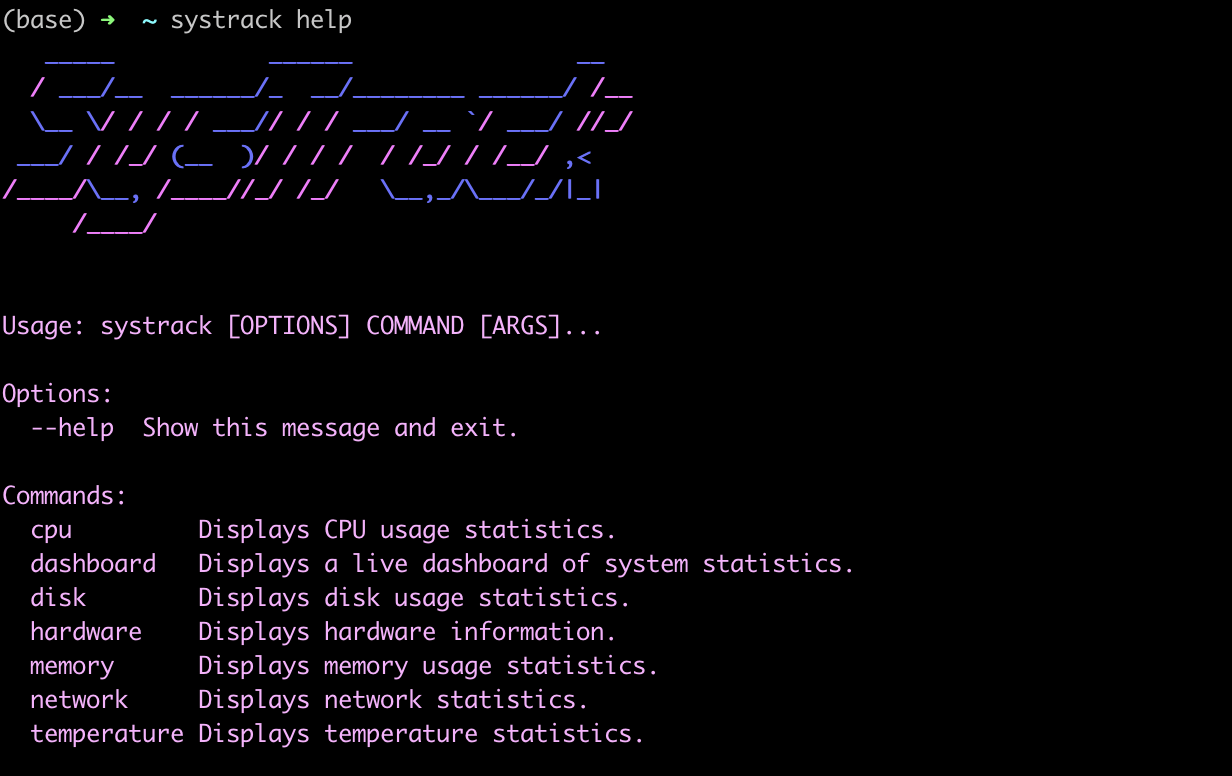
The systrack help command provides an overview of all available commands in the SysTrack CLI tool. It displays a stylized ASCII art logo of "SysTrack" followed by usage instructions, available options, and a list of all commands with brief descriptions. This command is essential for users to quickly understand the tool's capabilities and how to use each feature. The help output includes information on CPU, dashboard, disk, hardware, memory, network, and temperature commands, giving users a comprehensive guide to monitoring various aspects of their system.
systrack cpu
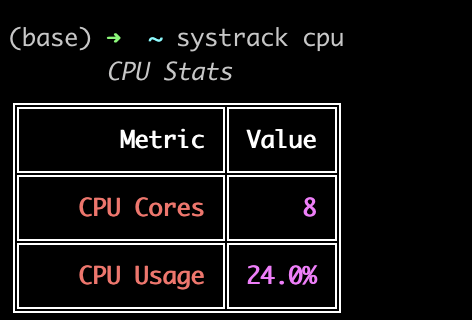
The systrack cpu command provides a quick and visually appealing snapshot of the system's CPU statistics. It displays information in a neatly formatted table with two key metrics:
-
CPU Cores: Shows the total number of CPU cores available on the system. In this example, the system has 8 cores.
-
CPU Usage: Displays the current CPU utilization as a percentage. The screenshot shows a 24.0% usage, indicating the current load on the CPU.
This command is particularly useful for quickly assessing the CPU's capacity and its current workload. The clear, color-coded output makes it easy to read and interpret at a glance, making it an excellent tool for system administrators and users who need to monitor CPU performance regularly.
systrack dashboard
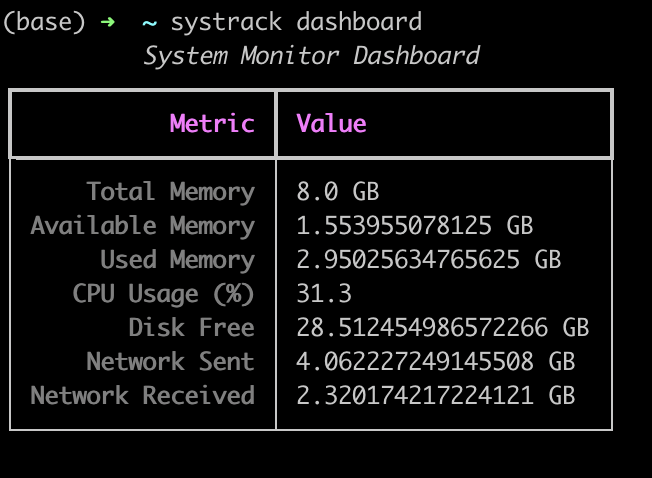
The systrack dashboard command provides a comprehensive real-time overview of key system metrics. This dynamic dashboard displays:
- Total and Available Memory: Shows the system's total RAM (8.0 GB) and currently available memory.
- Used Memory: Indicates the amount of RAM currently in use.
- CPU Usage: Displays current CPU utilization as a percentage (31.3% in this example).
- Disk Free: Shows the amount of free storage space on the system.
- Network Statistics: Provides data on network usage, including sent and received data.
This command is invaluable for system administrators and users who need a quick, all-in-one view of their system's current state and performance.
systrack disk
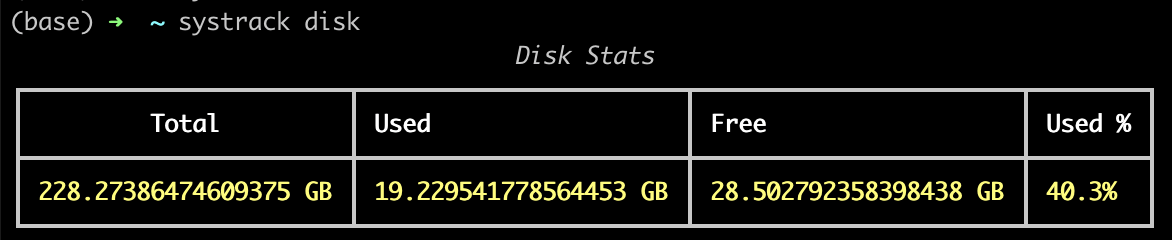
The systrack disk command offers a detailed snapshot of the system's disk usage. It presents information in a clear, tabular format:
- Total: Displays the total disk capacity (228.27 GB in this case).
- Used: Shows the amount of disk space currently in use (19.23 GB).
- Free: Indicates the available disk space (28.50 GB).
- Used %: Provides the percentage of disk space utilized (40.3%).
This command is essential for monitoring storage utilization, helping users manage their disk space effectively and plan for future storage needs.
systrack hardware
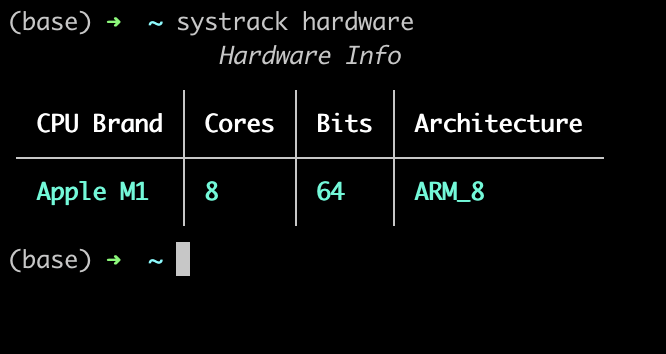
The systrack hardware command delivers key information about the system's CPU hardware:
- CPU Brand: Identifies the processor (Apple M1 in this instance).
- Cores: Shows the number of CPU cores (8 cores).
- Bits: Indicates the processor architecture bit-depth (64-bit).
- Architecture: Specifies the CPU architecture (ARM_8).
This command is particularly useful for quickly identifying the system's hardware capabilities, which is valuable for software compatibility checks, performance expectations, and system requirements assessments.
systrack memory
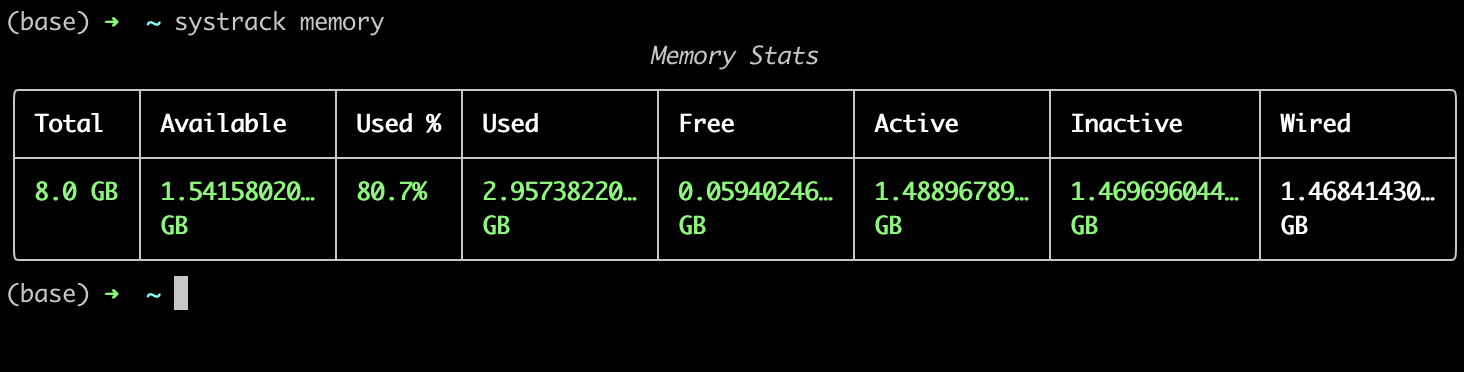
The systrack memory command provides a comprehensive overview of the system's memory statistics. It displays information in a neatly formatted table with the following metrics:
- Total: Total system memory (8.0 GB)
- Available: Current available memory
- Used %: Percentage of memory in use (80.7%)
- Used: Amount of memory currently in use
- Free: Amount of free memory
- Active: Amount of active memory
- Inactive: Amount of inactive memory
- Wired: Amount of wired memory
This command is useful for quickly assessing memory usage and availability, helping users identify potential memory constraints or optimization opportunities.
systrack network
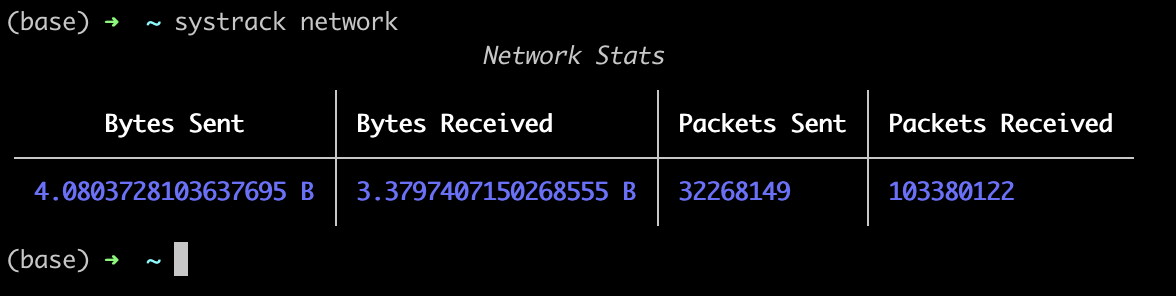
The systrack network command offers a snapshot of the system's network activity. It presents network statistics in a clear, tabular format with four key metrics:
- Bytes Sent: Total number of bytes sent over the network
- Bytes Received: Total number of bytes received from the network
- Packets Sent: Total count of packets sent
- Packets Received: Total count of packets received
This command is valuable for monitoring network traffic, troubleshooting connectivity issues, or analyzing data transfer patterns. The color-coded output enhances readability, making it easy to quickly interpret network activity at a glance.
Release history Release notifications | RSS feed


Download files
Download the file for your platform. If you're not sure which to choose, learn more about installing packages.
Source Distribution
Built Distribution
Filter files by name, interpreter, ABI, and platform.
If you're not sure about the file name format, learn more about wheel file names.
Copy a direct link to the current filters
File details
Details for the file systracker-0.2.7.tar.gz.
File metadata
- Download URL: systracker-0.2.7.tar.gz
- Upload date:
- Size: 9.8 kB
- Tags: Source
- Uploaded using Trusted Publishing? No
- Uploaded via: twine/5.1.0 CPython/3.9.6
File hashes
| Algorithm | Hash digest | |
|---|---|---|
| SHA256 |
4c8c280468890bf5da72cd77fe4e1e90426561efce7872bb59926e3cc573e295
|
|
| MD5 |
ccd5574e2cb3594a37d639c4427c678e
|
|
| BLAKE2b-256 |
51accf0cdae01315dfc6fc14447f5518b8f3580af20f9ccbef1df3693bef2b76
|
File details
Details for the file systracker-0.2.7-py3-none-any.whl.
File metadata
- Download URL: systracker-0.2.7-py3-none-any.whl
- Upload date:
- Size: 8.6 kB
- Tags: Python 3
- Uploaded using Trusted Publishing? No
- Uploaded via: twine/5.1.0 CPython/3.9.6
File hashes
| Algorithm | Hash digest | |
|---|---|---|
| SHA256 |
3c6e138d702288b2de472010d5bb41f8a0dfa4d01ba4bbb58b6461902eb1d8be
|
|
| MD5 |
4afe4e53055178b97c1cbab355423ace
|
|
| BLAKE2b-256 |
1844e8cb7532e9a41cd45aae5235736f6e17fd8c576586bc4b9663efb87d410b
|






