
▀▀██▀▀         ██                ▀██     ▀██             ▄██
  ██    ▀▀▀▀█▄ ██▀▀▀█▄ ▄█▀▀▀█▄    ██      ██   ▄█▀▀▀█▄    ██
  ██   ▄█▀▀▀██ ██   ██ ██▀▀▀▀▀    ██      ██   ██▀▀▀▀▀    ██
  ▀▀    ▀▀▀▀▀▀  ▀▀▀▀▀   ▀▀▀▀▀   ▀▀▀▀▀▀  ▀▀▀▀▀▀  ▀▀▀▀▀   ▀▀▀▀▀▀
                                                       ▀▀▀▀▀▀▀▀
t1 bootstrap — start a Python project without thinking about the boilerplate.




uv init gives you a folder. This gives you the folder you actually wanted: a venv on the
Python you picked, a src/ layout, the directories you always end up creating by hand, and a
pyproject.toml with your project name and lint config already filled in.
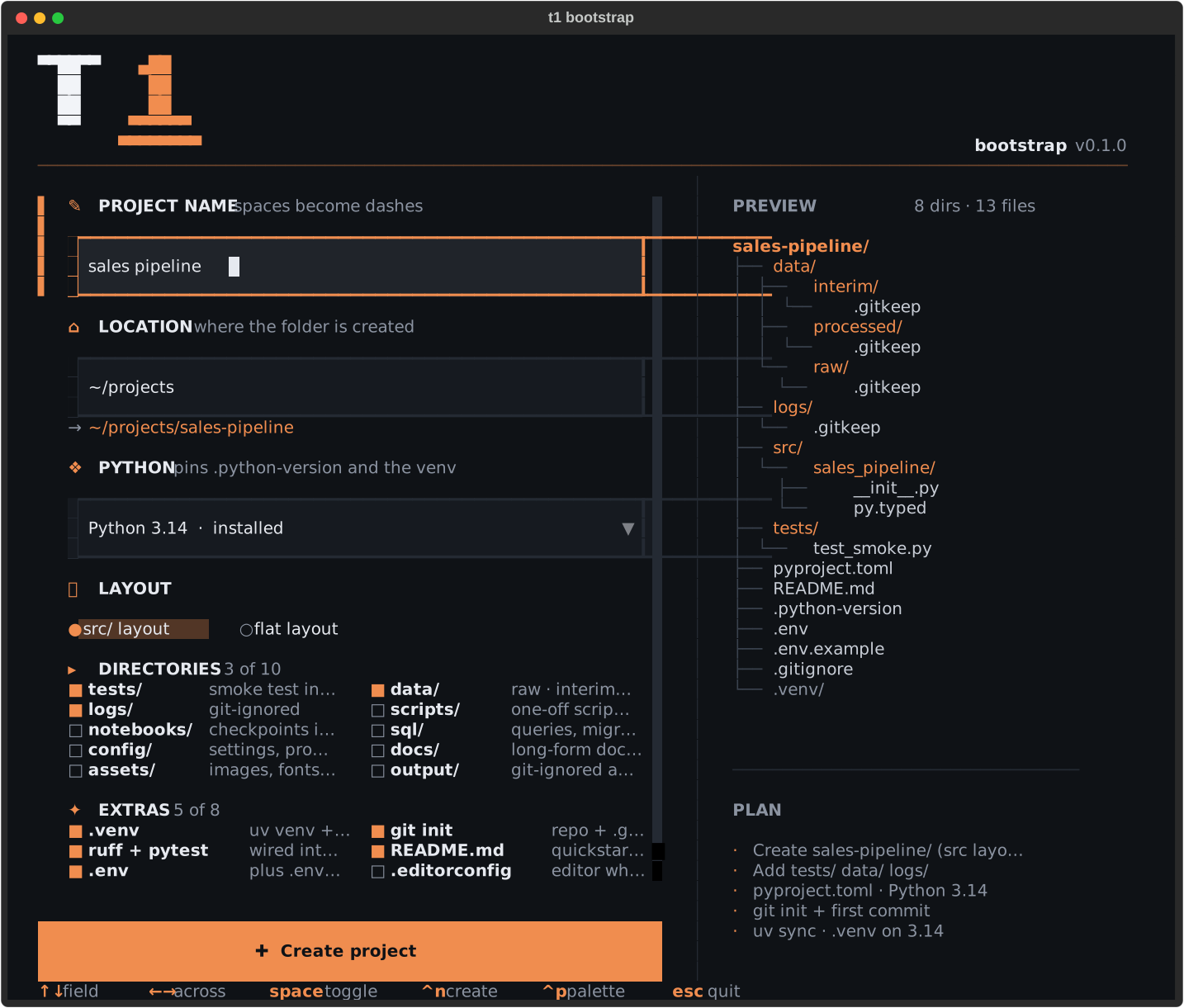
A start screen, then one screen with a live preview — keyboard or mouse. A full project lands in less than a second.
Install
Runs on macOS, Linux and Windows (Windows Terminal with PowerShell 5.1 or 7). Needs
Python 3.13 or newer — uv fetches one if the machine has none.
uvx t1-bootstrap                  # try it without installing anything
uv tool install t1-bootstrap      # keep it: `t1` on your PATH
pipx install t1-bootstrap         # the same, without uv
Use it
t1 # start screen, then the wizard
⏎ on the start screen opens the form.
| Key | |
|---|---|
↑ ↓ |
move between fields |
← → |
move across a row of toggles, or pick a layout |
⇥ |
next field, in reading order |
space |
toggle a directory or extra |
⏎ |
open the Python menu, next field, or create from the last one |
^n |
create the project |
^p |
command palette |
^r |
reset the form |
^q |
quit |
The arrows walk the form the way it looks: ↓ from a toggle lands on the one below it, not the
one beside it, and the pane scrolls to follow rather than scrolling out from under you. A rail
in the accent colour marks the field you are in.
Mouse works everywhere too — click a field, click a toggle, scroll either pane.
The right-hand pane previews the exact tree you are about to get, and updates as you type.
Landing in the project
The build screen ends with two ways out:
| Button | Key | |
|---|---|---|
| Open a shell here | ⏎ |
quits into a shell inside the new project, .venv active |
| Done | d |
quits and leaves your terminal where it was |
Out of the box the first one starts a shell in the project — exit returns you to where you
were. Install the wrapper once and your own shell follows along instead, so there is no
nested shell and deactivate works as usual:
eval "$(t1 shell-init)"                                    # ~/.zshrc or ~/.bashrc
t1 shell-init fish | source                                # ~/.config/fish/config.fish
Invoke-Expression (t1 shell-init powershell | Out-String) # $PROFILE
Without the TUI
t1 new "sales pipeline"                          # sensible defaults
t1 new etl -p 3.13 --dirs data,logs,sql          # pick the Python and the directories
t1 new lib --flat --extras none                  # just the package
t1 new api -C ~/projects --no-venv --no-git      # elsewhere, and without the slow parts
t1 new thing --dry-run                           # print the plan, write nothing
t1 options                                       # list directories and extras
t1 pythons                                       # list interpreters you can build on
t1 shell-init                                    # the shell function, for your rc file
t1 install-uv                                    # install uv, if you don't have it
t1 --version
--dirs and --extras take a comma list, or all / none. -p takes a version series such
as 3.13; anything else is refused before a file is written.
If you don't have uv
uv builds the venv and installs dependencies. Without it you still get a project — just
python -m venv on the interpreter you asked for, and no install. If uv isn't on your PATH,
t1 offers to fetch it from
Astral's official installer and
shows you the exact command first. It only asks when there's someone there to answer, never
installs on a --dry-run, and taking the offer is always optional:
curl -LsSf https://astral.sh/uv/install.sh | sh                                # macOS, Linux
powershell -ExecutionPolicy ByPass -c "irm https://astral.sh/uv/install.ps1 | iex"   # Windows
What you get
sales-pipeline/
├── data/{raw,interim,processed}/   # each with .gitkeep, contents git-ignored
├── logs/
├── src/sales_pipeline/
│   ├── __init__.py
│   └── py.typed
├── tests/test_smoke.py
├── pyproject.toml                  # name, ruff, pytest, uv_build — all filled in
├── README.md
├── .python-version
├── .gitignore
├── .env + .env.example
└── .venv/
Directories — tests data logs scripts notebooks sql config docs assets output
Extras — .venv · git init · ruff + pytest · README.md · .env · .editorconfig ·
logging setup · console script
Extras pull in what they need: choosing logging setup turns on logs/ for you.
Why it's quick
The generated pyproject.toml uses uv_build
rather than hatchling. Measured on a cold cache, first uv sync:
| backend | first sync |
|---|---|
| hatchling | 3456 ms |
uv_build |
323 ms |
Apple Silicon Mac, uv 0.9.30. Your numbers will differ; the ratio shouldn't.
uv sync also creates .venv on the pinned interpreter by itself, so there is no separate
uv venv call. Writing every file costs about 6 ms; the rest is git and uv.
Development
git clone https://github.com/tabelle1/t1-bootstrap && cd t1-bootstrap
uv sync
uv run pytest
uv run ruff check . && uv run ruff format .
uv run ty check src
uv run t1                                                 # the wizard, from the checkout
uv run textual run --dev t1_bootstrap.app:BootstrapApp   # with the Textual devtools
uv run python scripts/screenshot.py                       # refresh docs/wizard.svg
CI runs the same checks on macOS, Linux and Windows, plus a leg on the oldest dependency versions the package claims to support. User-visible changes are recorded in CHANGELOG.md as they land. Bugs and ideas: open an issue. Security concerns: see SECURITY.md.
License
MIT © Philipp Formanek.
1 maintainer

Download files
Download the file for your platform. If you're not sure which to choose, learn more about installing packages.
Source Distribution
Built Distribution
Filter files by name, interpreter, ABI, and platform.
If you're not sure about the file name format, learn more about wheel file names.
Copy a direct link to the current filters
File details
Details for the file t1_bootstrap-0.1.0.tar.gz.
File metadata
- Download URL: t1_bootstrap-0.1.0.tar.gz
- Upload date:
- Size: 49.5 kB
- Tags: Source
- Uploaded using Trusted Publishing? Yes
- Uploaded via:
uv/0.12.9 {"installer":{"name":"uv","version":"0.12.9","subcommand":["publish"]},"python":null,"implementation":{"name":null,"version":null},"distro":{"name":"Ubuntu","version":"24.04","id":"noble","libc":null},"system":{"name":null,"release":null},"cpu":null,"openssl_version":null,"setuptools_version":null,"rustc_version":null,"ci":true}
File hashes
| Algorithm | Hash digest | |
|---|---|---|
| SHA256 |
4eff75161c3b075afb00ba63746d28146250e351b31eae13200eef0ed489b723
|
|
| MD5 |
ae892b998f59275d927f75a0a92d3cfd
|
|
| BLAKE2b-256 |
d7ee6033d40511fc5af4409cf543d4e2e24b9cb01fe7fc480ad66435b786987f
|
File details
Details for the file t1_bootstrap-0.1.0-py3-none-any.whl.
File metadata
- Download URL: t1_bootstrap-0.1.0-py3-none-any.whl
- Upload date:
- Size: 39.6 kB
- Tags: Python 3
- Uploaded using Trusted Publishing? Yes
- Uploaded via:
uv/0.12.9 {"installer":{"name":"uv","version":"0.12.9","subcommand":["publish"]},"python":null,"implementation":{"name":null,"version":null},"distro":{"name":"Ubuntu","version":"24.04","id":"noble","libc":null},"system":{"name":null,"release":null},"cpu":null,"openssl_version":null,"setuptools_version":null,"rustc_version":null,"ci":true}
File hashes
| Algorithm | Hash digest | |
|---|---|---|
| SHA256 |
6f758980f00bd03d92b5b60a57010dc025a3d0fcc8ca91be7dfb479ee509a8c1
|
|
| MD5 |
222a3c3e3584b19ede70d1095185c600
|
|
| BLAKE2b-256 |
935c65c5a2a956909b2f49c82b2c9252af45e6f0e29d7bb3310851cf0db8d284
|













