
T2S-Metrics
A small evaluation toolkit for text-to-SPARQL systems. It runs a configurable set of metrics over JSONL datasets and can execute queries against local RDF files or SPARQL endpoints.





Features
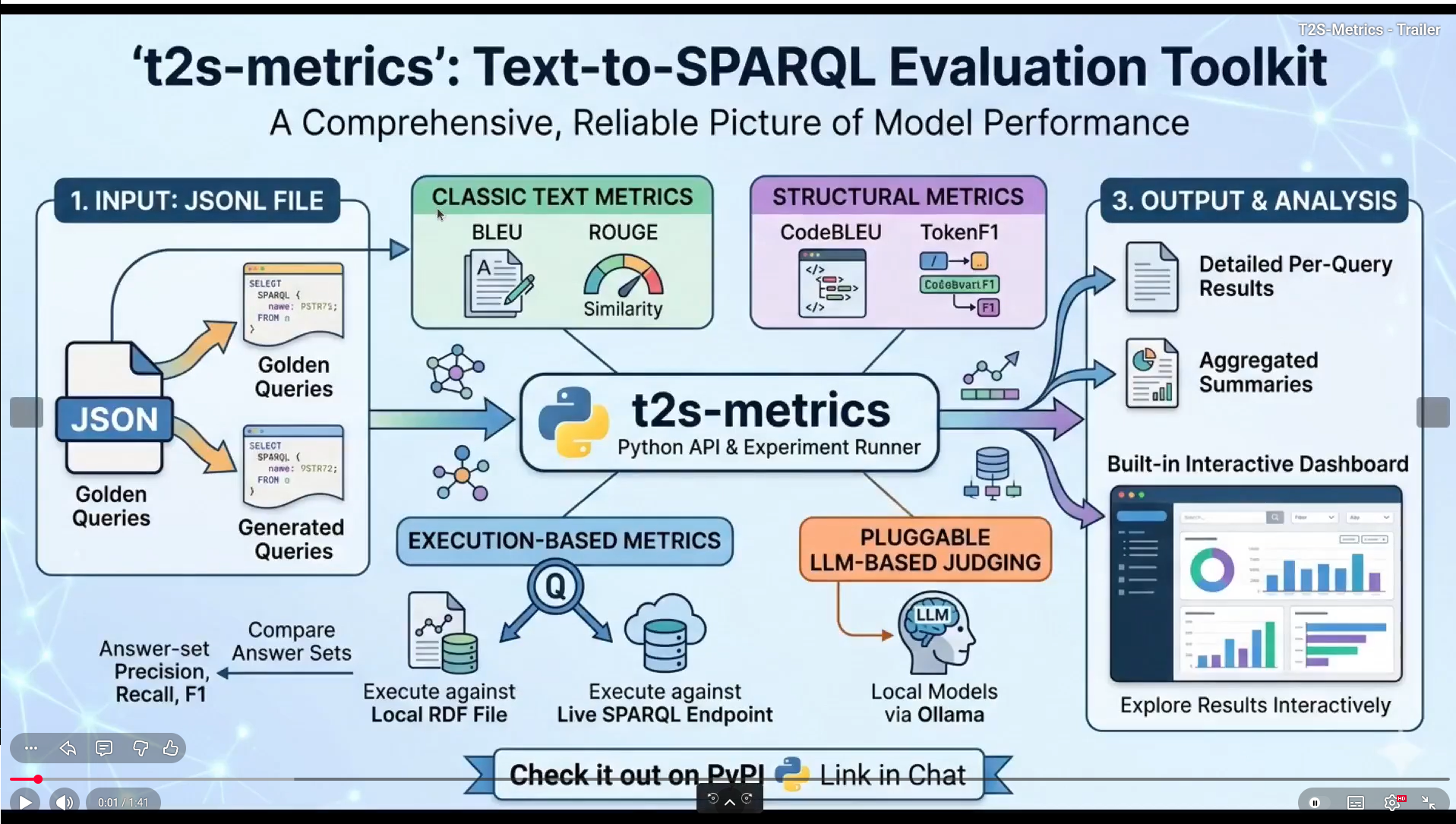
- Full evaluation pipeline for Text-to-SPARQL systems from JSONL inputs to exportable JSON results.
- Rich metric coverage for answer-set quality, text similarity, structural similarity, ranking, distance, and execution validity.
- Two execution backend families:
- Local RDF graphs with RDFLib.
- Remote SPARQL endpoints (QLever, Corese, Fuseki, GraphDB, Virtuoso, Blazegraph, etc.).
- Simple Python API for research workflows and reproducible experiment scripts.
- CLI to run evaluations and launch dashboards.
- Static dashboard export support for sharing reports without running a server.
- Rule-based filtering that exports matching cases as WADM Turtle or Label Studio data.
- Optional query limits and automatic or custom prefix insertion for evaluation runs.
Demo video ⏯️
Teaser
Full tutorial
Prerequisites
- Python 3.12 or later.
- uv (recommended for local development) or pip.
- A SPARQL endpoint only if you use execution metrics with a remote KG (for example QLever/Corese).
- Ollama only if you enable LLM-based metrics.
- QCan jar only if you use qcan-related metrics. The repository includes it under third_party_lib.
- NLTK data only if you use BLEU and METEOR realated metrics.
Installation
PyPI
For users who only want to run the library and CLI:
pip install t2s-metrics
After installation, the CLI entry point is available as:
t2s --help
For development (editable install):
- Clone the repository:
git clone https://github.com/Wimmics/t2s-metrics.git
- Navigate to the project directory:
cd t2s-metrics
- Install dependencies
Using uv:
uv sync

# With dev dependencies (pytest, ruff, twine)
uv sync --all-extras
Using pip:
pip install -e .

# With dev dependencies (pytest, ruff, twine)
pip install -e ".[dev]"
Adding NLTK data (check Prerequisites)
python -c "import nltk; nltk.download('punkt_tab'); nltk.download('wordnet')"
Usage
This section focuses on practical usage for both PyPI users and repository users.
1. Prepare your evaluation data
Input files must be JSON Lines (.jsonl) with one object per line.
Required keys:
id: unique query/case identifier.golden: reference SPARQL query.generated: system-generated SPARQL query.order_matters: whether result ordering must be preserved.
Example (from datasets/ck25/eval/AIFB.jsonl):
{"id": "ck25:1-en", "golden": "PREFIX pv: <http://ld.company.org/prod-vocab/>\nSELECT DISTINCT ?result\nWHERE\n{\n <http://ld.company.org/prod-instances/empl-Karen.Brant%40company.org> pv:memberOf ?result .\n ?result a pv:Department .\n}\n", "generated": "SELECT ?department WHERE { ?person :name \"Ms. Brant\"; :worksIn ?department. }", "order_matters": false}
2. Choose your execution backend
You must provide one execution backend when running execution-aware metrics:
- Local graph file with
--execution_backend_graph_pathor--eg. - SPARQL endpoint URL with
--execution_backend_endpoint_urlor--ee.
Python examples:
from t2smetrics.execution.rdflib_backend import RDFLibBackend
from t2smetrics.execution.sparql_endpoint_backend import SparqlEndpointBackend

# Local file backend
local_backend = RDFLibBackend("./datasets/example/kg/example.ttl")

# Remote endpoint backend
endpoint_backend = SparqlEndpointBackend("http://localhost:8886/")
3. Run from Python (based on run_example.py)
The minimal complete workflow from t2smetrics/run_example.py:
from t2smetrics import run_experiments
from t2smetrics.metrics import (
    AnswerSetPrecision,
    AnswerSetRecall,
    AnswerSetF1,
    Bleu,
    CodeBLEU,
    QueryExecution,
    QueryExactMatch,
)

run_experiments.run(
    dataset="example",
    jsonl_evals=["./datasets/example/eval/example.jsonl"],
    metrics_list=[
        AnswerSetPrecision(),
        AnswerSetRecall(),
        AnswerSetF1(),
        Bleu(),
        CodeBLEU(),
        QueryExecution(),
        QueryExactMatch(),
    ],
    execution_backend_graph_path="./datasets/example/kg/example.ttl",
    verbose=True,
)
4. Run from Python on ck25 (based on run_text2sparql.py)
t2smetrics/run_text2sparql.py demonstrates a multi-system run on ck25 dataset with an endpoint backend and parallel execution.
uv run ./t2smetrics/run_text2sparql.py
This generates timestamped JSON results under:
datasets/ck25/results/ck25-YYYYMMDD-HHMMSS.json
5. Run from CLI (recommended for daily use)
Show command help:
t2s --help
t2s run --help
Here is an example command with specific metrics, a SPARQL endpoint, verbosity and parallel processing:
t2s run -d ck25 -j ./datasets/ck25/eval/ -m 'hit@1' 'answerset_f1' 'answerset_precision' 'answerset_recall' 'bleu' 'codebleu' 'cosine_sim' 'euclidean' 'f1_qald' 'f1_spinach' 'jaccard' 'levenshtein' 'meteor' 'mrr' 'ndcg' 'p@1' 'precision_qald' 'query_exact_match' 'recall_qald' 'rouge_4' 'sp-bleu' 'sp-f1' 'token_f1' 'token_precision' 'token_recall' 'uri_hallucination' 'query_execution' --ee http://localhost:8886/ -v -p
Here is an example with all metrics, a local TTL backend, an explicit export path, and detailed output per request instead:
t2s run -d ck25 -j ./datasets/ck25/eval/ \
  -m __all__ \
  --eg ./datasets/ck25/kg/dataset.ttl \
  --ep ./custom_results_folder \
  --eq -v -p
ollama serve          # run the server
ollama pull gemma3:4b # default model used by t2s-metrics
Common useful flags:
-s/--systems_namefor explicit system names.-p/--parallelfor multiprocessing.--eq/--export_per_queryto include per-query values in output JSON.--ep/--export_pathto control output location.--eg/--execution_backend_graph_pathto run on local RDF files instead of endpoint mode.--sl/--safe_limitto add aLIMITto evaluated queries.--pp/--add_popular_prefixesto add popular prefixes from prefix.cc.--cp/--add_custom_prefixesto provide a JSON prefix mapping.
6. Filter cases by metric rules
The filter command evaluates only the metrics referenced by a boolean rule and
exports matching query cases as WADM Turtle annotations. Rules use metric names
with exact values or inclusive/exclusive ranges, combined with && and ||.
t2s filter \
  -d ck25 \
  -j ./datasets/ck25/eval/ \
  -r 'answerset_f1[0,0.5] && f1_spinach[1]' \
  --ee http://localhost:8886/
By default, filter output is written under ./datasets/{dataset}/filter/.
Use --ep to choose a file or directory. Add -c label-studio to also create
Label Studio JSON and an accompanying template XML file.
7. Launch the dashboard
Auto-discover results under datasets/*/results/*.json:
t2s dashboard
Load explicit result files:
t2s dashboard -f \
  datasets/ck25/results/ck25-20260306-133227.json \
  datasets/db25/results/db25-20260306-132100.json
Generate a static dashboard snapshot:
t2s dashboard --static --output static_dashboard_snapshot
Then open:
http://127.0.0.1:8050
Development
Build
uv build
Tests
Run the test suite with:
uv run pytest
Release updates
For full details by version, see CHANGELOG.md.
License
t2s-metrics
t2s-metrics is provided under the terms of the GNU Affero General Public License 3.0 (AGPL-3.0).
Redistribution of third-party software and data
This repository provides several third-party contributions redistributed with their original licenses.
CK25 Dataset
t2s-metrics reuses the CK25 Corporate Knowledge Reference Dataset for Benchmarking Text-2-SPARQL QA Approaches that we modified to account for file format requirements (jsonl format).
The modified version is redistributed in directory datasets/ck25 under the terms of the Creative Commons Attribution 4.0 International license (CC-BY-4.0).
QCan library
t2s-metrics reuses the QCan software for canonicalising SPARQL queries.
QCan is written in Java. In this repository, we distribute the compiled jar of QCan v1.1, third_party_lib/qcan-1.1-jar-with-dependencies.jar, under the terms of the Apache 2.0 license.
Cite this work
Yousouf Taghzouti, et al. T2S-Metrics: Unified Library for Evaluating SPARQL Queries Generated From Natural Language. ELMKE 2026: The Third International Workshop on Evaluation of Language Models in Knowledge Engineering, co-located with ESWC 2026, May 2026, Dubrovnik, Croatia. ⟨hal-05598018⟩
See BibTex
@inproceedings{taghzouti:hal-05598018, TITLE = {{T2S-Metrics: Unified Library for Evaluating SPARQL Queries Generated From Natural Language}}, AUTHOR = {Taghzouti, Yousouf and Jiang, Tao and Juign{\'e}, Camille and Navet, Benjamin and Gandon, Fabien and Michel, Franck and Nothias, Louis-Felix}, URL = {https://inria.hal.science/hal-05598018}, BOOKTITLE = {{Proceedings of the Third International Workshop on Evaluation of Language Models in Knowledge Engineering (ELMKE 2026) co-located with the 23rd European Semantic Web Conference (ESWC 2026)}}, ADDRESS = {Dubrovnik, Croatia}, EDITOR = {CEUR}, YEAR = {2026}, MONTH = May }1 maintainer

Metadata
1 maintainer
Release files for t2s-metrics 1.2.0
For a detailed explanation of source distributions (sdists) and built distributions (wheels), please see the package formats documentation.
Source distribution (sdist)
| File | Size | Uploaded | Provenance | |
|---|---|---|---|---|
| t2s_metrics-1.2.0.tar.gz | 117.3 kB | Without provenance | Details |
Built distribution (wheel)
| File | Interpreter | ABI | Platform | Reset |
|---|---|---|---|---|
| t2s_metrics-1.2.0-py3-none-any.whl | Python 3 | none | any | Details |
Total release size: 236.2 kB
Release files / t2s_metrics-1.2.0.tar.gz
| Download URL | t2s_metrics-1.2.0.tar.gz |
|---|---|
| Size | 117.3 kB |
| Tags | Source |
|
SHA-256 checksum How to use checksums |
29ea75d64c418896a6cca58d7d3de2d83caac819d5edf7325ff2acfdc22a680b
|
|
BLAKE2b-256 checksum How to use checksums |
7c3a3f422298972c356e34605a0859c136fb98a62c111e6adf0ca44457e95452
|
| Upload date | |
|
Uploaded using Trusted Publishing? What is trusted publishing? |
No |
| Uploaded via |
twine/7.0.0 CPython/3.12.12
|
Release files / t2s_metrics-1.2.0-py3-none-any.whl
| Download URL | t2s_metrics-1.2.0-py3-none-any.whl |
|---|---|
| Size | 118.9 kB |
| Tags | Python 3 |
|
SHA-256 checksum How to use checksums |
c48868460ca19b835a8027ec98b10987175cdb0b41792a9941ed923b8d318200
|
|
BLAKE2b-256 checksum How to use checksums |
ca4fd33acc72203d770b9bb82c95b07428636185028011e873c9b3a5ec64ac48
|
| Upload date | |
|
Uploaded using Trusted Publishing? What is trusted publishing? |
No |
| Uploaded via |
twine/7.0.0 CPython/3.12.12
|
Security for t2s-metrics 1.2.0
Provenance
Provenance describes where a file came from. On PyPI, provenance is shared via attestations, which provide a verifiable record of the build or publishing details. View details, limitations and caveats.
No provenance found
None of the files in this release were uploaded with provenance metadata.
A note on package security
PyPI is a repository for distributing packages, not a service for auditing them. While third-party security researchers and our staff do their best to detect and remove malicious packages, PyPI cannot guarantee the quality, security or suitability of any given package.
To learn more about protecting yourself from malicious actors, visit our package security documentation.














