

The serving engine for tabular foundation models.
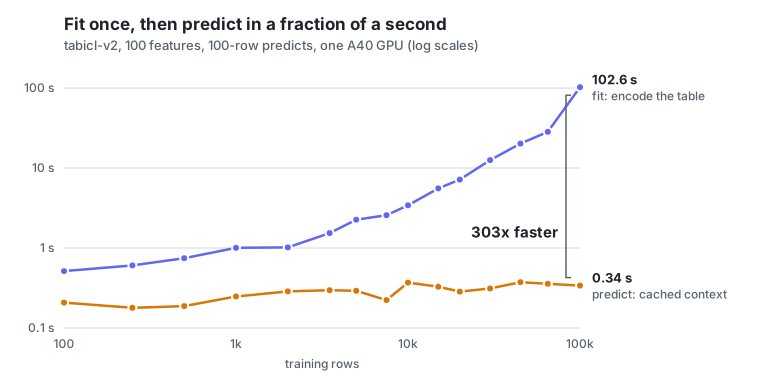
Fit a table once, keep it on the GPU, and answer every later prediction in a fraction of a second.






Docs · Quickstart · Coding agents · Live demo · Serving guide · How it works · Benchmarks
TabPFN and TabICL often beat gradient boosting with no training loop (our numbers): the training table is the prompt. Encoding that table is the expensive part, and it's the same work on every prediction. tabctx encodes each table once, keeps the result in a GPU cache shared by many tables and users, and serves predictions against it, behind one HTTP endpoint you run on your own GPUs.
Highlights
- Fit once, predict many. A fitted table becomes a context, addressed by id. Every later predict against it skips the re-encode.
- Many tables, one GPU. Contexts share a byte-budgeted cache. The coldest one is evicted (or spilled to disk and restored on next use), and a fit that would run the GPU out of memory is refused before it runs.
- Three models, one endpoint.
tabicl-v2,tabpfn-3.5andtabdpt-1.3behindGET /v1/models; pick one per request. Two of them are licensed for commercial use. Adding a model is one backend class and a few lines of wiring. - Prediction intervals. Regression predicts a distribution, so you can
ask for its quantiles (say a 90% interval) at no extra cost:
reg.predict_quantiles(X, [0.05, 0.95]). - Drop-in scikit-learn.
TabctxClassifierandTabctxRegressortake DataFrames with text, dates and missing values as they are, and work with pipelines andcross_val_score. - Tools for coding agents.
tabctx-mcplets Claude Code, Codex and Gemini CLI fit, predict, explain and run what-ifs on a CSV. - Built to run in production. Multi-GPU placement, multi-replica routing on Ray Serve (or a single process without Ray), tenant isolation, and a container image. Validated on L4, A40 and A100 GPUs.
Quickstart
Run a server on your laptop (CPU works; it uses the GPU if there is one):
pip install "tabctx[standalone,tabicl,client]"
TABCTX_BACKEND=tabicl python -m tabctx.serve        # http://127.0.0.1:8000
Then use it like any scikit-learn model:
from sklearn.datasets import fetch_openml
from sklearn.model_selection import train_test_split
from tabctx import TabctxClassifier, TabctxClient

X, y = fetch_openml("credit-g", version=1, as_frame=True, return_X_y=True)
X_train, X_test, y_train, y_test = train_test_split(X, y, random_state=0)

clf = TabctxClassifier(client=TabctxClient("http://127.0.0.1:8000"))  # the server's default model
clf.fit(X_train, y_train)          # encodes the table once, on the server
clf.score(X_test, y_test)          # 0.77, no training loop, no tuning
clf.predict_proba(X_test[:5])      # reuses the cached context: ~50 ms on a laptop
On a GPU server, use the image (TabICL, TabPFN and TabDPT included, weights downloaded when the server starts):
docker run --gpus all -p 8000:8000 -e TABCTX_BACKEND=tabicl ghcr.io/vectorinstitute/tabctx
On Kubernetes, the Helm chart in deploy/helm/tabctx runs it with a GPU,
probes and persistent volumes (guide):
helm install tabctx ./deploy/helm/tabctx
Prefer plain HTTP? Every client is a thin wrapper over two calls:
curl localhost:8000/v1/tabctx/fit -F dataset_id=churn -F target=churned -F file=@train.csv
curl localhost:8000/v1/tabctx/predict -F dataset_id=churn -F file=@today.csv
The serving guide covers Ray Serve, several GPUs, uploads, tenants and every setting.
Coding agents
Coding agents can read a CSV, but they can't learn from it. tabctx-mcp
gives them tabular foundation models as tools: inspect_table,
evaluate (vs. gradient boosting), fit_model, predict, what_if
and explain.
pip install "tabctx[mcp]"
export TABCTX_BASE_URL=http://127.0.0.1:8000   # your tabctx server
claude mcp add tabctx -- tabctx-mcp             # or codex, gemini, pi
Then ask: "Which of today's patients are most likely to be readmitted, and what would lower their risk?" In the demo, Claude Code, Codex and pi each answer it on 30,000 real hospital stays and are scored against what actually happened. More on agents →
Why tabctx
| Model in your process | Hosted API | tabctx | |
|---|---|---|---|
| Data stays on your machines | ✅ | ❌ | ✅ |
| Many tables cached at once, per tenant | ❌ | ✅ | ✅ |
| Refuses a fit before it runs out of GPU memory | ❌ | n/a | ✅ |
| Models from several labs behind one endpoint | ❌ | ❌ | ✅ |
| Open source, no per-call metering | ✅ | ❌ | ✅ |
| Newest API-only models | ❌ | ✅ | ❌ |
A model in your process (TabPFNClassifier().fit(...)) caches one table
inside one Python object. A hosted API handles the serving for you, on
its servers. tabctx is the serving layer for when you want both: many
users and tables, on GPUs you control.
Models
| Model id | Model | Weights license |
|---|---|---|
tabicl-v2 |
TabICLv2 (Inria) | BSD-3-Clause: commercial use OK |
tabpfn-3.5 |
TabPFN-3.5 (Prior Labs) | Non-commercial; production use needs a license from Prior Labs |
tabdpt-1.3 |
TabDPT (Layer 6) | Apache-2.0: commercial use OK |
TABCTX_BACKEND=tabicl,tabdpt serves both commercially usable models from
one cache. TabPFN weights download after you accept Prior Labs' terms (set
TABPFN_TOKEN). tabctx itself is Apache 2.0; each model's weights keep
their own license.
Learn more
The full documentation lives at vectorinstitute.github.io/tabctx: guides, concepts, and the Python, HTTP and configuration reference.
- Serving guide: install options, Ray Serve or standalone, multi-GPU, table files, tenants
- How it works: the architecture, the context cache, memory admission
- Benchmarks: latency, throughput and accuracy on real GPUs and datasets
- Roadmap and changelog
Contributing
Issues and PRs are welcome. The unit tests need no GPU (uv run pytest tests/unit); see CONTRIBUTING.md.
If tabctx is useful to you, a ⭐ helps others find it.
Built at the Vector Institute. Apache 2.0.
1 maintainer

Metadata
1 maintainer
Release files for tabctx 0.20.0
For a detailed explanation of source distributions (sdists) and built distributions (wheels), please see the package formats documentation.
Source distribution (sdist)
| File | Size | Uploaded | Provenance | Actions |
|---|---|---|---|---|
| tabctx-0.20.0.tar.gz | 1.5 MB | With provenance | Details for tabctx-0.20.0.tar.gz |
Built distribution (wheel)
| File | Interpreter | ABI | Platform | Actions Reset |
|---|---|---|---|---|
| tabctx-0.20.0-py3-none-any.whl | Python 3 | none | any | Details for tabctx-0.20.0-py3-none-any.whl |
Total release size: 1.7 MB
Release files / tabctx-0.20.0.tar.gz
| Download URL | tabctx-0.20.0.tar.gz |
|---|---|
| Size | 1.5 MB |
| Tags | Source |
|
SHA-256 checksum How to use checksums |
ddd8d90bee76dee10c4ba52176802b83bcacf4190fc8e2f130eb4b1d3ae07c61
|
|
BLAKE2b-256 checksum How to use checksums |
a01074e485afc7b77ef7c5799156bcc5dc4cb9f9d16e21de5867eac03d35ce97
|
| Upload date | |
|
Uploaded using Trusted Publishing? What is trusted publishing? |
Yes |
| Uploaded via |
twine/7.0.0 CPython/3.13.16
|
Provenance
Provenance describes where a file came from. On PyPI, provenance is shared via attestations, which provide a verifiable record of the build or publishing details. View details, limitations and caveats.


PyPI Publish Attestation
PyPI verified that this artifact, at this checksum, originated from the publisher listed below.
Signed by GitHub Actions, verified by PyPI on Nov 10, 2026.
Transparency logRelease files / tabctx-0.20.0-py3-none-any.whl
| Download URL | tabctx-0.20.0-py3-none-any.whl |
|---|---|
| Size | 226.0 kB |
| Tags | Python 3 |
|
SHA-256 checksum How to use checksums |
73ee6b9ff2eaf5c3b5b38ad556e3cf53f9d5376477995aaee2b4108495c17683
|
|
BLAKE2b-256 checksum How to use checksums |
4de0f45c75f48384c783c14b0952bd3dec56e722230147cc82723716dce0b49b
|
| Upload date | |
|
Uploaded using Trusted Publishing? What is trusted publishing? |
Yes |
| Uploaded via |
twine/7.0.0 CPython/3.13.16
|
Provenance
Provenance describes where a file came from. On PyPI, provenance is shared via attestations, which provide a verifiable record of the build or publishing details. View details, limitations and caveats.
PyPI Publish Attestation
PyPI verified that this artifact, at this checksum, originated from the publisher listed below.
Signed by GitHub Actions, verified by PyPI on Nov 10, 2026.
Transparency logSecurity for tabctx 0.20.0
Provenance
Provenance describes where a file came from. On PyPI, provenance is shared via attestations, which provide a verifiable record of the build or publishing details. View details, limitations and caveats.
Full provenance
Both files in this release have been uploaded with provenance metadata.
Attestation for tabctx-0.20.0.tar.gz
PyPI Publish Attestation
PyPI verified that this artifact, at this checksum, originated from the publisher listed below.
Signed by GitHub Actions, verified by PyPI on Nov 10, 2026.
Transparency logA note on package security
PyPI is a repository for distributing packages, not a service for auditing them. While third-party security researchers and our staff do their best to detect and remove malicious packages, PyPI cannot guarantee the quality, security or suitability of any given package.
To learn more about protecting yourself from malicious actors, visit our package security documentation.














