
tabheatcal - Heatmap visualization with easy value inspection

Project description
tabheatcal - Heatmap Calendar Visualization with Interactive Value Inspection
Tabheatcal is a Python module that creates elegant heatmap calendars with interactive value inspection capabilities. Perfect for visualizing time-series data like stock prices, transaction volumes, or any daily metrics over time.
Features
- Interactive Heatmaps: Hover over any day to see detailed information
- Custom Color Palettes: Choose from various color schemes (RdYlGn, Blues, etc.)
- Event Annotations: Add custom comments to highlight important dates
- Multi-Year Support: Automatically handles datasets spanning multiple years
- Standalone HTML Output: Generate self-contained HTML files for easy sharing
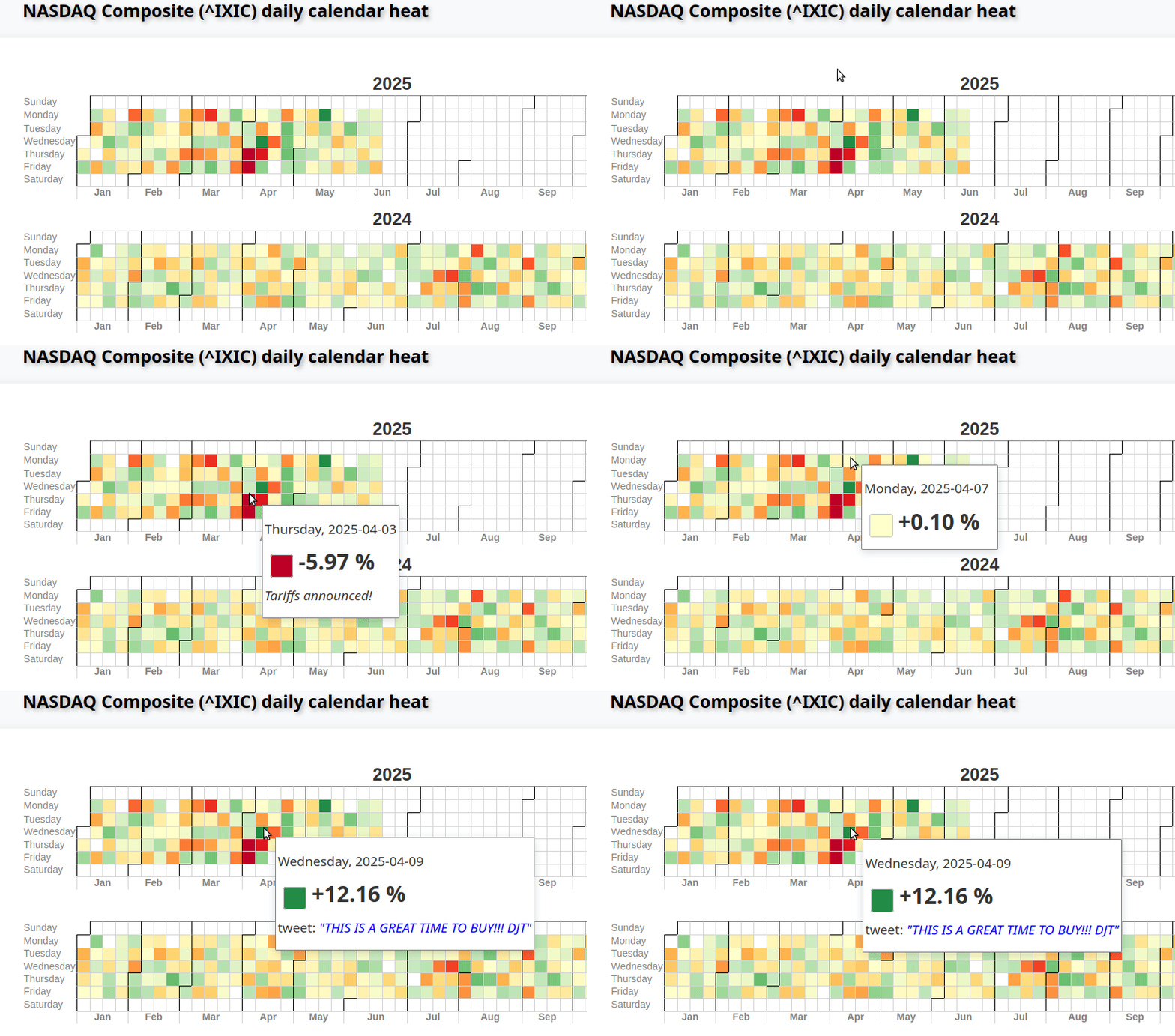
The visualizations use hand-crafted HTML and CSS with table-based layouts for maximum compatibility.
Quick Start
The basic function requires three arguments:
- dates: List of Python datetime objects
- values: List of numeric values to visualize with colors
- labels: List of labels to display on mouseover
import tabheatcal

# Generate raw HTML calendar
html = tabheatcal.table_html(dates, values, labels)

# Create full interactive page
tabheatcal.create_page(html, title="My Data Heatmap", output="output.html")
Complete Example: Stock Market Data
import datetime
import math
from html import escape
import pandas as pd
import yfinance as yf
import tabheatcal

# Download stock data
ticker_symbol = "^IXIC"  # NASDAQ Composite
df = yf.download(ticker_symbol, period="3y")

# Calculate daily percent changes
df["p_chng"] = df["Close"].pct_change() * 100

# Prepare data for visualization
dates = [pd.to_datetime(date).date() for date in df.index.values]
values = df.p_chng.values.tolist()
labels = ["%+.2f %%" % val if not math.isnan(val) else "n/d" for val in df.p_chng.values]

# Add event annotations
tariffs_day = datetime.date(2025, 4, 3)
tariffs_delayed = datetime.date(2025, 4, 9)
labels[dates.index(tariffs_day)] += "; <i>Tariffs announced!</i>"
labels[dates.index(tariffs_delayed)] += escape(
    ';tweet: <i class="emph">"THIS IS A GREAT TIME TO BUY!!! DJT"</i>'
)

# Generate visualization
html = tabheatcal.table_html(dates, values, labels)
tabheatcal.create_page(
    html,
    title="NASDAQ Composite (^IXIC) Daily Percent Change",
    output="NASDAQ.html",
    startfile=True
)
API Reference
table_html(dates, values, labels, palette="RdYlGn")
The table_html() function returns raw HTML that can be embedded directly into web frameworks without creating separate files:
Parameters:
dates(list): List of datetime.date objectsvalues(list): Numeric values for color mappinglabels(list): Hover labels for each datepalette(str): Color palette name (default: "RdYlGn")
Returns: HTML string containing the heatmap table
create_page(html, title, output="output.html", startfile=True)
Creates a complete HTML page with the heatmap.
Parameters:
html(str): HTML table fromtable_html()title(str): Page titleoutput(str): Output filename (default: "output.html")startfile(bool): Whether to open the file automatically (default: True)
Color Palettes
Available color palettes include:
RdYlGn(Red-Yellow-Green) - Default, good for showing positive/negative changesBlues- Blue gradient, good for showing intensity/volumeSpectral- Spectral color scheme with smooth transitionsSpectral1- Reverse spectral color scheme- Custom palettes can be added to the
assets.pyfile
Note: The module automatically detects and handles outliers in your data using statistical methods (values beyond 4 standard deviations from the mean). However, for very noisy datasets, it's recommended to normalize or preprocess your data before visualization to ensure optimal color mapping and visual clarity.
Live Examples
Note: The interactive features (hover tooltips, etc.) may not work in GitHub's HTML preview due to JavaScript restrictions. Download the HTML files and open them locally for full functionality.
📈 NASDAQ Composite (^IXIC) Daily Calendar Heat
Using Polygon API for Financial Data Here's an example showing daily transaction volume.
📊 Tesla Daily Transactions Volume
Demo
Run the included demo to see the module in action:
import tabheatcal
tabheatcal.demo()  # Creates a demo with random data
Dependencies
numpy- For numerical operationsjinja2- For HTML templatingpandas- For data manipulation (in examples)yfinance- For stock data (in examples)
Installation
pip install numpy jinja2
For the examples, also install:
pip install pandas yfinance
Output
The generated HTML files are:
- Self-contained: No external dependencies
- Interactive: Hover effects and tooltips
- Responsive: Works across different screen sizes
- Shareable: Easy to host or embed
Advanced Usage
Custom Event Annotations
# Add custom styling to specific dates
special_date_index = dates.index(datetime.date(2025, 1, 15))
labels[special_date_index] += "; <b>Important Event!</b>"
Multiple Years
The module automatically handles datasets spanning multiple years, displaying them in reverse chronological order (most recent first).
Data Preprocessing
The module includes automatic outlier detection (removing values beyond 4 standard deviations from the mean) and handles NaN values gracefully. For very noisy datasets with extreme outliers, consider preprocessing your data:
import numpy as np

# Example: Cap extreme values at 95th/5th percentiles
def normalize_data(values):
    values = np.array(values)
    p95, p5 = np.nanpercentile(values, [95, 5])
    return np.clip(values, p5, p95)

# Apply normalization before visualization
normalized_values = normalize_data(values)
html = tabheatcal.table_html(dates, normalized_values, labels)
This ensures optimal color mapping and visual clarity across the entire dataset.
Author
Copyright (c) Tomasz Sługocki
Release history Release notifications | RSS feed


Download files
Download the file for your platform. If you're not sure which to choose, learn more about installing packages.
Source Distribution
Built Distribution
Filter files by name, interpreter, ABI, and platform.
If you're not sure about the file name format, learn more about wheel file names.
Copy a direct link to the current filters
File details
Details for the file tabheatcal-0.0.1.tar.gz.
File metadata
- Download URL: tabheatcal-0.0.1.tar.gz
- Upload date:
- Size: 12.2 kB
- Tags: Source
- Uploaded using Trusted Publishing? No
- Uploaded via: twine/6.1.0 CPython/3.12.3
File hashes
| Algorithm | Hash digest | |
|---|---|---|
| SHA256 |
515904456b203ba5e5111bea1932ad26116e6b27fdc5f4c3e40d7b4d065275f0
|
|
| MD5 |
d7303fd6ab930b60017c2d8381a32cd7
|
|
| BLAKE2b-256 |
7504f59f3a0ef1bf13703ba300f8562205ecfc177e6fdf840075c2f9525abe55
|
File details
Details for the file tabheatcal-0.0.1-py2.py3-none-any.whl.
File metadata
- Download URL: tabheatcal-0.0.1-py2.py3-none-any.whl
- Upload date:
- Size: 13.3 kB
- Tags: Python 2, Python 3
- Uploaded using Trusted Publishing? No
- Uploaded via: twine/6.1.0 CPython/3.12.3
File hashes
| Algorithm | Hash digest | |
|---|---|---|
| SHA256 |
3d62d0a26a5dbc7a31ac6c0ca87da03442c6eda650fb9dd0c4c84ab12a40505b
|
|
| MD5 |
83d7a38aa59db65e9a79b5059ead96df
|
|
| BLAKE2b-256 |
29e59d002361cbf17487cc8b7b57ecc21354607c742b917bde537265f381b08e
|






