
tablat


A simple way to print output in a table
Basic usage
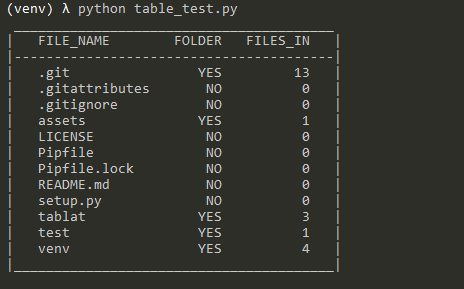
Just create a Table object and give it a headers list and the data. The number of columns will be calculated from the number of headers.
Code sample
from pathlib import Path
from tablat import Table

folder_path = Path('./')
header = ['FILE_NAME', 'FOLDER', 'FILES_IN']
data = []

for file_path in folder_path.iterdir():
    data.append(file_path.name)
    if file_path.is_dir():
        data.extend(['YES', len([f for f in file_path.iterdir()])])

    else:
        data.extend(['NO', 0])

my_table = Table(data, header)
my_table.print_table()
Note: print(my_table) is also valid
Output
Installation
You can intall the package using pip (Python Package Installer)
pip install tablat
or
python -m pip install tablat
Usage
Creating and modifying Table
Table object can be initialized with the data or empty:
my_table = Table(data=my_data, headers=my_headers)
If it is initialized empty it can be modified or updated later:
my_table = Table()
my_table.headers = ['FILE_NAME', 'IS_DIR']
my_table.table_data = ['My docs', True, 'profile_pic.png', False]
Table data can be expanded anytime:
for file_path in Path('./').iterdir():
  my_table.add_data([file_path.name, file_path.is_dir()])
Loading Table data by column
You can use the method set_column_content(column_dict) to init the Table by columns.
This method expects a dict with the column names as keys and a list with the column data as values.
{
  "column_name1": ["item11", "item12", "item13"],
  "column_name2": ["item21", "item21", "item23"],
  .
  .
  .
}
Here is the example from the begining modified:
from pathlib import Path
from tablat import Table

folder_path = Path('./')
column_data = {
    'FILE_NAME': [],
    'FOLDER': [],
    'FILES_IN': []
}
for file_path in test_path.iterdir():
    column_data['FILE_NAME'].append(file_path.name)
    column_data['FOLDER'].append('Y' if file_path.is_dir() else 'N')
    column_data['FILES_IN'].append(len([f for f in file_path.iterdir()]) if file_path.is_dir() else 0)

Table().set_column_content(column_data).print_table()
The method get_column_conten() returns a dict with the same structure even if you didn't initialized the table with set_column_content(column_dict).
Loading Table data from json
The method load_data(file_path) initializes the table from a json file. The json file should
have the same structure that set_column_content(column_dict), column name as key and column content list as value:
{
  "column_name1": ["item11", "item12", "item13"],
  "column_name2": ["item21", "item21", "item23"],
  .
  .
  .
}
Modifying column alignment
By default first column will be aligned to left and the rest to right. The alignment
follows the same encoding as the string format function, a character can be passed to set the alignment:
- Right align:
> - Left align:
< - Center align:
^
Column alignment can be changed with alignment attribute or set_column_align() method.
With alignment attribute you can provide a list with the alignment for each column:
my_table.alignment = ['^', '^', '>']
With set_column_align(index, align_char) you can change a specific column alignment (column index starts form 0):
my_table.set_column_align(0, '<')
Filtering columns to print
By default print_table() will print all columns in the table, but you can filter what columns should be printed.
print_table() have two optional arguments: show_columns and hide_columns. This arguments expects a list with the indexes of the columns to print or hide respectively. If the two arguments are used hide_columns will be ignored.
# Shows first and third column
my_table.print_table(show_columns=[0, 2])

# Hide third column and shows the rest
my_table.print_table(hide_columns=[2])
Additional Notes
You can retrieve data form the table using indices
# Get first row data
my_table[0]

# Get third row, second column
my_table[2][1]
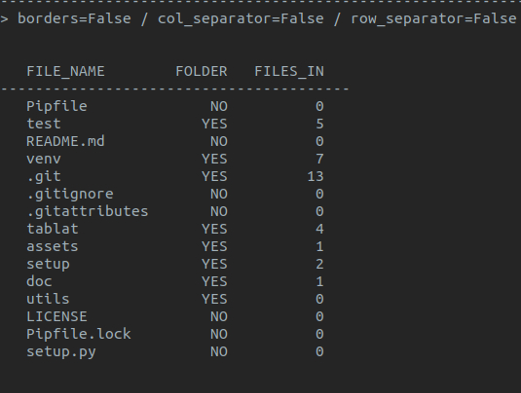
Table style
Syling the table with TabStyle
TabStyle class is used to encapsulate style options for the table. Current values are:
- Table borders
- Row separators
- Column separators
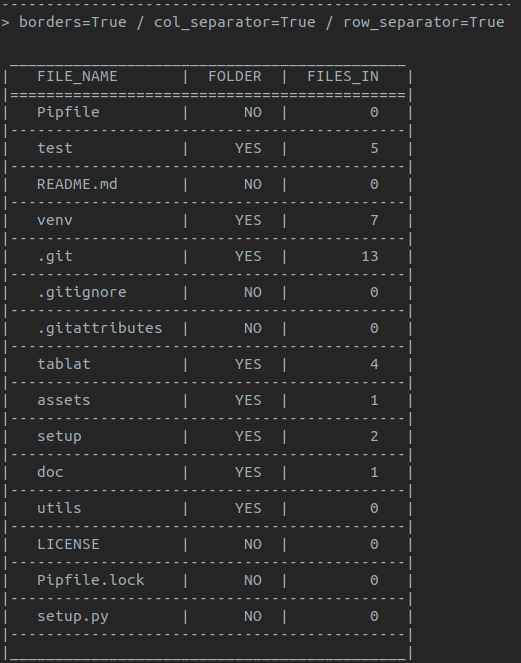
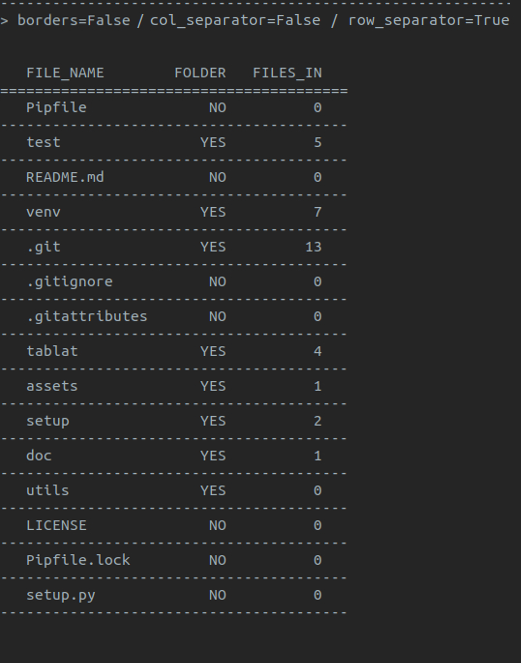
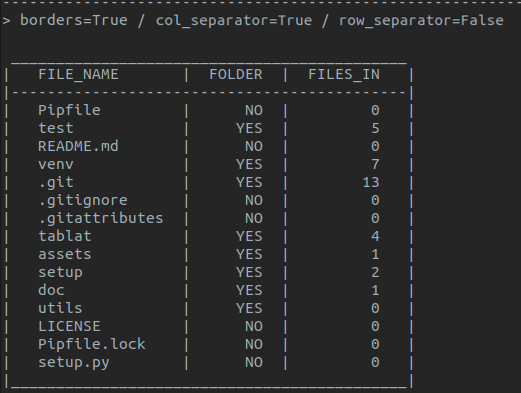
Note: default style is with borders and no separators for rows and columns
Using TabStyle to configure the style:
form tablat import Table, TabStyle


# Style object with no borders and row separators
pref_style = TabStyle(borders=False, row_sep=True)
.
.
.
# Initializing Table with our prefered style
some_tab = Table(data, headers, pref_style)
.
.
.
# Restoring Table default style
some_tab.style = TabStyle()
Table objects are initialized with a default TabStyle that can be modified
my_table = Table()

# Disabling borders
my_table.syle.borders = False

# Modifying style properties at once
my_table.style.update(col_sep=True, row_sep=True)
Sample table with style modifications
1 maintainer

Release files for tablat 0.2.0
For a detailed explanation of source distributions (sdists) and built distributions (wheels), please see the package formats documentation.
Source distribution (sdist)
| File | Size | Uploaded | |
|---|---|---|---|
| tablat-0.2.0.tar.gz | 10.0 kB | Details |
Built distribution (wheel)
| File | Interpreter | ABI | Platform | Reset |
|---|---|---|---|---|
| tablat-0.2.0-py3-none-any.whl | Python 3 | none | any | Details |
Total release size: 18.7 kB
Release files / tablat-0.2.0.tar.gz
| Download URL | tablat-0.2.0.tar.gz |
|---|---|
| Size | 10.0 kB |
| Tags | Source |
|
SHA-256 checksum How to use checksums |
570afe0d2775181f37a496ba7bebd93cde5c9d2626a2ffeb56ca29d7ac5b0eeb
|
|
BLAKE2b-256 checksum How to use checksums |
f1c406db3e7bb573e2ebac025be0212bde0b93ea5d40f65a0ec408625698e11b
|
| Upload date | |
|
Uploaded using Trusted Publishing? What is trusted publishing? |
No |
| Uploaded via |
twine/1.13.0 pkginfo/1.5.0.1 requests/2.21.0 setuptools/40.8.0 requests-toolbelt/0.9.1 tqdm/4.31.1 CPython/3.7.1
|
Release files / tablat-0.2.0-py3-none-any.whl
| Download URL | tablat-0.2.0-py3-none-any.whl |
|---|---|
| Size | 8.8 kB |
| Tags | Python 3 |
|
SHA-256 checksum How to use checksums |
44d5d1803dfd5c06457ecff0e263e33132faff8d78dd67217984a8ff5ec6becf
|
|
BLAKE2b-256 checksum How to use checksums |
a7e15633e9276f4f1f9323e73fa39feefe2d05e49e40922038acb69b4f6df29b
|
| Upload date | |
|
Uploaded using Trusted Publishing? What is trusted publishing? |
No |
| Uploaded via |
twine/1.13.0 pkginfo/1.5.0.1 requests/2.21.0 setuptools/40.8.0 requests-toolbelt/0.9.1 tqdm/4.31.1 CPython/3.7.1
|














