
Tabler QIcon


Tabler QIcon is a Python package that provides easy access to Tabler Icons [Preview] [GitHub] for PyQt and PySide applications. It uses SVGs from Tabler Icons and converts them into QIcon objects, which can be used in PyQt and PySide applications.
This package also supports icon customization such as changing color, size, view box size, stroke width, opacity, and applying transformations like flip and flop.
Tabler QIcon v0.3.0 is currently synced with tabler-icons version 3.0. Please refer to the update.log file for more details on the last sync.
Preview icons

🚀 Features
- Customizable Icons: Adjust color, size, view box size, stroke width, opacity, and apply transformations like flip and flop.
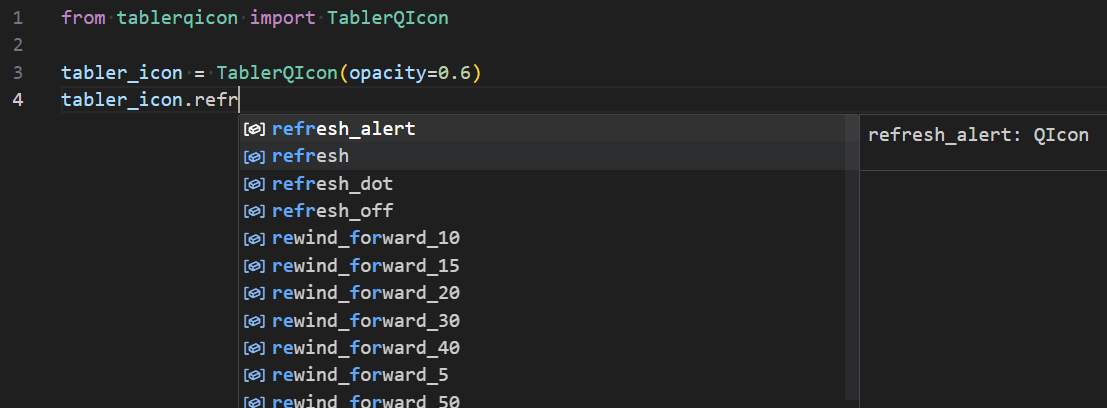
- Developer-Friendly: Python stubs enhance code autocompletion and type-checking in your IDE.
Code Autocompletion
- Broad Compatibility: Supports PyQt5, PyQt6, PySide2, and PySide6.
- Transformation Features: Flip and flop transformations can be applied to icons easily. (introduced in v0.2.2)
📋 Prerequisites
- Python 3.7 or later
- One of the following: PyQt5, PyQt6, PySide2, or PySide6
💻 Installation
You can install tabler-qicon from PyPI using pip:
pip install tabler-qicon
Alternatively, you can install it directly from the GitHub repository:
pip install git+https://github.com/promto-c/tabler-qicon.git
Using PyQt5? Install it separately:
pip install PyQt5
🖌️ Usage
Setting the Backend
Using Environment Variables (with qtpy)
If you're using qtpy to maintain compatibility across different PyQt/PySide backends, you'll need to specify the backend before importing other modules:
import os
os.environ['QT_API'] = 'PyQt5'  # Change 'PyQt5' to your desired backend

from tablerqicon import TablerQIcon

# ... Additional code ...
Using the use_backend method
Alternatively, you can also set the backend directly using the use_backend method:
import tablerqicon
tablerqicon.use_backend('PyQt5')

from tablerqicon import TablerQIcon

# ... Additional code ...
Default Usage
Directly access icons with default properties:
from PyQt5 import QtWidgets
from tablerqicon import TablerQIcon

# ... Additional code ...

refresh_button = QtWidgets.QPushButton("Refresh")

# Set the QIcon for the refresh_button using the 'refresh' icon name as an attribute
refresh_button.setIcon(TablerQIcon.refresh)
Customized Icons
- Instantiate
TablerQIconwith your desired properties. - Access icons using icon names.
- Utilize
flipandfloptransformations for versatile usage of icons.
from PyQt5 import QtWidgets
from tablerqicon import TablerQIcon

# ... Additional code ...

# Example: Using a custom opacity
tabler_icon = TablerQIcon(opacity=0.6)

refresh_button = QtWidgets.QPushButton('Refresh')
word_wrap_button = QtWidgets.QPushButton('Word Wrap')
play_backward_button = QtWidgets.QPushButton('Play Backward')

# Set the QIcon for the refresh_button using the 'refresh' icon name as an attribute
refresh_button.setIcon(tabler_icon.refresh)
# Set the QIcon for the word_wrap_button using the 'text_wrap' icon name as an attribute
word_wrap_button.setIcon(tabler_icon.text_wrap)
# Applying flip and flop transformations before setting the icon
play_backward_button.setIcon(tabler_icon.flip.flop.player_play)
Retrieve All Icon Names
print(TablerQIcon.get_icon_names())
🛠️ Development
Syncing Icons
To sync icons, we use a shell script that clones the icons from the tabler-icons repository and generates a .pyi file to facilitate type hints and autocompletion in IDEs.
If you are a contributor or a developer working on this project and need to sync icons, follow the steps below:
-
Run the Sync Script:
./sync_tabler_icons.sh
This script will:
- Clone the latest icons from the
tabler-iconsrepository. - Copy the icons to the target directory.
- Generate a
.pyifile to facilitate type hints and autocompletion.
- Clone the latest icons from the
-
Check the Update Log: After running the script, check the
update.logfile in theiconsdirectory to ensure that the sync was successful and to view details of the sync. -
Commit Changes: After successfully syncing the icons and generating the
.pyifile, commit these changes to the version control system.
Note to Contributors
- Please do not edit the generated
.pyifile directly. It is auto-generated by the sync script. - Ensure that you have run the sync script and tested the changes locally before submitting a pull request.
Running Tests
Run the tests to ensure that your changes do not break existing functionality.
pytest tests
🖋️ Coding Style
Adhering to PEP 8 with flake8 oversight. Auto-formatting via yapf. Our docstrings embrace the Google Python Style Guide for clarity and consistency.
📜 License
Tabler QIcon is licensed under the MIT License.
Note: This
README.mdfile was generated by ChatGPT.
1 maintainer

Metadata
1 maintainer
Release files for tabler-qicon 0.3.0
For a detailed explanation of source distributions (sdists) and built distributions (wheels), please see the package formats documentation.
Source distribution (sdist)
| File | Size | Uploaded | |
|---|---|---|---|
| tabler-qicon-0.3.0.tar.gz | 592.5 kB | Details |
Built distribution (wheel)
| File | Interpreter | ABI | Platform | Reset |
|---|---|---|---|---|
| tabler_qicon-0.3.0-py3-none-any.whl | Python 3 | none | any | Details |
Total release size: 3.3 MB
Release files / tabler-qicon-0.3.0.tar.gz
| Download URL | tabler-qicon-0.3.0.tar.gz |
|---|---|
| Size | 592.5 kB |
| Tags | Source |
|
SHA-256 checksum How to use checksums |
20761957b0be9c45fc123e89bbc1d00769037efa2fb199262008abd81b152ccb
|
|
BLAKE2b-256 checksum How to use checksums |
b821f4f1e9727d641376294a57c7cc0c6d76e332f34299cdeb834ff8077b9929
|
| Upload date | |
|
Uploaded using Trusted Publishing? What is trusted publishing? |
No |
| Uploaded via |
twine/4.0.2 CPython/3.9.2
|
Release files / tabler_qicon-0.3.0-py3-none-any.whl
| Download URL | tabler_qicon-0.3.0-py3-none-any.whl |
|---|---|
| Size | 2.7 MB |
| Tags | Python 3 |
|
SHA-256 checksum How to use checksums |
808825976cfeb4c40c3937a0fb09ffd81a6c6205e7b70aa96b0a968ad7f91046
|
|
BLAKE2b-256 checksum How to use checksums |
f4094722c60406977edce01dc2d36e4f8bce0c9ff7ac7d5ea0b38e5091b8bf0a
|
| Upload date | |
|
Uploaded using Trusted Publishing? What is trusted publishing? |
No |
| Uploaded via |
twine/4.0.2 CPython/3.9.2
|














