


⚡ Tablers
A blazingly fast PDF table extraction library with python API powered by Rust




Features
- 🚀 Blazingly Fast - Core algorithms written in Rust for maximum performance
- 🐍 Pythonic API - Easy-to-use Python interface with full type hints
- 📄 Edge Detection - Accurate table detection using line and rectangle edge analysis
- 📝 Text Extraction - Extract text content from table cells with configurable settings
- 📤 Multiple Export Formats - Export tables to CSV, Markdown, and HTML
- 🔐 Encrypted PDFs - Support for password-protected PDF documents
- 💾 Memory Efficient - Lazy page loading for handling large PDF files
- 🖥️ Cross-Platform - Works on Windows, Linux, and macOS
Why Tablers?
This project draws significant inspiration from the table extraction modules of pdfplumber and PyMuPDF. Compared to pdfplumber and PyMuPDF, tablers has the following advantages:
- High Performance: Utilizes Rust for high-performance PDF processing
- Higher Accuracy: Tablers optimizes some table detection algorithms to address table extraction problems that other libraries have not fully solved, including:
- Mixed strategies where one is text and the other is lines (#8)
- Tables whose edges are actually narrow closepath polylines (#13)
- Extracting table content when the bottom border is absent (pdfplumber discussion #631)
- Table recognition when outer lines are missing (pdfplumber issue #1296)
- Excluding tables formed by invisible edges (pdfplumber issue #1357)
- More Configurable: Supports customizable table filter settings (
min_rows,min_columns,include_single_cell, e.g., see this issue) - Clean Python Dependencies: No external python dependencies required
Benchmark
Benchmarked on the ICDAR 2013 Table Competition dataset, evaluating both extraction speed and accuracy across tablers, PyMuPDF, pdfplumber, and camelot. All libraries use their default configuration for table extraction. PyMuPDF excludes tables that have only one row or only one column (see PyMuPDF#3987), and this behaviour is not configurable; among the compared libraries, only tablers allows configuring minimum row/column counts. For a fair comparison, the benchmark therefore includes both tablers (default) and tablers (min 2×2) — the latter with min_rows=2 and min_columns=2 so that single-row/single-column tables are filtered out in the same way as in PyMuPDF. For more on the libraries and settings, see the Libraries compared section in tablers-benchmark.
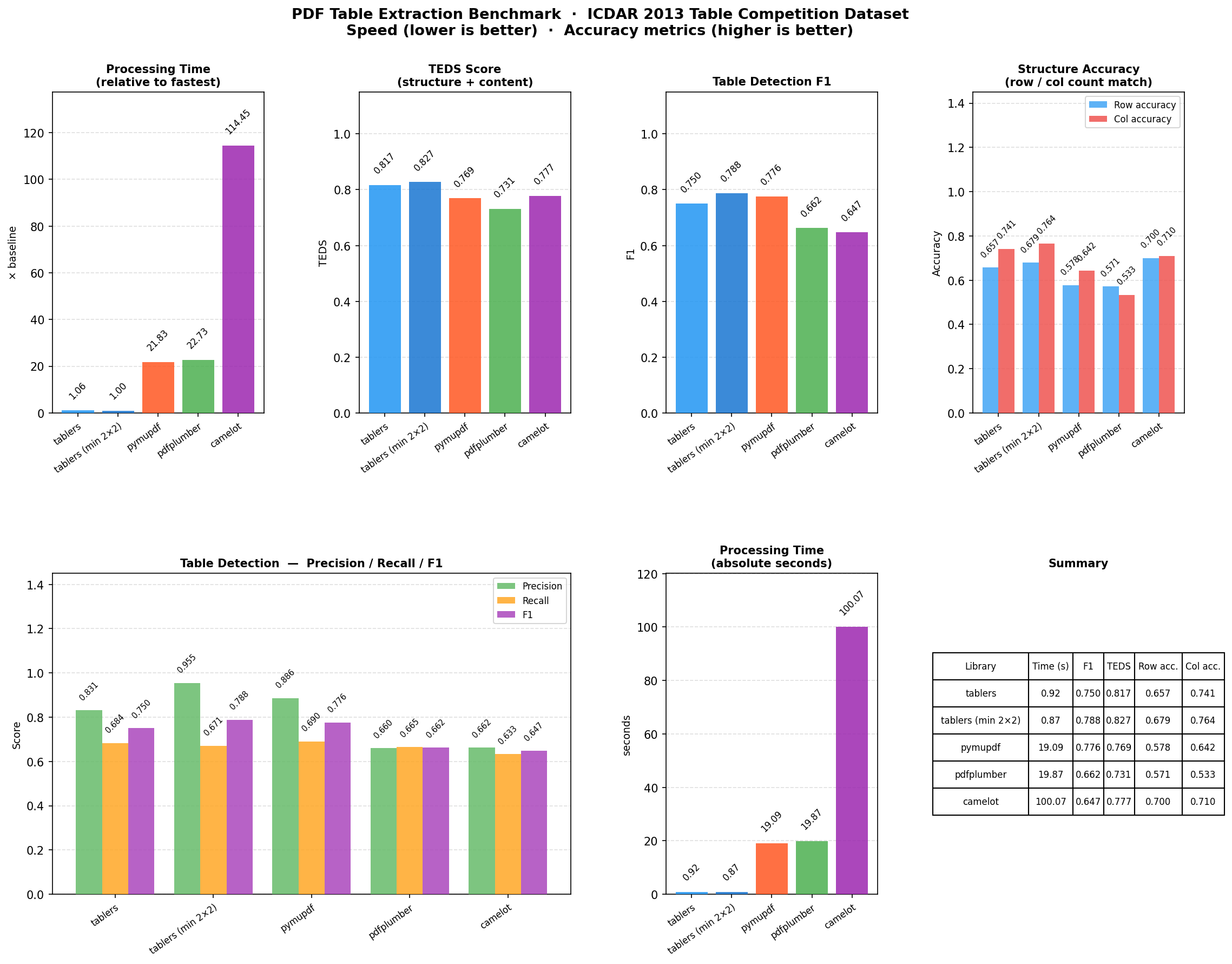
For more details, please refer to the tablers-benchmark repository.
Note
- This solution is primarily designed for text-based PDFs and does not support scanned PDFs.
- Thread Safety: Separate
Documentinstances can be created and used concurrently on different threads. A document and its pages must remain on their creating thread. Pdfium calls are mutex-serialized, so usemultiprocessingwhen true parallel extraction is required. See Thread Safety for details.
Installation
pip install tablers
Quick Start
Basic Table Extraction
from tablers import Document, find_tables

# Open a PDF document
doc = Document("example.pdf")

# Extract tables from each page
for page in doc.pages():
    tables = find_tables(page, extract_text=True)
    for table in tables:
        print(f"Found table with {len(table.cells)} cells")
        for cell in table.cells:
            print(f"  Cell: {cell.text} at {cell.bbox}")

doc.close()
Using Context Manager
from tablers import Document, find_tables

with Document("example.pdf") as doc:
    page = doc.get_page(0)  # Get first page
    tables = find_tables(page, extract_text=True)

    for table in tables:
        print(f"Table bbox: {table.bbox}")
For more advanced usage, please refer to the documents.
Requirements
- Python >= 3.10
- Supported platforms: Windows (x64), Linux (x64, ARM64) with glibc >= 2.28, macOS (x64, ARM64) with macOS >= 12
License
This project is licensed under the MIT License - see the LICENSE file for details.
Acknowledgments
- pdfplumber - PDF parsing library
- PyMuPDF - PDF parsing library
- pdfium-render - Rust bindings for PDFium
- PyO3 - Rust bindings for Python
1 maintainer

Metadata
1 maintainer
Release files for tablers 0.9.0
For a detailed explanation of source distributions (sdists) and built distributions (wheels), please see the package formats documentation.
Built distributions (wheels)
| File | Reset | |||
|---|---|---|---|---|
| tablers-0.9.0-cp310-abi3-win_amd64.whl | CPython 3.10 | abi3 | Windows x86-64 | Details |
| tablers-0.9.0-cp310-abi3-manylinux_2_28_x86_64.whl | CPython 3.10 | abi3 | Linux glibc 2.28+ x86-64 | Details |
| tablers-0.9.0-cp310-abi3-manylinux_2_28_aarch64.whl | CPython 3.10 | abi3 | Linux glibc 2.28+ ARM64 | Details |
| tablers-0.9.0-cp310-abi3-macosx_12_0_x86_64.whl | CPython 3.10 | abi3 | macOS 12.0+ x86-64 | Details |
| tablers-0.9.0-cp310-abi3-macosx_12_0_arm64.whl | CPython 3.10 | abi3 | macOS 12.0+ ARM64 | Details |
Total release size: 20.5 MB
Release files / tablers-0.9.0-cp310-abi3-win_amd64.whl
| Download URL | tablers-0.9.0-cp310-abi3-win_amd64.whl |
|---|---|
| Size | 3.7 MB |
| Tags | CPython 3.10 Windows x86-64 abi3 |
|
SHA-256 checksum How to use checksums |
7c6fa0fdb5645ed0d95961d04ea7e287ea67eb0c7623d37371be314af3b52d65
|
|
BLAKE2b-256 checksum How to use checksums |
9069b6c69f8eb2a6fd670cec71660da0b2cf3068405880f27d9711ac3472b35d
|
| Upload date | |
|
Uploaded using Trusted Publishing? What is trusted publishing? |
Yes |
| Uploaded via |
pdm/2.29.2 CPython/3.12.3 Linux/6.17.0-1022-azure
|
Release files / tablers-0.9.0-cp310-abi3-manylinux_2_28_x86_64.whl
| Download URL | tablers-0.9.0-cp310-abi3-manylinux_2_28_x86_64.whl |
|---|---|
| Size | 4.2 MB |
| Tags | CPython 3.10 Linux glibc 2.28+ x86-64 abi3 |
|
SHA-256 checksum How to use checksums |
329cb5e6e9e8fbd8afffa548528f0491d02a5398971b11792edb0f0915eefa24
|
|
BLAKE2b-256 checksum How to use checksums |
b57a2c54406516db98c31993fc5831fbf9fe9e74e8b3f6c33645e75e24caa95e
|
| Upload date | |
|
Uploaded using Trusted Publishing? What is trusted publishing? |
Yes |
| Uploaded via |
pdm/2.29.2 CPython/3.12.3 Linux/6.17.0-1022-azure
|
Release files / tablers-0.9.0-cp310-abi3-manylinux_2_28_aarch64.whl
| Download URL | tablers-0.9.0-cp310-abi3-manylinux_2_28_aarch64.whl |
|---|---|
| Size | 4.9 MB |
| Tags | CPython 3.10 Linux glibc 2.28+ ARM64 abi3 |
|
SHA-256 checksum How to use checksums |
e78c03d81e8f654c1f7397893986c4dc9383e81f819f6bee778bff8f6d2d8e5e
|
|
BLAKE2b-256 checksum How to use checksums |
56a3feeb8050a88fb00eb96547a8568e592d187eaf92deee82f042b5c0874193
|
| Upload date | |
|
Uploaded using Trusted Publishing? What is trusted publishing? |
Yes |
| Uploaded via |
pdm/2.29.2 CPython/3.12.3 Linux/6.17.0-1022-azure
|
Release files / tablers-0.9.0-cp310-abi3-macosx_12_0_x86_64.whl
| Download URL | tablers-0.9.0-cp310-abi3-macosx_12_0_x86_64.whl |
|---|---|
| Size | 3.9 MB |
| Tags | CPython 3.10 abi3 macOS 12.0+ x86-64 |
|
SHA-256 checksum How to use checksums |
f18d3b0e4cfcb8028406659751543104a05204222e9fb2e9b915301d42f4fd53
|
|
BLAKE2b-256 checksum How to use checksums |
46c5b204c83dcc93380eb45309e32f9edbf9582fdcb2af8d92ffba13f1e7781e
|
| Upload date | |
|
Uploaded using Trusted Publishing? What is trusted publishing? |
Yes |
| Uploaded via |
pdm/2.29.2 CPython/3.12.3 Linux/6.17.0-1022-azure
|
Release files / tablers-0.9.0-cp310-abi3-macosx_12_0_arm64.whl
| Download URL | tablers-0.9.0-cp310-abi3-macosx_12_0_arm64.whl |
|---|---|
| Size | 3.8 MB |
| Tags | CPython 3.10 abi3 macOS 12.0+ ARM64 |
|
SHA-256 checksum How to use checksums |
7aca71a2e1d256b180076210c03d6d4acb6b61735d280815f03d8a30ce2cdb14
|
|
BLAKE2b-256 checksum How to use checksums |
2917f05173d29e28e24f92ff165ccbf2df3019bd0367082c63ab1a06d8028b33
|
| Upload date | |
|
Uploaded using Trusted Publishing? What is trusted publishing? |
Yes |
| Uploaded via |
pdm/2.29.2 CPython/3.12.3 Linux/6.17.0-1022-azure
|














