
tableschema-bigquery-py



Generate and load BigQuery tables based on Table Schema descriptors.
Features
- implements
tableschema.Storageinterface
Contents
Getting Started
Installation
The package use semantic versioning. It means that major versions could include breaking changes. It's highly recommended to specify package version range in your setup/requirements file e.g. package>=1.0,<2.0.
pip install tableschema-bigquery
Prepare BigQuery
To start using Google BigQuery service:
- Create a new project - link
- Create a service key - link
- Download json credentials and set
GOOGLE_APPLICATION_CREDENTIALSenvironment variable
Documentation
import io
import os
import json
from datapackage import Package
from apiclient.discovery import build
from oauth2client.client import GoogleCredentials

# Prepare BigQuery credentials
os.environ['GOOGLE_APPLICATION_CREDENTIALS'] = '.credentials.json'
credentials = GoogleCredentials.get_application_default()
service = build('bigquery', 'v2', credentials=credentials)
project = json.load(io.open('.credentials.json', encoding='utf-8'))['project_id']

# Save package to BigQuery
package = Package('datapackage.json')
package.save(storage='bigquery', service=service, project=project, dataset='dataset')

# Load package from BigQuery
package = Package(storage='bigquery', service=service, project=project, dataset='dataset')
package.resources
API Reference
Storage
Storage(self, service, project, dataset, prefix='')
BigQuery storage
Package implements Tabular Storage interface (see full documentation on the link):
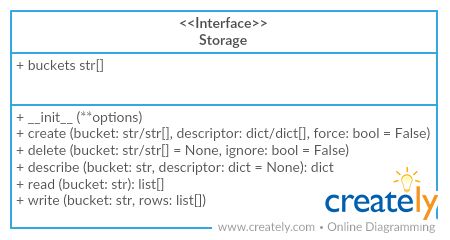
Only additional API is documented
Arguments
- service (object): BigQuery
Serviceobject - project (str): BigQuery project name
- dataset (str): BigQuery dataset name
- prefix (str): prefix for all buckets
Contributing
The project follows the Open Knowledge International coding standards.
Recommended way to get started is to create and activate a project virtual environment. To install package and development dependencies into active environment:
$ make install
To run tests with linting and coverage:
$ make test
Changelog
Here described only breaking and the most important changes. The full changelog and documentation for all released versions could be found in nicely formatted commit history.
v1.0
- Initial driver realease
1 maintainer

Release files for tableschema-bigquery 1.0.1
For a detailed explanation of source distributions (sdists) and built distributions (wheels), please see the package formats documentation.
Source distribution (sdist)
| File | Size | Uploaded | |
|---|---|---|---|
| tableschema-bigquery-1.0.1.tar.gz | 11.0 kB | Details |
Built distribution (wheel)
| File | Interpreter | ABI | Platform | Reset |
|---|---|---|---|---|
| tableschema_bigquery-1.0.1-py2.py3-none-any.whl | Python 2, Python 3 | none | any | Details |
Total release size: 19.8 kB
Release files / tableschema-bigquery-1.0.1.tar.gz
| Download URL | tableschema-bigquery-1.0.1.tar.gz |
|---|---|
| Size | 11.0 kB |
| Tags | Source |
|
SHA-256 checksum How to use checksums |
b756a5375be8d4682679c1b57d52eadc468e517fcff3f061a28d002383e0b03b
|
|
BLAKE2b-256 checksum How to use checksums |
de91bc21d6c0878594be9227fbf6b1caf6a144d19ce82dc0bb9081391dc9c1d1
|
| Upload date | |
|
Uploaded using Trusted Publishing? What is trusted publishing? |
No |
| Uploaded via |
twine/3.1.1 pkginfo/1.5.0.1 requests/2.23.0 setuptools/47.1.1 requests-toolbelt/0.9.1 tqdm/4.46.1 CPython/3.8.0
|
Release files / tableschema_bigquery-1.0.1-py2.py3-none-any.whl
| Download URL | tableschema_bigquery-1.0.1-py2.py3-none-any.whl |
|---|---|
| Size | 8.7 kB |
| Tags | Python 2 Python 3 |
|
SHA-256 checksum How to use checksums |
5ab94f089fce21c83dd8614e99bd33e59d6df5b16b6c07f98ab8f16f918775b0
|
|
BLAKE2b-256 checksum How to use checksums |
a93961fd22e9ebdff4bc8b0f37b84361567b9c8aeeac0836dba103493e061f84
|
| Upload date | |
|
Uploaded using Trusted Publishing? What is trusted publishing? |
No |
| Uploaded via |
twine/3.1.1 pkginfo/1.5.0.1 requests/2.23.0 setuptools/47.1.1 requests-toolbelt/0.9.1 tqdm/4.46.1 CPython/3.8.0
|














