




tabmancer
Many Claude Code sessions in many terminals: one screen for all of them, and none lost. tabmancer is a dashboard for your coding-agent sessions, in the terminal. See every session from every project, which ones are working, which one waits for you and how full each one's context is, and go to any of them in a key. Close them when you have to, even halfway through a task: they come back where they left off, each in its own tab and folder, and the ones cut off mid-reply carry on by themselves. Claude Code first, Codex and Antigravity if you use them.
I run Claude Code in several terminals at once, and keeping track of them got hard: which one is working, which one is waiting for me. And I often had to close them before Claude had finished. tabmancer is what I built for both: one screen to see and manage them all, and every session back where it left off, all of them at once. Sinan Tüfekci
Try it
uvx tabmancer --demo # made-up sessions: nothing of yours is read or changed
Every key works in the demo, but nothing opens and no model is asked. Then install it:
uv tool install tabmancer    # or: pipx install tabmancer
tabmancer                    # the dashboard
It needs Python 3.10+ and Claude Code's claude on your PATH. Upgrade it with
uv tool upgrade tabmancer (or pipx upgrade tabmancer): the dashboard says when a newer
version is out (updating). ? lists every key and runs
the one you pick; the footer shows the common ones and what they do on the row you are on.
On Windows, tabmancer shortcut adds a desktop shortcut and tabmancer startup on opens the
picker at login when sessions were left open.
What it does
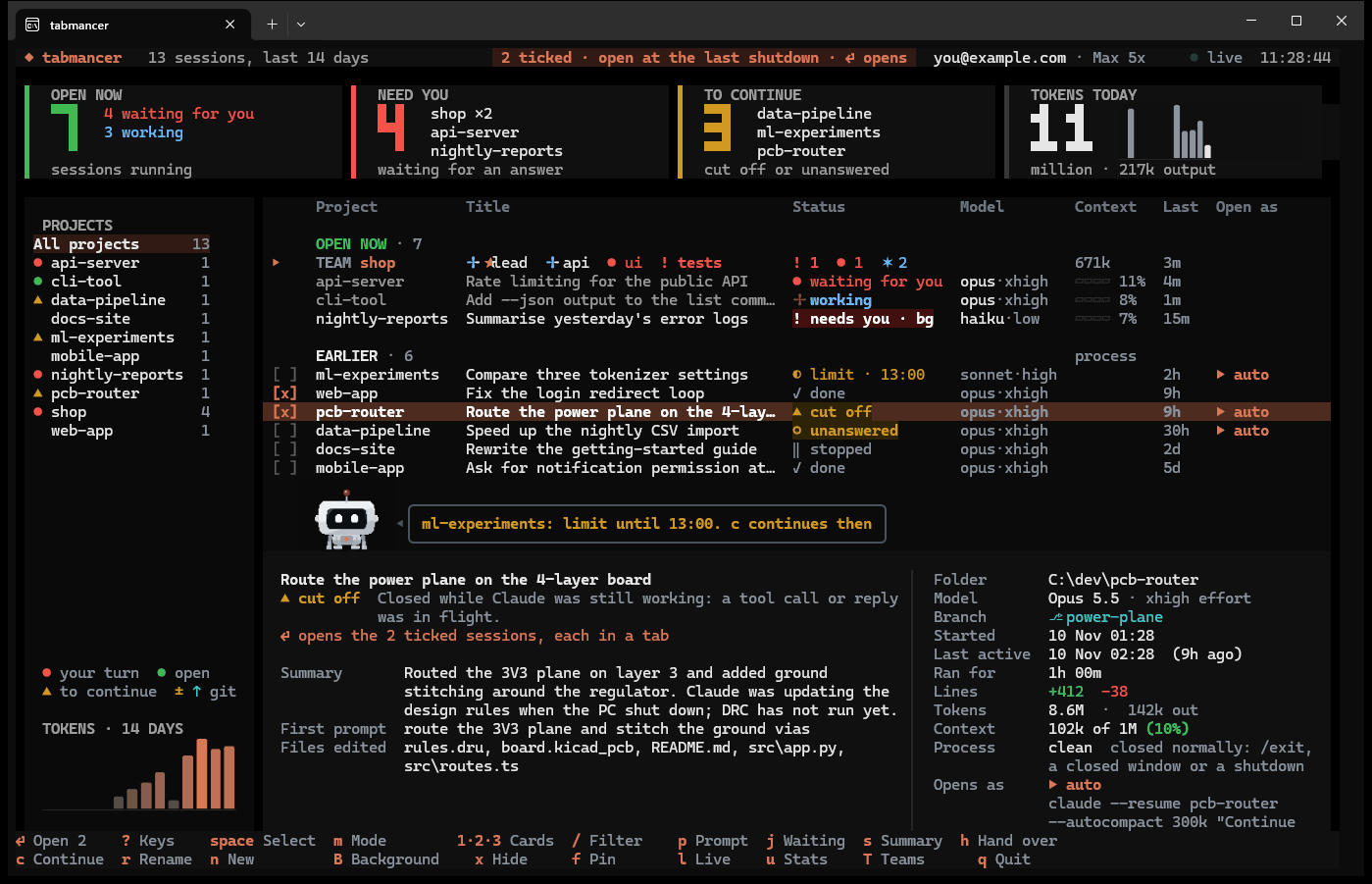
- Shows what each one is doing. Every open session, whichever terminal it is in: working,
waiting for you or needing you, and how full its context is; your plan limits in the top bar.
jgoes to the next one waiting for you, andEnteron an open one goes to its tab. - Brings your sessions back. Closed before they were done, by you, a reboot or a crash,
they say how they ended (cut off, unanswered, at a usage limit, done) and wait under TO
CONTINUE.
Enteropens them again where they left off, each in its own tab and folder, and the ones cut off mid-task are told to carry on. After a reboot the ones that were open start out ticked: oneEnterbrings them all back. Resume, fork or start fresh, per session. - Gets past a usage limit. Sessions stopped at a limit say when it lifts;
ccontinues them all then, or right away once you have signed in with another account. - Runs teams. Several sessions on one project with an orchestrator, or as peers on related topics side by side, talking through Claude Code's own messaging between sessions: one row in the list, and a view of who tells whom what. Each member can run on its own model and effort.
- Hands crowded sessions over.
hmoves the work to a fresh session, with a full handover as its first message. - Counts. Tokens, when you work, tools and files, plan limits with a forecast, and a written report of the week to share.
- Wraps your week up. Claude Code Wrapped: your week as a card to post on X, Bluesky, Threads or your Instagram story.
- Finds.
/finds a session by anything you or Claude said in it. - Codex and Antigravity too, if you use them.
Everything it does, and the details: using it (what each status means, every key, writing to a session, background sessions, workspaces) · teams · handing over · stats and reports · setup and commands · how it works
Claude Code Wrapped
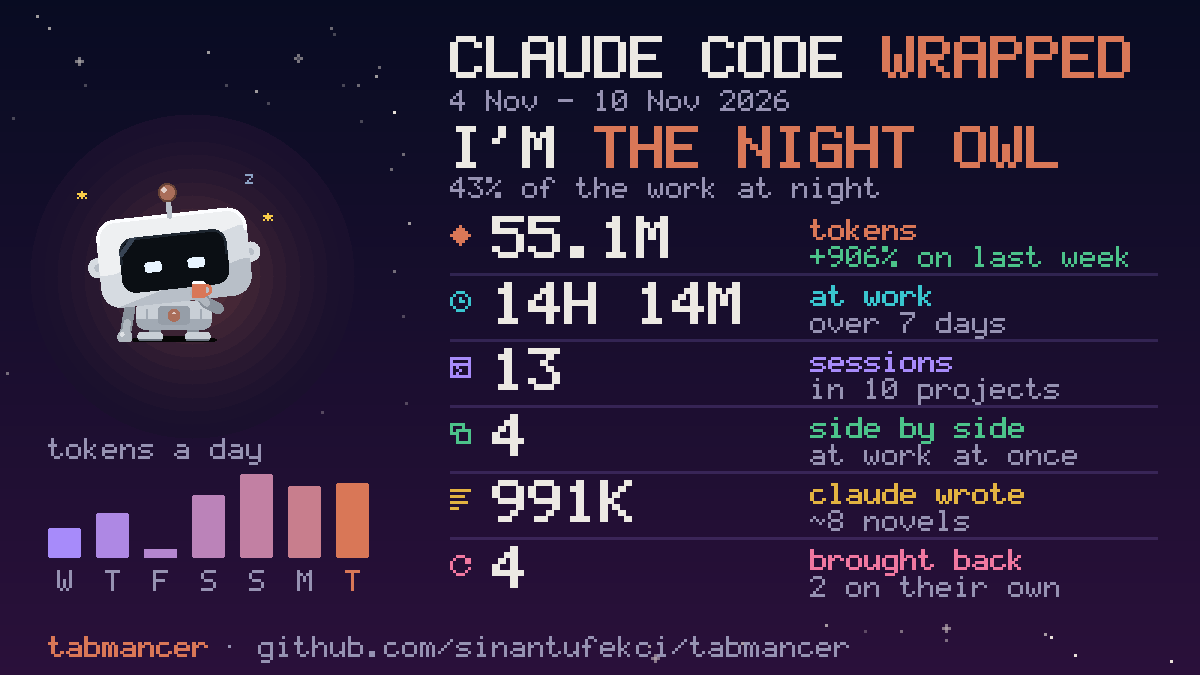
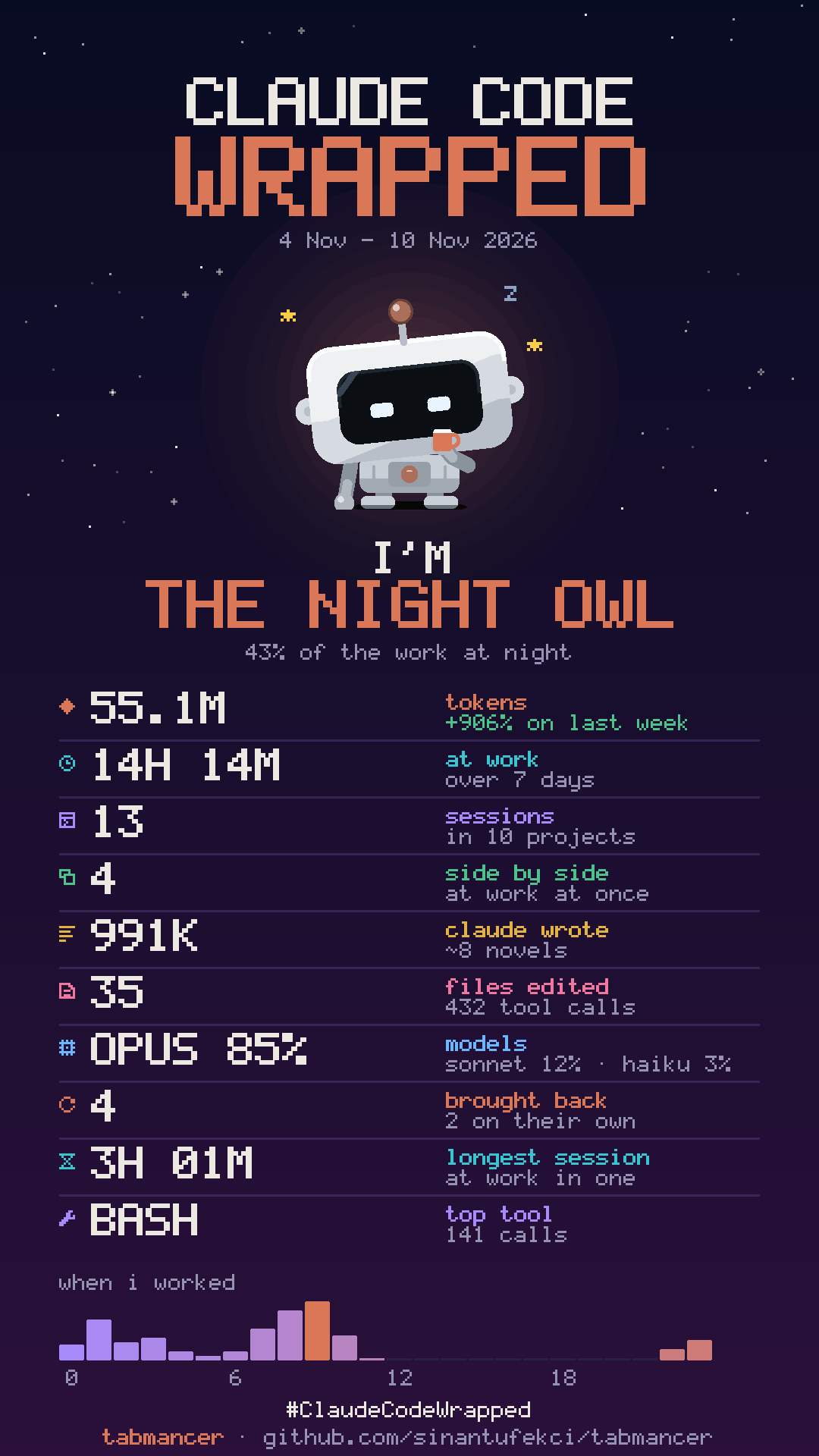
Your week with Claude Code as a card worth posting, drawn in pixels like Bit. On Fridays Bit
says it is ready, and W shows it any day: who the week made you (the Conductor, the Night
Owl, the Marathoner, the Comeback Kid and more, each with the number behind it), the tokens
against last week, the time at work, the sessions side by side, what Claude wrote in novels'
worth, the files edited, the models, the longest session and the hours you worked. f turns it
into a story card. p shares it: X, Bluesky or Threads open a new post with the words already
written and the card on your clipboard to paste in; for Instagram the story card is saved and
its folder opened, to send to your phone. Nothing is posted until you post it, and the card
holds counts only: no project names, nothing said in a session.
tabmancer wrapped --share x # or bluesky, threads, instagram; --story saves the tall card
Keys
| Key | Action |
|---|---|
Enter |
open the ticked sessions, or the highlighted one, each in its own tab |
Space |
tick a session |
m |
how it opens: resume → auto-continue → fork → new |
p |
write a prompt to a session (an open one: go to its tab) |
j |
the next open session waiting for you |
/ |
find by project, title, or anything said in a session |
n |
fresh sessions in several projects at once |
T |
teams |
h |
hand a session over to a fresh one |
c |
continue the sessions stopped at a usage limit |
u |
stats |
W |
Claude Code Wrapped: your week as a card; p shares it, f makes it a story |
? |
every key, explained; Enter runs the one picked |
Where it runs
Built and used every day on Windows 11 with Windows Terminal: tabs, going to a session's tab, start at login, desktop notifications and a desktop shortcut. On Linux, tabs open in tmux (tried for real), WezTerm, kitty, GNOME Terminal and Konsole; on macOS in iTerm2 and Terminal.app, which have not been tried on a real Mac yet. In any other terminal, tabmancer prints the commands to run. What has been tried where. Reports are welcome.
Claude Code's formats are its own and can change between releases: after an update,
tabmancer doctor checks that everything tabmancer relies on still works.
Privacy
tabmancer runs on your machine and talks to no server of its own. It reads the transcripts
the agents already keep (~/.claude, ~/.codex, ~/.gemini) and asks the claude CLI
which sessions are open and how full your plan limits are (/usage, a local command). It
reads which account you are signed in with (its email and plan) from ~/.claude.json and
Codex's auth.json, to show it in the top bar, and remembers the emails of the Claude accounts it
has seen, in its own folder, to offer them when you switch (A), and the ids of the sessions it
opened again, to count them on your week's card (W). Once a day it asks PyPI which version of
tabmancer is the latest, to tell you of a newer one (tabmancer updates off stops it). A model
is called only when you ask for one, through your own CLI
and plan: an AI summary (s), a handover (h), a report (r in the stats), a team's line-up
(Ctrl+R in the new-team form, which sends the goal, the project's file names and its README's
start). It types into
an open session only when you have it continue the ones stopped at a usage limit (c).
Sharing your week's card (p on it) opens the platform's own page for a new post in your
browser, with the words written in: you post it, or not.
Nothing is sent anywhere else, and there is no telemetry.
Trademarks
tabmancer is an independent project, not made by, affiliated with or endorsed by Anthropic, OpenAI or Google. Claude Code, Codex and Antigravity are their owners' trademarks; they are named here only to say what tabmancer works with.
License
The code is licensed under the Apache License 2.0: keep the NOTICE with it and credit "tabmancer by Sinan Tüfekci". Bit, the robot, is licensed under CC BY 4.0: wherever you use it, credit "Bit by Sinan Tüfekci". Not affiliated with Anthropic.
1 maintainer

Metadata
1 maintainer
Release files for tabmancer 0.1.4
For a detailed explanation of source distributions (sdists) and built distributions (wheels), please see the package formats documentation.
Source distribution (sdist)
| File | Size | Uploaded | Provenance | Actions |
|---|---|---|---|---|
| tabmancer-0.1.4.tar.gz | 466.3 kB | Without provenance | Details for tabmancer-0.1.4.tar.gz |
Built distribution (wheel)
| File | Interpreter | ABI | Platform | Actions Reset |
|---|---|---|---|---|
| tabmancer-0.1.4-py3-none-any.whl | Python 3 | none | any | Details for tabmancer-0.1.4-py3-none-any.whl |
Total release size: 793.9 kB
Release files / tabmancer-0.1.4.tar.gz
| Download URL | tabmancer-0.1.4.tar.gz |
|---|---|
| Size | 466.3 kB |
| Tags | Source |
|
SHA-256 checksum How to use checksums |
f28cc6caf5e948787303cde460a07818d2fb998cf512cd90a908fda4578e05aa
|
|
BLAKE2b-256 checksum How to use checksums |
a6a9619b6b327bd94767d2c13b70aab99a200335688461e709596133b121af50
|
| Upload date | |
|
Uploaded using Trusted Publishing? What is trusted publishing? |
Yes |
| Uploaded via |
uv/0.13.7 {"installer":{"name":"uv","version":"0.13.7","subcommand":["publish"]},"python":null,"implementation":{"name":null,"version":null},"distro":{"name":"Ubuntu","version":"26.04","id":"resolute","libc":null},"system":{"name":null,"release":null},"cpu":null,"openssl_version":null,"setuptools_version":null,"rustc_version":null,"ci":true}
|
Release files / tabmancer-0.1.4-py3-none-any.whl
| Download URL | tabmancer-0.1.4-py3-none-any.whl |
|---|---|
| Size | 327.7 kB |
| Tags | Python 3 |
|
SHA-256 checksum How to use checksums |
bbe259d68f5284228cd58552047171ddc77a9e7f2d8267442b9257239dd0cba9
|
|
BLAKE2b-256 checksum How to use checksums |
114ee6358c65b0ae9f2a253b419967665f6ce31491ac9342da7e40f097c07a22
|
| Upload date | |
|
Uploaded using Trusted Publishing? What is trusted publishing? |
Yes |
| Uploaded via |
uv/0.13.7 {"installer":{"name":"uv","version":"0.13.7","subcommand":["publish"]},"python":null,"implementation":{"name":null,"version":null},"distro":{"name":"Ubuntu","version":"26.04","id":"resolute","libc":null},"system":{"name":null,"release":null},"cpu":null,"openssl_version":null,"setuptools_version":null,"rustc_version":null,"ci":true}
|
Security for tabmancer 0.1.4
Provenance
Provenance describes where a file came from. On PyPI, provenance is shared via attestations, which provide a verifiable record of the build or publishing details. View details, limitations and caveats.
No provenance found
None of the files in this release were uploaded with provenance metadata.
A note on package security
PyPI is a repository for distributing packages, not a service for auditing them. While third-party security researchers and our staff do their best to detect and remove malicious packages, PyPI cannot guarantee the quality, security or suitability of any given package.
To learn more about protecting yourself from malicious actors, visit our package security documentation.














