

BI-quality charts, world maps and dashboards from a pandas DataFrame.
Exact numbers. Every guess explained. One offline HTML file.





Most chart tools take your columns at face value. They add up discounts, treat zip codes as numbers, smooth lines between real data points, and quietly average averages when someone filters a dashboard. The chart looks fine and the numbers are wrong.
tabsight starts one step earlier. It works out what each column actually is, tells you why it thinks so, keeps every number exact, and only then draws the chart, formatted the way a finance team would expect. The result is a single HTML file that opens in any browser, offline, with nothing to install on the other end.
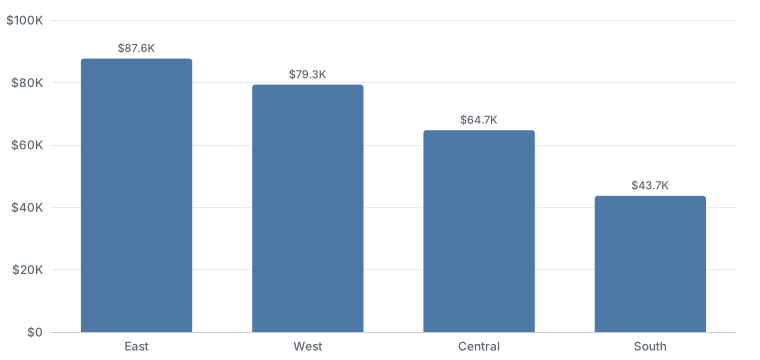
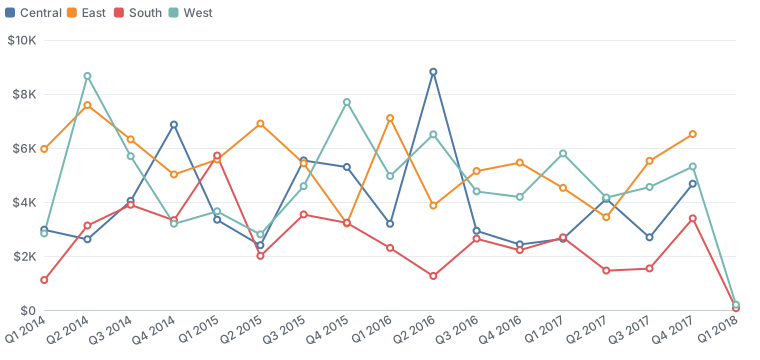
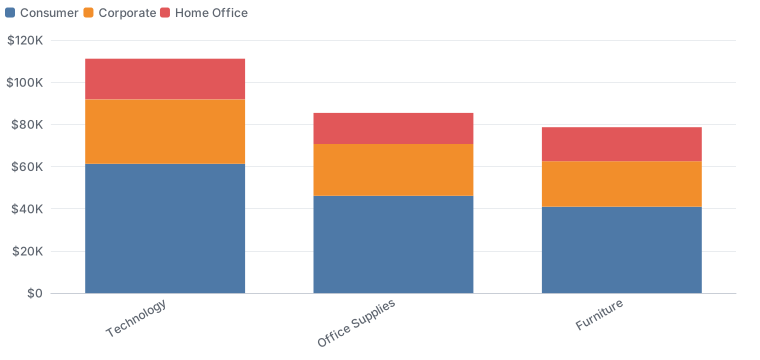
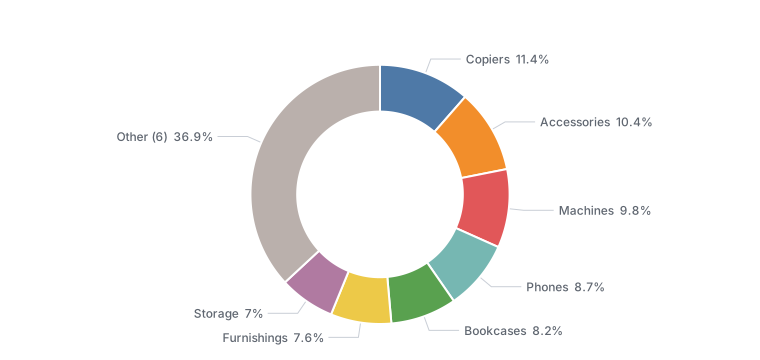
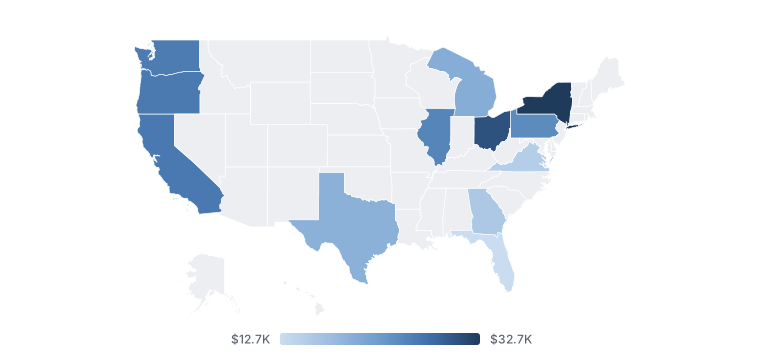
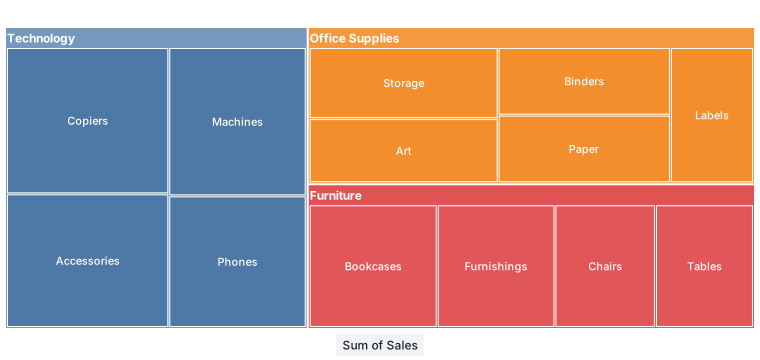
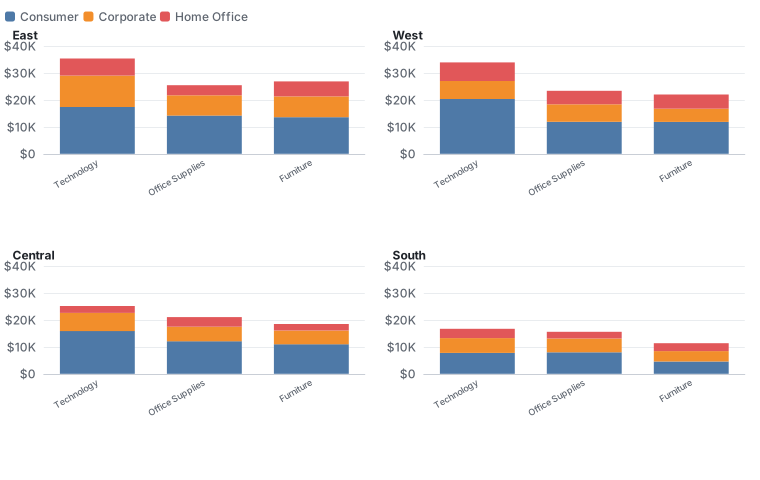
Real output from ts.chart on the sample data in this repository, nothing edited by hand.
Status: version 0.1, the first release. It is tested on Windows, macOS and Linux with Python 3.11 to 3.14 and pandas 2 and 3. Some names may still change before 1.0; the changelog will say when.
Quick start
pip install tabsight
# not run
import pandas as pd
import tabsight as ts

df = pd.read_csv("sales.csv")  # or ts.load("sales.csv")
ts.auto(df).to_html("sales.html")  # a whole dashboard, chosen from the data
ts.chart(df, "bar", x="Region", y="Sales").to_html("bar.html")  # or one chart
Or from a terminal, with no code at all:
tabsight auto sales.csv # writes sales.html
The file is one offline HTML page: open it in any browser, email it, or put it on a website.
A first look
The examples below use the sample file in this repository.
import tabsight as ts

orders = ts.load("examples/superstore_sample.csv")
print(ts.profile(orders))
Profile: 1,200 rows, 18 columns

Column        Role       Unit       Agg     Why
Row_ID        id         none       countd  name says it is an ID/code; never summed
Order_ID      id         none       countd  name says it is an ID/code
Order_Date    time       none       none    text that reads as dates; 100% parse as %m/%d/%Y
Ship_Date     time       none       none    text that reads as dates; 100% parse as %m/%d/%Y
Ship_Mode     dimension  none       none    categories
Customer_ID   id         none       countd  name says it is an ID/code
Segment       dimension  none       none    categories
Country       dimension  none       none    categories
City          dimension  none       none    categories
State         dimension  none       none    categories
Postal_Code   id         none       countd  name says it is an ID/code
Region        dimension  none       none    categories
Category      dimension  none       none    categories
Sub_Category  dimension  none       none    categories
Sales         measure    currency   sum     name suggests money
Quantity      measure    count      sum     name suggests a count
Discount      measure    percent    mean    name suggests a percentage; values stored as fractions (0.15 = 15%); averaged, because totals of rates/prices/scores are meaningless
Profit        measure    currency   sum     name suggests money

Hierarchies:
  Category -> Sub_Category
  Region -> City
  Region -> State
Nothing was configured. The IDs will never be added up, the discount will be averaged rather than summed, the dates were read as month-first because a value like 01/15 settles it, and tabsight noticed that every sub-category belongs to one category. Each of those decisions can be changed in one argument, and none of them touched orders.
From there it's one line to a chart:
fig = ts.chart(orders, "bar", x="Region", y="Sales")
print(fig.title)
print(fig.option["series"][0]["data"])
Sum of Sales by Region
[87642.84, 79286.84, 64667.9, 43661.26]
# not run
fig.to_html("sales_by_region.html")  # one file, opens offline in any browser
In Jupyter, a figure on the last line of a cell draws itself.
What it does today
Reads data carefully. ts.load reads local files only. It detects Windows-1252 exports, keeps the leading zero in 02134, and works out ;-separated European CSVs. ts.profile assigns every column a role (dimension, measure, time, ID…), a unit (money, percent, count, duration) and a sensible way to summarise it, with a written reason for each.
Checks and, if you want, cleans. ts.check reports stray spaces, West versus west, placeholders like N/A, likely typos, dates before 1901 and ship dates before order dates, and changes nothing. ts.clean is optional. It fixes only what can't change meaning, suggests the rest, and every change can be undone or replayed on next month's file.
Keeps the numbers exact. ts.aggregate stores every summary in a form that can be recombined after filtering: a sum and a count for an average, the values themselves for a median. The average for "Other" is the true average of those rows, not an average of averages. Different currencies are never added together.
margin = ts.calc("Margin = SUM(Profit) / SUM(Sales)")
by_category = ts.aggregate(orders, "Category", ["Sales", margin]).values
by_category["Margin"] = by_category["Margin"].map(lambda m: ts.format_number(m, "percent"))
print(by_category)
          Category      Sales Margin
0       Technology  111105.78   3.7%
1  Office Supplies   85475.89   3.7%
2        Furniture   78677.17   1.9%
Formats like a business tool. Every number is formatted by what it means, in 14 locales:
for locale, currency in [("en_US", "USD"), ("de_DE", "EUR"), ("en_IN", "INR")]:
    print(
        locale,
        ts.format_number(1_234_567.5, "currency", "compact", locale=locale, currency=currency),
    )
en_US $1.2M
de_DE 1,2 Mio. €
en_IN ₹12.3L
Draws 33 kinds of chart that follow the rules. Bars, lines and areas, scatter and bubble, histograms and box plots, treemaps, sunbursts, waterfalls, funnels, Pareto, Sankey, heatmaps and calendars, bullets, gauges, combos, KPI cards, tables and four kinds of map, plus small multiples (facet=) that share one scale. Every label is readable, or the chart turns horizontal and tells you so. Lines are never smoothed, bars start at zero, the same region keeps the same colour in every chart, and a chart that ends on a half-finished month says so instead of implying a crash.
Picks the chart, and tells you why. ts.recommend ranks the charts that fit your fields and lists what it ruled out. kind="auto" draws the winner, fig.explain() lists every decision, and fig.lint() checks any chart, including one you changed by hand, against 17 design rules.
print(ts.recommend(orders, x="Sub_Category", y="Discount"))
Charts for 1 category field, 1 measure:

   90  bar             a measure by category: bars, largest first, are easiest to compare
   80  hbar            horizontal bars work too, and suit longer labels
   50  lollipop        a lighter alternative to bars
   40  table           a table lists exact values

Ruled out:
       donut           these values are averages or distinct counts, which don't add up to a whole
       treemap         these values are averages or distinct counts, which don't add up to a whole
       line            a line implies an order between categories; use bars
A donut of average discounts would show shares of a total that doesn't exist, so it's ruled out. Rules, not a model: the same data always gets the same answer, and the rules are checked against 70 labelled cases.
Draws maps of any country, offline. Give it a column of places and it finds the map: countries, the states, provinces or counties of every country, or about 7,300 cities. Names match in about 25 languages and as ISO or postal codes. Ambiguous names like Georgia or Punjab are settled by the other values, and anything that doesn't match is reported with a suggestion, never dropped silently.
for values in (
    ["Bayern", "Hessen", "Sachsen"],
    ["England", "Scotland", "Wales"],
    ["CA", "TX", "NY"],
):
    print(ts.geo.detect(values).label)
Germany map (states)
United Kingdom map (nations)
United States map (states)
Works like df.plot in notebooks. A figure on the last line of a cell draws itself. Set pd.options.plotting.backend = "tabsight" and pandas' own df.plot.bar(...), .hist() or .scatter() draw tabsight charts, or use df.ts.treemap(...) without changing any pandas setting.
Insights in plain English. tabsight states what the numbers show, never guesses why. "Today" is the latest date in the data, so the answer is the same on every machine.
print(ts.insights(orders, y="Profit", x="Sub_Category", date="Order_Date"))
- Profit is up 109% in 2017 compared with 2016.
- 2 of 13 Sub Category values have negative Profit: Chairs and Machines.
- Profit peaked in Jan 2014 ($920.6).
- Profit was lowest in Jan 2016 (-$828.9).
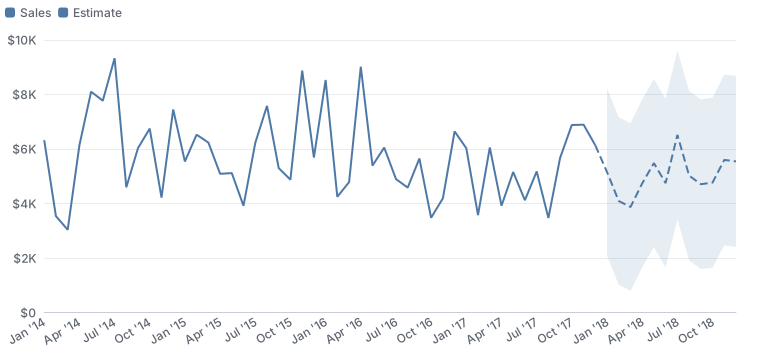
Charts take an analytics pane like a BI tool's: trend=True, forecast=6 (Holt-Winters, dashed and labelled "Estimate", with a range), ref="mean", band=("p25", "p75") and outliers=True. A KPI card compares periods with compare="previous_year".
Cross-filtering dashboards in one offline file. Click a bar and every other tile filters to it, with the numbers re-added exactly in the browser from stored sums and counts, never averages of averages.
# not run
dash = (
    ts.Dashboard("Sales", data=orders, filters=["Region", "Order_Date"])
    .kpi("Sales", compare="previous_year")
    .add("map", geo="State", y="Sales")
    .add("hbar", x="Sub_Category", y="Profit")
)
dash.to_html("sales.html")
Or one line, or one command. ts.auto(df) picks the KPIs, a trend, a map, bars and filters from the data with fixed rules, and says why in dash.decisions. The tabsight command does the same from a file:
tabsight auto sales.csv          # writes sales.html
tabsight serve sales.csv         # server mode on this computer: no size limit, every tile filters
In your web app. dash.server(url) keeps the data in Python, and the page asks for the numbers it needs as the viewer filters. ts.web.fastapi_router, ts.web.flask_blueprint, ts.streamlit and ts.web.dash_iframe wire it up. See Web apps and server mode.
Saved notebooks still show their charts. With pip install "tabsight[static]", each chart also carries a still picture of itself, drawn in Python. A notebook reopened untrusted, or viewed on GitHub, shows the picture where the interactive chart would be blank. fig.to_svg() saves the same picture for slides, and fig.to_png() (tabsight[png]) saves it as a PNG image.
The rules it follows
- It never changes your data. Every function works on a copy, and a test checks this for every public function.
- Every guess has a reason and an override. You can read why a decision was made and change it in one argument.
- It warns rather than stops, unless you ask for strict mode.
- Extras are opt-in. Cleaning, forecasts and insights never run unless asked.
- Same input, same output. No randomness, no clock, no network.
- Private and offline by default. No telemetry, and nothing is ever downloaded or sent.
Security
A chart is a web page someone else will open, so tabsight treats every value in your data as hostile. Data never becomes markup. Each page carries a strict Content Security Policy that allows only tabsight's own scripts (pinned by hash) and blocks all network access. Formulas run through tabsight's own parser, never eval. Saved specs and settings are validated against allow-lists.
Most of this is enforced automatically: a code scanner rejects risky calls, fuzz tests exercise every parser, and every chart kind is tested with attack strings. More on security. To report a problem, please use GitHub's private vulnerability reporting rather than a public issue.
Install
tabsight needs Python 3.11 or newer and pandas 2.2 or newer. Install it from PyPI:
python -m pip install tabsight                     # core: needs only pandas
python -m pip install "tabsight[excel,parquet]"    # optional readers
Other extras: static (still SVG pictures and saved-notebook previews), png (PNG export), web (FastAPI and Flask for server mode) and polars. The installation guide lists them all.
Documentation
The full guide is on the documentation website, and the same pages read directly on GitHub in docs/. Every example in it is run by the test suite, and the printed output you see is real.
- Quickstart: one file from CSV to chart
- How tabsight thinks: the ideas behind the defaults
- User guide: profiling, aggregating, calculated fields, charts, choosing a chart, more chart types, small multiples, notebooks and df.plot, maps, trends, forecasts and insights, dashboards, one-line dashboards and the CLI, web apps and server mode, formatting and more
- Reference: formula functions, locales, chart kinds, lint rules, map coverage
The same pages build a documentation website with search and dark mode: python -m pip install -e ".[docs]", then zensical serve.
Working on tabsight
python -m pip install -e ".[dev,docs]"
python tools/fetch_vendor.py                   # pinned, hash-checked third-party files
cd tools && npm install --ignore-scripts && cd ..
python -m pytest                               # over 1,000 tests, including Node checks
python -m ruff check . && python -m mypy
python tools/render_doc_outputs.py             # refresh the real outputs in docs and README
python tools/make_gallery.py                   # every chart kind, into ./gallery
python tools/make_readme_images.py             # the chart images in this README
Python and JavaScript share one number formatter: tabsight.js is a line-by-line port, checked against Python on 54,950 cases. CI runs the full suite on Windows, macOS and Linux, on Python 3.11 to 3.14, with pandas 2 and 3.
Contributions are welcome. CONTRIBUTING.md has the ground rules, and SECURITY.md explains how to report a vulnerability.
Licence and credits
tabsight is MIT licensed. It bundles Apache ECharts (Apache 2.0) and topojson-client (ISC), and its maps use Natural Earth data (public domain). Details are in NOTICE. The sample data in examples/ is synthetic.
1 maintainer

Metadata
1 maintainer
Release files for tabsight 0.1.0
For a detailed explanation of source distributions (sdists) and built distributions (wheels), please see the package formats documentation.
Source distribution (sdist)
| File | Size | Uploaded | Provenance | |
|---|---|---|---|---|
| tabsight-0.1.0.tar.gz | 4.0 MB | With provenance | Details |
Built distribution (wheel)
| File | Interpreter | ABI | Platform | Reset |
|---|---|---|---|---|
| tabsight-0.1.0-py3-none-any.whl | Python 3 | none | any | Details |
Total release size: 7.7 MB
Release files / tabsight-0.1.0.tar.gz
| Download URL | tabsight-0.1.0.tar.gz |
|---|---|
| Size | 4.0 MB |
| Tags | Source |
|
SHA-256 checksum How to use checksums |
7c1427ac9016b8fa30b5bce15acaa47dffd927bd3df3b4036cbe6e76ecfd11e2
|
|
BLAKE2b-256 checksum How to use checksums |
997675bc3fe3d51fe5fa985a0d449dba88c6cd690452623748ef909688f49852
|
| Upload date | |
|
Uploaded using Trusted Publishing? What is trusted publishing? |
Yes |
| Uploaded via |
twine/7.0.0 CPython/3.13.16
|
Provenance
Provenance describes where a file came from. On PyPI, provenance is shared via attestations, which provide a verifiable record of the build or publishing details. View details, limitations and caveats.


PyPI Publish Attestation
PyPI verified that this artifact, at this checksum, originated from the publisher listed below.
Signed by GitHub Actions, verified by PyPI on Oct 28, 2026.
Transparency logRelease files / tabsight-0.1.0-py3-none-any.whl
| Download URL | tabsight-0.1.0-py3-none-any.whl |
|---|---|
| Size | 3.8 MB |
| Tags | Python 3 |
|
SHA-256 checksum How to use checksums |
74476d6e0105cb57ab7c12c2758e1157866810047333c7d50423010f916864d9
|
|
BLAKE2b-256 checksum How to use checksums |
a082bcb29291a796b846b1e38541a1eb97886c70bf905612fa7cc08b3355e4f7
|
| Upload date | |
|
Uploaded using Trusted Publishing? What is trusted publishing? |
Yes |
| Uploaded via |
twine/7.0.0 CPython/3.13.16
|
Provenance
Provenance describes where a file came from. On PyPI, provenance is shared via attestations, which provide a verifiable record of the build or publishing details. View details, limitations and caveats.
PyPI Publish Attestation
PyPI verified that this artifact, at this checksum, originated from the publisher listed below.
Signed by GitHub Actions, verified by PyPI on Oct 28, 2026.
Transparency logSecurity for tabsight 0.1.0
Provenance
Provenance describes where a file came from. On PyPI, provenance is shared via attestations, which provide a verifiable record of the build or publishing details. View details, limitations and caveats.
Full provenance
All 2 files in this release have been uploaded with provenance metadata.
Attestation for tabsight-0.1.0.tar.gz
PyPI Publish Attestation
PyPI verified that this artifact, at this checksum, originated from the publisher listed below.
Signed by GitHub Actions, verified by PyPI on Oct 28, 2026.
Transparency logA note on package security
PyPI is a repository for distributing packages, not a service for auditing them. While third-party security researchers and our staff do their best to detect and remove malicious packages, PyPI cannot guarantee the quality, security or suitability of any given package.
To learn more about protecting yourself from malicious actors, visit our package security documentation.














