
tabulato
tabulato is a Python package that provides functionality for generating tabulated representations of data with customizable colors and formatting options. It offers a user-friendly interface for creating visually appealing tables in terminal output.
With tabulato, you can easily format your data into tables with specified headers, apply different colors to headers and rows, and customize the appearance of your tabulated data. Whether you're working on command-line applications, data analysis scripts, or any other project that requires presenting data in a tabular format, tabulato can help streamline the process and enhance the visual presentation of your data.




Table of Contents
- tabulato
- Table of Contents
- Key features of tabulato include:
- Installation
- Python Version
- Example
- What's missing on this package?
- Docs
- License
Key features of tabulato include:
- Generating tables with customizable colors for headers, even rows, and odd rows.
- Specifying required columns to ensure important data is always displayed.
- Option to make headers bold for emphasis.
- User-friendly API for straightforward integration into your Python projects.
tabulatosimplifies the task of formatting and presenting tabular data in terminal environments, making it an essential tool for developers and data scientists working with command-line interfaces.
Installation
To install tabulato, you can use pip:
pip install tabulato
Python Version
This package support python version >=3.10
Example
In the following examples shows you how you can use
from tabulato import colorful_tabulate, TableRowStyle

headers = ["Name", "Student Number", "DOB", "Email Address"]

data = [
    ["John Doe", "S12345", "1995-07-15", "john@example.com"],
    ["Alice Smith", "S67890", "1998-03-22", "alice@example.com"],
    ["Bob Johnson", "S54321", "1997-11-10", "bob@example.com"],
    ["Emma Brown", "S98765", "1996-09-18", "emma@example.com"],
    ["Michael Lee", "S24680", "1999-05-30", "michael@example.com"],
    ["Sophia Wang", "S13579", "1994-12-05", "sophia@example.com"],
    ["David Chen", "S75310", "1992-04-08", "david@example.com"],
    ["Olivia Kim", "S36924", "1993-10-25", "olivia@example.com"],
]

colorful_tabulate(
    data=data,
    column_widths=[20, 20, 20, 30],
)
The above function will result in the following table being created in the terminal.
+----------------------+----------------------+----------------------+--------------------------------+
| name                 | student number       | dob                  | email                          |
+----------------------+----------------------+----------------------+--------------------------------+
| John Doe             | S12345               | 1995-07-15           | john@example.com               |
| Alice Smith          | S67890               | 1998-03-22           | alice@example.com              |
| Bob Johnson          | S54321               | 1997-11-10           | bob@example.com                |
| Emma Brown           | S98765               | 1996-09-18           | emma@example.com               |
| Michael Lee          | S24680               | 1999-05-30           | michael@example.com            |
| Sophia Wang          | S13579               | 1994-12-05           | sophia@example.com             |
| David Chen           | S75310               | 1992-04-08           | david@example.com              |
| Olivia Kim           | S36924               | 1993-10-25           | olivia@example.com             |
+----------------------+----------------------+----------------------+--------------------------------+
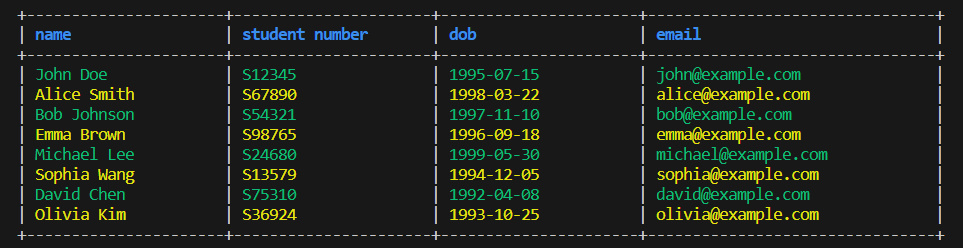
The colorful table will look as follows:
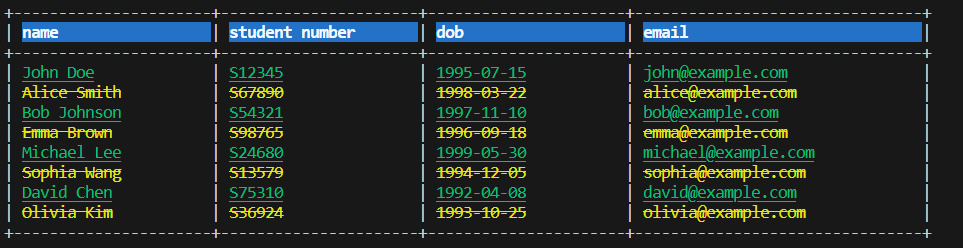
However you can style the rows of the table using the TableRowStyle class by specifying the options as follows:
colorful_tabulate(
    data=data,
    column_widths=[20, 20, 20, 30],
    header_style=TableRowStyle(
        bold=True,
        italic=False,
        color="BLUE",
        background="BG_BLUE",
    ),
    even_row_style=TableRowStyle(
        bold=False,
        italic=False,
        color="GREEN",
        underline=True,
    ),
    odd_row_style=TableRowStyle(
        bold=False,
        italic=False,
        color="YELLOW",
        strikethrough=True,
    ),
)
The table data can also be a list of python dictionaries. Here is an example of using a list of python dictionaries to generate a table.
data = [
    {
        "name": "John Doe",
        "student number": "S12345",
        "dob": "1995-07-15",
        "email": "john@example.com",
    },
    {
        "name": "Alice Smith",
        "student number": "S67890",
        "dob": "1998-03-22",
        "email": "alice@example.com",
    },
    {
        "name": "Bob Johnson",
        "student number": "S54321",
        "dob": "1997-11-10",
        "email": "bob@example.com",
    },
    {
        "name": "Emma Brown",
        "student number": "S98765",
        "dob": "1996-09-18",
        "email": "emma@example.com",
    },
    {
        "name": "Michael Lee",
        "student number": "S24680",
        "dob": "1999-05-30",
        "email": "michael@example.com",
    },
    {
        "name": "Sophia Wang",
        "student number": "S13579",
        "dob": "1994-12-05",
        "email": "sophia@example.com",
    },
    {
        "name": "David Chen",
        "student number": "S75310",
        "dob": "1992-04-08",
        "email": "david@example.com",
    },
    {
        "name": "Olivia Kim",
        "student number": "S36924",
        "dob": "1993-10-25",
        "email": "olivia@example.com",
    },
]

colorful_tabulate(
    data=data,
    column_widths=[20, 20, 20, 30],
)
The colorful_tabulate is a useful function for visually enhancing tabulated data in terminal output by applying colors and styling. The following are the parameters that this function takes.
| Parameter | Description | Type | Default | Required |
|---|---|---|---|---|
data |
The list of data to be displayed. | list |
- | Yes |
headers |
The list of column headers. | list |
None |
No |
colorful |
Whether to display the table in color. | bool |
True |
No |
bold_header |
Whether to display the header in bold. | bool |
True |
No |
header_style |
Style for the header row. | TableRowStyle |
TableRowStyle(bold=True, italic=False, color="BLUE", background=None) |
No |
even_row_style |
Style for even-numbered rows. | TableRowStyle |
TableRowStyle(bold=False, italic=False, color="GREEN", background=None) |
No |
odd_row_style |
Style for odd-numbered rows. | TableRowStyle |
TableRowStyle(bold=False, italic=False, color="YELLOW", background=None) |
No |
column_widths |
List of column widths. | list |
[] |
No |
The following are the color literals that can be passed to the color abd background respectively.
| Color | Description |
|---|---|
"BLACK" |
Black |
"RED" |
Red |
"GREEN" |
Green |
"YELLOW" |
Yellow |
"BLUE" |
Blue |
"PURPLE" |
Purple |
"CYAN" |
Cyan |
"WHITE" |
White |
| Background | Description |
|---|---|
"BG_BLACK" |
Black background |
"BG_RED" |
Red background |
"BG_GREEN" |
Green background |
"BG_BLUE" |
Blue background |
"BG_PURPLE" |
Purple background |
"BG_CYAN" |
Cyan background |
"BG_WHITE" |
White background |
"BG_YELLOW" |
Yellow background |
What's missing on this package?
This package lacks wrapping of text for long lines. This version only support small tables. Long column data might not end up displayed well, however with small column data like this package is the best.
Docs
You can read the full documentation here.
License
This project is licensed under the MIT License - see the LICENSE file for details.
1 maintainer

Metadata
1 maintainer
Release files for tabulato 1.0.4
For a detailed explanation of source distributions (sdists) and built distributions (wheels), please see the package formats documentation.
Source distribution (sdist)
| File | Size | Uploaded | |
|---|---|---|---|
| tabulato-1.0.4.tar.gz | 281.7 kB | Details |
Built distribution (wheel)
| File | Interpreter | ABI | Platform | Reset |
|---|---|---|---|---|
| tabulato-1.0.4-py3-none-any.whl | Python 3 | none | any | Details |
Total release size: 291.0 kB
Release files / tabulato-1.0.4.tar.gz
| Download URL | tabulato-1.0.4.tar.gz |
|---|---|
| Size | 281.7 kB |
| Tags | Source |
|
SHA-256 checksum How to use checksums |
2c05bc9af9f39f1f4261cd718383ec94f661dded8c7fa1fba199ba015696745f
|
|
BLAKE2b-256 checksum How to use checksums |
008e47cac96c36c41aee90c6e7299fc99e90742527b742907ff1f4d0bdcde646
|
| Upload date | |
|
Uploaded using Trusted Publishing? What is trusted publishing? |
No |
| Uploaded via |
twine/5.0.0 CPython/3.12.2
|
Release files / tabulato-1.0.4-py3-none-any.whl
| Download URL | tabulato-1.0.4-py3-none-any.whl |
|---|---|
| Size | 9.3 kB |
| Tags | Python 3 |
|
SHA-256 checksum How to use checksums |
ae886b579c1d180b6aa98ef2f149f478479bfe6aa8e3bc7a31971a08a2de8e44
|
|
BLAKE2b-256 checksum How to use checksums |
315eb34379910a375913aa2cfff6d5e3d63fb6f29ea5c33dafa8f318bad64bdd
|
| Upload date | |
|
Uploaded using Trusted Publishing? What is trusted publishing? |
No |
| Uploaded via |
twine/5.0.0 CPython/3.12.2
|














